
Our readers keep the lights on and the weekend projects moving. As an Amazon Associate, I earn from qualifying purchases.
The smell of melting plastic and the sound of a machine whirring to life can be the start of an incredible creative journey for a child, or it can be the beginning of a frustrating tangle of failed prints and confusing software. Picking the wrong 3D printer for a young mind can kill the spark before it even catches, turning what should be a gateway to STEM and design into a tedious chore. The right machine, however, hands a child the power to turn imagination into a tangible object they can hold, play with, and call their own.
I’m Rikta — the co-founder and writer behind FitlyFast. I’ve spent hundreds of hours analyzing market data, dissecting customer feedback, and comparing hardware specs to separate the truly kid-friendly machines from the ones that just claim to be, helping parents make the right investment in their child’s creativity.
This guide breaks down the safest, most reliable, and easiest to use 3d printers for kids, focusing on auto-leveling beds, enclosed designs, intuitive apps, and the support communities that will actually get your child printing their own toys and tools.
How To Choose The Best 3D Printer For Kids
Selecting a 3D printer for a child isn’t the same as buying one for a hobbyist. The priorities shift dramatically from speed and build volume to safety, simplicity, and the sheer joy of seeing a completed object. A machine that requires constant manual bed leveling and fiddling with settings will quickly end up in the closet. Look for turnkey solutions that minimize the friction between thinking of an idea and holding the finished print.
Auto Leveling & Assembly: The “Unbox and Print” Factor
The number one reason kids give up on 3D printing is a failed first layer caused by an unlevel bed. Avoid any printer that requires manual leveling with a piece of paper. A fully-assembled unit with auto bed leveling is non-negotiable for children. This feature alone turns the setup from a frustrating calibration ritual into a simple “load filament, select file, press print” process that builds confidence from the very first attempt.
Safety Enclosures & Materials
While the FDM printers on this list primarily use PLA filament (a corn-based, low-odor plastic generally considered safe indoors), an open-frame printer has hot moving parts and a heated bed that can be a burn risk for younger children. An enclosed design or a printer with a low-build plate temperature and a stable, tip-resistant base adds a crucial layer of physical safety. Always pair the printer with a well-ventilated room, regardless of the material.
App Ecosystem & Kid-Centric Slicing
A child shouldn’t need to master Cura or PrusaSlicer before making their first toy. The most kid-friendly printers offer a dedicated app (like Poloprint Cloud or Geeetech’s app) that features a built-in library of hundreds of pre-sliced models. The “one-tap print” functionality from a tablet or phone is the gold standard. Look for apps that include AI-driven design modules (like “photo to 3D” or “voice to model”) that let kids customize projects without needing CAD skills.
Quick Comparison
On smaller screens, swipe sideways to see the full table.
| Model | Category | Best For | Key Spec | Amazon |
|---|---|---|---|---|
| AOSEED X-Maker Joy AI+ | Premium | All-in-one creative starter kit | AI Doodle, 8,000+ model library, enclosed | Amazon |
| Bambu Lab A1 | Premium | Speed & multi-color prints | 10,000 mm/s² acceleration, ≤48 dB | Amazon |
| FLASHFORGE Adventurer 5M | Premium | First perfect layer, fast printing | 600 mm/s speed, Core XY, 0.025s acceleration | Amazon |
| HEPHi3D TINA2C (WiFi) | Mid-Range | App & WiFi control, massive model library | 3000+ models, one-tap print from app | Amazon |
| Entina Tina2C (Poloprint) | Mid-Range | AI creativity & STEM learning | AI-powered search, 20+ creative modules | Amazon |
| Geeetech Smart M1S | Mid-Range | High-speed & quiet operation | 250 mm/s, 16-point auto-leveling | Amazon |
| Fully Assembled TINA2S (Wiiboox) | Mid-Range | Complete starter kit, open-source | Auto leveling, dual z-axis, WiFi | Amazon |
| Entina TINA2 Basic | Budget | Ultra-simple entry-level experience | Fully assembled, prints in 5 minutes | Amazon |
| HEPHi3D TINA2 Basic | Budget | Affordable first-time printer | Auto bed leveling, compact, 5.68 lbs | Amazon |
In‑Depth Reviews
1. AOSEED X-Maker Joy AI+

The AOSEED X-Maker Joy AI+ is the closest thing to a creative appliance for a child’s room, arriving as a complete kit with 8 rolls of PLA filament and an enclosed design that prioritizes safety. Its AI-powered features, including Doodle (turn a drawing into a 3D model) and MiniMe (turn a photo into a figurine), eliminate the steep learning curve of traditional 3D modeling software, allowing kids to jump straight into making personalized toys and trinkets. The built-in camera for real-time monitoring and time-lapse sharing adds a layer of excitement for parents and kids to share the process.
The inclusion of 17 themed design modules and over 8,000 pre-loaded models means a child will never run out of inspiration, and the one-tap print function from the app removes any slicing confusion. The printer’s TÜV Rheinland-tested PLA is a real differentiator for parents concerned about air quality, and its quiet operation allows it to run in a bedroom or playroom without being a distraction. Being able to finish small toy projects in roughly 20 minutes keeps young attention spans engaged from idea to completion.
Some customer feedback notes that while setup is incredibly easy, the smaller build volume limits the size of the toys, and prints from the app can sometimes have measurement inaccuracies. The reliance on the app for the most straightforward experience means a tablet or phone is a necessary companion. For families wanting the absolute least-fuss, most complete creative ecosystem available in a mid-range package, this is the current benchmark.
Why it’s great
- Enclosed, child-safe design with low-emission PLA
- AI Doodle and photo-to-print features are genuinely kid-friendly
- Includes 8 rolls of filament as a complete starter kit
- Quiet operation and fast ~20 min prints for small toys
Good to know
- Small build volume limits the size of printable objects
- Heavily reliant on the app for the best creative experience
- Some app model measurements can be slightly off
2. Bambu Lab A1

The Bambu Lab A1 represents a leap in reliability and ease-of-use that makes it a top-tier option for kids, despite its open-frame design. Its full-auto calibration process handles z-offset and bed leveling completely on its own, removing the biggest headache for beginners entirely. The real magic, however, is its compatibility with the AMS Lite unit, which enables multi-color printing—a feature that captivates children and turns standard action figures or puzzles into vibrant, custom creations without any post-painting.
Operating at ≤48 dB, the A1 is whisper-quiet, making it ideal for a shared space or classroom. The intuitive touchscreen interface and the Bambu Handy app simplify the workflow so much that a child can browse a model library, queue a print, and watch it come to life with minor adult supervision. The core XY kinematics deliver high speeds (10,000 mm/s² acceleration) that produce clean, detailed prints without the long wait times that frustrate young users, keeping the thrill of the “reveal” high.
The machine is not enclosed, so parents need to supervise to avoid contact with the hot nozzle and moving parts. The AMS Lite unit for multi-color printing is an additional purchase, and the filament spool holder setup for 1kg spools requires a specific configuration. For a family investing in a machine that can grow with a child from basic prints to complex, multi-material projects, the Bambu Lab A1 is the premium pick that sets the standard for reliability in this category.
Why it’s great
- Full-auto calibration ensures perfect first layers every time
- Multi-color printing via AMS Lite unlocks advanced fun
- Very quiet operation (≤48 dB) for home use
- High build volume (256mm³) for larger projects
Good to know
- Open-frame design requires supervision for young kids
- AMS Lite for multi-color printing is sold separately
- Higher initial investment than dedicated kid-focused models
3. FLASHFORGE Adventurer 5M

The FLASHFORGE Adventurer 5M brings a taste of industrial-grade speed and reliability to the desktop, making it an exceptional choice for a child who wants to see results fast. Its Core XY motion system achieves speeds up to 600 mm/s with an acceleration of 20,000 mm/s², drastically cutting print times down to minutes for small models—perfect for keeping a young creator’s excitement alive between prints. The one-click auto leveling system is robust and reliable, delivering a perfect first layer every time, which builds confidence in a young user from the start.
The machine’s direct drive extruder with a quick-detachable 280°C nozzle simplifies maintenance and material changes, a task that can be daunting for beginners. The dual-sided PEI coating on the build plate provides excellent adhesion during the print and easy flex removal when it’s done, meaning no wrestling with a spatula. The filament run-out sensor and power loss recovery are mature features that prevent catastrophic failures, saving a child’s long-running print from being wasted by a spool running empty or an accidental power flicker.
Some users have reported firmware freeze issues and a dark work area that makes it hard to inspect prints mid-job. The printer is an open design, so it doesn’t offer the same physical barrier as an enclosed unit. For a budget-minded family that still wants premium features like ultra-fast printing and industrial-grade motion control without the “toy” feeling, the Adventurer 5M delivers serious performance that a tech-savvy kid can grow into.
Why it’s great
- Extremely fast printing speed reduces wait times for kids
- Direct drive extruder with quick-detach nozzle for easy maintenance
- Robust auto leveling delivers reliable first layers
- Large build volume (220mm³) for flexible projects
Good to know
- Some reports of firmware instability
- Open-frame design with no enclosure for safety
- Work area can be dim, making inspection harder
4. HEPHi3D TINA2C (WiFi)
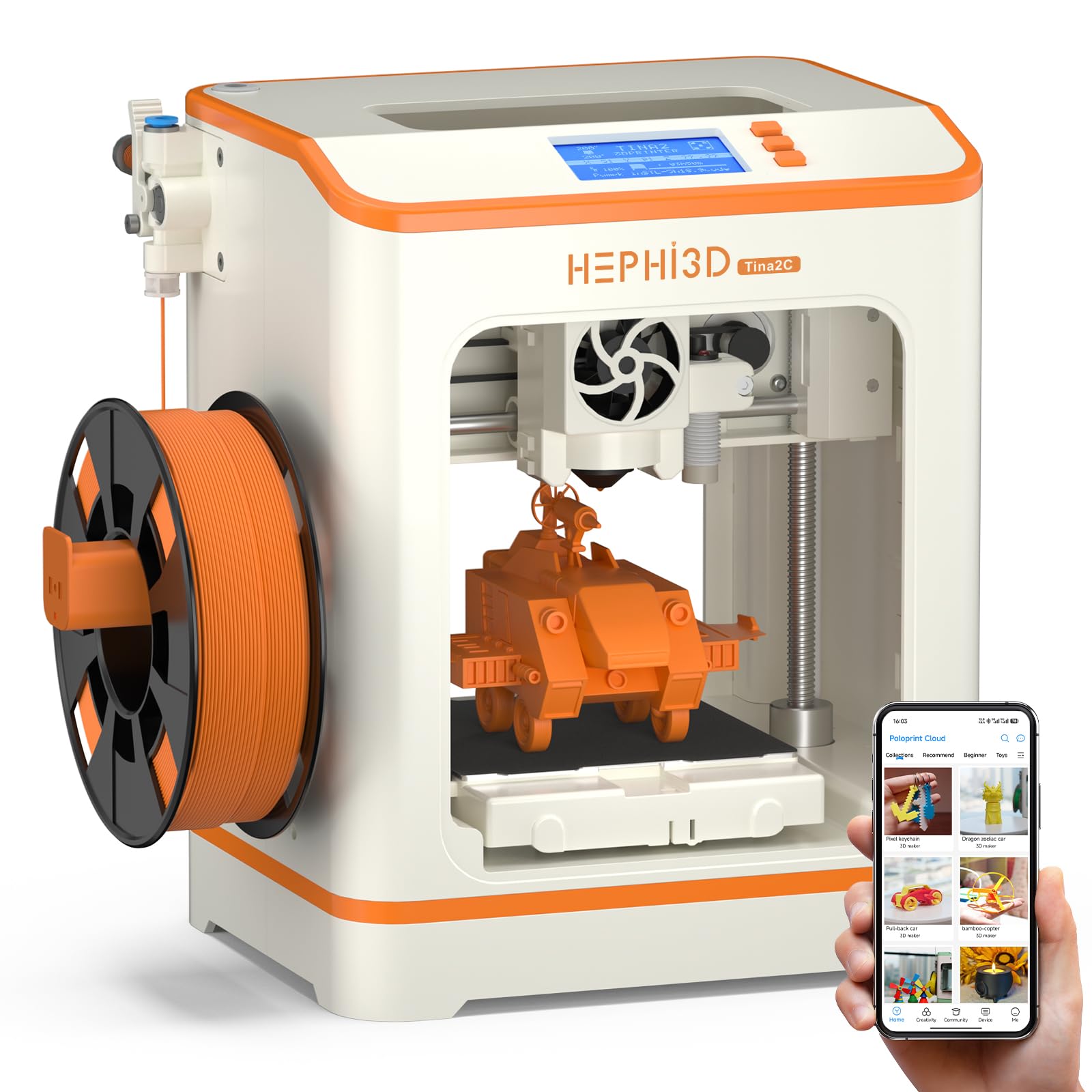
The HEPHi3D TINA2C refines the “unbox and print” concept by adding WiFi and cloud functionality that streamlines the entire workflow for a child. Its hallmark is the app with a curated library of over 3,000 models updated weekly, where a single tap sends the file to the printer. The addition of AI generation features, like turning a photo into a model or using text prompts, eliminates the biggest barrier for kids—designing the object itself. This machine is built to keep a child in the creative flow rather than stuck in the software weeds.
The compact, fully-assembled design is paired with a reliable auto-leveling bed and a factory-pre-set nozzle height, ensuring a high success rate on the first print. It also includes an integrated STEM education module within the app, turning each print into a guided learning experience about engineering and design. The inclusion of a starter kit (filament, tools, TF card) means the box contains everything needed, including pre-sliced models that print perfectly, which is critical for building a child’s initial confidence.
While the physical printer is well-thought-out, some children under 13 still found the app’s model selection and preparation process a bit confusing without an adult’s help. The build volume is restrictive (roughly 3.9-inch cube), meaning only small toys, figurines, or parts can be produced. For families who prioritize a deep, engaging app ecosystem over a massive print area, the TINA2C is an excellent mid-range gateway for creative kids.
Why it’s great
- WiFi app control with over 3,000 one-tap printable models
- AI photo and text-to-print features for custom creations
- Comes with a complete starter kit including filament and tools
- Silent printing and auto-detection of the print bed
Good to know
- App navigation can still be confusing for children under 13
- Small build volume limits print size
- Relies heavily on a stable 2.4G WiFi connection
5. Entina Tina2C (Poloprint)

The Entina Tina2C is a near-identical sibling to the HEPHi3D version, sharing the same hardware DNA, but its focus on the Poloprint Cloud app gives it a slightly different flavor aimed squarely at educational play. The guided setup promises an 8-minute start to first print, and the app’s AI-powered search and “photo to print” functionality are genuinely impressive, allowing a child to take a picture of a drawing and have it ready to print in moments. This model emphasizes the “STEM Learning” angle more heavily, with regularly updated interactive courses built into the app.
The hardware features are thoughtfully designed for a younger audience: a self-cleaning nozzle reduces clogs (a common beginner frustration), a flexible magnetic build plate makes removing prints as simple as bending the plate, and a compact design with rounded edges makes it a safer desk companion for the home or classroom. The power-loss recovery feature is a smart addition that saves the day if a print is interrupted, preserving the hours a child has already invested in their project.
Like its counterpart, the build volume is small (3.9-inch cube), which is both a constraint and a benefit—it forces simpler, quicker projects that a child can see through to completion. Some users noted that translating the “8-minute start” promise into reality often requires a bit of adult help to navigate the initial app setup. For a family wanting a focused, app-driven educational tool that is as safe and quiet as it is simple, this is a top contender in the mid-range.
Why it’s great
- AI-powered photo-to-print and STEM learning modules in the app
- Self-cleaning nozzle design reduces maintenance for kids
- Fast, guided 8-minute setup from box to first print
- Quiet, rounded-edge design is safer for home use
Good to know
- Small 3.9-inch cube build volume limits project size
- Initial app setup might still need an adult’s help
- Requires 2.4G WiFi for app connectivity
6. Geeetech Smart M1S

The Geeetech Smart M1S targets the balance between speed and simplicity, offering a print speed of up to 250 mm/s and a large-capacity nozzle that keeps print jobs moving quickly for impatient young creators. Its 16-point full-auto leveling is thorough, ensuring a smooth first layer across the entire small build platform, which is a critical confidence builder for a child’s first few prints. The direct drive extruder with a 1:5 gear ratio provides reliable extrusion for both standard PLA and flexible TPU, expanding the types of toys kids can create.
The printer is fully assembled out of the box, and the one-button filament loading system makes material changes a simple task even for a young user. The 2.4-inch color LCD screen and high-brightness LED lighting inside the build area let kids easily monitor progress without needing a separate app or phone. The heated, flexible magnetic build plate helps reduce warping on prints and makes removing finished objects a quick, satisfying peel-off process.
The printer has had some reports of initial quality control issues, including a faulty auto-leveling sensor on the first unit for some customers, though the replacement unit worked well. The WiFi connection can be temperamental after the printer goes to sleep, sometimes requiring a full restart to re-establish. For families that want a balance of speed, a detailed leveling system, and the ability to print with a wider variety of materials like TPU, the Geeetech M1S is a solid, speed-focused mid-range option.
Why it’s great
- Fast 250 mm/s print speed keeps projects moving
- 16-point auto-leveling provides thorough bed calibration
- Dual-drive metal gear extruder can handle flexible filaments
- Includes LED lighting for easy visibility of prints
Good to know
- Some units may have initial quality control issues
- WiFi connection can be unreliable after sleep mode
- Small build volume similar to other mini printers
7. Fully Assembled TINA2S (Wiiboox)

The Wiiboox TINA2S is a proven workhorse in the kids’ 3D printer space, often praised for its reliability and stable, well-packaged design. It comes as a true complete starter kit, including 10 meters of PLA filament, a microSD card loaded with test models and slicing software, and all necessary tools, so a child can go from opening the box to watching a rabbit print from the SD card in minimal time. Its auto-leveling and dual Z-axis rail design are the core features that ensure high-precision prints without constant manual intervention, a godsend for busy parents.
The printer is fully open-source, meaning a tinkering child can graduate from the included Wiibuilder software to industry standards like Cura or Simplify3d as they grow. The WiFi capability is a nice extra for wireless file transfer, though many customers find the SD card method to be the most reliable. The magnetic flexible build plate survives the test of time well, making print removal a simple bend rather than a fight, which is the most common point of frustration for young beginners.
A notable minority of users have reported a frustrating setup process, with auto-leveling failing to ensure consistent first-layer adhesion, and some print quality being rough. There are also reports of a cheaply-built feel to some units. For a family wanting to buy into a mature, widely-reviewed ecosystem with a huge open-source community and a complete package, the TINA2S is a solid and safe entry point, but be prepared for a slight learning curve that is steeper than the newer app-driven models.
Why it’s great
- Comes as a true starter kit with filament, tools, and SD card
- Fully assembled and auto-leveling for easy first prints
- Open-source compatibility grows with the child’s skills
- Dual Z-axis rails provide stable, high-precision printing
Good to know
- Setup can be frustrating for some with adhesion issues
- Print quality may be rough out of the box for some models
- Some units may feel cheaper than expected
8. Entina TINA2 Basic

The Entina TINA2 Basic is the no-frills, budget-friendly entry point into the TINA2 family, offering the same core hardware and auto-leveling features as its more expensive siblings but stripped of WiFi and some app integration. This makes it a pure “SD card and button” experience, which some parents may actually prefer as it removes the potential for app-related connectivity frustrations. The printer is fully assembled, and you can be printing the pre-loaded frog or rabbit model from the TF card in a matter of minutes, exactly as advertised.
The safety-first design philosophy is evident in the compact, lightweight frame and the knob-based operation that is intuitive for a child to understand. The auto-leveling bed and magnetic platform work flawlessly, ensuring that the common “first layer” problem is largely solved. This model is open-source, so a more advanced child user can still tap into the wider world of slicing software, but the primary audience is the absolute beginner who just wants to see something come to life.
The biggest trade-off is the bare-minimum user experience—downloading and preparing other models requires a PC and a bit of know-how, as there is no integrated app to guide the process. The build volume is very small (100mm cube), so only the smallest trinkets, fidgets, or parts are possible. For a parent on a tighter budget who is willing to handle the computer-based slicing for their child and wants a proven, reliable little machine, the TINA2 Basic is a stellar budget pick.
Why it’s great
- Simplest possible workflow without app complications
- Fully assembled and auto-leveling for instant printing
- Safety-first design with rounded, compact build
- Knob operation is intuitive for young children
Good to know
- No WiFi or app; requires PC to find and slice models
- Very small build volume (100mm³) for the smallest prints
- Limited to SD card printing only
9. HEPHi3D TINA2 Basic

The HEPHi3D TINA2 Basic is the mirror image of the Entina version, built on the same proven platform but sometimes offered with slight variations in included accessories or pricing. Its key feature set is identical: a fully-assembled, auto-leveling mini FDM printer that relies on TF card and USB-C for file transfer, not WiFi. This model also highlights the dual Z-axis and dual Y-axis rails, which provide a level of mechanical stability that is impressive for its price point, leading to better print quality than the “toy” label might suggest.
The printer’s resume printing function and sensor detection are genuine safety nets that prevent the heartbreak of a half-completed print after a power bump. The hotend is a 3-second quick-release design, making nozzle changes a breeze for a parent helping a child swap materials. The starter kit includes a sample PLA roll and a microSD card with multiple g-code files, ensuring that the “out of the box” feeling is a positive one with an immediate, successful print.
Like its Entina counterpart, the major drawback is its dependency on a computer for managing the slicing and model library, which many customers found too complicated for a 9-year-old to handle independently. The build volume is equally restrictive. For the budget-conscious buyer who values a solid, mechanically refined build and doesn’t need the app ecosystem, this is a fantastic entry-level tool that produces quality small prints right from the start.
Why it’s great
- Stable dual Z and Y axis rails for improved print precision
- Pause and resume function prevents print failures
- Quick-release hotend simplifies nozzle changes
- Fully assembled and auto-leveling for immediate use
Good to know
- No WiFi; requires PC for all model management
- Small build volume limits printable objects
- Setup of new models from PC is confusing for younger kids
FAQ
What is the safest type of 3D printer for a 7-year-old?
Why do so many entry-level kid printers have a small build volume?
Do I need to buy a separate enclosure for a 3D printer for my child?
Can a child use a 3D printer if they can’t use a computer yet?
Final Thoughts: The Verdict
For most users, the 3d printers for kids winner is the AOSEED X-Maker Joy AI+ because it combines a fully enclosed, safe design with an intuitive AI-driven app, a massive model library, and a complete starter kit that includes 8 rolls of filament. If you want the ultimate speed and multi-color capabilities for a tech-savvy teen, grab the Bambu Lab A1. And for the most budget-friendly route into reliable printing without app complexity, nothing beats the Entina TINA2 Basic.