
Our readers keep the lights on and the weekend projects moving. As an Amazon Associate, I earn from qualifying purchases.
Specs are compiled from manufacturer listings and verified buyer reviews and can change over time — please confirm the key details on the product page before buying.
You want a 3D scanner that turns real objects into digital models without wasting hours on failed scans — and you do not want to blow your budget past $1000 to get it. This guide walks you through the eight best options under that thousand-dollar ceiling, separating the machines that deliver usable scans from the ones that just frustrate you.
I’m Rikta — the founder and writer behind FitlyFast. This guide is built by comparing the manufacturers’ published specifications and the patterns across verified customer reviews, so you get each pick’s real strengths and trade-offs instead of marketing spin.
Whether you are 3D printing parts, reverse-engineering components, or preserving objects as digital files, the right 3d scanner under $1000 balances accuracy, solid tracking, and software that does not make you want to throw the thing out a window.
Quick Picks
- Revopoint POP3 Plus 3D Scanner — Best Overall
- Revopoint INSPIRE 2 3D Scanner — Top Performer
- Shining 3D Einstar Handheld 3D Scanner — Best Value
- 3DMakerpro 3D Scanner Seal Lite — Best Detail
- Creality 3D Scanner CR-Scan Ferret Pro — Best Wireless
- Creality Otter Lite Basic 3D Scanner — Versatile Pick
- Creality CR-Ferret SE 3D Scanner Desktop — Budget Desktop
- EINSTAR 2 Wireless 3D Scanner — Premium Wireless
How To Choose The Best 3D Scanner Under $1000
Not all 3D scanners are wired the same, so you need to focus on a few key specs to avoid picking a model that loses tracking every few seconds. Your attention should go to accuracy (tied to the point distance), the type of light source, and how the scanner handles dark or shiny surfaces — because spray-on coating is a chore, not a feature.
Accuracy and Point Distance
Accuracy tells you how true the measurement is to the real object, while point distance (often called “fused point distance”) determines how much surface detail you can grab. A scanner that claims 0.02mm accuracy, like the 3DMakerpro Seal Lite, can pick up tiny dents and fine edge textures, whereas a 0.1mm unit is fine for larger mechanical parts but will miss subtle curves. For jewelry or small precision parts, you want the lower number.
Light Source and Surface Handling
The light source matters a lot for what you can scan. Blue LED light (400–500nm) projects finer structured light, which helps with detail on non-shiny objects. Scanners that use infrared lasers — like the Revopoint INSPIRE 2 and its 11 laser lines — can often handle reflective and dark surfaces without requiring you to spray them with a matting coat. If your primary use is scanning car parts or black plastic without extra prep, look for a scanner that explicitly lists this capability.
Tracking Stability and Anti-Shake
Nothing kills a scanning session faster than a device that loses tracking. Some models, like the Creality CR-Ferret SE, include anti-shake technology (a one-shot 3D imaging method) that counters hand tremors so you do not produce distorted models. Others rely on a 9-axis IMU (an inertial sensor that detects motion across nine axes) to stabilize the scan and prevent faulty frames. A good tracking system is worth more than raw accuracy because a 0.02mm spec is useless if the scan keeps failing.
Quick Comparison
| Model | Best For | Accuracy | Scan Speed | Wireless | Amazon |
|---|---|---|---|---|---|
| Creality CR-Ferret SE | Budget desktop entry | 0.1 mm | — | No | Amazon |
| Creality Ferret Pro | Beginners wanting wireless | 0.1 mm | — | Wi-Fi 6 | Amazon |
| 3DMakerpro Seal Lite | Tiny object detail | 0.02 mm | 10 fps | No | Amazon |
| Creality Otter Lite Basic | Dual-range precision | 0.05 mm | 30 fps | No | Amazon |
| Revopoint POP3 Plus | Detail-oriented hobbyists | 0.05 mm | 18 fps | Wi-Fi 6 | Amazon |
| Revopoint INSPIRE 2 | Dual-mode versatility | 0.03 mm | — | Wi-Fi 6 | Amazon |
| Shining 3D Einstar | Hair/body scanning | 0.1 mm (point distance) | 14 fps | No | Amazon |
| EINSTAR 2 Wireless | Top-tier portable scanning | — | 90 fps (Blue Laser) | Yes (built-in battery) | Amazon |
In‑Depth Reviews
1. Revopoint POP3 Plus 3D Scanner

The all-rounder that balances precision, speed, and a genuinely useful software suite.
Getting crisp 3D models matters more than chasing the smallest number on the spec sheet, and the POP3 Plus delivers a fused point distance of 0.05mm (the space between data points on the scanned model) with a scanning speed of up to 18 fps, which means it captures plenty of surface detail without feeling sluggish. It uses a 9-axis IMU (a motion sensor that detects movement across nine axes) to stabilize the scan and prevent faulty frames caused by hand shaking — a feature that directly helps beginners who have not yet developed a steady scanning rhythm.
Buyers report that the included Revo Scan software is intuitive and that the kit comes with everything you need, including two turntables and tracking markers. The main catch is that your computer must use an x86_64 processor architecture — old ARM-based Windows laptops will not run the software. One reviewer noted that after five hours of trying, they still could not produce a usable scan, though other owners praise the two-year warranty and responsive customer support for sorting out issues quickly.
Why It Leads the Pack
- Excellent accuracy at 0.05mm fused point distance for medium objects (20mm to 2m)
- Full-color scanning with HD RGB camera and Flash LED lighting for lifelike texture
- Two-year warranty and 24/7 customer support give confidence
The Real Trade-Offs
- Requires an x86_64 processor — no ARM or Apple Silicon native support mentioned
- Some owners mention a steep learning curve with initial results being poor
- Charging cables may be delicate, per one user’s experience with replacements
The right fit if: you want a well-rounded, detail-oriented scanner for 3D printing and animation, with strong customer support backing.
Look elsewhere if: you need extreme sub-0.03mm accuracy for jewelry or micro parts — the INSPIRE 2 is a better match.
2. Revopoint INSPIRE 2 3D Scanner
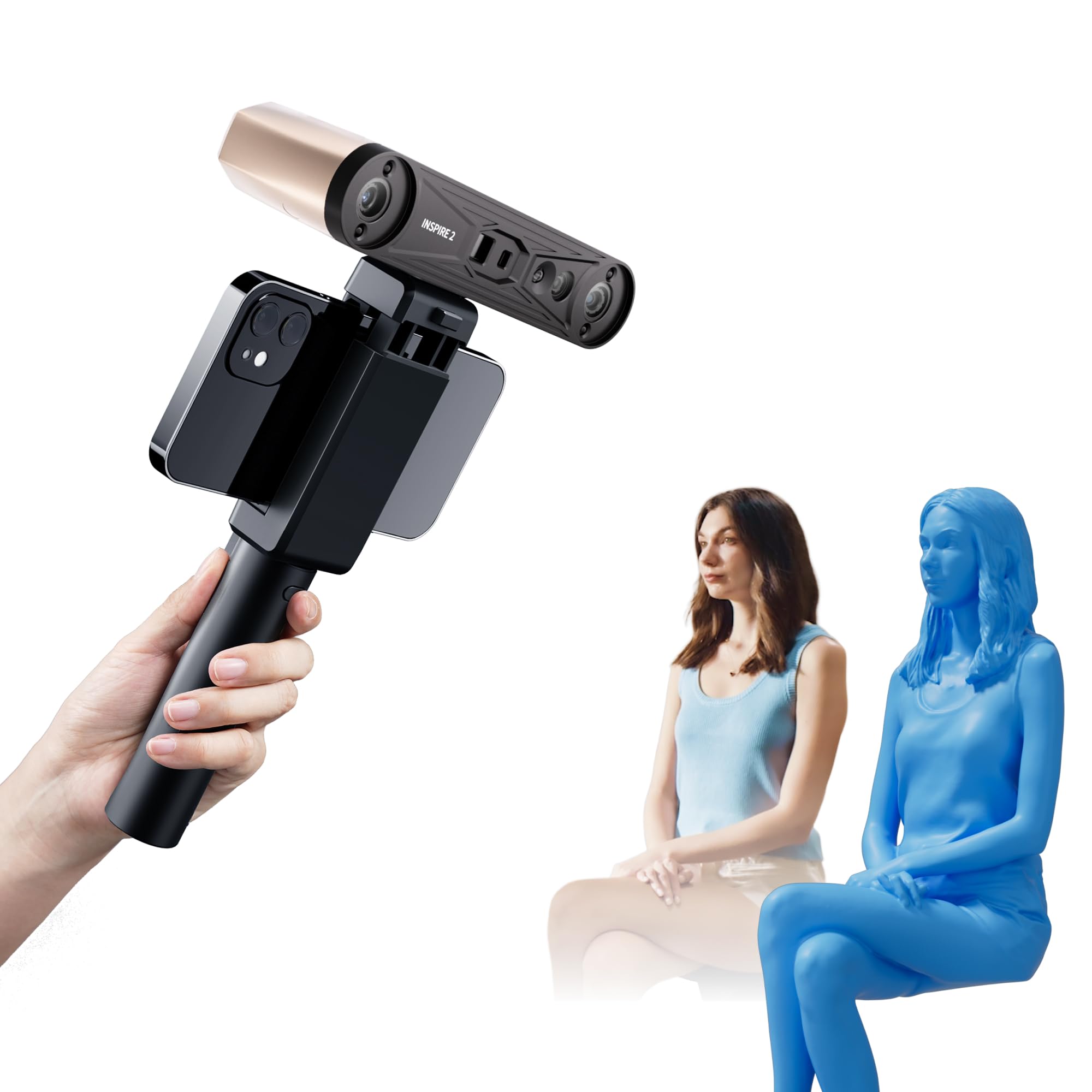
Twin scanning modes and a shock-absorbing calibration board.
This model stands out for its dual scanning modules — infrared structured light and multi-line laser scanning — which let you switch methods depending on the object’s size and material. The precision spec of up to 0.03mm is the tightest on this list, and the 11 infrared laser lines mean you can tackle reflective or dark surfaces without needing scanning spray. It also supports outdoor scanning up to 20,000 lux (the measure of light brightness), so shaded or semi-bright conditions are manageable.
Customers note that the sticky calibration dots can be annoying — they do not stay stuck well — but that the scanner produces very detailed results once set up. One buyer mentioned a steep learning curve for beginners and noted that the tripod cannot support the camera’s weight well, drifting over time. Another owner with a custom PC (32GB RAM, AMD 5800x3D) hit persistent errors until customer service resolved them, so a powerful computer is non-negotiable here.
Why It Excels
- 0.03mm precision for highly detailed small-to-medium objects
- Dual scanning modes handle challenging materials (reflective, dark) without spray
- Built-in Wi-Fi 6 for wireless streaming to Android, iOS, Windows, or macOS
Where It Stumbles
- Minimal instructions and a steep learning curve frustrate absolute beginners
- Calibration process is sensitive — one owner reported failed calibration after 30 minutes
- Tripod included may not hold the scanner steady over time
Ideal for: intermediate users who want the highest precision in this price bracket and are willing to invest time learning the workflow.
skip it if: you are a beginner looking for a truly plug-and-play experience — the POP3 Plus is easier out of the gate.
3. Shining 3D Einstar Handheld 3D Scanner

A solid workhorse that outperforms pricier rivals, especially for human and body scanning.
The Einstar collects point cloud data with a point distance of up to 0.1mm (the gap between data points on the scanned surface) and scans at up to 14 fps. Its built-in RGB color camera captures high color fidelity, which is useful for digital archiving and design work. What makes it distinctive is the “Hair Mode” — a setting that tune data capture for human hair, improving overall scan completeness for full-body models. It uses three infrared VCSEL projectors (vertical-cavity surface-emitting lasers that project a structured light pattern) and two stereo depth cameras for stable outdoor scanning.
Reviewers point out the Einstar outperforms the Revopoint Range at a similar price, describing it as “best consumer grade scanner currently on the market” in mid-2023. One reviewer scanned a dark gray shiny bumper with tracking dots in poor lighting and said the tracking was easy and data accurate, while the Revopoint lost tracking and produced elongated point clouds. The catch is significant — a 1-star reviewer called the software terrible with no tutorial and said the scanner has bad ergonomics with no tripod mount and messy wires.
Its Strong Suits
- Hair Mode enables effective human body scanning that many competitors cannot handle
- Scanned a dark gray shiny bumper without dots or spray, per a verified buyer
- Stable outdoor scanning with three infrared VCSEL projectors
- Multiple format support (OBJ, STL, PLY, ASC, 3MF, P3) for broad compatibility
Watch Out For
- Ergonomics are poor — no tripod mount, awkward hand position, messy cable management
- Software lacks tutorial and guidance, which frustrates new users
- Requires a capable PC (Ryzen 5, 1660 GPU, 32GB RAM recommended by one user)
Grab this if: you need to scan human subjects or car parts and can invest time in a learning curve — the tracking is reliably solid once you learn its limits.
Pass if: you want a refined, beginner-friendly experience with great documentation.
4. 3DMakerpro 3D Scanner Seal Lite

The highest accuracy on paper, but it demands patience and a powerful PC.
The Seal Lite uses a blue LED light source with a shorter wavelength (400–500nm) to project finer structured light, achieving a market-leading 0.02mm accuracy — meaning it can capture tiny dents and edge textures that most scanners in this range miss. It is designed for small-format scanning of objects from 10mm to 300mm, with a recommended working distance of 180–280mm. The scanning frame rate is 10fps, which is slower than some rivals, but the scan-back and anti-shake features help keep results stable.
Shoppers say that the Seal Lite produces great quality scans once you learn the proper technique, but one customer observed it “could not scan black bow at all” and that it only captures mono texture (no color). Another reviewer mentioned the learning curve is steep — “like learning to drive” — and that it requires a 65W wall power connection to a high-powered PC. Two separate users returned the unit after weeks of failed attempts on dark objects and tiny items, while others praise its detail for small-format scanning when conditions are right.
What Makes It Special
- 0.02mm accuracy — the best spec on this list for capturing fine details
- Blue LED light (400–500nm) projects finer structured light for better texture capture
- Compact size (2.36 x 1.38 x 4.33 inches) for desktop use
- Lifetime free JMStudio software with visual tracking, error correction, and auto-alignment
The Hard Truths
- Fails on shiny and dark surfaces without scanning spray (one reviewer could not scan a black bow)
- Only captures mono texture — no full-color output
- Slower scan rate (10fps) than competitors
- Requires a powerful PC tethered via 65W charger; not truly portable
Perfect for: hobbyists who need extreme detail on small, non-dark, non-shiny objects like intricate prototypes or miniatures.
Not for you if: you need to scan dark, reflective, or colored objects, or you want a true plug-and-play experience.
5. Creality 3D Scanner CR-Scan Ferret Pro

Wireless freedom that spans all major platforms, but the software needs work.
The Ferret Pro is the fully-loaded member of Creality’s Ferret family, adding a battery handle and built-in Wi-Fi 6 so you can scan wirelessly with Android, iOS, Windows, and macOS devices — a clear step up from the SE version that only works tethered to a PC. It captures full-color scans with 24-bit color depth at up to 0.1mm accuracy, handling objects from 50mm to 2000mm in size. The anti-shake technology is the same as the SE, using one-shot 3D imaging to counteract hand tremors.
Buyers have mixed feelings. One reviewer says it “exceeded expectations on small, detailed scans” and used the output to 3D print a perfectly fitting glasses holder. Another calls it “buggy software, lots of troubleshooting” and complains that it only exports STL files with no negative part creation — and that it cannot connect to a Mac for calibration. A third user warns that the Creality software does not work on computers with AMD hardware and will crash immediately, a fact the listing does not advertise. At 105g, it is extremely lightweight, but the fixed-height tripod and minimal instructions add friction.
What You Get
- True wireless scanning with Wi-Fi 6 across all major platforms (Android, iOS, Windows, macOS)
- Lightweight at 105g for comfortable handheld use
- Full-color 24-bit scanning with anti-shake technology
- Comes with WiFi box, tripod, power bank, phone holder, and carrying case
Deal-Breaker Issues
- Software crashes on AMD hardware — confirmed by Creality reps on forums but not advertised
- Limited export format — only STL, no negative part creation, per one user
- Cannot connect to Mac for calibration (another reviewer’s experience)
- Initial tracking loss is common until you practice for about two days
Reach for this if: you prioritize wireless scanning across multiple devices and are on Intel-based PCs — the cross-platform capability is genuinely useful.
Avoid if: you have an AMD-powered computer or need advanced export flexibility (OBJ/PLY).
6. Creality Otter Lite Basic 3D Scanner
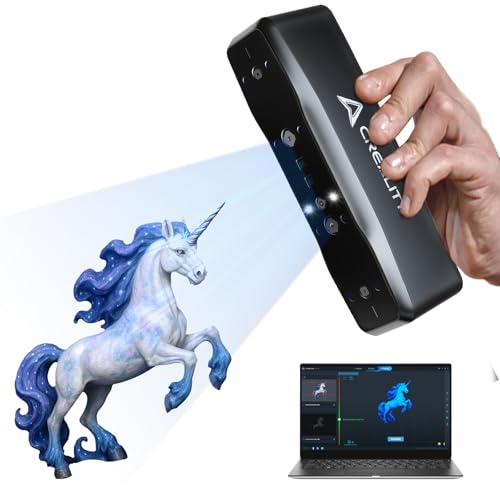
Dual-range scanning modes that switch between close-up detail and larger objects — no extra hardware needed.
The Otter Lite Basic offers a professional-grade 0.05mm resolution with two scanning modes: close-range (100–200mm) for fine details and long-range (250–1500mm) for larger objects up to 1500mm away. This dual-mode flexibility is rare at this price. It scans at up to 30 fps (frames per second — how many times the scanner captures data each second), which makes the process feel smooth and fast. An RGB camera and infrared cameras combine for full-color texture mapping, and you can export to OBJ, STL, or PLY formats.
Buyers are generally positive. One calls it a “very nice higher mid grade scanner” that is great for garage use scanning car parts, though they note it lacks a lens cover. Another says it works well with good lighting and a strong PC, and recommends recalibrating every few weeks. The package includes a turntable, calibration board, reflective markers, and a carrying case, so you do not need many extras. The main downside is that it weighs 4.44 pounds — quite heavy compared to the 105g Ferret Pro — and one reviewer bluntly called it “absolute garbage.”
Why It Works
- Dual-range scanning (100–200mm close and 250–1500mm long) adds real versatility
- Full-color texture mapping at up to 30 fps for smooth, fast scanning
- Includes turntable, calibration board, markers, and carrying case
- Intuitive button controls with multi-color LED indicators for optimal distance
What Holds It Back
- Heavy at 4.44 pounds — not comfortable for long handheld sessions
- No built-in handle included (a typical omission for this form factor)
- One reviewer found it completely non-functional, calling it “absolute garbage”
Ideal for: users who need to scan both small mechanical parts and larger objects, like reverse-engineering car components or scaling 3D prints.
Pass if: portability and lightweight design are your top priorities.
7. Creality CR-Ferret SE 3D Scanner Desktop

The lightest scanner on the list at 105g, but it is strictly a desktop-only affair.
This is Creality’s entry-level desktop model, built around anti-shake technology that the company calls revolutionary — a one-shot 3D imaging method that counteracts hand tremors for steadier scans. It can scan black and metallic objects without spraying, which is a useful trick at this price point. It uses a 2MP high-resolution color camera for 24-bit full-color scanning, and the resolution is rated at ≥1000 dpi. The Ferret SE weighs just 105g, making it the lightest scanner here, but it has no battery handle and supports PC scanning only.
Buyers are divided. One owner says it is a “good buy for the price” but warns that the phone app is broken and recommends installing it only on a computer. A different buyer reports that “it would lose tracking every few seconds” and that the camera, advertised at 30fps, only managed a buggy 12fps after firmware updates. Another reviewer could not get past the configure screen at all, getting a “spinning circle of death” on a 2-year-old laptop. The pattern is clear: the hardware can work if you have the right PC, but the software experience is inconsistent.
Strengths
- Incredibly lightweight at 105g for easy handling
- Can scan black and metallic objects without spray, per the specs
- Budget-friendly entry point for desktop 3D scanning
- 24-bit full-color capture with 2MP camera
Reported Weaknesses
- Frequent tracking loss — one user says it lost tracking every few seconds at a buggy 12fps
- No battery handle and no wireless support — PC tethered only
- Software compatibility issues: phone app broken, some PCs get stuck on configure screen
- Fewer exports (no PLY/OBJ flexibility) compared to more expensive models
Best for: absolute beginners on a tight budget who already own a capable Windows PC and are willing to troubleshoot software.
pass on it if: you need reliable out-of-the-box tracking — save up for the Ferret Pro or a Revopoint model.
8. EINSTAR 2 Wireless 3D Scanner
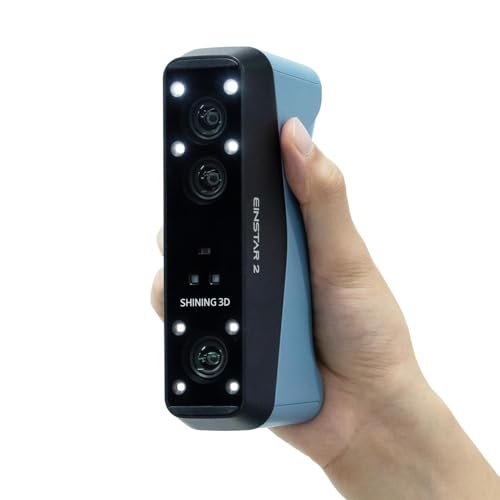
The speed king with a swappable battery that frees you from cables entirely.
The EINSTAR 2 is the most advanced scanner in this lineup, offering two scanning modes: a blue laser mode with 17 parallel lines that hits up to 90 fps (frames per second) for high-resolution detail capture, and a VCSEL infrared mode that scans at up to 20 fps for larger objects. Its swappable built-in battery provides up to 3 hours of uninterrupted scanning — no wire, no external hub needed. It handles black and reflective objects directly (no spray required) and works outdoors in light up to 110,000 Lux in Laser HD mode.
Buyers coming from the original Einstar are enthusiastic: one says “scan quality and speed is noticeably better” and that it is a “no brainer upgrade for the price.” Another calls it “super accurate” and loves the wireless freedom. The catch is that it needs a very beefy PC — one user reports using an i7-12700KF with a 4060 Ti GPU and 32GB RAM, and notes that scans above 0.2mm point distance require even more memory. A 1-star reviewer says the instructions are “all wrong” and calls it “total junk” because they could not get it to track properly, so the learning curve is still present despite the premium price.
The Flagship Advantages
- Blazing fast blue laser mode at up to 90 fps for detailed scans
- Wireless operation with a swappable battery giving up to 3 hours of scanning
- Handles black, reflective, and metallic surfaces without spray
- Outdoor scanning works up to 110,000 Lux in bright environments
Premium Price, Premium Problems
- Requires a top-tier PC (i7-12700KF/4060 Ti/32GB RAM minimum per one user)
- Heavy at 5.72 pounds — significantly more than any other scanner here
- Poor documentation — one buyer says instructions are wrong and the unit would not track
- Scans above 0.2mm point distance demand even more system memory
Get this if: you are an experienced user with a powerful workstation and need the fastest, most portable scanner in the sub-$1000 range — the wireless battery is a standout.
Look elsewhere if: your PC is older or you are not willing to invest significant time learning the setup and software.
Understanding the Specs
Accuracy vs. Point Distance
Accuracy measures how close the scanned model is to the real object’s dimensions — think of it as the margin of error in millimeters. A 0.02mm accurate scanner will produce a model that is within 0.02mm of the real part, which is essential for tight-fitting components. Point distance (also called fused point distance) is the gap between individual data points on the surface. A smaller point distance (0.05mm) means you get more points per square millimeter, so you capture finer textures and edges. A 0.1mm point distance is fine for mechanical parts but will miss subtle surface details you need for jewelry or miniatures.
FPS (Frames Per Second)
FPS tells you how many times per second the scanner captures a complete set of data. A higher frame rate (90 fps on the EINSTAR 2) lets you move the scanner faster without losing detail, which is great for scanning large objects quickly. Slower rates like 10fps (on the 3DMakerpro Seal Lite) force you to move very slowly and deliberately, which reduces the chance of tracking errors but makes the process more tedious. If you plan to scan multiple objects in a session, higher FPS directly equals less time spent.
Single Scan Mode vs. Multi-Line Laser
Single scan mode means the projector flashes one pattern at a time, and the cameras record the deformation. This works well for stationary or slow scanning. Multi-line laser scanners project several laser lines at once (17 lines on the EINSTAR 2, 11 lines on the INSPIRE 2), which lets them capture data across a wider area per frame. This speeds up scanning and improves performance on tricky surfaces like reflective metal or dark plastic, because the lasers can cut through the glare or absorbency that trips up single-mode structured light scanners.
PC Requirements You Cannot Ignore
Every scanner in this list requires a separate computer to process the data — none are fully standalone. Entry-level models need at least an i5-8th gen CPU with 8GB of RAM just to run the software, while the premium units (INSPIRE 2, EINSTAR 2) practically demand an i7-13th gen or AMD Ryzen 7 with 16-32GB RAM and a dedicated GPU like an Nvidia GeForce RTX 3060. If your laptop is more than three years old, check the minimum requirements before buying, because a scanner that works great on a powerful PC may be unusable on an underpowered machine.
FAQ
Do I need a separate computer for all these 3D scanners?
Can these scanners capture color or just the shape?
Will a 0.02mm scanner automatically be better than a 0.1mm one?
How long does a full scan take?
What is scanning spray and do I really need it?
Can I use these scanners for body and face scanning?
Why do different scanners use different file formats?
How do I know if my computer is powerful enough?
Is Wi-Fi on the scanner better than a wired USB connection?
Can I scan very small objects like jewelry or coins?
Final Thoughts: The Verdict
Across the board, the 3d scanner under $1000 winner is the Revopoint POP3 Plus because it delivers a strong 0.05mm accuracy, smooth 18fps scanning, a full-color camera, and a two-year warranty — all at a price that leaves room for the computer upgrades you will need. If you want the highest precision for small-format objects, grab the 3DMakerpro Seal Lite with its 0.02mm accuracy. And for wireless portability and the fastest scanning speed in this bracket, the standout is the EINSTAR 2 — just be ready with a top-tier PC to back it up.
How We Picked
We do not accept paid placement. Every pick is matched to a real buyer and a real use-case; we do not hands-on test units.
Sources & Methodology
Specifications: manufacturer listings and product documentation. Review insights: verified customer reviews, as of July 2026. Pricing: not shown on this page (it changes often); check the current price via the retailer link.
As an Amazon Associate, FitlyFast earns from qualifying purchases. This does not affect which products we feature.