
Our readers keep the lights on and the weekend projects moving. As an Amazon Associate, I earn from qualifying purchases.
You are done paying for monthly cloud subscriptions, but choosing between all the 4-bay NAS options can be confusing. You don’t need to be an IT expert to find the right one — you just need to know which specs matter for your movies, photos, and backups. This guide cuts through the noise to show you exactly what to look for and which models deliver real value.
I’m Rikta — the co-founder and writer behind FitlyFast. This guide is built by comparing the manufacturers’ published specifications and the patterns across verified customer reviews, so you get each pick’s real strengths and trade-offs instead of marketing spin.
The best 4 bay nas for archiving family videos, running a media server, or backing up computers depends on the processing power, storage capacity, and software features you need.
How To Choose The Best 4 Bay NAS
Buying a 4-bay NAS is a long-term decision — you will likely live with it for years. The key is matching the hardware to what you actually plan to do, not buying the most expensive box you can find. Work through these points before you add one to your cart.
Processor and Memory (CPU & RAM)
The processor (CPU — the chip that does the thinking) determines what your NAS can handle. If you only plan to store files and run simple backups, an Intel Celeron processor with 4GB of RAM (temporary memory for active tasks) is plenty. But if you want to run Plex to stream 4K movies across your house, host virtual machines, or use Docker containers for smart home or web servers, you need a more powerful chip, like an Intel Core i3 or a higher-clocked Celeron, with at least 8GB of RAM. More RAM keeps more apps running smoothly without slowdowns.
Network Speed (Ethernet Ports)
The Ethernet port is the connection between your NAS and your router. Most home routers still use 1GbE (gigabit Ethernet) ports — these transfer 1 billion bits per second. That is about 125 MB/s. Many newer NAS models feature 2.5GbE ports, which transfer 2.5 times that speed — about 312 MB/s. For a single user, 1GbE is fine. But if multiple people edit large photo files or transfer huge video projects, 2.5GbE cuts waiting time a lot. Some high-end models offer two ports for link aggregation (combining them for more speed or failover security).
Software Experience (NAS Operating System)
Each brand has its own operating system — this is what you interact with every day. Synology’s DiskStation Manager (DSM) is known for being polished, intuitive, and full of third-party apps. QNAP’s QTS is powerful with enterprise features but can feel cluttered. TERRAMASTER’s TOS is simple and improving. UGREEN’s newer software is beginner-friendly but lacks some advanced tools. The best choice is the one you find easiest to manage daily.
Drive Compatibility and Expansion
Not all hard drives work in all NAS units. Some brands like Synology have started restricting third-party drives — a fact that frustrates many buyers. If you want to buy the cheapest 16TB drives on the market, check the brand’s compatibility list first. Also consider if you might outgrow 4 bays in a few years. Some units let you attach external expansion enclosures; others max out at four drives.
Quick Comparison
On smaller screens, swipe sideways to see the full table.
| Model | Category | Best For | Key Spec | Amazon |
|---|---|---|---|---|
| Synology DS925+ | Premium | Balanced home & office performance | 565 MB/s read, dual 2.5GbE | Amazon |
| TERRAMASTER F4-424 Pro | Premium | Heavy Plex & virtual machines | Intel Core i3-N305, 32GB DDR5 | Amazon |
| Asustor AS5404T | Mid-Range | Fast NVMe caching & gaming | 4x M.2 NVMe, 2.5GbE x2 | Amazon |
| Synology DS425+ | Mid-Range | Small team productivity | 278 MB/s, up to 30 IP cameras | Amazon |
| QNAP TS-453E-8G-US | Mid-Range | ZFS storage & multi-protocol sharing | 8GB DDR4, dual M.2 NVMe | Amazon |
| UGREEN DH4300 Plus | Mid-Range | Beginner-friendly home cloud | 120 TB max, 8GB LPDDR4X | Amazon |
| BUFFALO TeraStation Essentials 24TB | Budget | Out-of-box storage, no setup | 24TB pre-installed, RAID 5 | Amazon |
| BUFFALO TeraStation Essentials 32TB | Budget | Larger pre-loaded storage | 32TB pre-installed, RAID 5 | Amazon |
In‑Depth Reviews
1. Synology 4-Bay DiskStation DS925+
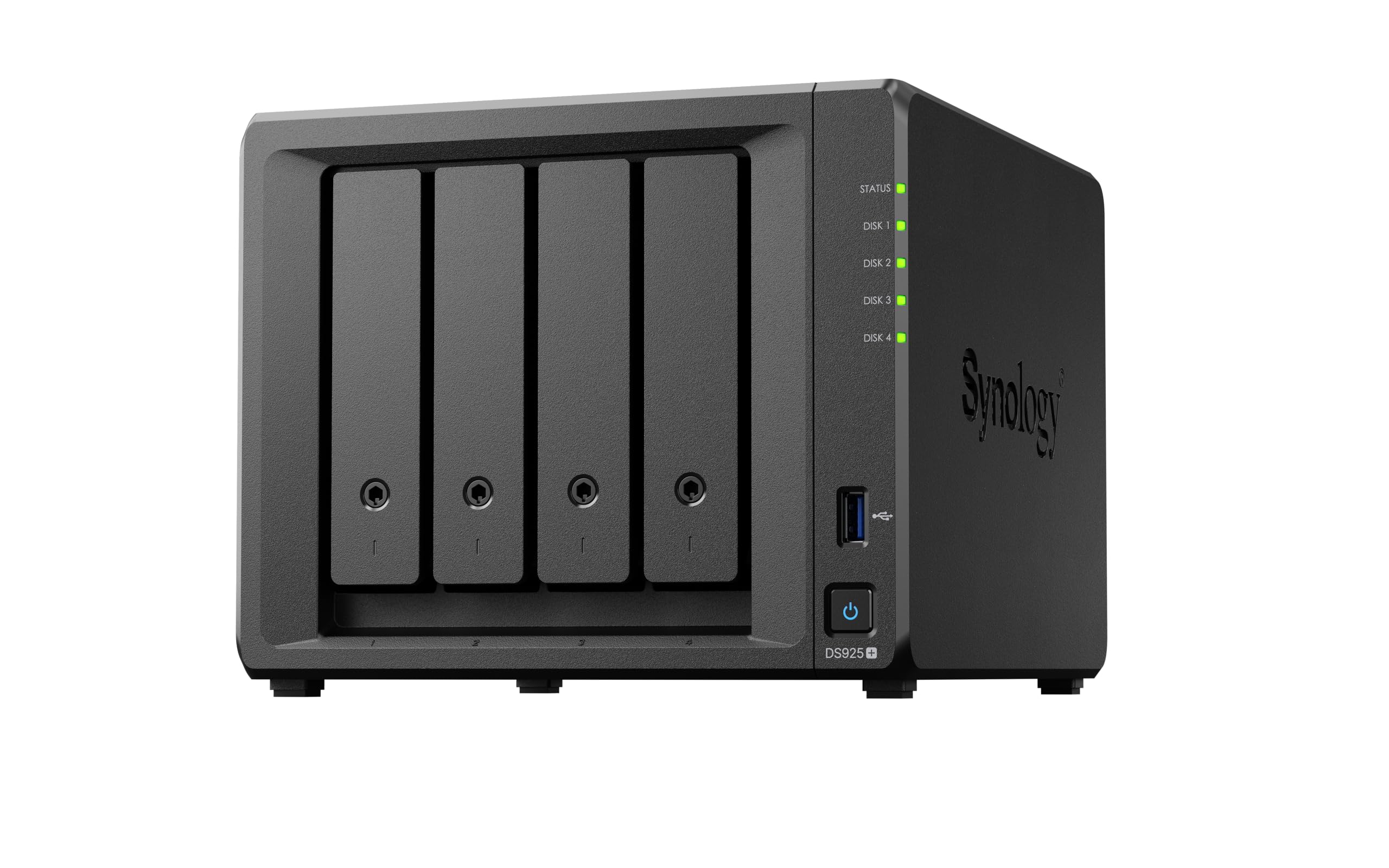
The Synology DS925+ earns the top spot because no single feature stands out, but everything works reliably — the software is polished, the speed is fast enough for most homes, and buyers rarely regret buying it. It reads files at 565 MB/s and has two 2.5GbE ports, so you get fast transfers for multiple users without upgrading your whole network. One reviewer used 3x16TB drives in SHR-1 (Synology Hybrid RAID) for 29TB of usable space, and it handled large drives without issues.
The real strength is the operating system. Synology’s DiskStation Manager (DSM — the software you use to manage the NAS) is widely considered the simplest interface in this category. Its apps for photos, drive sync, and backups actually make sense. The toolless drive caddies let you swap drives in seconds without a screwdriver. The unit is quiet enough for a living room. At 2260 grams (about 5 pounds), it is heavier than the Synology DS425+, but that added weight signals better build quality.
The catch is that Synology pushed its own branded drives, and while the requirement was later dropped, it left a sour taste. One reviewer noted that NVMe caching slots (fast SSD slots for speeding up frequent tasks) only work with Synology drives unless you run a third-party script. If that does not bother you, this is the most stress-free choice for backups, photo archiving, and Plex. Buyers who want the simplest, most reliable experience with the best app ecosystem choose this over the TERRAMASTER F4-424 Pro, which has more raw power but cruder software.
Why it’s great
- Intuitive DSM software with excellent photo and backup apps
- Fast 565 MB/s read speeds for large file transfers
- Quiet operation and toolless drive installation
Good to know
- NVMe caching slots may require Synology-branded drives
- Some external RAM caused stability issues for one reviewer
- Louder than expected for a few buyers, though most find it quiet
2. TERRAMASTER F4-424 Pro

If the Synology DS925+ is the refined daily driver, this is the muscle car. The TERRAMASTER F4-424 Pro has an Intel Core i3-N305 processor (8-core, 8-thread, turbo to 3.8GHz) and 32GB of DDR5 RAM — a completely different league for heavy work. While the DS925+ manages up to 565 MB/s reads, the F4-424 Pro hits 283 MB/s in linear transfers (tested with four 18TB drives in RAID 0). Its real advantage is app responsiveness: it loads applications 100% faster and processes database queries 55% quicker than older Terramaster models, according to the brand.
Reviewers who run Plex on this unit report it handles 4K HDR content plus two simultaneous remote 1080p streams while using less than 50% of the CPU. That is extraordinary for a desktop-sized unit. It also has dual M.2 NVMe slots for SSD caching, and the side-sliding cover makes installation tool-free. The metal enclosure and sound-absorbing panels keep it quieter than expected for this power.
The downside is the software. TerraMaster’s TOS operating system is catching up to Synology but is not there yet. One buyer mentioned the TRAID auto-repair feature failed after a drive died, causing data loss. Others find TOS fine for basic use. Many buyers install Unraid or TrueNAS instead, using the F4-424 Pro as a custom server in a compact box. Choose this over the top pick if you need raw computing power for multiple 4K streams or virtual machines and are fine learning workaround software.
Where it shines
- Exceptional Plex performance: 4K HDR plus multiple 1080p streams
- 32GB DDR5 RAM and Core i3 processor for demanding apps
- Tool-less M.2 and drive installation, plus noise-dampening panels
Worth noting
- TOS software has reliability concerns, especially with RAID auto-repair
- 32GB RAM is non-expandable and non-ECC
- Limited app selection compared to Synology or QNAP ecosystems
3. Asustor AS5404T

Need a NAS that doubles as a fast scratch drive for video editing? The Asustor AS5404T is the only 4-bay unit here with four dedicated M.2 NVMe slots (SSD slots for ultra-fast storage). You can set up a super-fast storage pool or cache that speeds up access for your most-used data. The Intel Celeron N5105 quad-core processor (10nm, 2.0GHz) keeps power low while handling Docker containers and live streaming.
Buyers report that the two 2.5GbE ports deliver transfers that cut backup times in half compared to a standard 1GbE connection, especially with a Wi-Fi 7 router. One owner reported their NAS handled streaming better than a dual-Xeon 64GB desktop PC. Three USB 3.2 Gen 2 ports (10 Gbit/s each) let you plug in external drives for quick offloads.
A physical design flaw: the four M.2 slots are so close together you cannot install four M.2 drives with their heatsinks — you need non-heatsink versions, which may run hotter. Some buyers also say the screws strip easily, and the English manual is not guaranteed. If you are comfortable working around these quirks, the AS5404T offers unmatched SSD flexibility for its price. It is best for video editors and gamers who need fast cache; avoid it if you dislike tinkering with hardware.
What stands out
- Four dedicated M.2 NVMe slots for caching or storage pools
- Dual 2.5GbE ports with real backup-time improvements
- Low-power Intel N5105 that outperforms older desktop hardware
The trade-offs
- M.2 slots too close together for drives with heatsinks
- Screws may strip easily, according to some reviewers
- Software has a buggy NIC pairing mode that can cause network errors
4. Synology DS425+

The number that sums up the Synology DS425+ is 278 MB/s sequential read speed — it is not the fastest here, but it is ample for a small team of up to ten people sharing files and accessing media. While the DS925+ reaches 565 MB/s, the DS425+ trades raw speed for business features like supporting 30 IP cameras for surveillance and Active Backup 365 for Microsoft 365 environments. This is a productivity tool first, a media server second.
The trade-off is drive compatibility. One customer observed that Seagate IronWolf Pro 16TB drives were not recognized, and Synology’s own drives cost more and have shorter warranties. If you stick to recommended drives, you get a 3-year warranty and enterprise-grade support.
Another buyer reported that migrating from an older Synology DS416Play took about four days and needed old admin credentials. This unit suits small offices needing centralized storage, user-access controls, and camera recording. It is less ideal for media-heavy home users — the UGREEN DH4300 Plus offers easier setup and bigger capacity at a lower learning curve, making the DS425+ a premium-priced productivity investment rather than a budget storage bargain.
The upsides
- Supports up to 30 IP cameras for business surveillance
- Active Backup 365 protects Microsoft 365 data
- Synology’s intuitive software with snapshot and redundancy tools
Keep in mind
- Third-party drives may not be recognized; stick to Synology’s list
- Slower 278 MB/s speed vs. premium models
- Migration from older Synology units can take several days
5. QNAP TS-453E-8G-US
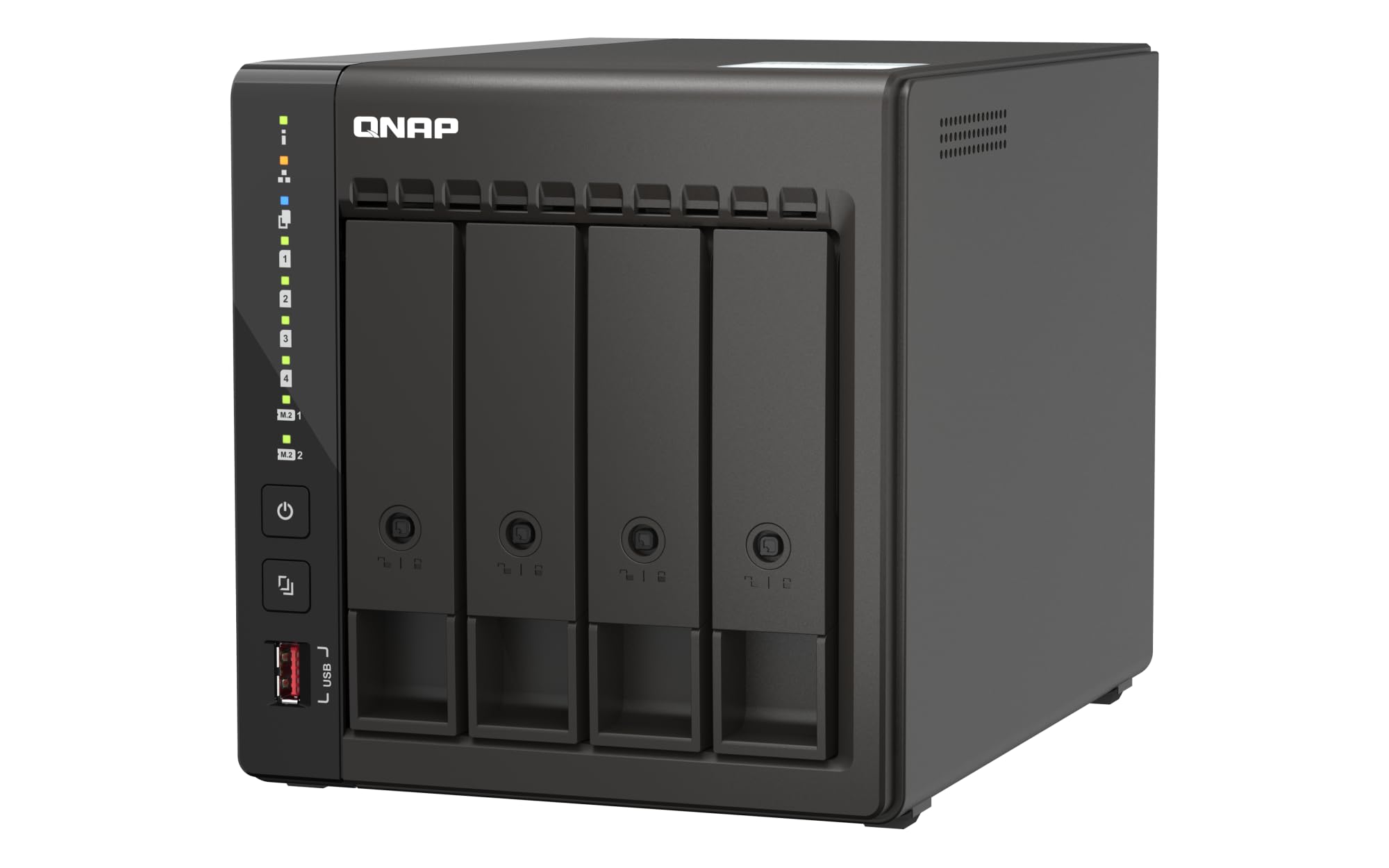
What you actually get at this lower price is enterprise-grade ZFS support — a file system that self-heals corrupted data and provides advanced snapshots — something most consumer NAS units skip. Its Intel Celeron J6412 quad-core processor (burst to 2.9 GHz) and 8GB of DDR4 RAM are modest on paper, but the unit achieves around 500 MB/s in RAID10 with caching. Owners mention it runs Plex, Docker, and file serving flawlessly for years.
What you give up is a polished out-of-box experience. Several buyers describe the operating system as clunky and slow. One reported a storage pool falsely showed as full after a week, causing volumes to go read-only and requiring exhausting troubleshooting. The dual 2.5GbE ports are a nice bonus, but only two LAN ports total limits link aggregation.
On value, this unit is strong if you prioritize data integrity features like ZFS and constant firmware updates (QNAP includes Bitdefender antivirus). You also get a 3-year warranty, and the metal enclosure is built to last around 10 years, according to one reviewer. The Synology DS925+ is simpler, but this is one of the most capable units for the money if you are okay with a steeper learning curve — making it the exact budget buyer it is perfect for.
Why we’d pick it
- ZFS support for self-healing data and advanced snapshots
- ~500 MB/s speeds in RAID10 with caching
- 3-year warranty and constant firmware updates
A few caveats
- Operating system can be clunky and error-prone for some users
- Only two network ports, limiting high-speed aggregation
- Max memory limited to 16GB, no expansion beyond that
6. UGREEN NAS DH4300 Plus

For a first-time NAS buyer, the UGREEN DH4300 Plus feels like plugging in an external hard drive — the setup app uses NFC, the mobile and desktop apps are clean, and you do not need to learn RAID terminology on day one. It supports up to 120 TB of capacity (50% more than the Synology DS425+’s 80 TB), so you have room to grow. The 8GB LPDDR4X RAM is enough to run Docker containers for apps like Plex or a home assistant.
Beginner-friendly features include AI photo recognition — it identifies people, pets, objects, and finds duplicates automatically. The magnetic dust cover clicks shut satisfyingly. Reviewers rave about how quiet it is with SSDs. One noted that after adding Tailscale VPN for remote access, it fully replaced their paid Google Drive account, saving the monthly fee.
The honest limit is 4K movie streaming can be tricky. One user highlighted movies hang during playback even with hardware transcoding and a 2000 Mbps connection, though they solved it by connecting the NAS to the TV directly via its 4K HDMI port. It does not support virtual machines or Wi-Fi — wired Ethernet only. If you need straightforward file storage, backups, and photo management without monthly fees, this is the most beginner-friendly pick. The BUFFALO TeraStation gives you pre-installed drives, but this offers more capacity and smarter software for those who want a private cloud without the technical hassle.
Strong points
- Super easy setup with NFC and beginner-friendly mobile apps
- AI photo recognition sorts people, pets, and duplicates
- 120 TB max capacity offers huge room to expand
Before you buy
- Does not support virtual machines; Docker only
- 4K Plex streaming may need HDMI direct connection, not network
- No Wi-Fi support — wired Ethernet required
7. BUFFALO TeraStation Essentials 24TB

The BUFFALO TeraStation Essentials 24TB is the NAS for anyone who says “I do not want to think about drives, RAID levels, or compatibility lists.” It comes with four 6TB hard drives already installed and pre-configured in RAID 5 (Redundant Array of Independent Disks — a setup that combines drives for data protection and gives you 18TB usable with one-drive fault tolerance). You take it out of the box, plug it into your network, and start using it in minutes. Compared to the rest of the field, this is the most turnkey option at a competitive price for 24TB of pre-installed storage, saving you the hassle and potential extra cost of buying drives separately.
What you get is a professional-grade closed system with 256-bit drive encryption, cloud integration for Amazon S3, Dropbox, Azure, and OneDrive, and a 3-year warranty covering the hard drives. The native 2.5GbE port gives fast transfers without cabling upgrades. Reviewers describe it as rock solid after months of continuous use. One noted that initial data load took time, but after that, everything ran smoothly with zero issues.
One limitation: the drives spin at 5400 RPM (revolutions per minute — slower than the 7200 RPM drives in a typical DIY NAS). The software interface is functional but not as modern as Synology’s DSM. The manual is online only, and initial setup needs a driver installed on your PC. The one clear reason to choose it is if you value simplicity and warranty coverage above all else; skip it if you want the fastest drives or a polished software experience like the Synology DS925+ offers.
What we like
- Drives included and pre-configured in RAID 5 out of the box
- 3-year comprehensive warranty covers hard drives too
- Native 2.5GbE port for fast transfers
The downsides
- 5400 RPM drives are slower than typical DIY NAS drives
- Manual is only available online; driver install needed for setup
- Large physical footprint compared to other 4-bay units
8. BUFFALO TeraStation Essentials 32TB
The BUFFALO TeraStation Essentials 32TB is the highest-capacity pick in this guide for users who need 24TB usable out of the box with one-drive fault tolerance. Four 8TB drives come pre-installed in RAID 5, giving you that 24TB usable space. You get the same 256-bit encryption, cloud sync with S3, Dropbox, Azure, and OneDrive, and the same 3-year warranty that covers the drives.
At this higher capacity, the 5400 RPM drives are more noticeable if you move very large files frequently, but for daily file sharing, backups, and media streaming, the speed is adequate. One reviewer who upgraded from a Buffalo LSA220 unit noted the TeraStation’s network speed was significantly faster and the GUI was more responsive. The unit ran continuously for months without hiccups, and reviewers call it a solid performer that feels as fast as an internal hard drive.
The value of buying drives included is real — pricing out four 8TB NAS-rated drives separately often approaches the cost of this complete system. The trade-offs are the same: online-only manual, driver-based setup for initial detection, and a larger footprint. Choose this over the 24TB version if you need the extra 8TB from day one; the hardware and experience are identical otherwise. The Synology DS925+ has better software, but this wins on convenience.
Why it’s great
- 32TB total capacity with drives included and pre-installed
- 3-year warranty with hard drive coverage and data recovery service
- Cloud sync with S3, Dropbox, Azure, and OneDrive
Good to know
- 5400 RPM drives may feel slower for large file transfers
- Setup requires installing a driver on a local computer
- Manual is online-only; no printed guide in the box
Understanding the Specs
RAID Levels Explained
RAID (Redundant Array of Independent Disks) is a way to combine multiple drives for speed, redundancy (data protection if a drive fails), or both. RAID 0 combines all drives into one big volume with no protection — if one drive dies, you lose everything. RAID 1 mirrors data across two drives, so you survive a single drive failure, but you lose half your total capacity. RAID 5 spreads data and parity across three or more drives, giving you one-drive fault tolerance with better space efficiency. SHR (Synology Hybrid RAID) is a flexible version that lets you mix different drive sizes and still get good redundancy, which is why so many home users prefer Synology.
Transcoding and Media Streaming
Transcoding is converting a video file from one format to another on the fly — for example, converting a 4K HEVC movie into a 1080p stream so your old TV or phone can play it smoothly. The NAS processor does this work. If you plan to stream to multiple devices or have 4K content, you need a CPU with an integrated GPU that supports hardware transcoding, like Intel Celeron or Core series chips. Without it, your NAS will struggle or stutter with high-bitrate files. The UGREEN DH4300 Plus supports 4K HDMI output but can struggle over the network, while the TERRAMASTER F4-424 Pro handles multiple simultaneous transcodes with ease.
Docker vs. Virtual Machines
Docker is a lightweight way to run applications in isolated containers — think of it as running a small app (like Plex, a home automation hub, or a website) inside a virtual box. It uses very little system resources and is easy to set up. Virtual machines (VMs) run a full operating system inside your NAS, like having a separate Windows or Linux computer running inside your storage box. VMs need much more RAM and CPU power but offer more flexibility. Budget and mid-range NAS units (like the UGREEN DH4300 Plus) support Docker but not VMs, while premium units (like the Synology DS925+) can handle both. If you just want a few extra services, Docker is enough; if you need a full desktop environment, you need VM support.
2.5GbE and Link Aggregation
2.5GbE (2.5 Gigabit Ethernet) is a network port that transfers data at 2.5 times the speed of a standard gigabit port (which maxes out around 125 MB/s). A single 2.5GbE port can deliver about 312 MB/s in perfect conditions, which matches the typical speed of even mid-range hard drives. Having two 2.5GbE ports allows Link Aggregation, which combines both ports to act as one larger pipe — giving you up to 5 Gb/s total bandwidth for multiple users. However, link aggregation requires a compatible network switch and does not speed up a single file transfer; it only helps when several people access the NAS at the same time. For a single home user, one 2.5GbE port is plenty; for a small team, two ports offer future-proofing.
FAQ
Can I use any hard drives in my 4 Bay NAS?
How much RAM do I really need for a media server?
What is the difference between RAID 5 and SHR?
Can a 4 Bay NAS replace my cloud storage subscription?
What does “diskless” mean when buying a NAS?
Final Thoughts: The Verdict
For most buyers, the best 4 bay nas winner is the Synology DS925+ because it offers the most refined software experience, speedy 565 MB/s reads, dual 2.5GbE ports, and reliable data protection features in a quiet, easy-to-manage package. If you want raw computing horsepower for Plex transcoding and heavy application loads, grab the TERRAMASTER F4-424 Pro. And for a beginner-friendly entry with huge capacity and AI photo sorting, the UGREEN DH4300 Plus offers the best value.