
Our readers keep the lights on and the weekend projects moving. As an Amazon Associate, I earn from qualifying purchases.
Replacing a multi-monitor setup with a single 49-inch curved screen sounds like a desk-cleaning dream. But the reality of choosing between 32:9 aspect ratios, 1000R curves, and the specs that actually matter for your specific workflow or game can be overwhelming. The wrong pick leaves you with eye strain, screen tearing, or a resolution that feels cramped instead of expansive.
I’m Rikta — the co-founder and writer behind FitlyFast. I’ve spent countless hours dissecting the contrast ratios, refresh rates, color gamuts, and build qualities that separate a truly immersive ultrawide from a frustrating compromise.
Whether you need the raw pixel space for professional multitasking or the blistering refresh rates for competitive titles, this guide breaks down the critical specs and real-world performance to help you land on the perfect 49 inch curved monitor for your setup and budget.
How To Choose The Best 49 Inch Curved Monitor
Buying a 49-inch ultrawide is a commitment to a specific way of working or playing. The sheer size means the panel’s curvature, resolution, and refresh rate will define your daily experience. Ignore these core specs, and you risk a monitor that feels more like a burden than an upgrade.
Curvature: The Immersion Factor (1000R vs 1500R vs 1800R)
The “R” value describes the radius of the curve in millimeters. A 1000R curve wraps the screen around your field of vision, matching the natural shape of the human eye for maximum immersion and less neck movement to see the edges. This is ideal for gaming and single-user productivity. A 1500R or 1800R curve is gentler, better suited for shared viewing or if you prefer a less aggressive bend, but you may need to turn your head more to see the far corners.
Resolution: Pixel Density Matters
Most 49-inch panels default to Dual Quad HD (DQHD) at 5120×1440. This doubles the pixel density of a 27-inch 1440p monitor, giving you sharp text and massive screen real estate without the extreme GPU demands of 4K. Some older or budget models use 3840×1080 (DFHD), which is essentially two 1080p screens side-by-side — you will see individual pixels and less vertical workspace, which makes it a poor choice for professional work.
Refresh Rate & Adaptive Sync
For competitive gaming, 120Hz is the floor, 144Hz is the sweet spot, and 240Hz is for esports-level response. Pair your refresh rate with your GPU. AMD FreeSync Premium Pro reduces tearing on compatible Radeon cards, while NVIDIA G-Sync does the same for GeForce hardware. Many monitors now carry both certifications for broad compatibility.
Panel Technology: VA, IPS, or OLED
VA panels offer the best static contrast (3000:1 or higher), delivering deep blacks for HDR content and dark game scenes. Nano IPS panels provide superior color accuracy and wider viewing angles, but with a standard 1000:1 contrast ratio. OLED panels deliver the ultimate picture with per-pixel lighting (infinite contrast), but carry a higher price and a risk of burn-in for static desktop elements. Choose based on your priority: contrast, color, or absolute black levels.
Quick Comparison
On smaller screens, swipe sideways to see the full table.
| Model | Category | Best For | Key Spec | Amazon |
|---|---|---|---|---|
| Samsung Odyssey G9 (G91F) | Gaming | High-End Gaming & HDR | 1000R Curve, 144Hz, HDR600 | Amazon |
| Samsung Odyssey G9 (G95C) | Pro Gaming | Elite Smoothness & HDR | 240Hz, HDR1000, 1ms | Amazon |
| LG 49WQ95C-W | Productivity | Professional Multitasking | Nano IPS, 90W PD, KVM | Amazon |
| Dell UltraSharp U4924DW | Professional | Corporate & Precision Work | USB-C Hub, KVM, 2000:1 | Amazon |
| Dell UltraSharp U4919DW | Professional | Reliable Dual-System Work | USB-C, 350 cd/m2, 5ms | Amazon |
| LG 45GS95QE | OLED | Competitive & Immersive Gaming | OLED, 240Hz, 0.03ms | Amazon |
| ASUS ROG Strix XG49VQ | Entry Ultrawide | Budget Gaming & Racing | 3840×1080, 144Hz, Freesync 2 | Amazon |
| INNOCN 49C1R | Versatile | Productivity & Casual Gaming | 5K2K, 120Hz, 65W USB-C | Amazon |
| ZZA 49″ Curved | Value Gaming | Sim Racing & Coding | 165Hz, 120% sRGB, DP 1.4 | Amazon |
| CRUA 49″ Curved | Budget | Entry-Level Ultrawide | 165Hz, 3000:1, 32:9 | Amazon |
| Great voell 49″ | Value | Color-Accurate Gaming | 127% sRGB, HDR400, 1ms | Amazon |
In‑Depth Reviews
1. Samsung 49″ Odyssey G9 (G91F)

The Samsung Odyssey G9 (G91F) nails the sweet spot for both hardcore gamers and productivity power-users. Its 1000R curve wraps around your vision, making the 32:9 aspect ratio feel natural rather than stretched. The DQHD (5120×1440) resolution delivers crisp text for spreadsheets and code, while the 144Hz refresh rate with 1ms response time keeps fast-paced shooters and racing sims fluid. The DisplayHDR 600 certification provides a significant leap in brightness and contrast over basic HDR400 panels, with a 1,000,000:1 contrast ratio that makes dark scenes in games and movies pop.
Users consistently praise the build quality and the ergonomic stand, which offers height, tilt, and swivel adjustments for a comfortable long-term setup. The split screen and Picture-in-Picture features work seamlessly, letting you game on one side while watching a stream or referencing a guide on the other. The auto source switch is a small but welcome convenience for multi-device setups. For the price, it competes directly with monitors costing significantly more while delivering a genuinely immersive experience.
The only real compromise here is the lack of built-in speakers, which is common among high-end gaming monitors and expects you to use a headset or external speakers. The VA panel, while excellent for contrast, doesn’t have the same wide viewing angles as IPS, but on a 49-inch screen driven by a single user, this is rarely an issue. This is the monitor to beat for anyone wanting a premium ultrawide without stepping into OLED territory.
Why it’s great
- 1000R curve provides a genuinely wrap-around viewing experience, reducing eye and neck strain.
- DisplayHDR 600 delivers vibrant highlights and deep, inky blacks far beyond entry-level HDR.
- Ergonomic stand offers full height, tilt, and swivel adjustments for personalized comfort.
Good to know
- No built-in speakers, requiring external audio solutions.
- VA panel viewing angles are narrower than IPS panels, though less critical for a single-user display.
2. Samsung 49″ Odyssey G9 (G95C)

The Samsung Odyssey G9 (G95C) is a statement piece for those who demand the absolute peak in gaming performance. Its 240Hz refresh rate and 1ms (GtG) response time are paired with a VESA DisplayHDR 1000 certification, meaning you get ultra-smooth motion with no ghosting, and a peak brightness of 1000 nits that makes HDR content look spectacular. The 1000R curve on this 49-inch panel pulls you into the action like a cockpit, and the 1,000,000:1 contrast ratio ensures deep blacks alongside the blinding highlights. This is a panel built to make games like Cyberpunk 2077 or Forza Horizon look their absolute best.
Beyond raw specs, Samsung loaded this with thoughtful features. The CoreSync technology projects on-screen colors into your room for ambient immersion, while the Adaptive Picture sensor automatically adjusts brightness based on your room’s lighting. The included Hexa stand is rock-solid and offers full ergonomic adjustments, and AMD FreeSync Premium Pro keeps the 240Hz gameplay completely tear-free. With Picture-by-Picture and Picture-in-Picture modes, it’s also perfectly capable of handling a dual-PC workflow or a gaming console alongside your desktop.
The primary concern reported by some users is reliability, as a small number have experienced power failures after a few months. While Samsung’s warranty service has been described as a mixed bag, the overwhelming majority of reviews praise the monitor’s breathtaking quality and build. Drivers who can afford this tier will find the motion clarity, contrast, and brightness are in a different league compared to mid-range options.
Why it’s great
- 240Hz refresh rate with 1ms response delivers the smoothest possible motion for competitive gaming.
- VESA DisplayHDR 1000 provides stunning brightness and contrast, revealing incredible detail in highlights.
- Adaptive Picture and CoreSync features add smart ambient adjustments and immersive lighting effects.
Good to know
- Higher price point and some user reports of reliability issues requiring warranty support.
- The 1000R curve is very aggressive, which may not suit all desk setups or viewing distances.
3. LG 49WQ95C-W

The LG 49WQ95C-W is the ultimate tool for professionals who live in spreadsheets, code, or creative suites. Its 49-inch DQHD (5120×1440) Nano IPS panel delivers vibrant and accurate colors (DCI-P3 98%) with wide viewing angles, making it superior to VA panels for color-critical work. The 1000:1 contrast ratio is standard for IPS, but this is offset by excellent color uniformity and sharp text. The 144Hz refresh rate is a bonus for casual gaming, but the real star is the connectivity: a single USB-C port delivers 90W of power to your laptop while driving the display, effectively turning your desk into a single-cable docking station.
The built-in KVM switch is a game-changer for those who operate two computers. You can control both the PC and the laptop with a single keyboard and mouse, and the PIP/PBP modes allow you to display both sources side-by-side at native resolution. The sleek white design is a refreshing departure from the typical black gaming aesthetic. Reviewers who switched from multiple monitors report a cleaner desk and a massive boost in efficiency, particularly for tasks like data analysis, video editing timelines, and software development with multiple IDEs open.
Potential drawbacks include a relatively gentle curvature (around 2300R), which means the far edges of the screen are farther from your eyes, potentially requiring more head movement. Some users have also reported finicky USB-C behavior with sleep modes and occasional KVM hiccups. For those whose primary focus is productivity with color accuracy and a clean, single-cable workflow, this remains a top-tier choice despite its age.
Why it’s great
- Nano IPS panel provides exceptional color accuracy and wide viewing angles for professional creative work.
- 90W USB-C Power Delivery and built-in KVM switch enable a clean, single-cable dual-PC setup.
- Sleek white design and excellent color uniformity ideal for a professional office or studio environment.
Good to know
- Gentle curvature may require more head movement to see the far edges of the screen clearly.
- Standard IPS contrast ratio of 1000:1, which is lower than VA panels for HDR content.
4. Dell UltraSharp U4924DW
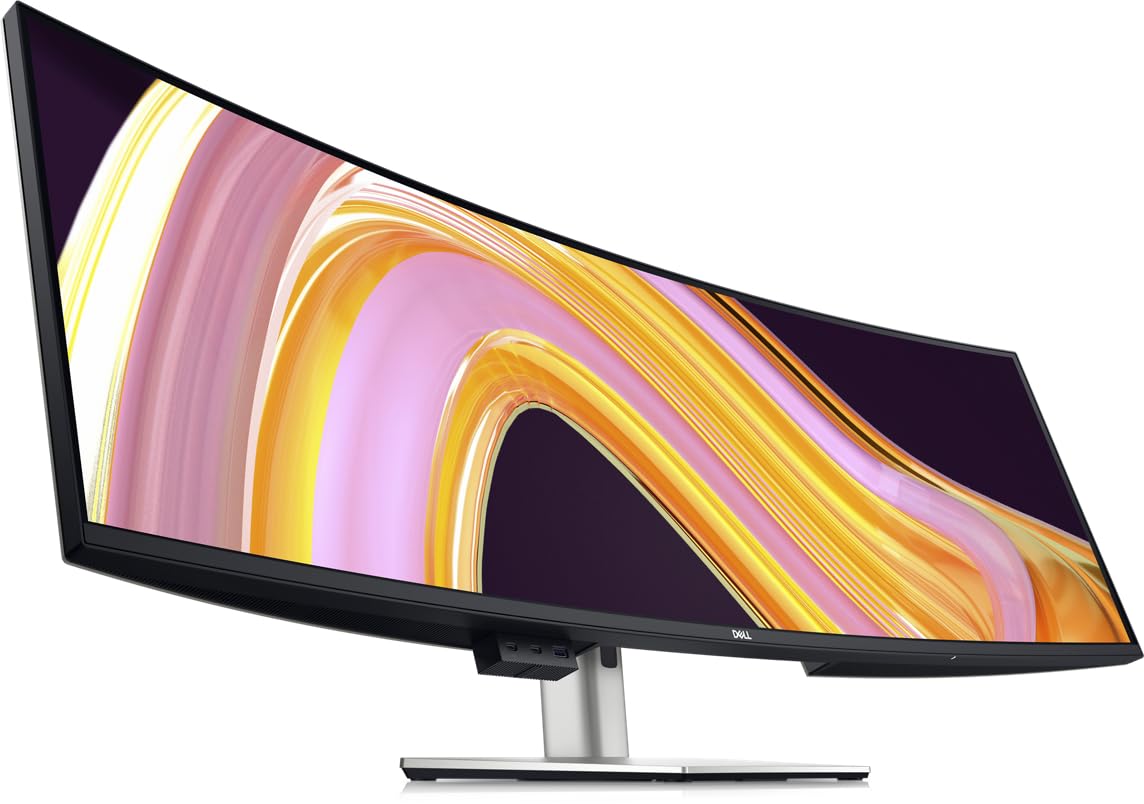
The Dell UltraSharp U4924DW is built for the corporate desk where reliability, connectivity, and support are paramount. It packs a massive 49-inch DQHD (5120×1440) display into a robust body with a 2000:1 contrast ratio, offering better black levels than standard IPS panels without the aggressive curve of gaming monitors. The 3800R curve is subtle, making it a more natural fit for shared workspaces or for users who simply want the screen real estate without the peripheral immersion. The built-in USB-C hub with Ethernet, multiple downstream ports, and a responsive KVM switch is the centerpiece, allowing a single cable to handle video, data, and charging (up to 90W).
Users coming from dual-monitor setups report a significant reduction in desk clutter and appreciate the seamless switching between a work-issued laptop and a personal desktop. The Dell Display Manager software allows for easy window tiling, essential for managing the massive 32:9 canvas. The anti-glare coating and eye-care features are excellent for long workdays, with reviewers noting less eye fatigue compared to cheaper ultrawides. The build quality is typical Dell UltraSharp: premium, solid, and backed by a strong warranty.
The biggest criticism is the slow KVM switching time (around 5 seconds), which can be a minor workflow annoyance for those who switch between computers frequently. The subtle curve also means the screen is almost flat, potentially causing glare from overhead lights and making the far ends of the 49-inch screen harder to read without moving your head. For a dedicated workstation where you don’t frequently switch inputs, it is an incredibly capable and reliable machine.
Why it’s great
- Integrated USB-C hub with Ethernet and KVM manages a complete desktop setup with one cable.
- Excellent anti-glare coating and eye-care features reduce fatigue during long work sessions.
- Superior 2000:1 contrast ratio provides deeper blacks than typical IPS productivity panels.
Good to know
- KVM switch is notably slow (around 5 seconds), which can interrupt a fast workflow.
- Subtle 3800R curve offers less immersion and may still cause glare from environment lighting.
5. Dell UltraSharp 49 U4919DW

The Dell UltraSharp U4919DW is the older but still highly capable workhorse of the 49-inch ultrawide productivity world. It offers the standard 5120×1440 resolution on a 49-inch panel with a gentle, business-friendly curve. Its key strength is its simplicity and reliability: it connects via a single USB-C cable and is immediately recognized by Windows and macOS, with solid color accuracy out of the box. The 350 cd/m² brightness is sufficient for well-lit offices, and the 5ms response time is adequate for professional use. It is essentially two 27-inch 1440p monitors in one, with seamless window management.
Professionals, particularly coders and engineers, love it for the ability to view massive blueprints, multiple code files, or complex data dashboards without any bezels interrupting the flow. The build quality is robust, with a heavy-duty stand that provides plenty of ergonomic adjustments. While newer models have better HDR and faster KVM, the U4919DW remains a very strong choice if you find it at a competitive price. It ships on a pallet due to its size, so expect excellent packaging, and initial setup is straightforward.
The main consideration is its age. The contrast ratio of 1000:1 is standard, and it lacks the deeper blacks and higher brightness of newer panels. It also has a single HDMI port and relies on USB-C for best results. For a pure work-from-home or office environment where you need massive screen real estate and don’t care about gaming or HDR, it remains a proven and dependable option that reviewers consistently recommend for its productivity boost.
Why it’s great
- Proven reliability with a simple USB-C connection that works seamlessly with Mac and PC.
- Massive screen real estate perfect for code, multiple documents, and data analytics.
- Robust build quality with excellent ergonomic adjustments and desk-friendly footprint.
Good to know
- Older panel technology with 1000:1 contrast ratio, less capable for HDR content.
- Limited to a single HDMI port; best functionality requires USB-C video input.
6. LG 45GS95QE Ultragear OLED
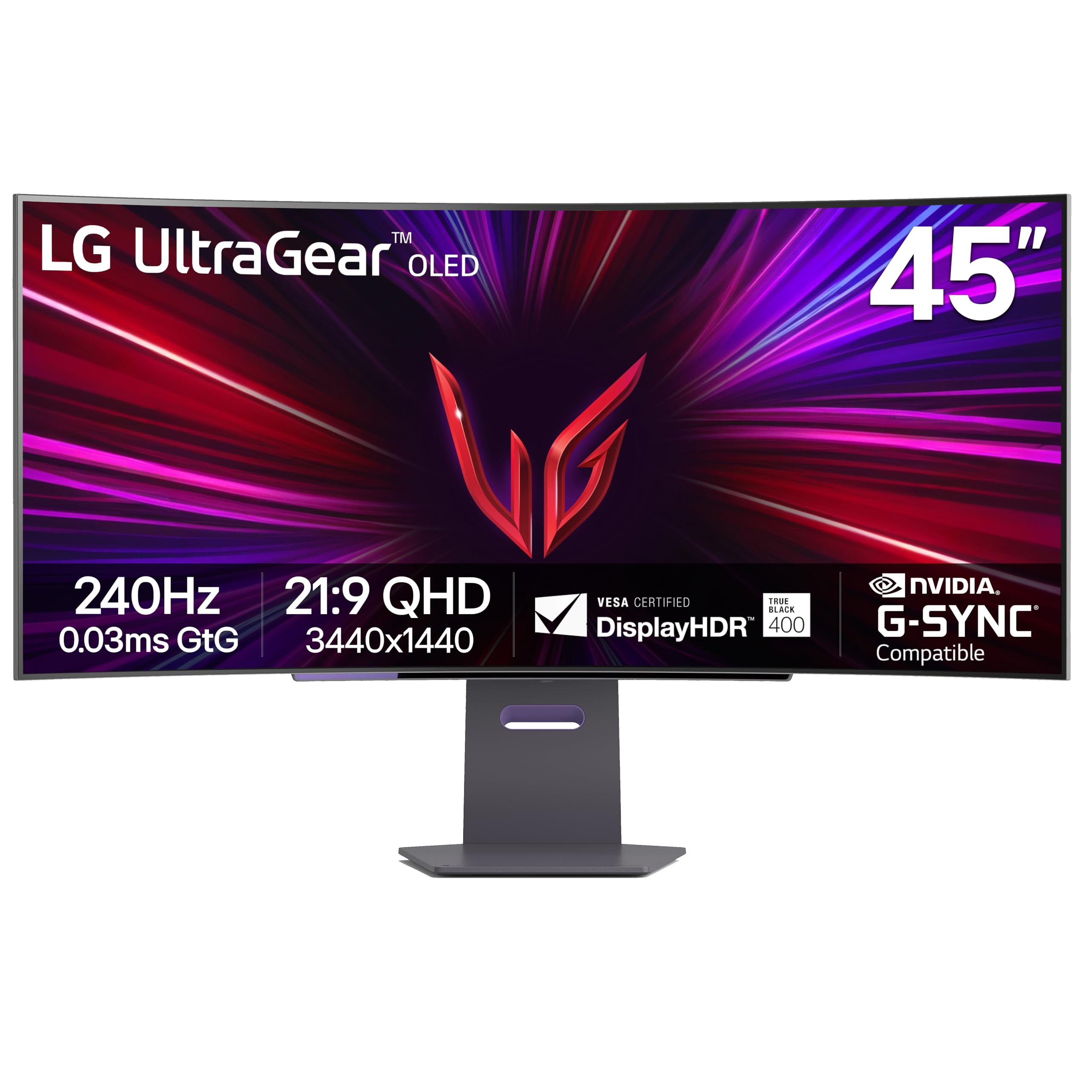
The LG 45GS95QE is the immersive gaming monitor that redefines what’s possible in your peripheral vision. Its 45-inch 21:9 OLED panel uses an 800R curve, which is so steep it actively wraps the screen around you, making side-to-side head movement nearly unnecessary. The OLED technology delivers perfect blacks, an infinite contrast ratio, and vibrant colors with a 98.5% DCI-P3 gamut. The 240Hz refresh rate and a lightning-fast 0.03ms (GtG) response time make motion clarity flawless, with zero ghosting or blur. It is approved for both AMD FreeSync Premium Pro and NVIDIA G-Sync, covering all GPU ecosystems.
Reviewers who moved from 49-inch 32:9 monitors to this 45-inch 21:9 LG often note the better game support (21:9 is more widely adopted than 32:9) and the reduced GPU strain from the slightly smaller pixel count (3440×1440). The image quality is described as “phenomenal,” with HDR content looking spectacular due to the per-pixel lighting. The stand is sturdy and ergonomic, and the build quality feels premium. The anti-glare coating is effective, reducing reflections in bright rooms without introducing the fuzziness some matte coatings create.
The only caution is pixel density. At 3440×1440 on a 45-inch screen, the pixels-per-inch (PPI) is lower than a 27-inch 1440p display or a 49-inch 5120×1440 display. Text clarity is not as sharp, and some users may notice pixelation on desktop icons. However, for gaming, this is a non-issue; the motion and color quality completely overshadow any PPI concerns. If you can overlook slightly softer desktop text for the best gaming image on the market, this is the one to buy.
Why it’s great
- OLED panel with 240Hz and 0.03ms response delivers the smoothest, most responsive gaming experience possible.
- 800R curve provides the most immersive wrap-around feel, eliminating the need to turn your head.
- Per-pixel lighting offers infinite contrast and perfect blacks for breathtaking HDR visuals.
Good to know
- Lower pixel density (3440×1440 on 45 inches) makes desktop text softer than DQHD monitors.
- 21:9 aspect ratio gives a taller image but slightly less horizontal space than a 49-inch 32:9 panel.
7. ASUS ROG Strix XG49VQ

The ASUS ROG Strix XG49VQ is a 49-inch monitor that offers a taste of the ultrawide lifestyle at a significantly lower entry cost. Its key trade-off is resolution: it uses a Dual Full HD (DFHD) panel at 3840×1080. This makes it essentially two 27-inch 1080p monitors side by side. The 144Hz refresh rate and AMD FreeSync 2 HDR support ensure a smooth gaming experience, and the 1800R curve is gentle enough for general use. Its primary value is in providing an immersive, bezel-free gaming and multitasking experience for those who don’t need to work with extremely fine text or high pixel density.
For sim racers and flight sim enthusiasts, this monitor is a popular choice because the 1080p resolution is much easier to drive at high frame rates with a mid-range GPU. Users praise the VA panel for its decent contrast and the immersive feel for racing games where peripheral vision matters more than pixel-level detail. The build includes a robust ergonomic stand with height, swivel, and tilt adjustments, plus the standard ASUS GamePlus overlays for crosshairs and timers. It performs admirably for its intended audience: gamers on a budget who want to go super-ultrawide.
The major downsides are the low pixel density and the dated HDR 400 implementation. You will see individual pixels, and text will look soft, making it unsuitable for professional photo editing, coding, or any task requiring sharp character rendering. Some users also report that FreeSync flickers with NVIDIA cards. It is a specialized tool for a specific budget-conscious gamer who prioritizes screen width and refresh rate over sharpness and professional accuracy.
Why it’s great
- Lower 3840×1080 resolution is far easier to drive to 144Hz with a mid-range graphics card.
- Excellent for sim racing and flight sims where peripheral immersion outweighs pixel density.
- Includes a full ergonomic stand and classic ASUS ROG gaming features and build quality.
Good to know
- Low pixel density results in soft text, making it a poor choice for professional productivity tasks.
- HDR400 implementation is underwhelming and FreeSync may flicker with NVIDIA graphics cards.
8. INNOCN 49C1R

The INNOCN 49C1R shatters the price barrier for a true 5120×1440 DQHD monitor. It delivers the full 49-inch ultrawide resolution at a price significantly lower than the established brands, making it the go-to budget pick for serious productivity users. The VA panel offers a strong 3000:1 contrast ratio and 99% sRGB coverage, ensuring decent color and deep blacks for a work-focused screen. The 1800R curve is a balanced middle ground, and the 120Hz refresh rate provides a noticeable boost in smoothness for window dragging and casual gaming. The inclusion of a 65W USB-C port with power delivery simplifies desk setup.
Users overwhelmingly praise its value, calling it a “solid basic 49-inch QHD curved monitor.” It works flawlessly with MacBooks via USB-C and supports 120Hz over DisplayPort. The reserved, professional design means it doesn’t look out of place in an office. For the price, it offers a massive amount of screen real estate, and the PIP/PBP modes work without issues for dual-system setups. For anyone who needs the full DQHD resolution but can’t justify the cost of a Samsung or Dell, this is an incredible alternative.
The main compromises involve build and support. While the panel is good, the bezels and stand feel less premium than more expensive monitors. Some users report firmware quirks, such as the monitor not waking from sleep properly with certain Mac settings, though this is fixable. Reviews also note that while customer support is responsive, the monitor can have occasional infantile failures. Given the price, many buyers accept this risk, but an extended warranty may be a wise purchase for peace of mind.
Why it’s great
- Unbeatable price for a true 5120×1440 DQHD panel with 65W USB-C power delivery.
- Good VA contrast ratio (3000:1) and 120Hz refresh rate for smooth productivity and light gaming.
- Clean, professional design that blends well into an office environment without gamer aesthetics.
Good to know
- Build quality feels less premium than established brands, and panel QC can be inconsistent.
- Firmware may require manual fixes for sleep/wake behavior with certain devices like Mac Mini.
9. ZZA 49″ Curved Monitor
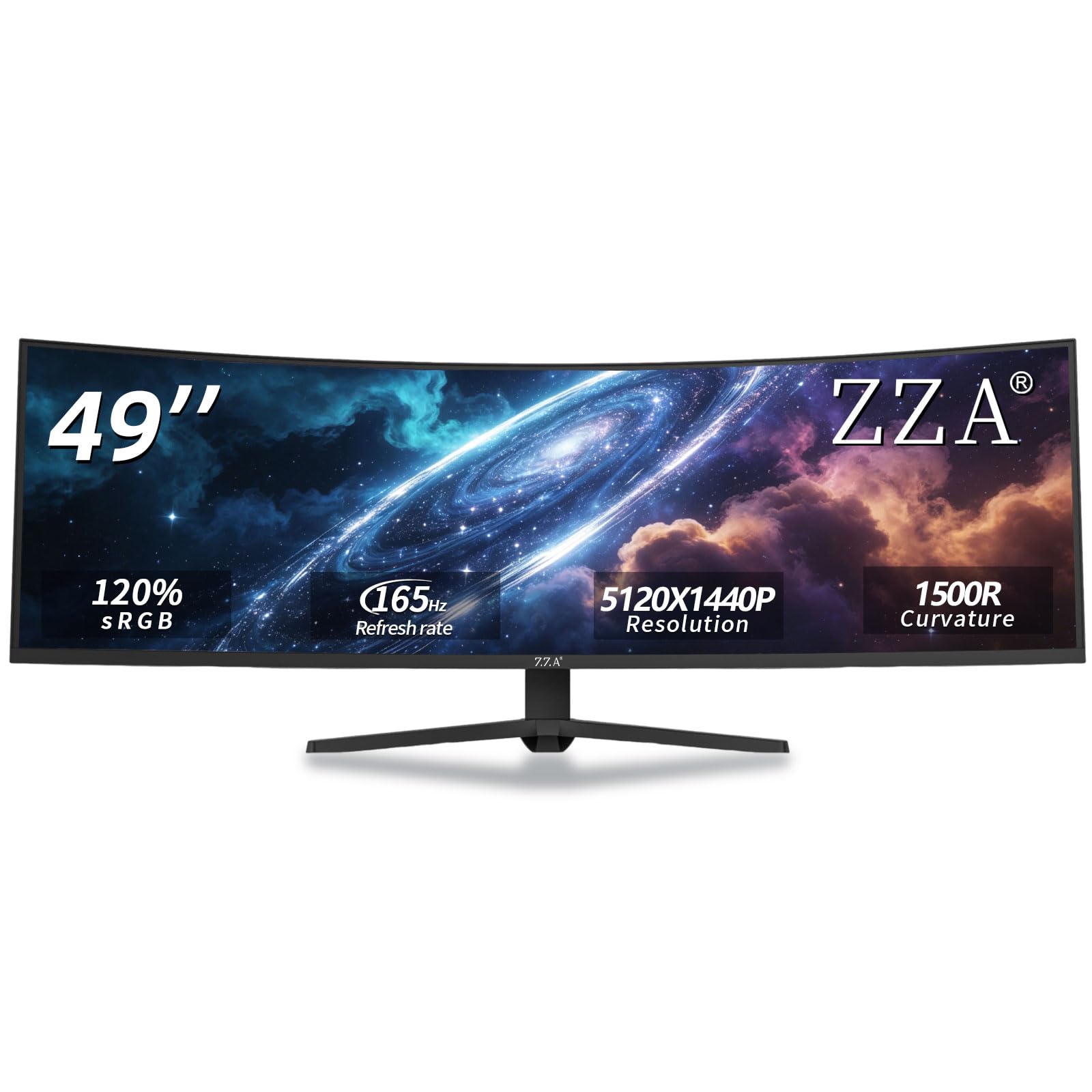
The ZZA 49″ Curved Monitor offers a compelling package for the value-conscious gamer: a full 5120×1440 DQHD resolution panel that can be overclocked to produce a 165Hz refresh rate. This combination is rare at this price point and makes it a strong candidate for sim racing and competitive gaming where smooth motion is critical. The 1500R curve is a good compromise, offering more immersion than the flatter business monitors without being as aggressive as the 1000R. It covers 120% of the sRGB gamut, ensuring colors are vibrant and accurate enough for general media consumption and gaming.
Users in the reviews specifically mention buying multiple units for sim racing rigs, praising the clarity and refresh rate. Programmers also appreciate it for the massive code canvas without the fatigue of a straight panel. The aluminum stand provides height, tilt, and swivel adjustments, which is a welcome feature at this price. Connectivity is modern, with HDMI 2.1 and DisplayPort 1.4 ensuring you can hit the full refresh rate with modern consoles and GPUs.
The primary concern with this budget-focused monitor is quality control. Reports of light bleed, power supply heat, and FreeSync issues causing blinking in specific games exist. The user interface and settings menu are described as difficult to navigate. It’s a good value, but it’s also a lottery on build quality. If you get a good unit, it’s an absolute steal. If you don’t, the return process may be necessary.
Why it’s great
- High 165Hz refresh rate on a 5120×1440 panel delivers excellent motion fluidity for competitive gaming.
- Good color coverage (120% sRGB) and a practical 1500R curve for a balanced viewing experience.
- Includes an ergonomic stand with full height, tilt, and swivel adjustments for personalized comfort.
Good to know
- Quality control can be inconsistent, with some units having light bleed or FreeSync issues.
- On-screen display menu is cumbersome to navigate, and the power supply runs hot.
10. CRUA 49″ Curved Gaming Monitor
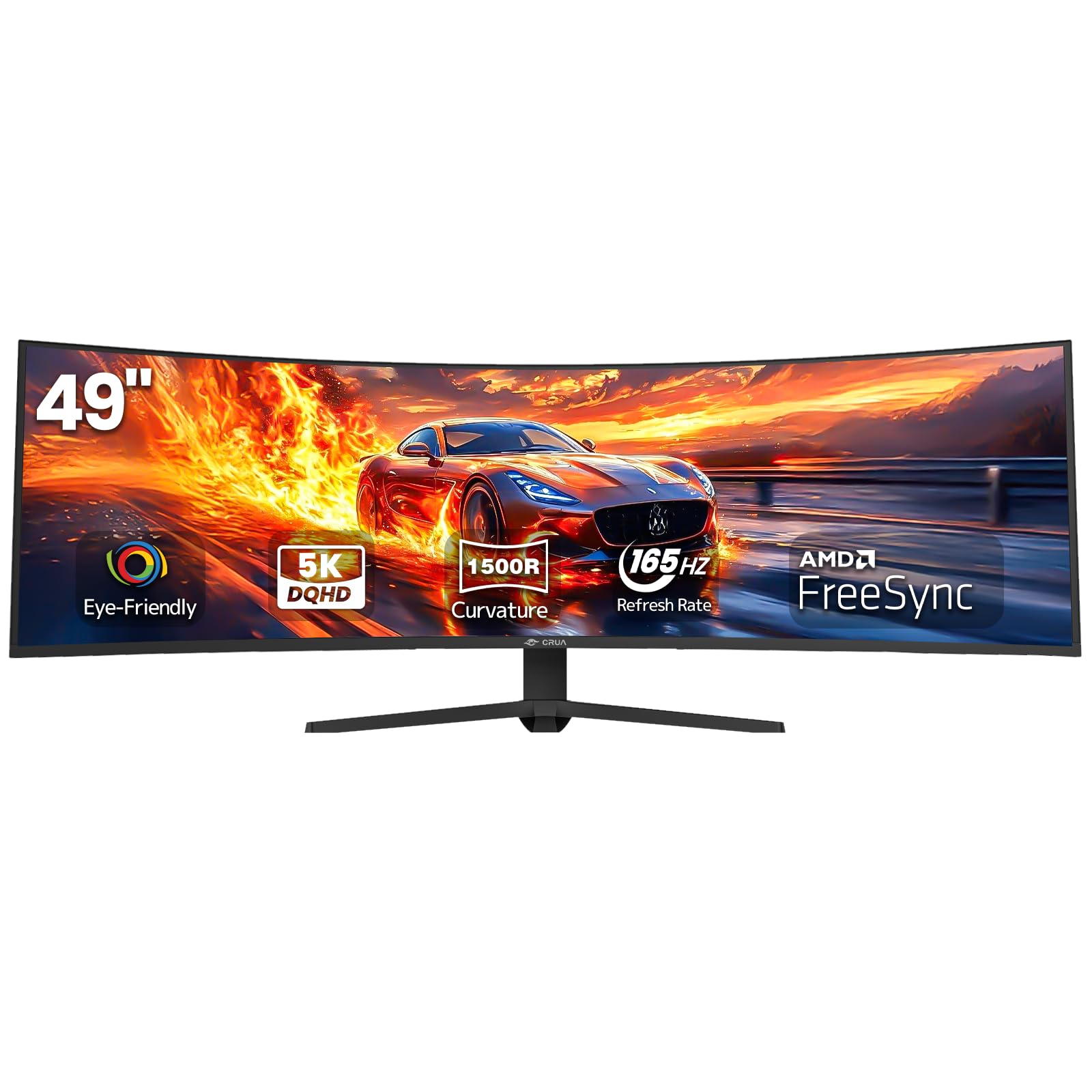
The CRUA 49-inch Curved Monitor is another entry-level contender that brings a full DQHD (5120×1440) resolution and a 165Hz refresh rate to the table for an aggressive price. It is designed for the gamer or professional who wants the biggest possible screen without breaking the bank. The 1500R curve and 32:9 aspect ratio deliver an immersive field of view, and the VA panel provides a solid 3000:1 contrast ratio for decent blacks. AMD FreeSync support helps to reduce tearing, though it lacks G-Sync certification.
First-time ultrawide buyers are often thrilled with the upgrade in screen real estate, with reviewers noting it makes work-from-home and 3D modeling much more efficient. The setup is straightforward, and the display is bright enough for most room conditions. For the price, it’s considered a “great budget product,” offering clarity and size that far exceeds what you’d get from even a single expensive 34-inch monitor. The inclusion of low blue light and flicker-free technology is a welcome addition for long sessions.
The trade-offs are familiar in this price bracket. The stand is non-adjustable in height, though it does tilt. The included VESA mount uses an 80mm standard instead of the more common 100mm, limiting aftermarket arm options. Some users have reported occasional screen flickering that was resolved by swapping the included cables for higher-quality ones. It’s a solid entry point for those who want to test the ultrawide waters with a DQHD panel, but it requires some patience with the basic stand and potential QC quirks.
Why it’s great
- Full DQHD 5120×1440 resolution at one of the lowest price points for a 49-inch panel.
- 165Hz refresh rate and 3000:1 VA contrast provide a smooth and immersive gaming experience.
- Includes eye-care features like low blue light and flicker-free technology for long sessions.
Good to know
- Stand is not height-adjustable, only tilt, and VESA mount uses a non-standard 80x80mm pattern.
- Build quality is budget-tier, and included cables may cause issues requiring replacement.
11. Great voell 49″ Curved Monitor
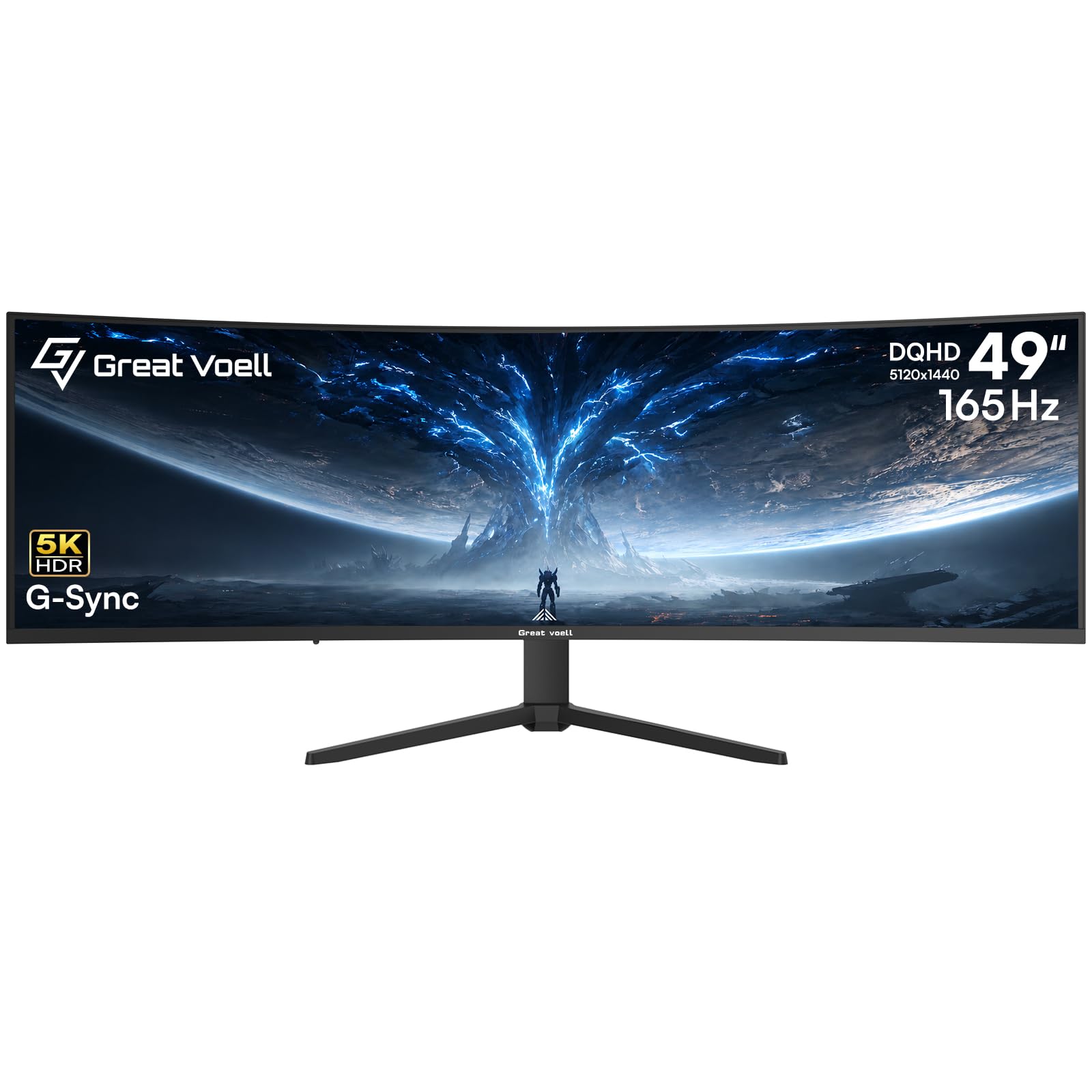
The Great voell 49-inch Curved Gaming Monitor is a pure value play for gamers who prioritize specs on paper. It boasts a 165Hz refresh rate, a 1ms response time, 127% sRGB color gamut, and support for both NVIDIA G-Sync and AMD FreeSync. The 32:9 DQHD resolution (5120×1440) means you get the full ultrawide canvas, and the HDR400 certification hints at better brightness than standard SDR panels. For the price, it packs a feature list that rivals monitors costing twice as much.
Buyers are generally happy with the visual quality, describing the picture and graphics as “on par with having a quality monitor” for gaming. The setup is simple, and the performance for fast-paced titles is smooth thanks to the high refresh rate and G-Sync compatibility. The 1500R curve is immersive without being too aggressive, making it suitable for both gaming and basic productivity. It’s a great option for a secondary gaming rig or for a younger gamer looking for a massive, high-performance screen on a limited budget.
The most common issues reported are related to missing screws for the stand assembly and general lack of accessories. While the monitor itself performs well, the unboxing experience and build quality reflect the lower price point. The HDR400 is basic, and the panel is not going to match the color accuracy of a professional-grade IPS monitor. If you can look past the sparse package contents and focus purely on the screen’s core gaming performance, it delivers exceptional value.
Why it’s great
- Impressive specification sheet including 165Hz, 1ms, G-Sync, and 127% sRGB gamut at a budget price.
- Full DQHD resolution and 1500R curve provide an immersive and smooth gaming experience.
- Wide GPU compatibility with support for both NVIDIA G-Sync and AMD FreeSync technologies.
Good to know
- Package may be missing essential hardware like screws for the stand, requiring a trip to the hardware store.
- Basic HDR400 implementation and build quality reflects the budget-friendly price point.
FAQ
Can a 49-inch curved monitor replace two 27-inch monitors?
What GPU do I need to drive a 5120×1440 monitor at 144Hz?
Is 1000R or 1800R better for a 49-inch monitor?
Do 49-inch curved monitors have built-in speakers?
Final Thoughts: The Verdict
For most users, the 49 inch curved monitor winner is the Samsung 49″ Odyssey G9 (G91F) because it perfectly balances a deep 1000R curve, a stunning DQHD resolution, and a high 144Hz refresh rate with HDR600 support. If you want the absolute smoothest motion and best HDR for high-end gaming, grab the Samsung Odyssey G9 (G95C). And for unparalleled color accuracy and a single-cable productivity workflow with a built-in KVM, nothing beats the LG 49WQ95C-W.