
Our readers keep the lights on and the weekend projects moving. As an Amazon Associate, I earn from qualifying purchases.
A podcast is only as good as its video quality. Listeners may tolerate a rough edit, but viewers click away from soft, grainy, or poorly framed 4K footage. The right camera for your setup isn’t just about resolution — it’s about sensor size, lens options, and audio connectivity that match your recording environment.
I’m Rikta — the co-founder and writer behind FitlyFast. I’ve analyzed dozens of cameras across every price tier to find the models that deliver true 4K clarity for podcasters who demand professional results from their video.
Whether you’re recording solo or running a multi-camera panel show, this guide breaks down the essential specs and real-world performance of the best 4k camera for podcasting on the market right now.
How To Choose The Best 4K Camera For Podcasting
Selecting a 4K camera for podcasting goes beyond just comparing megapixels. You need to balance sensor performance, lens flexibility, audio connectivity, and workflow integration. Here’s what matters most.
Sensor Size and Low-Light Performance
A larger sensor — 1-inch or Micro Four Thirds — captures more light, producing cleaner images in typical indoor podcast lighting. Smaller 1/2.3-inch sensors struggle when the lighting is less than perfect, introducing noise that ruins the 4K look.
Lens Options and Field of View
Fixed wide-angle lenses (around 19-24mm equivalent) are great for solo podcasters who stay in one spot. Interchangeable lens systems, like Micro Four Thirds, allow you to swap lenses for different looks — a fast prime for shallow depth-of-field or a zoom for flexible framing.
Audio Inputs and Quality
Built-in microphones are rarely sufficient for podcasting. Look for cameras with a 3.5mm external mic jack, or better yet, dual XLR inputs with phantom power. This lets you connect professional XLR microphones directly without an external audio recorder, simplifying your setup.
Connectivity and Streaming Features
If you live-stream your podcast, check for clean HDMI output, USB webcam mode, and support for protocols like NDI or RTMP. A camera that can double as a webcam saves the cost of a separate capture card and streamlines your workflow.
Quick Comparison
On smaller screens, swipe sideways to see the full table.
| Model | Category | Best For | Key Spec | Amazon |
|---|---|---|---|---|
| DJI Osmo Pocket 3 | Compact Gimbal | Solo vlog-style podcasting | 1-inch CMOS / 4K 120fps | Amazon |
| Blackmagic Pocket Cinema Camera 4K | Cinema Camera | Cinematic multi-camera setups | MFT Sensor / 13 stops DR | Amazon |
| Panasonic HC-X20 | Professional Camcorder | Multi-day event and interview recording | 1-inch sensor / 20x optical zoom | Amazon |
| OBSBOT Tail Air | AI PTZ Camera | Hands-free solo podcasting | AI Tracking / 4K 30fps | Amazon |
| Canon VIXIA HF G70 | Camcorder | Point-and-shoot simplicity | 20x optical zoom / DIGIC DV6 | Amazon |
| Logitech Mevo Core | Wireless Streaming | Wireless multi-cam live streaming | MFT mount / 6hr battery | Amazon |
| Zoom Q8n-4K | Audio-First Recorder | Musicians and audio-centric podcasts | 2x XLR inputs / 4-track audio | Amazon |
| FoMaKo 4K PTZ | Broadcast PTZ | Multi-camera studio production | 12G-SDI / 20x optical zoom | Amazon |
| Blackmagic Micro Studio 4K G2 | Studio Camera | ATEM switcher integration | 12G-SDI / 13 stops DR | Amazon |
| Canon PowerShot V10 | Ultra-Compact | On-the-go social media podcasting | 19mm wide-angle / built-in stand | Amazon |
| Xtra Muse Pocket Camera | Budget Gimbal | Budget-friendly smooth footage | 1-inch CMOS / 3-axis gimbal | Amazon |
In‑Depth Reviews
1. DJI Osmo Pocket 3
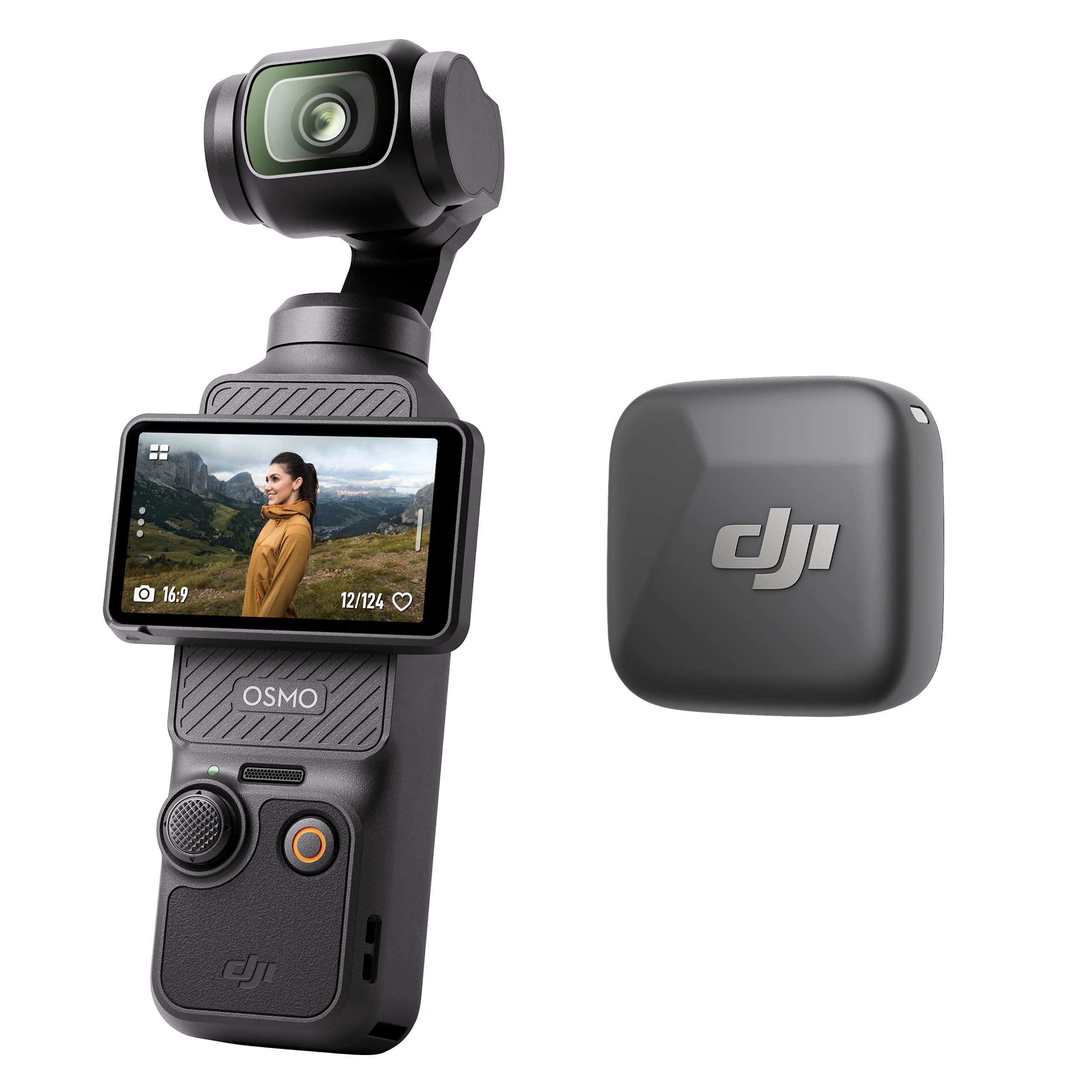
The DJI Osmo Pocket 3 sets the gold standard for compact 4K video with its 1-inch CMOS sensor and advanced 3-axis mechanical stabilization. The 2-inch rotatable touchscreen makes framing easy, switching between horizontal and vertical shooting without extra hardware. It records 4K at up to 120fps, giving you flexibility for slow-motion b-roll alongside your main podcast feed.
ActiveTrack 6.0 keeps you locked in frame as you move — ideal for podcasters who gesture or shift positions naturally during recording. The included DJI Mic Mini transmitter in the Vlog Combo provides crystal-clear wireless audio directly to the camera, simplifying your gear bag. The OsmoAudio technology also lets you connect two transmitters simultaneously for dual-host interviews.
Battery life is solid for a device this small, and the USB-C PD charging means you can top it up quickly between sessions. The compact form factor disappears into any bag, making it a fantastic travel companion for location-based podcasts or remote interviews.
Why it’s great
- Outstanding stabilization and 4K 120fps performance
- Included wireless mic with excellent range and clarity
- ActiveTrack 6.0 is reliable for solo shooting
- Rotatable screen for vertical content
Good to know
- Fixed lens limits wide-angle or zoom flexibility
- Small screen may be difficult for some to monitor
- Requires micro SD for storage
2. Blackmagic Pocket Cinema Camera 4K

The Blackmagic Pocket Cinema Camera 4K delivers true cinema-grade video with its Micro Four Thirds sensor and 13 stops of dynamic range. This means you can recover highlights and shadows that would be lost on typical camcorder sensors, giving your podcast a filmic depth. It records in 12-bit Blackmagic RAW or Apple ProRes, ensuring maximum flexibility in post-production color grading.
The active MFT lens mount lets you choose from a massive ecosystem of lenses — from fast primes for shallow depth-of-field to versatile zooms. The built-in 5-inch LCD touchscreen is bright and responsive, making menu navigation and focus peaking straightforward. Mini XLR and 3.5mm inputs provide professional audio connectivity right on the body.
Battery life is the main trade-off here — standard LP-E6 batteries last about 30 minutes, so you’ll need an external power solution or a battery grip for long recording sessions. The lack of in-body stabilization means you’ll want a tripod or gimbal for stationary podcast setups. It’s a camera that rewards manual control and careful setup.
Why it’s great
- Exceptional dynamic range for cinematic looks
- Interchangeable lens system for creative control
- Records in Blackmagic RAW and ProRes codecs
- Includes DaVinci Resolve Studio license
Good to know
- Short battery life requires external power
- No in-body image stabilization
- Larger and heavier than compact options
3. Panasonic HC-X20

The Panasonic HC-X20 is a purpose-built professional camcorder with a 1-inch sensor that captures 4K 60p video with true broadcast-quality detail. The 24.5mm wide-angle lens with 20x optical zoom provides immense framing flexibility — from wide establishing shots to tight close-ups of guests without physically moving the camera. This is a huge advantage for live event podcasting or interview scenarios.
5-axis HYBRID O.I.S. stabilization keeps handheld footage remarkably steady, and the 4K High Precision AF with Face Detection ensures your subject stays sharp even when moving slightly. Dual XLR inputs with phantom power let you connect professional microphones directly, while the built-in Wi-Fi and Ethernet support enable live streaming without a computer.
The triple manual ring system gives you independent control over focus, zoom, and iris — critical for multi-camera shoots where you need to match exposure across angles. The ergonomic body balances well on a shoulder or tripod, and the battery life supports long recording sessions. It’s a workhorse built for reliability on the road.
Why it’s great
- 20x optical zoom offers incredible framing range
- Professional XLR audio inputs with phantom power
- 5-axis stabilization for smooth handheld use
- Excellent battery life for all-day recording
Good to know
- Larger and heavier than compact cameras
- Fixed lens cannot be swapped for creative effects
- Price is in the premium tier
4. OBSBOT Tail Air

The OBSBOT Tail Air is a compact PTZ camera that brings professional AI tracking to solo podcasters. It can track humans, animals, and objects with impressive accuracy, keeping you centered even as you move around your recording space. The 23mm f/1.8 lens captures 4K video with good low-light performance, and gesture control lets you start/stop recording hands-free.
Connectivity is comprehensive — USB-C, micro HDMI, Ethernet, and wireless options cover nearly any workflow. NDI support (with an additional license) allows seamless integration into IP-based production systems, while the OBSBOT Start app gives you full control over framing, presets, and recording settings from your phone or tablet.
The built-in battery lasts about 2.5 hours, and the camera can operate while charging via USB-C. The main reliability concern is the non-replaceable battery — if it fails after the warranty period, the camera becomes unusable. For podcasters who set up and leave the camera in place, this is less of an issue, but it’s worth noting for long-term planning.
Why it’s great
- Advanced AI tracking for hands-free solo shooting
- Multiple connectivity options including NDI
- Gesture and remote control for easy operation
- Compact and portable design
Good to know
- Non-replaceable battery may fail long-term
- NDI license key requires separate purchase
- Auto-tracking headroom is not adjustable
5. Canon VIXIA HF G70

The Canon VIXIA HF G70 is a traditional camcorder that prioritizes ease of use. The 1/2.3-inch 4K UHD CMOS sensor paired with the DIGIC DV 6 image processor delivers sharp footage, and the 20x optical zoom with advanced image stabilization makes it a versatile tool for podcasters who need reach without compromising stability. The eight-blade aperture creates pleasing out-of-focus highlights for a more cinematic look.
UVC livestreaming lets you plug the camera directly into a PC or Mac via USB and immediately use it as a high-quality webcam for platforms like Zoom or OBS. The built-in time stamp recording is useful for archival footage, and dual SD card slots provide backup recording for long sessions. The Hybrid AF system with face detection keeps you in focus reliably.
Low-light performance is the main limitation — gain becomes noticeable above ISO 4, and the image softens significantly in darker environments. For well-lit studio setups, this is not a problem, but podcasters working with minimal lighting should budget for additional key lights. It’s best suited for users who want a no-fuss, point-and-shoot experience.
Why it’s great
- Excellent 20x optical zoom range
- UVC plug-and-play for live streaming
- Dual SD card slots for backup recording
- Easy to use with intuitive controls
Good to know
- Poor low-light performance
- HDMI and USB output limited to 1080p
- Small sensor compared to 1-inch alternatives
6. Logitech Mevo Core

The Logitech Mevo Core is a wireless live streaming camera built for the Mevo Multicam ecosystem. Its Micro Four Thirds mount means you can use interchangeable lenses, giving you professional control over depth of field and framing. The built-in three-mic array with noise cancellation captures clear audio, while the 6-hour battery allows for marathon recording sessions without being tethered to a wall outlet.
Wireless connectivity via Wi-Fi 6E enables multicam setups where you control multiple Mevo Core cameras from a single phone or tablet app. This is powerful for podcasters running multiple angles — you can cut between wide, medium, and close-up shots without a hardware switcher. The camera also supports NDI and SRT for direct streaming to YouTube, Twitch, and other platforms.
Setup is remarkably simple for a camera with interchangeable lenses. The app guides you through framing, exposure, and audio levels. The main downsides are the premium price and the reliance on the Mevo ecosystem for full functionality. If you plan to use the camera outside of the Mevo app, you lose some of the multicam convenience that makes it special. Support responsiveness has also been inconsistent according to some users.
Why it’s great
- Interchangeable MFT lens mount for creative control
- Excellent 6-hour battery life for long sessions
- Wireless multicam via Wi-Fi 6E
- Built-in three-mic array with noise cancellation
Good to know
- Premium price compared to similar features
- Relies on Mevo app for full functionality
- Customer support responsiveness can vary
7. Zoom Q8n-4K

The Zoom Q8n-4K is a video recorder built around professional audio capture. Its standout feature is the ability to record up to four simultaneous audio tracks with two XLR inputs that support phantom power. This lets you connect high-end microphones directly without a mixer — a massive advantage for podcasters who prioritize sound quality above all else.
The F2.8 150-degree wide-angle lens captures a broad field of view, and the five field-of-view settings adapt to different shooting scenarios. Swappable mic capsules give you flexibility in audio capture, and the USB streaming mode lets you connect to a computer for live streaming. The flip-out screen is helpful for self-shooting, and the remote control app adds convenience.
Video quality is the weakest link — the true 4K resolution is only available at the widest field of view, and low-light performance is poor. Many users note that an iPhone can capture better video. This camera is best for podcasters who have excellent lighting and consider audio their top priority. If video quality is equally important, look elsewhere.
Why it’s great
- Two XLR inputs with phantom power for pro audio
- Four-track simultaneous audio recording
- 150-degree wide-angle lens for group shots
- USB webcam mode for live streaming
Good to know
- Video quality is mediocre, especially in low light
- True 4K only available at widest FOV
- No optical zoom
8. FoMaKo 4K PTZ Camera

The FoMaKo 4K PTZ camera delivers broadcast-grade features at a mid-range price point. The 1/1.8-inch CMOS sensor with 8.42 million pixels records true 4K 60fps video over 12G-SDI — four times the bandwidth of traditional 3G-SDI systems. The 20x optical zoom and 16x digital zoom provide tremendous reach for large studios or auditoriums.
AI-powered auto-tracking with Gen 3 technology locks onto presenters and follows them smoothly. The FreeD protocol transmits real-time PTZ data for AR/VR virtual studio integration, and NDI 6 & HX3 support simplifies IP-based multi-camera workflows. The ultra-quiet belt-drive PTZ motor ensures zero noise interference during recording.
Setup is comprehensive with support for VISCA, Pelco-D/P, and integration with Blackmagic ATEM, vMix, and OBS. The camera can be controlled via the included remote, mobile app, or Stream Deck. A few users report HDMI compatibility issues with Blackmagic switchers, though NDI works reliably. The 1-year warranty with lifetime firmware updates adds peace of mind for studio deployments.
Why it’s great
- True 4K 60fps over 12G-SDI for broadcast use
- Advanced AI tracking with multiple modes
- FreeD protocol for AR/VR virtual sets
- Ultra-quiet PTZ motor for studio use
Good to know
- HDMI compatibility issues with some switchers
- Auto-tracking headroom not adjustable
- No battery option — requires PoE or power adapter
9. Blackmagic Micro Studio Camera 4K G2

The Blackmagic Micro Studio Camera 4K G2 is a small, purpose-built live production camera designed to integrate with ATEM switchers. Its MFT lens mount and 4K sensor with dual native ISO (400 and 3200) deliver clean, detailed images even in variable lighting. The 12G-SDI output feeds directly into broadcast infrastructure without adapters, and the tally light provides clear on-air status for the talent.
The ultra-compact carbon composite body makes it perfect for tight studio spaces, and the built-in color correction tools let you match multiple cameras without external grading. It records 12-bit Blackmagic RAW to USB disks, and the 3.5mm stereo input can also accept timecode for multi-camera sync. The lack of a built-in screen means you’ll need an external monitor or rely on the ATEM system’s multiview.
Battery life is very short on the optional LP-E6 battery — about 30 minutes — so external power is mandatory for real recording sessions. The sensor is the same as the first-generation model, so it’s not a leap forward in image quality. Some users report color mismatch with other Blackmagic cameras and occasional freezing that requires a reboot. It’s a specialized tool best left to those already in the Blackmagic ecosystem.
Why it’s great
- Designed specifically for ATEM switcher integration
- 12G-SDI output for 4K broadcast
- Compact body fits tight studio spaces
- Color correction tools for multi-camera matching
Good to know
- No built-in screen for monitoring
- Very short battery life
- Some reliability issues reported with freezing
10. Canon PowerShot V10

The Canon PowerShot V10 is a pocket-sized 4K camera designed for ultimate portability. The 1-inch back-illuminated CMOS sensor and 19mm wide-angle lens capture good quality video in most lighting conditions, and the built-in adjustable stand means you can set it up on any flat surface without a tripod. The retractable front-facing screen is perfect for solo podcasters who need to see themselves while recording.
Image stabilization modes — IS On, IS Enhanced, and IS Off — give you flexibility based on your shooting style. The built-in stereo microphones with a third center mic for noise reduction produce surprisingly clear audio for onboard mics. USB-C charging and an external mic jack add welcome flexibility, and the small size makes it a go-anywhere companion.
The lack of optical zoom is a significant limitation — you cannot zoom in during recording. Battery life is adequate for short sessions but may not last through a multi-hour podcast recording without a power bank. Some users find the auto-exposure struggles in bright conditions. It’s best suited for social media-friendly video that doesn’t demand long runtimes or complex setups.
Why it’s great
- Extremely portable with built-in stand
- Good image quality from 1-inch sensor
- Simple, intuitive operation
- External mic input for better audio
Good to know
- No optical zoom
- Battery life is average
- Exposure can be inconsistent in bright light
11. Xtra Muse Pocket Camera

The Xtra Muse pocket camera offers a budget-friendly alternative to premium gimbal cameras, featuring a 1-inch CMOS sensor that records 4K video at up to 120fps. The built-in 3-axis gimbal stabilization keeps footage remarkably smooth, even when walking or moving around your recording space. The 2-inch touchscreen is responsive and supports horizontal and vertical shooting.
Face and object tracking work reliably, keeping you in frame as you move — useful for podcasters who prefer to stand and move during episodes. The 10-bit X-Log color mode provides flexibility for color grading, and the standard bundle includes a carrying bag, wrist strap, and handle with 1/4-inch thread for tripod mounting. Battery life is decent at around 161 minutes of recording.
Compatibility with DJI Pocket 3 accessories is a nice bonus, but be aware that some external DJI microphones may require a firmware update to connect properly. The tracking system sometimes leaves excessive headroom, similar to other cameras in this category. For the price, it offers solid value for beginner podcasters looking for smooth, stabilized footage without spending top dollar.
Why it’s great
- Good 4K 120fps video quality for the price
- Effective 3-axis gimbal stabilization
- Face and object tracking for solo shooting
- 10-bit color mode for grading flexibility
Good to know
- Microphone compatibility issues with some models
- Auto-tracking headroom adjustment lacking
- Build quality may not match premium options
FAQ
Do I need a camera with XLR inputs for podcasting?
Is a 1-inch sensor necessary for good 4K podcast video?
Can I use a PTZ camera for solo podcasting?
Final Thoughts: The Verdict
For most users, the best 4k camera for podcasting winner is the DJI Osmo Pocket 3 because it combines a large 1-inch sensor with flawless stabilization and easy setup. If you want a more cinematic look with interchangeable lenses, grab the Blackmagic Pocket Cinema Camera 4K. And for a hands-off, PTZ-powered solo podcast studio, nothing beats the OBSBOT Tail Air.