
Our readers keep the lights on and the weekend projects moving. As an Amazon Associate, I earn from qualifying purchases.
Streaming quality hinges on one component more than any other — your webcam. A blurry, poorly lit, or slow-focusing camera undermines even the most engaging content. Choosing the right 4K webcam for streaming means balancing sensor size, autofocus speed, and audio quality to match your specific setup, whether you’re a live streamer, a podcaster, or a remote worker running professional video calls.
I’m Rikta — the co-founder and writer behind FitlyFast. I’ve spent countless hours analyzing market data, comparing technical specifications, and filtering through real user feedback to build this guide around what actually matters for streamers choosing a 4K webcam.
This guide lays out the top options for anyone shopping for a best 4k webcam for streaming and explains the specs that separate a good stream from a great one.
How To Choose The Best 4K Webcam For Streaming
Not all 4K webcams deliver the same streaming experience. The camera that works for a static Zoom call may fail when you move around during a live stream. Prioritize these factors to avoid wasting money on a model that can’t keep up.
Sensor Size and Low-Light Performance
A larger sensor captures more light, producing a cleaner image in dim conditions without adding grain. Look for a 1/1.3-inch or 1/2-inch CMOS sensor rather than the smaller 1/2.8-inch sensors found in budget models. The Sony STARVIS series is a reliable benchmark for low-light streaming.
Autofocus Technology
Phase-detection autofocus (PDAF) locks onto your face almost instantly, even when you lean in or move around. Contrast-based autofocus is slower and often hunts back and forth, which looks unprofessional on stream. For live streaming where motion is constant, PDAF is mandatory.
Frame Rate and Resolution Balance
4K at 30 frames per second provides excellent detail for stationary shots, but 1080p at 60fps delivers smoother motion for fast-paced streams. Many premium webcams offer both modes, letting you choose based on your content. If you stream gameplay or move frequently, prioritize 1080p@60fps capability.
Quick Comparison
On smaller screens, swipe sideways to see the full table.
| Model | Category | Best For | Key Spec | Amazon |
|---|---|---|---|---|
| Elgato Facecam 4K | Premium | Cinematic control and filter support | Sony STARVIS 2 CMOS | Amazon |
| Insta360 Link 2 Pro | Premium | AI PTZ tracking with natural bokeh | 1/1.3” Sensor | Amazon |
| Logitech MX Brio | Premium | AI-enhanced image quality and Show Mode | 8.5 MP Sensor | Amazon |
| Logitech BRIO | Premium | Pro-grade color and low-light balance | 5x Digital Zoom | Amazon |
| YOLOLIV YoloCam S3 | Mid-Range | Large sensor and PDAF autofocus | 1/1.28″ Sensor | Amazon |
| OBSBOT Tiny 3 Lite | Mid-Range | Compact AI tracking with spatial audio | 1/2″ CMOS | Amazon |
| EMEET Piko Dual | Mid-Range | Dual-camera hybrid zoom | 11X Hybrid Zoom | Amazon |
| EMEET PIXY | Mid-Range | AI-powered PTZ with gesture control | 1/2.55″ Sony Sensor | Amazon |
| NexiGo N950P (Gen 2) | Budget | Zoom with remote control | 8.5 MP Sensor | Amazon |
In‑Depth Reviews
1. Elgato Facecam 4K

The Elgato Facecam 4K uses a Sony STARVIS 2 CMOS sensor combined with Elgato Prime Lens technology to deliver clean, sharp 4K at 60 frames per second. Uncompressed video and HDR support ensure the feed looks professional straight out of the camera without the compression artifacts common in cheaper webcams.
The built-in flash memory saves your settings directly to the device, so your exposure and white balance preferences persist across different computers. The 49mm lens filter thread lets you attach polarizers or diffusion filters, giving streamers and video professionals DSLR-like creative control without the bulk of a mirrorless camera rig.
Manual focus is a deliberate choice — it avoids the hunting behavior of autofocus during streams, but it does require you to set your distance carefully before you start. The Camera Hub software is functional but basic; most power users will rely on OBS for finer adjustments. Connect it directly to your PC via the included USB-C cable, bypassing hubs for consistent performance.
Why it’s great
- Uncompressed 4K60 video with HDR support
- 49mm filter thread adds lens versatility
- Onboard flash memory saves custom settings
Good to know
- Manual focus requires a fixed camera position
- Needs a high-speed USB-C connection; picky with hubs
- Wide 20mm lens means digital zoom loses 4K quality
2. Insta360 Link 2 Pro

The Insta360 Link 2 Pro packs a large 1/1.3-inch sensor that captures excellent detail even in dim studio conditions. The physical pan-and-tilt gimbal enables AI tracking that follows you around the room smoothly, making it an ideal choice for streamers who move during their shows or presenters who walk a stage area.
Directional beamforming microphones isolate your voice from background noise, and the software suite offers a natural bokeh effect that mimics a DSLR’s depth of field. DeskView and Whiteboard modes add utility for product demonstrations or teaching streams. The unit integrates directly with Elgato Stream Deck, so you can switch presets or trigger tracking with a single button press.
Setup takes minutes — plug the USB-C cable in, download the Link Controller software, and you’re streaming. The magnetic mount holds securely on monitors or tripods. The bundled USB-C cable is on the shorter side, so consider an extension if your PC is far from your desk.
Why it’s great
- Physical PTZ gimbal tracks movement naturally
- 1/1.3″ sensor excels in low light
- Stream Deck integration for power users
Good to know
- Short included USB-C cable
- Not compatible with ARM-based Windows systems
- Bokeh effect is software-generated
3. Logitech MX Brio

The Logitech MX Brio uses an advanced sensor with 70% more pixels than standard 4K webcams, delivering crisp 4K at 30fps or smooth 1080p at 60fps. AI-enhanced image processing automatically adjusts exposure, white balance, and noise reduction to keep your face visible even when harsh backlighting competes with your subject.
Built-in dual microphones with beamforming and wind noise reduction clean up your audio feed, though dedicated streamers will still want an external mic. Show Mode lets you tilt the camera downward to share documents or physical objects on your desk — a practical feature for tutorials and product reviews.
The USB-C connection is built-in (not detachable), and the privacy shutter is integrated into the body. The stand can feel slightly loose on some monitors, but the included double-sided tape solves the issue for a more permanent mount. Works reliably across Windows, macOS, and Chrome OS without driver headaches.
Why it’s great
- AI handles tricky lighting automatically
- Show Mode simplifies desk sharing
- Beamforming mics reduce background noise
Good to know
- Stand doesn’t lock in place snugly
- Built-in USB-C cable cannot be replaced
- AI processing adds slight latency in 4K mode
4. Logitech BRIO

Logitech BRIO has been a staple in professional streaming for years, and its enduring value comes from reliable color science and consistent low-light performance. The 4K sensor outputs up to 4096 x 2160 resolution and supports 90 fps in 720p mode for high-speed capture. The 5x digital zoom lets you punch in without switching cameras.
RightMark imaging tests confirm that BRIO retains accurate white balance and exposure across varied lighting conditions better than most competitors at its tier. The included carrying case and curved adhesive mount make it easy to pack for multi-location streamers or remote presenters.
Plug-and-play setup works with Windows, macOS, and Chrome OS out of the box. The monitor mount limits vertical tilt range, so you may need a tripod for precise framing. Audio echoes reported by some users are typically caused by multiple active sound sources in software — disable extra audio inputs in your streaming app to resolve it.
Why it’s great
- Proven imaging pipeline with accurate color
- Carrying case included for portability
- High 90 fps capture in 720p mode
Good to know
- Monitor mount restricts vertical tilt
- Requires good lighting for optimal results
- Digital zoom degrades image quality
5. YOLOLIV YoloCam S3

The YoloCam S3 features a 1/1.28-inch sensor — one of the largest ever put inside a webcam — which translates to excellent dynamic range and natural background separation. Phase-detection autofocus locks onto your face with zero lag, even when you lean forward or shift position, eliminating the hunting behavior that ruins professional streams.
Picasso Resolve color grading is built into the YoloCam Compose software, giving you direct control over contrast, saturation, and exposure curves without needing a separate plugin. The foldable magnetic mount switches between landscape and portrait orientation instantly, and the 1/4-inch tripod thread ensures compatibility with standard studio gear.
The all-aluminum body dissipates heat effectively, so the camera runs 24/7 without throttling. Digital zoom at 1080p retains clarity without cropping the 4K feed, though there is no SD card slot for onboard recording — you’ll need the YoloCam Live Box for that. A minor trade-off for streamers who record directly through OBS anyway.
Why it’s great
- Large 1/1.28″ sensor for superior low-light performance
- Fast PDAF autofocus with no hunting
- Aluminum body prevents overheating during long streams
Good to know
- No onboard recording without Live Box accessory
- Picasso Resolve color grading is Windows-only initially
- Magnetic mount may not hold on very thick monitors
6. OBSBOT Tiny 3 Lite
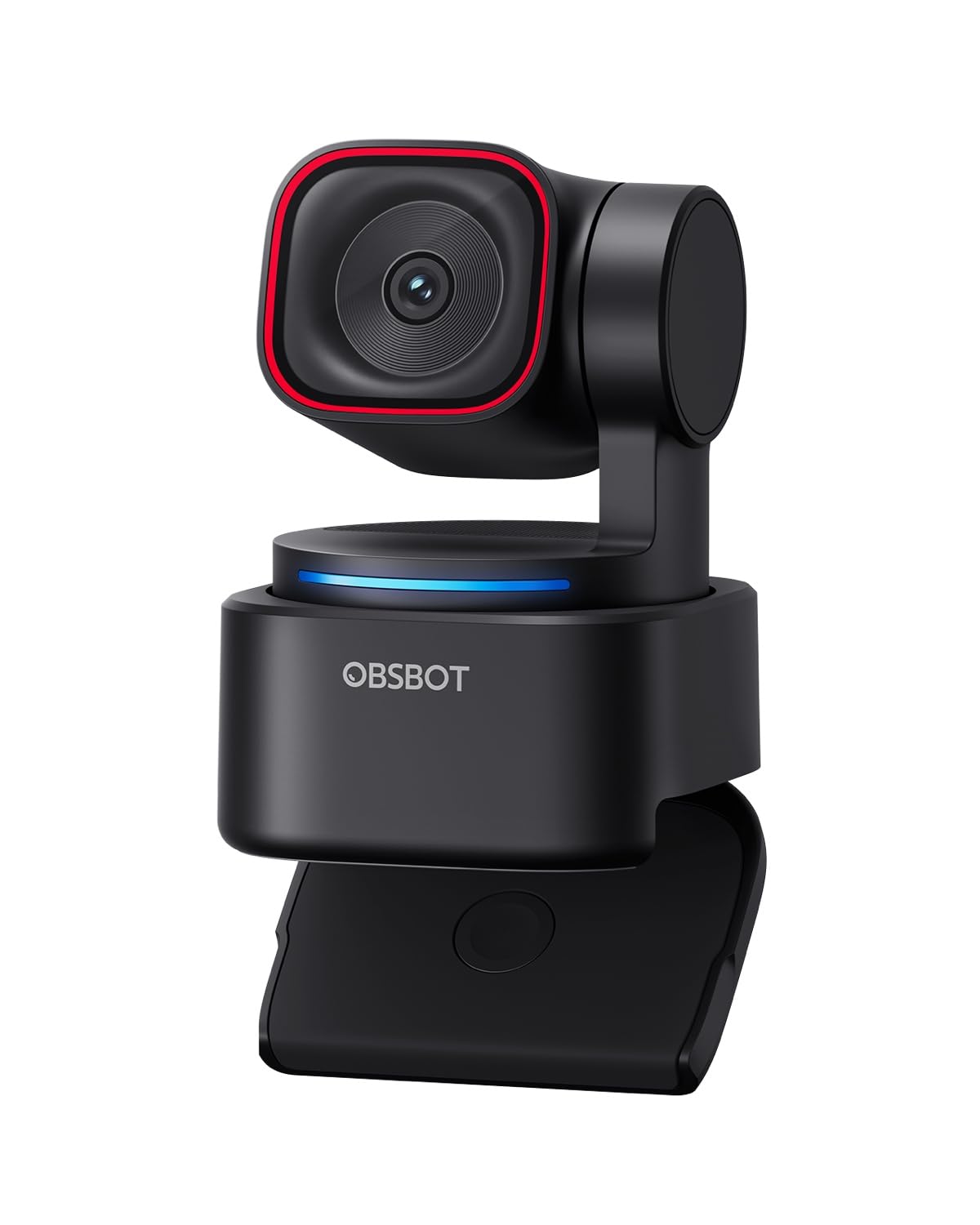
The OBSBOT Tiny 3 Lite is 48% smaller and 34% lighter than its predecessor, yet houses a 1/2-inch CMOS sensor that delivers 4K at 30fps or 1080p at 120fps. The high frame rate option makes it a strong choice for fast-moving content like gameplay or fitness streams where every movement needs to feel fluid.
AI Tracking 2.0 recognizes over 200 types of objects and follows them via the PTZ gimbal. Voice control and gesture commands let you zoom, switch presets, or activate tracking without touching your keyboard. The triple-mic array with five audio modes — including spatial audio — delivers professional sound that fills a room.
The OBSBOT Center software includes Beauty Mode, Background Blur, a teleprompter, and NVIDIA Maxine Eye Contact for gaze correction. Some users report the AI tracking occasionally locks onto random objects instead of the intended subject, and voice commands can trigger sleep mode accidentally — disable gesture control in the software to avoid this.
Why it’s great
- 1080p@120fps for ultra-smooth motion
- Compact size fits tight desk setups
- Triple-mic array with spatial audio modes
Good to know
- AI tracking occasionally selects wrong target
- Voice commands may need disabling during streams
- Software can feel overwhelming with features
7. EMEET Piko Dual
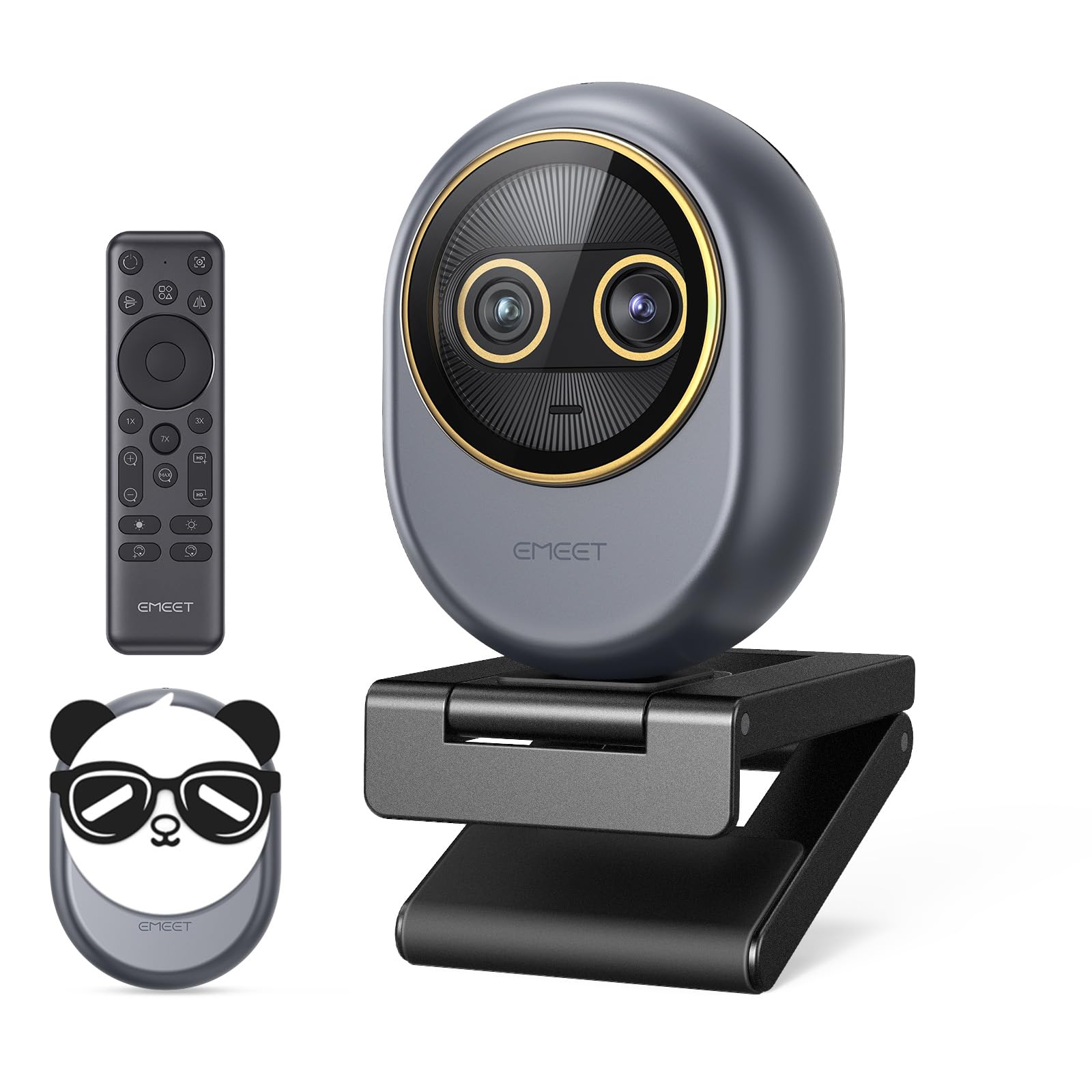
The EMEET Piko Dual is the world’s first dual-camera 4K webcam, combining a wide-angle lens for full-scene capture with a telephoto lens for sharp close-ups. The hybrid zoom reaches up to 11X, letting you switch between a wide room view and a tight facial shot instantly — useful for product demos, cooking streams, or teaching scenarios.
Autofocus locks in 0.2 seconds, keeping the transition between lenses stable and clear. The wireless remote gives you on-the-go control over zoom, focus lock, and camera switching, ideal for presenters who move around. The EMEET STUDIO software allows desktop-level fine-tuning of brightness and white balance for precise framing.
The magnetic panda privacy cover adds a playful aesthetic but uses only two magnets — some users report it falls off easily. The removable USB-C cable is a welcome detail for portability and cable replacement. Overall, it is a compact and versatile option for streamers who need two focal lengths without swapping cameras.
Why it’s great
- Dual cameras provide wide and telephoto views
- 11X hybrid zoom without swapping lenses
- Wireless remote for hands-free control
Good to know
- Magnetic privacy cover is not secure
- Zoom unavailable in 4K@60fps mode
- Hybrid zoom reduces quality at max magnification
8. EMEET PIXY

The EMEET PIXY uses a dual-camera system — a 4K main imaging camera paired with an auxiliary AI camera that detects face position to optimize autofocus and exposure in 0.2 seconds. This combination ensures flawless skin tones and sharp focus even when you move through uneven lighting. The Sony 1/2.55-inch sensor keeps the image clean.
A three-chip AI system enables smooth 310-degree pan and 180-degree tilt tracking. Gesture control activates tracking when you hold an open palm toward the camera for two seconds, making it easy to start and stop tracking mid-stream without clicking anything. Three sound modes — Live, Noise Canceling, and Original — adapt to different streaming environments.
The EMEET STUDIO software provides preset positions for instant angle switching and a whiteboard mode that auto-detects boards without stickers. The software can feel laggy, and the AI tracking can lose you if you stand up or move too quickly. The instructions and QR codes are poorly translated, so expect to figure some features out through trial and error.
Why it’s great
- Dual-camera AI optimizes skin tones and exposure
- Wide 310° pan and 180° tilt range
- Gesture control for hands-free tracking
Good to know
- AI tracking struggles with fast or standing movements
- Software and instructions have quality issues
- Requires 64-bit Windows or macOS 10.14+
9. NexiGo N950P (Gen 2)

The NexiGo N950P (Gen 2) uses an 8.5MP sensor to deliver 3840 x 2160 resolution at 30fps, providing clear video for entry-level streaming and conference calls. The RF remote lets you zoom, mute, and flip the image from across the room, adding convenience without requiring any software interaction.
5X digital zoom at 1080P works via the remote, allowing gradual magnification with a single button press. Dual omnidirectional microphones with noise cancellation pick up sound from all angles, though the audio quality is a step below dedicated mics — most streamers will want to connect an external microphone for better clarity.
Compatibility covers Windows, macOS, Android, and Smart TV, making it one of the most flexible options for multi-platform users. The manual focus and occasional autofocus issues require a stationary setup for best results. A privacy cover is included for security. This is a solid budget entry point for streamers testing 4K before investing in a premium model.
Why it’s great
- RF remote gives wireless control over zoom and mute
- Works across Windows, macOS, Android, and Smart TV
- 4K resolution at entry-level pricing
Good to know
- Built-in mic sounds poor; external mic recommended
- Autofocus can hunt when moving around
- Digital zoom reduces image quality
FAQ
What frame rate should I use for streaming with a 4K webcam?
Do I need AI tracking on a streaming webcam?
Final Thoughts: The Verdict
For most users, the best 4k webcam for streaming winner is the Elgato Facecam 4K because it delivers uncompressed 4K60 video with a Sony STARVIS 2 sensor and DSLR-like lens filter support in a package that integrates directly with streaming software. If you want AI-powered PTZ tracking with a large sensor, grab the Insta360 Link 2 Pro. And for budget-friendly entry into 4K streaming, nothing beats the NexiGo N950P (Gen 2).