
Our readers keep the lights on and the weekend projects moving. As an Amazon Associate, I earn from qualifying purchases.
Your phone gallery is bursting with sharp, vibrant photos, but the best memories stay trapped on a tiny screen. A dedicated 4×6 photo printer bridges that gap, turning digital moments into tangible keepsakes you can frame, scrapbook, or share. The real challenge isn’t finding a printer—it’s choosing one that delivers true-to-life color, consistent quality, and low per-print costs without frustrating connectivity.
I’m Rikta — the co-founder and writer behind FitlyFast. I spend hundreds of hours each year analyzing the real-world performance of compact photo printers, comparing dye-sublimation methods, paper costs, and color accuracy across dozens of consumer reviews.
Whether you’re building family albums or creating handmade gifts, finding the right tool matters. This guide breaks down the top models to help you choose the best 4×6 photo printer for your home, travel, and creative needs.
How To Choose The Best 4×6 Photo Printer
Not all compact photo printers are created equal. The technology inside—whether it’s dye-sublimation, ZINK, or instant film—determines print quality, water resistance, and long-term durability. Before you click buy, focus on the three specs that matter most for 4×6 prints.
Print Technology: Dye-Sub vs. ZINK vs. Instant Film
Dye-sublimation printers apply color layer by layer, then seal each print with a clear protective laminate. This method produces vivid, waterproof, and smudge-proof photos that resist fading for decades. ZINK (Zero Ink) printers embed dye crystals inside the paper; heat activates them. Prints are convenient and compact, but they lack the protective layer, making them less resistant to moisture and scratches. Instant film (like Instax Wide) produces a unique retro aesthetic, but the cost per print is significantly higher and the color gamut is narrower.
Connectivity and Workflow
The most reliable setups use Wi-Fi Direct or dedicated built-in Wi-Fi networks. These bypass your home router entirely, eliminating interference and dropouts. Bluetooth 5.0 is fast for small batches but can slow with multiple prints. Avoid printers that require an active internet connection for every job—look for direct peer-to-peer links. A well-designed companion app also matters: the best allow cropping, filter application, and borderless printing directly from your phone.
Per-Print Cost and Starter Supplies
The sticker price is only half the story. Some budget printers require proprietary paper-and-ink bundles that cost over 50 cents per print. Premium dye-sub models with bundled paper and ribbon can drop as low as 10 to 20 cents per 4×6 photo. Always check the included supplies: a printer that arrives with 108 sheets and two ribbons offers immediate value, while one with only 10 sheets means you’ll reorder sooner.
Quick Comparison
On smaller screens, swipe sideways to see the full table.
| Model | Category | Best For | Key Spec | Amazon |
|---|---|---|---|---|
| Canon SELPHY CP1500 | Premium Canon | Highest quality, scrapbooking | 300×300 dpi dye-sub, SD/USB support | Amazon |
| KODAK Dock Plus | Dye-Sub Dock | Smartphone docking station | 4PASS laminate, 55 sec per print | Amazon |
| HP Sprocket Studio Plus | HP Dye-Sub | Tear-resistant, waterproof, ID photos | Waterproof paper, Wi-Fi direct | Amazon |
| Canon Ivy 2 | ZINK Portable | Ultra-portable, stickers for journal | ZINK tech, peel-and-stick backing | Amazon |
| HPRT CP4100 | Value Dye-Sub | Home use, party memories | 108 sheets + 2 ribbons, AR video | Amazon |
| iDPRT CP4100 | AR Feature Printer | AR video playback | 300 DPI dye-sub, 108 sheets bundle | Amazon |
| Liene Amber M110 | Dual Tray | Mixed 4×6 and 3×3 sticker prints | Dual paper trays, Bluetooth 13s pair | Amazon |
| YOTON Photo Printer | AR Video Print | AR video prints, off-grid use | Built-in Wi-Fi, 54 sheets included | Amazon |
| Fujifilm Instax Link Wide | Instax Wide Film | Retro wide-format instant prints | Instax Wide film only, rich templates | Amazon |
In‑Depth Reviews
1. Canon SELPHY CP1500

The Canon SELPHY CP1500 stands as the gold standard for home 4×6 dye-sublimation printing. It uses a 300×300 dpi thermal transfer process that applies a yellow, magenta, and cyan layer, then seals the photo with a protective overcoat. The result is a smooth, water-resistant, and smudge-proof print with natural skin tones and deep contrast. The included two KP-108IN paper-and-ink bundles bring the cost per print down to roughly 10 cents, making it one of the most economical premium options per photo.
Beyond print quality, the CP1500 offers exceptional flexibility. You can print directly from an SD card, a USB drive, or via Wi-Fi from the SELPHY Layout app. The 3.5-inch LCD screen lets you crop, add borders, and apply effects like sepia or black-and-white without needing a phone. The paper cassette accepts multiple sizes—postcard, card, and square stickers—so it’s not locked into 4×6 prints. Travel-friendly and lightweight, it runs on optional battery power for on-the-go use.
Customer reviews consistently praise its reliability and print consistency over months of use. Some users note that computer connectivity can require a driver update, but phone-based workflows work flawlessly. The app is intuitive, allowing multi-photo layouts and text overlays. For scrapbookers and photographers who want lab-quality prints at a fraction of the cost, this is the clear choice.
Why it’s great
- Lowest per-print cost of any premium dye-sub (around 10 cents)
- Versatile media support, including SD card and USB direct printing
- Protective overcoat makes prints waterproof and smudge-proof
Good to know
- Requires proprietary Canon paper-and-ink packs
- Computer setup may need driver installation
2. KODAK Dock Plus

The KODAK Dock Plus is uniquely designed for home desktop use with an integrated docking station that charges your phone while it prints. It employs genuine 4PASS dye-sublimation technology: each photo is built in three color passes (CMY) and finished with a clear protective laminate layer. The final print is smooth, fingerprint-resistant, and water-resistant. Print time is about 55 seconds per 4×6 photo, and the full-color output rivals what you’d get from a retail kiosk.
Setup is refreshingly simple. Power on, hold the Bluetooth button, and connect via the KODAK Photo Printer app. The app offers editing tools, filters, borders, and the ability to print multiple copies. The dock keeps your phone upright and accessible, which is handy for events where you want a printing station. The compact yellow chassis fits neatly on a nightstand or desk, and the printer supports both iOS and Android devices without a wired connection.
Online reviews highlight the vibrant, saturated color output and the fun, satisfying process of watching the four-pass cycle. A few users mention that prints can lean slightly warm in tone, and the paper loading mechanism can jam if sheets aren’t fed one at a time. The app’s Bluetooth icon shows yellow when ready, which isn’t immediately intuitive. Overall, families and casual users appreciate the straightforward operation and consistent results.
Why it’s great
- Integrated phone dock charges device while printing
- 4PASS laminate makes prints water and fingerprint resistant
- Easy Bluetooth setup, no Wi-Fi required
Good to know
- Paper must be loaded one sheet at a time to avoid jams
- Colors can run slightly warm for some users
3. Canon Ivy 2

The Canon Ivy 2 is the quintessential portable photo printer for on-the-move creators. Instead of ink cartridges, it uses ZINK (Zero Ink) technology: heat activates dye crystals already embedded in the paper. This makes the printer incredibly lightweight and pocketable. The newer Ivy 2 model improves skin tone rendering, contrast, and sharpness over the original. Prints emerge with a peel-and-stick backing, perfect for sticking into journals, scrapbooks, or on a fridge.
Connectivity runs through Bluetooth 5.0, pairing quickly with iOS and Android via the Canon Mini Print app. The app includes editing features like brightness adjustments, filters, and borders. Each print takes about 50 seconds to process. The sticker-back paper means you don’t need extra adhesive—just print, peel, and place. It’s ideal for travelers, bullet journalers, and anyone who values instant physical prints over archival quality.
Customer feedback is overwhelmingly positive for portability and ease of use. Users note a slight blue tint in some prints, likely due to the paper’s dye activation curve. The prints are not waterproof, since there is no protective laminate layer. Battery life is solid, and the compact white design fits in a purse. For casual memory-keeping, the Ivy 2 is addictive and satisfying.
Why it’s great
- No ink cartridges needed, lowers long-term cost
- Peel-and-stick backing for instant use in journals
- Extremely compact and portable
Good to know
- Prints can have a slight blue color cast
- Not water resistant and lacks protective laminate layer
4. HPRT CP4100
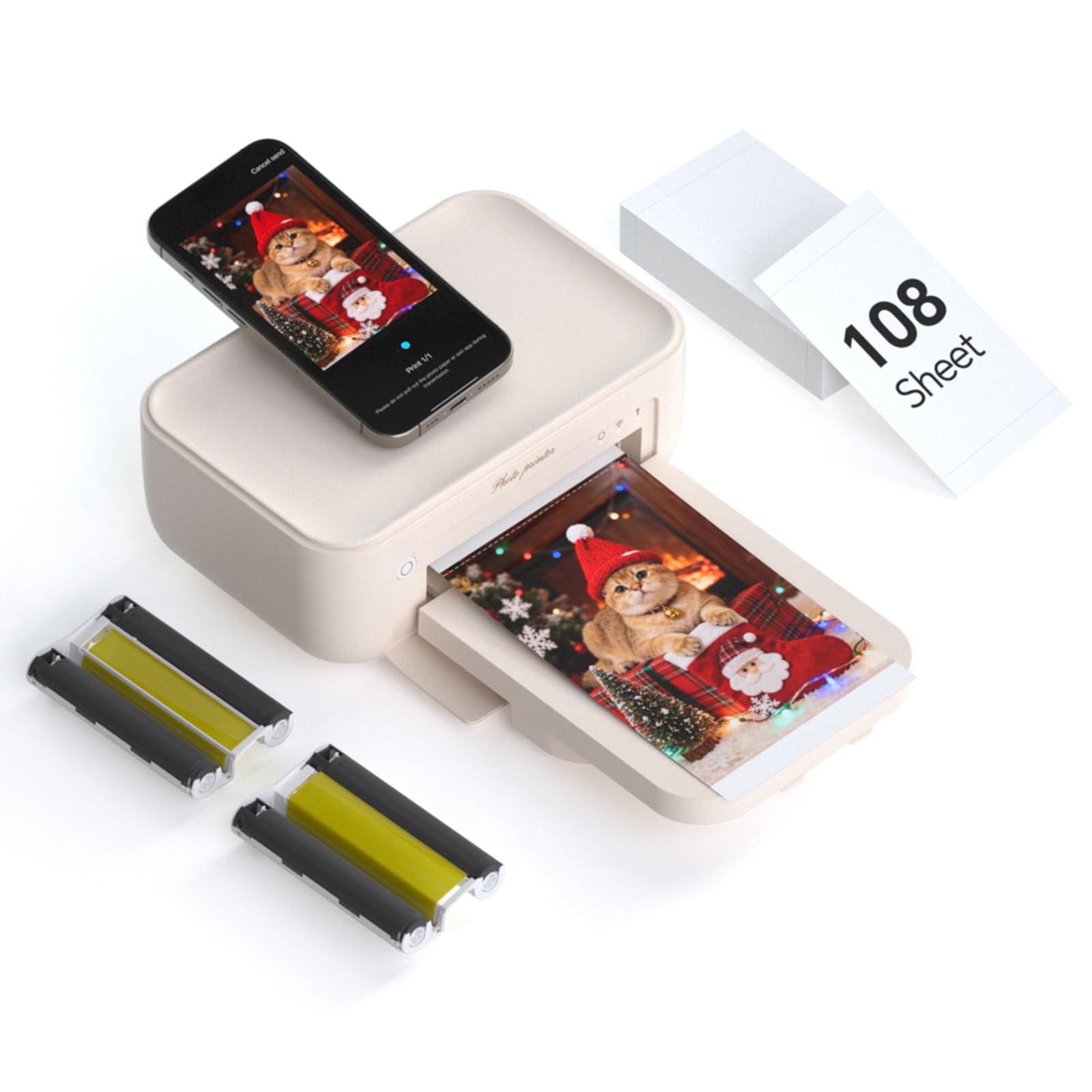
The HPRT CP4100 delivers genuine thermal dye-sublimation printing at a price that undercuts many competitors. It uses a 300 DPI resolution with 256 color gradations per channel, producing smooth, continuous-tone prints. The built-in protective film coats each photo against water damage, scratches, and fading. The bundle includes 108 sheets of 4×6 paper and two ribbons in the box, making the effective cost per print extremely competitive from day one.
Setup is straightforward via the Heyphoto app for iOS and Android. You can connect directly to the printer’s own Wi-Fi network for a stable link, even without internet access. The app features AR video printing—record up to 15 seconds, print a still, then scan it with the app to replay the video. This is a pleasant novelty for gifting and event albums. The printer itself is lightweight and compact enough to move between rooms or pack for a party.
Reviews consistently praise the vibrant color and sharpness of the prints. Users mention the app is intuitive and offers good editing tools. Some find the beige finish attractive, fitting nicely into a home office. The main caveat is that you must use HPRT’s proprietary paper and ribbon sets for consistent quality. For families wanting a high-value dye-sub printer with generous starting supplies, the HPRT CP4100 is a smart buy.
Why it’s great
- Large starter bundle of 108 sheets plus 2 ribbons
- AR video printing adds a unique interactive feature
- Direct Wi-Fi connection works without external network
Good to know
- Requires proprietary HPRT consumables for best results
- No dual printing or SD card slot
5. HP Sprocket Studio Plus
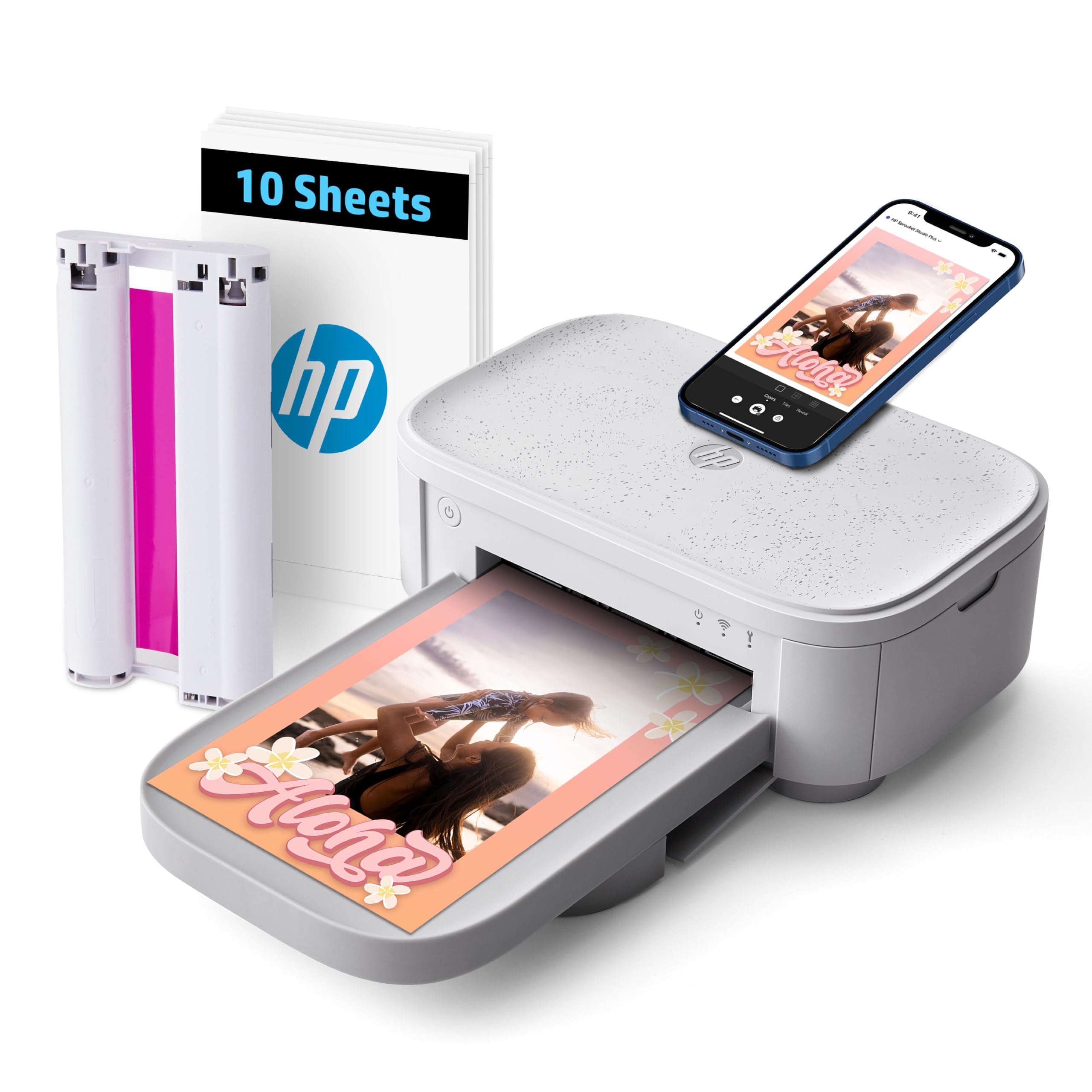
The HP Sprocket Studio Plus focuses on durability. It uses premium dye-sublimation paper that is tear-resistant, smudge-proof, and waterproof. Photos come out dry to the touch instantly, with a glossy finish that doesn’t stick or attract fingerprints. The printer is compact enough for a desk corner but robust enough for frequent use. It prints 4×6 photos in roughly 30 to 60 seconds, depending on the image complexity.
The companion HP Sprocket app offers collage, photobooth, and ID photo modes. You can decorate prints with stickers, text, and frames before printing. Wi-Fi allows a direct connection without needing a router, and the app is compatible with both iOS and Android. The printer supports printing from Facebook and Instagram albums directly, which is convenient for social media creators. The refill pack includes paper and a single ribbon cartridge that yields about 80 prints.
Reviews commend the print quality and the durable finish. Some users note that skin tones can look slightly off compared to the phone screen, so color calibration within the app is needed. A few report that the app can lose connection with certain phone models. The printer is louder than competitors during operation. For users who need waterproof, long-lasting prints that can handle physical handling, the HP Sprocket Studio Plus is a solid choice.
Why it’s great
- Waterproof and tear-resistant prints for long life
- Direct Wi-Fi connectivity, no router needed
- Fun app features including collage and photobooth modes
Good to know
- Skin tones may need exposure compensation in app
- Audible operation noise during printing cycles
6. iDPRT CP4100

The iDPRT CP4100 is a close sibling to the HPRT model, sharing the same thermal dye-sublimation engine and Heyphoto app ecosystem. It similarly offers 300 DPI prints with a protective laminate layer. The differentiator here is the emphasis on its “Magic AR” feature, where you print a still from a video clip, then scan it with the app to replay the original moving moment. It’s a powerful emotional addition for family albums and gifts.
The bundle includes 108 sheets of 4×6 paper and two ribbons out of the box, providing immediate value. Setup requires Bluetooth to be on, then connecting via Wi-Fi Direct through the app. The printer supports multiple sizes within the app, not just 4×6 but also passport, 3×3, and 2×2 formats. It’s a versatile machine for both personal memories and practical projects like ID photos. The beige design is neutral and fits well into most decor.
Customer feedback is strong, especially from those gifting the printer to family members. Users appreciate the easy Android and iOS app integration. Some note that the printer leaves a small white border on prints, which can be cropped. The paper loading is straightforward, and the prints are fade-resistant. For a feature-packed dye-sub printer with a focus on interactive memories, the iDPRT CP4100 delivers good value.
Why it’s great
- AR video playback turns static prints into moving memories
- Generous 108-sheet + 2-ribbon starter kit
- Versatile size options from ID photos to 4×6 prints
Good to know
- Prints with a preset white border; you can trim to your preference
- App needs location permissions to function on some phones
7. Liene Amber M110

The Liene Amber M110 stands out for its dual-paper-tray design. One tray holds standard 4×6 photo paper, while the second holds 3×3 sticker paper. You can switch between formats without swapping cassettes mid-session. It uses thermal dye-sublimation technology that penetrates the paper deeply, producing vibrant colors with a glossy, laminated finish that resists water, scratches, and fingerprints. Bluetooth 5.0 pairs in roughly 13 seconds, making it fast and reliable for mobile printing.
The Liene app includes editing tools like filters, contrast adjustment, and Polaroid-style borders. It also supports ID and visa photo printing from home, which is a practical bonus. The printer supports multiple simultaneous device connections, making it easy for friends and family to print from their own phones without re-pairing. The Liene Amber M110 only works with Liene-branded cartridges and paper, which maintains print consistency but limits third-party supply options.
Reviews praise the print quality, specifically the accurate skin tones and sharp details. Some users note the prints are slightly darker than the original image, so raising brightness before printing is advisable. The paper finish is slightly less glossy than drugstore prints, which some prefer for a more matte look. The responsive customer service is frequently mentioned as a positive. For users who need both standard photos and sticker prints without swapping trays, the Liene Amber M110 is a flexible and high-quality pick.
Why it’s great
- Dual paper trays for instant switching between 4×6 and 3×3
- Fast Bluetooth pairing in about 13 seconds
- Supports multiple simultaneous device connections
Good to know
- Requires proprietary Liene cartridges and paper
- Prints may come out slightly darker than the screen preview
8. YOTON Photo Printer

The YOTON Photo Printer carves its niche with built-in Wi-Fi that creates its own independent network. This means you can connect directly to the printer even in areas with no internet service—ideal for camping trips, backyard parties, or remote locations. It uses dye-sublimation printing for vivid, durable prints. The printer includes 54 sheets of 4×6 paper and one ink ribbon in the box, plus a USB cable. Its compact dimensions (7.1 x 4.9 x 2.2 inches) make it truly portable.
AR video printing is also available here: record up to 15 seconds of video, print a sample still frame, then scan it with the YOTON app to replay the video on your phone. The app includes filters, borders, and text overlays. The printer works with iOS and Android devices as well as laptops via USB. The yellow button on the ribbon cassette must click securely into place for printing to work—an important step some users miss initially.
Customer reviews highlight excellent print quality comparable to larger home printers once the connection is established. Some users find the initial setup challenging because the printer requires a 2.4GHz Wi-Fi connection or direct network mode, and the app requests extensive permissions. The AR feature is a crowd-pleaser. For users who need a portable dye-sub printer that works offline with a built-in network, the YOTON is a compelling option.
Why it’s great
- Creates its own Wi-Fi network for printing without internet
- Small and highly portable for travel or outdoor events
- AR video printing adds unique interactive capability
Good to know
- Setup can be finicky with 2.4GHz requirement and app permissions
- Paper must be stored properly to prevent dust contamination
9. Fujifilm Instax Link Wide

The Fujifilm Instax Link Wide operates on a completely different principle from the dye-sub printers above. It uses Instax Wide instant film—the same proprietary chemical film used in Fujifilm Instax Wide cameras. Instead of layering dyes, it exposes the film with a laser-like process, then the image develops physically over a few minutes. This produces the iconic retro look with white borders, a distinct matte finish, and a physical depth that separates it from ink-based prints.
Connectivity is via Bluetooth to the Instax app, which offers over 30 editable templates, a QR print mode for embedding URLs or messages, and an extensive sticker library. The print size is roughly 3.4 x 4.3 inches, smaller than standard 4×6. The printer is compact and lightweight, designed for parties and casual sharing. You need to charge the unit for about an hour before first use, and a full charge yields roughly 100 prints. The film is sold separately and costs significantly more per print than dye-sub alternatives.
Online reviews praise the print quality as far superior to the Instax Wide camera, since you can edit and crop from your phone before printing. Fans love the wide format for group shots and the fun, hands-on development process. The biggest downsides are the high per-print cost and that you can only use Fujifilm Instax Wide film. For users who value the analog aesthetic and enjoy the instant film experience, the Instax Link Wide delivers a uniquely satisfying result.
Why it’s great
- Genuine analog Instax Wide film with retro aesthetic
- App offers extensive templates, QR linking, and stickers
- Better image quality than taking a photo with an Instax camera
Good to know
- Print size is smaller than standard 4×6
- Film costs substantially more per print than dye-sub options
FAQ
How many 4×6 prints can I get from a single ink ribbon?
Are dye-sublimation prints really waterproof?
Can I print 4×6 photos without using a smartphone app?
Is AR video printing on photo printers useful or just a gimmick?
Final Thoughts: The Verdict
For most users, the best 4×6 photo printer winner is the Canon SELPHY CP1500 because it combines the lowest per-print cost with versatile media handling, direct SD/USB printing, and superb color accuracy from genuine dye-sublimation. If you want a compact, no-ink portable printer for journaling and stickers, grab the Canon Ivy 2. And for the highest print volume with a generous starter bundle and AR features, nothing beats the HPRT CP4100.