
Our readers keep the lights on and the weekend projects moving. As an Amazon Associate, I earn from qualifying purchases.
You’re hunting for a compact mechanical keyboard that doesn’t sacrifice arrow keys, dedicated delete keys, or satisfying acoustics. The 65% layout hits that sweet spot between desk-space efficiency and daily functionality, but the market is flooded with boards that rattle, ping, or force you into proprietary software hell. Sifting through switch types, mounting systems, and connectivity options to find one that actually feels stable under your fingers is the real challenge.
I’m Rikta — the co-founder and writer behind FitlyFast. I’ve spent hundreds of hours analyzing gasket-mount designs, foam-dampening layers, keycap materials, and hot-swap PCB specs across dozens of models to understand what separates a genuinely premium typing experience from a budget compromise.
This guide breaks down the internals—switch feel, plate flexibility, acoustics, and latency—so you can confidently choose the best 65% keyboard for your workflow, gaming habits, and aesthetic preferences.
How To Choose The Best 65% Keyboard
The 65% layout removes the function row and navigation cluster while preserving arrow keys and a handful of editing keys (Delete, Page Up, Page Down, Home, End). That trade-off makes it the most versatile compact form factor for mixed gaming and typing use. But beyond size, three internal specs separate a board you’ll love for years from one you’ll stash in a drawer within months.
Mounting System and Sound Dampening
The mounting system determines how the plate sits inside the case and how much flex you feel under each keystroke. Gasket-mount designs suspend the plate between silicone or poron gaskets, creating a softer, more uniform typing feel and a deeper, fuller acoustic profile (often called “thock”). Entry-level tray-mount boards tend to sound hollow or metallic because the plate screws directly into the case, transmitting vibration into the base. Look for boards with at least two layers of internal foam—poron, IXPE, PET, or silicone—to kill pinging and echoes before they reach your ears.
Switch Compatibility and Actuation
Hot-swappable PCBs let you change switches without soldering, which is crucial for fine-tuning your preferred feel down the road. Standard 3-pin and 5-pin compatibility covers nearly every aftermarket switch on the market. For competitive gaming, Hall effect (magnetic) switches offer adjustable actuation from as shallow as 0.1mm to 3.8mm, enabling rapid-trigger functionality that registers key releases instantly. Traditional linear switches like Gateron Cream or HyperX Red are smoother for typing but lack that variable actuation edge.
Wireless Performance and Battery Life
Tri-mode connectivity (Bluetooth, 2.4GHz, wired) is the current standard for premium 65% boards. The 2.4GHz dongle delivers latency comparable to wired (sub-1ms polling), while Bluetooth suits multi-device desk setups. Battery capacity matters: a 3000mAh to 4000mAh cell can run a RGB-lit board for one to three weeks depending on brightness. Boards with smaller batteries often require weekly charging, which defeats the purpose of going wireless.
Quick Comparison
On smaller screens, swipe sideways to see the full table.
| Model | Category | Best For | Key Spec | Amazon |
|---|---|---|---|---|
| IQUNIX Magi65 | Low Profile Premium | Ultra-slim typing & portability | CNC aluminum case, 0.43″ thick | Amazon |
| ARBITER Polar 65 | Hall Effect Gaming | Competitive rapid-trigger play | Adjustable actuation 0.1–3.8mm | Amazon |
| Razer BlackWidow V4 Mini | Wireless Premium | High-end wireless & RGB | 200-hour battery, 5052 alloy top | Amazon |
| EPOMAKER x Aula F65 | Mid-Range Acoustics | Deep thock with budget value | 5-layer foam, 4000mAh battery | Amazon |
| RK ROYAL KLUDGE R65 | Entry-Level Wireless | First-time mech buyer | CNC volume knob, cream switches | Amazon |
| HyperX Alloy Origins 65 | Wired Alloy | Sturdy workhorse for typing | Full aluminum frame, USB-C | Amazon |
| ASUS ROG Strix Scope II X | Full-Size Alternative | Full layout with number pad | 100% wired, PBT double-shot keycaps | Amazon |
In‑Depth Reviews
1. IQUNIX Magi65 Low Profile Mechanical Keyboard
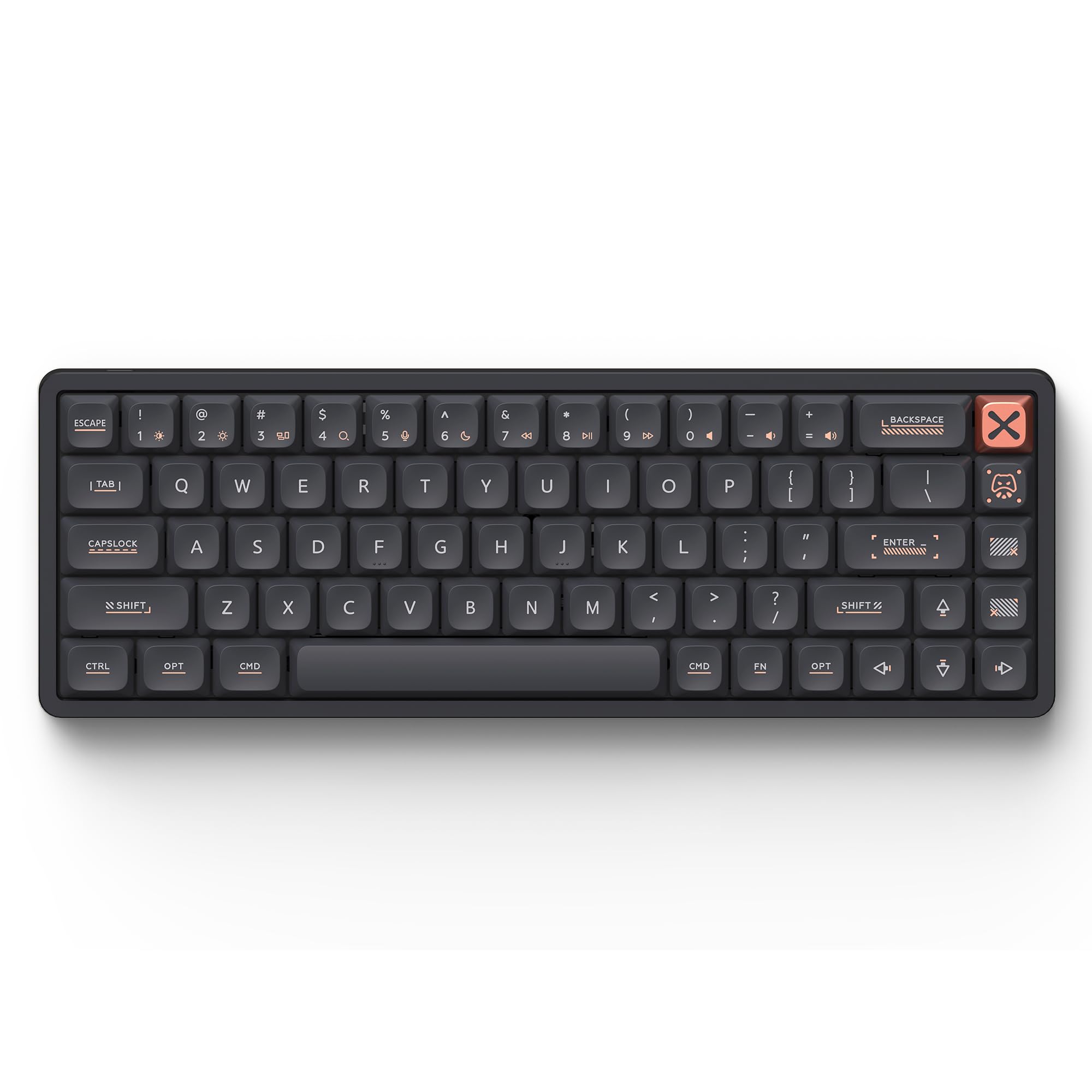
The Magi65 redefines what a premium 65% keyboard can be with a CNC-machined aluminum body that measures just 0.43 inches thick. That ultra-slim profile reduces wrist strain naturally without needing a separate palm rest, and the Le-tray mount combined with an FR4 plate and six-layer foam stack delivers a cushioned, quiet typing feel that rivals boards twice its price. Pre-lubed Gold Red linear switches actuate between 30gf and 50gf, producing a creamy sound profile that stays office-friendly.
Wireless versatility is class-leading: Bluetooth, 2.4GHz, and USB-C connectivity pair with a 3000mAh battery that pushes up to 300 hours of use with RGB off. The 2.4GHz connection maintains a 1000Hz polling rate for imperceptible latency during gaming. VIA software support allows full key remapping and macro creation without any app installation, and Mac users get a seamless out-of-box experience with extra keycaps for PC setup included.
The stabilizers on some units exhibit a slight space-bar rattle, though most users find the deep thock and heavy, solid build more than compensate. At roughly 2 pounds, it sits firmly on any desk and resists sliding during intense typing sessions. For a low-profile board that competes directly with NuPhy and Keychron, the Magi65 delivers exceptional build quality and acoustic refinement in a genuinely portable package.
Why it’s great
- Ultra-slim 0.43″ CNC aluminum frame
- 300-hour battery life with 3000mAh cell
- VIA programmable with no software install
- Mac and PC ready out of the box
Good to know
- Space bar stabilizer may need light tuning
- No dedicated volume knob
- Low-profile keycaps limit aftermarket options
2. ARBITER Polar 65 CNC Magnetic Gaming Keyboard

The Polar 65 brings Hall effect technology to the mainstream with Fuji linear switches that offer 20 sensitivity levels from 0.1mm to 3.8mm actuation. That means you can set WASD to activate on a microscopic press for strafing in shooters while leaving typing keys at a deeper, more forgiving threshold. The rapid-trigger functionality registers key releases instantly—sub-1ms latency—giving competitive players a measurable advantage in games like Valorant, Overwatch, and Fortnite.
The CNC aluminum frame provides a weighted, premium feel that eliminates any board flex. Dual silicone dampening layers kill hollow resonance, and the screw-in space-bar stabilizer with additional plate-mounted stabilizers reduces rattle significantly compared to budget magnetic boards. The dual-shot PBT keycaps have a matte, grippy texture that withstands shine from extended gaming sessions.
Customization runs through a webapp rather than bloated desktop software—refreshingly simple for adjusting RGB, actuation curves, and macro layers. The board lacks wireless connectivity, so you’re tethered via the 1.8m braided USB-C cable. For pure wired gaming performance with magnetic switch precision, the Polar 65 outperforms its price tier convincingly.
Why it’s great
- Adjustable actuation 0.1–3.8mm via webapp
- Rapid trigger with sub-1ms latency
- Solid CNC aluminum frame, no flex
- Dual silicone dampening for quiet operation
Good to know
- Wired only, no Bluetooth or 2.4GHz
- Hall effect switches not hot-swappable with standard mechanical switch types
- Less suited for dedicated typists
3. Razer BlackWidow V4 Mini HyperSpeed

Razer’s BlackWidow V4 Mini HyperSpeed packs 68 keys into a 65% frame that retains arrow keys and a dedicated Delete button, all wrapped in a 5052 aluminum alloy top case. The hot-swappable PCB accepts both 3-pin and 5-pin switches, so you can swap the stock Orange tactile switches for your preferred linear or clicky option without soldering. Razer’s HyperSpeed Wireless delivers true lag-free 2.4GHz performance that feels identical to a wired connection.
The standout feature is the 200-hour battery life, which means you can charge this board roughly once a month under normal usage. The Phantom Pudding keycaps have translucent sides that let Razer Chroma RGB shine through brilliantly, creating a striking under-glow effect even in dim rooms. The legend-less top surface keeps the aesthetic clean when the RGB is off—a clever dual-personality design.
Synapse software remains the primary customization hub, which some users find heavy compared to VIA or web-based alternatives. A few early units reported keycap adhesion issues, though the overall build quality and wireless stability earn high marks. For a compact wireless board that pairs premium materials with genuine battery endurance, the V4 Mini is a strong contender.
Why it’s great
- 200-hour battery in HyperSpeed mode
- Hot-swappable PCB for 3/5-pin switches
- 5052 aluminum alloy top frame
- Legend-less keycaps with brilliant Chroma RGB
Good to know
- Proprietary software is resource-heavy
- Keycap legends not visible when backlight off
- Premium price tier compared to competitors
4. EPOMAKER x Aula F65 Wireless Mechanical Keyboard

The F65 from EPOMAKER and Aula collaboration delivers acoustic refinement that typically belongs in boards costing twice as much. The five-layer sound-dampening stack—two layers of poron foam, an IXPE switch pad, a PET enhancement pad, and a bottom silicone pad—transforms each keystroke into a deep, satisfying thock with virtually no metallic ping or hollow echo. The gasket-mount structure and flex-cut PC plate create a soft, bouncy typing feel that reduces finger fatigue over long sessions.
Tri-mode connectivity covers Bluetooth, 2.4GHz, and USB-C, backed by a generous 4000mAh battery that easily lasts two weeks with RGB active. The south-facing LEDs ensure compatibility with Cherry profile keycaps, and the RGB bar along the sides adds ambient desk lighting. Pre-lubed Reaper switches (a linear option) offer a smooth travel with minimal scratchiness out of the box.
The keycap legends on some units show slight printing inconsistencies, and the lack of a dedicated volume knob may deter users who prefer physical media controls. For anyone prioritizing deep acoustics and wireless endurance at a mid-range price, the F65 punches well above its weight class.
Why it’s great
- Deep thock from 5-layer internal foam
- 4000mAh battery for extended wireless use
- Flex-cut PC plate for soft typing feel
- Full-key hot-swap with 3/5-pin support
Good to know
- No volume knob or function row
- Keycap legend print quality can vary
- Mac software support limited
5. RK ROYAL KLUDGE R65 Wireless Mechanical Keyboard

The RK R65 brings rare convenience features to the budget segment: a CNC aluminum volume knob that lets you twist to adjust audio or press to mute, plus full QMK and VIA programmability for remapping every key. The gasket-mounted structure with five-layer internal dampening produces a noticeably quieter, deeper sound than typical tray-mount budget boards. Pre-lubed cream linear switches offer smooth, silky travel without tactile bump or click noise.
Tri-mode wireless (2.4GHz, Bluetooth, USB-C) supports up to three connected devices, and the included 2.4GHz dongle delivers reliable low-latency performance for gaming. Battery life hovers around one week with moderate RGB use—adequate for a board at this tier. The PBT double-shot keycaps resist shine and legends stay crisp over time, which is a welcome upgrade from ABS caps common at this price.
The compact 66-key layout omits dedicated navigation keys beyond arrow keys, so you’ll rely on the Fn layer for Home, End, Page Up, and Page Down. Plastic enclosure feels less premium than aluminum options, but the overall package—VIA support, hot-swap PCB, volume knob—makes it the best entry point for exploring the 65% format without overspending.
Why it’s great
- CNC aluminum volume knob with mute function
- QMK/VIA programmable via firmware
- Smooth cream switches out of the box
- Tri-mode wireless with 2.4GHz dongle
Good to know
- Plastic case, not as sturdy as alloy frames
- Limited to 66 keys, fewer nav keys
- No Mac-compatible software available
6. HyperX Alloy Origins 65 Gaming Keyboard

The Alloy Origins 65 stands out for its full aluminum frame construction—a rarity at its price point—giving it a rigid, weighty feel that resists any deck flex during aggressive typing or gaming. HyperX’s linear Red switches deliver smooth, consistent keystrokes with a relatively quiet sound signature that won’t dominate a shared workspace. The double-shot PBT keycaps maintain a textured grip and resist wear far better than the ABS caps found on cheaper boards.
Wired USB-C connectivity ensures zero latency, and the board is fully compatible with PlayStation and Xbox consoles straight out of the box. RGB brightness is among the best in class, with vivid colors and five adjustable brightness levels that remain visible even in well-lit rooms. The compact 65-key layout retains arrow keys while trimming the overall footprint to free up mouse space for low-sensitivity gamers.
The stock stabilizers exhibit some rattle on larger keys (space bar, shift), and the NGENUITY software has a reputation for being buggy and unreliable for saving custom profiles. The board is not hot-swappable, so you’re locked into the stock switches unless you solder. For a durable, no-fuss wired board with a premium metal chassis, the Alloy Origins 65 is a solid, straightforward pick.
Why it’s great
- Full aluminum frame provides rigid stability
- Bright, crisp RGB with 5 brightness levels
- PBT keycaps resist shine and wear
- USB-C wired with console compatibility
Good to know
- Not hot-swappable, switches are soldered
- Stabilizers rattle on larger keys
- NGENUITY software can be unreliable
7. ASUS ROG Strix Scope II X Gaming Keyboard

The Strix Scope II X takes a different approach with a full 100% layout that includes a dedicated number pad and a multi-function wheel for media and lighting adjustments. The hot-swappable PCB supports pre-lubed ROG NX Snow V2 linear switches that produce a smooth, thocky keystroke with integrated sound-dampening foam and switch-dampening pads that absorb pinging echoes effectively. PBT double-shot keycaps ensure long-term durability against wear and shine.
Three adjustable tilt angles and a detachable wrist rest provide ergonomic flexibility for marathon gaming or work sessions. The aluminum top plate adds a premium feel and structural heft (2.1 pounds) that keeps the board planted during frantic key presses. Pre-programmed hotkeys (F1–F5) grant instant access to Xbox Game Bar and recording controls, which streamers and content creators will appreciate.
Wired USB-C connectivity keeps latency at absolute zero, but the full-size form factor contradicts the desk-saving philosophy of a 65% board. The Armoury Crate software is necessary for deep RGB customization and macro programming, and some users find it bloaty compared to VIA or web-based configurators. If you need a number pad and want to start exploring hot-swap switches on a full-size platform, the Strix Scope II X delivers solid performance with ASUS build quality.
Why it’s great
- Full-size layout with number pad and media wheel
- Hot-swappable PCB for 3/5-pin switches
- Integrated sound-dampening foam for quiet typing
- Detachable wrist rest and three tilt angles
Good to know
- Full-size footprint, not compact
- Armoury Crate software is resource-heavy
- Wired only, no wireless option
FAQ
What does 65% mean on a mechanical keyboard?
Can I use any Cherry MX switch on a hot-swappable 65% keyboard?
Is a 65% keyboard good for gaming, or should I get a TKL?
How important is the battery capacity in a wireless 65% keyboard?
Do low-profile 65% keyboards sacrifice keystroke feel?
Final Thoughts: The Verdict
For most users, the best 65% keyboard winner is the IQUNIX Magi65 because it combines ultra-slim CNC aluminum construction, genuine low-profile typing comfort, and 300-hour wireless battery life into a package that works flawlessly with both Mac and Windows. If you want competitive gaming speed with variable magnetic actuation, grab the ARBITER Polar 65. And for deep, thocky acoustics at a mid-range price with a massive 4000mAh battery, nothing beats the EPOMAKER x Aula F65.