
Our readers keep the lights on and the weekend projects moving. As an Amazon Associate, I earn from qualifying purchases.
Finding a 65% mechanical keyboard that balances a compact footprint with a genuinely satisfying typing sound and feel is harder than it looks. Many boards in this form factor cut corners on internal dampening, leaving you with a hollow ping and rattly stabilizers that ruin the experience. The right choice delivers a dense, “thocky” acoustic profile without sacrificing the dedicated arrow keys and navigation cluster that make a 65% layout truly daily-driver material.
I’m Rikta — the co-founder and writer behind FitlyFast. For this guide, I spent dozens of hours analyzing the internal construction, switch quality, and real-world acoustic performance of the most popular 65% mechanical keyboards, weighing each board’s dampening layers, plate material, and stabilizer tuning against its intended use case.
Whether you prioritize a deep, creamy sound, hot-swap flexibility for endless customization, or a premium aluminum chassis that anchors your desk, the following models represent the strongest options currently available in the 65% mechanical keyboard category.
How To Choose The Best 65% Mechanical Keyboard
The 65% layout strikes a specific balance: it keeps the arrow keys and a few navigation keys that a pure 60% board drops, while still saving significant desk space compared to a tenkeyless (TKL). The real differentiators come down to the internal build, connectivity, and acoustic tuning. Below are the core factors that separate a satisfying typing experience from a frustrating one.
Gasket Mount vs. Tray Mount Construction
The mounting style governs how the board flexes and how the sound resonates. Gasket mount boards suspend the plate between silicone or foam gaskets, creating a softer bottom-out and a deeper, more uniform sound. Tray mount boards screw the plate directly into the case, which tends to produce a harsher, more metallic ping. Almost every high-quality 65% board now uses some form of gasket mount, but the thickness and density of the gaskets vary significantly between models.
Internal Dampening Layers
A bare PCB and plate without foam will resonate like a bell. Premium boards include multiple layers — typically Poron foam, IXPE switch pads, PET sound enhancement sheets, and silicone bottom pads — to absorb vibration and shape the acoustic profile. The EPOMAKER x Aula F65, for example, packs five layers of sound-dampening material, which directly translates into its highly praised “thocky” sound. Boards with only one thin layer of EVA foam tend to sound thin and hollow in comparison.
Hot-Swap Socket Compatibility
Hot-swap sockets allow you to change switches without soldering, which is critical for tailoring the feel and sound. Standard 5-pin hot-swap sockets accept the widest variety of switches from brands like Gateron, Cherry, Kailh, and Glorious. Some boards use 3-pin sockets, which restrict you to switches without plastic alignment pins. The GLORIOUS GMMK 2 Compact supports full 5-pin switches, making it a strong platform for builders who want total switch freedom.
Connectivity and Battery Life
Tri-mode connectivity — Bluetooth, 2.4GHz wireless, and wired USB-C — provides flexibility across multiple devices. When evaluating wireless boards, look beyond the marketing numbers and check the actual battery capacity. The YUNZII AL66 packs a 5000mAh battery, which can last weeks under normal use, while smaller units around 2000mAh may require weekly charging. Latency also matters: a 1000Hz polling rate in wired or 2.4GHz mode ensures that input lag stays imperceptible during gaming.
Quick Comparison
On smaller screens, swipe sideways to see the full table.
| Model | Category | Best For | Key Spec | Amazon |
|---|---|---|---|---|
| EPOMAKER x Aula F65 | Full Build | Deep “Thock” Sound | 5-Layer Dampening | Amazon |
| GLORIOUS GMMK 2 Compact | Barebones | Custom Build Platform | Aluminum Top Shell | Amazon |
| YUNZII AL66 | Full Build | Premium Aluminum Build | Full Aluminum CNC | Amazon |
| ASUS ROG Falchion Ace | Full Build | Gaming Performance | ROG NX Red Switches | Amazon |
| HyperX Alloy Origins 65 | Full Build | Durable Alloy Frame | Aluminum Enclosure | Amazon |
| Razer BlackWidow V3 Mini | Wireless Full | Wireless & RGB | 200H Battery Life | Amazon |
| Corsair K65 PRO Mini | Full Build | Optical Speed | OPX Optical Switch | Amazon |
In-Depth Reviews
1. EPOMAKER x Aula F65

The F65 has quickly become one of the most talked-about boards in the mid-range space, and for good reason. Its five-layer sound-dampening design — two Poron foam layers, an IXPE switch pad, a PET enhancement sheet, and a silicone bottom pad — delivers a deep, rich “thock” that rivals boards costing significantly more. The polycarbonate flex-cut plate adds just enough give to soften bottom-outs without making the board feel mushy.
Connectivity is a strong point: tri-mode Bluetooth, 2.4GHz, and USB-C, paired with a generous 4000mAh battery that easily lasts through a full work week of mixed use. The Reaper switches come pre-lubed from the factory and feel impressively smooth right out of the box, with minimal stem wobble. The south-facing RGB layout also ensures compatibility with Cherry-profile keycap sets if you decide to swap later.
The only minor compromises are the stock keycaps, which have decent dye-sublimation but a slightly thin feel compared to higher-end double-shot PBT sets, and the absence of a dedicated knob for volume control. For the price, the acoustic tuning and overall build quality are exceptional.
Why it’s great
- Deep, satisfying acoustic profile from five-layer dampening
- Full 5-pin hot-swap support for easy switch customization
- Tri-mode wireless with long-lasting 4000mAh battery
Good to know
- Stock keycaps feel slightly thin compared to premium PBT sets
- No dedicated volume knob or function row
2. GLORIOUS GMMK 2 Compact 65% Barebones
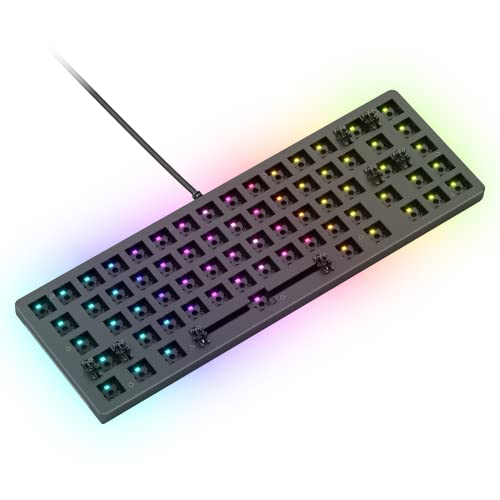
The GMMK 2 Compact is a barebones board, meaning you supply your own switches and keycaps. This makes it an ideal foundation for a fully custom build. The aluminum top shell provides excellent rigidity and a premium feel, with an anodized matte finish that resists scratches and corrosion. The board sits solidly on its rubber feet with no wobble during aggressive typing or gaming sessions.
The hot-swap sockets accept any standard 5-pin switch, giving you total freedom to choose your preferred actuation force and tactile feedback. The pre-lubed stabilizers come with screw-in mounts, which reduce rattle significantly compared to clip-in designs. A thick interior foam layer eliminates case ping, though the overall sound profile will depend heavily on your choice of switches and keycaps.
The included braided USB-C cable is a nice touch, and the switch and keycap pullers are basic but functional. The board is north-facing, so Cherry-profile keycaps may interfere with the LEDs on some switches — something to keep in mind when shopping for aftermarket caps. The Glorious Core software is serviceable but not as polished as competitors like Corsair’s iCUE.
Why it’s great
- Premium aluminum top shell with rigid, sturdy feel
- Full 5-pin hot-swap support for any switch type
- Screw-in stabilizers reduce rattle for smoother long-key presses
Good to know
- North-facing sockets may interfere with Cherry-profile keycaps
- Barebones format requires separate purchase of switches and keycaps
3. YUNZII AL66

The YUNZII AL66 stands out for delivering a full CNC-machined aluminum chassis at an approachable price point. The anodized silver finish feels dense and cool to the touch, and the gasket mount structure combined with Poron foam layers produces a creamy, well-damped typing sound. The included Milk switches are pre-lubed and reasonably smooth, though enthusiasts will likely want to swap them for something more refined.
The 66-key layout includes a multifunction knob that controls volume, RGB brightness, and lighting modes — a handy addition that most boards in this range omit. The 5000mAh battery is the largest in this comparison, providing weeks of wireless use on a single charge. Tri-mode connectivity works reliably, and switching between devices via Bluetooth is quick.
Some downsides include the lack of adjustable typing feet, which locks you into a single fixed angle, and a somewhat scratchy texture on the aluminum surface that can feel unpleasant to people with sensory sensitivity. The stock keycaps are decent but not on the same level as the double-shot PBT sets found on pricier boards.
Why it’s great
- Full CNC aluminum chassis for a dense, premium feel
- Gasket mount with Poron foam for creamy sound
- Massive 5000mAh battery lasts weeks between charges
Good to know
- Fixed typing angle with no adjustable feet
- Aluminum surface has a slightly scratchy texture
4. ASUS ROG Falchion Ace

The Falchion Ace is purpose-built for competitive gaming. The ROG NX Red switches are factory-lubed for a smooth linear feel with fast actuation, and the dedicated switch stabilizers — also lubed from the factory — keep long keys like the spacebar and shift stable and rattle-free. The sound-dampening foam inside the case reduces echo, though the board still sounds more “clacky” than “thocky” due to the stiffer plate material.
The most distinctive feature is the interactive touch panel on the left side, which can be programmed for volume control, app switching, or macro shortcuts. It works well in practice, though tactile buttons would be more reliable during intense gaming moments. The included protective cover is a nice bonus for transport, though it doesn’t stay as secure in a bag as some users would like.
The PBT double-shot keycaps feel substantial and the shorter stem reduces key wobble noticeably. The wired-only connection keeps latency to an absolute minimum, making this a straightforward choice for competitive FPS players who don’t need wireless convenience.
Why it’s great
- Factory-lubed ROG NX switches with smooth linear feel
- Innovative side touch panel for macros and volume
- PBT double-shot keycaps with reduced wobble
Good to know
- Wired-only connection limits desk cable management
- Touch panel less reliable for gaming than physical buttons
5. HyperX Alloy Origins 65

The HyperX Alloy Origins 65 delivers a no-nonsense wired experience with an exceptionally bright RGB implementation that stands out even in well-lit rooms. The full aluminum frame feels rigid and durable, and the slim profile saves vertical desk space. The Red linear switches are smooth and relatively quiet for stock switches, though they lack the factory lubrication found on some competitors.
The PBT double-shot keycaps resist shine well over time, but some users report that the legends on secondary symbol keys look slightly blurry — a minor cosmetic issue that doesn’t affect typing. The stabilizers have noticeable lateral play and rattle out of the box, which can be mitigated with a band-aid mod but shouldn’t require DIY work at this tier.
The NGENUITY software is the board’s weakest link. It crashes frequently, can be buggy when saving profiles, and requires the program to stay open to retain customizations. If you can live with the onboard hardware settings, the physical board itself is solid, but the software experience lags behind Razer’s Synapse and Corsair’s iCUE.
Why it’s great
- Extremely bright, true-color RGB LEDs
- Full aluminum frame is rigid and durable
- PBT double-shot keycaps resist shine and wear
Good to know
- Stabilizers have noticeable rattle out of the box
- NGENUITY software is buggy and crashes frequently
6. Razer BlackWidow V3 Mini HyperSpeed

The BlackWidow V3 Mini is Razer’s flagship compact wireless offering, built around the company’s signature Green mechanical switches. These are tactile and clicky, providing audible and physical feedback on every keystroke. For users who crave the classic mechanical keyboard sound, this board delivers it in spades, though it is noticeably louder than linear or silent switch options.
Razer’s HyperSpeed wireless technology delivers lag-free performance that feels identical to a wired connection in practice. The battery life is rated up to 200 hours in wireless mode, which translates to weeks of regular use before needing a recharge. The Phantom Pudding keycaps let the Chroma RGB shine through brilliantly, creating a vibrant under-glow effect that looks especially impressive in dim environments.
The main consideration is the switch choice: Green switches are not for everyone. They require a higher actuation force (about 50g) and produce a distinct click sound that can be distracting in shared workspaces. The ABS keycaps are also prone to developing shine over time compared to PBT alternatives. The price reflects Razer’s brand premium, but the wireless performance and build quality justify it for those who want a reliable, feature-rich compact.
Why it’s great
- Up to 200 hours of battery life in wireless mode
- Razer Chroma RGB is the brightest and most customizable in the category
- HyperSpeed wireless feels indistinguishable from wired
Good to know
- Green clicky switches are loud and not suitable for shared spaces
- ABS pudding keycaps may develop shine faster than PBT
7. Corsair K65 PRO Mini RGB

The K65 PRO Mini is Corsair’s answer to the demand for a compact, high-speed competitive board. The CORSAIR OPX optical switches use light-based actuation, which eliminates debounce delay and provides linear, ultra-smooth keystrokes rated to 150 million presses. The rapid response is noticeable in fast-paced games where every millisecond matters.
AXON Hyper-Processing Technology pushes the polling rate and RGB responsiveness well beyond standard gaming keyboards, allowing up to 20 layers of lighting effects to run simultaneously without slowing down input registration. Two layers of internal sound dampening soften keystroke noise, producing a satisfying muted clack rather than a sharp ping. The PBT double-shot keycaps feel premium and resist wear over time.
The wired-only connection keeps latency at zero but limits desk cable management options. The iCUE software is one of the most feature-rich in the industry, though some users find its macro customization options less intuitive than competitors. The 65% layout means no dedicated function row — a tradeoff that some users may find limiting for productivity tasks like spreadsheet navigation.
Why it’s great
- Optical switches for lightning-fast, lag-free actuation
- AXON tech delivers 8x faster input processing than standard boards
- PBT double-shot keycaps with two-layer sound dampening
Good to know
- Wired-only connection limits desktop setup flexibility
- No dedicated function row may hinder productivity workflows
FAQ
What makes a 65% keyboard different from a 60% keyboard?
Can I use any Cherry MX keycaps on a 65% mechanical keyboard?
Is a gasket mount really better than a tray mount for sound?
Final Thoughts: The Verdict
For most users, the best 65% mechanical keyboard winner is the EPOMAKER x Aula F65 because its five-layer sound dampening and gasket mount construction deliver an acoustic profile that rivals boards at double the price. If you want a premium aluminum chassis and a dedicated volume knob, grab the YUNZII AL66. And for competitive gaming with zero latency, nothing beats the Corsair K65 PRO Mini with its optical OPX switches and AXON hyper-processing.