
Our readers keep the lights on and the weekend projects moving. As an Amazon Associate, I earn from qualifying purchases.
Finding the perfect 75% keyboard for gaming is a duel between desk space and uncompromised performance, where every millimeter of key travel and every millisecond of latency defines your edge. The compact layout chops off the number pad without sacrificing the arrow keys or function row, giving you a leaner setup for furious flicks and strategic macros. But with the market flooded with gasket mounts, magnetic switches, and proprietary software, you need a clear path to the one that actually delivers on its promises.
I’m Rikta — the co-founder and writer behind FitlyFast. I’ve spent countless hours dissecting switch types, wireless protocols, and build materials across dozens of gaming boards to separate the true performers from the flashy distractions in this specific form factor.
After deep-diving into actuation points, battery life benchmarks, and keystroke consistency across the current lineup, I’ve identified the models that deserve a spot on your desk in this definitive guide to the 75% keyboard for gaming.
How To Choose The Best 75% Keyboard For Gaming
Before you click buy, focus on three critical areas: switch technology, build and acoustics, and connectivity reliability. The wrong choice here means either spongy key feel that costs you a round, or a noisy board that drowns out your game audio. Focus on these fundamentals.
Switch Architecture: Mechanical vs. Magnetic vs. OmniPoint
Standard mechanical switches (like the Razer Orange or Corsair MLX Red) use a physical metal leaf spring to register a keystroke at a fixed actuation point. Hall Effect magnetic switches (like those in the Keychron K2 HE) use a magnet and sensor to detect travel, allowing you to set the actuation distance anywhere from 0.2 mm to 3.8 mm. SteelSeries’ OmniPoint 3.0 takes this further with 40 levels of adjustable actuation and features like Rapid Trigger and Protection Mode. For competitive FPS titles, magnetic or OmniPoint tech gives you a measurable reaction-time advantage because you can dial in hair-trigger actuation without bottoming out.
Build Acoustics: Gasket Mount, Foam Layers, and Plate Material
The hollow “ping” of cheap keyboards ruins immersion. Premium boards use a gasket mount — a silicone or rubber gasket that suspends the plate and PCB, creating a flex zone that softens bottom-out impact. Multiple layers of sound-dampening foam (silicone, EVA, or Poron) fill the cavity between the plate and case bottom to absorb reverb. The plate material also matters: FR4 (a fiberglass composite) offers firmness with slight flex, while aluminum adds rigidity and a higher-pitched clack. Models like the ASUS ROG Azoth combine all three layers for a signature “thock” sound that many gamers crave.
Wireless Performance and Polling Rate
Not all wireless is equal. Bluetooth 5.x inevitably introduces 10-30 ms of latency, making it unsuitable for competitive gaming. Look for a dedicated 2.4 GHz dongle connection that delivers 1000 Hz polling (1 ms response) — many tri-mode boards in this list achieve this. Also check battery capacity: the GravaStar Mercury K1 Pro packs an 8000 mAh cell, while the Corsair K65 Plus manages 266 hours with RGB off. A keyboard that dies mid-match is useless, so prioritize models with at least 40-50 hours of real-world battery life under moderate RGB use.
Quick Comparison
On smaller screens, swipe sideways to see the full table.
| Model | Category | Best For | Key Spec | Amazon |
|---|---|---|---|---|
| Corsair K65 Plus Wireless | Wireless Gaming | Marathon battery life & silent linear play | 266 hours battery (RGB off) | Amazon |
| Keychron K2 HE | Magnetic Switch | Rapid Trigger & adjustable actuation | 0.2–3.8 mm actuation range | Amazon |
| Razer BlackWidow V4 75% | Hot-Swappable | Custom switch swapping & media controls | Gasket-mounted FR4 plate | Amazon |
| SteelSeries Apex Pro Gen 3 | OmniPoint 3.0 | Pro-level latency & Protection Mode | 40-level adjustable actuation | Amazon |
| ASUS ROG Azoth | Premium Build | Customizable acoustics & OLED display | Triple-layer dampening foam | Amazon |
| GravaStar Mercury K1 Pro | Artisan Design | Unique aesthetic & 8000 mAh battery | Aluminum alloy + gasket mount | Amazon |
| AULA S75 PRO | Budget Friendly | Entry-level thock & LCD screen | Five-layer foam dampening | Amazon |
In‑Depth Reviews
1. Keychron K2 HE

The Keychron K2 HE ditches traditional leaf springs for Gateron Double-Rail Magnetic switches, giving you an actuation range from 0.2 mm to 3.8 mm with 0.1 mm precision. That level of granularity lets you set WASD keys to hair-trigger sensitivity for strafing while keeping utility keys at a deeper actuation to avoid accidental presses. The Rapid Trigger mode dynamically resets the actuation point based on real-time key travel, meaning you can spam a key without ever fully releasing it — a genuine edge in games that demand rapid-fire inputs like Valorant or Apex Legends.
The build uses an aluminum top frame with natural rosewood side panels, offering a warm aesthetic that stands apart from the usual all-metal or all-plastic designs. Under the hood, the gasket-mounted plate and multiple dampening layers produce a soft, thocky sound signature that reviewers describe as “typing royalty.” The web-based Launcher configurator handles key remapping, macro creation, and actuation profiles without requiring any software install, and all settings persist across all three connection modes (2.4 GHz, Bluetooth 5.2, and USB-C).
One trade-off: the PBT keycaps are non-shine-through, so in a dim room you’ll need to rely on the south-facing RGB to illuminate the legends, which doesn’t work perfectly on non-shine-through caps. The battery life hovers around two days under continuous wireless use with RGB on, but you can run it wired indefinitely. The wooden side panels add some weight, but the 965-gram total keeps it portable for LAN events.
Why it’s great
- Precise 0.2–3.8 mm adjustable actuation with Rapid Trigger for competitive FPS games.
- No software bloat – all customization done via web Launcher with settings saved on-board.
- Unique aluminum and natural rosewood construction provides a premium, stable typing feel.
Good to know
- Non-shine-through PBT keycaps make legends hard to read in low light.
- Magnetic switches are only compatible with Gateron Double-Rail units, limiting hot-swap options.
- Battery lasts roughly two days with constant RGB and wireless use.
2. Corsair K65 Plus Wireless

The Corsair K65 Plus strikes a nearly perfect balance between premium features and mid-range pricing. It uses pre-lubricated MLX Red linear switches that deliver a silky, consistent keystroke with minimal wobble — ideal for both twitch gaming and extended typing sessions. The multi-function rotary dial on the top edge lets you adjust volume, media playback, and lighting on the fly, while dedicated FN shortcuts handle everything else without needing to open iCUE software.
Connectivity is where this board shines: the 2.4 GHz wireless connection operates at 1000 Hz polling, meaning you get true 1 ms response times without a cable. The AES-encrypted signal also prevents keylogging, a consideration for competitive players who use public tournament PCs. The battery life is the best in class at 266 hours with RGB off; even with full backlighting, it easily outlasts a week of daily use. The PBT dye-sublimated keycaps resist the greasy shine that afflicts ABS caps after heavy gaming sessions.
The plastic chassis isn’t as rigid as the aluminum builds on the premium side, but the internal silicone and polycarbonate layers keep the typing sound quiet and refined rather than hollow. One caveat: the default keycaps are not shine-through, so legends are invisible when the RGB is off. The iCUE software ecosystem provides deep customization but needs to be running for macro functionality — the keyboard has no on-board memory for storing macros independently.
Why it’s great
- Best-in-class 266-hour wireless battery life ensures weeks of gaming between charges.
- Pre-lubricated MLX Red linear switches feel smooth and quiet straight out of the box.
- Secure AES encryption on 2.4 GHz connection prevents keystroke interception at events.
Good to know
- Non-shine-through PBT keycaps lack backlit legends, making low-light use harder.
- iCUE software must be active for macro bindings; no on-board macro storage.
- Plastic enclosure lacks the rigidity of metal-frame rivals at similar price points.
3. SteelSeries Apex Pro Gen 3
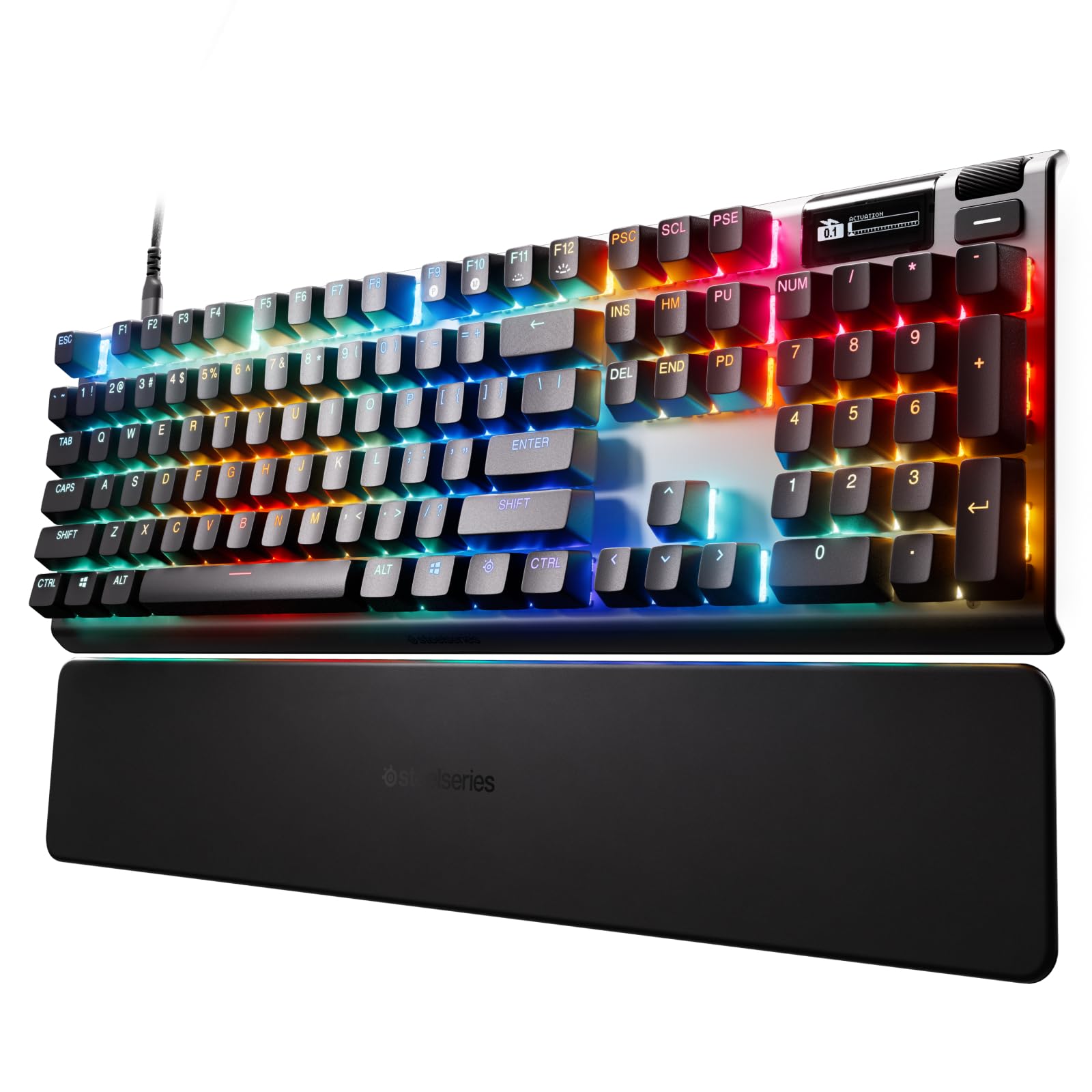
The SteelSeries Apex Pro Gen 3 is engineered for the absolute competitive edge, leveraging OmniPoint 3.0 Hall Effect switches that register actuation 20 times faster than standard mechanical switches and with 40 distinct levels of adjustment. You can set your movement keys to a microscopic 0.1 mm actuation for instant direction changes, while reserving a deeper 3.5 mm actuation for ability keys to prevent accidental casts. The Rapid Trigger and Rapid Tap features go a step further: Rapid Trigger re-defines the actuation point dynamically as you press and release, allowing you to strafe-peek without ever fully resetting the key; Rapid Tap (SOCD) resolves conflicting directional inputs, favoring the most recent press for flawless counter-strafing.
The Protection Mode is a SteelSeries exclusive that reduces the sensitivity of keys surrounding your active key to prevent grazing errors — crucial in clutch moments when your fingers hover over the entire cluster. The OLED Smart Display on the top right shows game stats, system info, or your current actuation profile without alt-tabbing. The alloy steel frame gives the board substantial weight and zero flex under heavy use, and the dedicated GG QuickSet software offers game-ready presets that automatically load profiles when you launch a title.
On the downside, this model lacks on-board RGB profile storage — you must have the GG software running for per-key lighting effects to persist. The compact 75% layout here is the most crowded of the group; the function row is compressed, and finding the correct FN combos takes practice. Reviewers note the keycaps are standard ABS and prone to shine over time. Still, for pure, uncompromising competitive performance, the Apex Pro Gen 3 is the benchmark.
Why it’s great
- OmniPoint 3.0 delivers 40 levels of adjustable actuation with 20x faster switch response.
- Rapid Trigger and Rapid Tap provide measurable reaction-time advantages in FPS and rhythm games.
- Protection Mode prevents accidental inputs from grazing adjacent keys during intense play.
Good to know
- Requires SteelSeries GG software running for per-key RGB profiles to function.
- Compressed function row in the 75% layout demands adaptation for frequent FN-key users.
- ABS keycaps may develop a shiny surface faster than PBT alternatives.
4. Razer BlackWidow V4 75%

Razer brings enthusiast-grade tweakability to the mainstream with the BlackWidow V4 75%. The hot-swappable PCB accepts both 3-pin and 5-pin switches, so you can swap the pre-loaded Orange tactile switches for anything from linear Speed Silvers to clicky Navy Blues without soldering. The gasket-mounted FR4 plate and two layers of sound-dampening foam (one silicone, one EVA) tame the hollowness that plagues many out-of-the-box gaming keyboards, producing a deep, poppy sound with each keystroke.
The multi-function roller and dedicated media keys sit on the top edge for instant volume and playback control — a rare convenience in the crowded 75% bezel. The aluminum top plate provides a sturdy, spill-resistant foundation, while the magnetic plush leatherette wrist rest offers genuine comfort for long sessions. The two-side RGB underglow combined with per-key lighting creates immersive lighting sync that works with Razer Chroma Connect for supported games like Apex Legends and Fortnite.
Potential issues: the wrist rest’s magnetic attachment is reported as weak by several users, occasionally detaching during heated sessions. There have also been isolated reports of switch failures after three months, with some buyers noting Razer’s warranty verification process is strict — you should register the serial number immediately after purchase. The USB-A wired-only connectivity keeps latency low but adds cable clutter. For modders who want a solid foundation to customize further, this is a compelling starting point.
Why it’s great
- Hot-swappable PCB accepts both 3-pin and 5-pin switches for limitless customization.
- Gasket-mounted FR4 plate plus dual foam layers deliver a premium acoustic profile.
- Integrated multi-function roller and media keys offer immediate control without software.
Good to know
- Magnetic wrist rest attachment is weak and may detach during intense play.
- Wired USB-A only — no wireless connectivity for a clutter-free desk.
- Switch durability concerns reported; verify serial number immediately for warranty coverage.
5. GravaStar Mercury K1 Pro

The GravaStar Mercury K1 Pro is the most visually distinct 75% board on this list, featuring a handcrafted battle-worn yellow finish over a solid aluminum alloy chassis. The skeletal frame design exposes the gasket-mounted FR4 plate, giving it an industrial sci-fi look that commands attention. Under the hood, custom Kailh Speedy Mint linear switches operate at 45 gf actuation force with 1.2 mm pre-travel, providing a stealthy, ultra-responsive keystroke that’s quiet enough for shared gaming spaces.
The extraordinary 8000 mAh battery dwarfs every other model here, offering weeks of mixed-use gameplay between charges even with dual RGB lighting systems running. Tri-mode connectivity (wired, Bluetooth, 2.4 GHz) gives you flexibility, though the dedicated 2.4 GHz dongle delivers the 1000 Hz polling that competitive players need. The five layers of sound-dampening foam and gasket mount produce a “thocky and clacky” acoustic profile that reviewers consistently praise as among the best for the price point.
One quirk: the pudding PBT keycaps with dye-sublimation art look fantastic but the side-shine legends can be hard to read in full darkness, as the lighting escapes through the translucent bottom rather than directly through the keycap top. The compact 79-key layout pushes Page Down near the Enter key and omits dedicated Home and End keys, requiring a learning curve for productivity-heavy users. The software, while functional with SignalRGB for lighting, could be more polished in its macro editing interface.
Why it’s great
- Massive 8000 mAh battery provides the longest unplugged gaming endurance available.
- Handmade aluminum alloy frame with battle-worn finish offers unmatched visual distinctiveness.
- Five-layer foam dampening and gasket mount deliver an exceptionally thocky and clacky sound profile.
Good to know
- Non-standard 79-key layout shifts keys like Page Down, requiring adaptation.
- Side-shine PBT keycaps reduce legend readability in low-light environments.
- Software ecosystem lags behind more established brands in macro editing polish.
6. ASUS ROG Azoth

The ASUS ROG Azoth is the ultimate DIY enthusiast’s 75% keyboard, shipping with a complete professional kit including Krytox GPL-205-GD0 lubricant, a switch opener, keycap and switch pullers, a lube station, and an extra brush. This makes it the only board in this roundup that encourages you to mod immediately — whether you’re lubing the pre-installed ROG NX Snow linear switches or swapping them out for your own 3-pin switches via the hot-swap PCB. The gasket mount with three layers of integrated dampening foam (silicone, Poron, and EVA) creates an exceptionally refined sound signature devoid of pinging or reverb.
The integrated 2-inch OLED display is genuinely functional: it monitors CPU/GPU temperatures, media playback info, and keyboard settings in real-time. The multi-function control knob next to it lets you adjust volume, cycle lighting modes, and scrub through media tracks without reaching for the mouse. Wireless performance via 2.4 GHz with ROG SpeedNova technology delivers sub-1 ms latency and a battery life exceeding 2000 hours with OLED and RGB off — meaning you could theoretically game wirelessly for months on a single charge.
However, not everything is perfect. The OLED display’s full functionality (system monitoring) only works in wired mode; on wireless, it’s limited to battery status and basic animations. The ROG Armoury Crate software required for deep customization has a reputation for being resource-heavy and occasionally buggy. There have also been user reports of double-typing defects with the NX Snow switches after several months of use. For the premium price, you get the most comprehensive modding kit and the best typing acoustics in class, but the software and occasional switch defects are worth noting.
Why it’s great
- Comes with a full DIY modding kit including Krytox lubricant and switch opening tools.
- Triple-layer dampening foam (silicone, Poron, EVA) produces the most refined acoustic profile here.
- 2.4 GHz SpeedNova wireless delivers sub-1 ms latency with over 2000-hour battery potential.
Good to know
- OLED system monitoring only works in wired mode; limited to basic info wirelessly.
- Armoury Crate software is resource-heavy and can be buggy during profile setup.
- Reports of NX Snow switches developing double-typing defects after several months.
7. AULA S75 PRO
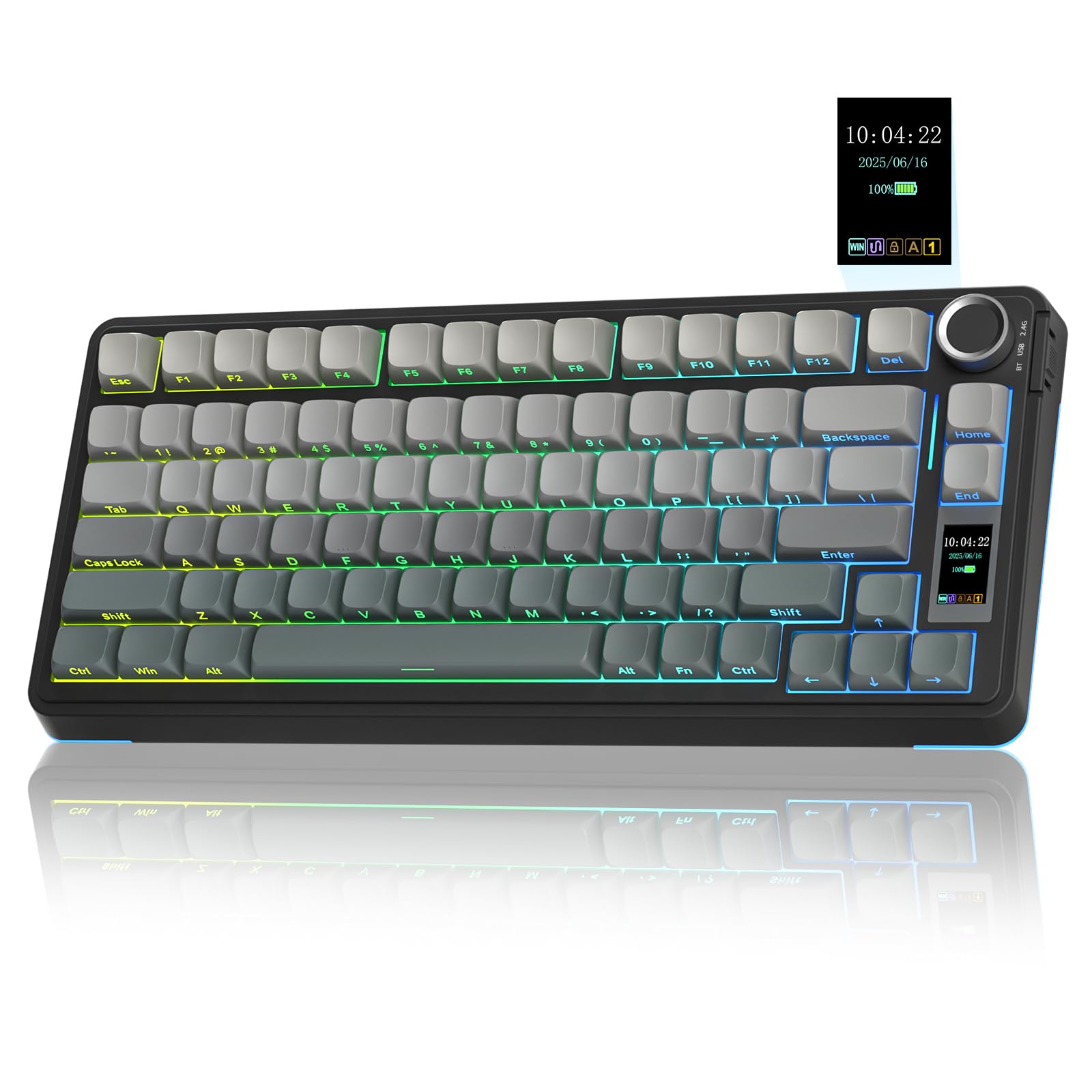
The AULA S75 PRO proves that budget-friendly doesn’t have to mean bare-bones. It includes an LCD screen — a feature typically reserved for boards costing several times more — that shows battery status, time, date, and even custom GIF images. The multi-function knob next to the screen lets you cycle RGB modes, adjust volume, and toggle between your three connected devices (BT 5.0, 2.4 GHz, or wired USB-C). The pre-lubricated switches and stabilizers produce a creamy, thocky sound that reviewers consistently describe as “surprisingly premium for the price.”
The five-layer foam dampening setup (a silicone pad, multiple EVA layers, and PCB single-key slotting) kills cavity noise effectively, resulting in a solid, dense feel when typing. The side-printed PBT keycaps use a double-injection and heat sublimation process that resists fading, and the south-facing RGB LEDs illuminate the legends clearly in dark rooms. The software driver supports full macro customization and RGB programming, though it only works on Windows in wired mode.
Battery life is the main compromise: with full RGB on, you’ll get around 20 hours of continuous use — about a day and a half of heavy gaming. Turning off the lights extends this significantly, but the advertised week-long standby is only achievable with aggressive auto-off settings. The 2.4 GHz connection is responsive with no perceptible latency, but Bluetooth introduces a slight delay that makes it unsuitable for competitive shooters. For the entry-level gamer or someone building their first mechanical board, the AULA S75 PRO delivers 90% of the premium experience at a fraction of the cost.
Why it’s great
- Includes a functional LCD screen with custom GIF support, usually found on much pricier boards.
- Five-layer foam dampening and pre-lubed switches produce a creamy, thocky sound profile.
- Hot-swappable PCB accepts both 3-pin and 5-pin switches for future upgrades.
Good to know
- Battery life is limited to ~20 hours with RGB on; Bluetooth latency makes wired or 2.4 GHz preferable for gaming.
- LCD screen customization requires Windows software in wired mode; Mac users see a static date display.
- Plastic chassis lacks the premium feel of aluminum or metal-framed rivals.
FAQ
Is 75% the same as TKL for gaming?
What is Rapid Trigger and do I need it for competitive gaming?
Can I use a 75% wireless keyboard for competitive gaming without latency?
Final Thoughts: The Verdict
For most users, the 75% keyboard for gaming winner is the Corsair K65 Plus Wireless because it delivers a near-perfect mix of silky MLX Red switches, class-leading 266-hour battery life, and true 2.4 GHz low-latency performance at a mid-range price. If you want the competitive edge of adjustable actuation and Rapid Trigger, grab the Keychron K2 HE for its cutting-edge Hall Effect switches and web-based configurator. And for the enthusiast who values a premium DIY modding experience and the best acoustic profile, nothing beats the ASUS ROG Azoth with its complete lube kit and OLED display.