
Our readers keep the lights on and the weekend projects moving. As an Amazon Associate, I earn from qualifying purchases.
The 75% layout strikes the ideal balance between desk space and full functionality, keeping the F-row, arrow keys, and a compact footprint that serious typists and gamers demand. Yet the real battle lies in choosing a board with the right gasket structure, switch type, and sound dampening — not just a lower sticker price. The wrong build produces hollow clatter and fatigue; the right one delivers creamy, thocky acoustics that make every keystroke satisfying.
I’m Rikta — the co-founder and writer behind FitlyFast. I’ve pored over the internal construction, switch compatibility, and real-world performance data of dozens of 75% mechanical keyboards to separate the boards that merely look the part from those that genuinely enhance your workflow or gaming performance.
After analyzing gasket mount designs, battery capacities, hot-swap PCB specs, and material quality wirelessly and wired, I’ve ranked what matters most for a 75% mechanical keyboard that consistently delivers an outstanding user experience without the guesswork.
How To Choose The Best 75% Mechanical Keyboard
Finding the right 75% mechanical keyboard means looking past the number of keys and focusing on the three pillars: internal structure, switch ecosystem, and connectivity stability. Each of these variables dictates whether your board feels premium or disappoints within the first week of use.
Gasket Mount & Sound Dampening
The gasket mount system suspends the plate between layers of silicone or foam, isolating vibration and creating a softer, more uniform keystroke. Boards with a five-layer or six-layer dampening setup — combining IXPE, PET, PORON, and silicone pads — eliminate hollow ping and produce that sought-after creamy or thocky sound. A tray-mount design, by contrast, transfers harsh bottom-out noise directly through the case.
Battery Capacity & Wireless Performance
Wireless 75% boards rely on battery capacity to sustain heavy RGB use. A 4000mAh cell gets you through a long work week, while an 8000mAh battery can push past 230 hours of continuous use with lights off. The connection method matters equally — 2.4GHz offers competitive latency around 2-3ms, Bluetooth adds convenience for multi-device switching, and wired mode ensures zero lag. For gaming, prioritize 2.4GHz or wired modes.
Hot-Swap PCB & Switch Compatibility
A hot-swappable PCB supporting both 3-pin and 5-pin switches lets you experiment with different switch types — linear, tactile, or clicky — without soldering. Enthusiasts value this flexibility to fine-tune actuation force and sound signature. Skip boards with proprietary switch mounts; industry-standard compatibility ensures access to a wide aftermarket ecosystem from Gateron, Cherry, Kailh, and others.
Quick Comparison
On smaller screens, swipe sideways to see the full table.
| Model | Category | Best For | Key Spec | Amazon |
|---|---|---|---|---|
| Keychron K2 HE | Magnetic HE | Hall Effect & full QMK | Adjustable actuation 0.2–3.8mm | Amazon |
| Wobkey Rainy 75 Pro | CNC Aluminum | Premium out-of-box acoustic | 6063 aluminum / 7000mAh | Amazon |
| Womier MT75 | Aluminum Frame | QMK/VIA + dot-matrix display | 8000mAh battery | Amazon |
| Aula NOVA75 | Aluminum Backplate | Long battery & TFT screen | 8000mAh / 232h runtime | Amazon |
| Corsair K65 Plus | Branded Wireless | Low-latency gaming + iCUE | 266h battery / 2.4GHz AES | Amazon |
| AULA S75 Pro | Plastic Gasket | Budget LCD screen & knob | LCD GIF display | Amazon |
| RedThunder K75 | Budget Triple-Mode | Entry-level creamy typing | 4000mAh / gasket mount | Amazon |
In‑Depth Reviews
1. Keychron K2 HE Wireless Custom Keyboard

The Keychron K2 HE uses Gateron Double-Rail magnetic switches with Hall Effect sensing, allowing per-key adjustable actuation from 0.2mm to 3.8mm in 0.1mm increments. This means you can set WASD keys to instant snap action while keeping modifier keys deliberately deep — no other board in this roundup offers that level of granularity without software installed. The full aluminum frame and acoustic foams produce a deep, thocky sound profile out of the box.
Connectivity includes 2.4GHz wireless with a 1000Hz polling rate, Bluetooth 5.2 for up to three devices, and USB-C wired mode. The web-based Launcher handles all customization — key remapping, macros, and actuation points — and saves directly to onboard memory, so settings persist across devices without running background software. The Cherry Profile shine-through PBT keycaps offer solid durability and good RGB visibility, though the per-key backlight is slightly dimmer than some competitors.
Build quality is exceptional: the aluminum top case and ABS bottom weigh in at a solid 2.2 pounds, giving it a premium, stable desk presence. The magnetic switch ecosystem is limited to Gateron Double-Rail compatible units, so traditional MX-style hot-swap flexibility is absent. For users who want cutting-edge rapid trigger technology and adjustable actuation without compromise, this is the definitive mid-range to premium choice.
Why it’s great
- Per-key adjustable actuation 0.2–3.8mm
- Snap action & rapid trigger for competitive gaming
- Web-based configurator saves to onboard memory
Good to know
- Only compatible with Gateron Double-Rail magnetic switches
- All-metal frame makes it heavy for travel
2. KEEBMONKEY Wobkey Rainy 75 Pro

The Rainy 75 Pro is precision-machined from 6063 aluminum alloy, creating a rigid chassis that eliminates case flex and resonance. Five layers of foam plus 14 individual dampening buds fill every cavity in the board, resulting in a deep creamy sound that rivals custom builds costing significantly more. The FR4 plate with flex cuts provides a soft bottom-out feel while maintaining switch alignment, and the included HMX or Cocoa linear switches come pre-lubed from the factory.
Triple-mode connectivity covers USB-C wired, Bluetooth 5.0, and 2.4GHz wireless with 3ms latency — fast enough for competitive play. The 7000mAh battery provides extended use between charges, and the south-facing LED layout ensures compatibility with aftermarket keycap sets. The Pro Black variant uses double-shot PBT keycaps that resist shine and fading over long use, though the power toggle sits under the caps lock key, making it awkward to access.
The board does not include adjustable feet, relying on a fixed typing angle that suits most users but may not satisfy those who prefer a steeper incline. Despite that, the out-of-box acoustic tuning, aluminum build quality, and generous foam package make it the strongest premium option for anyone who prioritizes sound and feel above all else.
Why it’s great
- Deep creamy sound with 5-layer foam + 14 dampening buds
- 6063 aluminum alloy case with FR4 flex-cut plate
- 3ms 2.4GHz latency for competitive gaming
Good to know
- No adjustable feet — fixed typing angle only
- Power switch located under caps lock key
3. Womier MT75 Wireless Mechanical Keyboard
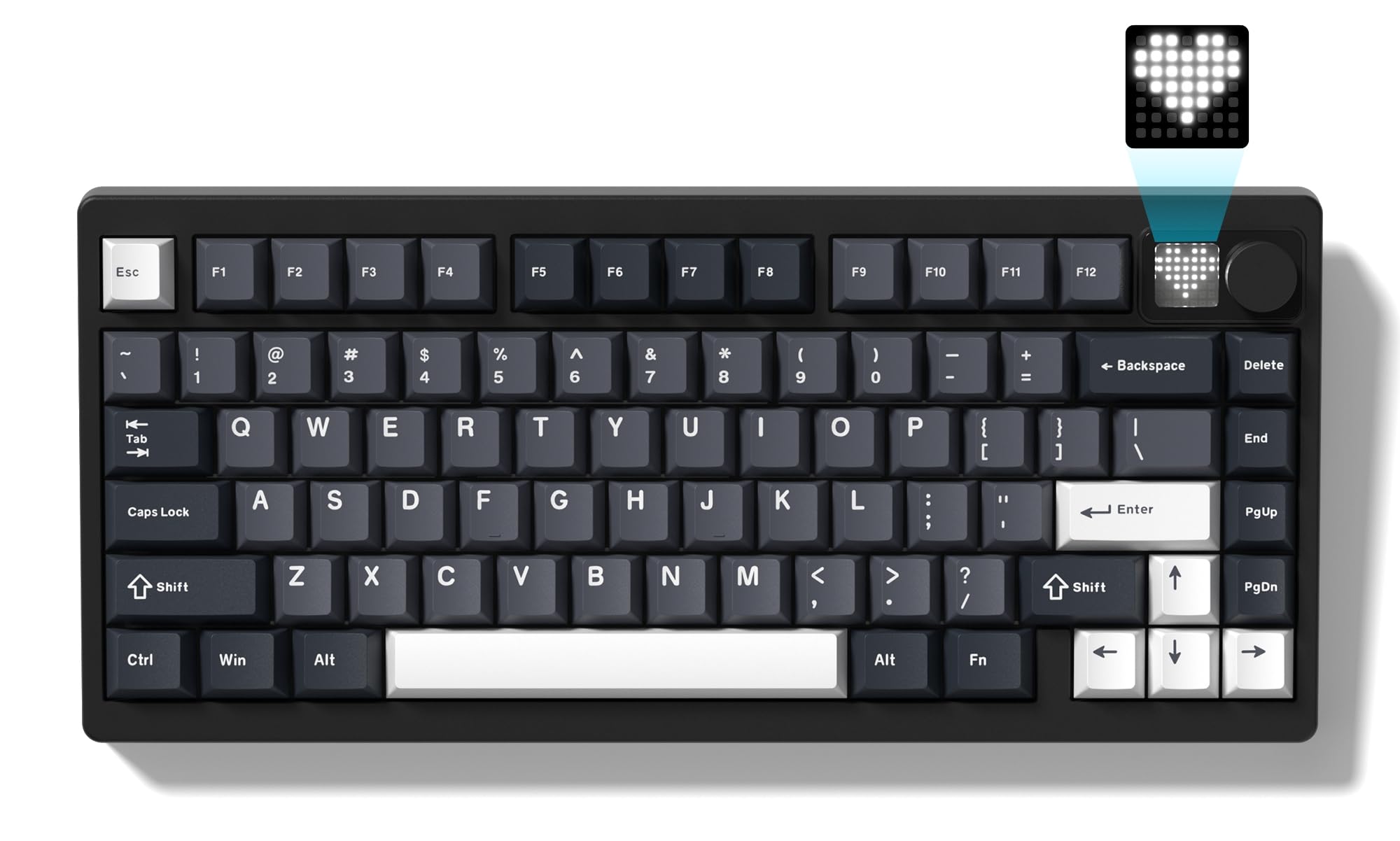
The Womier MT75 stands out in the mid-range with full QMK and VIA support, giving enthusiasts complete control over key mapping and macro layers without proprietary software. The aluminum frame adds substantial weight and rigidity — roughly 3 pounds — that many budget boards lack, while the 8000mAh battery delivers more than two weeks of daily use under typical RGB settings. The dot-matrix display offers six preset animations and custom static or dynamic icons via editing software.
The MT75 uses pre-lubed POM linear switches that feel creamy and smooth right out of the box. The hot-swap PCB supports both 3-pin and 5-pin switches, making it easy to experiment with tactile or clicky alternatives. Triple-mode connectivity covers BT5.0, 2.4GHz, and USB-C wired, and the board can pair with up to five devices simultaneously. The PBT keycaps are double-shot and resistant to shine, though the stock switches have some scratchiness that modders typically address with additional lubing.
One limitation is the fixed 8° typing angle — there are no adjustable feet, which may affect ergonomics for some users. The accessory packaging can also arrive compressed, but the keyboard itself appears well-protected. This is the top pick for users who want a premium aluminum foundation and plan to customize switches and keycaps over time.
Why it’s great
- Full QMK/VIA support with web-based configurator
- Heavy aluminum frame with 8000mAh battery
- Dot-matrix display with custom icon editor
Good to know
- Fixed 8° angle with no adjustable feet
- Stock switches may feel slightly scratchy
4. Aula NOVA75 Wireless Mechanical Keyboard
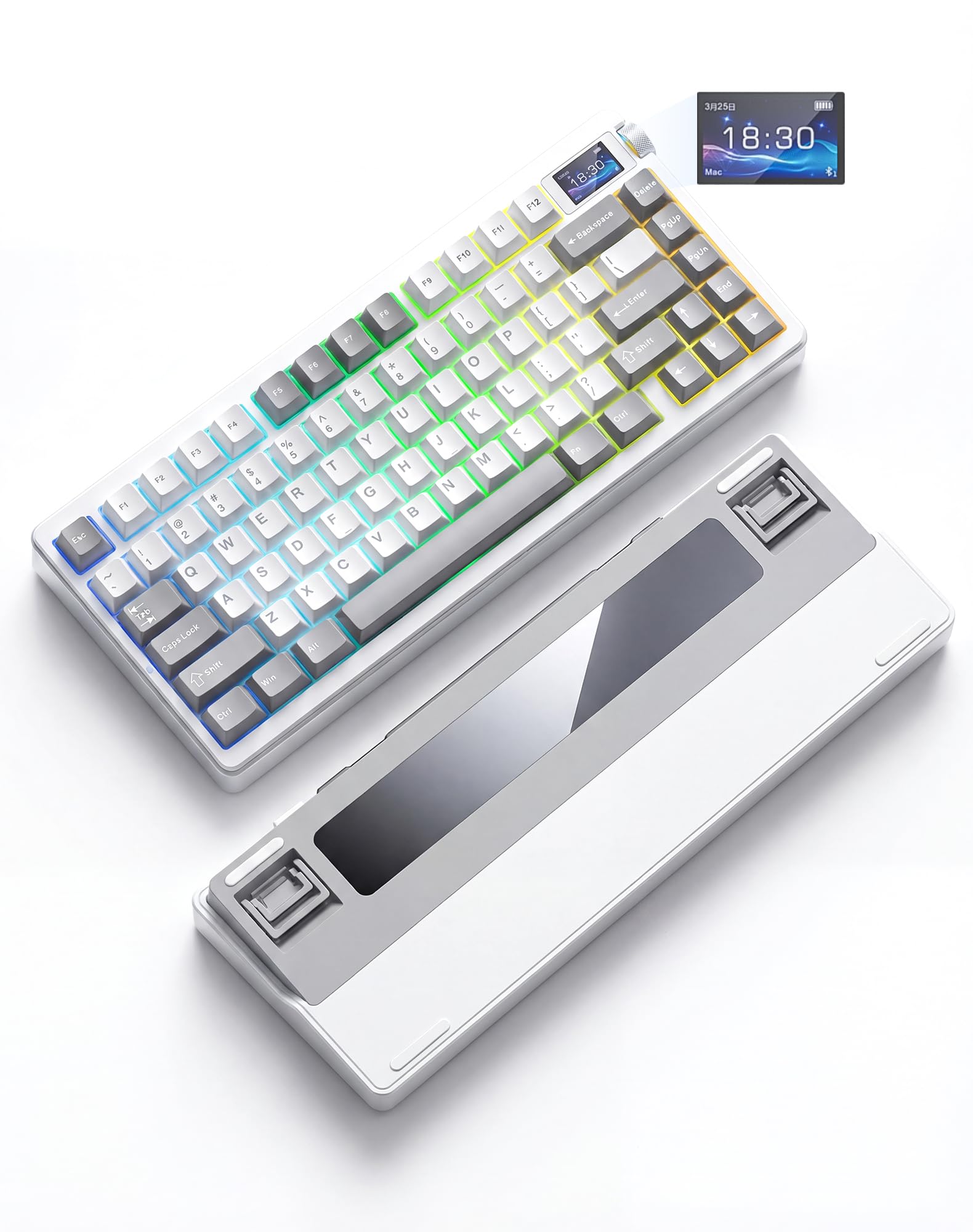
The Aula NOVA75 pairs a 1.14-inch TFT color LCD screen with an 8000mAh battery rated at 232 hours of continuous use with backlighting off — the highest endurance in this roundup. The screen shows battery level, connection status, system time, and custom GIF animations uploaded via the driver, making it a visually engaging addition to any desk setup. The Gray-White color scheme is complemented by an aluminum alloy backplate that adds rigidity without the full weight of a solid aluminum case.
The internal construction uses a gasket mount with six layers of premium padding — including PORON, IXPE, and PET — producing a creamy, thocky sound that is consistent across all keys. The pre-lubed Dream Sakura linear switches deliver a smooth keystroke, and the hot-swap PCB supports both 3-pin and 5-pin switches. Triple-mode connectivity includes Bluetooth 5.1 (up to three devices), 2.4GHz wireless, and USB-C wired, and the board is compatible with Windows, Mac, iOS, and Android.
The plastic enclosure, while well-built, does not match the premium feel of full aluminum competitors. The north-facing RGB orientation is optimized for shine-through keycaps, but may cause interference with some cherry-profile aftermarket sets. For users who prioritize battery life and want a fun, customizable display without paying full aluminum pricing, this is a compelling mid-range choice.
Why it’s great
- 232-hour battery life with 8000mAh capacity
- 1.14″ TFT screen for custom GIFs and system info
- 6-layer gasket dampening for thocky acoustics
Good to know
- Plastic enclosure lacks full aluminum feel
- North-facing LEDs limit some aftermarket keycaps
5. Corsair K65 Plus Wireless 75% Keyboard

The Corsair K65 Plus is built around pre-lubricated MLX Red linear switches, offering a smooth, consistent keypress that is favored by gamers who want quiet but responsive feedback. The 266-hour battery life with RGB off is among the best in its class, and the low-latency 2.4GHz connection uses AES encryption for secure wireless transmission. The multi-function rotary dial handles volume and media control with satisfying tactile detents.
The PBT dye-sublimated keycaps resist fading and shine better than standard ABS options, though they are not shine-through, making key legends harder to read in dark rooms without ambient light. The board connects to Corsair’s iCUE software for macro programming, key reassignment, and lighting customization, though macros require the software to be running — there is no onboard memory for macro storage. The compact 75% layout keeps arrow keys and function row intact while saving significant desk space over a full-size board.
Build quality is solid but the plastic case lacks the premium heft of aluminum alternatives at similar price points. The MLX Red switches are not hot-swappable, limiting customization options for switch enthusiasts. For users who want a reliable, low-latency wireless gaming keyboard from a major brand with extensive software support, this is a strong contender.
Why it’s great
- 266-hour battery life with 2.4GHz low-latency
- Smooth pre-lubed MLX Red linear switches
- Multi-function rotary dial for volume/media
Good to know
- Non-hot-swappable switches limit customization
- No shine-through keycaps — hard to read in dark
6. AULA S75 Pro Wireless Mechanical Keyboard
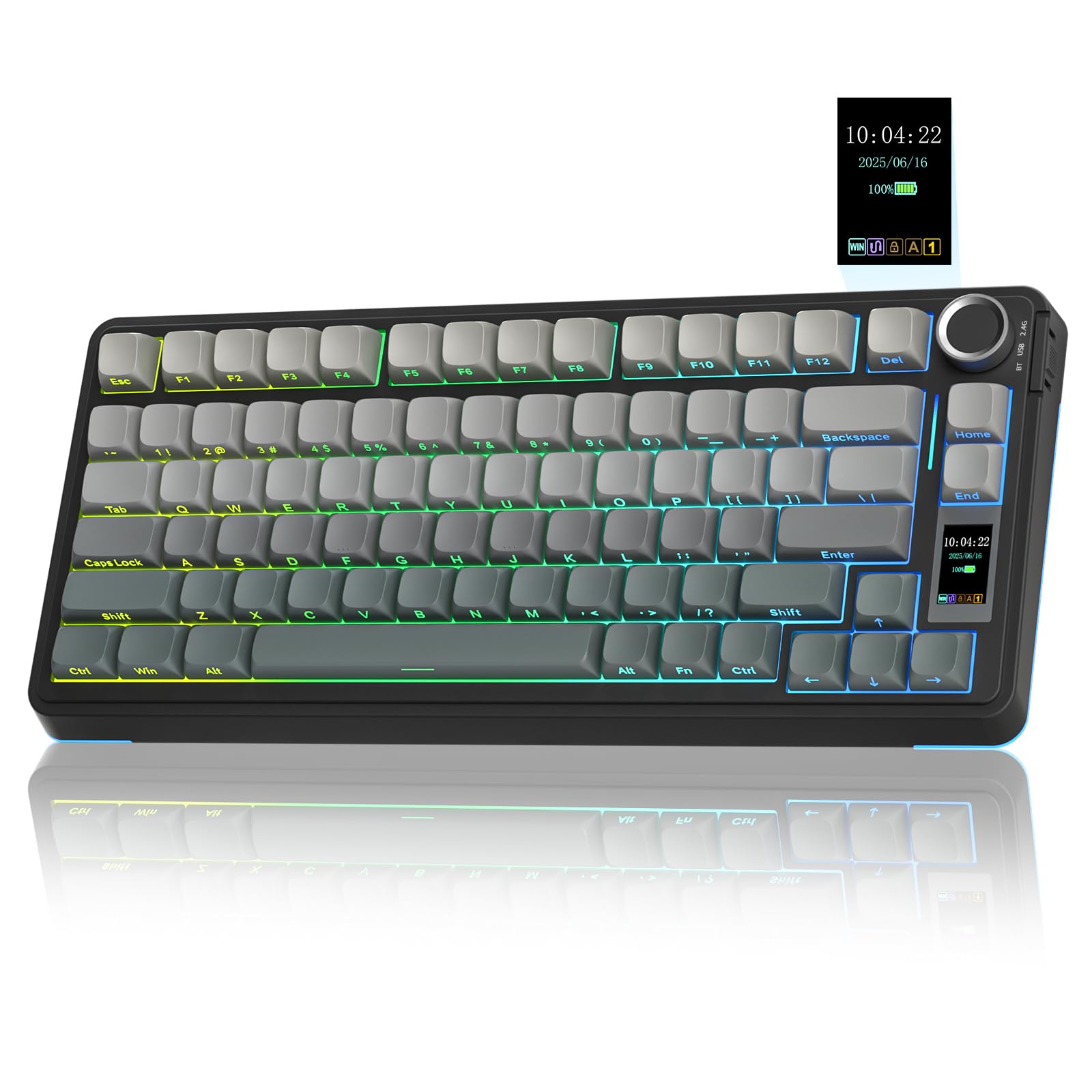
The AULA S75 Pro delivers an LCD screen and a multi-function knob at a price point where those features are rarely found together. The screen displays battery status, date, time, system, and custom GIF images — configurable via Windows software in wired mode. The side-engraved double-shot PBT keycaps with south-facing LEDs provide excellent low-light visibility, and the layout saves desk space while retaining essential arrow and function keys.
The board uses a gasket mount with five layers of filling silencer, including an extended integrated silicone pad, producing creamy, thocky acoustics that rival boards in higher price tiers. The hot-swap PCB supports 3-pin and 5-pin switches, and the pre-lubed linear switches offer smooth travel right out of the box. Triple-mode connectivity covers BT5.0, 2.4GHz, and USB-C wired, with a side button for quick switching between five paired devices.
The plastic enclosure is well-constructed but lacks the weight and rigidity of metal frames found in more expensive options. Battery life with RGB on is around 20 hours, dropping to roughly 1.5 days with full illumination, though the keyboard enters sleep mode to conserve power. The software interface is functional but not visually polished. For buyers on a strict budget who still want a screen, hot-swap flexibility, and a quality sound profile, this is the standout entry-level pick.
Why it’s great
- Affordable LCD screen for custom GIFs and system info
- 5-layer gasket dampening with creamy sound profile
- South-facing LEDs with side-engraved PBT keycaps
Good to know
- Plastic build lacks premium weight
- Battery life ~20 hours with full RGB
7. RedThunder K75 Wireless Mechanical Gaming Keyboard
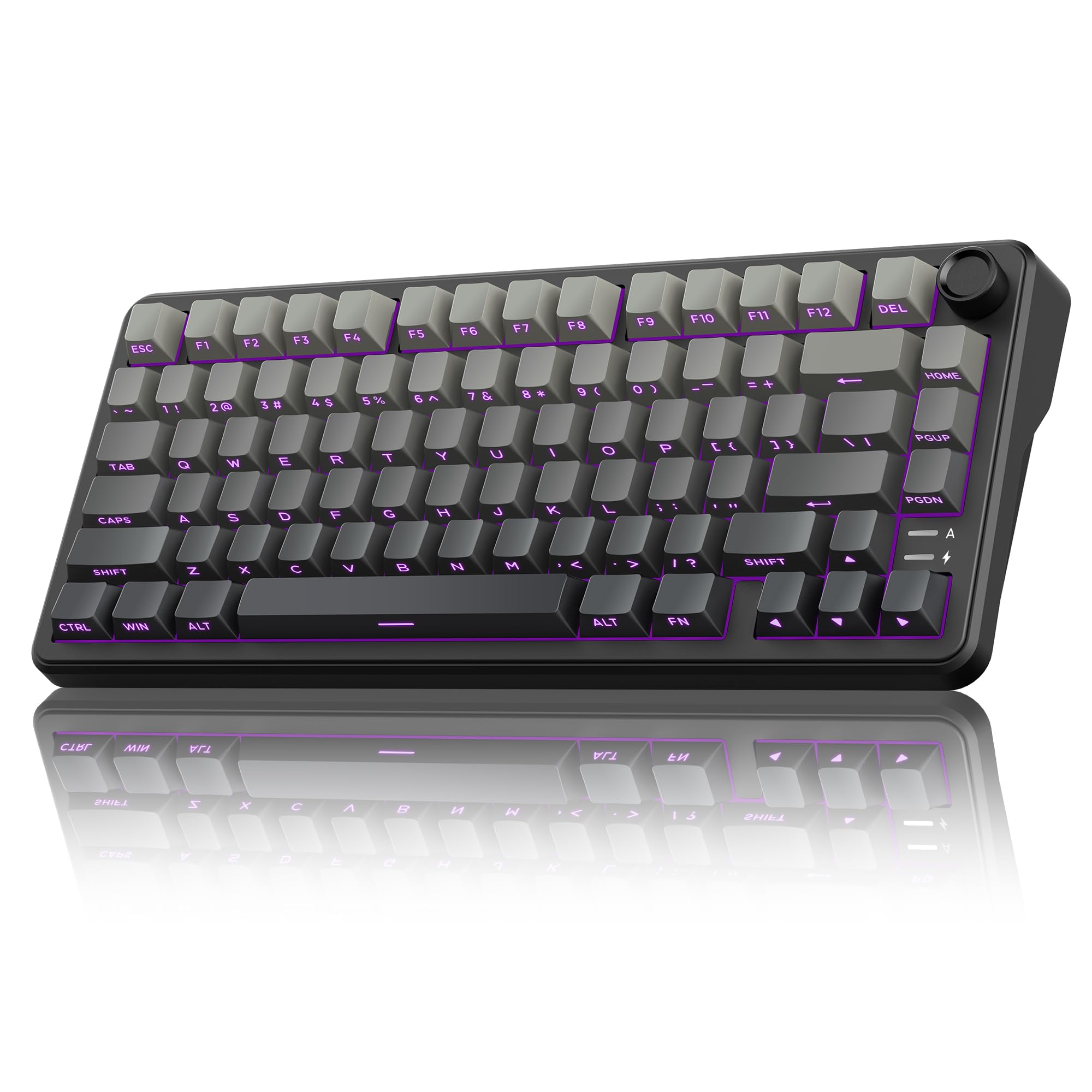
The RedThunder K75 is the most affordable board in this roundup that still includes a gasket mount, hot-swap PCB, and pre-lubed linear switches. The five-layer shock absorption design and single-key positioning plate deliver a softer keystroke than typical tray-mount budget boards, producing a creamy sound that punches well above the entry-level price tier. The gradient gray PBT keycaps are side-engraved and translucent, enhancing the RGB glow in dim environments while resisting shine over time.
Triple-mode connectivity covers 2.4GHz wireless, Bluetooth 5.0, and USB-C wired, with a 4000mAh battery that supports extended use with the RGB active. The CNC aluminum knob switches between RGB control and volume adjustment with a long press, adding convenient physical control that many budget boards omit. The programmable software enables key remapping, macro creation, and backlight customization in 2.4GHz or wired mode on Windows.
The plastic case and smaller 4000mAh battery reflect the cost-saving measures, and the board is not recommended for complete beginners due to the included accessories and side-engraved keycap design. The hot-swap PCB supports 3-pin and 5-pin switches, giving newcomers room to upgrade switches later without buying a new board. This is the right starting point for budget-conscious buyers who want gasket-mount feel, wireless freedom, and hot-swap flexibility without spending more.
Why it’s great
- Gasket mount with 5-layer dampening at entry-level pricing
- Hot-swap PCB supports 3-pin and 5-pin switches
- Side-engraved PBT keycaps with good RGB glow
Good to know
- Plastic case and smaller 4000mAh battery
- Not recommended for absolute keyboard beginners
FAQ
Can I use a 75% keyboard for competitive gaming?
What is the difference between 3-pin and 5-pin hot-swap compatibility?
How do I clean a gasket-mounted 75% keyboard?
Final Thoughts: The Verdict
For most users, the 75% mechanical keyboard winner is the Keychron K2 HE because its Hall Effect switches with per-key adjustable actuation offer a level of customization that no other board in this price range matches, and the web-based QMK configurator makes setup effortless across Windows, Mac, and Linux. If you want the best acoustic experience without any modding, grab the Wobkey Rainy 75 Pro for its 6063 aluminum build and factory-tuned thocky foam package. And for budget-friendly value with room to grow, nothing beats the Womier MT75, which combines a heavy aluminum frame, 8000mAh battery, and full QMK/VIA support at a mid-range price.