
Our readers keep the lights on and the weekend projects moving. As an Amazon Associate, I earn from qualifying purchases.
A wired network is only as strong as its weakest link, and that link is often a dusty, old 10/100 switch bottlenecking your entire home or office. Upgrading to a modern 8 port gigabit switch instantly removes the data jam, providing dedicated 1 Gbps or even 2.5 Gbps bandwidth to every connected device—from gaming PCs and 4K streamers to NAS drives and security cameras—without the latency or dropouts of Wi-Fi.
I’m Rikta — the co-founder and writer behind FitlyFast. After weeks of analyzing switching capacity, power budgets, noise levels, and real-world throughput reports for dozens of models, I’ve distilled the essential specs that separate a reliable network backbone from a frustrating bottleneck.
Whether you need silent fanless operation for a media room, Power over Ethernet for security cameras, or multi-gigabit speeds for a NAS, this guide cuts through the noise to help you find the best 8 port gigabit switch for your specific wired network setup.
How To Choose The Best 8 Port Gigabit Switch
Picking the right switch requires matching its capabilities to your actual gear. A basic unmanaged model is perfect for expanding a home router, while a PoE or multi-gigabit switch serves specific power or speed needs. The following breakdown clarifies the key decisions.
Unmanaged vs Smart Managed vs Fully Managed
The vast majority of home and small office buyers only need an unmanaged switch — plug it in, connect your cables, and it works instantly with zero configuration. Smart managed switches add a simple web interface for features like VLANs (to isolate IoT traffic) and QoS (to prioritize gaming or video). Fully managed switches offer deep control via CLI and SNMP, overkill for most non-enterprise setups.
Standard Gigabit vs 2.5G Multi-Gigabit
Standard gigabit (1 Gbps) is still plenty for most internet connections and streaming. However, if you have a NAS with a 2.5G port, a Wi-Fi 6 router with a 2.5G WAN, or you transfer large files between local machines, a multi-gigabit 2.5G switch provides up to 2.5x the throughput on existing Cat5e or Cat6 cabling — a future-proof upgrade that doesn’t require expensive new wiring.
Power over Ethernet (PoE) Budget
If you need to power IP cameras, VoIP phones, or wireless access points from a single cable, you need a PoE switch. The total PoE budget (measured in watts) determines how many devices you can power. A 120W budget can handle multiple high-power cameras, while lower budgets may be fine for a few phones and access points. Ensure each port’s individual power delivery supports your most demanding device (typically up to 30W per port with PoE+).
Quick Comparison
On smaller screens, swipe sideways to see the full table.
| Model | Category | Best For | Key Spec | Amazon |
|---|---|---|---|---|
| TP-Link TL-SG108S-M2 | 2.5G Unmanaged | Multi-gig network backbone | 40 Gbps switching capacity | Amazon |
| NETGEAR GS108Ev3 | Smart Managed | VLAN & QoS control | Lifetime warranty | Amazon |
| Real HD 2.5G Switch | 2.5G + SFP+ | High-speed local transfers | 10G SFP+ uplink | Amazon |
| BrosTrend 2.5Gb Switch | 2.5G Smart Features | Link Aggregation & VLAN | Static Link Aggregation | Amazon |
| STEAMEMO PoE+ Switch | Managed PoE | IP cameras & VoIP phones | 120W PoE budget | Amazon |
| NETGEAR GS308 | Unmanaged Gigabit | Simple plug-and-play expansion | Silent metal housing | Amazon |
| D-Link DGS-108 | Unmanaged Gigabit | Reliable home/office splitter | Surge & ESD protection | Amazon |
In‑Depth Reviews
1. TP-Link TL-SG108S-M2

The TP-Link TL-SG108S-M2 is the ideal upgrade for anyone who wants true multi-gigabit performance without the complexity of managed features. All eight ports deliver 2.5 Gbps each, and the auto-negotiation seamlessly drops back to 1 Gbps or 100 Mbps for older devices. Its 40 Gbps switching capacity eliminates congestion even under heavy simultaneous loads, making it a premium backbone for a modern wired network.
Setup is pure plug-and-play — no software, no configuration, no fuss. The compact plastic housing stays whisper-quiet thanks to its fanless design, and the power adapter is compact enough to not block adjacent outlets. It auto-senses link speeds so you can connect a mix of Wi-Fi 6 access points, gaming PCs, and NAS drives without worrying about compatibility.
The main trade-off is the plastic chassis; some users prefer a metal case for heat dissipation. However, in real-world use, the unit runs cool and shows no performance degradation. If you want an eight-port 2.5G switch that simply works out of the box, this is the definitive choice.
Why it’s great
- True unmanaged 2.5G on all eight ports
- Silent operation for noise-sensitive rooms
- Auto-negotiation with 100M/1G/2.5G
Good to know
- Plastic case, not metal
- No PoE support
2. NETGEAR GS108Ev3

The NETGEAR GS108Ev3 hits the sweet spot between a dumb switch and a full enterprise setup. As a Plus switch, it offers a simple web interface for basic managed capabilities — VLANs for traffic segmentation, QoS for prioritizing gaming or streaming, and port mirroring for network diagnostics. The metal chassis is sturdy, and NETGEAR backs it with a lifetime warranty and next-business-day replacement, which is rare at this tier.
Setup takes just a few minutes for networking-savvy users, but the default plug-and-play mode means even beginners can use it immediately without touching the software. The eight gigabit ports provide dedicated, non-blocking bandwidth, and the fanless design keeps it silent. Energy-efficient Ethernet (IEEE 802.3az) reduces power consumption when ports are idle.
One limitation is the plastic top cover (the base is metal), and the VLAN configuration interface is not the most intuitive — expect to read the manual. If you need port-based VLAN isolation for IoT devices on a budget, this switch delivers pro-level features without the pro-level price.
Why it’s great
- VLAN and QoS for traffic control
- Lifetime hardware warranty
- Port mirroring for network debugging
Good to know
- VLAN setup requires some learning
- Plastic top panel
3. Real HD 8 Port 2.5G Switch
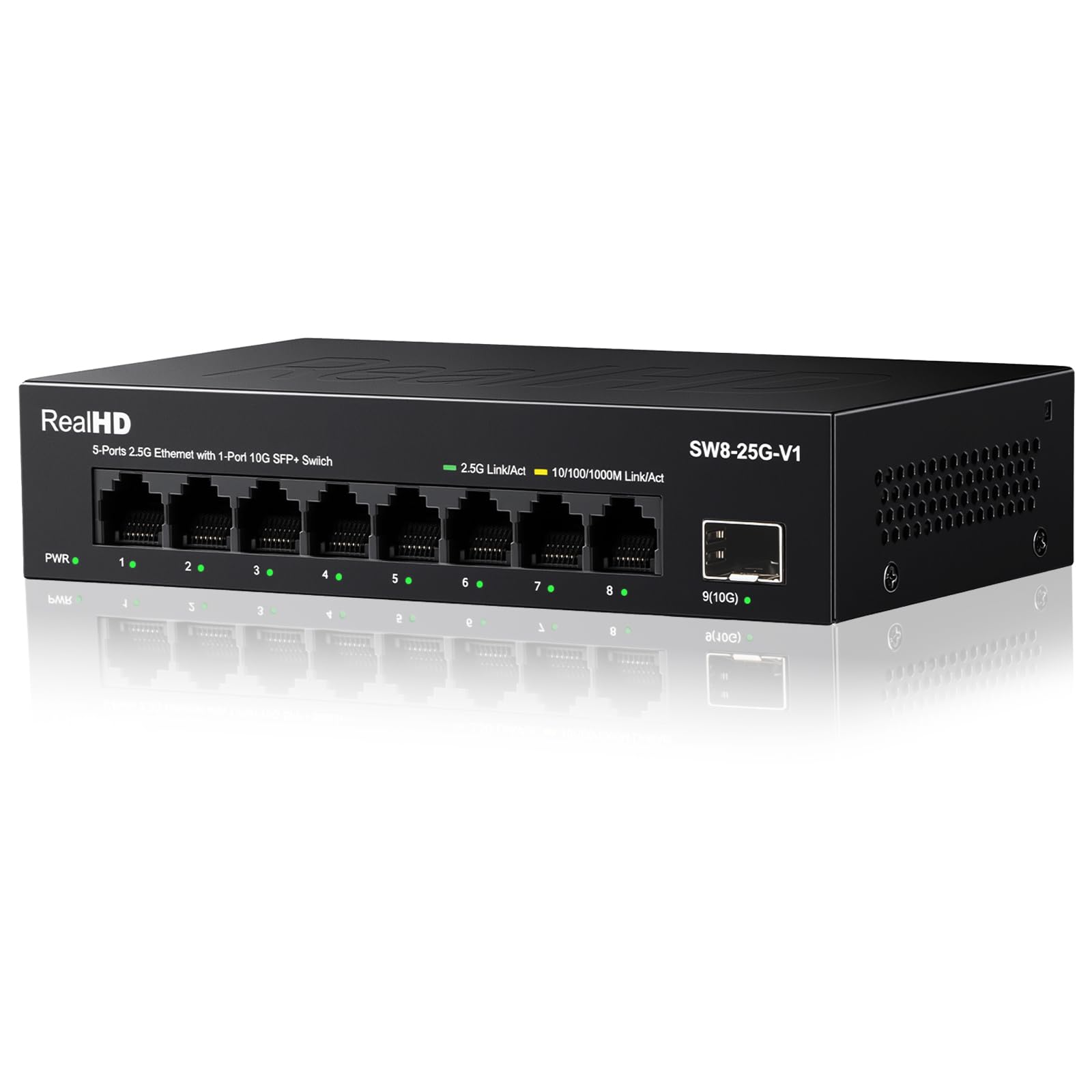
The Real HD 2.5G switch is a value-packed option for users who need both multi-gig RJ45 connections and a fiber uplink. Beyond its eight 2.5Gbps ports, it includes a dedicated 10G SFP+ port for connecting to a core switch or NAS, providing a future-proof bridge between copper and fiber infrastructure. The full metal housing with 4KV lightning protection adds durability for less-than-ideal environments.
Plug-and-play setup is refreshingly simple: power it up, connect your cables, and the switch auto-negotiates with any 10/100/1000/2500Mbps device. In practice, users report tripling local transfer speeds to around 300 MB/s when using compatible 2.5G hardware. Despite the metal build and higher throughput potential, the fanless design keeps it completely silent during operation.
The caution here is that achieving full 2.5G requires Cat6 cabling or better, and every device in the chain (router, NIC, cable) must support the same speed — otherwise, the bottleneck settles at the weakest link. For the price, this switch is a solid entry point into multi-gig networking, though power users may want a more established brand for long-term support.
Why it’s great
- 10G SFP+ port for fiber uplink
- Metal housing with lightning protection
- Great price per 2.5G port
Good to know
- Requires Cat6 cables for full speed
- Brand does not have the same reputation as NETGEAR or TP-Link
4. BrosTrend 2.5Gb Switch

The BrosTrend 2.5Gb switch stands out by offering a physical toggle button for three operational modes: Standard (unmanaged), Static Link Aggregation (combining two ports for up to 5 Gbps throughput to a NAS or server), and VLAN Mode (for port-based traffic isolation). This hardware-switch approach eliminates the need to log into a web interface, making advanced features accessible to users who want control without complexity.
All eight ports run at 2.5 Gbps, and the 40 Gbps switching capacity ensures no single connection saturates the backplane. The all-metal chassis is robust and ventilated for passive cooling, staying silent under any load. Static Link Aggregation is a genuine benefit for dual-NIC NAS setups, providing both increased bandwidth and automatic failover if one cable fails.
The VLAN mode has been reported as buggy in some firmware versions, causing DHCP issues for connected devices. If you rely heavily on hardware VLANs, you may want to test it thoroughly or use standard mode. For most home users who just want fast, reliable multi-gig connectivity with the option to aggregate, this switch delivers exceptional value.
Why it’s great
- Physical mode switch for LAG and VLAN
- Static Link Aggregation up to 5 Gbps
- Sturdy metal fanless design
Good to know
- VLAN mode can cause IP address conflicts
- No LACP support
5. STEAMEMO PoE+ Switch

The STEAMEMO PoE+ switch is built for users who need both network expansion and device power delivery over a single Ethernet cable. With eight PoE ports, each capable of delivering up to 30W (PoE+), and a total budget of 120W, it can comfortably power a mix of PTZ cameras, VoIP phones, and wireless access points. The additional two uplink ports allow you to connect to a router or another switch without sacrificing PoE capacity.
Despite being a managed switch, it offers a dual-mode toggle: run it as a simple unmanaged plug-and-play switch, or enable the web/cloud management interface for VLANs, QoS, port mirroring, and traffic monitoring. The fanless metal chassis keeps noise at zero, and the integrated 4KV surge protection adds resilience against power spikes. Users report powering five Reolink security cameras plus a monitor without any hiccups.
The data transfer rate on the PoE ports is 100 Mbps rather than gigabit — this switch is designed for camera and phone traffic, not high-speed file transfers. Also, the power adapter’s DC plug has been noted to have loose pins; some users modify the plug for a more secure connection. For a dedicated surveillance or VoIP network, this switch is cost-effective and reliable.
Why it’s great
- 120W PoE budget across 8 ports
- Dual managed/unmanaged modes
- Fanless and surge-protected
Good to know
- PoE ports are 100 Mbps only
- Power connector can be loose
6. NETGEAR GS308

The NETGEAR GS308 is the benchmark for what a budget-friendly 8-port gigabit switch should be. Its all-metal casing gives it a premium feel and excellent heat dissipation without any fan noise. Plugging in power and Ethernet cables is all it takes — no IP address, no software, no manual. It just works, which is exactly what most home users need when their router runs out of ports.
In practice, the GS308 delivers full line-rate gigabit speeds with near-zero added latency. It’s compact enough to tuck behind a desk or mount on a wall, and the energy-efficient design (IEEE 802.3az) automatically cuts power to idle ports. Users consistently report flawless stability after months of 24/7 operation with devices like media streamers, game consoles, and work computers.
The only real concessions are the lack of any management features and a plastic power adapter that some find cheap-feeling. You cannot create VLANs, prioritize traffic, or monitor port activity. If you simply need a reliable network splitter and have no interest in configuration, this is the gold standard in its category.
Why it’s great
- Solid metal case for quiet cooling
- True plug-and-play simplicity
- Energy-efficient idle port power-down
Good to know
- No managed features at all
- Power adapter feels cheap
7. D-Link DGS-108

The D-Link DGS-108 is a seasoned contender in the unmanaged switch space, recognized for its durable all-steel housing and built-in surge/ESD protection that helps it withstand everyday electrical spikes. It features eight auto-negotiating gigabit ports with smart QoS that prioritizes voice, video, and gaming traffic — a rare feature for an unmanaged switch at this level. IGMP snooping also helps manage IPTV and multicast streams efficiently.
Setup is instantaneous: connect power and cables, and the switch begins forwarding packets immediately. The fanless design guarantees silent operation, and the jam-packed feature set includes jumbo frame support (9 KB) for large file transfers and energy-efficient Ethernet to cut power usage by up to 80% on idle ports. Users report it runs cold even after days of continuous use, unlike older switches that would get hot.
The main drawback is that some units have caused addressing conflicts in specific modem/router bridge mode configurations, particularly with NVRs and VoIP adapters. These issues appear to be environment-dependent and not widespread. For a reliable, well-protected switch that adds QoS without complexity, the D-Link DGS-108 is a very strong choice.
Why it’s great
- All-steel housing with surge protection
- QoS and IGMP snooping for traffic tuning
- Jumbo frame support for transfers
Good to know
- Occasional addressing issues in bridge mode
- Power adapter included, but cable length may be short for some setups
FAQ
Can I plug an 8 port gigabit switch directly into my router?
Will a 2.5G switch work with my existing Cat5e cables?
What is the difference between an unmanaged and a managed 8 port switch?
How much power does an 8 port gigabit switch consume?
Final Thoughts: The Verdict
For most users, the best 8 port gigabit switch winner is the TP-Link TL-SG108S-M2 because it delivers true 2.5G performance on every port with zero setup hassle. If you want VLAN and QoS control on a budget, grab the NETGEAR GS108Ev3. And for powering security cameras or phones over Ethernet, nothing beats the STEAMEMO PoE+ Switch.