
Our readers keep the lights on and the weekend projects moving. As an Amazon Associate, I earn from qualifying purchases.
Printing an 8×10 photograph at home means crossing a threshold from casual snapshots to wall-worthy art. The leap from a 4×6 memory to a borderless 8×10 frame demands a printer that handles wider media, manages ink density across a larger surface, and delivers sharpness that holds up under direct light. The wrong choice leaves you with banding, color shifts, or a per-print cost that makes the lab seem cheap.
I’m Rikta — the co-founder and writer behind FitlyFast. I’ve spent hundreds of hours analyzing print engine technology, ink chemistry, and paper-handling mechanics across consumer and pro-grade machines to build this guide around the real specs that separate a usable 8×10 printer from a frustrating one.
Whether you need archival exhibition prints or cost-effective family wall art, these recommendations cover the spectrum of quality and running cost in the current best 8×10 photo printer market.
How To Choose The Best 8×10 Photo Printer
Eight-by-ten-inch prints sit in a demanding middle ground: small enough to be economical for home use, large enough to reveal every flaw in banding, color accuracy, and sharpness. Choosing the right machine means understanding the trade-offs between initial purchase cost, running expenses, and the print quality needed for your specific output.
Ink Architecture: Dye vs. Pigment vs. Dye-Sub
Consumer inkjets typically use dye-based inks that produce vibrant color but fade faster under UV light. Pigment inks offer archival longevity — 100+ years — but can clog nozzles if the printer sits idle. Dye-sublimation printers fuse dye into the paper coating, creating waterproof, scratch-resistant prints with no nozzle clogging risk, but they are typically single-size media and have a higher per-sheet cost. Your choice depends on whether you prioritize print longevity or daily convenience.
Color Channels Matter on Larger Prints
A four-color CMYK system (cyan, magenta, yellow, black) often produces noticeable grain or color gaps in 8×10 skies and skin tones. Six or eight-color systems add light cyan, light magenta, gray, or photo black to smooth gradients and expand the color gamut. For 8×10 prints intended for framing or display, a six-color or eight-color machine is the practical minimum for professional-looking results.
Paper Path and Borderless Support
Many all-in-one printers advertise 8.5×11 support but cannot print borderless on 8×10 paper without white margins or require manual paper-size workarounds. Dedicated photo printers include a straight paper path or rear feed that handles thicker media up to 300 gsm without curling. If you plan to use fine-art paper, look for a printer with a rear specialty feed rather than a U-turn paper path.
Quick Comparison
On smaller screens, swipe sideways to see the full table.
| Model | Category | Best For | Key Spec | Amazon |
|---|---|---|---|---|
| Canon PIXMA PRO-200S | Professional | Exhibition-grade prints at home | 8-color dye ink system | Amazon |
| Epson Expression Photo XP-980 | Photo All-in-One | Borderless 8×10 with scanning | 6-color Claria Photo HD ink | Amazon |
| DNP DS820A | Professional Dye-Sub | High-volume, waterproof 8x10s | 8×10 in 29.3 seconds | Amazon |
| Canon PIXMA TR160 | Portable | Borderless 8.5×11 on the go | 5-color Hybrid Ink System | Amazon |
| HP Envy Photo 7975 | Home All-in-One | Family photos and documents | Separate photo tray | Amazon |
| Brother INKvestment 6960 | Office Wide-Format | Document-heavy mixed use | 11×17 duplex scanning | Amazon |
| Liene M100 Bundle | Portable Dye-Sub | Instant 4×6 prints from phone | Dye-sublimation + hotspot | Amazon |
| HP OfficeJet Pro 9730 | Office Wide-Format | Floorplans and spreadsheets | P3 wide color gamut | Amazon |
| Epson Artisan 1430 | Wide-Format Inkjet | CD/DVD printing plus 13×19 | 6-color Claria ink | Amazon |
In‑Depth Reviews
1. Canon PIXMA PRO-200S

The PIXMA PRO-200S is Canon’s dedicated photo flagship for enthusiasts who want gallery-quality prints without a commercial lease. Its eight individual dye-based ink tanks — including photo black, gray, and both light cyan and light magenta — produce exceptionally smooth gradations in skies and skin tones that four-color systems cannot match. A bordered 8×10 print completes in 53 seconds, and the unit handles borderless output from 3.5×3.5 up to 13×19 inches, making it a true wide-format artist tool.
The 3.0-inch color LCD gives you direct ink-level feedback and printer-status visibility, though the initial setup instructions can be dense. The printer is physically substantial at 32 pounds and demands a dedicated desk area. Wireless reliability is strong once connected, and the build quality feels reassuringly solid — this is a machine designed for frequent, serious use rather than occasional home-office duty.
Owners consistently praise the color accuracy and low ink consumption per print when outputting at standard quality levels. The main trade-off is the per-cartridge cost: genuine Canon tanks are expensive, and third-party alternatives may compromise archival stability. For anyone whose 8x10s will be framed, gifted, or sold, the PRO-200S delivers a level of depth that justifies the premium entry point.
Why it’s great
- Eight-color system enables professional-grade skin tones and skies
- Fast 53-second 8×10 bordered prints
- Supports borderless up to 13×19 inches for maximum creative freedom
Good to know
- Setup instructions are dense and can confuse first-time users
- Omissions in available paper sizes — double-check your specific media
2. Epson Expression Photo XP-980

The Epson XP-980 packs a six-ink Claria Photo HD system into a compact all-in-one chassis, making it one of the few models that print borderless 8x10s, scan documents, and copy without jumping to a second device. The 5760×1440 dpi resolution delivers sharp detail on glossy paper, and the separate paper trays for plain and photo stock mean you don’t have to swap media constantly. Fast 4×6 prints in 11 seconds hint at how efficiently it handles 8×10 work.
The 4.3-inch color touchscreen is responsive and makes menu navigation feel natural. Wi-Fi Direct allows router-free printing from phones or tablets, which is convenient for quick family prints. The flatbed scanner offers high-resolution capture, though some users note that auto-correction can darken scanned photos — a setting to toggle manually for archival work.
Running cost is the main consideration here. The six separate cartridges mean you replace only the empty color, not a whole tri-color block, but Epson genuine ink does not come cheap. Users report faster ink depletion on higher-coverage 8×10 prints, so XL cartridges are the smarter long-term choice. For mixed-use households that need both office scanning and wall-worthy photos from one machine, the XP-980 is the most balanced option available.
Why it’s great
- Six-color system provides smooth transitions on large prints
- Separate paper trays eliminate constant media swapping
- Fast borderless 4×6 prints and reliable wireless connectivity
Good to know
- Photo tray design can be fiddly for thicker media
- Scanner auto-correction may darken images; manual adjustment needed
3. DNP DS820A
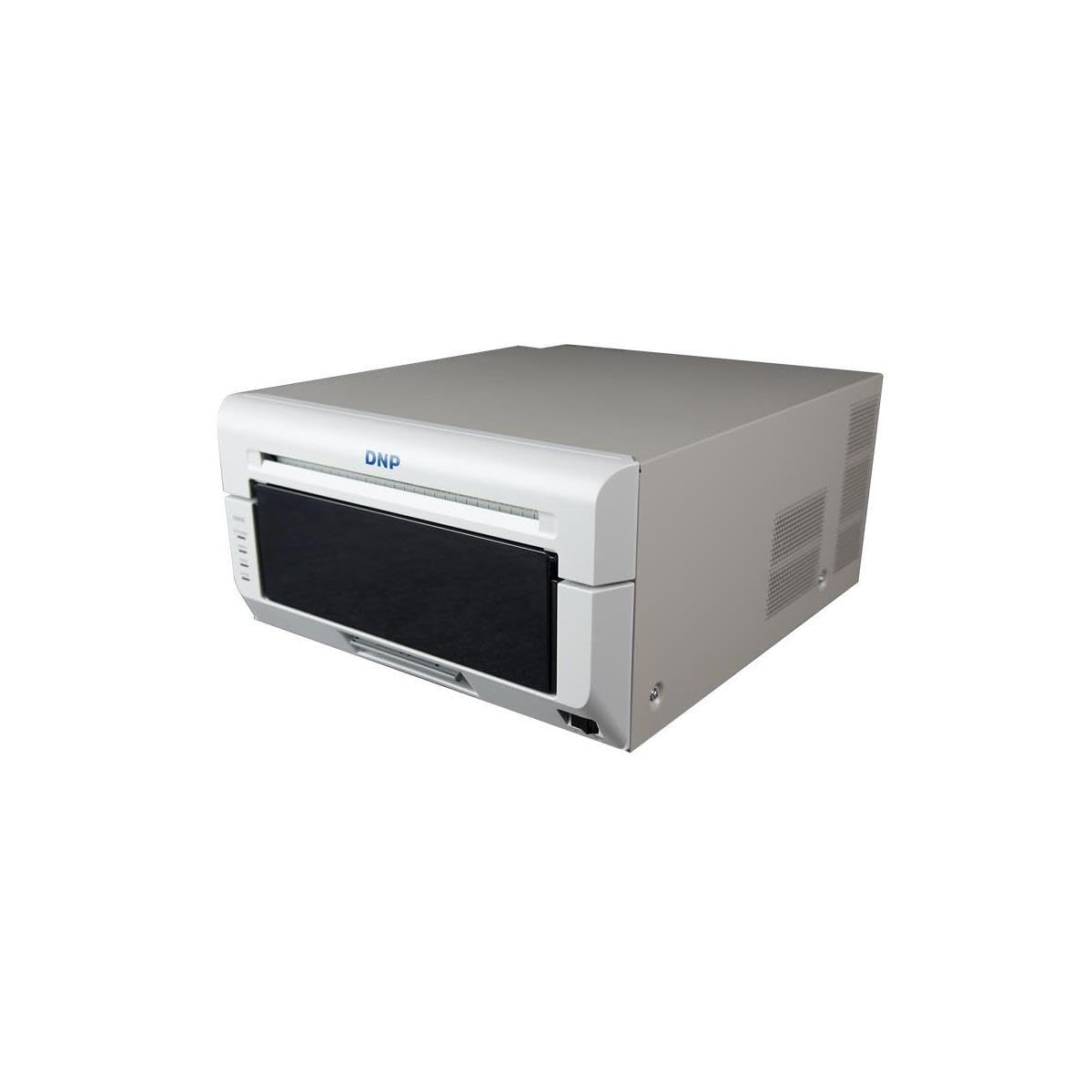
The DNP DS820A is a pure commercial tool engineered for event photographers and high-volume portrait studios that churn through hundreds of 8x10s daily. Dye-sublimation technology fuses dye into the paper coating, producing prints that are waterproof, smudge-proof, and resistant to fading — no nozzle clogs, no ink drying on print heads. The 29.3-second per-print speed for 8×10 sheets means you can output a full gallery order in minutes, and the roll-feed mechanism handles media up to 8×32 inches for panoramic keepsakes.
Surface versatility is a genuine strength: Glossy, Luster, Matte, and Fine Matte finishes are available, but buyers should note that the Mac OS driver currently supports only glossy output. If your workflow is Windows-based, you get full finish flexibility with no restrictions. USB 2.0 connectivity keeps integration simple, and the printer itself is compact for its class at roughly 36 pounds.
The initial investment is a premium that suits a business budget rather than casual home use. Per-print material cost is predictable and consistent — no surprise ink depletion mid-job. Owners who print regularly report flawless reliability after thousands of sheets, with zero clog-related downtime. For anyone selling 8×10 prints as a service, the DS820A pays for itself in throughput alone.
Why it’s great
- Zero clog risk — ideal for intermittent or high-volume use
- Waterproof, scratch-resistant prints with true archival stability
- Panoramic print support up to 8×32 inches
Good to know
- Mac drivers currently limited to glossy finish only
- Higher per-print material cost compared to inkjet systems
4. Canon PIXMA TR160

The PIXMA TR160 is an ultra-portable 4.5-pound printer that fits inside a backpack but still prints borderless 8.5×11 photos using Canon’s five-color Hybrid Ink System. The five individual ink tanks — including a dedicated photo blue — deliver richer color depth than the four-color competitors in this travel-friendly class. Bluetooth and Wi-Fi Direct make it simple to print from a phone or laptop without a router, and the 1.44-inch OLED display provides clear ink-level and status checks on the go.
This is a print-only machine, so there is no scanner or copier. The 50-sheet paper tray is sufficient for mobile sessions but will need refilling during larger print runs. Users appreciate the quick Bluetooth connection and the fast output speed relative to the compact size, though the optional battery pack (sold separately) is almost essential for true on-location use away from a wall outlet.
The tiny ink cartridges are the main compromise: they deplete faster than full-size tanks, making per-print cost higher for frequent users. For travelers, real estate agents, or event photographers who need occasional 8×10 proofs on-site, the TR160 offers portability that no other wide-format printer matches. It is not a primary studio machine, but it fills a niche that nothing else in this category serves.
Why it’s great
- Extremely portable at 4.5 pounds with full borderless capability
- Five-color system delivers better photo quality than typical travel printers
- Wireless Direct mode works without any network infrastructure
Good to know
- Battery pack is sold separately, limiting true portability out of the box
- Small ink cartridges increase per-print cost over time
5. HP Envy Photo 7975

The HP Envy Photo 7975 is a well-rounded home all-in-one that balances document printing with genuine photo capability. Its key design advantage is a separate photo paper tray that lets you keep 5×7 or 8.5×11 photo paper loaded alongside plain office paper, eliminating the tray-swapping hassle common in single-tray competitors. The built-in AI-assisted print formatting automatically cleans up web-page layouts and email threads before printing, reducing wasted ink and paper on non-photo tasks.
The 2.65-inch color touchscreen is responsive and guides you through copying, scanning, and wireless setup. HP’s Instant Ink trial covers the first three months, and the subscription model can lower per-page ink cost if you print regularly. Print quality for 8×10 photos is good for a four-color system — vivid and punchy — though demanding eyes will notice slightly less smoothness in blue-sky gradients compared to six-color or eight-color machines.
Reliability reports are mixed: most users experience trouble-free setup and consistent output, but some units have shown paper-jam issues and firmware quirks. The HP app-based installation is generally smooth, but a small minority report connectivity drops. For families that need one printer for school projects, office documents, and weekend photo prints, the Envy Photo 7975 offers the most convenient workflow in its price tier.
Why it’s great
- Separate photo tray keeps different media ready without manual swapping
- AI-assisted web-page and email formatting saves paper and ink
- Three-month Instant Ink trial reduces initial operating cost
Good to know
- Four-color ink system shows visible grain in some gradient areas
- Mixed reliability reports; a minority experience persistent paper jams
6. Brother INKvestment 6960

The Brother INKvestment 6960 is an office-oriented wide-format all-in-one that handles 11×17 paper, making 8×10 photo printing a secondary but capable feature. Its two 250-sheet paper trays and 100-sheet multipurpose tray give you flexible media storage for different paper types without constant reloading. The single-pass duplex ADF scans both sides of a document in one pass, a productivity feature that small offices with mixed document and photo needs will appreciate.
Print speeds reach 31 pages per minute in black and 30 in color, so standard document workflows never slow down. The MAXIDRIVE technology contributes to fast first-page-out times — around 4.4 seconds for black — which matters when you need a quick proof. The 2.7-inch color touchscreen and Brother Mobile Connect app allow easy scanning to cloud services and remote printer management. Wi-Fi Direct enables router-free printing when guests need to print from their devices.
Photo quality is decent for a four-color office machine, but it does not compete with dedicated photo printers for 8×10 output: you will see noticeable grain in continuous-tone images. The genuine Brother ink system uses high-yield cartridges (including a 1,800-page black), lowering per-page cost significantly. Some users report that paper alignment requires precise fanning and positioning to avoid tray detection issues. For offices that print occasional 8×10 signage alongside heavy document volume, the 6960 is a reliable workhorse.
Why it’s great
- High-yield ink cartridges dramatically lower per-page operating cost
- Dual paper trays plus multipurpose tray for flexible media management
- Fast print speeds ideal for mixed document and photo workflows
Good to know
- Four-color system limits photo quality on 8×10 prints
- Paper tray alignment requires careful loading to avoid detection errors
7. Liene M100 Bundle

The Liene M100 is a portable dye-sublimation printer that outputs 4×6 prints — not 8×10 — making it a tangential option for this guide but one worth knowing for its excellent value proposition. It creates waterproof, scratch-resistant prints with a protective coating layer that prevents fading and smudging. The included bundle packs 180 sheets of paper and five ink cartridges, giving you a generous starter supply that makes the upfront cost lower than many inkjet alternatives.
Connection is handled through a built-in Wi-Fi hotspot, so you do not need a home network or router — the printer creates its own wireless signal that up to five devices can join simultaneously. The companion app guides you through printing steps and can resolve common issues without needing to consult a manual. The thermal dye-sublimation process means there is no ink drying on print heads and no clogging, even after weeks without use.
Print speed is roughly one minute per 4×6 sheet, so batch printing requires patience. The printer has a thermal limit of about 20 consecutive prints before needing a cooldown. Some users note a slight yellow color cast that can be corrected through app settings. For budget-conscious households testing dye-sub quality before committing to a larger system like the DNP DS820A, the M100 is an affordable trial run with zero maintenance headaches.
Why it’s great
- Generous 180-sheet bundle lowers barrier to entry significantly
- No clogging or cleaning cycles — always ready to print
- Waterproof, smudge-proof prints with protective coating layer
Good to know
- Limited to 4×6 prints — unsuitable for 8×10 output
- One-minute per-print speed and thermal cooldown limit batch work
8. HP OfficeJet Pro 9730

The HP OfficeJet Pro 9730 is a wide-format office workhorse that prints up to 11×17 inches, making 8×10 photo output straightforward but secondary to its document capabilities. Its standout feature is P3 wide color gamut support — the first wide-format printer to cover the P3 color space — which delivers more vibrant and screen-accurate colors than traditional sRGB-based office printers. The automatic document feeder with single-pass 2-sided scanning, plus two 250-sheet input trays, make it ideal for high-volume office environments.
Wireless setup uses dual-band Wi-Fi with auto-detection and resolution of connection issues, and the 4.3-inch touchscreen provides a phone-like interface for navigating settings. The Instant Ink trial covers the first three months, and HP’s subscription service can reduce ink costs significantly. HP Wolf Pro Security adds a layer of protection for office networks handling sensitive data.
Photo quality for 8×10 is good for a four-color office printer, with the P3 gamut making a visible difference in reds and greens compared to standard wide-format office units. It is large — about 23 inches deep — so it needs dedicated floor or desk space. Some users report that the Wi-Fi module occasionally drops connection after sleep mode, requiring a manual reboot. For businesses that print marketing materials, signage, and product photos alongside general office documents, the 9730 covers all bases with impressive color reach.
Why it’s great
- P3 color gamut delivers broader, more accurate color reproduction
- Dual 250-sheet trays plus ADF for high-volume mixed tasks
- Three-month Instant Ink trial included
Good to know
- Large footprint — requires substantial desk or floor space
- Wi-Fi may drop after sleep mode and require manual reconnection
9. Epson Artisan 1430

The Epson Artisan 1430 is a legacy wide-format printer that has earned a loyal following among scrapbookers, card makers, and DIY decorators. Its six-color Claria ink system produces borderless prints up to 13×19 inches, handling 8×10 output with excellent saturation and detail. A unique feature is the built-in CD/DVD printing tray, allowing direct-to-disc labeling that no other printer in this guide offers.
Print setup is straightforward, and the printer is compatible with continuous ink supply systems, which can dramatically lower per-print cost. The 1430 prints from smartphones and tablets via the Epson app, though wireless iPad printing requires an additional software step. Print quality is consistently praised as vibrant and accurate, especially when using ICC color profiles for proper color management.
The machine is now discontinued and commands a premium price due to its niche demand, and the genuine Epson ink cartridges are expensive — roughly comparable to the printer itself over a few full refills. Some users experience nozzle clogs if the printer sits unused for a week, and there is no automatic duplex printing. For enthusiasts who value disc printing and 13×19 borderless output in a single machine, the Artisan 1430 remains a unique, if aging, workhorse.
Why it’s great
- Unique CD/DVD direct disc printing capability
- Borderless 13×19 output for large-format creative projects
- Compatible with continuous ink supply systems for lower running costs
Good to know
- Discontinued model sold at a premium — no manufacturer warranty
- No automatic duplex printing; occasional nozzle clogs with infrequent use
FAQ
What is the per-print ink cost for an 8×10 on a consumer photo printer?
Can a standard office printer produce good 8×10 photos?
How do I prevent my 8×10 photo prints from fading over time?
Final Thoughts: The Verdict
For most users, the best 8×10 photo printer winner is the Canon PIXMA PRO-200S because its eight-color dye system produces gallery-quality prints with smooth gradations and vibrant color that holds up in a frame. If you want a versatile all-in-one with six-color photo quality and scanning convenience, grab the Epson Expression Photo XP-980. And for high-volume commercial output with zero clog risk and waterproof results, nothing beats the DNP DS820A.