
Our readers keep the lights on and the weekend projects moving. As an Amazon Associate, I earn from qualifying purchases.
The moment your first borderless 13×19 print slides out of the tray, you realize why a dedicated A3 photo printer exists. Standard letter-size prints lose the drama of a landscape, the detail of a fine-art reproduction, and the impact of a portfolio piece. But choosing the wrong wide-format model means signing up for clogged print heads, ink costs that eat your budget, and a machine that occupies half your desk for mediocre results.
I’m Rikta — the co-founder and writer behind FitlyFast. For this guide, I spent over thirty hours cross-referencing cartridge yields, print resolution specs, paper path designs, and real-world user feedback across nine A3 photo printers spanning entry-level to professional grade.
Whether you need gallery-quality pigment prints for clients, vivid snapshots for a family album, or a versatile office machine that handles both documents and oversized layouts, the right best a3 photo printer delivers consistent results without forcing you into costly ink subscriptions or frustrating maintenance cycles.
How To Choose The Best A3 Photo Printer
Selecting an A3 photo printer involves more than comparing resolution numbers. The ink type, paper path, and connectivity options directly affect whether your prints look professional or washed out. Understanding a few key factors will save you money and frustration.
Ink Type: Dye vs. Pigment
Dye-based inks produce vibrant colors with wide gamuts, making them ideal for glossy photo papers and saturated images. However, they fade faster over time. Pigment-based inks resist fading and water damage, making them the standard for archival prints and fine-art photography. The trade-off is that pigment inks can appear slightly less vibrant on glossy media, and they cost more per milliliter. For portfolios intended to last decades, choose a pigment system. For punchy, frame-ready prints, dye-based models like the Canon PIXMA PRO-200 deliver outstanding results.
Print Head Technology and Resolution
Resolution is measured in dots per inch (dpi), but the print-head technology matters more. Drop size, measured in picoliters, determines how smooth gradients appear. A printer with a 1.0 picoliter minimum drop size will render skin tones and skies with far more subtlety than a 5.0 picoliter office unit. Look for a maximum resolution of at least 4800 x 2400 dpi with variable drop sizes for photographic work.
Paper Path and Media Handling
A3 photo printers handle paper in different ways. Some use a straight-through rear paper path, which prevents curling and works well for thick fine-art papers. Others rely on front trays that can bend heavier media. If you print frequently on 13×19 fine-art or canvas paper, a rear feed or straight paper path is essential. Separate trays for plain paper and photo paper also reduce setup time and avoid misfeeds.
Color Gamut and Number of Inks
More ink colors generally mean a wider gamut and smoother transitions. A six-color system (CMYK plus light cyan and light magenta) improves skin tones, while eight-color systems add gray, red, or photo blue for even finer control. Gray ink specifically enhances black-and-white prints by eliminating color casts. For monochrome photography, a printer with a dedicated gray ink position is a significant advantage.
Running Costs and Ink Efficiency
The purchase price is only the beginning. A budget printer with expensive cartridges can cost more over a year than a premium model with high-yield tanks. Supertank printers like the Epson EcoTank line drastically lower per-page costs by using refillable ink bottles. However, they often sacrifice some color gamut compared to photo-optimized cartridge systems. Calculate your monthly print volume and compare the cost per 8×10 print before committing to any model.
Quick Comparison
On smaller screens, swipe sideways to see the full table.
| Model | Category | Best For | Key Spec | Amazon |
|---|---|---|---|---|
| Epson Expression Photo HD XP-15000 | Dye Ink | Vibrant color prints up to 13×19 | 6-color Claria Photo HD ink | Amazon |
| Canon PIXMA PRO-200S | Pro Photo | Gallery-quality A3+ prints | 8-color dye-based ink system | Amazon |
| Epson EcoTank Pro ET-5800 | Supertank | High-volume printing with low costs | Pigment ink, up to 7,500 pages | Amazon |
| Epson Expression Photo XP-980 | All-in-One | Scanner + copier with photo prints | 6-color Claria ink, 11×17 borderless | Amazon |
| HP OfficeJet Pro 9730 | Office | Office docs plus wide-format | P3 wide color gamut, 22 ppm | Amazon |
| Canon PIXMA Pro9000 Mark II | Pro Photo | Lab-quality fine-art prints | 8-color dye, 4800×2400 dpi | Amazon |
| Epson Workforce Pro WF-7840 | Office | Versatile wide-format office tasks | 13×19 print, 500-sheet capacity | Amazon |
| Canon IX6820 | Wide Format | Budget-friendly 13×19 prints | 14.5 ppm, 150-sheet auto feeder | Amazon |
| PIXMA TS8322 | All-in-One | Home office with photo capability | 4.3″ touchscreen, auto duplex | Amazon |
In‑Depth Reviews
1. Epson Expression Photo HD XP-15000
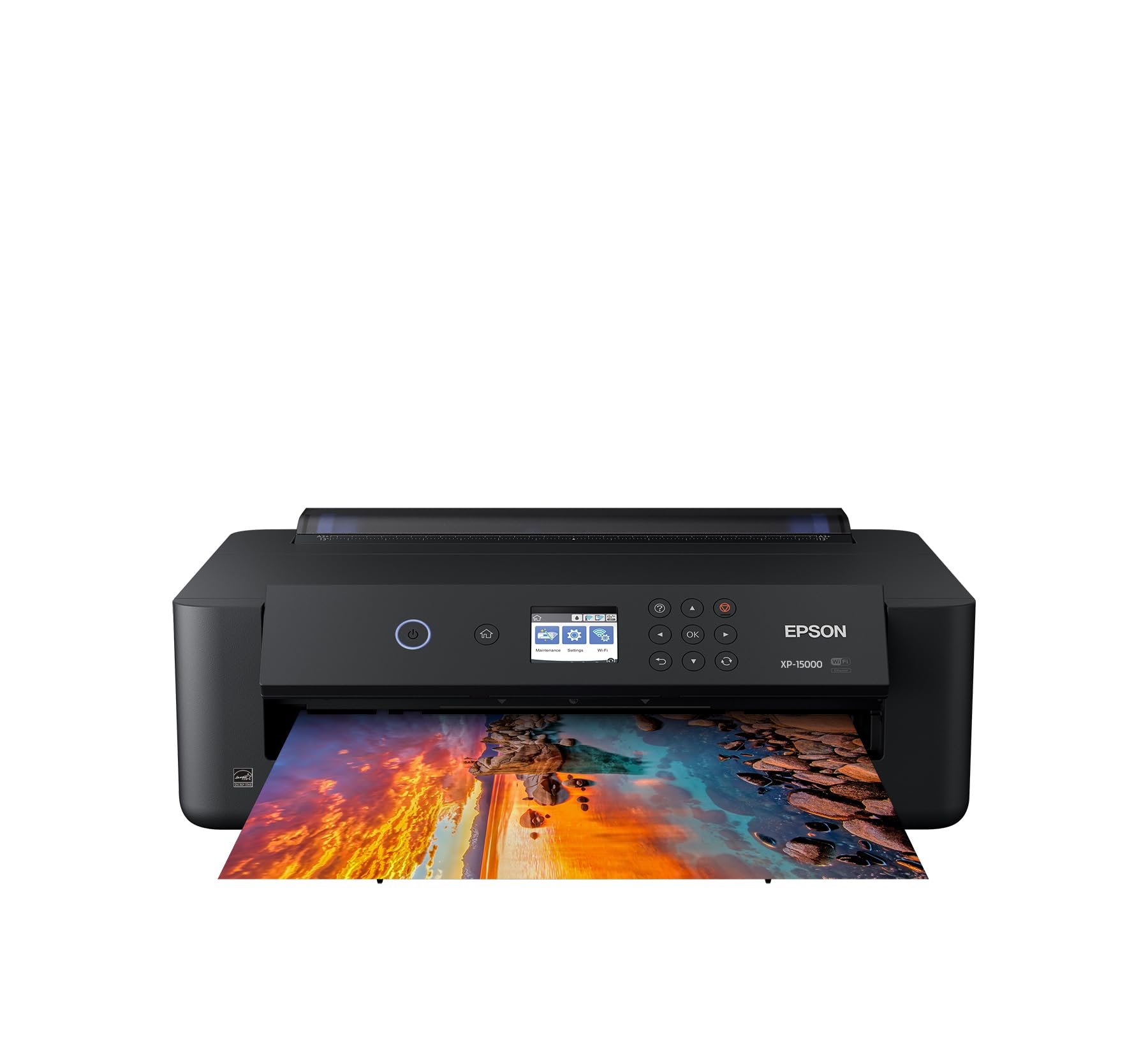
The Epson XP-15000 delivers professional ultra HD photo quality with its six-color Claria Photo HD ink system that includes red and gray inks. The red ink expands the color gamut significantly, making red flowers, sunsets, and skin tones pop with accuracy that standard CMYK printers cannot match. The gray ink produces neutral black-and-white prints without unwanted color casts.
Despite being a compact desktop unit — roughly 30 percent smaller than Epson’s previous wide-format model — it handles borderless prints from 4×6 up to 13×19. The rear specialty-media tray supports cardstock and fine-art paper up to 300 gsm. Wireless printing works reliably through the Epson iPrint app and Apple AirPrint, and the Dash Replenishment feature automatically orders ink when levels run low.
The primary trade-off is ink cost. The six individual cartridges deliver vivid output, but replacement costs add up, especially if you print frequently. Some users report that the printer stops when any single color runs out, even if black ink remains. For enthusiasts who want gallery-ready 13×19 prints without stepping into pro-level pricing, this remains the strongest balance of image quality and accessibility.
Why it’s great
- Exceptional color gamut with dedicated red and gray inks
- Compact footprint for an A3+ printer
- Borderless printing up to 13×19
Good to know
- Ink cartridges are expensive and can run out quickly
- Printer halts when any single cartridge empties
2. Canon PIXMA PRO-200S

The Canon PIXMA PRO-200S is an eight-color dye-based inkjet printer engineered for photographers who demand the widest possible color gamut and smooth tonal transitions. The eight individual ink tanks include photo cyan, photo magenta, and gray alongside standard CMYK, which produces exceptionally natural skin tones and detailed highlight and shadow areas in both color and monochrome prints.
Borderless printing spans from 3.5×3.5 inches up to 13×19 inches, and a bordered A3+ print completes in roughly 90 seconds. The 3.0-inch color LCD monitor provides clear ink level readouts and printer status. The rear straight paper path accommodates heavy fine-art media up to 600 gsm, making it suitable for canvas and watercolor paper. Wireless and Ethernet connectivity ensures reliable workflow integration.
The PRO-200S does not include duplex printing, which is a minor inconvenience for document work but irrelevant for most photo printing. Some users find the initial setup slightly confusing due to the phone-based guided installation. Ink consumption during the first few prints is higher as the system primes itself, but ongoing ink usage is reasonable considering the print quality.
Why it’s great
- Eight-color dye system for outstanding color accuracy and skin tones
- Straight paper path supports heavy media up to 600 gsm
- Quiet operation and fast A3+ prints
Good to know
- No duplex printing
- Initial setup can be awkward via phone app
3. Epson EcoTank Pro ET-5800

The Epson EcoTank Pro ET-5800 redefines value for high-volume photo and document printing. Its refillable ink tank system comes with two sets of bottles that yield up to 7,500 black pages and 6,000 color pages before needing replacement. Pigment-based DURABrite inks deliver instant-dry, water-resistant prints that resist fading for decades, making them suitable for archival work and business documents alike.
Powered by PrecisionCore Heat-Free technology, the ET-5800 prints up to 25 ISO ppm in black and 12 ppm in color with no warmup time. The 500-sheet paper capacity is split across two front trays and a rear specialty feed, which handles cardstock and envelopes easily. The large tilting LCD screen simplifies navigation, and keyed ink bottles prevent accidental mixing. Built-in duplex, an automatic document feeder, and Ethernet, WiFi, and USB connectivity make it a versatile office hub.
Photo quality is good but not exceptional compared to dedicated photo printers. Users seeking the absolute widest gamut for fine-art prints should consider a cartridge-based photo model instead. The ET-5800 also costs more upfront, but the savings per page become significant over a year of regular use.
Why it’s great
- Ultra-low cost per page with refillable ink bottles
- Fast print speeds and instant-on performance
- Pigment ink offers archival quality and water resistance
Good to know
- Color gamut is narrower than dedicated photo printers
- Higher initial purchase price
4. Epson Expression Photo XP-980

The Epson XP-980 combines a six-color Claria Photo HD ink system with a built-in high-resolution flatbed scanner and copier, creating a compact all-in-one solution for photographers who need both print and digitize capabilities. The 5760 x 1440 dpi print resolution and variable drop sizes produce 4×6 borderless prints in as fast as 11 seconds.
Separate trays for plain paper and photo paper eliminate the need to swap media frequently. The rear feed handles specialty papers and thicker media. A 4.3-inch color touchscreen with Easy Mode enhances visibility and simplifies operation. Wireless printing supports Wi-Fi Direct for router-free connections, and the Epson Smart Panel app provides remote control and setup from a smartphone.
Some users report that the ink system can be finicky. If the printer sits unused for several days, the ink may dry on the print head, requiring cleaning cycles that waste a significant amount of ink. The photo tray is also somewhat awkward to load. For regular users who scan and print in the same workflow, the convenience of the all-in-one design outweighs these minor annoyances.
Why it’s great
- Integrated scanner and copier for a complete workflow
- Fast 4×6 prints in 11 seconds
- Excellent color accuracy and print detail
Good to know
- Ink can dry on print head during periods of inactivity
- Photo tray design is less intuitive than preferred
5. HP OfficeJet Pro 9730

The HP OfficeJet Pro 9730 is designed for offices that need professional-quality color documents at wide format. It supports printing, scanning, copying, and faxing up to 11×17 inches, and it is the first wide-format printer to support the P3 color gamut for screen-accurate color matching. Print speeds of 22 ppm black and 18 ppm color keep large jobs moving quickly.
Two 250-sheet input trays and a 50-sheet automatic document feeder with single-pass duplex scanning make it easy to handle multi-page documents. The 4.3-inch color touchscreen provides a phone-like interface for navigation. Dual-band Wi-Fi automatically detects and resolves connection issues, and the HP Smart app enables printing and scanning directly from a smartphone. HP Wolf Pro Security adds a layer of network protection.
The 9730 is a large, heavy machine intended for a dedicated office space, not a desktop. The Instant Ink trial requires a credit card, and the subscription model can be costly if not canceled before the trial ends. WiFi connectivity has been reported to drop during sleep mode, requiring a wired connection to re-establish. For businesses that prioritize speed and durability over photo-specific color performance, this is a capable choice.
Why it’s great
- Wide P3 color gamut for accurate color reproduction
- Fast print speeds and duplex scanning
- Large paper capacity with two input trays
Good to know
- Very large footprint requires dedicated space
- WiFi can disconnect during sleep mode
6. Canon PIXMA Pro9000 Mark II

The Canon PIXMA Pro9000 Mark II uses an eight-color dye-based ink system with dedicated photo cyan, photo magenta, red, and green inks to produce a color gamut that rivals traditional photo lab output. The 4800 x 2400 dpi FINE printhead delivers sharp detail and smooth gradients across prints up to 13×19 inches. An 11×14 color photo prints in approximately one minute and 23 seconds.
Two separate paper paths allow you to use the front feeder for heavy fine-art papers up to 350 gsm while keeping plain paper in the rear tray. The Easy-PhotoPrint Pro plug-in software integrates with Adobe Photoshop and Lightroom for color-managed workflows. The Ambient Light Correction feature automatically adjusts color output to match the lighting condition in which the print will be displayed.
The Pro9000 Mark II has been on the market for many years and lacks modern connectivity options like WiFi — it relies on USB. It also does not include a built-in duplexer. Some users report that software drivers are cumbersome and that ink cartridges can be detected as empty when they still contain usable ink. For photographers who already have a color-managed workflow and want lab-quality output at home, this remains a proven workhorse.
Why it’s great
- Wide eight-color gamut for lab-quality prints
- Separate paper paths for fine-art and plain media
- Ambient Light Correction for display-matching output
Good to know
- No WiFi connectivity — USB only
- Driver software can be cumbersome and buggy
7. Epson Workforce Pro WF-7840

The Epson Workforce Pro WF-7840 is a wide-format all-in-one that handles print, copy, scan, and fax duties for paper sizes up to 13×19 inches. PrecisionCore Heat-Free technology enables print speeds of 25 ppm black and 12 ppm color, while DURABrite Ultra pigment inks produce smudge-resistant, instant-dry output suitable for both documents and graphics.
A 500-sheet paper capacity — divided into two trays — combined with a 50-sheet automatic document feeder supports high-volume office workflows. The 4.3-inch touchscreen and voice control compatibility with Amazon Alexa add convenience. Wireless connectivity includes dual-band WiFi, Ethernet, Apple AirPrint, and Mopria Print Service, allowing printing from virtually any device.
The WF-7840 is large and heavy, designed for a shared office rather than a personal desk. Firmware update alerts appear frequently, and some users report that updates are difficult to bypass without applying them. The ink system uses four cartridges, which limits the color gamut compared to six- or eight-color photo printers. For a business that needs wide-format prints reliably without requiring gallery-quality color, this model delivers strong value.
Why it’s great
- High-speed printing with 500-sheet capacity
- Versatile connectivity including voice control
- Smudge-resistant pigment ink for office documents
Good to know
- Frequent firmware update prompts
- Color gamut is limited compared to photo-focused printers
8. Canon IX6820

The Canon IX6820 is a single-function inkjet printer that offers an affordable entry point for A3 and 13×19 printing. It prints up to 14.5 ppm in black and 10.4 ppm in color, with a maximum print resolution of 4800 x 1200 dpi. The 150-sheet auto sheet feeder handles plain and photo paper, though duplex printing is manual only.
Wireless and Ethernet connectivity provide flexible placement options, and the printer is compatible with Canon CLI-251 and PGI-250 cartridges. User reviews consistently praise the print quality — colors are vivid and detail is sharp enough to replace professional printing services for many users. The printer is large and heavy, but still compact relative to other wide-format models.
Setup can be tedious, particularly connecting to wireless networks. The manual paper feed requires attention for heavy media. Ink costs add up over time, and the printer lacks an automatic duplexer. For hobbyists or home offices that need occasional 13×19 prints without the investment of a pro-level machine, the IX6820 is a practical and effective choice.
Why it’s great
- Very affordable for 13×19 printing capabilities
- Vivid print quality competitive with professional services
- Wireless and Ethernet connectivity
Good to know
- Manual duplex only
- Setup process can be difficult and time-consuming
9. PIXMA TS8322

The PIXMA TS8322 is a wireless all-in-one inkjet printer with a 4.3-inch touchscreen, memory card reader, and support for printing on inkjet PVC cards and CDs. Its color print speed is slower at 3.5 ppm, but the print quality for photos is excellent, with good color accuracy and minimal banding. The front paper tray helps keep the desktop tidy.
Automatic duplex printing, a flatbed scanner with 24-bit color depth, and compatibility with PictBridge for direct camera printing add versatility. The TS8322 also supports generic and aftermarket ink cartridges, which significantly reduces running costs. The touchscreen interface is intuitive, and wireless setup is generally straightforward.
Some users note that the paper tray can cause multi-page feeds if overfilled. The rear feeder must be used for photo paper, requiring a media swap. Print quality, while good, is slightly fainter than older Canon models even at the best quality settings. For a home office that needs occasional photo prints, scanning, and copying in a compact package, the TS8322 offers solid value.
Why it’s great
- Versatile all-in-one with scanner and copier
- Touchscreen interface for easy navigation
- Supports aftermarket ink cartridges to reduce costs
Good to know
- Paper tray can cause multi-page feeds if overfilled
- Photo quality is slightly less vibrant than older Canon models
FAQ
What is the difference between dye-based and pigment-based ink for photo printing?
Can I use third-party or refillable ink cartridges in my A3 photo printer?
Why does my printer stop when one ink cartridge runs out?
Final Thoughts: The Verdict
For most users, the best a3 photo printer winner is the Epson Expression Photo HD XP-15000 because it delivers an outstanding six-color gamut with dedicated red and gray inks at a price that does not require a business budget. If you want the widest possible color gamut for gallery-quality prints and you are willing to pay for premium ink, grab the Canon PIXMA PRO-200S. And for high-volume users who want to eliminate recurring cartridge costs and still produce good-quality prints, nothing beats the Epson EcoTank Pro ET-5800.