
Our readers keep the lights on and the weekend projects moving. As an Amazon Associate, I earn from qualifying purchases.
Whether it’s a lost voice box, aphasia after a stroke, dyslexia, or a complete inability to produce speech, finding the right tool to communicate is not a convenience—it’s a necessity. The market is flooded with dictation microphones, speech-generating electrolarynxes, AI-powered reading pens, and full-featured wearable assistants, making the choice overwhelming.
I’m Rikta — the co-founder and writer behind FitlyFast. My research for this guide involved spending dozens of hours dissecting the technical specifications, user feedback, and real-world performance data across 11 distinct AAC devices to cut through the noise and give you a clear, actionable path to the right device for your specific situation.
We have evaluated everything from a simple dictation microphone to a wearable AI assistant, to build the definitive list of the best aac devices for restoring communication, independence, and confidence.
How To Choose The Best AAC Device
Choosing a device is deeply personal and depends entirely on the user’s physical condition, environment, and communication needs. A person who has had a laryngectomy needs a fundamentally different tool than a student with dyslexia who needs text read aloud. The first step is to identify the primary challenge: is it producing voice, processing text, or understanding language?
Voice Production vs. Text Access
If a user can move their mouth but cannot vibrate their vocal cords due to a laryngectomy, an electrolarynx (like the Servox or TruTone) is the primary category. If a user needs to hear printed text spoken aloud, an AI reader (like the OrCam Read or Scanmarker Max) is the solution. Confusing these two categories is the most common mistake—one replaces vocal cord vibration, the other replaces eye-to-brain reading.
Battery Life & Power Management
For an electrolarynx or AI reader, battery life is not a luxury—it is a lifeline. Look for devices that use standard, replaceable batteries (like AAA NiMH in the Servox XL or the 18650 in the Elogio Parlez) rather than proprietary sealed units that force you to stop speaking when they die. Devices that offer both rechargeable and alkaline capability provide critical redundancy.
Voice Quality & Adjustability
For speech aids, the single most defining spec is the ability to modulate pitch and volume. A device with single-button voice intonation (like the TruTone Plus) allows natural inflection, making speech less robotic and more emotionally intelligible. Consider also the learning curve—some devices, like the Elogio Parlez, are praised for immediate clarity, while others require careful neck placement practice.
Connectivity & Offline Use
Many AI readers and translators require an internet connection for full functionality. If you need reliability in a hospital basement or rural area, prioritize devices like the OrCam Read or Scanmarker Max that have robust offline processing capabilities. For electrolarynxes, connectivity is irrelevant—they are purely mechanical vibration tools.
Quick Comparison
On smaller screens, swipe sideways to see the full table.
| Model | Category | Best For | Key Spec | Amazon |
|---|---|---|---|---|
| Servox Digital XL | Electrolarynx | Clear, adjustable speech after laryngectomy | Uses 4 standard AAA batteries; 50% more talk time | Amazon |
| OrCam MyEye Pro | Wearable AI Assistant | Blind/low-vision users needing full independence | Text, facial & product recognition via gesture control | Amazon |
| OrCam Read | AI Reader | Reading large amounts of text (dyslexia, fatigue) | Offline reading; no internet required | Amazon |
| TruTone Plus | Electrolarynx | Natural-sounding speech with single-button intonation | Single-Button Voice Intonation; splash-proof | Amazon |
| Elogio Parlez Electrolarynx | Electrolarynx | New users needing a quick learning curve | USB-C rechargeable; replaceable 18650 battery | Amazon |
| NuVois III Digital | Electrolarynx | Users wanting pitch and inflection control on a budget | Digital tone/pitch buttons; uses 1 9V battery | Amazon |
| Philips SpeechMike Premium Air | Wireless Dictation Mic | Professional dictation (medical, legal) with PC | 2.4 GHz wireless; up to 16 ft range | Amazon |
| Pocketalk Plus | Translator | Real-time language translation in healthcare/business | 84+ languages; 2-year LTE data plan included | Amazon |
| Scanmarker Max | Reading Pen | Classroom support for dyslexia & learning differences | Teacher Lock function; offline text-to-speech | Amazon |
| Philips LFH3200 SpeechMike III | Wired Dictation Mic | Reliable, noise-canceling dictation for Dragon users | 512 MB internal memory; 30 hours recording time | Amazon |
| NuVois I Electronic Larynx | Electrolarynx | Entry-level speech aid for basic communication | Standard analog electrolarynx | Amazon |
In‑Depth Reviews
1. Servox Digital XL Speech Aid

The Servox Digital XL is the benchmark for modern electrolarynxes. Its key innovation is moving away from expensive proprietary batteries to four standard AAA batteries (rechargeable NiMH or alkaline), which is a massive win for user convenience and long-term cost. The power management system delivers 50% more talk time than its predecessor, which is critical for all-day communication.
Long-time Servox users (some with 35 years of experience) praise the improvements, finding it easier to use and more reliable than older models. The one-finger pitch and volume adjustments allow for a surprisingly natural sounding voice with practice. The complete kit also includes international plug adaptors, making it a global-ready device.
The primary drawback is a learning curve for first-time users. Some find the instructions overwhelming and the battery life less than advertised under heavy use. However, for the premium tier, the combination of battery flexibility, adjustable sound frequency, and brand heritage makes it the most complete package for post-laryngectomy speech.
Why it’s great
- Uses widely available AAA batteries solves the proprietary-battery headache
- 50% more talk time than previous generation Servox models
- Easy single-finger pitch and volume control for natural inflection
Good to know
- Steep learning curve for first-time electrolarynx users
- Instructions and troubleshooting can be overwhelming for some
- Talk time can disappoint under very heavy continuous use
2. OrCam MyEye Pro

The OrCam MyEye Pro is not a voice production tool—it is a wearable AI assistant that reads text aloud, recognizes faces, identifies products and currency, and reads street signs, all through a small camera that clips onto any pair of glasses. For someone who is blind or severely visually impaired, this device transforms printed and social environments into audible information.
Users with macular degeneration and retinal dystrophy report life-changing results: reading their first book in years, recognizing family members, and shopping independently. The device works offline, which is a massive advantage over most phone-based solutions. The gesture and voice control interface allows hands-free operation once the user learns the commands.
The investment is significant, and battery life is a known challenge—some users rely on a portable USB stick for on-the-go charging. The learning curve for the gesture system can be steep for elderly users, and technical support responsiveness has been uneven. Nevertheless, for restoring agency to a person with severe vision loss, it is unmatched.
Why it’s great
- Fully offline reading and recognition—no internet needed
- Facial and product recognition enables independent living
- Lightweight, clips onto any glasses, incredibly discreet
Good to know
- Battery life is limited; needs frequent charging
- Gesture control has a learning curve
- Customer service response times can be slow
3. OrCam Read

The OrCam Read is a dedicated AI reader designed for anyone who faces large volumes of text—students with dyslexia, professionals with reading fatigue, or those with moderate visual impairment. Unlike the MyEye, this is a handheld device that you point at a page or screen. It reads the text aloud using a natural-sounding voice, and its Smart Reading feature lets you ask for specific sections like “Read the headlines” or “Start from desserts.”
User feedback is overwhelmingly positive, with many praising its accuracy and offline capability. One family member who suffered a stroke and aphasia was able to read again using this device. It is lightweight, simple to operate, and does not require an internet connection, making it reliable in any environment. It was awarded the CES 2021 Best of Innovation Award in the Accessibility category.
The main complaints center on the optional Smart Reading feature, which feels overpriced for what it adds, and the lack of fine-grained OCR or text-to-speech speed adjustment. The volume could also be louder for use in noisy environments. Despite these gripes, for its core mission—turning printed text into clear, audible speech—it is an essential tool.
Why it’s great
- Fast, accurate offline reading without needing internet
- Smart Reading feature helps navigate complex documents
- Lightweight, simple point-and-click operation
Good to know
- Smart Reading feature requires a separate premium purchase
- Lacks detailed text-to-speech speed and voice adjustments
- Volume output could be stronger for noisy settings
4. TruTone Plus Electrolarynx

The TruTone Plus stands out in the electrolarynx category for its single-button voice intonation. This exclusive feature allows the user to add natural inflection and emphasis to their speech with one thumb press, which dramatically increases intelligibility and reduces the robotic monotone that plagues basic devices. It is also splash-proof, providing peace of mind in daily use.
User reviews are very positive, with one 25-year laryngectomy survivor stating the sound is “better than Servox.” The ability to charge the device on the go via Micro-USB (without removing the battery) is a huge convenience. The 2-year Drop & Soak Warranty shows manufacturer confidence in its build quality.
The biggest hurdle is the lack of clear, user-friendly instructions. First-time buyers of an electrolarynx will struggle without more precise guidance. The learning curve for placement is also real. However, for a user who wants the most natural-sounding voice possible and is willing to practice, the TruTone Plus is a premium choice.
Why it’s great
- Single-Button Voice Intonation makes speech sound far less robotic
- Micro-USB charging without battery removal is very convenient
- 2-Year Drop & Soak Warranty shows confidence in durability
Good to know
- Instruction manual is not user-friendly for first-time buyers
- Requires significant practice for optimal neck placement
- Premium price point that may be out of reach for some budgets
5. Elogio Parlez Electrolarynx
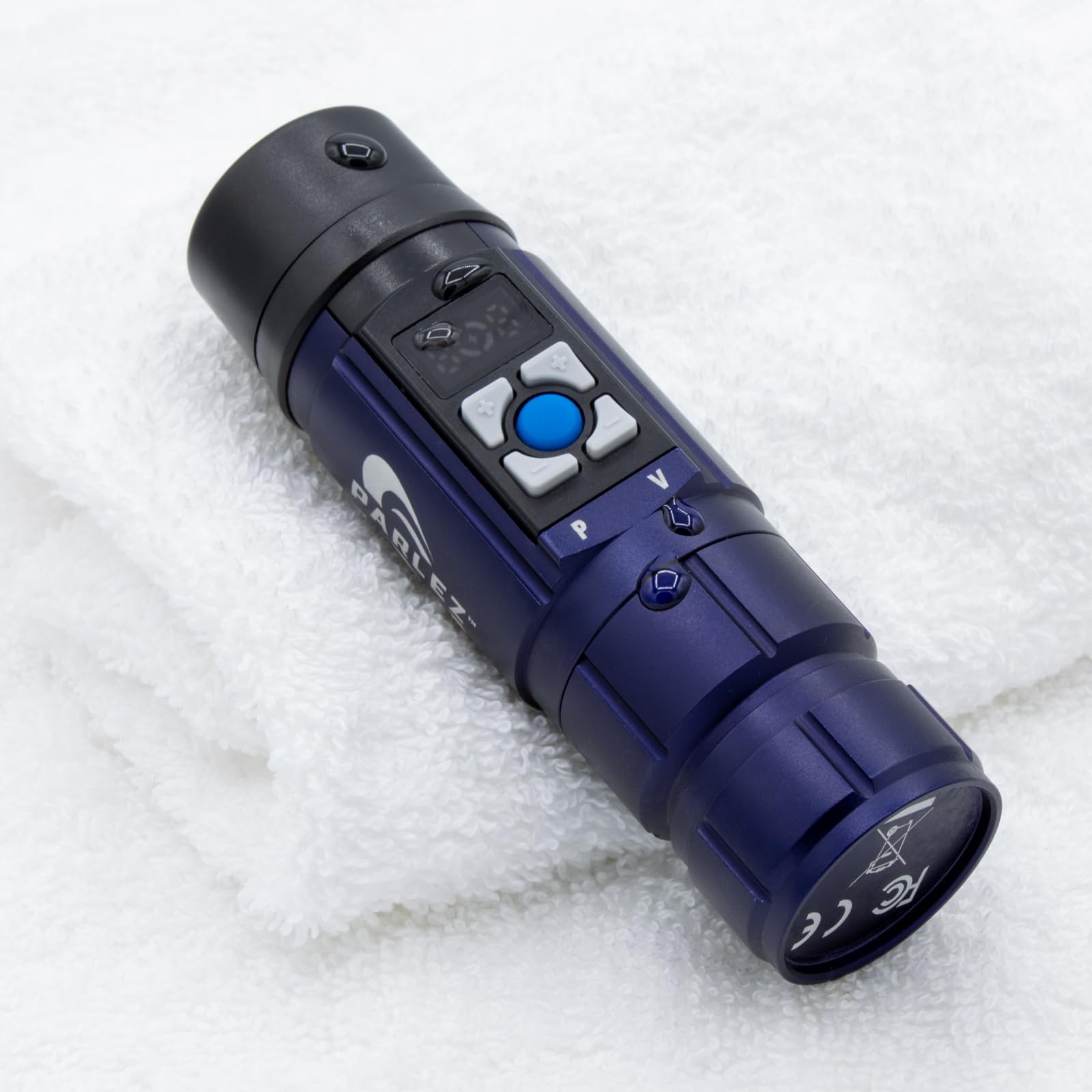
The Elogio Parlez is a modern entrant designed specifically for total laryngectomy patients. It generates the vibration that the user shapes into speech with their mouth and tongue. What makes it exceptional is its near-instant usability—users report being understood immediately with no learning curve, a stark contrast to many electrolarynxes that require days or weeks of practice.
The build is premium: a solid aluminum body that feels durable yet lightweight. The USB-C charging is a welcome modern standard, and the use of a common 18650 rechargeable battery means users can carry spares for extended days. The device includes a detachable silicone mouth tube and a lanyard for carrying. Customer service from Elogio is also frequently praised for being responsive and helpful.
The main limitation is the lack of real-time pitch modulation while speaking; you must pause to adjust pitch and volume using buttons and an LCD screen. This makes it less fluid for emotionally expressive conversation compared to the TruTone’s single-button intonation. However, for its clarity, build quality, and ease of entry, it is a top-tier option.
Why it’s great
- Users report being understood immediately with minimal practice
- Solid aluminum body with USB-C and replaceable 18650 battery
- Excellent customer service and support from the manufacturer
Good to know
- No real-time pitch modulation; must pause to adjust settings
- Practice required to find the optimal neck placement point
- Does not come with a USB power adapter in the box
6. NuVois III Digital Speech Aid

The NuVois III Digital is a budget-conscious electrolarynx that does not sacrifice essential features. It offers volume and tone/pitch buttons that allow the user to add emphasis and inflection for a more natural-sounding voice. This digital control over pitch is a significant step up from older analog models that offer only a single monotone tone.
Users report that it is a decent machine, clearer and better than other options they have tried, particularly for basic daily communication. For a cancer patient or elderly user needing to communicate with family, it serves its purpose effectively. It is lightweight, running on a single standard 9V battery, which makes replacement very easy.
The main caveat is the significant learning curve. New users must be patient while finding the correct placement on the neck; initial attempts may only produce 1-2 understandable words. It is also not recommended for elderly users who may lack the manual dexterity or patience for the practice required. However, for its price tier, it delivers solid digital control over voice inflection.
Why it’s great
- Digital pitch and tone buttons allow for natural-sounding inflection
- Very lightweight design running on a widely available 9V battery
- Five-year limited warranty provides long-term peace of mind
Good to know
- Steep learning curve; requires patience for correct placement
- Not recommended for elderly users with dexterity issues
- Using non-recommended batteries can reduce sound quality
7. Philips SpeechMike Premium Air

The Philips SpeechMike Premium Air is not a speech-generating device for those who cannot speak—it is a professional dictation microphone designed for PC-based voice recognition. For medical or legal professionals who rely on Dragon Naturally Speaking but need the freedom to move around the office, this is the gold standard. The 2.4 GHz wireless connection offers a range of up to 16 feet with zero lag.
Radiologists and busy physicians praise its seamless plug-and-play installation and all-day battery life. The compact charging dock ensures it is always ready, and the sleep mode resolves any connectivity confusion. One key advantage is that the mic can be programmed as a keyboard with hotkeys, allowing it to work on any hospital computer without IT intervention—a major plus.
The main concern is potential connectivity issues. Some units arrive defective, experiencing constant vibrations or failure to sync with the base. The initial pairing process can also be confusing, requiring the correct USB dongle. Despite these issues, when it works—which is most of the time—it dramatically improves dictation accuracy and efficiency compared to standard or wired mics.
Why it’s great
- Seamless wireless freedom up to 16 feet from the workstation
- Dramatically better voice recognition accuracy than standard mics
- All-day battery life with a compact and convenient charging dock
Good to know
- Some units arrive defective with constant vibration issues
- Initial syncing process can be confusing without proper guidance
- Requires a USB dongle and proper line-of-sight to the base station
8. Pocketalk Plus

The Pocketalk Plus is a two-way real-time translator, not a speech aid in the traditional sense. However, it is an essential AAC device for anyone who struggles with language barriers—whether due to a condition like aphasia making native-language expression difficult or simply needing to communicate in over 84 languages for work or travel. Its HIPAA compliance makes it uniquely suitable for healthcare settings.
The included 2-year global LTE data plan is a standout feature, providing connectivity in over 130 countries right out of the box. The camera and image translation feature also allows users to take photos of menus or signs and get text overlays and audio translations instantly. In a busy hospital, manufacturing floor, or airport, the speed and accuracy are praised by most users.
The device is heavily dependent on internet connectivity—it will not work offline. In areas with poor signal, it becomes useless. Translation accuracy is reported to be around 75% by some, with occasional issues recognizing accented English. Users with basic needs may find a free smartphone app more practical. However, for dedicated, private, and professional-grade translation, it fills a critical niche.
Why it’s great
- HIPAA-compliant for secure use in medical and legal settings
- 2-year global LTE data plan included for out-of-the-box connectivity
- Camera translation is very useful for signs, menus, and documents
Good to know
- Does not work at all without an internet connection
- Translation accuracy can be around 75%, not perfect
- Battery life is limited; pop-up notifications can be annoying
9. Scanmarker Max Reading Pen
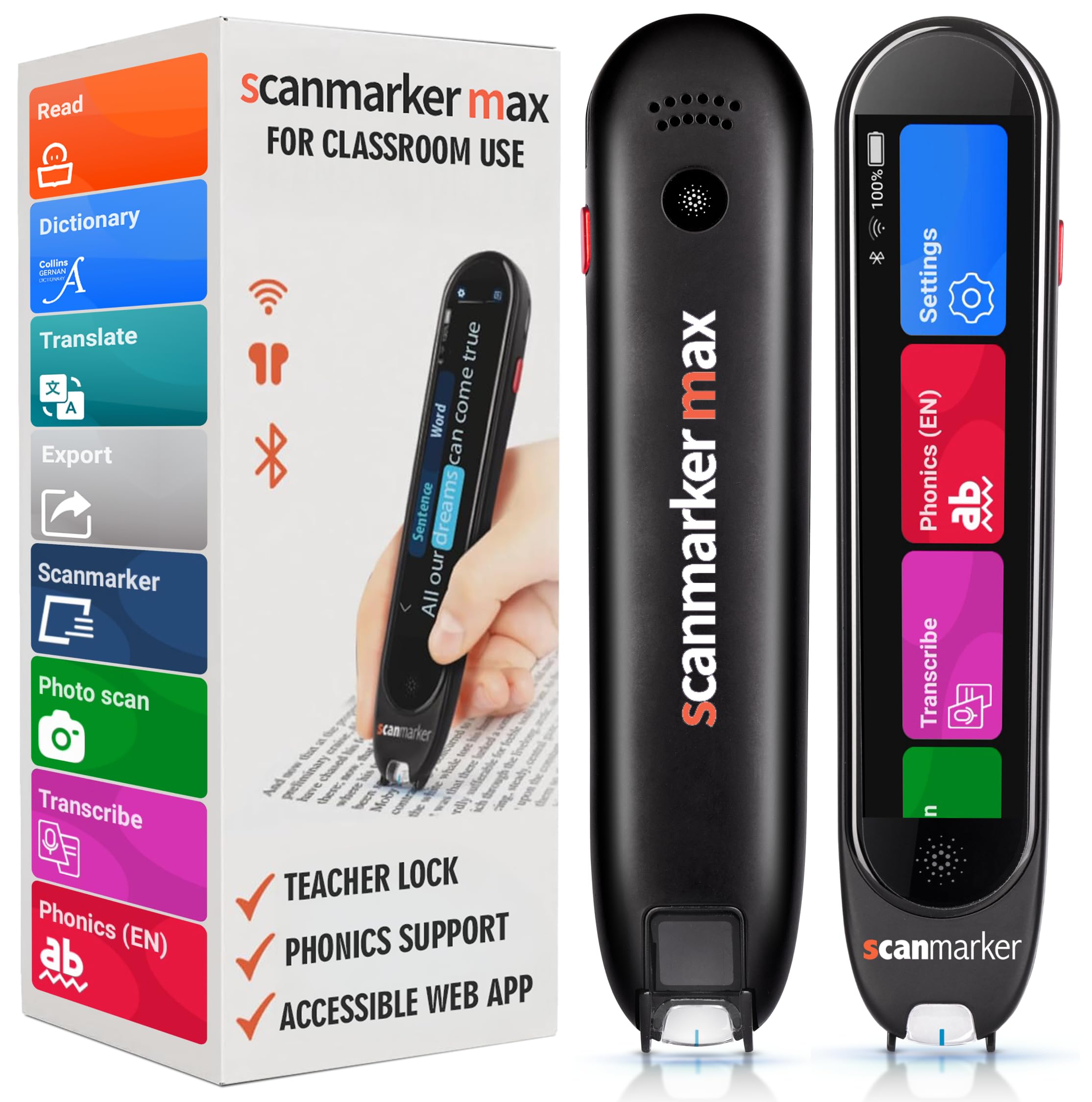
The Scanmarker Max is a dedicated reading and scanning pen designed for educational environments. It instantly scans and reads printed text aloud with natural text-to-speech in multiple languages. Its Teacher Lock function is a unique feature that allows educators to restrict which features a student can access during exams, making it a controlled learning tool rather than a potential distraction.
Users with dyslexia, reading fatigue, and diminishing eyesight find it invaluable. The phonetic support helps with pronunciation, and the photo scan mode can capture entire paragraphs for text-to-speech and translation. The device works both online and offline, which is critical for classroom testing environments where internet access may be restricted. The battery life is reported to last a whole week with moderate use.
The main downside is that the device requires precise scanning technique. Users must keep the tip guide straight and steady on the line of text; wobbly hands can cause recognition errors. While the menu is comprehensive, there is a minimal learning curve involved. For classroom support and independent reading practice, however, it is a top-tier tool.
Why it’s great
- Teacher Lock function allows controlled use during exams
- Works fully offline—no internet connection required
- Excellent battery life lasting a week on a single charge
Good to know
- Requires steady, straight scanning technique for accuracy
- Small learning curve to navigate the comprehensive menu
- Best suited for single lines of text; paragraphs require photo mode
10. Philips LFH3200 SpeechMike III

The Philips LFH3200 is the wired, push-button version of the SpeechMike line. It is a PC-dictation microphone designed for Dragon Naturally Speaking and similar voice recognition software. While not a standalone speech aid, for professionals who need to convert spoken word to text with high accuracy—and who have a functioning voice but a physical disability that prevents typing—this is a robust and reliable solution.
Medical practices report using these mics for over 6 years with no issues. The noise-canceling technology is praised for delivering far fewer errors and better accuracy than standard mics, even in noisy clinical environments. With 512 MB of internal storage, it can record up to 30 hours of dictation, which can be transferred later via USB.
The touch-sensitive mouse controls on the microphone are known to be “touchy,” which can frustrate users during navigation. It is also exclusively a wired device, which limits movement compared to the Premium Air model. As a dedicated tool for Dragon and medical EMR systems, it offers unbeatable value and reliability, but it is not for casual computer users.
Why it’s great
- Proven 6+ year track record of reliability in medical practices
- Noise-canceling tech dramatically reduces dictation errors
- 512 MB internal memory provides 30-hour recording capacity
Good to know
- Touch-sensitive mouse controls are overly sensitive and tricky
- Wired USB connection limits mobility at the workstation
- Exclusively a PC dictation tool—not for general voice amplification
11. NuVois I Electronic Larynx

The NuVois I is the entry-level analog electrolarynx in this lineup. It is designed for the most basic voice replacement after a laryngectomy. It does not have the digital pitch control or advanced features of its sibling, the NuVois III. Instead, it offers a straightforward, no-frills approach to producing the vibration needed for speech, making it the most budget-friendly option for someone who simply needs a voice.
User experience is mixed. Some report the device works as advertised and is a “great” product, while others find the volume insufficient even at maximum, making the user difficult to hear. One user mentioned the device constantly sounds “like it’s ready to die,” indicating potential power management or battery issues. The overall consensus suggests it is a very basic tool that may not meet daily communication needs.
Given the mixed feedback and the existence of the more capable NuVois III at a only moderately higher investment, the NuVois I is best reserved as a backup device or for very short-term, low-demand use. For someone needing reliable daily communication, the step up to the NuVois III is strongly recommended.
Why it’s great
- Entry-level price point for basic voice replacement needs
- Simple analog operation with no complex menus or settings
- Includes all accessories in a complete package
Good to know
- Inconsistent volume output even at maximum setting
- Users report device sounds underpowered and dying quickly
- Analog design lacks the pitch control of digital alternatives
FAQ
What is the difference between an electrolarynx and a dictation microphone?
Can an AAC device be used without an internet connection?
What does HIPAA compliance mean for an AAC device like the Pocketalk?
Final Thoughts: The Verdict
For most users needing a true speech replacement after a laryngectomy, the best aac devices winner is the Servox Digital XL because it offers the best balance of clear voice output, standard AAA battery convenience, and robust construction in a premium package. If you need a natural-sounding voice with real-time intonation, grab the TruTone Plus. And for the blind or severely visually impaired, nothing compares to the full independence offered by the OrCam MyEye Pro.