
Our readers keep the lights on and the weekend projects moving. As an Amazon Associate, I earn from qualifying purchases.
Specs are compiled from manufacturer listings and verified buyer reviews and can change over time — please confirm the key details on the product page before buying.
You want a 3D printer that delivers clean layers and fast prints without emptying your wallet. The key is finding a machine that balances speed, build quality, and reliability at a fair price. This guide covers top affordable models, from beginner-friendly picks to fast CoreXY machines.
I’m Rikta — the founder and writer behind FitlyFast. This guide is built by comparing the manufacturers’ published specifications and the patterns across verified customer reviews, so you get each pick’s real strengths and trade-offs instead of marketing spin.
The best affordable 3D printers work as reliable tools, not ongoing projects. finding a reliable affordable 3d printer is about matching speed, features, and price to your actual needs.
Quick Picks
- Anycubic Kobra X Multicolor 3D Printer — Best Overall
- Creality K1C 3D Printer — Speed Meets Precision
- ELEGOO Centauri Carbon 3D Printer — Best Value CoreXY
- FLASHFORGE AD5M Pro 3D Printer — Smart & Beginner Friendly
- Creality K2 SE 3D Printer — Multi-Color Ready
- FLASHFORGE Adventurer 5M Pro 3D Printer — Speedy & User Friendly
- Entina Tina2 Plus Smart 3D Printer — Budget Champion
How To Choose The Best Affordable 3D Printer
When shopping on a budget, you need to know which corners a printer cut and which it didn’t. These specs and features separate a great deal from a frustrating one.
Print Speed (mm/s)
Print speed tells you how fast the printer’s nozzle can move. A higher number, like 250 mm/s or 600 mm/s, means a small object that takes a few hours on a slow printer can be done in under 30 minutes. If you value time, look for models that advertise 250 mm/s or more, but remember that the material and complexity of the object also affect the final time.
Auto Bed Leveling
Older printers required you to manually turn knobs to make the print surface perfectly flat against the nozzle. This was a pain. Auto bed leveling, sometimes called “LeviQ” or a similar name, uses sensors to measure the bed for you and compensates for any uneven spots. Auto bed leveling is a huge convenience and a must-have for beginners.
Build Volume
This is the maximum size of the object you can print, usually given in millimeters (e.g., 220 x 220 x 220 mm). A larger build volume lets you print bigger things in one piece, but it also makes the printer itself larger and heavier. Think about what you want to print most — phone cases, toy parts, or larger decorative items — and pick a size that fits your projects.
Filament Compatibility
The most common material is PLA (a plant-based plastic that’s easy to print with), but you might also want to use PETG for stronger parts or TPU for flexible things. A printer with a nozzle that can reach higher temperatures, like 280°C or 300°C, can handle a wider range of specialty filaments. A high-temperature nozzle gives you more filament options as you advance.
Quick Comparison
| Model | Best For | Max Speed (mm/s) | Build Volume (mm) | Nozzle Temp (°C) | Amazon |
|---|---|---|---|---|---|
| Anycubic Kobra X | Multi-Color & Speed | 600 | 260 x 260 x 260 | 300 | Amazon |
| Creality K1C | High Speed & Carbon Fiber | 600 | 220 x 220 x 250 | 300 | Amazon |
| ELEGOO Centauri Carbon | CoreXY Value & Reliability | 500 | 256 x 256 x 256 | 320 | Amazon |
| FLASHFORGE AD5M Pro | Enclosed & Beginner Friendly | 600 | 220 x 220 x 220 | 280 | Amazon |
| Creality K2 SE | Future Multi-Color Upgrade | 500 | 220 x 215 x 245 | — | Amazon |
| FLASHFORGE Adventurer 5M Pro | Fast & Simple Operation | 600 | 220 x 220 x 220 | 280 | Amazon |
| Entina Tina2 Plus | Kids & First Timers | 250 | — | — | Amazon |
In-Depth Reviews
1. Anycubic Kobra X Multicolor 3D Printer

A fast, multi-color workhorse that handles PLA through TPU without breaking a sweat.
The Anycubic Kobra X gives you native 4-color printing right from the start, and you can expand it up to 19 colors by adding more ACE Pro units. This is a massive benefit if you want to do multi-material or vibrantly multi-hued parts without buying a separate add-on that costs as much as the printer. Its top speed of 600 mm/s puts it in the fast lane, and buyers report that after 265 hours of printing, they had only one user-caused failure, which speaks to its reliability.
At 20.9 pounds, it is lighter than some competitors, and it’s noticeably quieter at 45 dB, so it won’t dominate your workspace. The built-in AI camera monitors for “spaghetti” failures, which is a nice peace-of-mind feature for overnight prints. You get a large build volume of 260mm³, and the LeviQ 3.0 auto-leveling uses a 49-point calibration to ensure that first layer sticks. Its hardened steel nozzle reaches 300°C, so you can print PLA, PETG, TPU, PVA, and ASA with confidence. One reviewer noted that it smoothly integrates with the desktop slicer, app, and cloud, making the whole workflow feel connected.
Compared to the Entina Tina2 Plus, the Kobra X is significantly larger—23 x 13 x 22 inches versus 11.4 x 8.6 x 8.6 inches—and prints at over twice the speed (600 mm/s vs. 250 mm/s). That size and speed gap means you can print bigger parts in a fraction of the time. The main trade-off is that some users found the initial software setup finicky, with one reviewer saying the slicer had glitches and struggled to connect to WiFi on a specific network.
The Multi-Color Advantage
- Fast max speed of 600 mm/s
- 4-color native printing, expandable to 19
- Reliable with 300°C nozzle for advanced materials
- Built-in AI for failure detection
A Few Hiccups
- WiFi/software setup can be troublesome for some
- Larger footprint requires more desk space
Reach for this if: You want multi-color capability and fast speeds right now, without a premium price tag.
Look elsewhere if: You need the absolute smallest, most compact printer for a tight desk space.
2. Creality K1C 3D Printer

A CoreXY powerhouse that handles carbon fiber filaments from the start.
The Creality K1C is a serious step up if you want to print tough materials like PLA-CF and PETG-CF (carbon fiber filaments) without needing a hardware upgrade. Its tri-metal nozzle is rated to 300°C, and the maker claims it delivers 1,000 hours of clog-free extrusion, which is a huge selling point if you plan to run the printer often. It runs on Creality’s own open-source operating system (based on Klipper), which gives you fine control over settings if you like to tinker with profiles.
The built-in AI camera not only lets you monitor prints but can also alert you if a single print in a batch fails, so you can exclude it without losing the whole job. In silent mode, the noise level drops to 45 dB, making it comfortable to run in a home office or bedroom. One reviewer who upgraded from an Ender 3 said they’d done over 200 prints across TPU, PETG, and PLA without issues, calling it a beast.
At 27.5 pounds, it has a solid feel, but note that some owners mention the included smooth build plate requires a glue stick for PLA. You’ll want to pick up a textured PEI “B Plate” to get better adhesion without the mess. Another reviewer pointed out that at high speeds, the printer can shake quite a bit, so putting it on a stable table or the floor is a good idea.
The Pros
- Top speed of 600 mm/s
- Built for carbon fiber filaments
- AI camera with batch exclusion feature
- Very quiet in silent mode (45 dB)
The Cons
- Smooth plate requires glue stick for PLA
- Vibrates heavily at high speed
Grab it for: printing carbon fiber parts or wanting a fast CoreXY machine with strong community support.
Pass if: you want the largest build volume available in this price bracket.
3. ELEGOO Centauri Carbon 3D Printer

A fully enclosed, pre-calibrated machine that hits a balance for speed and price.
The ELEGOO Centauri Carbon delivers a CoreXY system with a max speed of 500 mm/s and a high-flow hotend that’s rated for 320°C, which is hot enough for carbon fiber reinforced filament. It comes fully assembled and pre-calibrated, so you can be printing within about 30-45 minutes of opening the box. The build volume is a generous 256 x 256 x 256 mm (10 cubic inches), giving you plenty of room for medium-sized projects.
It features automatic bed leveling and a built-in camera for real-time monitoring and time-lapse recording. The rigid die-cast aluminum frame and automatic vibration compensation help keep print quality consistent even at high speeds. One reviewer who upgraded from an Ender 3 said a print that used to take 24 hours now finishes in just 5 hours on the Centauri Carbon, with better layer quality.
At 38.5 pounds, this is the heaviest printer in the lineup, and it shakes noticeably during operation, so you really need a stable, heavy table. Some early units had USB-C cable issues, though the manufacturer seems to have updated the hardware. The slicer software crashed for one user on an older laptop, but it worked fine on a newer one.
Why It Stands Out
- High 500 mm/s CoreXY speed
- Excellent 320°C nozzle for advanced filaments
- Fully enclosed and pre-calibrated for quick setup
- Built-in camera with remote monitoring
The Downsides
- Very heavy (38.5 lbs) and shakes at speed
- Early reliability issues reported by some
This pick is for: users who want a fast, enclosed CoreXY machine at a competitive price point without sacrificing build volume.
skip it if: you have a lightweight desk or need to move the printer around often.
4. FLASHFORGE AD5M Pro 3D Printer

An enclosed, app-controlled printer that prioritizes ease of use for families and classrooms.
The Flashforge AD5M Pro is essentially the same machine as the Adventurer 5M Pro but in a sleeker product refresh. It hits a top speed of 600 mm/s and features quick-swap nozzles that you can change in about three seconds. The fully enclosed chamber and dual-layer filtration make it safe for home and school use, cutting down on odors and particles.
You can control it via a mobile app (Maker) and use the included Orca slicer for more advanced settings. The auto-leveling is one-touch, and the PEI build plate gives great adhesion for PLA without any glue. One first-time user reported that this printer has been going nonstop for a month, with only three clogs from cheap filament, and found the whole experience easy to learn.
Some customers note that the packaging can arrive damaged, and the included instructions are not great. A few owners had reliability issues after just a few prints, with the extruder failing and requiring replacement. At 32.2 pounds, it is also a fairly heavy machine, so plan your work surface accordingly.
The Highlights
- Fast 600mm/s CoreXY speed
- Tools-free 3-second nozzle swaps
- Fully enclosed with dual filtration
- Great PEI plate for PLA without adhesives
The Lowlights
- Some users report early hardware failure
- Packaging can be flimsy, leading to damage
Perfect for: a beginner or a family looking for a safe, enclosed printer that works with an app.
Think twice if: you want the lowest maintenance option, as a few users had early reliability issues.
5. Creality K2 SE 3D Printer
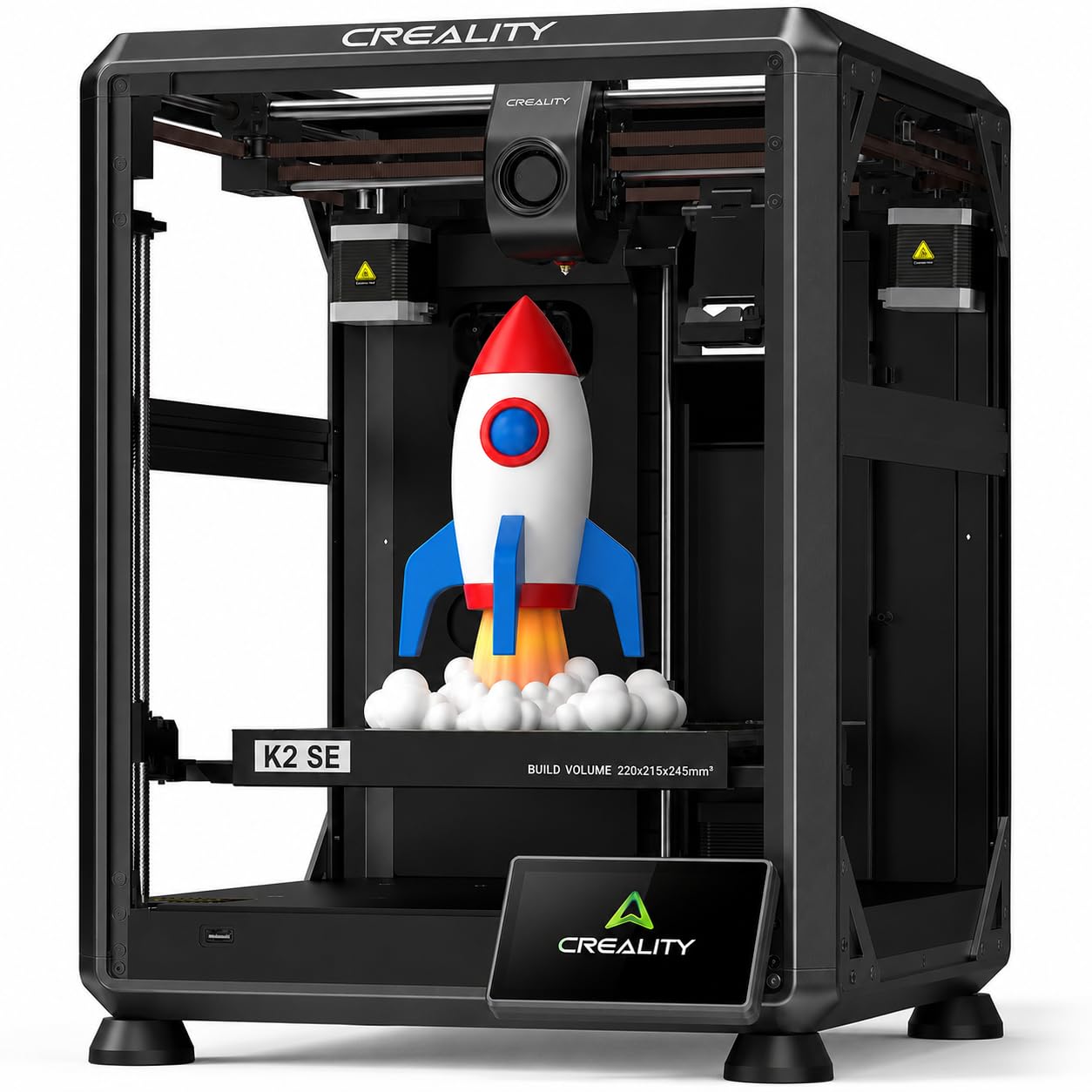
A compact CoreXY printer that supports a multi-color add-on, giving you future flexibility.
The Creality K2 SE is a solid CoreXY machine with a max speed of 500 mm/s and a print size of 220 x 215 x 245 mm. Its main selling point is that it can support multi-color printing with an optional CFS (Creality Filament System) add-on. This makes it a good choice if you think you might want color-swapping down the line but don’t want to pay for it right now.
Reviewers point out that the print quality is great right from the start, and it is noticeably quieter than the older Ender-5, though still audible in another room. One buyer mentioned it was a “great upgrade from Ender 3 v2” and that it prints fast and reliably. It includes auto-leveling and a PEI build plate, which helps with adhesion.
Weighing in at 27.5 pounds, it is the same weight as the K1C, but it is a smaller machine overall. A common complaint is that the Creality slicer software feels rough and has a busy interface. Some users also noted that the listing inaccuracies about the included parts, such as a missing segmented cable guide, are frustrating.
What Works
- 500mm/s speed with CoreXY motion system
- Compatible with multi-color CFS add-on
- Good print quality and quieter than older Creality models
What Doesn’t
- Creality slicer is not very user-friendly
- Listing inaccuracies on included parts
Choose this if: you want a CoreXY printer with an upgrade path to multi-color printing in the future.
pass on it if: you need a polished slicer experience right from the start.
6. FLASHFORGE Adventurer 5M Pro 3D Printer

A feature-packed enclosed printer that heats up in 35 seconds and prints at 600 mm/s.
The Flashforge Adventurer 5M Pro is designed to get you from box to print in about 10 minutes. The nozzle reaches 200°C in 35 seconds, and the Core XY all-metal frame keeps things stable at high speeds (up to 600 mm/s). It comes with pressure-sensing auto bed leveling, so you don’t need to do any manual calibration, and the dual-sided PEI plate makes removing prints easy.
It supports a wide range of materials (PLA, ABS, PETG, ASA, TPU, PC, and carbon-fiber blends) and has a built-in camera for remote monitoring via the Flash Maker app. A reviewer who bought this as their first printer said it’s “crazy simple to set up” and produces “unbelievably detailed models.” The enclosed chamber and dual circulation system also help keep dust and fumes down.
The biggest caveat from buyers is that some units arrive with hardware defects. One reviewer received a damaged unit that failed completely, though Flashforge’s customer service quickly issued a full refund. Another user had repeated Z-axis failures and heating errors. If you get a good unit, it is a fantastic machine, but the quality control seems inconsistent.
The Strengths
- Incredibly fast start-up and printing
- Excellent, easy-to-use auto leveling
- Great for many filament types including carbon fiber
- Enclosed design with good filtration
The Risks
- Some units have hardware defects from the start
- Build volume is limited to 220 mm³
Get it if: you want a very fast, user-friendly printer with great material support and good customer service if things go wrong.
Avoid it if: you need the largest print volume or can’t risk the chance of an early defect.
7. Entina Tina2 Plus Smart 3D Printer

A fully assembled, beginner-focused mini printer that starts printing in minutes, not hours.
The Entina Tina2 Plus is the most budget-friendly pick here, and it is aimed squarely at kids, beginners, and anyone who wants a small, low-maintenance introduction to 3D printing. It comes fully assembled, so you just load the included TF card and start printing. It uses a Poloprint Cloud app that gives you access to 1,500+ pre-made models, making it perfect for classroom or home projects where you don’t want to design anything yourself.
Despite its small size—it’s just 11.4 x 8.6 x 8.6 inches and weighs only 9.93 pounds (a 2.8x gap compared to the 27.5-pound Creality K2 SE)—it offers a ceramic hotend that heats up in 40 seconds and auto-leveling. Shoppers say it is very quiet and easy for a 10-year-old to use, with one parent noting they unboxed it and were printing within 15 minutes.
The trade-off is that it’s slow. Its top speed of 250 mm/s is far below the 600 mm/s of the Anycubic Kobra X, and buyers report that small prints still take 2-3 hours. There were also complaints about nozzle clogs and inconsistent results, with one buyer saying they had constant print failures and unhelpful customer support.
The Good
- No assembly needed, ready to print instantly
- Very compact and lightweight at 9.93 lbs
- Ideal for kids with easy mobile app and pre-loaded models
- Quiet and safe for home use
The Bad
- Slow speed (250 mm/s) vs. competitors
- Some units have reliability issues (clogs, failures)
Great starter for: a child or absolute beginner who wants immediate, easy printing without complicated setup.
Not a good fit if: you want fast output or plan to print complex, detailed parts regularly.
Understanding the Specs
Print Speed (mm/s)
This is the speed at which the print head moves across the build plate. A higher speed means you finish your objects faster. Budget printers historically topped out around 60-100 mm/s, but newer affordable models now hit 250 mm/s or even 600 mm/s. At 250 mm/s, a small part might take a couple of hours; at 600 mm/s, it can take less than 30 minutes. Real-world speed depends on the material and shape, but this number tells you the printer’s potential.
Build Volume
This is the maximum size of the object you can print. It is usually given as three dimensions (width x depth x height) in millimeters. A common size is 220 x 220 x 220 mm, which is enough for most phone cases, small tools, and action figures. Larger volumes like 260 mm³ let you print bigger items like lamp shades or helmet pieces in one go, but they also make the printer taller and heavier.
FAQ
What does auto leveling do and do I really need it?
Is 250 mm/s fast enough for an affordable 3D printer?
Can an affordable 3D printer print in multiple colors?
What is the best filament for a beginner on a budget printer?
Why do some printers need a glue stick on the bed?
How much does a spool of filament cost for these printers?
Can I leave an affordable 3D printer running overnight?
How do I fix a clogged nozzle on a budget printer?
Are CoreXY printers better than bedslingers for beginners?
What is the difference between 280°C and 320°C nozzles?
Final Thoughts: The Verdict
For the majority of shoppers, the best affordable 3D printer is the Anycubic Kobra X because it delivers native multi-color capability, a blazing 600 mm/s speed, and a large 260 mm³ build volume at very competitive price point. If you want a fully enclosed machine for advanced materials like carbon fiber, grab the ELEGOO Centauri Carbon. And for a child or complete beginner who just wants to start printing immediately, the standout is the compact, pre-assembled Entina Tina2 Plus.
How We Picked
We do not accept paid placement. Every pick is matched to a real buyer and a real use-case; we do not hands-on test units.
Sources & Methodology
Specifications: manufacturer listings and product documentation. Review insights: verified customer reviews, as of July 2026. Pricing: not shown on this page (it changes often); check the current price via the retailer link.
As an Amazon Associate, FitlyFast earns from qualifying purchases. This does not affect which products we feature.