
Our readers keep the lights on and the weekend projects moving. As an Amazon Associate, I earn from qualifying purchases.
The right balance of print speed, scan quality, and running costs separates a daily workhorse from a frustrating paperweight.
I’m Rikta — the co-founder and writer behind FitlyFast. I’ve analyzed hundreds of spec sheets and real-user reports across dozens of home-office and budget-conscious printer models to find the units that genuinely deliver repeatable results without hidden costs.
Whether you need crisp text for remote work or reliable copying for family projects, this guide cuts through the noise to spotlight the affordable printer scanner options that actually earn their place on your desk.
How To Choose The Best Affordable Printer Scanner
Finding a budget-friendly all-in-one means identifying where your needs intersect with measurable specs. Focus on connectivity, paper handling, and long-term ink economics rather than flashy features you’ll never use.
Print Speed and Duplex Capability
Pages per minute (ppm) in black directly impact productivity. For home or small office use, 10-16 ppm black is acceptable. Automatic duplex printing — printing on both sides without manual flipping — is a must-have for saving paper, especially with school assignments, contracts, or multi-page reports.
Scanning Hardware: ADF vs Flatbed
A flatbed scanner works fine for single pages or fragile documents. An Automatic Document Feeder (ADF) handles stacks of pages, making it essential for anyone scanning bills, tax forms, or multi-page client files. Check the ADF capacity — 20 sheets is typical for entry-level units, while premium models offer 35 or more.
Ink Economics and Cost-Per-Page
Starter ink cartridges that ship with the printer are often low-yield, sometimes lasting only 50 to 120 pages. Always check the yield of replacement cartridges or subscription services like HP Instant Ink or Brother Refresh. A printer with cheap refills can cost less over its lifetime than one with a lower sticker price but expensive proprietary consumables.
Quick Comparison
On smaller screens, swipe sideways to see the full table.
| Model | Category | Best For | Key Spec | Amazon |
|---|---|---|---|---|
| Brother MFC-J1410DW | Premium | Home Office Productivity | 16 ppm B&W / ADF / 2.7″ Touch | Amazon |
| HP OfficeJet Pro 8125 | Premium | Fast Business Documents | 20 ppm B&W / 225-sheet Tray | Amazon |
| HP Envy Inspire 7955e (Renewed) | Mid-Range | Value Renewed Pick | 15 ppm B&W / 2.7″ Touch | Amazon |
| Brother MFC-J1360DW | Mid-Range | Compact Home Office | 16 ppm B&W / 1.8″ Display | Amazon |
| Canon PIXMA TR7120 | Mid-Range | Compact Design + ADF | 14 ppm B&W / Auto Duplex | Amazon |
| HP Envy 6155 | Budget | Family & Light Use | 10 ppm B&W / Instant Ink | Amazon |
| Canon PIXMA TS7720 | Budget | Simple Home Photo Printing | 15 ppm B&W / 2.7″ Touch | Amazon |
In‑Depth Reviews
1. Brother Work Smart 1410 (MFC-J1410DW)

The Brother MFC-J1410DW strikes the hardest balance between upfront cost, feature density, and long-term ownership. Printing at 16 pages per minute black and 9 color, it nearly matches much pricier office-class hardware. The 2.7-inch color touchscreen makes cloud app scanning to Google Drive or Dropbox genuinely usable without a computer, and the 20-sheet ADF handles your multi-page jobs without manual babysitting.
Brother’s LC501 ink platform keeps replacement costs reasonable, and users consistently report cartridges lasting six months or more under moderate use. The automatic duplex printing saves paper reliably, and the compact footprint fits tight desk corners. Setup, while not instant for everyone, is less painful than most Wi-Fi printers once the full driver package is installed rather than the quick-start software.
A few reports note minor network hiccups during initial firmware updates, and the printer emits noticeable noise during operation. But for a home or small office environment where dependability and per-page cost outweigh the occasional decibel, this Brother model is the clear all-around champion.
Why it’s great
- Excellent 16 ppm black print speed for the price tier.
- Automatic duplex and 20-sheet ADF included at this price point.
- Touchscreen with cloud connectivity reduces computer dependency.
- Affordable LC501 ink cartridges keep cost-per-page low.
Good to know
- Setup can be tricky with the quick-start software; full driver install may be required.
- A bit louder than some competitors during operation.
2. HP OfficeJet Pro 8125

The HP OfficeJet Pro 8125 is engineered for speed, spitting out up to 20 pages per minute in black and 10 in color — making it the fastest unit in this roundup. It targets home offices handling high-volume business documents, reports, and presentations. The 225-sheet input tray reduces refill frequency, and the automatic document feeder plus duplex printing make multi-page scanning and two-sided output seamless.
Its 2.7-inch color touchscreen with a phone-like interface speeds up navigation, and dual-band Wi-Fi maintains stable connections across devices. The inclusion of HP Wolf Essential Security is a rarity in budget-adjacent printers, adding firmware-level protection for sensitive data. HP’s Instant Ink trial (3 months) helps mitigate cost-per-page anxiety during the initial period.
The trade-off is a higher purchase price and the expectation that you will eventually subscribe to HP’s ink service or pay a premium for standard HP 923 cartridges. Users looking purely for the cheapest upfront cost should look elsewhere, but if your time is money and speed matters, the OfficeJet Pro 8125 earns its keep.
Why it’s great
- Fastest black print speed at 20 ppm — ideal for document-heavy workflows.
- Generous 225-sheet paper tray capacity.
- Built-in security features for data-conscious users.
- Dual-band Wi-Fi with self-healing connection detection.
Good to know
- Higher upfront cost relative to entry-level all-in-ones.
- Ink replacement costs are significant without an Instant Ink subscription.
3. HP Envy Inspire 7955e (Renewed Premium)
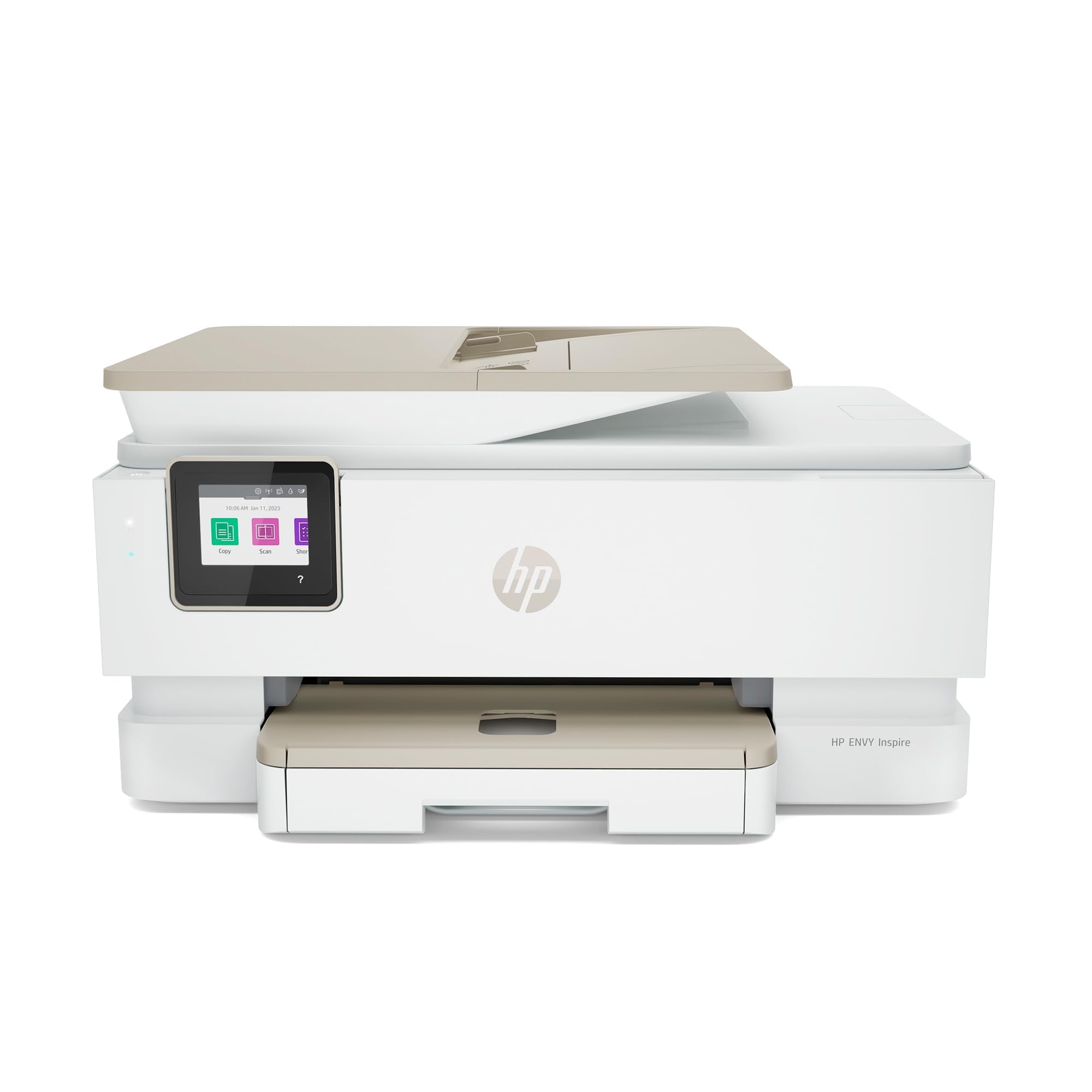
The HP Envy Inspire 7955e Renewed Premium offers a compelling path to better hardware without paying full retail. Professionally inspected and certified to look and perform like new, it delivers 15 ppm black and 10 ppm color, automatic duplex, and a large 2.7-inch color touchscreen — specs that rival or exceed many brand-new mid-range printers. The HP Smart App integration makes mobile scanning and management smooth.
Its eligibility for HP Instant Ink means you can still access ink subscription savings, lowering the long-term cost-per-page despite the reduced initial hardware investment. The Renewed certification adds peace of mind that others’ returns or overstock units are tested before they reach your desk.
The expected caveat is that it uses HP’s proprietary cartridge system — off-brand ink is effectively blocked by firmware checks. Also, as a Renewed unit, cosmetic wear may be present even if functionality is perfect. For those comfortable with certified refurbished gear, this is a smart way to access performance well above its price tier.
Why it’s great
- Renewed Premium certified — tested and inspected like new.
- Fast print speeds (15/10 ppm) at a lower effective cost.
- Automatic duplex and a large color touchscreen.
- Eligible for HP Instant Ink subscription savings.
Good to know
- Renewed units may show minor cosmetic blemishes.
- Printer firmware blocks non-HP ink cartridges.
4. Brother Work Smart 1360 (MFC-J1360DW)

The Brother MFC-J1360DW is the slightly pared-back sibling of the J1410DW, retaining the same print engine (16 ppm black, 9 color) and 20-sheet ADF but substituting a 1.8-inch color display for the larger touchscreen. The trade-off saves upfront dollars while maintaining the core performance that makes Brother inkjets reliable workhorses. The 150-sheet paper tray covers daily needs without constant refills.
Owners consistently praise the Brother Mobile Connect app, which simplifies scanning to email and cloud services directly from the small display. The automatic duplex function works flawlessly, and users report months of normal usage on a single set of LC501 cartridges. The Brother Refresh subscription option also exists for those who want predictable ink delivery.
The smaller screen is less responsive than touch-centric models, and the plastic body feels less substantial than pricier office printers. But for the price, you get Brother’s well-regarded reliability, a genuine ADF, and the lowest long-term ink costs in this comparison — a combination hard to beat for budget-conscious home offices.
Why it’s great
- Same fast 16 ppm black engine as its more expensive sibling.
- Includes 20-sheet ADF and automatic duplex.
- Excellent ink economy with Brother LC501 cartridges.
- Strong mobile app integration for scanning to cloud.
Good to know
- Smaller 1.8-inch display is less intuitive than a touchscreen.
- Build quality is functional but feels budget-tier.
5. Canon PIXMA TR7120

The Canon PIXMA TR7120 packs an ADF, automatic duplex, and a compact footprint into a white chassis that fits home and hybrid workspaces. Its dual-band Wi-Fi (2.4GHz or 5GHz) gives reliable wireless performance, and the 1.42-inch monochrome OLED display provides clear ink level and status readouts despite its small size. Print speeds of 14 ppm black and 9 color are adequate for light-to-moderate use.
This model uses a 2-cartridge hybrid ink system (one pigment black, one tri-color), which keeps replacement simple but means color cartridges combine cyan, magenta, and yellow — when one color runs out, the whole cartridge must be swapped. Customers report the starter ink runs out quickly, a common issue across all entry-level inkjets. For users who only print occasionally, this is manageable but worth factoring into the long-term cost.
The TR7120 is at its best for someone who needs a small printer with ADF capability for occasional scanning but doesn’t require blazing speed or ultra-low cost-per-page. Replacement ink is expensive relative to Brother’s separate color tank system, making this a better fit for low-volume households than for heavy scanning or bulk document printing.
Why it’s great
- Includes ADF and automatic duplex in a compact, stylish design.
- Dual-band Wi-Fi ensures stable wireless connections.
- Setup is straightforward — users report it works out of the box.
- Decent print quality for the price tier.
Good to know
- Tri-color cartridge means wasteful replacement when one color depletes.
- Starter ink yields are low; replacement cartridges are pricey.
6. HP Envy 6155

The HP Envy 6155 is built for the low-volume home user who values simplicity and a 3-month trial of HP Instant Ink, which can dramatically reduce ink costs during the introductory period. The 2.4-inch color touchscreen, while not the largest, is adequate for navigating copy and scan functions. HP’s AI-driven print formatting automatically removes wasted pages from web printouts — a genuinely useful feature for homework or recipes.
P3 color technology ensures photo prints are reasonably vibrant, making it suitable for the occasional borderless snapshot. Dual-band Wi-Fi auto-detects and resolves connection issues, which reduces one of the most common frustrations with wireless printers. The sustainable design uses over 60% recycled plastic.
The catch is speed — 10 ppm black and 7 color are the slowest in this group, and the 100-sheet input tray is small. The starter cartridges are low-yield (around 120 pages black, 75 tri-color). Without an ongoing Instant Ink subscription, per-page costs are high. This is a printer for the user who prints a few pages a week and doesn’t mind the pace.
Why it’s great
- 3-month Instant Ink trial lowers initial operating cost.
- AI web print formatting saves paper and ink.
- Good photo quality for a budget all-in-one.
- Very easy setup per user reports.
Good to know
- Slower print speeds: 10 ppm black, 7 ppm color.
- Small 100-sheet paper tray and low-yield starter cartridges.
- Ink is expensive without a subscription.
7. Canon PIXMA TS7720

The Canon PIXMA TS7720 is the entry-level champion for straightforward home printing, leaning into its strengths: a roomy 2.7-inch LCD touchscreen, fast-enough print speeds (15 ppm black, 10 color), and a compact white design that blends into any room. It prints borderless photos up to 8.5×11 inches, and the two-cartridge system (pigment black, tri-color) keeps replacement simple — though the same tri-color waste caveat applies.
The biggest negative is the flatbed-only scanner — there is no ADF, so multi-page scanning requires manual page-by-page handling. This omission pushes the TS7720 firmly into “light use only” territory for scanning tasks. The bottom paper tray must be fully extended manually, and paper can fall out if not handled carefully.
Users that pair this with the Canon PRINT app find mobile scanning and printing straightforward. Wi-Fi setup can require the manual to find the router connection. The TS7720 is a capable photo and document printer for a student dorm, a kitchen counter, or a casual home user who rarely scans stacks of paper — but for scanning volume, the ADF-equipped options above are better.
Why it’s great
- Large 2.7-inch LCD touchscreen for easy navigation.
- Good photo print quality with borderless support.
- Compact and stylish — fits small spaces.
- Simple two-cartridge ink system.
Good to know
- Flatbed scanner only — no Automatic Document Feeder.
- Tri-color cartridge must be replaced even if one color runs out.
- Bottom paper tray extends manually and can drop paper.
FAQ
Is an ADF necessary for a budget-friendly printer scanner?
What is the difference between starter ink and standard ink cartridges?
Can I use off-brand ink in these affordable printer scanners?
Final Thoughts: The Verdict
For most users, the affordable printer scanner winner is the Brother MFC-J1410DW because it delivers the best combination of ADF, automatic duplex, fast 16 ppm print speed, and low long-term ink costs in a compact package. If you want the fastest document throughput, grab the HP OfficeJet Pro 8125 with its 20 ppm engine. And for the best value via a renewed unit, nothing beats the HP Envy Inspire 7955e.