
Our readers keep the lights on and the weekend projects moving. As an Amazon Associate, I earn from qualifying purchases.
Specs are compiled from manufacturer listings and verified buyer reviews and can change over time — please confirm the key details on the product page before buying.
An AIO computer hides the entire PC behind its screen, so you get a full-power desktop without the bulky tower taking up floor space. The hard part is picking the right one from models that look alike but vary wildly in processor speed, memory, and screen quality — get it wrong and you are stuck with a sluggish machine you cannot easily upgrade. This guide walks through nine real models across mid-range and premium tiers, comparing the specs and real-buyer experiences that actually decide whether a machine feels fast or frustrating a year from now.
I’m Rikta — the founder and writer behind FitlyFast. This guide is built by comparing the manufacturers’ published specifications and the patterns across verified customer reviews, so you get each pick’s real strengths and trade-offs instead of marketing spin.
Whether you are outfitting a home office, a student desk, or a business workstation, these nine in-depth reviews will help you find the right aio computer for your actual workload and budget.
Quick Picks
- Acer Aspire C27-1700-UA91 — Best Overall
- Dell Inspiron 7730 All in One — Premium Pick
- HP 27 inch All-in-One Desktop PC, AMD Ryzen 7 — High-End Value
- Lenovo IdeaCentre 27″ AIO — Powerful Workhorse
- Dell 24 All-in-One Desktop ec24250 — Touchscreen Performance
- HP 24 Touchscreen All-in-One — Family Touch AIO
- Lenovo 24″ FHD All-in-One Desktop — Budget Business
- MECHAZER 23.8″ Curved AIO — Budget Curved Display
- STGSivir All in One Desktop Computer, 24″ FHD — Budget Pick
How To Choose The Best AIO Computer
An AIO computer is a long-term purchase — you cannot swap out the motherboard or easily upgrade the graphics like you can in a tower. That makes getting the initial specs right critical. Focus on three things: the processor generation (an Intel 12th-gen i5 or newer or an AMD Ryzen 7 will feel fast for years; an older i7 from the 7th-gen or a low-power N100 can feel slow on heavy multitasking), the amount of RAM (16GB is the baseline for smooth multitasking today, 32GB gives you future-proofing), and the storage type (a PCIe NVMe SSD is non-negotiable for quick boot times; 512GB is a comfortable starting point for most users).
Screen Size and Touch
Screen size directly affects your usable workspace and how much desk space the AIO takes up. A 23.8-inch or 24-inch display fits neatly in a standard home office or student desk and is big enough for side-by-side windows. A 27-inch screen gives you noticeably more room for spreadsheets, video editing timelines, or multiple open applications, but it also takes up a larger footprint. Touchscreens are a nice bonus for quick taps and swipes, but they add cost and glare — if you are mainly typing and mousing, a non-touch matte display with an anti-glare coating is often more comfortable for long sessions.
Graphics and Connectivity
Most AIO computers use integrated graphics built into the processor — that is perfectly fine for office work, browsing, streaming 4K video, and even some light photo editing. If you plan to play games like Fortnite or Valorant or do heavier video editing, look for a model with a dedicated graphics card (an NVIDIA GeForce MX series or AMD Radeon). For connectivity, Wi-Fi 6 or 6E gives you faster and more stable wireless connections, while Bluetooth 5.2 or 5.3 is ideal for pairing modern wireless peripherals. Make sure the model has enough USB ports (at least a few USB 3.2 Type-A plus a USB-C) for your printer, external drives, and other accessories. An HDMI-out port also lets you connect a second external monitor later.
Quick Comparison
| Model | Best For | Screen Size | Processor | RAM | Amazon |
|---|---|---|---|---|---|
| Acer Aspire C27-1700 | Best Overall | 27″ FHD IPS | Intel i5-1235U | 16GB DDR4 | Amazon |
| Dell Inspiron 7730 | Premium Power | 27″ FHD Touch | Intel Core 7-150U | 32GB DDR4 | Amazon |
| HP 27″ AMD Ryzen 7 | High-End Value | 27″ FHD | AMD Ryzen 7 7730U | 32GB | Amazon |
| Lenovo IdeaCentre 27″ | Powerful Workhorse | 27″ FHD IPS | Intel N100 | 8GB | Amazon |
| Dell 24 Touch | Touchscreen Performance | 23.8″ FHD Touch | Intel Core 5 120U | 16GB DDR5 | Amazon |
| HP 24 Touchscreen | Family Touch AIO | 23.8″ FHD Touch | Intel N100 | 16GB DDR4 | Amazon |
| Lenovo 24″ FHD | Budget Business | 23.8″ FHD IPS | Intel N100 | 16GB DDR4 | Amazon |
| MECHAZER 23.8″ Curved | Budget Curved Display | 23.8″ Curved | Intel i7-7700HQ | 16GB | Amazon |
| STGSivir 24″ | Budget Pick | 24″ FHD | Intel i5 (3470T) | 16GB | Amazon |
In-Depth Reviews
1. Acer Aspire C27-1700-UA91

The 27-inch AIO that balances screen real estate with genuine processing power.
The big story here is the 27-inch Full HD IPS display, which gives you a 91% screen-to-body ratio — meaning the bezels are so slim the screen feels larger than it already is. Compared to the Lenovo 24-inch model, the Acer’s display is 27 inches versus 23.8 inches, a noticeable difference when you are working with multiple documents or timelines side-by-side. That generous screen is backed by a 12th Gen Intel Core i5-1235U processor that hits a max turbo of 4.4 GHz, versus the Lenovo’s N100 at 3.4 GHz, so it handles streaming, browsing, and even photo editing without hesitation.
Buyers report the setup is straightforward, with automatic bookmark transfer from an old PC, and that the 512GB NVMe SSD leaves the machine feeling fast and efficient as an upgrade from older computers. The 5.0 MP webcam with a privacy cover and dual stereo microphones makes video calls look and sound clear, though one reviewer noted the fan noise is normal and the built-in speakers are only average (they recommend headphones for better audio). A few noted the lack of touchscreen, but the tiltable screen and BlueLightShield technology for eye comfort help during long sessions. The choice to keep the tower off the floor and out of sight is the whole point, and this Acer does it with modern specs that will age well.
Why It Leads
- Generous 27″ FHD IPS display with slim bezels and a 91% screen-to-body ratio.
- 12th Gen Intel i5 processor with max 4.4 GHz turbo speed outperforms many competitors at this tier.
- Includes 5.0 MP pop-up webcam with privacy cover and dual stereo microphones.
- Wireless Wi-Fi 6 and Bluetooth 5.2 for modern, fast connectivity.
The Trade-Offs
- No touchscreen, and the built-in speakers are described as mediocre by buyers.
- Touchscreen activation not explained in the included guide, per one reviewer.
Best for: The home-office or student user who wants a large, clear screen and modern processing power without the complexity of a tower.
One caveat: If you need touch input or high-quality built-in audio, you will want to add an external monitor or speakers.
2. Dell Inspiron 7730 All in One

A premium AIO with a 27-inch touchscreen for users who want a large display and Dell’s support extras.
This Dell pairs a 27-inch FHD touchscreen with ComfortView Plus and four-side narrow borders for a clean, modern look. Buyers praise the large, responsive display and easy setup, while Dell’s support extras make it appealing for shoppers who want a more premium ownership experience.
Buyers rave about the easy setup and large, responsive touchscreen, with one describing the performance as “the best and fastest response that I have experienced.” They also note the keyboard is battery-operated (batteries included) and that Windows 11 updates can take 1-2 hours initially. A couple of reviewers mentioned that screen color balance can be challenging to adjust — oversaturated or undersaturated depending on settings — but overall would buy again. The inclusion of 1 Year Dell Premium Support and 6 Months Dell Migrate adds confidence for a long-term investment. If you want a powerful AIO that can double as a creative workstation, this is it.
Power Highlights
- 27-inch FHD touchscreen with narrow borders and ComfortView Plus blue light reduction.
- Large display and easy setup are consistently praised by buyers.
- Includes 1 Year Premium Support + 6 Months Dell Migrate service.
Things to Note
- Screen color balance can be hard to calibrate, per some buyer reports.
- Requires a 130W adapter; a 65W adapter may cause slowness, as one buyer mentioned.
Ideal for: Shoppers who want a large touchscreen AIO with a polished design and Dell support extras.
Skip if: You are on a tighter budget or do not need the touchscreen experience — you can save money with the Acer.
3. HP 27 inch All-in-One Desktop PC, AMD Ryzen 7

An AMD-powered 27-inch AIO with 32GB of RAM that punches well above its price range.
Where most AIOs in this tier offer 16GB of memory, this HP delivers 32GB of RAM and a 1TB SSD right from the start — a combination that future-proofs your workflow for years of heavy multitasking. The AMD Ryzen 7 7730U processor is a strong, efficient chip that reviewers describe as a “beast” that does not slow down or hesitate even with many browsers and tabs open. The 27-inch FHD display features an ultra-slim three-sided micro-edge bezel with up to a 90% screen-to-body ratio, giving you a spacious viewing area without a big frame. HP also includes a tiltable pop-up privacy camera, dual array microphones, and advanced noise reduction for clear video calls.
While most buyers are thrilled, one critical review noted the computer shuts off randomly and needs to be unplugged to reset — the buyer suspected overheating or a power supply issue that was not disclosed. That is a risk with any consumer electronics, but note that the majority of reviewers had a smooth experience with easy setup and low-maintenance transition from an old computer. The Ryzen 7, 32GB RAM, and 1TB SSD make this one of the best value-to-performance ratios among 27-inch AIOs, especially if you plan to keep it for several years.
Value Strength
- 32GB DDR4 RAM provides more headroom than 16GB configurations in many competing AIOs.
- 1TB SSD provides 15x faster storage than a traditional hard drive, per the manufacturer.
- AMD Ryzen 7 7730U delivers strong multitasking performance for demanding users.
- Ultra-slim micro-edge bezel and pop-up privacy camera enhance the work experience.
Watch For
- A small number of owners mention random shutdowns that require a power reset.
- No touchscreen option, and the built-in speakers are not described as premium.
Perfect for: Users who need lots of memory and storage for heavy multitasking, data analysis, or content creation at a competitive price.
Keep in mind: The potential random-shutdown risk, though rare, means you may want to test it thoroughly within the return window.
4. Lenovo IdeaCentre 27″ AIO

A 27-inch AIO aimed at basic everyday computing in a larger-screen format.
This Lenovo IdeaCentre is configured around an Intel N100 processor with 8GB of RAM, making it better suited to basic office work, browsing, and everyday home use than demanding professional workloads. The larger 27-inch display remains its main appeal for shoppers who want more screen space in an all-in-one format.
Reviewers in office environments say these Lenovos are “quick and reliable and get the job done,” while home users appreciate the fast setup and the space-saving design. The HARMAN speakers and 5MP webcam with dual microphones handle video conferencing well. However, one buyer gave a stark 1-star review, criticizing poor build quality (“cheap plastic screen”), ports hidden under the bezel that are blocked by the stand, and cables that hang distractingly in view. This is a split-consensus model: if you need the power and the design quirks do not bother you, it is a strong machine; if you prioritize build quality and ergonomics, you may want to look elsewhere.
Processing Muscle
- 27-inch display gives you more workspace than smaller 23.8-inch and 24-inch AIOs.
- Space-saving all-in-one design works well for basic home or office use.
Design Drawbacks
- Ports under bezel blocked by stand, making cable access awkward, per a critical review.
- Build quality described as cheap plastic by one buyer, with distracting visible cables.
Choose this if: You want a larger 27-inch all-in-one for basic tasks and can accept some design compromises.
Pass if: You need stronger processing power for demanding work or place a high priority on premium build materials.
5. Dell 24 All-in-One Desktop ec24250

A 23.8-inch touchscreen AIO that combines easy setup with a sharp, responsive display.
Dell packs a lot of polish into this mid-size AIO: the 23.8-inch FHD touchscreen features an IPS display with 99% sRGB coverage, so colors look vivid and blacks look deep. The Intel Core 5 Processor 120U keeps things snappy, and the 16GB of DDR5 RAM (faster than the DDR4 in most similarly-priced models) handles multitasking without slowdowns. One of the neat touches is the 5MP+IR camera with HDR technology that adjusts for challenging lighting, making it ideal for professionals who spend all day on video calls.
Buyers call it “powerful, sleek” with a “responsive touchscreen” that works well for both academic apps and telehealth. Setup takes about 30 minutes, and the system automatically connects to Wi-Fi and Bluetooth devices. A reviewer noted a minor issue — the camera angle is not adjustable — but the overall consensus is that this is a solid investment for both home and office. The inclusion of 1 Year Onsite Service and 6 Months Dell Migrate adds real value. If you want a touchscreen AIO with a crisp display and strong build quality from a trusted brand, this Dell delivers.
Screen & Service
- 23.8-inch FHD touchscreen with 99% sRGB and higher contrast for vivid colors.
- 5MP+IR webcam with HDR for good video quality in various lighting conditions.
- DDR5 RAM is a generation ahead of most competitors at this price point.
- Includes 1 Year Onsite Service + 6 Months Dell Migrate for confidence.
Minor Gripes
- Camera angle is not adjustable, which may frustrate some users.
- Some reviewers found preloaded news feeds limited to one political perspective and said the system pushes Microsoft Edge.
Great for: Professionals and families who want a responsive touchscreen, fast DDR5 RAM, and the security of Dell’s onsite service.
Consider instead: If you prefer a larger 27-inch screen or do not need touch, the Acer C27 offers more screen real estate for a similar investment.
6. HP 24 Touchscreen All-in-One

A touchscreen AIO with 1TB of storage and a privacy camera for family and school use.
This HP stands out for families because it combines a responsive 23.8-inch touchscreen with a generous 1TB PCIe SSD — enough room for school projects, family photos, movies, and music without worrying about space. The Intel Processor N100 is modest (4 cores, max 3.40 GHz), so this is not a machine for heavy video editing or gaming, but customers note it is “AMAZING” for everyday use, with a screen that is “super clear” and “beautiful colors.” The HP True Vision 720p HD privacy camera with temporal noise reduction and dual array microphones keeps video calls clear, and the anti-glare touchscreen works well in bright rooms.
Reviewers love the touchscreen, calling it “fast, easy to use” and “perfect for everyday use.” One mentioned a minor learning curve moving from Windows 10 to Windows 11, but praised the “quick response & beautiful colors.” The HP 125 USB wired keyboard and mouse are included, so you are ready to go from the start. The trade-off is the N100 processor — it is fine for browsing, Office apps, and streaming, but if you plan to push the machine with heavier software, look at the Acer or Lenovo models with i5 or i7 chips instead. For a family computer that prioritizes storage and touch over sheer speed, this is a solid pick.
Family-Friendly
- 1TB PCIe SSD provides plenty of space for a family’s files, photos, and media.
- 23.8-inch touchscreen with anti-glare technology and vivid colors.
- HP True Vision 720p HD privacy camera with temporal noise reduction for clear calls.
- Includes wired HP keyboard and mouse, so no extras to buy.
Speed Limits
- Intel N100 processor is entry-level — fine for basic tasks but underpowered for heavy multitasking or gaming.
- Integrated Intel UHD Graphics cannot handle modern games or intensive creative work.
Ideal for: Families, students, and home users who want a touchscreen computer with lots of storage for everyday tasks.
Not for: Power users or anyone who needs to run demanding software — the processor will be the bottleneck.
7. Lenovo 24″ FHD All-in-One Desktop

An entry-level Lenovo with a sharp 23.8-inch IPS screen and modern wireless standards for the office.
This Lenovo keeps costs down with an Intel N100 processor, but it does not cut corners on the things you notice every day: the 23.8-inch FHD IPS anti-glare display covers 99% sRGB and hits 250 nits of brightness, so colors look accurate and reflections stay low. The 16GB of DDR4 RAM is generous for an entry-level machine, helping with multitasking even if the processor is not a speed demon. The 256GB PCIe NVMe SSD provides fast boot times, though it is relatively small — compared to the Acer C27’s 512GB, this is 256GB versus 512GB, so you may need external storage sooner.
Buyers overall are pleased, with one calling it “better than all the computers” and another saying it works great and arrived fast. The notable quirk: several reviewers report the keyboard has incorrect key mappings, with one saying “the @ symbol is near the Enter button but works on F2.” Lenovo offered a refund in some cases. On the plus side, the inclusion of Wi-Fi 6 and Bluetooth 5.2 gives you fast, modern wireless connectivity that many budget AIOs skip. If you are okay with the keyboard swap and do not need a ton of storage, this Lenovo is a capable, space-saving machine for basic office or school work.
What Works
- 23.8-inch IPS anti-glare display with 99% sRGB for accurate colors.
- 16GB DDR4 RAM is above average for the entry-level class.
- Wi-Fi 6 and Bluetooth 5.2 provide modern, fast wireless connections.
- Trusted Lenovo brand with a compact, space-saving design.
What Falls Short
- 256GB SSD is smaller than the Acer C27’s 512GB, so storage fills up fast.
- Several reviewers point out the included wireless keyboard has incorrect key mappings.
- Intel N100 processor is entry-level and not suited for heavy multitasking.
Best for: Basic office tasks, schoolwork, or as a secondary home computer where the display quality matters more than raw processing speed.
Watch out for: The keyboard issue is a real annoyance — if you buy this, plan to swap the keyboard or contact Lenovo for a refund.
8. MECHAZER 23.8″ Curved AIO

A budget AIO with a curved screen, fingerprint login, and a fast i7 from a previous generation.
This MECHAZER AIO is a bit of a wildcard: it uses an older Intel Core i7-7700HQ processor from the 7th generation, which still packs 4 cores and 8 threads with a turbo up to 3.8 GHz — enough for daily tasks and light productivity, but noticeably behind modern 12th-gen and 13th-gen chips in efficiency and raw speed. Where it makes up for that is a 23.8-inch curved display, which wraps slightly around your field of view and adds a sense of immersion that flat screens do not offer at this price. It also has a built-in fingerprint reader for quick, secure login, a rare feature at this tier.
Buyers are happy with the value: one calls it “excellent for the home office,” praising the “zippy Core i7/16GB RAM” and fast 512GB SSD. Another notes a quirky behavior — “system sleeps ~10s when keyboard plugged in” — but otherwise loves the clear colors and wide viewing angle of the curved screen. The 16GB of RAM and 512GB SSD are solid amounts for the price, and the inclusion of a wired keyboard and mouse means you are good to go immediately. The catch is the non-expandable single-slot RAM (16GB is all you get) and an older chipset that lacks modern features like Wi-Fi 6 (it uses dual-band WiFi and Bluetooth 5.0). For the price, it is a compelling entry-level curved AIO.
Unique Perks
- 23.8-inch curved display provides an rich viewing angle not found in most budget AIOs.
- Built-in fingerprint reader for fast, password-free login.
- 16GB RAM + 512GB SSD is a good storage and memory combo for the price.
- Includes wired keyboard and mouse, plus many ports (6 USB, HDMI, VGA).
Trade-Offs
- Older 7th-gen i7 processor lacks the efficiency and speed of modern i5 or i7 chips.
- RAM is soldered in a single slot, so you cannot upgrade beyond 16GB.
- System may briefly sleep when plugging in a keyboard, per buyer reports.
Good for: Budget-conscious buyers who want a curved display and fingerprint security without spending premium money.
Not for: Anyone who needs modern processor efficiency, upgradeable RAM, or plans to run heavy software.
9. STGSivir All in One Desktop Computer, 24″ FHD
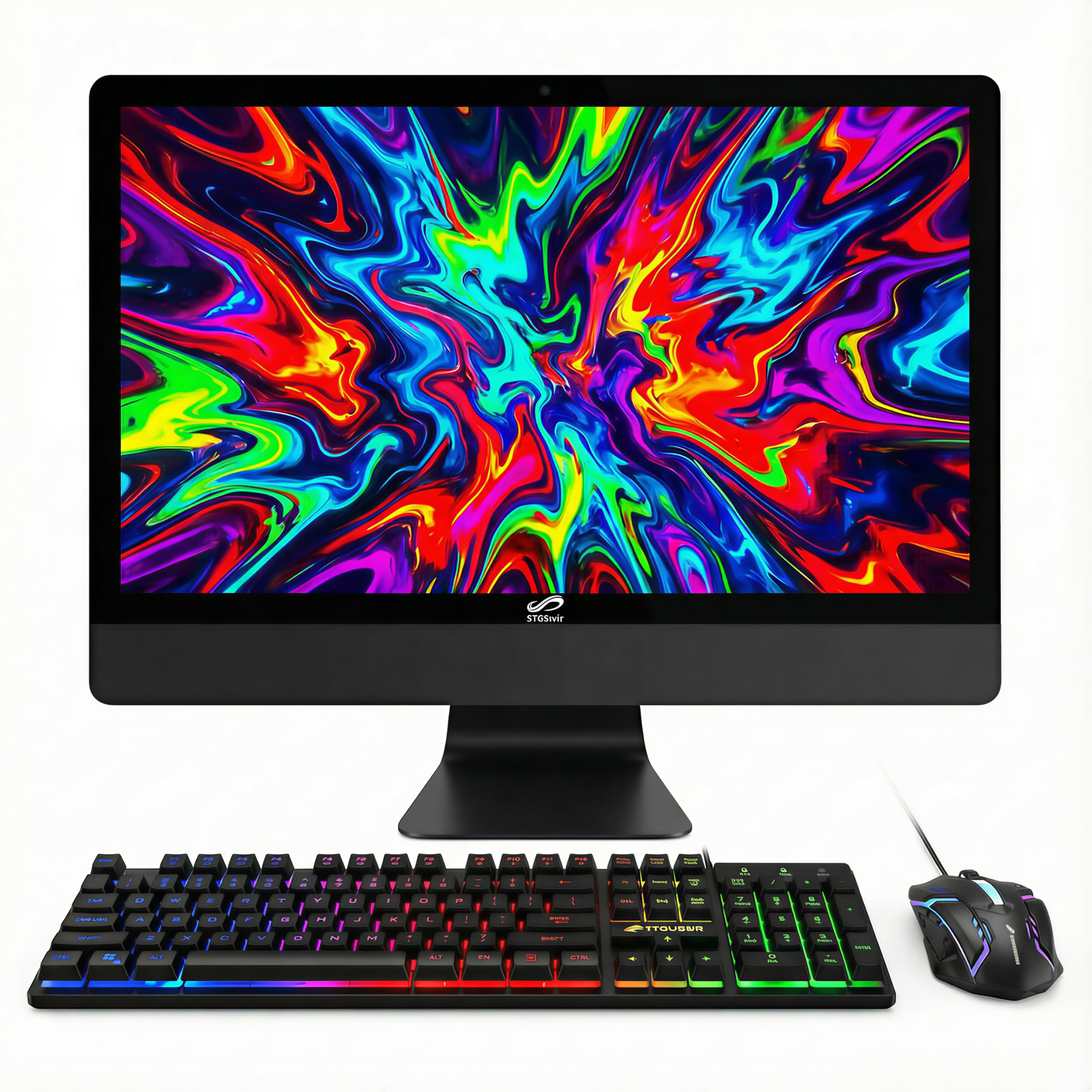
A budget-friendly 24-inch AIO with RGB flair and a 1TB SSD for file-heavy families.
The STGSivir targets the rock-bottom price segment while offering a few pleasant surprises: a 24-inch Full HD display, a 1TB solid-state drive (rare at this level), and an RGB keyboard and mouse set that adds a splash of color for younger users or gamers on a tight budget. The processor is an older Intel Core i5-3470T, which maxes out at 3.6 GHz — adequate for basic browsing, Office tasks, and schoolwork, but not for anything demanding. The 16GB of RAM helps keep things responsive for light multitasking.
Buyer experiences are mixed. One reviewer says it is “outstanding” for the price and loves the clear picture. Another calls it a “great computer” and enjoys the colorful lights on the keyboard, mouse, and mouse mat. But a critical review reports the computer “failed after two uses within 30 days,” showing a loading screen then a blue screen. Another buyer noted the left speaker failed after a few weeks, though the company offered either a repair or a Bluetooth speaker as a replacement. The consistent praise is for the price-to-storage ratio — 1TB of SSD space at this budget level is tough to top. If you are on a strict budget and need lots of storage, the STGSivir is worth a shot, but buy from a place with a good return policy.
Budget Benefits
- 1TB SSD provides massive storage for the price — rare at this budget level.
- 16GB RAM helps with basic multitasking performance.
- Includes RGB keyboard, mouse, and mouse mat for a fun aesthetic.
- 24-inch FHD display offers a clear, large screen for everyday tasks.
Reliability Risk
- Some shoppers say total failure after a few uses (blue screen, no power-on).
- One owner reported the left speaker failed after weeks, though replacement was offered.
- Older i5 processor is not suitable for games or heavy multitasking.
- Keyboard lights may turn off periodically, according to a buyer.
Best for: Budget-sensitive users who need lots of storage and are okay with some risk for the price — a kid’s first computer or a basic secondary machine.
Think twice if: You need reliability from the start for work or school — the failure rate in reviews is higher than with established brands like Dell, HP, or Acer.
Understanding the Specs
Processor Generation & Cores
The processor is the engine of your AIO, and its generation matters more than the model number alone. A 12th-gen Intel Core i5 (like the i5-1235U in the Acer C27) will outperform an older 7th-gen i7 (like the i7-7700HQ in the MECHAZER) in most real-world tasks because of architectural improvements and efficiency. Pay attention to core count: more cores (especially Performance-cores in 12th-gen and newer) mean better multitasking. The N100 processors in the HP 24 Touch and Lenovo 24 are entry-level with only 4 cores and no Performance-cores, making them fine for light use but sluggish for anything demanding.
RAM and Upgradeability
Most AIO computers do not let you easily upgrade the RAM after purchase — many models solder the memory directly to the motherboard, or the RAM slot is buried under the screen. That is why buying enough RAM upfront is critical. 16GB is the current balance for smooth everyday use and moderate multitasking. If you plan to run many applications at once, edit large files, or keep the computer for 4-5 years, consider a model with 32GB like the HP AMD Ryzen 7 or Dell Inspiron 7730. Always check the product specs or reviews to see if the RAM is soldered or socketed before buying.
FAQ
Can I upgrade the RAM in an AIO computer after I buy it?
Is a touchscreen AIO worth the extra cost?
Can I use an AIO computer as a second monitor for a laptop?
How long does an AIO computer typically last?
What’s the difference between the Intel N100 and Core i5 processors in an AIO?
Do AIO computers have good built-in speakers?
Can I play games on an AIO computer?
How much storage do I really need in an AIO?
What is the difference between an all-in-one and a standard desktop tower?
Does the webcam quality matter on an AIO for video calls?
Final Thoughts: The Verdict
For the majority of shoppers, the best aio computer winner is the Acer Aspire C27-1700 because it perfectly balances a large 27-inch FHD display with a modern 12th-gen i5 processor and generous 16GB RAM at a mid-range price, giving you a great everyday machine that looks clean and performs well. If you want a larger touchscreen model with Dell’s support extras, the Dell Inspiron 7730 is the premium pick. And for a budget-conscious family that values storage and touchscreen, the HP 24 Touchscreen AIO delivers a great all-in-one experience with its 1TB SSD and responsive display.
How We Picked
We do not accept paid placement. Every pick is matched to a real buyer and a real use-case; we do not hands-on test units.
Sources & Methodology
Specifications: manufacturer listings and product documentation. Review insights: verified customer reviews, as of July 2026. Pricing: not shown on this page (it changes often); check the current price via the retailer link.
As an Amazon Associate, FitlyFast earns from qualifying purchases. This does not affect which products we feature.