
Our readers keep the lights on and the weekend projects moving. As an Amazon Associate, I earn from qualifying purchases.
The frustration of navigating a media center with a standard remote is universal — you want to click a link, but you’re stuck mashing directional arrows on a tiny grid. An air mouse solves this by turning your hand into a natural pointer, using gyroscopic sensors to translate a simple wrist flick into on-screen cursor movement, making browsing from the couch feel intuitive.
I’m Rikta — the founder and writer behind FitlyFast. I’ve spent years analyzing the hardware specifications that separate a usable air mouse from a frustrating one, from gyroscope accuracy to IR learning compatibility and RF interference patterns.
Whether you’re building a home theater PC or upgrading your Android TV box, finding the best air mouse comes down to understanding gyroscope calibration, dual-mode connectivity, and battery longevity.
How To Choose The Best Air Mouse
Choosing an air mouse means balancing gyroscope sensitivity, connectivity type, and physical layout. A model that drifts on a projector screen or fails to pair with a specific Android box wastes your time and money. Focus on these three factors to narrow your options.
Gyroscope Technology and Calibration
The core of any air mouse is its motion sensor. Six-axis gyroscopes (3-gyro + 3-accelerometer) are the standard players. What matters more is the firmware calibration — a poorly calibrated unit will have cursor drift or require exaggerated arm movements. Look for models that offer adjustable pointer speed, usually with three or more sensitivity settings, so you can dial in the responsiveness for your screen size and viewing distance.
Connectivity: RF vs. Bluetooth vs. Dual-Mode
RF 2.4GHz dongles provide the lowest latency and most reliable connection for critical tasks like navigating a media player interface. Bluetooth 5.0 offers convenience for pairing with devices that lack USB ports, such as certain smart TVs. Dual-mode remotes give you the best of both worlds, but be aware that Bluetooth mode on some units may not support Windows computers or certain voice functions — always check the spec sheet for OS restrictions.
IR Learning and Key Programmability
If you want one remote to rule them all, IR learning is non-negotiable. This feature lets the air mouse copy commands from your TV’s original infrared remote, handling power, volume, and input switching. Some budget units only offer one or two programmable keys, while premium models can learn 34 keys or more. Check user reviews for real-world compatibility, as many air mice struggle with recent Samsung, Sony, or LG TV models.
Quick Comparison
On smaller screens, swipe sideways to see the full table.
| Model | Category | Best For | Key Spec | Amazon |
|---|---|---|---|---|
| Pepper Jobs W10 Fly Mouse | Premium PC Remote | Windows HTPC optimization | 6-Axis Gyro + 34 IR-learnable keys | Amazon |
| Dupad story G60S Pro | Dual-Mode Premium | RF + BT flexibility | 6-Axis Gyro + Touchpad + USB-C charging | Amazon |
| Dupad story MX3 Pro Voice | Mid-Range Workhorse | 5 programmable IR keys | 6-Axis Gyro + 2-in-1 QWERTY | Amazon |
| iPazzPort Universal Air Mouse | Mid-Range Compact | Dual-mode (BT + 2.4G) | Built-in rechargeable battery | Amazon |
| ELISWEEN Presenter Remote | Presentation Specialist | PowerPoint + air mouse combo | RF 2.4GHz + red laser pointer | Amazon |
| WeChip W3 Air Mouse | Slim Budget Pick | Ultra-slim media remote | 6-Axis Gyro + IR learning (basic) | Amazon |
| Dupad story G20S Pro Plus | Budget Favorite | Replaceable AA batteries | 6-Axis Gyro + Bluetooth 5.0 | Amazon |
In‑Depth Reviews
1. Pepper Jobs W10 Fly Mouse

The Pepper Jobs W10 Fly Mouse stands out as the only air mouse purpose-built for Windows 10 and 11, with shortcut keys and hotkeys that map directly to the Windows OS. Its 6-axis gyro delivers stable, jitter-free cursor movement that remains steady even after extended use, a critical advantage over units that require constant recalibration. The double-sided backlit keyboard automatically powers down after 5 seconds of inactivity, conserving battery life while remaining readable in dark rooms.
IR learning on this unit covers up to 34 keys from your TV remote, making it one of the most flexible programmability options in its class. Users report seamless operation with Linux systems via the included USB dongle, and the remote auto-senses its orientation to disable the unused side of the keyboard — a thoughtful ergonomic touch. The removable AAA batteries mean no built-in battery degradation over time, a practical advantage for long-term use.
Some owners note the lack of dedicated scroll wheel and F1-F12 function keys, and the power button sends a system shutdown command to the PC rather than just putting the remote to sleep. A minority report key chatter (double-registering presses) after several months, though this appears to affect a small sample of units. For home theater PC users who prioritize stable gyro performance and deep OS integration, this remains the top contender.
Why it’s great
- Stable 6-axis gyro with no cursor drift
- Full Windows 10/11 shortcut optimization
- 34-key IR learning is class-leading
Good to know
- Lacks dedicated scroll and F1-F12 keys
- Power button shuts down the PC, not the remote
- Some units report key chatter after several months
2. Dupad story G60S Pro

The G60S Pro offers dual-mode connectivity (RF 2.4GHz and Bluetooth 5.0) alongside a built-in touchpad, making it one of the most versatile air mice for controlling multiple devices without juggling dongles. Its 6-axis gyroscope provides responsive air mouse control, and the USB-C rechargeable battery lasts approximately two months under light use — a significant convenience over units requiring AA swaps. The backlit keyboard and touchpad with multi-touch gesture support work well for navigating Android TV interfaces and media center apps.
IR learning on this model covers six buttons, enough to handle power, volume, and input switching for most TVs, though it falls short of the 34-key learning found on the Pepper Jobs unit. Users particularly praise the gyro mouse stability and the ability to use the RF dongle for low-latency PC control while switching to Bluetooth for an Android TV box. The touchpad is functional but lacks proper palm rejection, causing occasional cursor jumps when gripping the remote naturally.
A common caveat is the lack of dedicated Home and Mute buttons, which requires remapping software for proper Android navigation — the “Home” function sends a Back keycode instead. Some users experienced pairing issues in Bluetooth mode and report unresponsive ‘OK’ buttons in 2.4GHz cursor mode on certain firmware batches. Despite these quirks, the combination of dual modes, USB-C charging, and a useful touchpad makes it a strong mid-premium option.
Why it’s great
- RF + BT 5.0 dual mode for multi-device use
- USB-C charging with long battery life
- Touchpad adds precise navigation when needed
Good to know
- Lacks dedicated Home and Mute buttons
- Touchpad lacks palm rejection
- Some units have BT pairing issues
3. Dupad story MX3 Pro Voice

The MX3 Pro Voice is a well-established mid-range workhorse that combines a 6-axis gyro air mouse, a 38-key QWERTY keyboard, and a built-in microphone for voice input. Its five programmable IR learning keys allow basic TV control (power, volume, input) without requiring a separate original remote, and users consistently report that the IR teaching process is straightforward when following the manual. The air mouse speed is adjustable through three distinct sensitivity settings, though the steps between them are wide, making fine-tuning difficult for those who prefer a very specific cursor feel.
Backlighting on this model is white and easier to read than earlier MX3 versions, and the LED illumination helps accurately input information in low-light settings. The simultaneous operation of IR and RF buttons — eliminating the need to manually toggle between modes — is a convenience upgrade over previous generations. Battery life from two AAA cells is competent, and the risk-free 30-day return policy plus lifetime support adds buyer confidence for a mid-range investment.
The voice search function is strictly limited to in-app input boxes and does not function like a universal Alexa or Google Assistant voice remote — it cannot launch commands across apps or control smart home functions. Some users with Nvidia Shield devices report erratic air mouse behavior, with the cursor taking 10-20 seconds to aim and arrow buttons requiring hard presses that only registered 40-50% of the time. Compatibility with modern Samsung, Sony, LG, TCL, and Roku smart TVs is not supported, so check your TV brand before purchasing.
Why it’s great
- Five programmable IR keys for TV control
- Simultaneous IR/RF operation without mode toggle
- Readable white backlighting
Good to know
- Voice input works only within apps, not across them
- Not compatible with Samsung/Sony/LG/TCL/Roku TVs
- Erratic air mouse reported on some Nvidia Shield units
4. iPazzPort Universal Air Mouse

The iPazzPort Universal Air Mouse packs a 4-in-1 design (air remote, mini keyboard, voice search, IR learning) into a compact form factor that feels surprisingly lightweight despite its depth of key travel. Its dual-mode connectivity (2.4GHz RF via USB dongle or Bluetooth 5.0) gives flexibility for pairing with a wide range of devices from Android TV boxes to Windows and Linux PCs, all without requiring driver installation. The built-in rechargeable battery eliminates the nagging need for AAA replacements, making this a convenient long-term companion.
Users report excellent compatibility with Linux systems and the keyboard disables automatically when in remote mode (and vice versa), which prevents accidental inputs during media playback. The IR learning key is programmable for power, channel, volume, and mute functions — though the documentation is notoriously sparse, and the learning process can be finicky. For living room PC control, the compact layout and responsive 2.4GHz connection make it ideal for navigating Steam from across the room.
The main friction point is the documentation, which matches a different model and offers little guidance for the IR learning process or Bluetooth pairing sequence. In Bluetooth mode, the connection can be very laggy, making the 2.4GHz dongle the preferred option for cursor responsiveness. The remote also lacks a dedicated TV volume or power button in Bluetooth mode, requiring IR setup for those functions — and the Bluetooth pairing was impossible for one reviewer on any device, indicating potential QC variability.
Why it’s great
- Compact build with deep, satisfying key travel
- Built-in rechargeable battery
- Dual mode (2.4G RF + BT 5.0) for flexible pairing
Good to know
- Documentation is sparse and matches wrong model
- Bluetooth mode suffers from noticeable lag
- IR learning process can be inconsistent
5. ELISWEEN Presenter Remote

The ELISWEEN Presenter Remote bridges the gap between a traditional presentation clicker and an air mouse, offering slide control, a bright red laser pointer, and wireless cursor motion in a single ergonomic package. Its RF 2.4GHz connection provides a generous 165-foot range for slide control, with the air mouse function effective up to 50 feet — enough for large conference rooms and auditoriums. The intuitive touch keys allow page forward/back without looking, and the silent key operation avoids distracting an audience during presentations.
Setup is genuinely plug-and-play across Windows, Mac OS, Linux, and Android systems, and the presenter supports PowerPoint, Keynote, Prezi, and standard Office applications. The red laser is clearly visible against most backgrounds, and the jumbo cursor mode helps highlight key data points on projected slides. For presenters who need to jump between windows or play embedded videos, the full-function control (volume, search, hyperlinks) reduces the need to return to the keyboard.
The air mouse function suffers from noticeable lag and requires exaggerated hand movements for fine cursor positioning, making it less precise than dedicated media-center air mice. The laser pointer does not illuminate on LED screens, which limits its usefulness in modern conference rooms with digital displays. The battery cover pops off easily during drops, and the remote would benefit from a pocket clip for secure storage between sessions.
Why it’s great
- Combines slide control, laser pointer, and air mouse
- Silent keys and ergonomic grip for comfortable use
- Plug-and-play across multiple presentation platforms
Good to know
- Air mouse lags and requires large hand movements
- Laser invisible on LED/digital screens
- Battery cover pops off easily if dropped
6. WeChip W3 Air Mouse
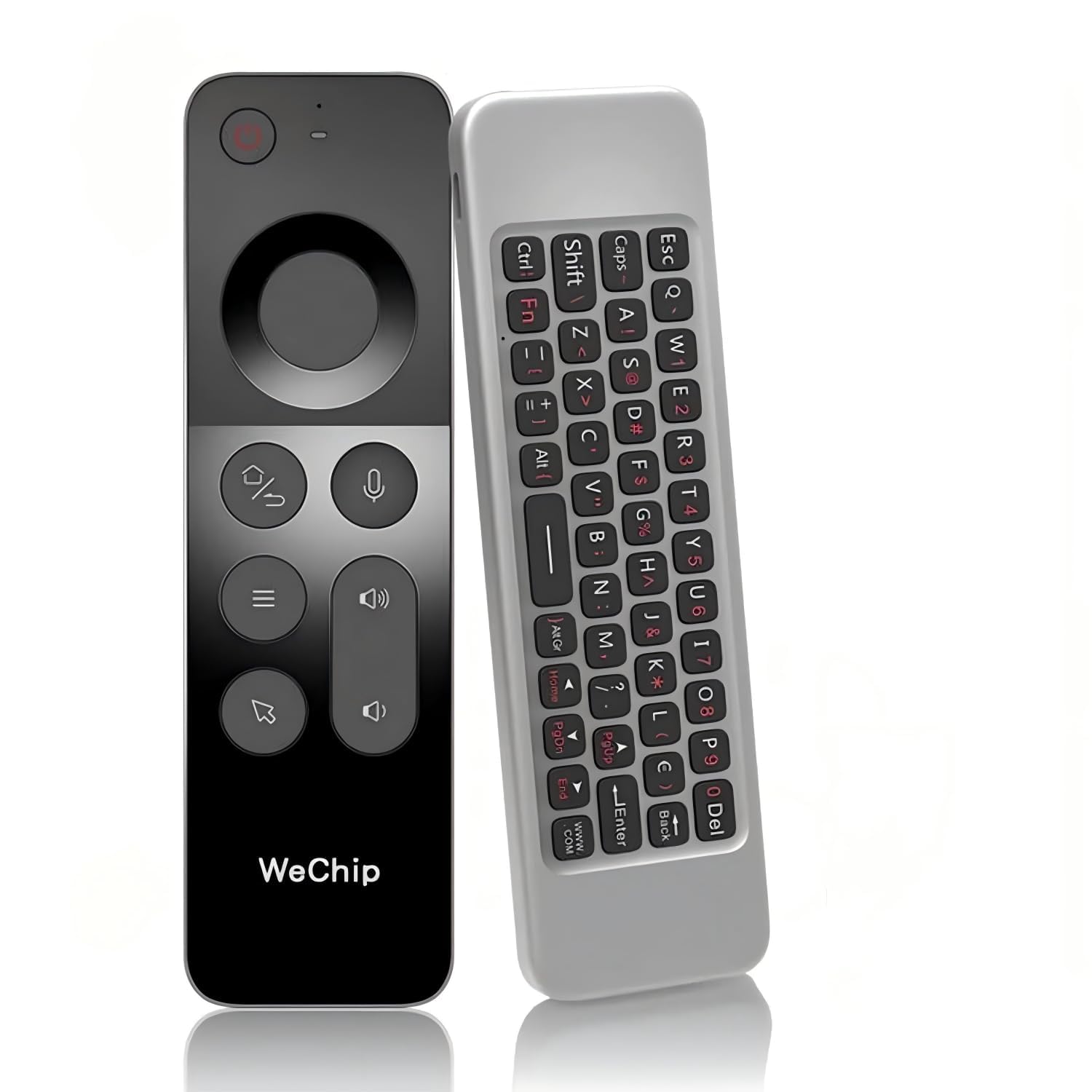
The WeChip W3 Air Mouse impresses with its ultra-slim build crafted from premium ABS material, making it one of the slimmest air mice available without sacrificing the core 6-axis gyroscope function. Its 4-in-1 design replaces a mouse, keyboard, remote, and basic gamepad, reducing clutter on your coffee table or media cabinet. The cursor lock feature prevents accidental movement during movie watching, a thoughtful touch for a budget-friendly entry.
Compatibility covers Windows, Android, Mac OS, and Linux systems, with support for Android TV boxes, mini PCs, smart TVs, projectors, and HTPCs. Users report accurate point-and-click navigation from couch distance, though the cursor is slightly slow even on the highest sensitivity setting. Battery life stretches to weeks or even a month under daily use, and the IR learning function allows basic TV control after pairing with an old remote.
The major blind spots are the lack of Bluetooth connectivity (2.4GHz dongle only) and the absence of backlit keys, making typing in the dark a guessing game. The function characters are printed in dark ink on a black body, rendering them nearly invisible even in moderate lighting. Some users note that the cursor calibration feels poorly calibrated, with combined movement axes that make diagonal motion imprecise. The IR learning also failed to wake a NUC out of the box, requiring a separate FLIRC receiver for wake-from-sleep functionality.
Why it’s great
- Ultra-slim design is easy to hold and store
- Cursor lock button prevents accidental movement
- Good battery life for daily use
Good to know
- No Bluetooth — 2.4GHz dongle only
- No backlit keys or readable function labels
- Cursor calibration feels imprecise for diagonal movement
7. Dupad story G20S Pro Plus

The G20S Pro Plus offers a rare combination in the budget tier: Bluetooth 5.0 connectivity alongside standard 2.4GHz RF, plus a 6-axis gyroscope that follows hand movement naturally rather than relying on slow arrow keys. Its LED backlight makes nighttime operation straightforward, and the replaceable AA batteries mean no anxiety over internal battery degradation — a practical advantage over sealed rechargeable units. The two-button infrared learning covers basic TV functions (power, volume, input) and works reliably with most Android TV boxes.
Users consistently praise the air mouse accuracy and responsive Bluetooth pairing with Android and Google TV devices, with several reviewers noting it as their favorite 2.4GHz remote for Kodi-based media centers. The built-in microphone enables voice search within compatible apps, and the motion sensing works well for gyroscopic games and Home Assistant automation. The form factor is compact at 6.29 inches long, and the backlight provides clear visibility in dark rooms.
The power button fails to turn the connected box back on after shutdown on some units, and the voice activation doesn’t function reliably across all Android TV boxes. In Bluetooth mode, the remote is not compatible with Windows computers — it requires the 2.4GHz dongle for PC control. The mute button is awkwardly placed but can be remapped through keymapping software in Kodi or similar apps.
Why it’s great
- Replaceable AA batteries — no internal battery degradation
- Bluetooth 5.0 + 2.4GHz dual mode
- Responsive air mouse with backlit keys
Good to know
- Power button may not turn box back on after shutdown
- Bluetooth mode incompatible with Windows PCs
- Voice activation unreliable on some boxes
FAQ
Can an air mouse replace my TV remote completely?
Does Bluetooth or 2.4GHz RF work better for an air mouse?
Why does my air mouse cursor drift when I hold it still?
Final Thoughts: The Verdict
For most users, the best air mouse winner is the Pepper Jobs W10 Fly Mouse because it delivers stable gyro performance, deep Windows OS integration, and class-leading 34-key IR learning in a package that works out of the box. If you want dual-mode flexibility with a useful touchpad and USB-C charging, grab the Dupad story G60S Pro. And for a budget-friendly entry with replaceable AA batteries and reliable Bluetooth pairing, nothing beats the Dupad story G20S Pro Plus.