
Our readers keep the lights on and the weekend projects moving. As an Amazon Associate, I earn from qualifying purchases.
Every watt your high-end CPU and GPU pull turns into heat that has to leave the chassis. Without a well-vented case, component fans starve for cool air, temperatures spike, and performance throttles. The difference between a stifling build and a cool-running rig comes down to mesh density, fan placement, and unobstructed intake paths.
I’m Rikta — the co-founder and writer behind FitlyFast. I’ve analyzed thermal test data, fan static pressure specs, and panel perforation ratios across dozens of chassis to separate the truly breathable from the merely advertised.
Whether you are building a silent workstation or a high-heat gaming beast, finding the best airflow atx case means picking a chassis that moves large volumes of air with minimal noise and dust intrusion.
How To Choose The Best Airflow ATX Case
An airflow-focused case is defined by its intake area, fan configuration, and how unobstructed the path is from the front mesh to your motherboard and GPU. Look beyond advertised fan support and check the actual perforation ratio of the front panel.
Front Panel Mesh Density
A solid glass or metal front panel with small side slits chokes airflow regardless of how many fans you install. True high-airflow cases use a full mesh or perforated steel front with at least 40–50% open area. This lets 140mm fans actually move air instead of pulling against a solid wall.
Pre-Installed Fan Quality and Size
Three cheap 120mm fans do not equal two quality 140mm fans in terms of static pressure or noise. Look for cases that include PWM-controlled fans with a decent RPM range and blade design. Bonus points for a built-in fan hub that simplifies cable management.
Dedicated GPU Cooling Pathways
Modern high-wattage GPUs dump heat into the case. The best airflow cases include bottom fan mounts, a ventilated PSU shroud, or a dedicated side intake that feeds cool air directly to the graphics card. This prevents the GPU from recycling hot air from the CPU cooler.
Quick Comparison
On smaller screens, swipe sideways to see the full table.
| Model | Category | Best For | Key Spec | Amazon |
|---|---|---|---|---|
| Montech AIR 903 MAX | Mid-Range | Budget-Friendly High Airflow | 51% mesh ventilation rate | Amazon |
| LIAN LI LANCOOL 207 | Mid-Range | Compact ATX with GPU Cooling | 2x bottom fans under GPU | Amazon |
| Corsair 4000D RS Frame | Mid-Range | Modular Builds & BTF Mobo Support | InfiniRail fan mounting system | Amazon |
| LIAN LI LANCOOL 216 | Mid-Range | Large Pre-Installed Fans | 2x 160mm front + 1x 140mm rear fans | Amazon |
| NZXT H7 Flow 2024 | Premium | Clean Aesthetic & Dedicated GPU Cooling | Supports 3x bottom 120mm fans | Amazon |
| Montech King 95 PRO | Premium | Dual-Chamber & Curved Glass Looks | 6 pre-installed ARGB PWM fans | Amazon |
| Antec Flux Pro | Premium | Full-Tower with Wood Accent & iShift PSU | 6 pre-installed PWM fans + 420mm rad support | Amazon |
In‑Depth Reviews
1. LIAN LI LANCOOL 216

The LANCOOL 216 sets the standard for mid-price airflow cases by shipping with two massive 160mm front fans and a 140mm rear fan. These larger fans move more air at lower RPMs, making the case nearly silent under normal loads while keeping temperatures in check even with high-wattage CPUs and GPUs. The all-around mesh panels on the front, top, and PSU shroud ensure no section of the case traps hot air.
An innovative rear PCIe fan bracket lets you mount an extra 120mm or 140mm fan directly behind the CPU socket, which improves VRM and CPU cooler exhaust. The motherboard tray includes velcro straps, cable grommets, and clips that make cable management effortless. The four-millimeter tempered glass side panel attaches with a single retained screw for quick access.
Internally, the 216 supports E-ATX motherboards up to 280mm wide, graphics cards up to 392mm, and CPU coolers up to 180mm tall. The removable top radiator bracket supports up to a 360mm AIO without pressure leaks. For the price, this case delivers a combination of pre-installed fan quality, airflow volume, and build flexibility that is hard to beat.
Why it’s great
- Industry-best pre-installed 160mm front fans for quiet, high-volume airflow
- Rear PCIe fan bracket adds targeted CPU/VRM cooling
- Excellent cable grommets and velcro straps for a clean build
Good to know
- Front I/O power button uses a flat black design that can be hard to spot
- SSD mounts behind the motherboard tray require removing the panel for access
2. LIAN LI LANCOOL 207

The LANCOOL 207 rethinks the ATX layout by placing the PSU at the front, which frees up room for two dedicated bottom intake fans that blow directly onto the graphics card. This design directly addresses the biggest thermal challenge of modern high-TDP GPUs: supplying fresh, cool air instead of letting them pull from the case interior. The case ships with two 140x30mm ARGB front fans and two 120mm PWM bottom fans.
The recessed motherboard tray shifts the board lower, improving clearance for top-mounted radiators and creating a cleaner airflow path from the front to the CPU area. A pre-installed GPU anti-sag bracket works with any card length and is fully adjustable. The front, top, and bottom mesh panels ensure low restriction on all intake surfaces, and the included fan hub simplifies the cable mess of four separate fans.
This is a compact mid-tower that still fits ATX motherboards, 410mm GPUs, and 360mm top radiators. Cable management is tight in the front-PSU configuration, so a fully modular power supply is recommended. The stock front fans can emit a humming resonance at certain speeds, but this is easily fixed with small rubber gaskets. The 207 is a smart pick for builders who prioritize GPU cooling in a smaller footprint.
Why it’s great
- Revolutionary front-PSU layout with two bottom fans for direct GPU cooling
- Includes four pre-installed fans with a hub for easy control
- Built-in fully adjustable GPU anti-sag bracket
Good to know
- Stock front fans can produce a humming resonance at mid-RPMs
- Cable routing space is tighter with the front-mounted PSU
3. Corsair 4000D RS Frame

The Corsair 4000D RS Frame introduces the FRAME modular system, allowing users to swap motherboard trays, front I/O panels, and side panels after purchase. Its 3D Y-pattern front panel uses steel perforation across three dimensions, achieving high airflow with minimal restriction while still filtering dust. Three pre-installed RS PWM fans support Zero RPM mode for silent operation at low loads and can be daisy-chained for clean wiring.
The InfiniRail mounting system uses sliding steel rails on the front and roof, enabling builders to position fans anywhere along the track. This means you can mount up to 200mm fans in the front or 140mm fans in the top without fixed screw holes dictating placement. The internal side panel near the motherboard tray doubles as a cable cover or can be removed entirely to mount side fans for additional intake or exhaust.
This case natively supports reverse connector motherboards from ASUS (BTF), Gigabyte (Project Stealth), and MSI (Project Zero), making it future-proof for upcoming clean-build trends. It fits multiple 360mm radiators simultaneously, large GPUs, and includes magnetic dust filters. The only downsides are a potentially pinched front USB-C cable during shipping and the lack of rubber grommets on every wire routing hole. For builders who plan to upgrade or reconfigure, the FRAME system offers unmatched flexibility.
Why it’s great
- InfiniRail sliding fan mounts allow custom positioning for any fan size
- FRAME modular system supports future I/O and tray upgrades
- Compatible with reverse connector BTF motherboards out of the box
Good to know
- Front USB-C cable can arrive pinched from shipping
- Side glass panel can be tricky to remove without proper screw guides
4. Montech AIR 903 MAX

The Montech AIR 903 MAX punches well above its price by including four 140mm fans — three ARGB front intakes and one rear exhaust — plus a combined LED and PWM fan hub. The metal front panel features a 51% ventilation rate, meaning over half the surface area is open for airflow. This aggressive mesh design keeps restriction low even when paired with high-static-pressure fans.
Build quality is solid for the price segment, with a tempered glass side panel, magnetic dust screens, and thumb screws on all expansion slots. The interior provides 180mm of CPU cooler clearance and 400mm of GPU clearance, easily accommodating large air coolers and flagship cards like the RTX 4090. The PSU is housed in a separate bottom chamber with its own dust filter, and the HDD cage is removable with thumb screws for additional airflow.
The main trade-offs are noise: the pre-installed fans are loud at default speeds, though a custom fan curve or replacement solves this. Some units have reported coil whine from the exhaust fan at higher RPMs. Cable management is average rather than excellent, with limited routing channels behind the motherboard tray. For users who care most about raw airflow per dollar and don’t mind tweaking fan curves, the AIR 903 MAX is the best entry-level option.
Why it’s great
- Four 140mm fans and a fan hub included at a budget price
- 51% mesh front ventilation delivers class-leading intake potential
- Spacious interior fits 400mm GPUs and 180mm CPU coolers
Good to know
- Pre-installed fans can be loud; a custom curve or swap is recommended
- Occasional coil whine reported on the rear exhaust fan
5. NZXT H7 Flow 2024

NZXT’s H7 Flow 2024 updates the popular Flow line with dedicated GPU cooling channels. The case supports three bottom-mounted 120mm fans that feed cool air directly to the graphics card, complementing the three pre-installed front 120mm intake fans. High-performance mesh panels on the front, top, and bottom maximize intake and exhaust while filtering dust.
The cable management system sets a high standard with wide channels, built-in hooks, and included velcro straps that make routing easy even for first-time builders. The interior uses a traditional mid-tower layout with plenty of clearance for large CPU tower coolers and long GPUs. Radiator support reaches 420mm in the front and 360mm in the top, making this case capable of handling the largest custom loops or high-end AIOs.
The metal and plastic build feels solid, and the design language is clean and understated — no aggressive gamer styling. The primary downside is that the included fans are 3-pin DC rather than PWM, limiting fine-grained speed control on modern motherboards. The side panels require a firm pull to remove (no latch), and the case is large enough to qualify as a full tower despite being marketed as mid-tower. For builders who want a premium look with excellent airflow, the H7 Flow is a strong choice.
Why it’s great
- Three bottom fan slots for dedicated GPU cooling
- Premium cable management with channels and velcro straps
- Large radiator support (420mm front, 360mm top)
Good to know
- Pre-installed fans are 3-pin DC, not PWM
- Side panels are latch-free and require a firm pull to remove
6. Montech King 95 PRO
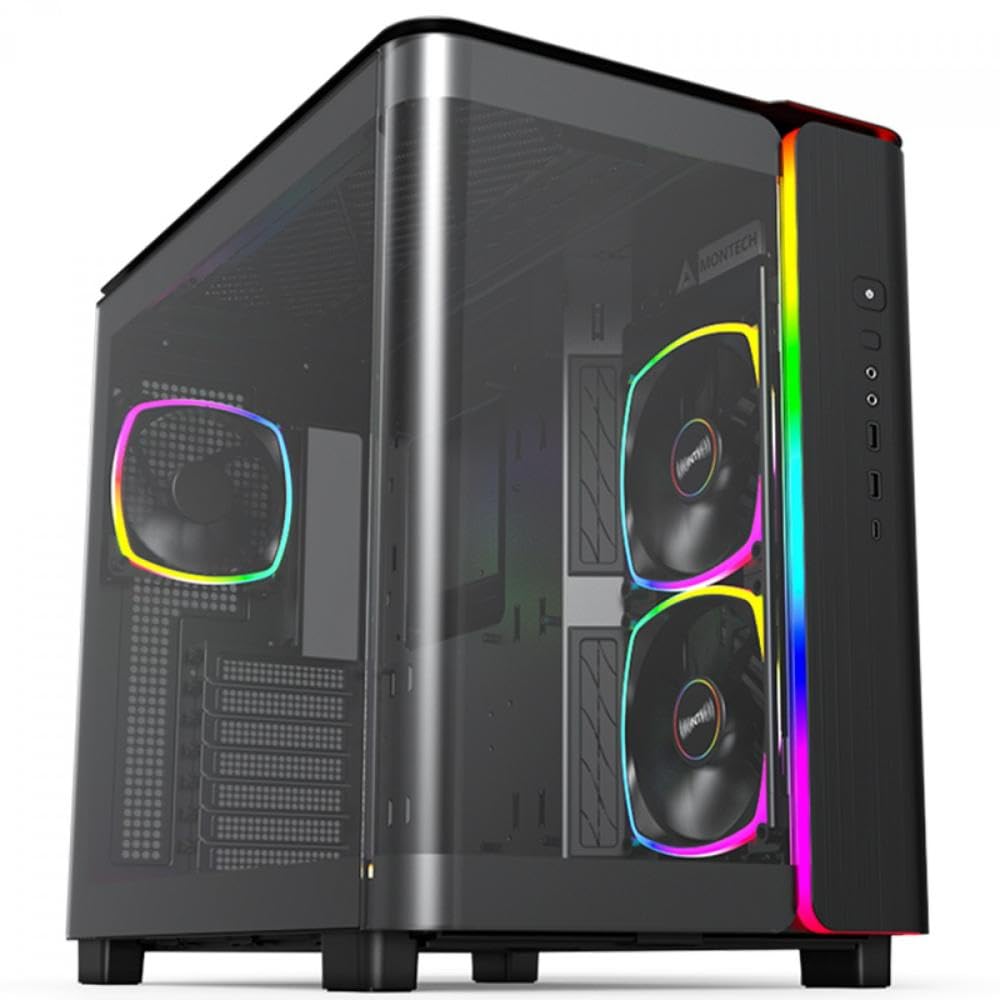
The Montech King 95 PRO is a dual-chamber mid-tower that includes six ARGB PWM fans — two 140mm top, two 120mm side, and two 120mm rear — plus a fan hub. The dual-chamber layout separates the motherboard and GPU from the PSU and storage, creating a cleaner and more open path for airflow through the main chamber. The sturdy curved tempered glass front panel provides 270-degree visibility of the interior while the mesh side panel on the opposite chamber remains ventilated.
Montech’s patented side fan mounts allow for vertical fan installation along the motherboard tray, feeding additional cool air directly to the CPU area. The included mesh panel covers the top and PSU shroud, and built-in filters at all critical intake points make cleaning straightforward. The interior is spacious enough for large GPUs and multiple radiators, and all major panels are toolless for quick access.
This case is heavy (over 26 pounds) and takes up significant desk space, so check dimensions before purchasing. The pre-installed fans can become noticeable under load, though they perform well thermally. Overall, the King 95 PRO delivers a premium aesthetic with high cooling capacity out of the box, making it ideal for showcase builds that need both style and airflow.
Why it’s great
- Six pre-installed ARGB PWM fans with hub for full lighting control
- Dual-chamber design keeps PSU heat separate from main components
- Curved glass front panel provides an unobstructed view of internal hardware
Good to know
- Very heavy and large — verify desk space before ordering
- Fans can produce audible noise under sustained gaming loads
7. Antec Flux Pro

The Antec Flux Pro is a full-tower E-ATX case that blends premium materials — metal, tempered glass, and real walnut wood — with high-density airflow engineering. It ships with six PWM fans pre-installed: three Tranquil 140mm front fans, two P12R reverse-blade fans on the PSU shroud, and one Tranquil 140mm rear fan. The innovative iShift PSU mount rotates the power supply 90 degrees, making cable routing simpler and freeing up airflow path through the lower chamber.
The multi-directional vent design supports up to twelve fans, and the removable cooling brackets on the front, top, and PSU shroud make installation easy. The case can simultaneously support a 420mm radiator at the front and a 360mm radiator at the top, offering the highest liquid cooling capacity on this list. A built-in CPU/GPU dual temperature display on the front panel provides real-time thermal feedback without software.
Build quality is exceptional — the steel chassis has minimal flex, and all panels fit with tight tolerances. The walnut wood front panel strip adds a classy, furniture-like aesthetic that works well in non-gaming setups. The main drawbacks are size (nearly 21 inches deep) and weight (29 pounds), so plan for a solid desk or floor placement. The included pre-installed fans are quiet and move generous amounts of air, keeping systems noticeably cooler than older cases. For high-end builds that demand maximum cooling and a refined look, the Flux Pro is the benchmark.
Why it’s great
- Six pre-installed PWM fans with reverse-blade options for GPU direct cooling
- iShift 90-degree PSU mount improves cable routing and airflow
- Premium walnut wood accent and dual temperature display add class
Good to know
- Large footprint and heavy — requires adequate desk or floor space
- Front panel cables can be slightly short in some configurations
FAQ
How many fans do I need for good airflow in an ATX case?
Should I choose a mesh front or glass front for airflow?
Does case size affect cooling performance?
Final Thoughts: The Verdict
For most users, the best airflow atx case winner is the LIAN LI LANCOOL 216 because its oversized 160mm front fans and PCIe fan bracket deliver exceptional thermal performance and quiet operation without breaking the bank. If you want dedicated GPU cooling in a compact chassis, grab the LIAN LI LANCOOL 207. And for a premium, furniture-grade full tower with the most fan capacity and a wood accent, nothing beats the Antec Flux Pro.