
Our readers keep the lights on and the weekend projects moving. As an Amazon Associate, I earn from qualifying purchases.
A color laser printer that prints, scans, copies, and faxes is the backbone of a small office. The wrong choice means costly toner, constant paper jams, or a machine that drops off your network at the worst moment. The right one handles a team’s daily workload without drama.
I’m Rikta — the co-founder and writer behind FitlyFast. I’ve spent countless hours analyzing hardware specifications, comparing cost-per-page formulas, and reading hundreds of verified owner accounts to separate the reliable workhorses from the frustrating paperweights in this category.
Small offices demand a machine that delivers sharp color documents, fast duplex speeds, and easy wireless sharing without a monthly subscription. This guide narrows the field to the top contenders for the best all in one color laser printer for small office.
How To Choose The Best All In One Color Laser Printer For Small Office
A small office printer has to serve multiple people, handle varied media, and stay online. Prioritize a machine that includes automatic duplex printing, a reliable automatic document feeder, and robust network connectivity. Avoid models that lock you into expensive, proprietary consumables without a high-yield option.
Print Speed vs. First-Page-Out
Advertised pages-per-minute (PPM) rates are measured on plain text. For a small office, the time it takes to start printing a complex color graphic is equally important. Look for a first-print-out time under 11 seconds to keep short jobs from feeling slow.
Toner Yield and True Cost-Per-Page
Starter cartridges included in the box often yield half the pages of standard or high-yield replacements. Always check the page yield of the standard and high-capacity cartridges before buying. A printer that accepts high-yield toner with 4,000-plus page black capacity will save your office significant money over time.
Wireless and Network Reliability
A printer that drops off the network kills productivity. Dual-band Wi-Fi (2.4GHz and 5GHz) and an Ethernet port are essential for a shared office. Verify that the printer supports your team’s devices, including Mac, Linux, or Chromebooks if needed.
Quick Comparison
On smaller screens, swipe sideways to see the full table.
| Model | Category | Best For | Key Spec | Amazon |
|---|---|---|---|---|
| Canon imageCLASS MF753Cdw | Premium All-in-One | High-volume teams | 35 ppm color print speed | Amazon |
| HP Color LaserJet Pro MFP 3301fdw | Premium All-in-One | Security-focused offices | 26 ppm, dual-band Wi-Fi | Amazon |
| Canon imageCLASS MF644Cdw | Mid-Range All-in-One | Reliable daily driver | 22 ppm, 5-inch touchscreen | Amazon |
| Canon imageCLASS MF642Cdw | Mid-Range All-in-One | Balanced features and cost | 22 ppm, 3-year warranty | Amazon |
| Xerox C325dni | Mid-Range All-in-One | Fast color output | 35 ppm, 4.3-inch touchscreen | Amazon |
| Brother MFC-L3720CDW | Mid-Range All-in-One | Touchscreen and cloud access | 19 ppm, 3.5-inch color display | Amazon |
| HP Color LaserJet Pro MFP 3301cdw (Renewed) | Refurbished All-in-One | Budget-friendly premium build | 26 ppm, TerraJet toner | Amazon |
| Lexmark CX431adw | Premium All-in-One | Steel-frame durability | 26 ppm, sturdy build | Amazon |
| Xerox C235dni | Entry All-in-One | Low monthly page volume | 24 ppm, smartphone setup | Amazon |
| Lexmark CX331adwe | Entry All-in-One | Secure, compact office | 26 ppm, steel frame | Amazon |
| Brother HL-L3220CDW | Print-Only | Print-only budget choice | 19 ppm, automatic duplex | Amazon |
In‑Depth Reviews
1. Canon imageCLASS MF753Cdw

The Canon MF753Cdw is built for offices that print and scan in volume. Its 35 ppm color speed matches the fastest in this roundup, and the one-pass duplex automatic document feeder captures both sides of a page in a single pass — a genuine time-saver for multi-page contracts.
The 5-inch color touchscreen is responsive, though the menu layout requires some learning. Users report that the setup for scanning to email is more involved than on competing models, often requiring manual SMTP configuration. The standard 250-sheet tray can be expanded to 850 sheets with an optional cassette.
Several buyers note that the included starter toner cartridges yield only about 1,100 pages per color, and replacement high-capacity cartridges are expensive. The printer also blocks non-OEM toner. If your office prints a high volume of color documents, factor in the ongoing consumable cost.
Why it’s great
- Fast 35 ppm color and mono print speed
- One-pass duplex scanning saves significant time
- Expandable paper capacity up to 850 sheets
Good to know
- Setup and menu navigation are not intuitive
- Starter toner yield is low; replacements are costly
- Blocks third-party toner cartridges
2. HP Color LaserJet Pro MFP 3301fdw

The HP 3301fdw is a strong contender for teams that prioritize data security. HP Wolf Pro Security provides a customizable suite of tools to guard against malware and unauthorized access. Print quality is excellent, with TerraJet toner producing vibrant color graphics and sharp text at 26 ppm.
Dual-band Wi-Fi with self-reset keeps the printer connected, and the HP Smart app makes mobile printing straightforward. The 250-sheet tray is adequate for a small team, and the 50-sheet ADF handles multi-page jobs. Users praise the fast, intuitive setup and stable network performance.
The major caveat is HP’s dynamic security, which blocks third-party toner cartridges. Several owners report that firmware updates can render non-HP cartridges unusable, and that replacement toner for this newer model was difficult to source shortly after launch. Budget for genuine HP consumables from day one.
Why it’s great
- Built-in HP Wolf Pro Security for data protection
- Dual-band Wi-Fi with self-reset for reliable connectivity
- Excellent color quality with TerraJet toner
Good to know
- Firmware updates block non-HP toner
- Replacement toner can be hard to find at launch
- Starter toners deplete quickly
3. Canon imageCLASS MF644Cdw

The MF644Cdw is a thoroughly tested workhorse that has earned a reputation for reliability over years of use. It prints at 22 ppm with a fast first-print-out time of 10.3 seconds. The 5-inch color touchscreen offers smartphone-like navigation, and the Application Library lets you customize shortcuts.
Wireless performance is solid, with AirPrint working flawlessly for most users. The duplex ADF handles two-sided scanning in one pass, a feature usually found on more expensive models. The printer also supports Wi-Fi Direct for connecting without a network router. Several owners report years of trouble-free use with aftermarket toner.
Setup can be frustrating. The documentation relies on pictographs, and getting scan-to-email working requires manual SMTP configuration. Some units have an issue where the printer loses network connectivity after entering sleep mode, requiring a power cycle to reconnect. The 80MB memory can choke on very large, high-resolution print jobs.
Why it’s great
- Proven long-term reliability with aftermarket toner support
- One-pass duplex scanning in the ADF
- Fast first-print-out time under 11 seconds
Good to know
- Network connection may drop after sleep mode
- Setup process is not beginner-friendly
- Limited memory can cause issues with large files
4. Canon imageCLASS MF642Cdw

The MF642Cdw is nearly identical to the MF644Cdw but trades the 5-inch screen for a smaller LCD display and a slightly lower paper capacity. It prints at 22 ppm color and mono with a three-year limited warranty that provides peace of mind for a small office investment.
Print quality is outstanding for a color laser in this class, with users commenting that documents and even photo prints look sharp and vibrant. The 250-sheet tray is standard, and the machine includes automatic duplex printing. Wireless setup via WPS is straightforward for most users, though a small number report needing guidance from Canon support.
Like its sibling, the MF642Cdw lacks one-pass duplex scanning; you must manually flip pages for two-sided scanning. The starter toner yield is modest (680 pages per color). Several long-term owners note the printer survives power surges and remains reliable for years with minimal maintenance.
Why it’s great
- Superb print quality for a color laser
- Three-year limited warranty included
- Compact footprint fits small desks
Good to know
- No one-pass duplex scanning
- Starter toner cartridges have low page yield
- Wireless setup can be tricky for some users
5. Xerox C325dni

The Xerox C325dni matches the Canon MF753Cdw’s 35 ppm print speed, making it one of the fastest options in this roundup. The 4.3-inch color touchscreen is intuitive, and the printer handles both plain paper and card stock with equal ease. Several users report excellent print quality and reliability after switching from HP.
Setup via the Xerox Easy Assist App is straightforward for smartphones, though some users find the web-based configuration interface clunky for advanced tasks like scan-to-network folder setup. The starter toner yields are generous (1,500 pages black, 1,000 color), but replacements are pricey, with some owners reporting that the high-yield cartridges deliver fewer pages than rated.
A notable design feature is that output pages stack within the printer’s footprint, saving desk space. The built-in duplex ADF scans two-sided documents quickly. Customer support experiences are mixed, with one user finding it unhelpful while others praise the machine’s overall performance.
Why it’s great
- Fast 35 ppm color and mono print speed
- Compact design with output stacking
- Intuitive 4.3-inch touchscreen
Good to know
- Replacement toner costs can be high
- Web interface for setup is clunky
- Starter toner yield may be less than rated
6. Brother MFC-L3720CDW

The Brother MFC-L3720CDW is a well-rounded all-in-one with a 3.5-inch color touchscreen that provides 48 customizable shortcuts for one-touch access to common tasks. It prints at 19 ppm, which is modest compared to faster models, but the trade-off is excellent reliability and low operating costs with high-yield toner options.
Wireless connectivity includes dual-band (2.4GHz/5GHz) and Wi-Fi Direct, making it easy for multiple users to connect. The 50-sheet ADF and 250-sheet paper tray handle moderate workloads. Users running Linux, Windows, and macOS all report smooth setup and consistent performance. The machine also works well with generic toner cartridges, keeping long-term costs down.
The most serious complaint comes from a user whose printer became a brick after the waste toner box needed replacement — the machine refused to recognize a new genuine part. This appears to be a known issue with some Brother models. The 19 ppm speed may feel slow if your office frequently prints large color decks.
Why it’s great
- Customizable touchscreen shortcuts boost workflow
- Works with generic toner for lower costs
- Dual-band Wi-Fi and Wi-Fi Direct
Good to know
- Waste toner error can brick the printer
- 19 ppm speed is slower than competitors
- Setup may require troubleshooting
7. HP Color LaserJet Pro MFP 3301cdw (Renewed)

This certified refurbished HP 3301cdw delivers the same 26 ppm engine and TerraJet toner technology as the new 3301fdw, but at a more accessible price point. It includes a one-year warranty, making it a compelling option for offices that want premium features without the full retail cost.
Buyers report excellent print quality, quiet operation, and easy setup via the HP Smart app. The refurbished units are generally clean and functional, though some arrived with cosmetic stains or scuffs. One user experienced severe color print defects and poor support, but most reviews are positive, with owners highlighting the fast speed and compact footprint.
The same HP dynamic security applies here — the printer blocks non-HP cartridges. Additionally, the refurbished model may ship with the original introductory toner, which depletes quickly. Factor in the cost of a full set of replacement cartridges shortly after purchase.
Why it’s great
- 26 ppm speed with TerraJet toner quality
- One-year warranty on refurbished unit
- Compact and quiet compared to similar models
Good to know
- May have cosmetic scuffs from previous use
- Blocks non-HP toner cartridges
- Starter toner depletes quickly
8. Lexmark CX431adw
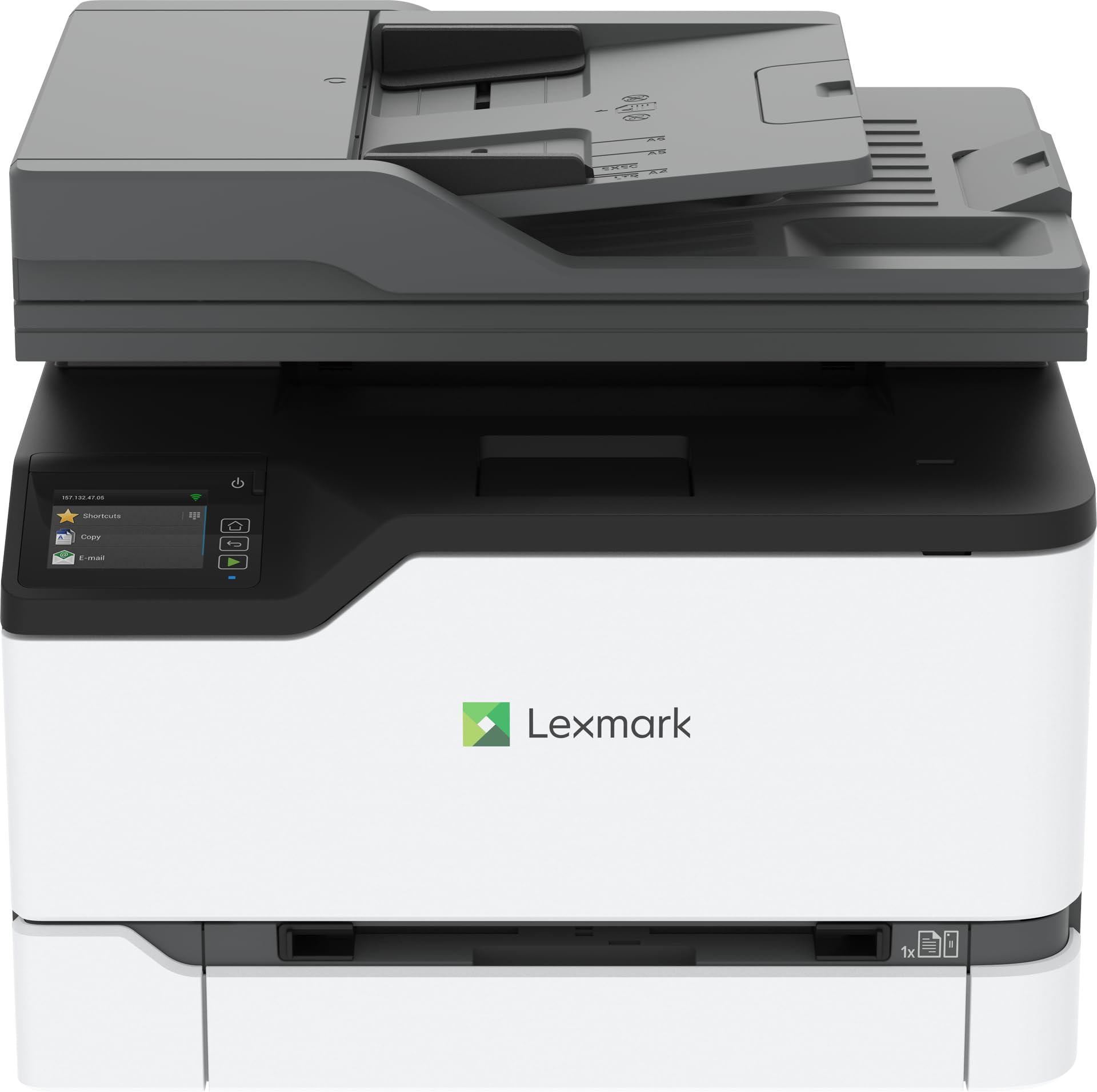
The Lexmark CX431adw is built around a steel frame, giving it a solid, durable feel that should withstand years of daily office use. It prints at 26 ppm and includes a touchscreen display for managing print, copy, scan, and fax functions. The inclusion of analog fax is still relevant for certain industries.
Wireless and Ethernet connectivity are standard, and the printer supports mobile printing. Print quality is good, with users describing copies as clear and fast. The scanner and copier functions work reliably for basic document handling.
Several owners report significant usability frustrations. The touchscreen is small, making Wi-Fi password entry tedious. There is no PC-based management software for scanning — almost every function is controlled through the on-device screen. Some users found the software setup very difficult, and customer support experiences were poor. The printer is also described as loud during operation.
Why it’s great
- Steel frame construction for durability
- 26 ppm print speed
- Includes analog fax functionality
Good to know
- Small touchscreen is cumbersome for setup
- No PC scan management software
- Loud during operation
9. Xerox C235dni

The Xerox C235dni is designed for smaller offices with lighter print volumes, supporting up to 1,500 pages per month. It prints at 24 ppm and includes a color LCD touchscreen for navigation. Setup is guided by the Xerox Easy Assist App, which many users find straightforward.
Print quality is good when using appropriate paper — some users found that generic copy paper resulted in light prints, which was resolved by switching to a premium multi-purpose paper and disabling Eco mode. The starter toner yields are modest at 500 pages each, but the printer supports high-yield cartridges for better long-term value.
The most significant complaints center on the scanner. Several users reported that scanned documents and copies were too light to read, even after adjusting darkness settings. Driver installation on Windows 11 was problematic for some, with the SmartStart utility failing to discover the printer. The scanner limitations make this a less reliable choice if scanning is a primary function.
Why it’s great
- Easy guided smartphone setup
- Good print quality with the right paper
- Supports high-yield toner cartridges
Good to know
- Scanner produces light, unreadable copies for some users
- Driver installation can fail on Windows 11
- Starter toner yield is low
10. Lexmark CX331adwe

The Lexmark CX331adwe is a compact all-in-one with a steel frame, offering durability in a small footprint. It prints at 26 ppm and supports automatic duplex printing, wireless connectivity, and mobile printing. Built-in security features protect data on the device and over the network, which is important for handling sensitive documents.
Print quality is solid, with users describing it as a reliable daily driver for a small office. The machine handles print, copy, scan, and fax duties. The scan-to-computer feature, while functional, is not intuitive and requires some learning. Most users find good value in its performance and build quality.
There are two notable concerns. One user reported that their unit stopped working after 10 months and would not power on. Another received a unit with a full waste toner message out of the box. Lexmark consumables are proprietary and can be expensive, though the printer supports high-yield cartridges. The warranty and support experience has been mixed.
Why it’s great
- Compact steel frame design saves desk space
- 26 ppm fast print speed
- Built-in network security features
Good to know
- Some units have early failure issues
- Scan-to-computer is not intuitive
- Proprietary toner can be expensive
11. Brother HL-L3220CDW

The Brother HL-L3220CDW is a print-only color laser, meaning it lacks a scanner, copier, and fax. For small offices that already have a dedicated scanner or need a secondary print station, this simplicity can be a strength. It prints at 19 ppm with automatic duplex and supports wireless, USB, and mobile printing.
The compact footprint is a standout feature — it’s one of the smallest color lasers available. Print quality is excellent, with users reporting crisp text and vibrant color graphics. The 250-sheet paper tray is sufficient for low to moderate volume, and the manual feed slot handles envelopes and specialty media. It includes high-yield toner options for good long-term value.
Setup can be challenging, especially on Mac, where some users had to create a self-signed certificate to get the printer working. There is no scanner to rely on, so if your office needs multifunction capabilities, this model is not suitable. Some users also report that the printer can ‘swallow’ print jobs when filenames are too complex or resolutions are too high.
Why it’s great
- Very compact; fits easily on small desks
- Excellent color print quality
- High-yield toner keeps per-page costs low
Good to know
- Print-only; no scanner, copier, or fax
- Mac setup can be difficult
- May drop jobs with complex filenames or high resolution
FAQ
What is the typical cost-per-page for a color laser printer?
Can I use third-party toner cartridges in my color laser printer?
How does print speed affect my team’s productivity?
Is a color laser printer more economical than an inkjet for an office?
What should I do if my printer keeps losing the Wi-Fi connection?
Final Thoughts: The Verdict
For most users, the best all in one color laser printer for small office winner is the Canon imageCLASS MF753Cdw because it combines the fastest print speed in this roundup (35 ppm) with efficient one-pass duplex scanning and expandable paper capacity. If you want built-in security and the best color quality from a major brand, grab the HP Color LaserJet Pro MFP 3301fdw. And for a balanced, proven daily driver with a three-year warranty, nothing beats the Canon imageCLASS MF644Cdw.