
Our readers keep the lights on and the weekend projects moving. As an Amazon Associate, I earn from qualifying purchases.
An all-in-one desktop eliminates a tangle of cables while compressing a full business workstation into the back of your monitor. But beneath the tidy exterior, the processor, RAM, SSD speed, and screen size determine whether that machine powers your daily workflows or becomes a frustrating bottleneck.
I’m Rikta — the co-founder and writer behind FitlyFast. My research process for this guide involved cross-referencing processor benchmarks, memory configurations, and warranty structures across eleven different models to find the machines that offer genuine long-term value for a small business environment.
After comparing dozens of configurations, I have assembled a definitive breakdown of the best all-in-one computer for small business options available today, with clear recommendations based on real-world productivity needs.
How To Choose The Best All-In-One Computer For Small Business
Selecting the right all-in-one for your business means balancing processor power, memory capacity, storage speed, and display quality against your actual workload. A machine that handles spreadsheets and video calls well may buckle under heavy data analysis or graphic design.
Processor Generation and Core Count
The CPU is the brain of your AIO. For standard office tasks like word processing, email, and web browsing, a current-generation Intel Core i5 or AMD Ryzen 5 provides more than enough speed. If your team runs database applications, virtual machines, or creative software, stepping up to a Core i7 or Ryzen 7 with 8 or more cores prevents slowdowns during peak hours.
Memory and Storage Configuration
16GB of RAM is the realistic minimum for a business machine in 2025, especially if you keep multiple browser tabs, a CRM, and communication tools open simultaneously. 32GB is a safer bet for power users. On the storage side, a 512GB PCIe NVMe SSD offers fast boot times and decent capacity, but 1TB gives breathing room for project files and backups without reaching for an external drive.
Display Size and Touch Capability
Screen size directly affects productivity. A 23.8-inch display works well for compact desks, while a 27-inch panel lets you view two documents side by side comfortably. Touchscreens add convenience for presentations and quick navigation, but they also increase the cost and reflect more light in bright offices. Consider whether your staff actually benefits from touch input before spending extra on it.
Warranty and Onsite Support
Downtime costs money. A business-grade all-in-one should offer at least one year of onsite service, where a technician comes to your location rather than requiring you to ship the entire machine. Brands like Dell and HP typically include this with their premium models, while budget-friendly options may only carry a basic mail-in warranty.
Quick Comparison
On smaller screens, swipe sideways to see the full table.
| Model | Category | Best For | Key Spec | Amazon |
|---|---|---|---|---|
| ASUS V470 All-in-One | Premium | Touchscreen productivity | 27″ FHD Touch, 1TB SSD | Amazon |
| Lenovo IdeaCentre 27″ | Premium | High-end multitasking | Core i7, 32GB DDR5 RAM | Amazon |
| Dell 27 All-in-One | Premium | Business-class support | Intel Core 7, 1yr Onsite | Amazon |
| HP All-in-One 27″ Ultra 7 | Flagship | Heavy workloads, 4TB | Ultra 7, 64GB DDR5 RAM | Amazon |
| HP 27″ AMD Ryzen 7 | Mid-Range | Large display, 32GB RAM | AMD Ryzen 7, 1TB SSD | Amazon |
| HP 23.8″ Intel Core i5 | Mid-Range | Reliable daily driver | 13th Gen i5, 16GB RAM | Amazon |
| HP 24 Touchscreen | Mid-Range | Touch input, 1TB storage | Intel N100, 1TB SSD | Amazon |
| Lenovo 24″ Core i3-N305 | Value | Budget office machine | 8-Core i3-N305, 512GB | Amazon |
| Acer Aspire C24 | Value | 120Hz smooth display | Ryzen 5, 120Hz FHD | Amazon |
| Lenovo 24″ Intel N100 | Entry | Basic office tasks | Intel N100, 256GB SSD | Amazon |
| Dell Slim Desktop ECS1250 | Entry | Ultra-quiet operation | Core Ultra 5, no display | Amazon |
In‑Depth Reviews
1. ASUS V470 All-in-One

The ASUS V470 strikes a rare balance between premium features and practical business value. Its 27-inch FHD touch display gives you ample screen real estate for multitasking, and the anti-glare coating keeps reflections manageable even in brightly lit offices. The Intel Core i5-13420H processor handles demanding spreadsheet models and database queries without stuttering, while 16GB of DDR5 RAM keeps your browser tabs and communication apps running simultaneously.
Storage is where this machine really pulls ahead — 1TB of PCIe SSD space means you can store project files, client presentations, and accounting records locally without worrying about running out of room. The Dolby Atmos speakers and AI noise-canceling technology make video calls sound much clearer than the typical AIO, which matters when you are pitching to clients or collaborating with remote team members.
Port selection is generous for a machine that sits on your desk. You get three USB 3.2 Gen 1 Type-A ports, one USB 3.2 Gen 1 Type-C port, HDMI-out, and an RJ45 Gigabit Ethernet jack. Wi-Fi 6E delivers fast, stable wireless connectivity. The pop-up 1080p webcam with a privacy shutter addresses security concerns, and the wired keyboard and mouse included are decent enough to start using right away without ordering replacements.
Why it’s great
- 27-inch touchscreen with anti-glare coating
- 1TB SSD provides ample local storage
- Dolby Atmos speakers enhance call quality
Good to know
- Standard warranty only, no onsite service
- Display height is not adjustable
2. Lenovo IdeaCentre 27″

This Lenovo IdeaCentre is built for businesses that push their hardware. The Intel Core i7-13620H processor packs 10 cores (6 performance, 4 efficiency) that turbo up to 4.9GHz, making light work of video editing, data analysis, and running multiple virtual desktops. With 32GB of DDR5-5200 RAM, you can keep heavy applications like Adobe Creative Suite and large Excel models loaded without any slowdowns.
The 27-inch FHD IPS display covers 99% of the sRGB color gamut, which matters if your work involves photo editing, design approvals, or video content. The three-side borderless design and anti-glare coating reduce eye strain during long sessions. HARMAN speakers deliver rich audio that fills a small office, and the 5MP webcam with dual microphones produces clear video for client calls.
On the connectivity front, you get Wi-Fi 6, Bluetooth 5.2, USB-C at 10Gbps, and an HDMI 2.1 port that supports external monitors. The inclusion of Windows 11 Pro rather than Home is a notable advantage for business users — it offers BitLocker encryption, remote desktop, and group policy management. The adjustable stand lets you tilt the screen to a comfortable ergonomic position, and the Luna Grey finish looks professional on any desk.
Why it’s great
- 10-core i7 handles demanding workloads
- 32GB DDR5 RAM for heavy multitasking
- Windows 11 Pro with BitLocker support
Good to know
- Some users report cheap plastic build quality
- Port access can be awkward behind the stand
3. Dell 27 All-in-One Desktop

Dell’s 27-inch touchscreen AIO is engineered for business environments where reliability and support matter as much as raw specs. The Intel Core 7 Processor 150U is paired with 32GB of DDR5 RAM and a 1TB SSD, giving you smooth performance for office suites, CRM software, and video conferencing. The NVIDIA GeForce MX570A with 2GB of GDDR6 VRAM is a genuine differentiator — it accelerates graphics tasks and supports dual external monitors without taxing the main CPU.
The FHD IPS display covers 99% sRGB and includes Dell ComfortView Plus to reduce harmful blue light emissions without washing out colors. The 5MP IR camera supports Windows Hello facial recognition for password-free logins, and the pop-up design ensures privacy when not in use. Dolby Atmos spatial sound produces clear, room-filling audio that makes conference calls feel more natural.
What sets this Dell apart is the included 1 Year Onsite Service. If a hardware issue cannot be resolved remotely, Dell sends a technician to your office — a safety net that can save days of downtime compared to shipping a machine for repairs. The innovative stand stores the keyboard underneath the display, keeping your desk clutter-free. Wi-Fi 6, Bluetooth 5.3, and a full array of USB ports round out an already impressive package.
Why it’s great
- Dedicated NVIDIA MX570A GPU for graphics tasks
- 1-year onsite service included
- 5MP IR camera with Windows Hello support
Good to know
- Some users report limited USB port count
- Premium pricing pushes it toward high-end budgets
4. HP All-in-One 27″ Ultra 7

This HP represents the ceiling of what an all-in-one can deliver for a small business. The Intel Core Ultra 7-155U processor features 12 cores that handle the most demanding multitasking scenarios — think running a virtual machine, editing 4K video, and managing a database all at once. 64GB of DDR5 RAM ensures you never hit a memory ceiling, and the 4TB SSD provides massive local storage for archives, project files, and media libraries.
The 27-inch FHD IPS touchscreen supports 10-point multi-touch input, which is useful for collaborative presentations or quick navigation. The display height is adjustable, so you can set the screen to a comfortable viewing angle without propping it on risers. HP True Vision FHD IR camera enables secure logins through Windows Hello, and the hardware is Zoom Certified for reliable video call quality right out of the box.
Connectivity is top-tier with Wi-Fi 6 and Bluetooth 5.3, plus a mix of USB Type-C and Type-A ports with 5Gbps signaling. The built-in speakers are adequate for office use, though users planning to edit audio might want external monitors. Windows 11 Pro comes pre-installed with BitLocker and remote desktop capabilities. The white finish and compact keyboard keep the setup looking clean and modern, but the price tag clearly targets businesses that need uncompromising performance.
Why it’s great
- 64GB RAM and 4TB SSD for extreme workloads
- 12-core Intel Ultra 7 processor
- Height-adjustable touchscreen display
Good to know
- Very expensive — only for high-demand teams
- Included keyboard lacks function keys
5. HP 27″ AMD Ryzen 7

The HP 27-inch AMD Ryzen 7 model is a compelling option for businesses that want a large display and ample memory without stepping into flagship pricing. The AMD Ryzen 7 7730U processor delivers eight cores with efficient multitasking, easily handling office suites, data analysis, and video calls. 32GB of RAM is generous for this price tier and ensures smooth performance when juggling multiple applications.
The 27-inch FHD display features ultra-slim micro-edges and a 90% screen-to-body ratio, giving you an immersive workspace that fits on most desktops. The tiltable pop-up privacy camera with dual array microphones and advanced noise reduction technology makes this a strong contender for remote collaboration. The camera physically tucks away when not in use, eliminating privacy concerns.
Storage comes in the form of a 1TB solid-state drive, which is 15 times faster than traditional hard drives according to HP’s testing. This means rapid boot times and instant application launches. The wired keyboard and mouse included are functional, though many users will upgrade them. Some reports mention random shutdowns related to overheating, so ensuring adequate ventilation is important. The 1-year limited warranty is standard for this class.
Why it’s great
- 27-inch screen with 90% screen-to-body ratio
- 32GB RAM for heavy multitasking
- Pop-up privacy camera with noise reduction
Good to know
- Random shutdowns reported by some users
- Standard warranty, no onsite service
6. HP 23.8″ Intel Core i5
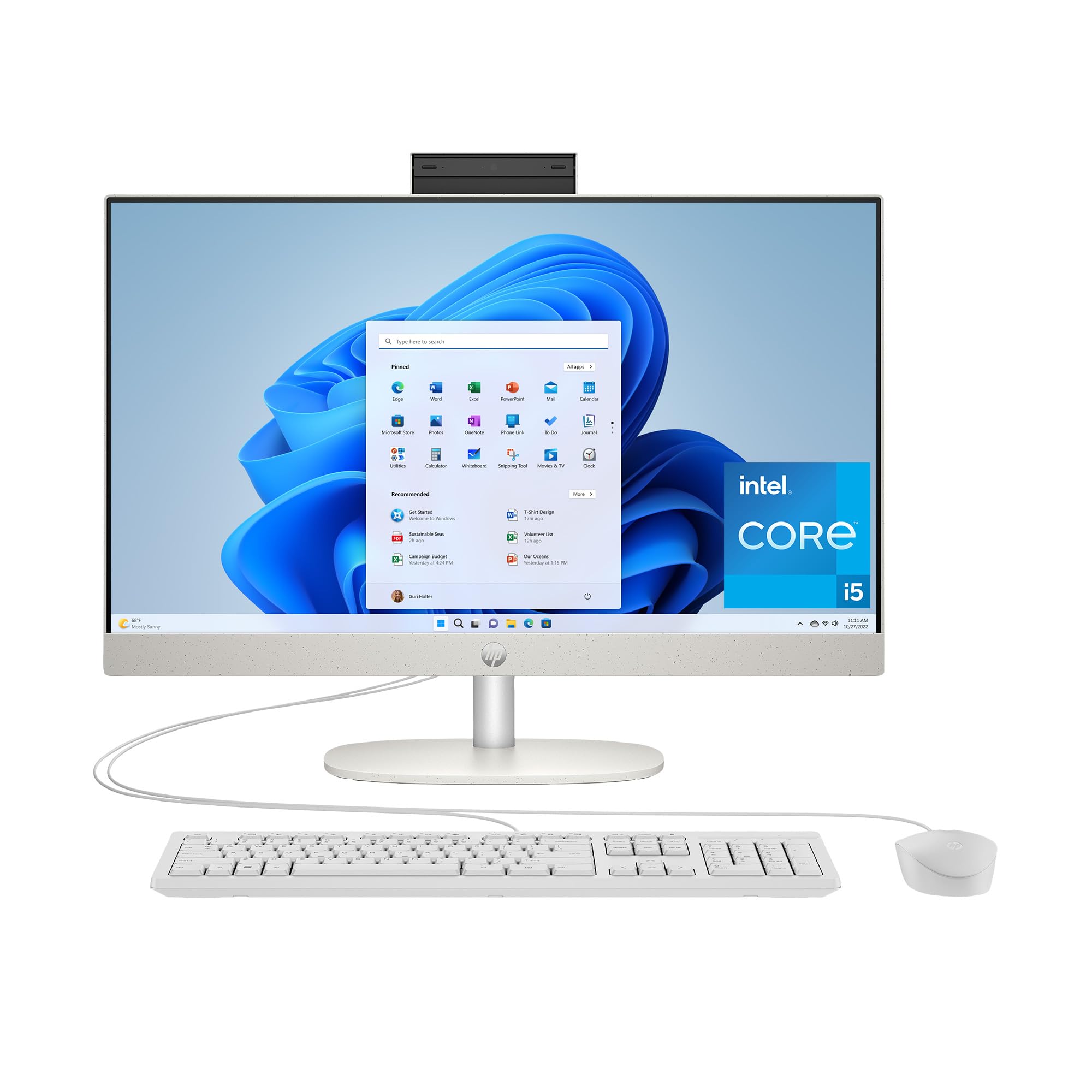
The HP 23.8-inch model is a straightforward, no-nonsense computer for small businesses that need reliable performance without extra frills. The 13th Generation Intel Core i5-1334U processor delivers strong single-threaded performance, making everyday tasks like document editing, web browsing, and spreadsheet work feel snappy. 16GB of RAM is sufficient for most office workflows, and the 512GB SSD provides fast storage with room for essential files.
The 23.8-inch FHD IPS display uses a three-sided micro-edge design that gives you an 89% screen-to-body ratio, making the screen feel larger than its measured size. Intel UHD Graphics can smoothly stream 4K content and handle light 720p gaming during breaks. The Shell White color and slim profile help the machine blend into a modern office aesthetic without dominating the desk.
Port selection includes one USB Type-C with 5Gbps signaling, two USB Type-A ports at the same speed, and two USB 2.0 Type-A ports for peripherals. RJ-45 Ethernet is present for wired networking. Users report the machine is very easy to set up, with Windows 11 walking you through the process step by step. A few customers noted the transition from older Windows versions can take some adjustment, but overall satisfaction with build quality and speed is high.
Why it’s great
- Reliable 13th Gen i5 performance
- Easy setup process for non-technical users
- Compact, attractive Shell White design
Good to know
- No touchscreen option
- 512GB storage may feel tight for media-heavy work
7. HP 24 Touchscreen

The HP 24 Touchscreen AIO delivers a 23.8-inch IPS FHD touch display at a price that undercuts most other touch-enabled all-in-ones. The Intel Processor N100 with four cores handles basic office tasks, web browsing, and video conferencing without issue, but it is not built for heavy computational work. 16GB of DDR4 RAM keeps your workflow moving, and the 1TB PCIe SSD provides generous storage for documents and media.
The touchscreen responds well to taps, swipes, and pinch-to-zoom gestures, making it ideal for interactive presentations, real estate walkthroughs, or retail point-of-sale setups. The anti-glare technology reduces reflections, and the HP True Vision 720p HD privacy camera with temporal noise reduction delivers decent video quality for remote meetings. The dual array digital microphones capture your voice clearly even in moderately noisy environments.
Connectivity includes Realtek Wi-Fi 6, Bluetooth 5.3, a USB Type-C port at 5Gbps, two USB Type-A ports at the same speed, and two USB 2.0 Type-A ports. The machine ships with an HP 125 White wired keyboard and mouse. Users consistently praise the fast startup, clear display colors, and compact footprint. The inclusion of a 1TB SSD at this price point makes this a compelling option for businesses that prioritize storage capacity over raw processing power.
Why it’s great
- Affordable touchscreen display
- 1TB SSD for large file libraries
- Privacy camera with shutter
Good to know
- N100 processor is entry-level performance
- Not suitable for CPU-intensive applications
8. Lenovo 24″ Core i3-N305

Lenovo’s 23.8-inch model with the Intel Core i3-N305 processor offers eight efficient cores that handle office multitasking surprisingly well for the price point. The octa-core design allows this machine to manage several browser tabs, a word processor, and a communication app simultaneously without noticeable lag. 16GB of DDR4 RAM and a 512GB PCIe NVMe SSD provide a responsive user experience for standard business operations.
The FHD IPS anti-glare display features a three-sided borderless design and 99% sRGB color accuracy, which means images and videos look vibrant and true to life. This makes the Lenovo a decent choice for light photo editing or reviewing marketing materials. The built-in HD webcam works well enough for routine video calls, and the slim all-in-one design with a tiltable stand keeps your desk clean and organized.
Connectivity options include Wi-Fi 6, Bluetooth 5.2, two USB-A 3.2 Gen 2 ports, two USB 2.0 ports, and HDMI-out for an external monitor. The system also includes lifetime Office 365 for the web, so you can edit Word, Excel, and PowerPoint documents as long as you have an internet connection. Users note that the included keyboard feels cheap with sticking keys, and the built-in speakers are underwhelming, but the overall speed and display quality earn consistent praise.
Why it’s great
- 8-core processor for smooth multitasking
- Borderless FHD display with 99% sRGB
- Includes web-based Office 365 access
Good to know
- Included keyboard has poor build quality
- Weak built-in speakers
9. Acer Aspire C24

The Acer Aspire C24 stands out in the value segment thanks to its 23.8-inch FHD IPS display with a 120Hz refresh rate. This higher refresh rate makes scrolling through documents and web pages feel noticeably smoother than the standard 60Hz panels found on most budget all-in-ones. Paired with an AMD Ryzen 5 7430U hexa-core processor and 16GB of DDR4 RAM, this machine handles office productivity software with ease.
The display’s 90.71% screen-to-body ratio and narrow bezels give it a modern look. Acer VisionCare technology includes flickerless operation, BluelightShield, and low dimming for comfortable extended use. The included 2MP webcam with a privacy shutter and dual microphones is adequate for video calls. Wi-Fi 6E support delivers extremely fast wireless speeds and the latest WPA3 encryption for security.
Storage comes in the form of a 512GB PCIe NVMe SSD, which provides quick boot times and responsive application loading. Port selection is solid with a front USB Type-C port, three USB 2.0 ports, two USB 3.2 Gen 2 Type-A ports, DisplayPort out, and HDMI out. A few users report that the fan can be loud out of the box, though adjusting power settings usually solves this. The USB keyboard and mouse are functional, and the dedicated Copilot key gives quick access to Microsoft’s AI assistant.
Why it’s great
- 120Hz display for smooth visual experience
- AMD Ryzen 5 delivers strong multi-core performance
- Wi-Fi 6E with WPA3 encryption
Good to know
- Fan can be loud at default settings
- No dedicated GPU option
10. Lenovo 24″ Intel N100

The Lenovo 24-Inch AIO with the Intel Processor N100 is the most accessible entry point into the all-in-one category. The quad-core N100 processor with a 3.4GHz turbo frequency is designed for light office tasks — think email, word processing, web browsing, and video streaming. 16GB of DDR4 RAM is surprisingly generous at this tier and helps keep basic multitasking smooth even when you have several applications open.
The 23.8-inch FHD IPS anti-glare display covers 99% sRGB, producing sharp text and accurate colors for everyday office work. The anti-glare coating is effective in brightly lit rooms, reducing eye strain during long work sessions. The all-in-one design with a tiltable stand saves significant desk space compared to a traditional tower and monitor setup.
Connectivity includes Wi-Fi 6, Bluetooth 5.2, two USB 2.0 ports, two USB 3.2 Gen 2 ports, HDMI-out, and an RJ-45 Ethernet jack. The machine ships with a wireless keyboard and mouse. Some users reported issues with the keyboard having incorrectly mapped keys, specifically the @ symbol, which suggests a quality control inconsistency. Customer service from Lenovo resolved the issue in some cases. For pure basic computing, this machine delivers solid value, but be prepared for potential peripheral quirks.
Why it’s great
- 16GB RAM at an entry-level price
- FHD anti-glare display with good color
- Compact, space-saving design
Good to know
- N100 processor is limited to light tasks
- Some keyboard quality control issues
11. Dell Slim Desktop ECS1250

The Dell Slim Desktop ECS1250 takes a different approach — it is a compact tower that connects to your existing monitor. The Intel Core Ultra 5-225 processor with built-in AI acceleration provides modern performance for office applications, and the 16GB of memory ensures smooth multitasking. The 512GB M.2 SSD delivers fast boot times and quick file access. This is not an all-in-one in the traditional sense, but its tiny footprint serves the same space-saving mission.
One major advantage of this form factor is the ability to support up to four FHD monitors using DisplayPort 1.4a daisy chaining, or two 4K displays via HDMI 2.1 and DisplayPort. This makes the Dell Slim a great option for financial analysts, traders, or anyone who needs multiple screens. The tool-less side panel lets you upgrade components easily, which is rare in the all-in-one world.
Security features include a hardware TPM security chip, a built-in lock slot, and a padlock loop. The 1 Year Onsite Service is included, meaning Dell will send a technician to your business if an issue cannot be solved remotely. Users consistently praise the whisper-quiet operation — many report not hearing the fan at all during daily use. This is an excellent choice for businesses that already own monitors and want a powerful, silent, and upgradeable desktop in a very small package.
Why it’s great
- Supports four monitors with daisy chaining
- Whisper-quiet operation
- 1-year onsite service included
Good to know
- No built-in display — requires external monitor
- Integrated graphics limit gaming capability
FAQ
How much RAM does a small business all-in-one need?
Should I choose a touchscreen all-in-one for my office?
Is Windows 11 Pro worth the extra cost for business?
Can I use an all-in-one with external monitors?
How important is onsite service for a business all-in-one?
Final Thoughts: The Verdict
For most users, the all-in-one computer for small business winner is the ASUS V470 All-in-One because it balances a large 27-inch touch display, 1TB of SSD storage, and modern DDR5 RAM at a price that makes sense for growing teams. If you need raw processing power for heavy workloads, grab the Lenovo IdeaCentre 27″ with its 10-core i7 and 32GB of RAM. And for businesses that value support and security above everything else, nothing beats the Dell 27 All-in-One with its dedicated NVIDIA graphics and 1-year onsite service.