
Our readers keep the lights on and the weekend projects moving. As an Amazon Associate, I earn from qualifying purchases.
You are staring at an empty desk, a pile of tangled cables from an old tower PC, and wondering if you can buy a single, clean, powerful device that does it all. That is the exact promise of a modern all-in-one computer: the entire machine lives inside the monitor, eliminating the tower, cutting cable clutter, and reclaiming your workspace. The challenge is picking the right one from a sea of configurations that span simple web-browsing machines to workstation-class powerhouses.
I’m Rikta — the co-founder and writer behind FitlyFast. I have spent years analyzing system benchmarks, screen quality metrics, and real-world user feedback across the consumer desktop market to identify which all-in-one models deliver genuine performance without compromise.
Whether you need a family hub for homework and streaming or a creative workstation for photo editing and video calls, choosing the best all-in-one computer means matching the processor generation, RAM capacity, and display quality to your daily workload.
How To Choose The Best All-In-One Computer
The all-in-one market splits cleanly along three lines: processor architecture, memory and storage configuration, and display quality. Ignoring any one of these leads to a system that feels either underpowered or overpriced for your actual use case.
Processor Generation is the Backbone
Intel 12th-gen and newer (Core i5 or i7), AMD Ryzen 7000-series, and Apple M4 chips all deliver modern performance. The trap is buying an AIO with a budget N-series Intel processor if you plan to run heavy multitasking or creative software. Look for at least a Core i5 or M4 base chip for a system that remains responsive three years from now.
RAM and Storage are Non-Negotiable
16GB of RAM is the minimum for comfortable multitasking, while 32GB suits photo editors and data-heavy users. Storage should always be an SSD — NVMe drives are noticeably faster than SATA SSDs. A 512GB drive fills up fast if you store local photos or games, making 1TB the sweet spot for most buyers.
Display Size and Touch Utility
A 24-inch 1080p IPS screen is standard for basic use. A 27-inch display with higher pixel density (or 4.5K Retina on iMac) dramatically improves reading comfort and creative work. Touchscreens add a premium cost but are genuinely useful for navigating Windows 11, especially in shared family setups where quick taps replace mouse clicks.
Quick Comparison
On smaller screens, swipe sideways to see the full table.
| Model | Category | Best For | Key Spec | Amazon |
|---|---|---|---|---|
| Apple iMac M4 (10-core) | Premium | Creative professionals | 24GB Unified Memory / 512GB SSD | Amazon |
| Apple iMac M4 (8-core) | Premium | Apple ecosystem users | 16GB Unified Memory / 256GB SSD | Amazon |
| HP 27″ Touch Intel Ultra 7 | High-End | Power users needing touch | 64GB DDR5 RAM / 4TB SSD | Amazon |
| Dell 27″ Touch i7 MX570A | Premium | Creative work + light gaming | 32GB DDR5 RAM / NVIDIA 2GB GPU | Amazon |
| HP 27″ AMD Ryzen 7 | Mid-Range | Home office multitasking | 32GB DDR4 RAM / 1TB SSD | Amazon |
| ASUS V470 Touch i5 | Mid-Range | Touch lovers on a budget | 16GB DDR5 RAM / 1TB SSD | Amazon |
| Acer Aspire C27 i5 | Mid-Range | Media streaming + light editing | 16GB DDR4 RAM / 512GB NVMe | Amazon |
| Lenovo 24″ 32GB/1TB | Value | School + basic office tasks | 32GB DDR4 RAM / 1TB PCIe SSD | Amazon |
| Lenovo 24″ N100 512GB | Value | Budget-conscious buyers | 16GB DDR4 RAM / 512GB NVMe | Amazon |
| Fusion5 24″ N150 | Entry-Level | Kids, seniors, browsing | 16GB LPDDR4 RAM / 512GB SATA | Amazon |
| Lenovo 24″ N100 128GB | Entry-Level | Light document processing | 16GB DDR4 RAM / 128GB PCIe SSD | Amazon |
In-Depth Reviews
1. Apple iMac M4 (10-core CPU/GPU, 24GB RAM)

The 10-core M4 iMac with 24GB unified memory hits the sweet spot of performance, build quality, and display excellence for anyone doing photo editing, video conferencing, or general creative work. The 24-inch 4.5K Retina display at 500 nits with support for one billion colors makes color-critical work accurate right out of the box. Four Thunderbolt 4 ports give you room for dual 6K external displays and fast peripherals.
The 512GB SSD is enough for a hefty app library plus local project files, and Wi-Fi 6E plus Bluetooth 5.3 keeps peripherals fast. The 12MP Center Stage camera and six-speaker spatial audio system make video calls feel natural. Everything runs silently with zero fan noise during normal use — a massive advantage over Intel-based AIOs that spin up under load.
macOS Seamless integration with iPhone and iPad is the hidden value here. iPhone Mirroring, universal clipboard, and iCloud sync mean your workflow follows you across devices. The keyboard and mouse charge via USB-C, though the Magic Mouse charging port placement remains awkward. For pure productivity and ecosystem polish, this is the benchmark.
Why it’s great
- Blazing M4 performance with zero fan noise
- 4.5K Retina display with one billion colors
- Four Thunderbolt 4 ports for expandability
- 12MP Center Stage camera and spatial audio
Good to know
- Magic Mouse charges from the bottom
- Limited to 24GB unified memory (non-upgradeable)
- No touchscreen option
2. Apple iMac M4 (8-core CPU/GPU, 16GB RAM)

The 8-core M4 iMac delivers substantially the same everyday performance as its 10-core sibling for most users — web browsing, document editing, streaming, and light photo editing all feel equally fast. The 16GB unified memory is sufficient for running a dozen browser tabs plus Office apps side by side without stutter. The 24-inch 4.5K Retina display is identical to the higher-end model, making it a steal for anyone who prioritizes screen quality above all else.
The 256GB SSD is the main compromise. You’ll need cloud storage or an external SSD for a large photo library or game collection. The two Thunderbolt 4 ports limit external display expansion to one 6K monitor. Setup is genuinely under five minutes: plug in the power cord, pair the keyboard and mouse, and sign into your Apple ID.
For families or small-office users who live inside Safari, Mail, and Microsoft 365, this machine outperforms every Windows AIO at its tier while consuming less power and producing zero noise. The seven color options — green, blue, pink, silver, yellow, orange, purple — let you match your workspace aesthetic exactly.
Why it’s great
- Silent M4 processor with excellent battery efficiency
- Best-in-class 4.5K Retina display
- Ultra-simple setup and macOS stability
- Seven vibrant color choices
Good to know
- 256GB SSD fills up quickly for heavy users
- Only two Thunderbolt ports
- Keyboard and mouse charge via USB-C (extra cable)
3. HP 27″ Touch Intel Ultra 7 (64GB RAM)

The HP 27-inch touchscreen with Intel Core Ultra 7-155U and 64GB of DDR5 RAM is the raw performance leader on the Windows side. The 12-core processor (2 performance cores, 8 efficient cores, 2 low-power cores) handles heavy multitasking, virtual machines, and large spreadsheets without flinching. The 4TB NVMe SSD is massive — you can store your entire media library locally without external drives.
The 27-inch FHD IPS touchscreen with three-sided micro-edge bezels and height adjustment makes this a proper ergonomic workstation. Windows Hello facial recognition works instantly via the HP True Vision FHD IR camera. Wi-Fi 6E and Bluetooth 5.3 keep connections modern. USB-C and USB-A ports at 5Gbps handle external storage and peripherals easily.
The bundled keyboard is compact but has been criticized for missing function row keys. Buyers have reported receiving AMD Ryzen variants instead of Intel in some units, though performance is similar. The fan does spin up under sustained load — expect audible noise during heavy rendering or gaming. For pure Windows muscle with touch capability, this is the definitive choice.
Why it’s great
- 64GB DDR5 RAM handles extreme multitasking
- 4TB SSD — no external drive needed
- Height-adjustable stand with touchscreen
- Windows Hello facial recognition
Good to know
- Fan noise audible under load
- Keyboard design may require replacement
- USB dongle for wireless peripherals is critical
4. Dell 27″ Touch i7 (NVIDIA GPU)

The Dell 27 all-in-one stands out because it includes a dedicated NVIDIA GeForce MX570A GPU with 2GB GDDR6 VRAM — unique in this category. The Intel Core 7 150U processor (12MB cache, up to 5.4GHz) handles CPU tasks, while the discrete GPU accelerates photo editing, light 3D modeling, and even some gaming at 1080p. The 27-inch FHD IPS touchscreen with ComfortView Plus reduces blue light for long editing sessions.
The 5MP+IR pop-up camera with HDR delivers sharp video calls, and the Dolby Atmos Bluetooth speakers fill a room. The keyboard hides under the monitor stand, keeping the desk tidy. Dell includes 1-year onsite service — a technician comes to you if hardware fails. The white chassis with narrow borders looks premium on any desk.
Buyers praise the large, crisp display and fast setup but note the lack of a DVD drive (buy separately) and limited USB ports. The wireless keyboard and mouse are functional but basic. If you need touch, color accuracy, and a dedicated GPU in one clean package, this Dell delivers where most AIOs rely on integrated graphics alone.
Why it’s great
- Dedicated NVIDIA MX570A GPU for creative apps
- 5MP HDR pop-up camera with IR
- 1-year onsite service included
- Dolby Atmos speakers
Good to know
- No DVD drive
- Limited USB ports for peripherals
- Keyboard missing USB dongle on some units
5. HP 27″ AMD Ryzen 7 (32GB RAM)

The HP 27-cr0012 packs an AMD Ryzen 7 7730U processor with 8 cores and 16 threads, combined with 32GB of DDR4 RAM and a 1TB SSD. This configuration handles heavy spreadsheet work, multiple virtual desktops, and 4K video streaming without hesitation. The 27-inch FHD IPS display with a three-sided micro-edge bezel achieves a 90% screen-to-body ratio, maximizing viewing space in a compact footprint.
The tiltable pop-up privacy camera with dual-array microphones and advanced noise reduction makes this a strong choice for remote workers who spend hours on Zoom or Teams. The AMD Radeon integrated graphics are sufficient for 1080p video playback and casual photo editing. Wi-Fi 6 keeps downloads fast, and the included wireless keyboard and mouse are above-average quality for a bundled set.
Some units have experienced random shutdowns due to overheating, which appears to be a batch-level issue. Buyers recommend monitoring temperatures during initial setup and ensuring proper ventilation. The 1TB SSD is genuinely fast (NVMe) and will feel snappy for years. For the home office user who needs Ryzen multitasking firepower, this HP is a compelling mid-range option.
Why it’s great
- AMD Ryzen 7 with 8 cores for heavy multitasking
- 90% screen-to-body ratio display
- Privacy pop-up camera with noise reduction
- 1TB NVMe SSD is fast and spacious
Good to know
- Some units reported overheating shutdowns
- Integrated graphics only (no GPU upgrade)
- No touchscreen available
6. ASUS V470 Touch i5 (1TB SSD)

The ASUS V470VA combines a 27-inch anti-glare touchscreen with an Intel Core i5-13420H processor (8 cores, up to 4.6GHz) at a price that undercuts most 27-inch touch AIOs. The 16GB of DDR5 RAM is faster than the DDR4 found in comparable Lenovo and Acer models, making a real difference when loading large documents or switching between apps. The 1TB PCIe SSD provides ample local storage.
The 1080p pop-up camera with AI noise cancellation and Dolby Atmos speakers positions this as a strong teleconferencing machine. The Ethernet port and Wi-Fi 6E give you wired and wireless flexibility. The stand lacks height adjustment, which is a downside for ergonomic setups, and ASUS preloads some bloatware. The touch response is fast and accurate, and the anti-glare coating works well in bright rooms.
Buyers transitioning from older Lenovo systems praise the screen clarity and sound quality. The wired keyboard and mouse are functional but users often switch to wireless. For anyone who wants a large touch display with modern DDR5 RAM and a generous 1TB drive without stepping into premium pricing, this ASUS is the best value touch AIO available.
Why it’s great
- 27-inch anti-glare touchscreen
- DDR5 RAM for faster app loading
- 1TB SSD included
- AI noise-canceling camera
Good to know
- Stand lacks height adjustment
- Preloaded bloatware
- Wired peripherals feel basic
7. Acer Aspire C27 i5 (Iris Xe)

The Acer Aspire C27-1700 uses a 12th-gen Intel Core i5-1235U with 10 cores (2 performance, 8 efficient) and Intel Iris Xe graphics, delivering smooth 4K playback and capable light photo editing. The 27-inch FHD IPS display features a 91% screen-to-body ratio with BlueLightShield technology for reduced eye strain. The tilt range of -5 to 25 degrees gives decent positioning flexibility.
The integrated 5MP webcam with a physical privacy cover and dual stereo microphones is well above the 720p cameras found on budget AIOs. 16GB of DDR4 RAM paired with a 512GB NVMe SSD is adequate for everyday multitasking but may feel tight for power users. The included wireless keyboard and mouse are functional and pair easily.
Buyers report smooth performance in Roblox, Valorant, and Overwatch at full graphics settings, which is impressive for integrated graphics. The fan noise is normal for an AIO — audible but not distracting. The speakers are mediocre, so external speakers or headphones improve the experience. For a balanced 27-inch media and light gaming machine, this Acer is a strong contender.
Why it’s great
- 27-inch FHD with 91% screen-to-body ratio
- 5MP webcam with physical privacy cover
- Iris Xe handles light gaming well
- BlueLightShield for eye comfort
Good to know
- Speakers are mediocre
- 512GB SSD fills fast for heavy users
- No touchscreen version
8. Lenovo 24″ N100 (32GB RAM, 1TB)
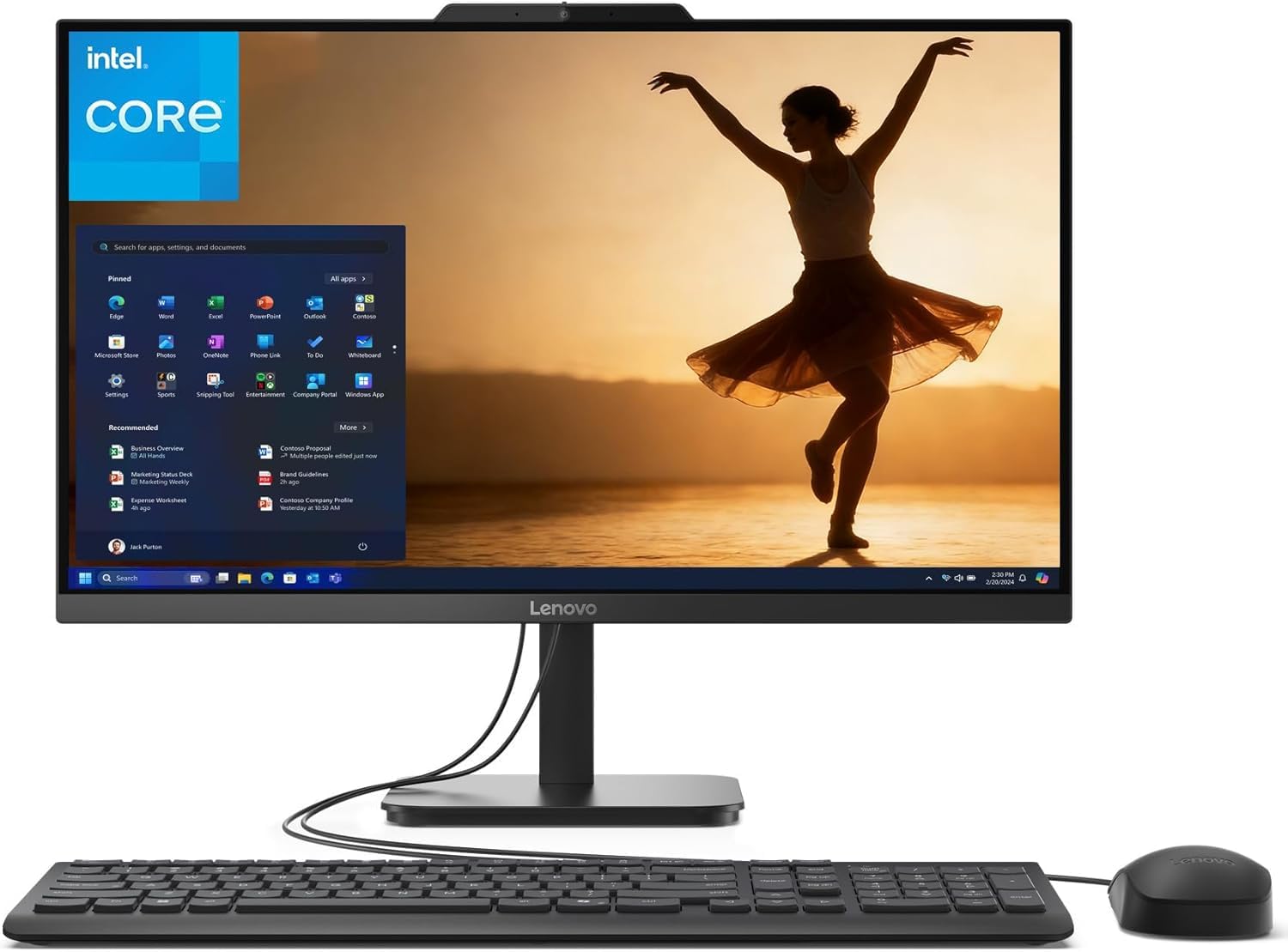
The Lenovo 24-inch with 32GB of DDR4 RAM and a 1TB PCIe SSD delivers the kind of memory capacity usually reserved for premium machines at a mid-range price. The Intel N100 processor (4 cores, up to 3.4GHz) is modest in raw speed, but the generous RAM means you can keep dozens of browser tabs open, run Office apps, and stream video simultaneously without slowdown. The 1TB SSD provides fast boot and ample storage.
The 23.8-inch FHD IPS anti-glare display with 99% sRGB delivers accurate colors for document work and streaming. The built-in 720p camera and microphone are basic but work for Zoom calls. Wi-Fi 6 and Bluetooth 5.2 keep connections current. The wired keyboard and mouse are included and functional.
The main limitation is the N100 processor — it lacks the single-core performance for heavy photo editing or demanding multitasking. The internal microphone on some units is non-functional, requiring an external USB mic. The included Office 365 for Web is a lighter version than the desktop apps. For school, email, and light office work where RAM is the bottleneck, this Lenovo delivers exceptional memory value.
Why it’s great
- 32GB RAM — best-in-class at this price tier
- 1TB PCIe SSD for fast storage
- 99% sRGB color coverage display
- Wi-Fi 6 and Bluetooth 5.2
Good to know
- N100 CPU limits heavy multitasking
- Internal microphone may not work
- Office 365 is web-only, not desktop apps
9. Lenovo 24″ N100 (512GB NVMe)

The Lenovo 24-inch N100 with 16GB DDR4 RAM and a 512GB PCIe NVMe SSD offers a well-balanced configuration for daily computing. The N100 quad-core processor handles web browsing, Microsoft 365 apps, and 1080p video streaming with ease. The 23.8-inch FHD IPS anti-glare display with 250 nits and 99% sRGB provides clear, color-accurate visuals suitable for schoolwork and basic creative tasks.
The inclusion of Windows 11 Pro (not Home) is a notable upgrade for business users who need BitLocker encryption, Remote Desktop, or group policy management. Connectivity includes Intel Wi-Fi 6, Bluetooth 5.2, HDMI-out, and Ethernet. The bundled wired keyboard and mouse are simple but reliable. The slim design eliminates the tower, freeing up desk space.
Buyers praise the easy setup and sharp screen but note the stand lacks height adjustment and the peripherals are wired rather than wireless. The first unit sometimes arrives damaged in the thin factory cardboard packaging. The 512GB drive is adequate for documents and apps but limited for media libraries. For a reliable Windows 11 Pro workstation at a sensible price, this Lenovo is a straightforward choice.
Why it’s great
- Windows 11 Pro for business features
- Fast 512GB PCIe NVMe SSD
- Wi-Fi 6 and Bluetooth 5.2
- Anti-glare 99% sRGB display
Good to know
- No height-adjustable stand
- Wired keyboard and mouse only
- Thin packaging increases damage risk during shipping
10. Fusion5 24″ N150 (512GB SATA)
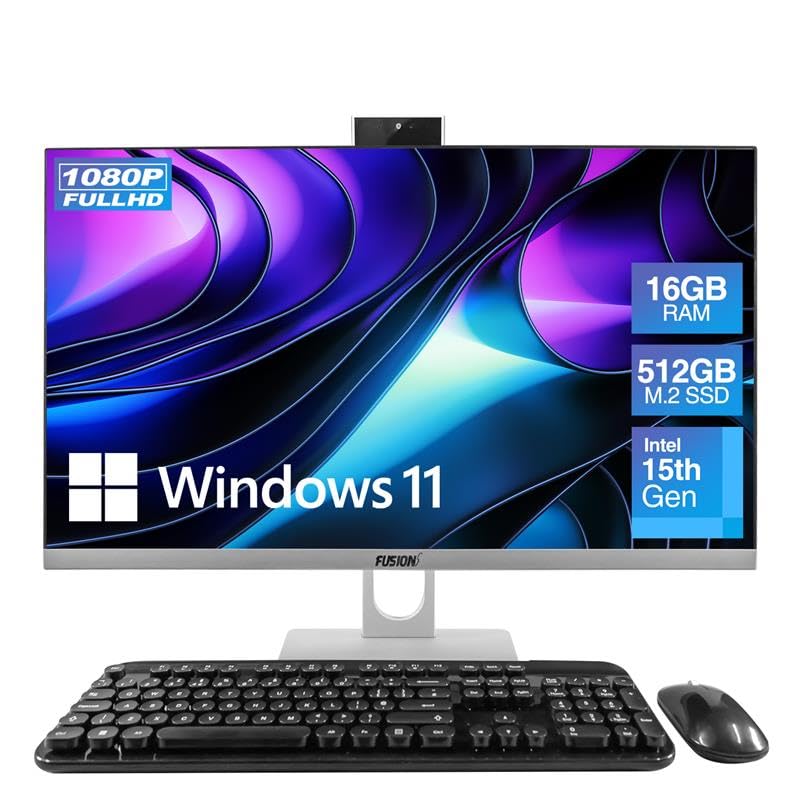
The Fusion5 A7 N6 with Intel’s 15th-gen N150 processor (up to 3.6GHz) and 16GB LPDDR4 RAM is designed for budget-conscious families, seniors, or students who need a clean, simple desktop for browsing, email, and streaming. The 23.8-inch FHD IPS display delivers vibrant colors and wide viewing angles, making it pleasant for Netflix and YouTube. The 512GB SATA SSD provides decent storage but is noticeably slower than NVMe drives found in pricier models.
The included wireless keyboard and mouse are comfortable, and the 3MP pop-up web camera is a thoughtful touch for video calls. Port selection includes 2 USB 3.0 ports and 4 USB 2.0 ports, plus HDMI-out. Windows 11 Home runs smoothly for basic tasks. The curved keys on the keyboard take some getting used to, but buyers report it’s comfortable for efficient typing.
The N150 processor lacks the horsepower for heavy multitasking or photo editing — this is strictly a daily driver for light use. The SATA SSD means boot times are a few seconds slower than NVMe systems. For anyone looking for a turnkey solution for kids’ homework and casual use without spending more, this Fusion5 delivers exactly what it promises.
Why it’s great
- Complete setup with wireless peripherals and webcam
- Bright 23.8-inch FHD IPS display
- Plenty of USB ports for basic accessories
- Pop-up camera for privacy
Good to know
- SATA SSD is slower than NVMe
- N150 CPU struggles with heavy multitasking
- Keyboard has unusual key layout
11. Lenovo 24″ N100 (128GB SSD)

The Lenovo 24-inch with 16GB DDR4 RAM and only 128GB PCIe SSD is the most accessible entry point into the all-in-one category. The Intel N100 quad-core processor with 6MB cache handles basic tasks — web browsing, document editing, and video streaming — without issue. The 23.8-inch FHD IPS anti-glare display is identical to more expensive Lenovo models, offering 99% sRGB and sharp 1080p resolution.
Wi-Fi 6 and Bluetooth 5.2 provide modern connectivity. The port selection includes HDMI-out and USB 3.2 Gen 2 ports for fast peripheral transfers. The bundled wireless keyboard and mouse keep the desk clean. Setup is straightforward, and Windows 11 Home runs smoothly for the intended workload.
The 128GB SSD is the major constraint — Windows itself occupies about 30GB, leaving roughly 80GB for apps and files. External cloud storage or a USB drive is essential for anything beyond basic documents. The keyboard on some units has mismatched key labels (the @ symbol appears on the wrong key). For the pure minimum viable desktop experience at the lowest entry cost, this Lenovo gets you started.
Why it’s great
- Lowest entry price for a complete AIO
- 23.8-inch FHD IPS display with good color
- Wi-Fi 6 and Bluetooth 5.2 included
- Wireless keyboard and mouse bundled
Good to know
- 128GB SSD requires external storage for media
- Keyboard key labeling errors reported
- N100 CPU unsuitable for multitasking
FAQ
Can I upgrade the RAM in an all-in-one computer later?
Is a touchscreen worth paying extra for on an all-in-one?
How do I connect a second monitor to an all-in-one computer?
Final Thoughts: The Verdict
For most users, the best all-in-one computer winner is the Apple iMac M4 (10-core) because it combines silent M4 performance, a stunning 4.5K Retina display, and macOS ecosystem integration in a package that remains fast for years with zero maintenance. If you want a high-performance Windows machine with touch and a dedicated GPU, grab the Dell 27 Touch i7. And for a budget-friendly family computer that handles everyday tasks without stress, nothing beats the Fusion5 24″ N150.