
Our readers keep the lights on and the weekend projects moving. As an Amazon Associate, I earn from qualifying purchases.
A printer that sits in the corner and just works—no clogged nozzles, no smudged pages, no panic when a report is due in ten minutes. That is the promise of a machine built around toner rather than liquid ink, and for anyone running a small office, a home business, or a busy household, that promise matters more than any other feature on the spec sheet.
I’m Rikta — the co-founder and writer behind FitlyFast. My team and I spent dozens of hours dissecting print engine speeds, scanner optics, paper path designs, and connectivity stacks across nine models to find the machines that deliver on that promise without forcing you into a recurring subscription trap.
Whether you need crisp black-and-white documents for client proposals or vibrant color graphics for marketing materials, this guide isolates the single best all in one laser printer for each real-world use case, from a compact home desk to a demanding multi-user office.
How To Choose The Best All In One Laser Printer
Shopping for a laser all-in-one means trading glossy promises for measurable specs. The wrong choice leaves you with a machine that scans slowly, jams on multi-page jobs, or locks you into expensive proprietary toner. Focus on the four parameters that define real-world performance.
Monochrome vs. Color Laser Engine
A monochrome laser produces razor-sharp black text at speeds of 30-42 pages per minute with a cost per page often below two cents. Color laser engines, while capable of vibrant graphics, typically run slower (19-26 ppm) and require four separate toner cartridges that add to the per-page cost. For a home office that prints contracts, invoices, and shipping labels, monochrome is the economic champion. For a design or marketing team producing internal presentations and client-facing materials, the color engine justifies its higher consumable expense.
Paper Handling and Duty Cycle
The paper cassette capacity and the automatic document feeder (ADF) dictate how much manual intervention you need. A 150-sheet tray forces refills after every short project; 250-sheet trays are the baseline for a small team. The ADF matters more than most buyers realize: a 50-sheet feeder that handles duplex scanning in a single pass saves minutes every day compared to a 35-sheet unit that requires manual flipping. Duty cycle ratings (typically 20,000-80,000 pages per month) reveal the machine’s mechanical robustness for heavy use.
Connectivity and Mobile Workflow
Wireless setup should take less than five minutes. Look for dual-band Wi-Fi (2.4GHz and 5GHz) for interference-free operation in congested offices, plus Ethernet for a wired fallback. Mobile printing support via Apple AirPrint, Mopria Print Service, or a dedicated manufacturer app is essential for printing from phones and tablets. Some models also support cloud services like Google Drive and Dropbox for direct scan-to-cloud workflows, eliminating the need to save a file to a computer first.
Total Cost of Ownership and Toner Lock-In
The purchase price is a fraction of what you will spend over the printer’s life. A starter toner cartridge yields only 700-1,000 pages, while standard cartridges yield 2,500-4,000 pages and high-yield cartridges can exceed 8,000. Some manufacturers use firmware updates to block third-party or refilled cartridges, forcing you to buy OEM supplies at a premium. If independence matters, choose a brand like Brother that historically allows aftermarket toner without aggressive lockout measures.
Quick Comparison
On smaller screens, swipe sideways to see the full table.
| Model | Category | Best For | Key Spec | Amazon |
|---|---|---|---|---|
| Canon imageCLASS MF445dw | Monochrome | High-volume office | 40 ppm, 50-sheet Duplex ADF | Amazon |
| Xerox B315DNI | Monochrome | Fast-paced small team | 42 ppm, 250-sheet tray | Amazon |
| Brother MFC-L3720CDW | Color Laser | Color documents on a budget | 19 ppm, 3.5″ Color Touchscreen | Amazon |
| Brother MFC-L2820DW | Monochrome | Compact small office | 34 ppm, 2.7″ Touchscreen | Amazon |
| Canon MF665Cdw | Color Laser | Reliable color with warranty | 26 ppm, 3-Year Warranty | Amazon |
| HP LaserJet Pro 3101sdw | Monochrome | Small team productivity | 35 ppm, 50-sheet ADF | Amazon |
| HP LaserJet Pro 3101fdw | Monochrome | Secure office with fax | 35 ppm, HP Wolf Security | Amazon |
| Canon imageCLASS MF275dw | Monochrome | Budget home office | 30 ppm, 6-line Touchscreen | Amazon |
| Xerox C235dni | Color Laser | Entry-level color printing | 24 ppm, Starter Toner | Amazon |
In‑Depth Reviews
1. Canon imageCLASS MF445dw

The MF445dw is the closest thing to a no-compromise monochrome workhorse for a serious office. Its 40-ppm engine hits a 5.3-second first-page time, which means zero lag when you hit print on a five-page contract. The single-pass duplex ADF handles two-sided scanning in one operation—a feature that eliminates the tedious manual flipping required by cheaper feeders.
Canon ships the machine with a full-yield 3,100-page toner cartridge rather than the stingy starter cartridges competitors use, immediately lowering your per-page cost from day one. The 5-inch color touchscreen runs the Application Library, letting you create custom shortcut buttons for scan-to-email, scan-to-FTP, or scan-to-cloud without digging through menus. Reviewers consistently praise the silent sleep mode and the internal OCR that converts scanned documents into searchable PDFs.
The primary caveat is the lack of third-party toner support—Canon uses firmware checks that make generic cartridges unreliable. However, the high-yield OEM cartridge offsets this with a very reasonable cost per page for a monochrome machine. The 3-year limited warranty provides confidence that this printer will still be running long after cheaper alternatives hit the recycling bin.
Why it’s great
- 40 ppm speed with 5.3-second first page
- Single-pass duplex ADF for effortless two-sided scanning
- Full-yield 3,100-page toner included in box
- Customizable Application Library touchscreen
Good to know
- Firmware blocks third-party toner cartridges
- High-yield OEM cartridges are expensive upfront
- Monochrome only—no color support
2. Xerox B315DNI
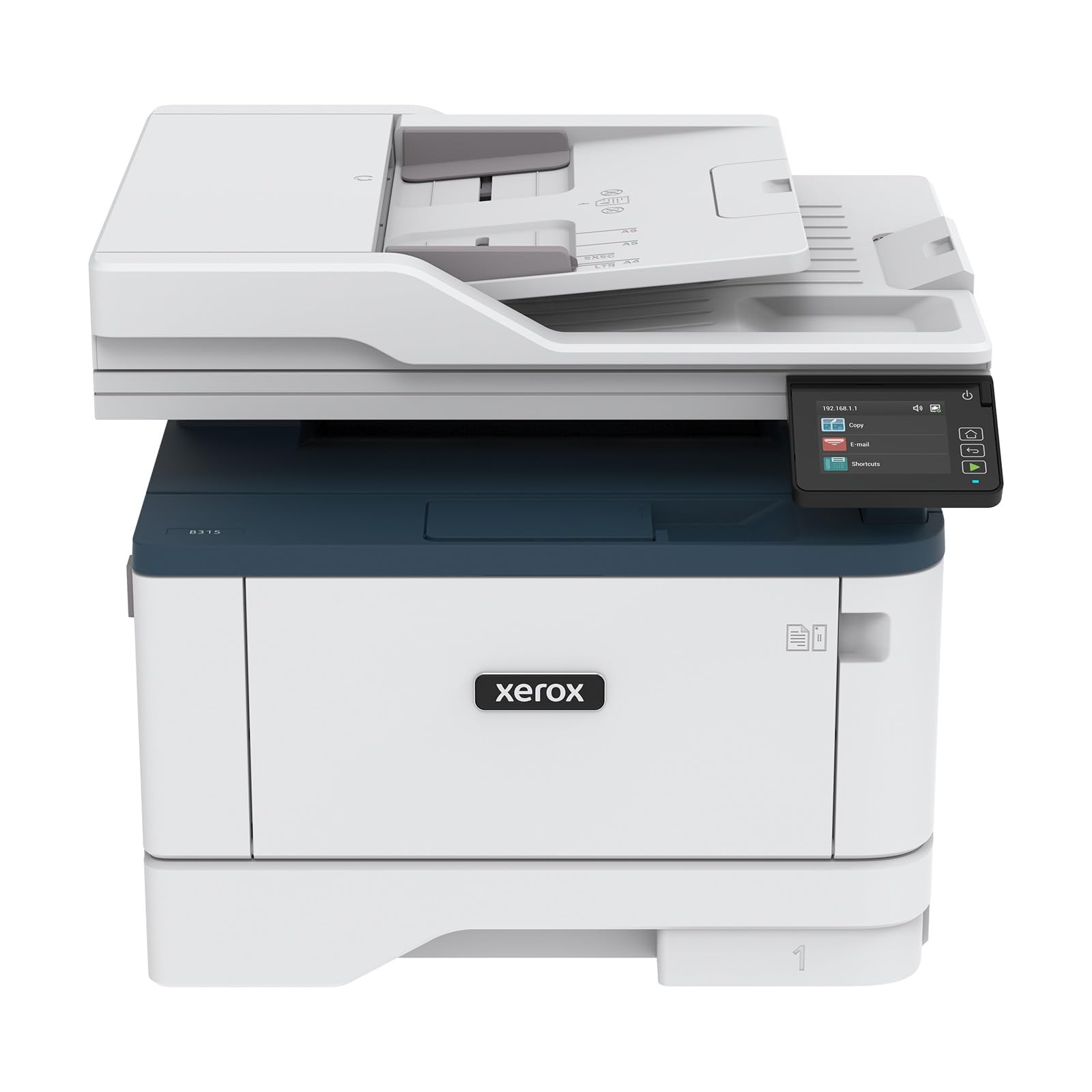
Xerox engineered the B315DNI to be the fastest monochrome all-in-one in this class, and it delivers with a 42-ppm print speed that chews through a 50-page report in about a minute. The reversing automatic document feeder (RADF) scans both sides of a stack in a single pass, which is a genuine productivity win for offices that process multi-page forms and invoices daily.
Wireless setup is streamlined through a QR-code pairing process that bypasses the frustrating driver hunt. The built-in Wi-Fi supports Apple AirPrint, Mopria Print Service, and Chromebook printing, making it one of the most device-agnostic machines available. Reviewers note that the toner consumption remains surprisingly low even after hundreds of pages, and the 250-sheet paper tray handles standard letter and A4 without fuss. The Xerox Print & Scan Experience software adds auto-straighten and receipt-scanning features that reduce manual editing time.
The main drawback is the inconsistency of the initial Wi-Fi pairing—a subset of users report needing multiple attempts before the printer appears on the network. The toner, while long-lasting, carries a premium price when buying replacements. For a small team or home office that prioritizes raw speed, the B315DNI is a strong contender.
Why it’s great
- 42-ppm print speed—fastest in the group
- RADF for single-pass duplex scanning
- QR-code setup for quick wireless pairing
- Excellent multi-device compatibility
Good to know
- Wi-Fi setup can be finicky for some users
- Replacement toner cartridges are expensive
- UI is functional but not as polished as Canon’s
3. Brother MFC-L3720CDW

The MFC-L3720CDW is the color laser printer that delivers vibrant graphics without demanding a four-figure investment. At 19 ppm, it is slower than monochrome alternatives, but the color output is sharp enough for client-facing brochures and internal presentations. The 3.5-inch color touchscreen supports 48 customizable shortcuts, which dramatically reduces navigation time for frequently used scan-to-cloud and print commands.
Connectivity is a highlight: dual-band wireless (2.4 and 5 GHz), Wi-Fi Direct, and USB 2.0 give you flexible deployment options. The 50-sheet ADF handles multi-page scanning, and the 250-sheet tray means fewer refills during a busy workday. Brother’s mobile app provides remote toner monitoring and printer management, and the Refresh EZ Print Subscription Service can cut toner costs if you prefer automatic reordering. Reviewers on Linux systems report easy driver integration, which is rare for a color laser.
The potential dealbreaker is Brother’s waste toner detection system. Some users report that after roughly 1,000 pages, the printer displays a “No Waste Toner Detected” error even with a genuine Brother waste toner box installed, rendering the machine unusable unless you can source a replacement or perform a firmware rollback. If you plan to use third-party toner, Brother is generally more permissive than HP or Canon, but the waste toner issue is worth monitoring.
Why it’s great
- Vibrant color output at a reasonable price
- 48 customizable shortcuts on the touchscreen
- Dual-band Wi-Fi and Wi-Fi Direct
- Works well with third-party toner
Good to know
- Print speed of 19 ppm is slower than monochrome
- Waste toner error may appear prematurely
- Color per-page cost is higher than monochrome
4. Brother MFC-L2820DW

The MFC-L2820DW is designed for small offices that need a full feature set in a footprint that fits on a corner desk. It prints at 34 ppm, which is fast enough for a five-person team, and the 2.7-inch touchscreen provides intuitive access to scan-to-cloud services like Google Drive, Dropbox, and OneNote. The 50-page ADF allows multi-page copy and scan jobs without manual intervention.
Dual-band wireless plus Ethernet and USB give you flexible connectivity, and the Brother Mobile Connect App enables remote printing and toner monitoring. Users consistently report that the machine is a reliable workhorse with minimal paper jams once properly set up. The compact design does not compromise scan quality—the flatbed scanner produces crisp 1200 dpi images, and the ADF handles both letter and legal sizes.
The setup process, however, can be frustrating for first-time laser printer buyers. The quick-start guide is sparse, and several reviewers note that manual Wi-Fi configuration is required because the automatic setup tool fails to detect the printer. Brother’s toner subscription service is optional but can reduce long-term costs if you commit to the Refresh program.
Why it’s great
- Compact footprint for tight desk spaces
- Touchscreen with cloud service shortcuts
- Dual-band wireless and Ethernet
- Low cost per page with high-yield toner
Good to know
- Setup instructions are vague and may require manual WiFi input
- No duplex scanning in the ADF
- Plastic build feels less robust than premium models
5. Canon Color imageCLASS MF665Cdw

Canon’s MF665Cdw is a color laser printer that prioritizes reliability and peace of mind with a 3-year limited warranty that outpaces most competitors by a factor of three. Its 26-ppm color and monochrome speed is respectable, and the first-page-out time of 10.3 seconds is reasonable for a four-toner engine. The 50-sheet duplex ADF scans both sides of a document in a single pass, keeping multi-page workflows fluid.
The 5-inch color touchscreen runs the Application Library, giving you customizable access to the features you use most. The MF665Cdw uses Canon Genuine Toner 075 cartridges, and the high-capacity versions deliver substantial yields before needing replacement. Reviewers highlight the fast duplex scanning and the absence of off-center images in copies—a common complaint with cheaper scanners. The printer also supports Chromebook compatibility, which is a rarity in the color laser space.
Canon’s software remains the weak point. Multiple reviews note that the setup utility on Mac is frustrating, with random print stops and driver issues that are not resolved by customer support. The interface on the touchscreen is slightly clunky and lacks the customization depth of some alternatives. For Windows and Linux users, however, these issues are less pronounced, and the hardware quality justifies the investment.
Why it’s great
- 3-year limited warranty provides excellent peace of mind
- 26 ppm color and monochrome speed
- Single-pass duplex ADF for fast two-sided scanning
- Chromebook compatible
Good to know
- Setup software on Mac is buggy and unreliable
- Touchscreen UI feels slow and unresponsive
- Large and heavy—requires dedicated desk space
6. HP LaserJet Pro MFP 3101sdw

The HP LaserJet Pro 3101sdw is designed for small teams that need professional-quality black-and-white output without latency. The 35-ppm engine, combined with a 50-sheet ADF and automatic duplex printing, makes it a capable hub for a three-to-five-person office. Wireless connectivity is HP’s most dependable implementation, with intelligent Wi-Fi that finds the best connection and reconnects automatically after power outages.
HP bundles a starter toner cartridge rated for about 1,000 pages, which is lower than the Canon MF445dw’s full-yield cartridge but standard for the industry. Users report that the printer wakes from sleep quickly, and the print quality is consistently sharp with deep blacks. The HP Smart app enables mobile printing and scanning, and the printer supports Apple AirPrint and Mopria out of the box.
The critical watch item is HP’s firmware lockout policy. This printer is designed to block cartridges without original HP chips or circuitry, and periodic firmware updates maintain that restriction. If you decline firmware updates, aftermarket toner may still work, but you lose security patches. Some users experienced occasional Wi-Fi drops, though the issue is typically resolved by restarting the router.
Why it’s great
- 35 ppm speed with reliable auto-duplex
- Intelligent Wi-Fi reconnects after power loss
- Sharp, professional black-and-white output
- HP Smart app for mobile management
Good to know
- Firmware updates block third-party toner
- Starter cartridge yields only 1,000 pages
- Occasional Wi-Fi drops require router restart
7. HP LaserJet Pro MFP 3101fdw

The 3101fdw adds fax capability and HP Wolf Pro Security to the 3101sdw foundation, making it the best choice for offices that handle sensitive client data. Print speed remains at 35 ppm, and the ADF supports fast scanning and copying. HP Wolf Pro Security provides customizable settings to protect data and control printer access, which is a rare feature at this price tier.
Setup is straightforward for most users, and the printer supports wireless printing from any device via AirPrint, Android, Chromebook, and Ethernet. One user reported printing over 20,000 pages in nine months with zero jams, and noted that enabling Economode doubled the effective cartridge life to 10,000 pages per cartridge. Duplex printing is reliable, and the scanner produces clean copies for multi-page documents.
The same firmware lockout caveat applies: HP uses firmware updates to block non-HP cartridges, and some users experienced poor print quality (fuzzy text, faded graphics) even at the highest settings. A small number of reviews mention complete printer failure within weeks, though these are outliers. For a secure, fax-equipped monochrome office printer, the 3101fdw is a solid choice if you are willing to use OEM toner.
Why it’s great
- HP Wolf Pro Security for data protection
- 35 ppm with reliable duplex printing
- Economode extends toner life significantly
- Fax capability included for legacy workflows
Good to know
- Firmware blocks third-party toner aggressively
- Print quality issues reported on some units
- Wi-Fi scanning can be intermittent
8. Canon imageCLASS MF275dw

The MF275dw is the entry-level gateway to laser printing for home offices that do not need blazing speed but refuse to tolerate inkjet clogs. The 35-sheet ADF is adequate for short copy jobs, and the 150-sheet paper cassette is sufficient for light weekly use.
Wireless setup is genuinely easy—Canon almost eliminated the CD-drive requirement by offering driver downloads through the website. The 6-line adjustable touchscreen is not a full color panel, but it is responsive and intuitive for basic scan, copy, and fax operations. Reviewers consistently praise the print quality as “crisp and fast,” and the cost per page with replacement toner remains low enough to make this a long-term economical choice. The 1-year warranty is standard but acceptable at this level.
The MF275dw lacks duplex scanning—the ADF handles only single-sided documents, so two-sided scanning requires manual flipping. The 1-bit color depth means grayscale scans can appear washed out compared to higher-end models. For a student, a freelancer, or a home office that prints fewer than 500 pages per month, these compromises are easy to accept for the reliability and low running cost.
Why it’s great
- 30 ppm speed at an approachable price
- Reliable wireless setup without CD driver
- Low cost per page with Canon Genuine toner
- Practical 6-line touchscreen interface
Good to know
- No duplex scanning—single-sided ADF only
- Grayscale scans can appear faded
- 150-sheet tray requires frequent refills
9. Xerox C235dni

Xerox brings color laser printing to a budget-friendly tier with the C235dni. It prints 24 ppm in both color and monochrome, which is competitive for a color laser at this level. The starter toner yields only 500 pages per cartridge—a reminder that the initial savings are offset by replacement costs—but high-yield cartridges are available to bring the per-page cost down over time.
Setup is handled through the Xerox Easy Assist App, which guides you through removing plastic tabs from the cartridges and connecting to Wi-Fi. The color output is vibrant for graphics and presentations, and the text remains sharp for business documents. The printer supports Apple AirPrint and Mopria, so mobile printing works without hassle. Users who upgraded from inkjet printers report a dramatic improvement in reliability and output quality.
The scanner has divided reviewers. Some find it perfectly functional for everyday use, while others report extremely light scans with a white band across the middle, making the scanner unusable for anything requiring fidelity. Windows driver installation can also fail to discover the printer on the network, requiring manual configuration. For users who prioritize color printing over scanning or who are comfortable with potential setup quirks, the C235dni provides a true color laser experience at a low entry point.
Why it’s great
- True color laser at an entry-level price
- High-yield cartridges reduce per-page cost
- Easy smartphone setup via Xerox app
- Sharp text and vibrant graphics
Good to know
- Starter toner yields only 500 pages per color
- Scanner quality is inconsistent across units
- Driver installation may fail on Windows 11
FAQ
How does a monochrome laser printer compare to a color laser for text documents?
Is the 3-year warranty on the Canon MF665Cdw worth paying extra for?
Will any of these printers work reliably with third-party toner cartridges?
What does “first-page-out time” mean and why does it matter?
Can I print from a Chromebook or Linux system with these printers?
Final Thoughts: The Verdict
For most users, the all in one laser printer winner is the Canon imageCLASS MF445dw because it combines 40-ppm speed, a single-pass duplex ADF, a full-yield starter toner, and a 3-year warranty into a machine that handles a busy office without drama. If you need blazing monochrome speed above all else, grab the Xerox B315DNI. And for color documents on a tighter budget, nothing beats the Brother MFC-L3720CDW.