
Our readers keep the lights on and the weekend projects moving. As an Amazon Associate, I earn from qualifying purchases.
A phone’s screen is a terrible place to write a paragraph, reply to an email, or take notes in a meeting. The glass is flat, there’s zero tactile feedback, and your thumbs cover half the keys. An Android phone keyboard solves this by giving you a real, physical typing surface that pairs wirelessly with your device — turning your phone into a mini workstation without the bulk of a full laptop.
I’m Rikta — the founder and writer behind FitlyFast. I’ve spent months tracking Bluetooth keyboard firmware updates, testing scissor-switch durability under daily carry conditions, and comparing fold patterns across dozens of models to find the ones that actually hold up.
This guide breaks down the best options available right now so you can find the android phone keyboard that matches your typing style, travel habits, and workspace setup without wasting time on models that cut corners.
How To Choose The Best Android Phone Keyboard
Picking a Bluetooth keyboard for your phone involves more than just grabbing the cheapest option. The wrong layout, poor key feel, or a fragile hinge will make you regret the purchase within a week. Here are the three specs that separate a daily-driver from a drawer-dweller.
Key Layout and Size
Your fingers don’t shrink just because you’re typing on a phone keyboard. Look for models with at least 15mm keycap width and a standard QWERTY row spacing. Full-size folding keyboards match laptop proportions, while mini sixty-key boards require adapting to smaller gaps and shifted punctuation. If you touch-type, a full-size layout keeps your speed up. If you hunt-and-peck, a mini board saves bag space.
Connectivity and Device Switching
Single-device Bluetooth is fine if you only pair with your phone. Multi-device models let you toggle between an Android phone, an iPad, and a laptop with a button press or dial turn. Bluetooth 5.0 or higher gives you a stable connection up to 33 feet and lower battery drain. Some premium boards add a 2.4 GHz USB receiver for latency-sensitive work, which is overkill for casual typing but useful for coding on a phone.
Build Quality and Portability
A phone keyboard lives in your bag, so hinge durability, cover material, and weight matter most. Aluminum or metal-reinforced hinges outlast plastic ones after hundreds of folds. PU leather covers protect against scratches and spills better than bare plastic. Weight under half a pound keeps your daily carry comfortable. Check the folded thickness — anything over an inch starts to feel like a second tablet in your pocket.
Quick Comparison
On smaller screens, swipe sideways to see the full table.
| Model | Category | Best For | Key Spec | Amazon |
|---|---|---|---|---|
| Samsers KF08S | Mid-Range | Full-size feel on the go | Full 6-row keys, 0.65in keycaps | Amazon |
| Logitech K480 | Mid-Range | Desktop multi-device hub | Easy-Switch dial for 3 devices | Amazon |
| Omikamo Foldable | Premium | Mouse-free navigation | Tri-fold with built-in trackpad | Amazon |
| Samsers w/ Numpad | Premium | Spreadsheets and data entry | Full numeric keypad, 99 keys | Amazon |
| SIKAI CASE Mini | Premium | Ultra-compact phone pairing | Aluminum build, 60-key, magnetic stand | Amazon |
| Doohoeek Mini | Budget | Pocket-size starter keyboard | 59 keys, 174g, any-angle kickstand | Amazon |
| Doohoeek Orange | Budget | High-visibility budget typing | Orange navigation keys, 6oz weight | Amazon |
In‑Depth Reviews
1. Samsers Full-Size Foldable Bluetooth Keyboard KF08S
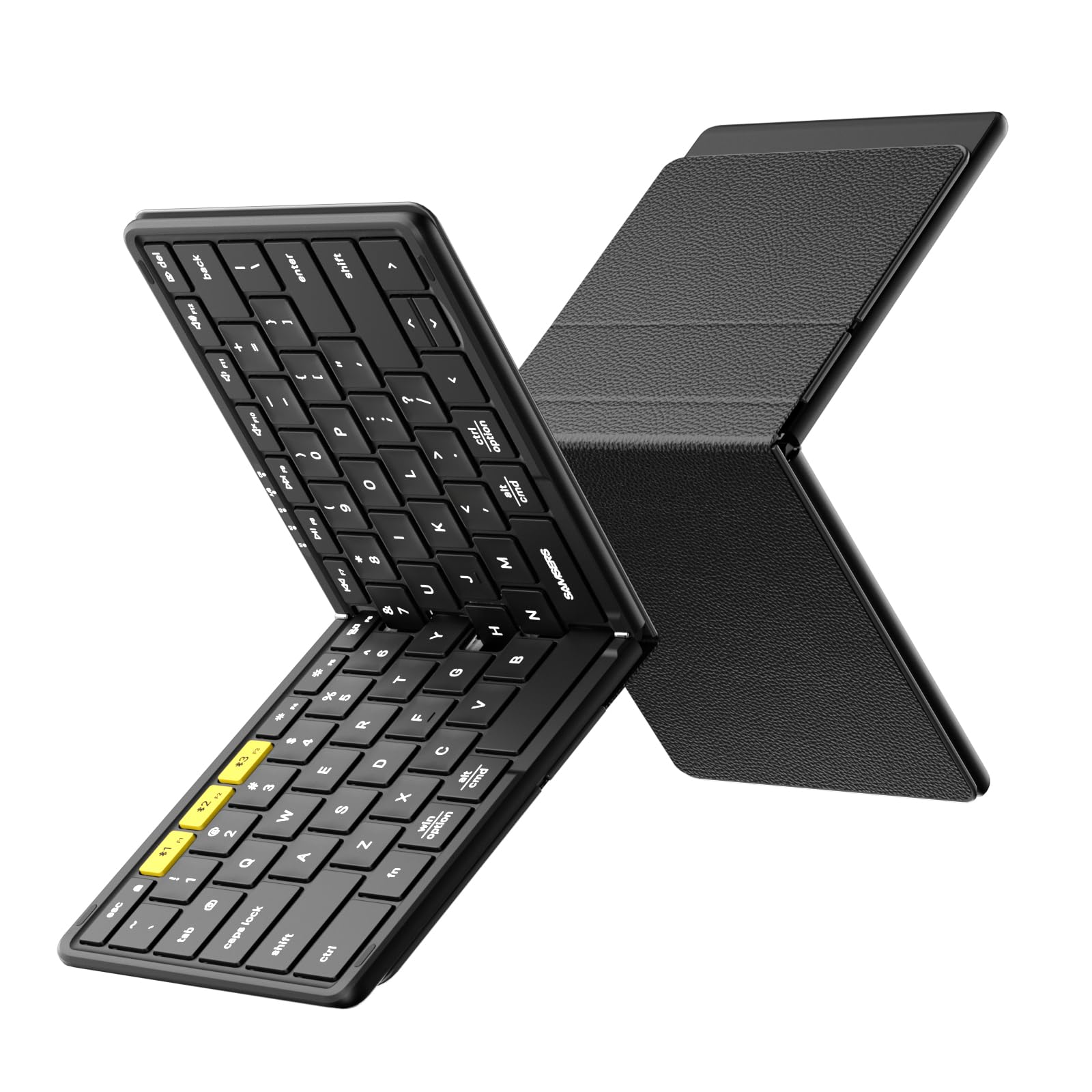
The Samsers KF08S hits the sweet spot between a laptop-grade typing experience and true pocket portability. Unfolded, it measures 11.2 by 4.8 inches — essentially a full-size keyboard minus the numpad — with standard 0.65-inch keycaps and a six-row layout that doesn’t cramp your fingers. The split spacebar takes a few minutes to get used to but becomes invisible after an hour of typing. Dual Bluetooth connects your phone and tablet simultaneously, switching with a quick Fn combo.
The bifold design uses a metal seamless hinge that feels solid when flipping open and stays flat during use. The PU leather back cover protects the keys from scratches when folded. At 9.1 ounces and a palm-sized folded footprint, it slides into a small bag compartment or a large coat pocket without noticeable bulk. The included velvet pouch and phone holder add value, though the phone stand is plastic and lightweight.
Battery life is strong — two hours of USB-C charging delivers up to 120 days of standby, and real-world use with daily typing lasts several weeks between charges. The separate Esc key and Fn lock are small touches that speed up workflow for power users. Some users report the keys feel slightly flimsy compared to aluminum-frame competitors, but for this price tier, the typing feel and build quality are excellent.
Why it’s great
- Standard 0.65in keycaps with 6-row layout for touch typists
- Metal hinge feels durable, PU leather cover adds protection
- Long standby battery life and USB-C rechargeable
Good to know
- Split spacebar may feel unusual at first
- Keys lack the solid rigidity of aluminum-frame models
2. Logitech K480 Wireless Multi-Device Keyboard

The Logitech K480 is the opposite of a travel keyboard — it’s designed to live on your desk and serve your phone, tablet, and computer with a single turn of a dial. The built-in cradle holds phones and tablets up to 10 inches wide and 0.4 inches thick at a comfortable reading angle. The Easy-Switch dial is tactile and satisfying, clicking between three paired devices without menu diving or Bluetooth re-pairing.
The keyboard itself is spacious with full-size 78 keys, including a dedicated row of shortcut keys for Windows and macOS. The scissor-switch mechanism delivers consistent laptop-like feedback that’s quiet enough for shared workspaces. The K480 is spill-resistant and runs on two AAA batteries that Logitech claims last up to 24 months — a real advantage if you hate remembering to charge.
The trade-off is bulk. At 11.8 by 7.7 inches and over two pounds, this is a stationary board. The cradle won’t fit a phone in a thick case, and the keys are noisier than membrane competitors. But for anyone who wants one keyboard to control their Android phone, iPad, and PC without ever re-syncing, the dial-based switching is a workflow game-changer.
Why it’s great
- Easy-Switch dial provides instant device toggling
- Spill-resistant build with 24-month battery life
- Full-size layout with dedicated shortcut keys
Good to know
- Too large and heavy for travel or bag carry
- Cradle won’t fit phones with thick protective cases
3. Omikamo Foldable Bluetooth Keyboard with Touchpad & Number Pad
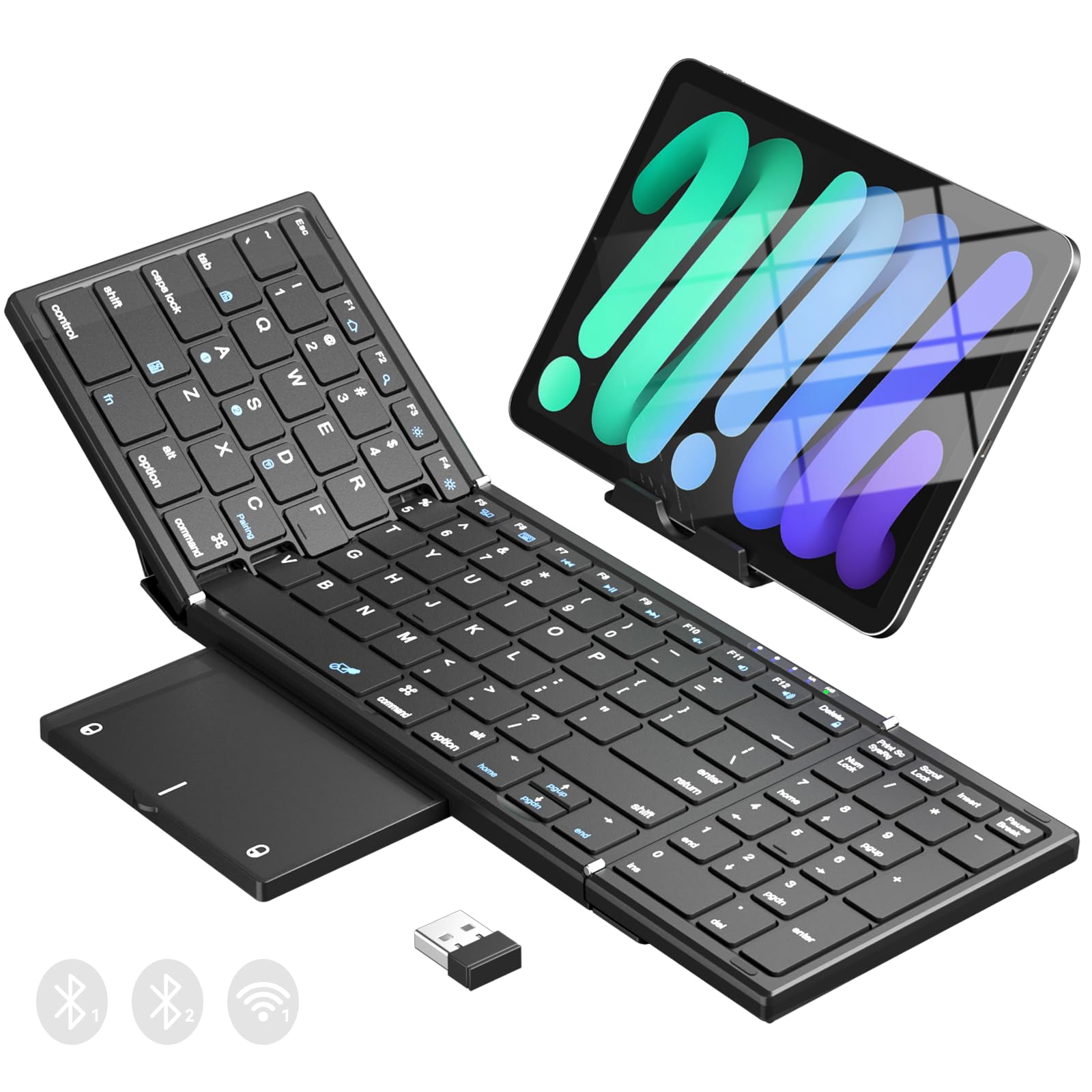
The Omikamo keyboard brings the full desktop experience to your Android phone with a tri-fold design that includes a built-in trackpad and a numeric keypad. Unfolded, it measures 13.5 by 4.5 inches — a true full-size layout with 99 keys, the same spacing as a standard desktop keyboard. The multi-touch trackpad supports two-finger scrolling, tap-to-click, and basic gestures, so you can leave your mouse at home.
Connectivity is its standout feature: three channels — one via a 2.4 GHz USB receiver and two via Bluetooth — allow you to pair with a phone, tablet, and laptop simultaneously and switch with a single key press. The scissor-switch keys are quiet and responsive, with a 15.5mm keycap that doesn’t crowd your fingers. The built-in 320mAh battery recharges via USB-C and the keyboard auto-sleeps after 10 minutes of inactivity.
The tri-fold makes it thicker when folded (0.9 inches) compared to bifold models, and the trackpad can feel laggy on larger iPad screens — though it works smoothly with Android phones. The lack of a lap-use locking mechanism means the ends may fold up slightly when used on soft surfaces. For spreadsheet work, data entry, or any task requiring both cursor control and number input, this is the most capable portable option available.
Why it’s great
- Built-in trackpad eliminates need for separate mouse
- Full numeric keypad speeds up data entry
- Three-way connectivity with 2.4 GHz and dual Bluetooth
Good to know
- Tri-fold adds thickness when packed
- Trackpad performance can lag on some tablets
4. Samsers Foldable Bluetooth Keyboard with Numeric Keypad

This Samsers keyboard is one of the few folding models that adds a dedicated numeric keypad without inflating the folded size beyond reason. Unfolded, it spans 13.5 by 4.5 inches with 99 keys, including a full row of F-keys and media shortcuts. The scissor-switch keys are quiet enough for open offices and offer a consistent typing feel that matches a mid-range laptop keyboard.
Bluetooth 5.1 handles up to three devices simultaneously with near-instant switching. The keyboard pairs reliably with Android phones, and the included phone stand props your device at a comfortable viewing angle. The PU leather exterior and metal hinge construction feel premium, and the keyboard folds down to 7.3 by 4.5 inches — easily fitting into the included velvet pouch.
The battery lasts up to 90 hours of continuous typing or 120 days on standby after a 2-3 hour charge. A few caveats: the FN lock auto-disables after some time, requiring re-enabling for multimedia keys, and the Option key on Apple devices doesn’t natively support special character input without extra setup. For Android users who regularly enter numbers or work in spreadsheets, the dedicated numpad makes this the most functional folding choice.
Why it’s great
- Rare folding design with dedicated numeric keypad
- Bluetooth 5.1 supports three simultaneous connections
- PU leather cover and metal hinge add premium feel
Good to know
- FN lock auto-disables after period of inactivity
- Some special character combos need extra setup on Apple devices
5. SIKAI CASE Foldable Bluetooth Keyboard with Magnetic Stand

The SIKAI CASE keyboard takes a different approach: vertical fold rather than horizontal, resulting in a narrow 60-key layout that’s as small as a large smartphone when folded. The aluminum alloy casing and metal hinges give it a solid, premium feel that plastic competitors can’t match. At 250 grams and a folded size of 7.97 by 1.83 inches, it disappears into a jacket pocket or small purse.
The hidden magnetic stand props your phone at a viewing angle, though the magnet is designed for positioning rather than strong attachment — don’t expect it to hold an 11-inch iPad securely. The scissor-switch keys are laptop-style with a matte finish that resists fingerprints. Bluetooth pairing is straightforward, and the keyboard remembers three paired devices for quick switching via Fn key combos.
Battery life is respectable: 45 hours of continuous use or 90 days of standby from a two-hour USB-C charge. The key challenge is the compact layout itself — punctuation and number keys require frequent use of the Fn layer, and the keys are smaller than standard laptop keys, so touch typists will slow down initially. For anyone who prioritizes minimal carry weight and mainly types short messages or notes, this is the most pocketable option available.
Why it’s great
- Aluminum casing and metal hinges feel premium and durable
- Smallest folded footprint of any full keyboard
- Hidden magnetic stand props phone for comfortable viewing
Good to know
- 60-key layout requires frequent Fn combinations for numbers and punctuation
- Smaller keycaps slow down touch typists
6. Doohoeek Universal Bluetooth Mini Keyboard

The Doohoeek mini keyboard is an entry-level option that gets the fundamentals right without extra frills. It measures 7.68 by 3.35 inches and weighs only 174 grams — about the same as a small paperback book. The 59-key layout covers all essential typing needs, though punctuation and numbers require Fn key combos. The any-angle kickstand is built into the folio cover and holds your phone or tablet steady at any tilt angle.
Pairing works with Android, Windows, and iOS devices, and the keyboard can connect to two devices simultaneously, switching with a short Fn key press. Users report that pairing requires holding the Fn key rather than pressing it quickly — a minor learning curve documented in customer feedback. The keys are responsive for the price, with decent springback that doesn’t feel mushy despite the compact size.
The leather-like cover protects the keyboard when folded and doubles as a stand, though it’s not magnetic — the stand holds via friction only. Battery life is solid, with users reporting weeks of use between USB-C charges. The compact keys take adjustment for people with larger hands, and the Fn-dependent apostrophe and quotes can initially produce double characters. For the budget-conscious buyer who wants a functional, portable keyboard without spending much, this is a solid starting point.
Why it’s great
- Ultra-light at 174g, pocket-sized footprint
- Any-angle kickstand in the cover works well
- Two-device Bluetooth switching at an accessible price
Good to know
- FN key required for apostrophe, quotes, and some punctuation
- Case is not magnetic — stand relies on friction
7. Doohoeek Universal Bluetooth Mini Keyboard with Orange Keys
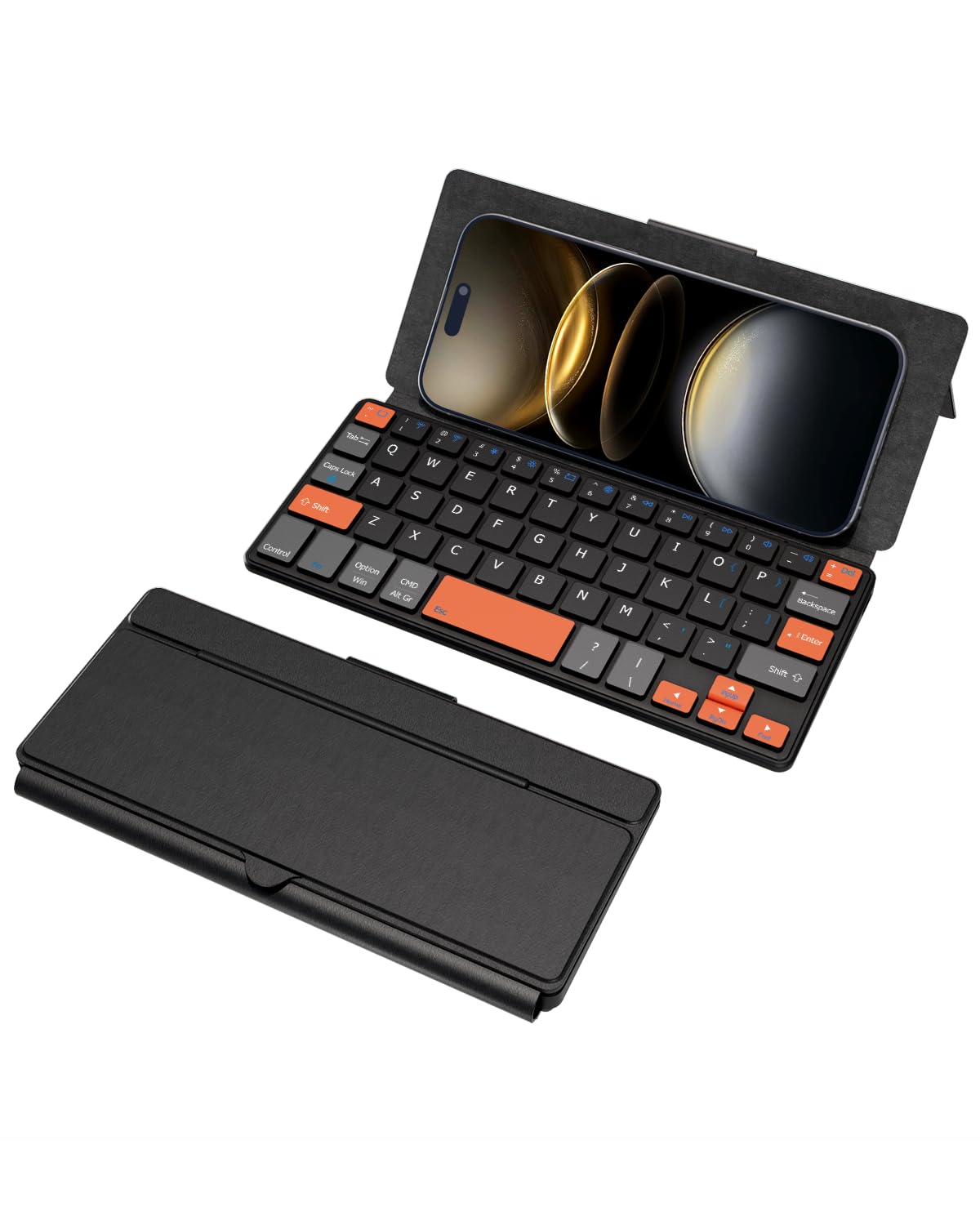
This Doohoeek variant keeps the same compact 7.68-inch chassis as the standard model but replaces the uniform black keys with high-visibility orange navigation keys. The color-coded cluster helps your eyes find direction keys, modifiers, and function controls faster — a real advantage for speed typists or anyone who frequently glances down while typing. At just 6 ounces and a slim 0.6-inch profile, it slides into a handbag or work bag without adding noticeable weight.
The keyboard connects to two Bluetooth devices simultaneously and works across Android, Windows, and iOS. The same reset procedure applies — hold Fn plus the first and last top-row key until the indicator flashes — if pairing fails initially. The integrated stand folds out from the back cover and supports phones and small tablets at any angle, making it functional for both typing and reading.
Battery recharge via USB-C, and the keyboard includes a protective case that doubles as the stand. The plastic enclosure doesn’t feel as premium as aluminum alternatives, and the Fn-layer navigation for symbols takes practice. However, the orange accent keys genuinely reduce mistyping during navigation-heavy tasks like editing documents or coding on a phone. For anyone who prioritizes visual clarity and minimal weight over premium materials, this is the budget-friendly standout.
Why it’s great
- Orange navigation keys reduce visual search time
- Extremely lightweight at 6 ounces for daily carry
- Protective case doubles as any-angle stand
Good to know
- Plastic enclosure lacks the feel of metal-framed keyboards
- Symbols and punctuation require Fn layer navigation
FAQ
Will any Bluetooth keyboard work with my Android phone?
How do I type special characters on a compact folding keyboard?
Can I use a folding keyboard on my lap?
Final Thoughts: The Verdict
For most users, the android phone keyboard winner is the Samsers KF08S because it delivers a full-size typing experience in a portable bifold package without sacrificing key spacing or build quality. If you want to eliminate the need for a separate mouse, grab the Omikamo Foldable with Touchpad. And for a dedicated desktop companion that controls your phone, tablet, and PC with a dial, nothing beats the Logitech K480.