
Our readers keep the lights on and the weekend projects moving. As an Amazon Associate, I earn from qualifying purchases.
The Android tablet market has never been more competitive, but the trap most buyers fall into is assuming you need to spend a fortune to get a smooth, large-screen experience. The reality is that the sweet spot for performance, display quality, and battery longevity sits in a range where many capable options are often overlooked in favor of overpriced flagships. A good tablet doesn’t just play videos; it needs to handle split-screen note-taking, light gaming, and weeks of casual use on a single charge cycle. Finding a device that nails those fundamentals without demanding a flagship budget is the real challenge.
I’m Rikta — the co-founder and writer behind FitlyFast. I’ve spent countless hours analyzing display resolutions, processor benchmarks, battery capacities, and real-world Android tablet feedback to separate the hardware that performs from the specs that only look good on paper. This guide focuses exclusively on the trade-offs that matter: screen quality for media consumption, RAM management for multitasking, and battery size measured against real-world endurance.
Whether you need a massive screen for late-night streaming, a matte display for reading without eye strain, or a dedicated pen experience for sketching, you can find a model that delivers. This is your complete analysis of the best android tablet under $400.
How To Choose The Best Android Tablet Under $400
The best Android tablet under $400 isn’t defined by the highest spec sheet — it’s defined by the least compromise in the areas you actually use daily. Screen quality, processor balance, and battery endurance form the core decision triangle. You have options from ultra-portable 11-inch screens to massive 13-inch canvas devices, all within a budget where the difference between a good experience and a frustrating one is often just one spec.
Display Technology and Eye Comfort
Standard IPS LCD is the norm at this level, offering good color and brightness for video. However, some models include matte or paper-like screens that drastically reduce glare and blue light strain, which is critical if you read or work for hours. Look for Widevine L1 certification if you want HD streaming from Netflix or Prime Video — many budget tablets lack this, capping your video quality to standard definition. Refresh rate also matters: 90Hz panels provide noticeably smoother scrolling and pen response compared to the standard 60Hz.
Processor and RAM — Performance vs. Gimmicks
MediaTek Dimensity chipsets (the 6300 and 8300) offer excellent efficiency and gaming capability at this price range. The Unisoc T-series and older MediaTek Helio G-series are capable for media and note-taking but will struggle with demanding 3D games or heavy multitasking. Pay careful attention to “expandable RAM” claims — virtual RAM is software-based and does not match the speed of physical RAM. A tablet with 8GB of real physical RAM and a Dimensity processor will outlast a 12GB virtual-expansion tablet in daily real-world usage. Trust the physical RAM count and the processor model, not the marketing number.
Battery Life and Charging Speed
Capacity is measured in milliamp hours (mAh), and most tablets in this range pack between 7,000 and 10,000mAh. A larger battery does not guarantee longer runtime if the processor is inefficient or the screen is power-hungry. Look for an average battery life rating of at least 8 hours for video playback. Charging speed also varies significantly — 18W to 30W is common, but the Lenovo Idea Tab Pro supports 45W fast charging, which drastically reduces downtime. Proprietary chargers can be a hidden cost, so consider that when evaluating total value.
Quick Comparison
On smaller screens, swipe sideways to see the full table.
| Model | Category | Best For | Key Spec | Amazon |
|---|---|---|---|---|
| Lenovo Idea Tab Pro | Premium Student | Gaming & 3K Video | MediaTek Dimensity 8300 | Amazon |
| Lenovo Idea Tab | College All-Rounder | Note-taking & Streaming | 2.5K IPS 90Hz Display | Amazon |
| TECLAST Artpadpro | Creative Media Hub | Large Canvas & Drawing | 12.7″ 2K 4:3 Display | Amazon |
| Wacom MovinkPad 11 | Professional Artist | Digital Drawing & Sketching | 8,192 Pressure Levels Pen | Amazon |
| TCL NXTPAPER 11 Gen 2 | Eye Care Reader | Reading & Eye Comfort | NXTPAPER 4.0 Matte Display | Amazon |
| JJGJ 13 Inch Tablet | Max Screen Value | Split-Screen Productivity | 10000mAh + 2TB Expansion | Amazon |
| HUIHUANG 11″ Tablet | Budget All-in-One | Full Accessory Bundle | 32GB RAM + 8000mAh Battery | Amazon |
| ANTEMPER 11″ Tablet | Entry-Level Productivity | Included Keyboard & Mouse | 16GB RAM + Android 15 | Amazon |
| Samsung Galaxy Tab A9+ | Family & Kids | Reliable Media Consumption | Quad Dolby Atmos Speakers | Amazon |
In‑Depth Reviews
1. Lenovo Idea Tab Pro

The Lenovo Idea Tab Pro represents the pinnacle of what an Android tablet under $400 can deliver. Its 12.7-inch 3K LCD display with a 2944×1840 resolution provides exceptional sharpness for streaming, document reading, and photo editing. The quad JBL speakers with Dolby Atmos tuning produce clear, room-filling audio that elevates any media experience. Lenovo has included the Tab Pen Plus in the box, which supports Circle to Search with Google and makes note-taking seamless out of the gate.
Under the hood, the MediaTek Dimensity 8300 processor offers near-flagship performance for gaming, with support for 90fps and a 360Hz touch sampling rate — a spec typically reserved for expensive gaming phones. The 8GB of physical RAM handles heavy multitasking without slowdown, though the 128GB storage may feel tight for heavy media hoarders given the microSD expansion cap. The 90Hz refresh rate makes scrolling through web pages and social feeds feel fluid and responsive.
The 10,200mAh battery delivers a full day of mixed usage, and the included 45W fast charger gets you back to 100% quickly. However, the catch is that Lenovo uses a proprietary charging standard, meaning third-party chargers will charge extremely slowly. The tablet is also on the heavier side at over 1.5 pounds, making one-handed portrait use impractical. For anyone seeking a top-tier media and gaming device without breaking the bank, the Idea Tab Pro is the clear winner.
Why it’s great
- Industry-leading 3K 12.7-inch display ideal for both productivity and entertainment.
- MediaTek Dimensity 8300 with 90fps gaming support rivals higher-priced flagships.
- Included Tab Pen Plus and folio case provide excellent out-of-box value.
Good to know
- Proprietary 45W charger is required for fast charging, adding a hidden cost if lost.
- Heavier build at over 1.5 lbs, making extended one-handed use uncomfortable.
2. Lenovo Idea Tab

If the Idea Tab Pro is the flagship, the standard Lenovo Idea Tab is the smart, cost-conscious student companion. It shares the same excellent build quality but steps down to an 11-inch 2.5K IPS panel with a smooth 90Hz refresh rate, which is still superior to the 60Hz panels found on many budget tablets. The MediaTek Dimensity 6300 processor is power-efficient and handles YouTube, note-taking, and casual gaming with ease, though larger digital art canvases may stutter with heavy brush strokes.
The included Lenovo Tab Pen is responsive for note-taking in apps like Squid and Nebo, which are pre-installed, turning the tablet into a capable digital notebook on day one. The quad Dolby Atmos-tuned speakers provide clear audio for lecture recordings and study breaks. TÜV Rheinland Low Blue Light certification ensures hours of reading without significant eye fatigue, making it a strong choice for students digging through PDFs and textbooks.
Battery life is a standout here, with up to 12 hours of YouTube playback, easily lasting through a full campus day and then some. The included folio case provides basic protection, though reviewers note it feels flimsy. The 256GB storage offers double the capacity of the Pro model for a lower entry price, with microSD expansion available if needed. For the student who wants solid performance, a great screen, and a pen for notes without wasting money on features they won’t use, the Idea Tab is the right call.
Why it’s great
- Excellent 2.5K 90Hz IPS display provides crisp and smooth visuals for the price.
- Included Tab Pen and pre-installed productivity apps (Squid, Nebo) reduce setup friction.
- Outstanding 12-hour battery life easily lasts a full day of campus use.
Good to know
- Dimensity 6300 processor struggles with heavy 3D games and large art canvases.
- Included folio case is functional but feels thin and cheap compared to the tablet.
3. TECLAST Artpadpro

The TECLAST Artpadpro targets a specific niche: anyone who wants a large, spacious canvas for drawing and note-taking without the inflated cost of a major brand. Its 12.7-inch 2176×1600 IPS display uses a 4:3 aspect ratio, which closely mirrors the proportions of a traditional sketchbook or iPad Pro. This ratio provides substantially more vertical space for documents and social feeds than standard 16:10 screens, making it a productivity-focused choice. The T-Pen stylus supports 4096 levels of pressure sensitivity with palm rejection, and the ArtTune audio system with four speakers delivers a surprisingly immersive soundstage for media consumption.
Performance from the 20GB RAM configuration (8GB physical) and MediaTek G99 processor is capable but not flawless. Light gaming, streaming, and multitasking between note apps and web browsers run smoothly, but the G99 will struggle with graphics-intensive mobile titles. The 256GB UFS storage is a welcome upgrade, providing fast app loading speeds, and the microSD slot supports expansion up to 1TB. Android 15 runs with a custom ArtOS skin that includes a sidebar for quick app switching and floating windows, mimicking desktop-like productivity.
The 10,000mAh battery with 30W fast charging offers excellent endurance, easily stretching through a full day of mixed use. However, the included stylus, while functional, is noted for inconsistent pressure sensitivity at light strokes compared to Wacom or Lenovo pens. The metal body gives the tablet a premium, robust feel that belies its price point. If maximizing screen real estate for under $400 is your goal, the Artpadpro delivers the biggest usable workspace in this guide.
Why it’s great
- 12.7-inch 4:3 2K display offers the largest usable canvas for notes and drawing.
- Metal body and 256GB UFS storage feel premium and run fast.
- 10,000mAh battery with 30W charging provides long endurance and quick refills.
Good to know
- MediaTek G99 processor is not suitable for demanding 3D gaming.
- Included stylus has light stroke skipping issues; not ideal for precision art.
4. Wacom MovinkPad 11

Wacom is the gold standard for digital drawing, and the MovinkPad 11 brings that pedigree into an Android tablet form factor. The 11.45-inch display features a matte etched glass surface that creates a genuine paper-like drawing feel, complete with subtle texture that reduces glare and fingerprints. The battery-free Slim Pro Pen 3 offers a best-in-class 8,192 levels of pressure sensitivity with zero lag, three customizable buttons, and felt nibs stored in the pen body. This is not just a tablet with a pen — it’s a dedicated creative studio that happens to run Android 14.
The included Wacom Canvas app and two years of CLIP STUDIO PAINT DEBUT mean you can start creating immediately without purchasing additional software. The “Quick Draw” feature lets you tap the pen to the screen to instantly launch a sketch app, replicating the muscle memory of a physical sketchbook. The 8GB RAM and 128GB storage are sufficient for art apps and file storage, but the MediaTek processor is not designed for heavy gaming or complex 3D rendering. This device is laser-focused on the digital artist who values pen precision over raw gaming power.
Portability is a major advantage: at just 1.3 pounds and with a sleek metal build, it fits easily into a bag without weighing you down. Battery life is solid, though the charging is slower than some competitors. The lack of a 3.5mm headphone jack and a finicky touchscreen calibration (noted by some users) are its main compromises. If drawing is your primary use case and you want the industry’s best pen feel, the MovinkPad 11 is unmatched in this price range.
Why it’s great
- Industry-leading 8,192 pressure levels and paper-like matte etched glass for drawing.
- Battery-free Pro Pen 3 with felt nibs ensures zero latency and a natural feel.
- Pre-loaded with Wacom Canvas and CLIP STUDIO PAINT DEBUT for immediate use.
Good to know
- Processor is not powerful enough for heavy 3D gaming or complex rendering.
- No 3.5mm headphone jack and slow charging are notable drawbacks.
5. TCL NXTPAPER 11 Gen 2

The TCL NXTPAPER 11 Gen 2 solves the problem that plagues most budget tablets: eye strain from prolonged use. Its 11-inch 2K display uses NXTPAPER 4.0 technology, which combines low blue light certification, DC dimming, and an anti-glare matte coating to create a screen that genuinely looks and feels like paper. The default color mode is intentionally warmer and softer than standard IPS panels, making it perfect for reading EPUBs, web articles, or comics for hours without fatigue. The included T-PEN stylus supports 4096 pressure levels, turning the tablet into a surprisingly capable digital notebook.
Beyond the display, the MediaTek Helio G80 processor and 8GB+8GB RAM provide adequate performance for note-taking, web browsing, and video streaming, but the GPU is weak — modern 3D games will struggle or require low settings. The 128GB storage is expandable up to 1TB via microSD, giving you plenty of space for a large comic or book library. The 8000mAh battery is the star performer, frequently delivering 2-3 days of mixed reading and note-taking on a single charge, with reverse charging available to power other devices in a pinch.
The three VersaView modes (Regular, Ink Paper, Color Paper) are genuinely useful, letting you switch between a standard vibrant display, a monochrome e-reader mode, and a soft-color mode for art. However, the included flip case feels flimsy, there is no 3.5mm headphone jack, and the lack of guaranteed Android updates from TCL is a long-term concern. For anyone whose primary use is reading, note-taking, and creative work with minimal gaming, the NXTPAPER 11 Gen 2 delivers an unmatched eye-friendly experience.
Why it’s great
- NXTPAPER 4.0 display with matte anti-glare coating is the best for reading and eye comfort.
- Long 2-3 day battery life with reverse charging capability for powering other devices.
- VersaView modes genuinely toggle between e-reader, art, and standard tablet experiences.
Good to know
- Helio G80 processor is underpowered for modern gaming and heavy multitasking.
- No guaranteed Android OS updates and a flimsy included case are notable weaknesses.
6. JJGJ 13 Inch Tablet

The JJGJ 13 Inch Tablet provides the largest screen size in this entire guide, with a 13.4-inch 1920×1200 IPS display that offers 40% more visible area than a standard 11-inch tablet. The screen supports Widevine L1, unlocking HD streaming from Netflix and Prime Video, which is a critical feature for binge-watchers on a budget. The included Bluetooth keyboard, mouse, and stylus transform the tablet into a functional laptop alternative for writing documents, spreadsheets, and web research. The 8GB physical RAM plus virtual expansion to 32GB keeps multiple Chrome tabs open without reloading.
The Unisoc T615 octa-core processor is the limiting factor here. It handles basic apps, HD video, and split-screen productivity smoothly, but frame rates drop noticeably in any game beyond simple casual titles. The 256GB internal storage is generous, and the microSD expansion up to 2TB means you practically never have to worry about space. The 10,000mAh battery runs for a full day of mixed use, and the 5G Wi-Fi provides fast streaming connectivity.
The tablet’s sheer size makes it impractical for handheld use — this is strictly a device for use on a desk, lap, or table with the case stand. Some users reported two apps failing to install, which could point to isolated software compatibility quirks. For the price, you get a massive screen with all accessories included, making it the ultimate choice for remote work, studying with multiple documents, or digital reading where screen real estate is the top priority.
Why it’s great
- Largest 13.4-inch screen in the guide with Widevine L1 for HD Netflix streaming.
- Full accessory bundle (keyboard, mouse, stylus, case) provides true laptop-like utility.
- Expandable storage up to 2TB ensures you never run out of space for media.
Good to know
- Unisoc T615 processor is weak for gaming; best suited for productivity and media.
- Size and weight make it impractical for one-handed use or tight spaces.
7. HUIHUANG 11″ Tablet
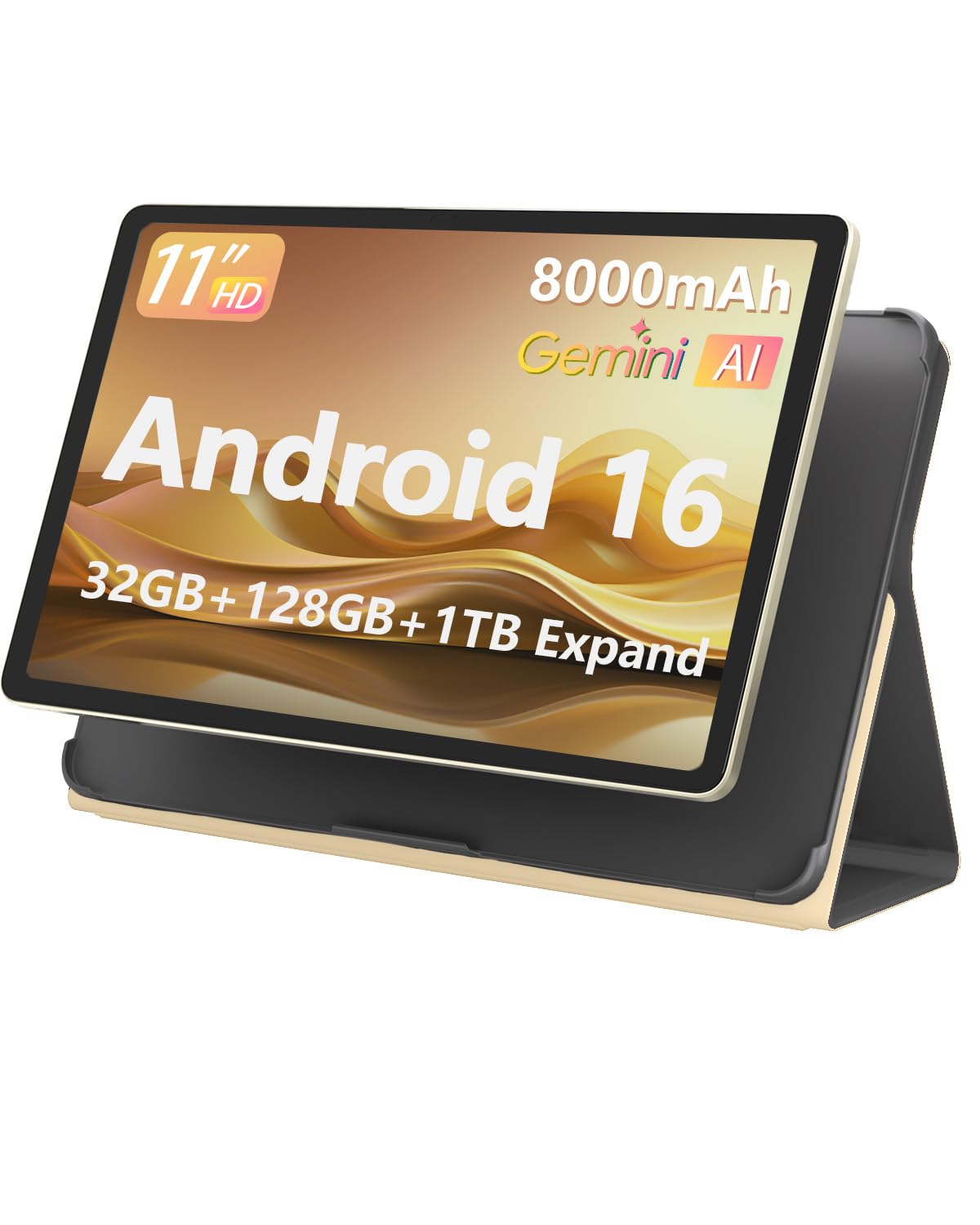
The HUIHUANG 11-inch tablet packs an eye-catching spec sheet that includes 32GB RAM (8GB physical plus virtual expansion), a 90Hz FHD+ IPS display, and an 8000mAh battery with fast charging. The T7280 octa-core processor provides smooth performance for everyday tasks like web browsing and video streaming, and the 128GB storage with microSD expansion up to 2TB offers flexibility for media hoarders. The package includes a Bluetooth keyboard, mouse, stylus, case, and screen protector, delivering the most complete out-of-box accessory bundle in this lineup.
Real-world performance is stronger than you’d expect from the price point — users report smooth operation for streaming, light productivity, and casual gaming, with the 90Hz display making scrolling and navigation feel responsive. The battery life is rated at up to 6 hours of video playback, which is average but reasonable for the 8000mAh capacity. Face ID unlock adds a level of convenience usually found on more expensive devices. Android 16 with Gemini AI integration provides smart features like document generation and chart analysis, adding practical value for students and professionals.
The speakers are adequate but not exceptional, lacking the Dolby Atmos tuning of branded competitors. The camera quality is basic, suitable only for video calls and document scanning. The tablet’s plastic build feels less premium than metal-chassis alternatives, but the included case mitigates this. For anyone who wants a functional, feature-packed tablet with every accessory included for the lowest possible total investment, the HUIHUANG delivers unbeatable value.
Why it’s great
- Impressive 90Hz FHD+ IPS display provides smooth scrolling and clear visuals.
- Best accessory bundle in class: keyboard, mouse, stylus, case, and screen protector.
- Android 16 with Gemini AI integrates smart features for productivity.
Good to know
- Plastic build lacks the premium feel of metal-chassis alternatives.
- Average battery life of 6 hours for video playback is behind the competition.
8. ANTEMPER 11″ Tablet
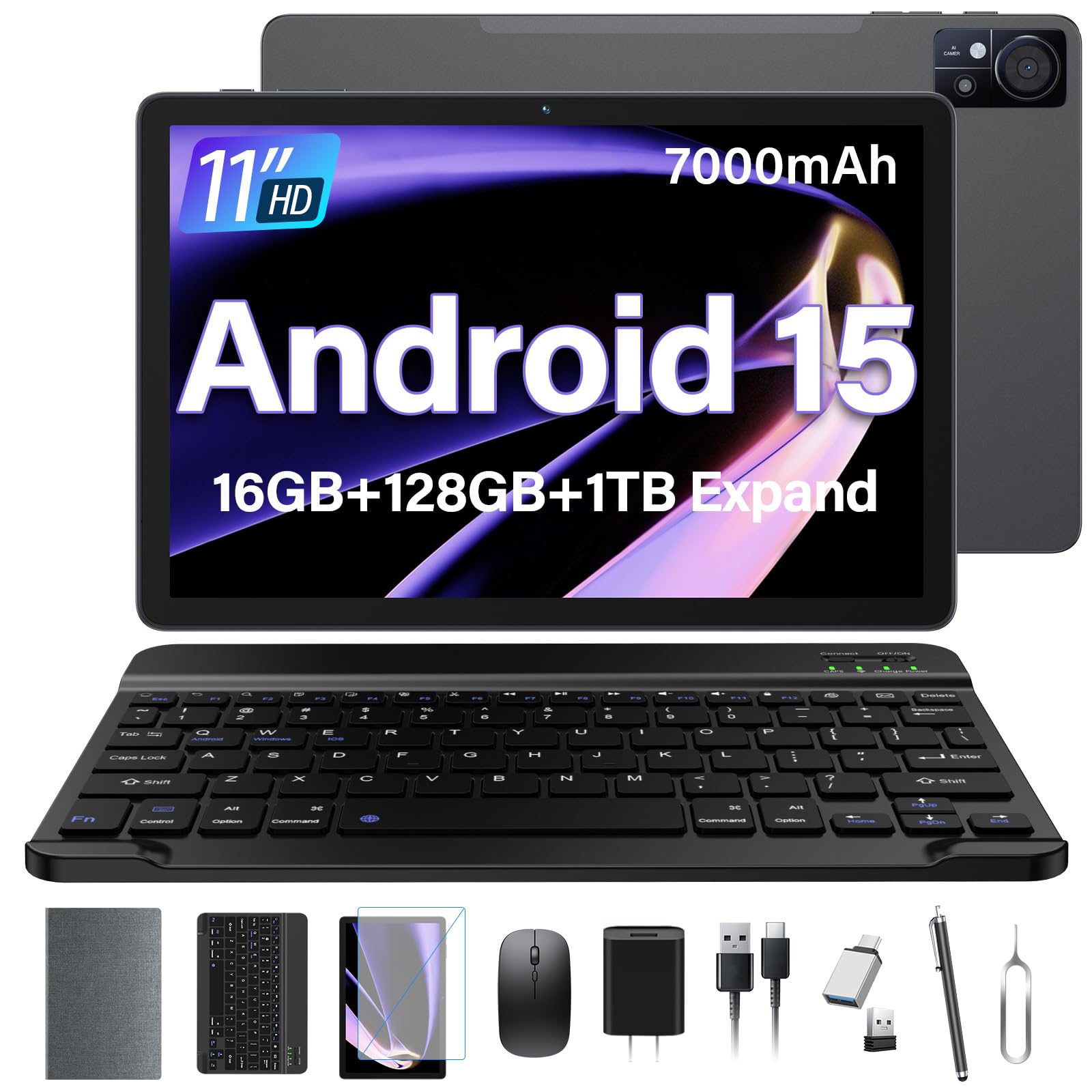
The ANTEMPER 11-inch tablet targets users who need an affordable device that can handle productivity, media, and the occasional game without major compromises. The 11-inch 1280×800 HD display is standard for the price, offering acceptable clarity for video and reading, but it lacks the sharpness of higher-resolution panels. The 16GB RAM (8GB physical plus virtual) and 128GB storage provide enough headroom for multitasking between note apps, web browsers, and email, with expansion up to 1TB via microSD for heavy media collections.
The inclusion of 4G LTE cellular support with dual SIM slots is the standout feature here, offering genuine mobile connectivity without needing a Wi-Fi hotspot — a rare and valuable addition in this price tier. The MediaTek MT8786 octa-core processor handles everyday tasks with reasonable speed, and users report smooth performance in Call of Duty Mobile at moderate settings. The 7,000mAh battery lasts a full workday, though heavy gaming drains it faster. The bundle includes a Bluetooth keyboard, wireless mouse, stylus, protective case, and screen protector, providing excellent initial value.
The screen resolution is the primary weak point — at 1280×800, text appears less sharp than the 2K panels found on Lenovo and TCL models, and the 60Hz refresh rate lacks the smoothness of 90Hz alternatives. Speakers are adequate but not loud. The plastic construction and 5V/2A charger (slow by modern standards) show where corners were cut. For users who need 4G connectivity and a full productivity bundle at the lowest possible price, the ANTEMPER is a compelling entry-level machine, but the display is a clear downgrade from mid-range options.
Why it’s great
- 4G LTE cellular support with dual SIM slots provides true mobile connectivity.
- Complete accessory bundle includes keyboard, mouse, stylus, and screen protector.
- Expandable storage up to 1TB offers generous space for media and apps.
Good to know
- 1280×800 display resolution and 60Hz refresh rate are noticeably less sharp and smooth.
- Slow 5V/2A charger and plastic build reflect the budget-friendly compromises.
9. Samsung Galaxy Tab A9+

The Samsung Galaxy Tab A9+, available as a renewed model, brings the reliability of the Samsung ecosystem to a budget-friendly price point. The 11-inch display with a 90Hz refresh rate provides smooth scrolling and responsive touch, making it pleasant for browsing and casual gaming. The quad speakers with Dolby Atmos tuning deliver genuinely impressive audio for a tablet at this level — rich, clear, and loud enough to fill a medium-sized room without distortion. The Samsung Kids app and parental controls make it a safe option for children’s entertainment and learning.
Performance from the upgraded chipset is adequate for media consumption, reading, and light multitasking, but it is noticeably sluggish with app loading and task switching compared to MediaTek Dimensity-powered alternatives. The 7,040mAh battery delivers around 8 hours of mixed use, which is solid middle-of-the-pack performance. Samsung’s One UI remains one of the cleanest Android skins, with good app compatibility and long-term software support expectations.
The camera system is basic, useful only for video calls, and the 4G LTE support adds mobile connectivity if you insert a SIM card. The renewed condition means cosmetic wear is possible, but reviewers consistently report battery life and performance indistinguishable from new units. The Tab A9+ is the most reliable choice for families who want a well-known brand, durable construction, and a safe digital environment for kids, even if its raw specs don’t compete with the newer Chinese models.
Why it’s great
- Samsung One UI and long-term software support provide a familiar, trustworthy experience.
- Quad Dolby Atmos speakers deliver best-in-class audio for media consumption.
- Samsung Kids app and parent controls make it the safest family choice.
Good to know
- Renewed condition may have minor cosmetic wear, though battery life is reportedly good.
- Limited 64GB storage fills quickly; a microSD card purchase is strongly recommended.
FAQ
Should I trust virtual RAM expansion or focus on physical RAM?
What is Widevine L1 and why does it matter for streaming?
Is an 11-inch screen sufficient for note-taking and digital art?
How does 4G LTE cellular support affect battery life on a tablet?
Final Thoughts: The Verdict
For most users, the android tablet under $400 winner is the Lenovo Idea Tab Pro because its 3K 12.7-inch display, MediaTek Dimensity 8300 processor, and included Tab Pen Plus deliver the best balance of performance, screen quality, and value for both productivity and entertainment. If you want the most eye-friendly reading experience, grab the TCL NXTPAPER 11 Gen 2 — its matte display and long battery life are unmatched for document-heavy use. And for professional digital artists who prioritize pen feel above all else, nothing beats the Wacom MovinkPad 11 with its industry-leading 8,192 pressure levels and paper-like etched glass screen.