
Our readers keep the lights on and the weekend projects moving. As an Amazon Associate, I earn from qualifying purchases.
Staring at a glossy monitor in a bright office or sunlit room forces your eyes to work harder, causing fatigue, headaches, and a constant need to shift your angle. The problem is the reflective glass layer—standard glossy panels act like mirrors, washing out content and hiding detail in any environment with overhead lights or windows. An anti-glare matte surface diffuses that incoming light, preserving contrast and letting you work longer without discomfort.
I’m Rikta — the founder and writer behind FitlyFast. I’ve spent years analyzing display technology, evaluating how panel coatings, brightness levels, and color accuracy interact to create a truly comfortable viewing experience for demanding users.
After comparing dozens of models across specs, real-world usability, and ergonomic features, I’ve built a focused guide to the best options available. This is your comprehensive resource for choosing the right anti glare computer monitor that matches your workspace and visual needs.
How To Choose The Best Anti Glare Computer Monitor
Picking the right anti-glare monitor isn’t just about finding the cheapest matte panel. You need to match the coating type, brightness, and panel technology to your specific lighting conditions and daily tasks. Here are the three factors that separate a comfortable monitor from one that still leaves you squinting.
Coatings: Matte, Glossy, and Nano Matte
A matte or anti-glare coating physically diffuses light that hits the screen using a chemical etch or layered film. The trade-off is that aggressive matte coatings can introduce a slight grainy or hazy look to bright content, softening text sharpness. Higher-end monitors use a lighter haze or a Nano Matte coating that reduces reflections without the heavy texture. For mixed-use rooms with windows or overhead lighting, aim for a monitor explicitly described with a low-haze (25%) or advanced anti-reflective surface rather than a generic “matte” panel.
Brightness and Contrast Ratio
A bright monitor (300 nits or higher) can overpower ambient light, but brightness alone doesn’t fix reflections — that’s where contrast ratio matters. A higher contrast ratio (1500:1 or 3000:1) preserves black depth and shadow detail even when some light hits the screen, making content look punchier rather than washed out. VA panels typically offer the best static contrast for anti-glare use, while IPS and QD-OLED panels rely on higher brightness and advanced coatings to achieve similar real-world results.
Panel Technology: IPS vs. VA vs. QD-OLED
IPS panels deliver wide viewing angles and accurate colors, ideal for collaborative work or color-critical tasks, but they generally have lower contrast (1000:1 – 1200:1). VA panels offer deeper blacks and significantly higher contrast, making them superior for movie watching or gaming in dimmer rooms despite narrower viewing angles. QD-OLED combines perfect blacks with vibrant colors, but its glossy surface requires very high brightness or careful room lighting; some models now come with specialized anti-glare filters to mitigate reflections.
Quick Comparison
On smaller screens, swipe sideways to see the full table.
| Model | Category | Best For | Key Spec | Amazon |
|---|---|---|---|---|
| LG 27UP650K-W | Mid-Range | 4K productivity & color work | Anti-Glare IPS, 95% DCI-P3 | Amazon |
| Dell S2725QS | Mid-Range | All-day comfort & 120Hz smoothness | 1500:1 Contrast, ComfortView Plus | Amazon |
| BenQ RD280U | Premium | Programming & text-heavy work | Nano Matte Panel, 3:2 aspect | Amazon |
| Dell S3425DW | Premium | Ultrawide multitasking with USB-C | 3000:1 VA, 120Hz, USB-C 65W | Amazon |
| Samsung ViewFinity S50GC | Mid-Range | Ultrawide screen real estate | 3440×1440, 3000:1 VA, HDR10 | Amazon |
| MSI PRO MAX 271UPXW12G | Premium | Color-critical work & HDR content | QD-OLED, DisplayHDR True Black 400 | Amazon |
| HP Series 3 327se | Value | Budget-friendly home office | IPS, HP Eye Ease, Built-in speakers | Amazon |
| LG 32MR50C-B | Value | Immersive casual viewing | 32″ Curved VA, 3000:1, 100Hz | Amazon |
| HP 27″ FHD IPS (2026) | Value | Entry-level anti-glare setup | IPS, 300 nits, Eyesafe certified | Amazon |
In‑Depth Reviews
4. LG 27UP650K-W 27-inch 4K UHD IPS

The LG 27UP650K-W hits the sweet spot for an anti-glare 4K monitor because it combines a proper matte screen with excellent color performance at a mid-range price. The 27-inch UHD IPS panel delivers 95% DCI-P3 coverage and VESA DisplayHDR 400, so whites stay bright and blacks remain deep even when a window is behind you. The matte coating handles overhead lights without the foggy haze cheap panels introduce, keeping text sharp for spreadsheet work.
The ergonomic stand is a major plus — full height adjustment, tilt, and pivot make it easy to find the perfect angle to further reduce reflections. Black Stabilizer and Dynamic Action Sync are gaming-friendly extras, but the real strength is the rich, accurate color that stays consistent across the full 178-degree viewing angle. The white chassis blends into clean desk setups without looking bulky.
No USB hub or built-in speakers, so factor that into your cable plan. The 60Hz refresh rate is fine for productivity and media consumption but not competitive gaming. The matte coating is lighter than some aggressive matte panels, meaning you get excellent anti-glare with only a tiny sacrifice in perceived sharpness on white backgrounds.
Why it’s great
- True 4K UHD resolution with wide color gamut (95% DCI-P3)
- Effective light matte coating reduces glare without visible grain
- Fully adjustable stand (height, tilt, pivot) for ergonomic setup
- VESA DisplayHDR 400 for improved brightness and contrast
Good to know
- 60Hz refresh rate may feel sluggish to fast-paced gamers
- No built-in speakers or USB hub
- White colorway may show dirt more easily in some workspaces
5. Dell 27 Plus 4K Monitor S2725QS

The Dell S2725QS stands out in the anti-glare category because it pairs a high contrast ratio (1500:1) with Dell’s ComfortView Plus, which cuts blue light below 35% without washing out colors. The matte coating is effective at diffusing harsh office lighting, and the 350-nit peak brightness ensures content remains vibrant even in bright rooms. The 120Hz refresh rate adds silky smoothness for general desktop use and casual gaming, a noticeable upgrade over standard 60Hz panels.
Color reproduction is solid with 99% sRGB coverage, making it suitable for photo editing and design work that doesn’t require DCI-P3. The built-in speakers have been re-engineered for deeper frequency response, so you get usable audio for video calls and media without needing external speakers. The ultra-thin bezel and ash white finish keep the desk looking clean and modern.
The anti-glare coating has a very slight matte grain that some users notice on solid white backgrounds — acceptable given the reflection reduction it provides. The 0.03ms response time is a marketing figure for motion clarity, but real-world ghosting is minimal for productivity. For competitive FPS gaming, the FreeSync Premium handles screen tearing well, though the 120Hz ceiling is easily hit with older GPUs.
Why it’s great
- High 1500:1 contrast ratio for deeper blacks in bright rooms
- 120Hz refresh rate with AMD FreeSync Premium
- ComfortView Plus reduces blue light without color shift
- Built-in speakers with improved audio quality
Good to know
- Matte coating adds faint grain to solid white surfaces
- Only sRGB color gamut — not ideal for DCI-P3 workflows
- Not optimized for competitive gaming (some ghosting reported)
8. BenQ RD280U 28.2″ 4K Programming Monitor

The BenQ RD280U is uniquely built for programmers, and its Nano Matte Panel is the most advanced anti-glare surface on this list. It uses a proprietary multi-layer coating to reduce reflections without the grainy haze that plagues typical matte IPS displays. The 3:2 aspect ratio (3840×2560) gives you significant vertical space for code, PDFs, and documentation — roughly one-third more lines than a standard 16:9 4K panel — making it unmatched for text-heavy workflows.
Color accuracy is excellent out of the box, and Brightness Intelligence Gen2 automatically adjusts the backlight based on ambient light, keeping the image comfortable through the day. The MoonHalo backlight reduces eye strain in dim environments by providing bias lighting behind the screen. The KVM switch lets you share the display and peripherals between two systems, a genuine productivity boost for developers juggling multiple machines.
The 60Hz refresh is a deliberate trade-off — this is a productivity tool, not a gaming display. The HDMI 2.0 port limits the native resolution to 50Hz, so use DisplayPort or USB-C (90W PD) for full 60Hz. The built-in speakers are weak, and the price puts it in a premium tier that only makes sense if you truly benefit from the extra vertical resolution and Nano Matte coating.
Why it’s great
- Nano Matte Panel drastically reduces glare without haze
- 3:2 aspect ratio offers massive vertical screen real estate
- KVM switch and 90W USB-C for clean multi-device setups
- MoonHalo backlight reduces eye strain in low light
Good to know
- High premium price for a 60Hz monitor
- HDMI limited to 50Hz at native resolution
- Weak built-in speakers
7. Dell 34 Plus USB-C Curved Monitor S3425DW

The Dell S3425DW is a 34-inch curved ultrawide that uses a VA panel with a 3000:1 contrast ratio, meaning blacks stay black even when ambient light hits the screen — a crucial advantage over IPS panels in bright rooms. The anti-glare coating on this VA panel is applied with a light haze, so you get reflection suppression without the grainy texture noticeable on cheaper 1080p VA monitors. The 120Hz refresh rate ensures smooth scrolling through code, documents, and media.
Color performance is strong with 99% sRGB and 95% DCI-P3 coverage, making it one of the more color-accurate ultrawides at this price. The single USB-C cable delivers up to 65W of power delivery to your laptop, keeping the desk clean and reducing cable clutter — exactly what you want when pairing with a MacBook or Dell XPS. The built-in speakers have improved frequency response over older Dell monitors, good enough for Zoom calls and background music.
The VESA mount design has a recessed bracket that may require special screws for some aftermarket arms. Port selection is limited to HDMI and USB-C (no DisplayPort), and the curve (1500R) takes a day or two to acclimatize to. For ultrawide anti-glare needs with high contrast and fast refresh, this is a top-tier choice.
Why it’s great
- VA panel with 3000:1 contrast for excellent black depth
- Single USB-C with 65W power delivery for clean desk setup
- Wide color gamut (95% DCI-P3) for creative work
- 120Hz refresh for smooth productivity and casual gaming
Good to know
- No DisplayPort input included
- VESA mount recess requires careful bracket selection
- Curved screen may feel unusual for first-time ultrawide users
6. Samsung 34″ ViewFinity S50GC Ultra-WQHD

The Samsung ViewFinity S50GC is a flat 34-inch ultrawide that offers solid anti-glare performance on a budget. Its VA panel delivers a 3000:1 static contrast ratio, which combined with the matte coating, provides noticeably better black depth in bright rooms than IPS alternatives at the same price point. The Ultra-WQHD resolution (3440×1440) gives you excellent screen real estate for multitasking without needing a 4K GPU to drive it.
The anti-glare surface uses a moderate haze that effectively diffuses overhead lights, though you will see a faint texture on pure white backgrounds under direct sunlight — typical for budget VA panels. The 100Hz refresh rate is a nice step up from 60Hz, making desktop navigation and web scrolling feel fluid. HDR10 support adds a small dynamic range boost, though peak brightness (300 nits) limits the impact compared to higher-end HDR models.
The borderless design makes it easy to pair in a dual-monitor setup, and the Picture-in-Picture (PiP) / Picture-by-Picture (PbP) functions let you view input from two sources simultaneously — a surprisingly useful feature for working across a PC and a laptop. The stand is tilt-only and quite tall, so budget extra for a monitor arm if you need full height adjustment. For its price, this is the best way to get a large, anti-glare ultrawide.
Why it’s great
- Large 34-inch Ultra-WQHD screen at a very competitive price
- 3000:1 contrast ratio for deep blacks in bright rooms
- PiP/PbP support for dual-source productivity
- Borderless design works well in multi-monitor setups
Good to know
- Stand only allows tilt adjustment; height requires aftermarket arm
- Brightness limited to 300 nits — HDR is underwhelming
- Matte coating shows faint grain on white surfaces
9. MSI PRO MAX 271UPXW12G 27″ 4K QD-OLED
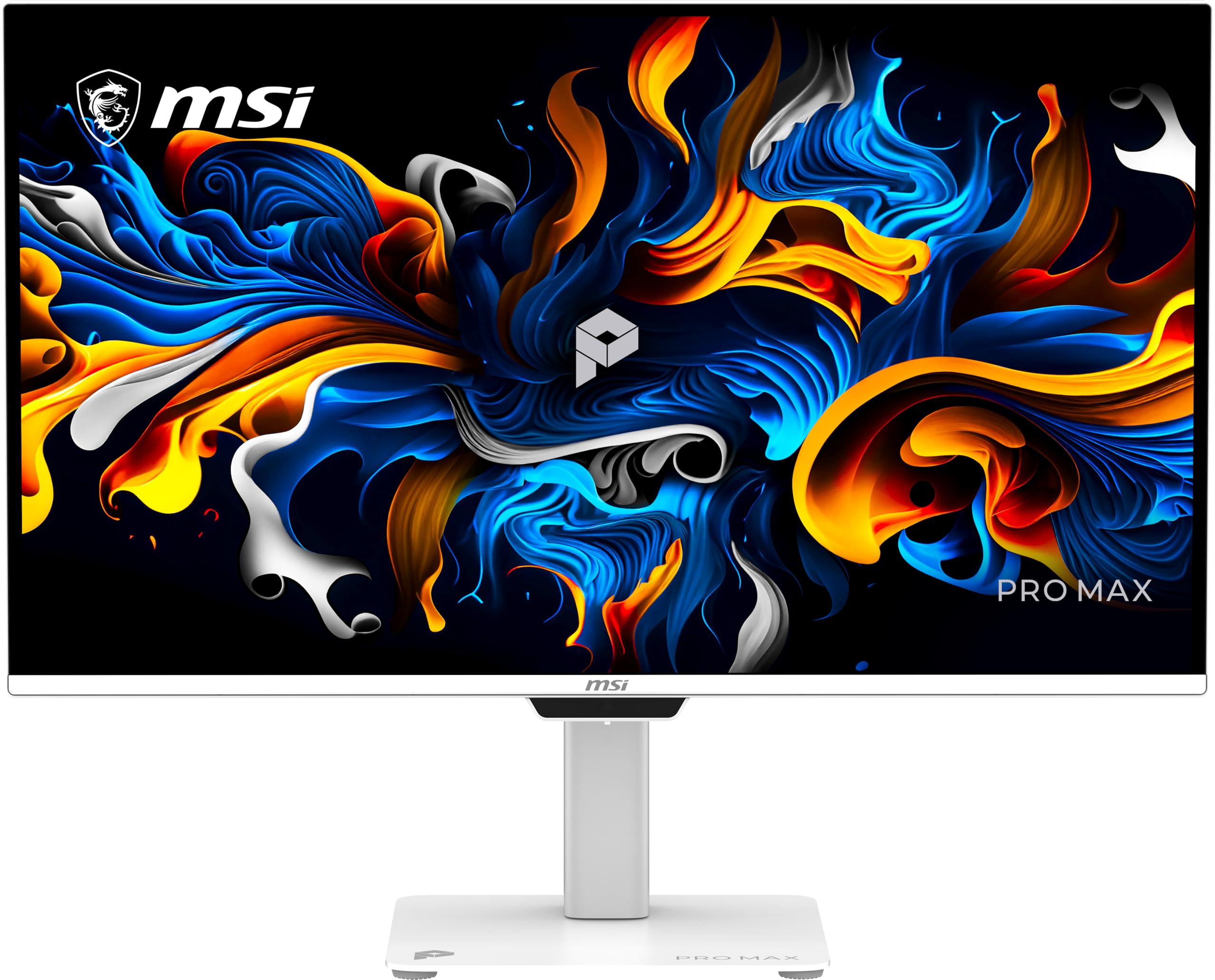
The MSI PRO MAX 271UPXW12G brings QD-OLED technology into the anti-glare conversation with the best image quality of any monitor on this list. The 27-inch 4K UHD QD-OLED panel delivers perfect blacks, infinite contrast, and vibrant colors (Delta E < 2) that make standard IPS and VA screens look flat in comparison. VESA DisplayHDR True Black 400 certification means HDR content looks genuinely stunning, with no blooming or gray blacks even in a bright office.
The anti-glare performance relies on a different approach than traditional matte coatings — the QD-OLED layer is combined with a specialized filter that reduces reflections without the grain of a matte finish. The result is a screen that stays readable in moderate ambient light while preserving the clarity and punch you expect from OLED. The 120Hz refresh rate and FreeSync Premium Pro support make this equally capable for design work and gaming.
Dual USB-C ports (98W + 15W PD) turn it into a hub for your laptop, and the Mac Color Match software syncs the color space seamlessly with macOS. The main downside is the premium price, which puts it in a different bracket than traditional anti-glare productivity monitors. The glossy-ish surface still benefits from careful positioning relative to direct light sources, and burn-in remains a long-term consideration for static UI elements.
Why it’s great
- QD-OLED delivers perfect blacks and unlimited contrast
- DisplayHDR True Black 400 for stunning HDR content
- Dual USB-C with up to 98W power delivery
- Excellent color accuracy (Delta E < 2) for creative work
Good to know
- Premium price significantly above other anti-glare options
- Surface is less matte than traditional anti-glare — careful placement needed
- Long-term burn-in risk with static desktop elements
1. HP Series 3 27″ FHD Monitor 327se

The HP Series 3 327se is a budget-friendly 27-inch FHD monitor that still delivers a proper anti-glare experience thanks to its IPS panel with HP Eye Ease technology. The 1300:1 contrast ratio is higher than typical office IPS panels, providing better shadow detail in bright rooms. The matte coating on this model is applied with a medium haze that handles overhead fluorescents well, though text sharpness on white backgrounds shows slight softening compared to higher-end IPS displays.
The 100Hz refresh rate is a surprising upgrade over the 75Hz typically found in this price segment, making everyday scrolling noticeably smoother. The built-in dual 2W speakers are adequate for voice calls and alerts but lack bass for media consumption. The stand offers tilt adjustment only, so you’ll want a separate arm for proper ergonomic positioning. VGA, HDMI, and DisplayPort inputs give good legacy compatibility.
The environmentally conscious build uses recycled plastics in the enclosure and recycled glass in the panel, which doesn’t affect performance but is worth noting. For a budget anti-glare monitor, the trade-offs are predictable — lower peak brightness (250 nits) and 1080p resolution limit its use in very bright rooms or for detailed creative work. For a spare office monitor or student setup, it’s hard to beat at this price.
Why it’s great
- 100Hz refresh rate for fluid desktop navigation
- HP Eye Ease filter reduces blue light without yellow shift
- Built-in speakers for basic audio needs
- Sustainable materials in construction
Good to know
- 250 nit peak brightness limits glare resistance in very bright rooms
- Stand offers tilt only — no height adjustment
- 1080p resolution on 27-inch panel results in lower pixel density
2. LG 32MR50C-B 32″ Curved FHD Monitor

The LG 32MR50C-B offers a large 32-inch curved screen with a VA panel that naturally excels at anti-glare performance. The 3000:1 static contrast ratio is a key advantage here — blacks stay deep and shadows retain detail even when ambient light hits the screen from windows or lamps. The curve (1500R) wraps the display around your field of view, reducing reflections from the sides and making the anti-glare coating even more effective in multi-light environments.
The 100Hz refresh rate is smooth for daily use and casual gaming, and AMD FreeSync eliminates screen tearing when paired with a compatible GPU. Reader Mode adjusts the color temperature to reduce blue light, which pairs well with the anti-glare surface for long reading sessions. The Black Stabilizer feature brightens dark scenes in games and movies, working in tandem with the VA contrast to deliver a rich image.
The stand only offers tilt adjustment, and the 250-nit brightness is adequate for most rooms but struggles in very sunlit spaces. The 1080p resolution on a 32-inch panel means individual pixels are visible at typical viewing distances, so this is best suited for media consumption, general office work, and gaming rather than detailed design or text-intensive coding. For immersive viewing with a curved, matte VA screen, the value is excellent.
Why it’s great
- VA panel with 3000:1 contrast for deep blacks in bright rooms
- 1500R curve enhances immersion and reduces side reflections
- 100Hz refresh rate and FreeSync for smooth gaming
- Reader Mode reduces eye strain during long reading sessions
Good to know
- 1080p resolution looks soft on 32-inch display
- 250 nit brightness may wash out in very bright rooms
- Stand is tilt-only — no height or swivel adjustment
3. HP 27″ FHD IPS Monitor (2026 Model)

This HP 27-inch FHD monitor is an entry-level IPS display with HP Eye Ease Eyesafe Certification, providing an always-on low-blue-light filter that maintains color accuracy while reducing eye strain. The anti-glare coating on this IPS panel uses a standard matte finish that effectively diffuses overhead lighting, though it introduces a light haze that slightly softens text clarity compared to premium office monitors. The 300-nit peak brightness is above average for budget monitors, giving it some headroom against ambient light.
The 75Hz refresh rate with AMD FreeSync offers a step up from basic 60Hz panels, making desktop navigation and casual gaming feel a bit smoother. The 99% sRGB color gamut ensures colors are reasonably accurate out of the box — good enough for general photo browsing and office presentations, but not suitable for color-critical design work. The micro-edge bezel design makes it easy to pair in a dual-monitor setup.
Reliability is a concern with some units — a minority of buyers report failure after a few hours of use, which suggests quality control is inconsistent. The included Docztorm Dock is a small USB hub that adds basic connectivity, though the dock’s data transfer speed (5Gbps) is adequate for peripherals. For the price, the combination of a bright 27-inch IPS panel with Eyesafe certification is compelling, but longevity is not guaranteed.
Why it’s great
- Bright 300-nit IPS panel for better anti-glare performance
- Eyesafe Certification keeps blue light low without color shift
- 99% sRGB for decent out-of-box color accuracy
- Micro-edge bezel for clean dual-monitor setups
Good to know
- Some units have reported early failure (quality control issues)
- 75Hz refresh rate — functional but not competitive for gaming
- Standard matte coating softens text slightly
FAQ
What is the actual difference between anti-glare and matte screens?
Does a matte monitor reduce eye strain compared to a glossy one?
Can I use an anti-glare screen protector on a glossy monitor instead?
Why does my monitor seem to have a rainbow or oily sheen on the screen?
Should I get a curved or flat monitor for anti-glare?
Final Thoughts: The Verdict
For most users, the anti glare computer monitor winner is the LG 27UP650K-W because it combines a true 4K UHD IPS panel with effective matte coating, wide color gamut (95% DCI-P3), and a fully adjustable ergonomic stand at a mid-range price. If you want a smoother 120Hz refresh rate with excellent built-in blue light reduction, grab the Dell S2725QS. And for programmers who need superior anti-glare plus vertical space, nothing beats the BenQ RD280U with its unique Nano Matte panel and 3:2 aspect ratio.