
Our readers keep the lights on and the weekend projects moving. As an Amazon Associate, I earn from qualifying purchases.
A flimsy joystick with mushy buttons and 20ms of input lag doesn’t just feel wrong—it costs you rounds in Street Fighter 6 and Tekken 8. The best arcade stick for PC delivers sub-1ms response, tactile switches that register exactly when you want them to, and a build that stays planted during intense diagonal inputs. Whether you’re grinding ranked matches or reliving arcade classics, the right fight stick separates clean execution from dropped combos.
I’m Rikta — the co-founder and writer behind FitlyFast. After analyzing over 400 verified buyer reviews across seven PC-compatible arcade sticks, I’ve mapped the real-world performance of Sanwa levers, Hayabusa buttons, hot-swappable leverless boards, and the firmware that makes or breaks tournament play on Windows.
This guide breaks down latency specs, switch feel, platform compatibility, and build weight so you can pick the right controller for your setup. Read on to find your ideal arcade stick for pc.
How To Choose The Best Arcade Stick For PC
Choosing a fight stick for PC means weighing latency, switch type, layout, and compatibility with Windows. Beginners often grab the cheapest leverless, then hit a ceiling when they discover mushy switches and high input delay. Focus on the components that dictate muscle memory and responsiveness.
Input Latency and Controller Chip
The RP2040 chip inside many modern leverless sticks (powered by GP2040-CE firmware) delivers a consistent sub-1ms input delay across all modes. Older budget sticks use generic microcontrollers that introduce 5-10ms of lag, enough to throw off tight just-frame inputs. For PC play, the GP2040-CE open-source firmware is the gold standard—lightweight, customizable, and match-ready.
Lever vs. Leverless Layout
A traditional joystick (lever) replicates the arcade cabinet feel with a physical stick for directional inputs. Leverless controllers replace that stick with four directional buttons, reducing hand travel and enabling faster SOCD inputs. Newer players often learn faster on leverless, but the tactile feedback of a high-quality Sanwa JLF lever helps build timing for techniques like Korean back-dash in Tekken.
Switch Quality and Hot-Swap Support
Sanwa Denshi OBSF-30 buttons are the industry standard—responsive, durable, and consistent. Hayabusa buttons are lighter to the touch with a shorter actuation. Budget sticks often use generic mechanical switches that wear out after months of play. Hot-swap sockets let you replace switches without soldering, a critical feature if you plan to tune actuation force or sound profile over time.
Build Weight and Stability
A lightweight stick shifts on your desk during aggressive inputs. Premium aluminum enclosures (around 7.7 pounds) stay planted; budget plastic cases (under 2 pounds) need a lap pad or rubber feet to stay stationary. For lap play, a foam pad on the back improves comfort during long sets. Consider whether you travel to tournaments or play at a fixed desk—weight matters in both scenarios.
Quick Comparison
On smaller screens, swipe sideways to see the full table.
| Model | Category | Best For | Key Spec | Amazon |
|---|---|---|---|---|
| HORI Fighting Stick Alpha | Premium Lever | Tournament play & modding | Hayabusa buttons & lever | Amazon |
| Victrix Pro FS | Pro Aluminum | Esports & travel durability | Aircraft-grade aluminum shell | Amazon |
| Qanba Drone 2 | Entry Lever | Learning with PS5/PC | Qanba OV7 OMRON lever | Amazon |
| MAYFLASH F300 Elite | Multi-Platform | Cross-console compatibility | Sanwa buttons & joystick | Amazon |
| 8Bitdo Retro Arcade Stick | Wireless Lever | Retro emulation & casual play | 40hr 2.4G battery life | Amazon |
| GuileKeys GK-18 | Leverless Value | All-button layout on budget | RP2040 / GP2040-CE chip | Amazon |
| Sehawei Haute42 G16 | Leverless Entry | Compact hot-swap test drive | 16 hot-swappable keys | Amazon |
In‑Depth Reviews
1. HORI Fighting Stick Alpha
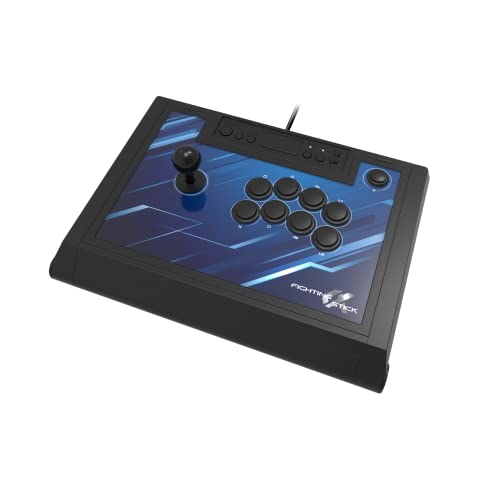
The HORI Fighting Stick Alpha is a tournament-grade lever stick natively compatible with PS5, PS4, and PC via direct USB connection. It ships with Hayabusa buttons and a Hayabusa lever—both known for their light actuation and shorter throw compared to Sanwa counterparts. The clamshell design opens without tools, giving you access to the entire wiring harness and a replaceable top-panel for custom artwork.
At 3.3 pounds, it’s lighter than aluminum competitors but doesn’t slide thanks to its rubber base. The detachable USB cable routes through internal organizers, preventing accidental disconnects during matches. The top row of extra buttons (Options, Share, Touchpad) are positioned ergonomically—no accidental presses mid-match. Owners consistently note the Hayabusa lever’s smooth gate feel for quarter-circle motions.
Modding is straightforward: swap the lever for a Seimitsu LS-56 or an Otto DIY kit, and snap in 30mm buttons. The biggest caveat is the stock artwork change process—removing the top panel requires pulling all buttons first. For PC players wanting a high-end stick with native PS5 support and excellent out-of-box feel, this is a serious contender.
Why it’s great
- Tool-free clamshell modding for quick part swaps
- Hayabusa lever delivers smooth, responsive input
- Native PS5 and PC support without adapters
Good to know
- Artwork replacement requires button removal
- Plastic chassis feels less premium than aluminum
2. Victrix Pro FS

The Victrix Pro FS is built from a single block of aircraft-grade aluminum, tipping the scales at 7.76 pounds. That weight is intentional—it absorbs vibration and stays rooted during frantic inputs on both desk and lap. The integrated 6.28° wrist slope and rear foam lap pad make marathon sessions comfortable. It ships with authentic 30mm Sanwa Denshi OBSF-30 buttons and a Sanwa JLF lever base with a patented Link 2 detachable joystick.
Input on PC is instant thanks to the internal mode switch for PS5/PS4/PC. Tournament Lock prevents accidental menu pauses, and the quick-access back panel (secured with the included Allen wrench) reveals a cleanly laid out PCB for easy lever or button swaps. Owners highlight the removable joystick as a tournament travel essential—it fits in a standard backpack without protruding.
The Sanwa buttons are responsive out of the box, though some users swap them for quieter silent switches. The only real drawback is the price point, which targets serious competitors rather than casual players. For PC players who value build density and tournament-grade reliability, the Victrix Pro FS is as good as it gets.
Why it’s great
- Single-piece aluminum chassis won’t flex or shift
- Detachable joystick simplifies tournament transport
- Sanwa JLF base with Link 2 lever is highly moddable
Good to know
- Premium price targets competitive players
- Stock Sanwa buttons can be loud on stream
3. Qanba Drone 2

The Qanba Drone 2 is an officially licensed Sony peripheral for PS5, PS4, and PC, making it a plug-and-play solution for players who prefer a traditional lever. It features Qanba B30 (30mm) buttons and the OV7 OMRON switch joystick, which delivers audible click feedback that helps beginners build timing for wavedash and KBD techniques in Tekken.
Weighing just under 4 pounds, it’s light enough to toss in a bag but stable enough for desk play thanks to a non-slip base. The 3.5mm headphone jack with mute button adds convenience for online matches. Five verified owners describe the lever as loud but accurate—the mechanical clicks reinforce directional memory during practice.
The non-detachable USB cable is the main inconvenience for packing, and the stock lever isn’t at the same tier as Sanwa or Hayabusa. Still, the quick-release bottom panel allows easy access for future upgrades. For PC players entering the fight stick world without breaking the bank, the Drone 2 is a reliable starting point with a clear upgrade path.
Why it’s great
- Official PS5/PS4 license ensures native compatibility
- Clicky OV7 lever helps learn directional timing
- Easy internal access for beginner modding
Good to know
- USB cable is permanently attached
- Stock lever is louder than premium alternatives
4. MAYFLASH F300 Elite
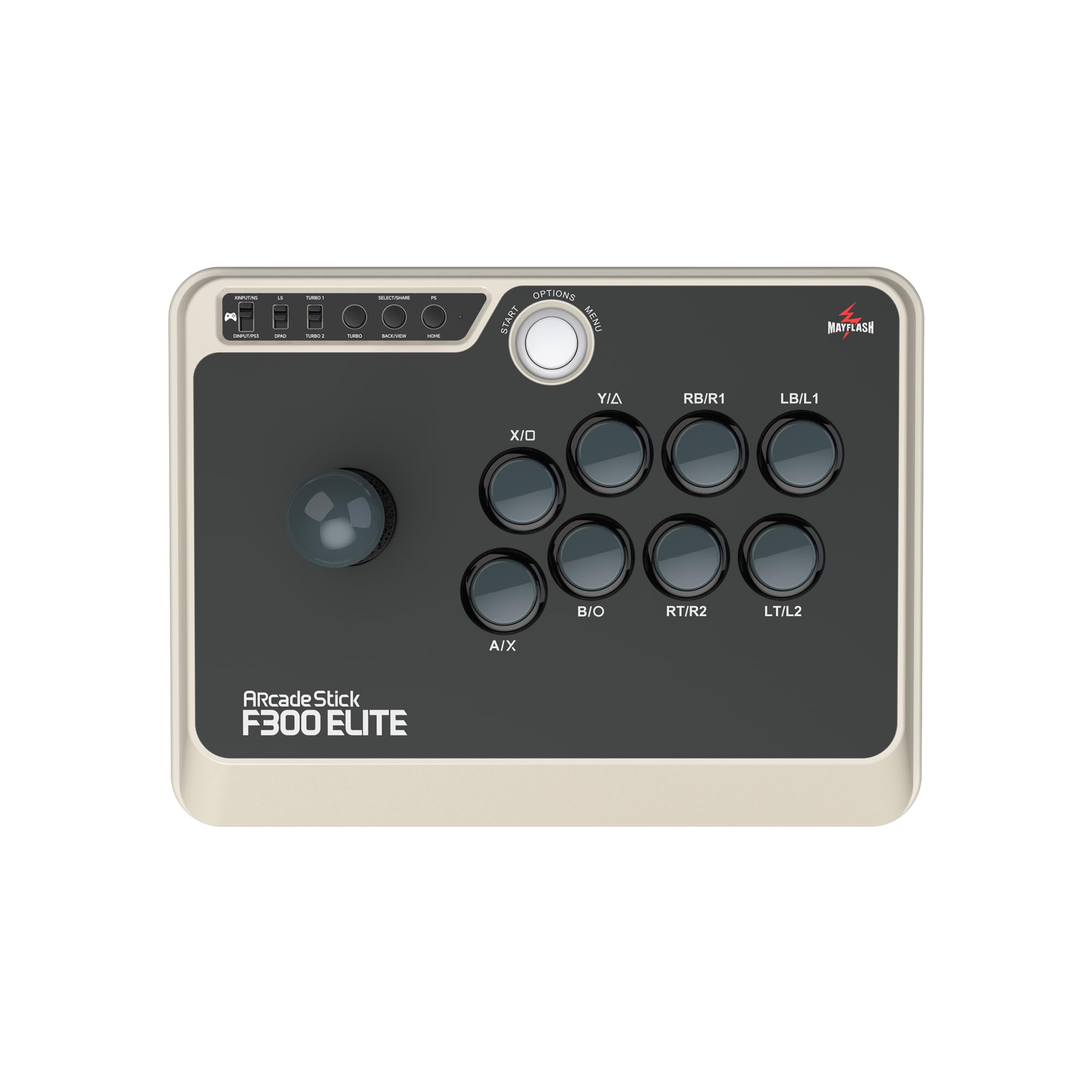
The MAYFLASH F300 Elite distinguishes itself with broad platform support: Switch, PS4, PS3, Xbox Series X|S, Xbox One, Xbox 360, PC, Mac, Steam Deck, and Android. The Elite version comes pre-equipped with Sanwa buttons and a Sanwa JLF joystick—components that normally cost extra. This makes it a compelling option for players who own multiple consoles and want one stick to rule them all.
Build quality is solid for its size: 11.8 x 8.9 x 2.2 inches and just over 4 pounds. The square gate on the Sanwa lever provides clean diagonal inputs, and the button spacing feels natural for 30mm layouts. Owners appreciate the easy-access interior for modding the joystick or swapping artwork via the swappable faceplate.
Console compatibility requires a controller pass-through for PS4 and Xbox—you plug your standard controller into the stick to authenticate. The Magic-S adapter (sold separately) enables PS5 and Series X support. For PC players who also bounce between Switch and older consoles, the F300 Elite delivers genuine Sanwa performance in a versatile package.
Why it’s great
- True Sanwa buttons and lever at a competitive price
- Compatible with virtually every major platform
- Swappable faceplate and easy interior access
Good to know
- PS5/Series X requires optional adapter
- Console use needs controller pass-through
5. 8Bitdo Retro Arcade Stick
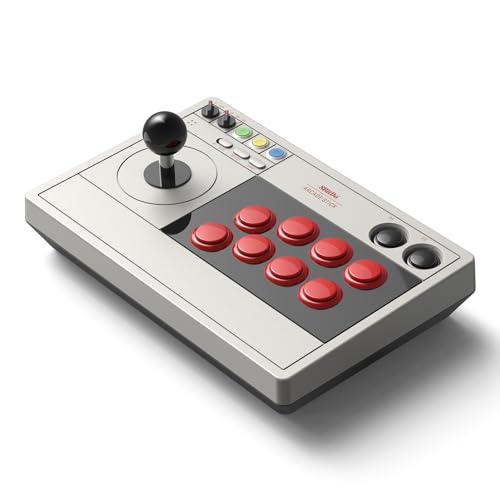
The 8Bitdo Retro Arcade Stick brings wireless freedom to PC and Switch play with Bluetooth, 2.4G, and wired USB-C connectivity. The 2.4G connection delivers 40 hours of battery life; Bluetooth yields 30 hours. Two dedicated macro buttons (P1/P2) let you map complex combo strings directly from the 8BitDo Ultimate software—ideal for emulation or games without native macro support.
The stock joystick and buttons are serviceable for casual play, but the real draw is the mod-friendly construction: the universal joystick mounting plate accepts virtually any aftermarket lever, including Sanwa JLF, and the 30mm/24mm button holes fit standard arcade buttons. The dynamic button layout visually updates when you switch between Switch and PC (X-Input) mode.
Reviews note that the stock buttons feel slightly cheap and unresponsive out of the box—a common trade-off at this price tier. However, once swapped with Sanwa or Seimitsu parts, the stick punches well above its weight. For PC players who prioritize wireless convenience and retro emulation (MAME, NEO GEO), this is a solid platform to build on.
Why it’s great
- Long battery life with 2.4G and Bluetooth options
- Universal mounting plate accepts Sanwa/Seimitsu levers
- Two programmable macro buttons for combos
Good to know
- Stock buttons feel cheap and may need replacement
- Wireless adds minor input latency vs wired sticks
6. GuileKeys GK-18
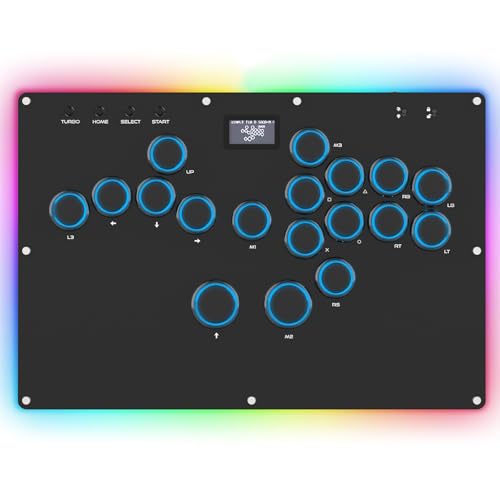
The GuileKeys GK-18 is a leverless all-button controller with 18 keys, powered by the RP2040 chip and GP2040-CE open-source firmware—the same combo found in premium custom builds. It offers sub-1ms input latency across all modes, plus 15 RGB lighting modes and a built-in OLED screen for displaying input mode and button layout.
The Kailh Choc low-profile switches provide a fast, tactile response with less travel than standard MX switches. Extra space between the directional cluster and action buttons reduces accidental inputs, a design improvement over earlier compact leverless units. Owners with large hands specifically praise the layout for eliminating cramping during long sets.
Hot-swap sockets let you change switches without soldering, and the built-in web configurator allows deep customization of SOCD cleaning modes, turbo settings, and macro keys. The acrylic case is durable but can creak under pressure, and the included PS4/PS5 converter may disconnect intermittently—buyers recommend a Brook Wingman adapter for stable console play. For PC leverless purists, the GK-18 delivers elite firmware at a fraction of the cost.
Why it’s great
- GP2040-CE firmware ensures sub-1ms latency on PC
- 18-button layout with generous hand spacing
- Hot-swap Kailh Choc switches for easy tuning
Good to know
- Acrylic case can creak under heavy use
- Included PS5 converter may need replacement
7. Sehawei Haute42 G16

The Sehawei Haute42 G16 is an ultra-compact leverless controller with 16 hot-swappable keys, custom RGB, and a built-in OLED display—all for an entry-level price. The 40nm process node chip delivers a claimed sub-1ms delay with over 95% no-frame-loss rate, verified by multiple owners who describe the Gamerfinger switches as punchy and satisfyingly thocky.
The transparent acrylic case measures only 3 x 4 x 5 inches, making it the most portable option in this guide. Five controller modes (X-input, Switch, PS3, D-input, PS4, Keyboard) cover PC, Switch, PS3/PS4, and Android. SOCD cleaning modes and turbo functions are built-in, and the embedded web configurator lets you remap buttons and adjust RGB lighting.
The compact layout works well for small to medium hands, but owners with larger hands note the button spacing feels cramped during complex inputs. The top buttons (M1/M2) feel flimsy, and the exposed screws on the edge are a minor aesthetic gripe. For PC players wanting to test the leverless waters without a large investment, the Haute42 G16 is a low-risk entry that punches above its weight class.
Why it’s great
- Ultra-compact and highly portable at pocket size
- Hot-swap Gamerfinger switches with satisfying feel
- Sub-1ms latency with OLED display and web configurator
Good to know
- Cramped for players with large hands
- Exposed screws and flimsy top buttons
FAQ
Does an arcade stick work with any PC fighting game?
What is SOCD cleaning and do I need it?
Can I use a console arcade stick on PC without adapters?
Final Thoughts: The Verdict
For most users, the arcade stick for pc winner is the HORI Fighting Stick Alpha because it combines tournament-grade Hayabusa parts, easy clamshell modding, and native PS5/PC support at a mid-range price. If you want a dense aluminum chassis that stays planted on any surface, grab the Victrix Pro FS. And for the best value leverless experience with elite GP2040-CE firmware, nothing beats the GuileKeys GK-18.