
Our readers keep the lights on and the weekend projects moving. As an Amazon Associate, I earn from qualifying purchases.
That moment your quarter-circle input drops mid-combo—not because you messed up, but because your stick wobbled—is the moment you realize not all arcade sticks are built for competition. The difference between an enjoyable session and a rage quit often comes down to the quality of the joystick’s gate, the responsiveness of the buttons, and whether the frame shifts under your palm during an intense match.
I’m Rikta — the co-founder and writer behind FitlyFast. I’ve spent countless hours comparing the latency, build materials, and modding potential across the full spectrum of arcade sticks so you don’t have to open every return box yourself.
Whether you are chasing tournament legality or just want retro nights to feel authentic, this breakdown of the best arcade stick on the market will help you find the one that actually holds up to your inputs.
How To Choose The Best Arcade Stick
Choosing the right arcade stick means looking past the brand name and focusing on what matters for your platform and playstyle. The wrong decision often leads to wrist fatigue, dropped inputs, or a frame that slides across your desk during a heated match.
Parts Quality: Sanwa, Hayabusa, or Optical
Sanwa Denshi joysticks and buttons are the gold standard in arcade cabinets and tournament circuits—they offer a tactile feel with a shorter throw. Hayabusa parts, found in HORI sticks, have a slightly looser feel and longer throw. Low-profile optical switches, like those in leverless controllers, actuate faster with no physical contact, giving a near-instant response. Beginners often overvalue price over these part differences, which dictate how clean your inputs actually are.
Form Factor: Joystick vs. Leverless
Traditional joysticks use a stick gate (square, octagonal, or circular) for directional input. Leverless controllers replace the stick with four directional buttons, allowing quicker transitions and eliminating stick drift entirely. Leverless designs are slimmer and easier to travel with, but require a learning period for players used to a physical stick. If you grew up in arcades, the muscle memory of a stick may be more natural.
Platform Compatibility and Connectivity
Not every stick works out of the box with every console. Native PS5 support often requires an official license, while multi-platform sticks may use adapters or require a controller plugged in for authentication on Xbox or PlayStation. PC players have the most freedom, with virtually every stick supporting XInput or DirectInput. Wireless options are rare in competitive sticks due to latency concerns, so wired connections remain the tournament standard.
Quick Comparison
On smaller screens, swipe sideways to see the full table.
| Model | Category | Best For | Key Spec | Amazon |
|---|---|---|---|---|
| Razer Kitsune | Leverless | Competitive precision | Low-profile optical switches | Amazon |
| NACON Daija | Traditional Stick | Professional play | Sanwa buttons & joystick | Amazon |
| HORI Fighting Stick Alpha | Traditional Stick | Easy modding | Hayabusa lever & buttons | Amazon |
| Victrix Pro FS | Traditional Stick | Durable travel | Aircraft-grade aluminum build | Amazon |
| Turtle Beach Victrix Pro KO | Leverless | Collector & competitor | Hot-swappable Cherry MX switches | Amazon |
| MAYFLASH F300 Elite | Traditional Stick | Multi-console use | Sanwa joystick & buttons | Amazon |
| 8Bitdo Retro Arcade Fight Stick | Wireless | Casual & retro play | 40-hour battery life | Amazon |
In‑Depth Reviews
1. Razer Kitsune All-Button Arcade Controller

The Razer Kitsune replaces the traditional joystick with four movement buttons, giving you instant direction changes that avoid any gate wobble or mechanical stick drift. Its low-profile linear optical switches actuate with a light tap, reducing the travel distance required for buffering charges or performing complex motion inputs. The slim 0.76-inch form factor slides easily into a backpack, making it one of the most portable competitive controllers available today.
Build quality is excellent, with a removable aluminum top plate for custom vinyl wraps and a cable security clasp that prevents disconnects during tournaments. The integrated lock switch disables non-essential buttons, which is critical for maintaining tournament compliance. At 1.7 pounds, the Kitsune feels dense but not heavy, and the near-silent button presses are a welcome change from clacky mechanical alternatives.
Adapting from a traditional joystick to the leverless layout takes time—expect a few sessions to retrain your directional inputs. The matte finish also picks up oil and dust quickly, so keeping a microfiber cloth handy is a good idea. For players who prioritize execution speed and portability, the Kitsune delivers a competitive edge out of the box.
Why it’s great
- Optical switches offer near-instant actuation
- Ultra-slim and lightweight for travel
- Tournament lock switch prevents accidental inputs
Good to know
- Leverless layout has a steep learning curve
- Matte finish attracts fingerprints and dust
- Limited to PS5 and PC natively
2. NACON Daija Arcade Fight Stick

The NACON Daija was developed in collaboration with professional fighting game players, and it shows in every detail. It ships with genuine Sanwa joysticks and action buttons, the same components found in most arcade cabinets, ensuring every input feels familiar and precise. The 7.7-pound weight keeps the stick planted on your lap or table during aggressive play, and the textured palm rest supports long sessions without cramping.
Full button mapping is available through the NACON software on PC and Mac, and the stick itself saves up to four custom profiles—no need to reconfigure between games. The lock function prevents accidental presses during critical moments, and the 3-meter detachable USB-C cable gives you room to stretch. The customizable front plate comes with three options and a downloadable template for creating your own art.
Some users have reported input mode issues with certain older games that require switching between LS and D-Pad modes, which is a niche but notable frustration. The stick is officially licensed for PS5, PS4, and PC, so native compatibility is seamless. For players who want a tournament-ready stick with genuine Sanwa parts and easy customization, the Daija is a top-tier choice.
Why it’s great
- Official Sanwa joystick and buttons from the factory
- Heavy, non-slip base stays put during sessions
- Stores up to four custom profiles on the stick
Good to know
- LS vs D-Pad mode switching can be inconsistent across games
- Premium price point
- Custom faceplate tools are included but not intuitive at first
3. HORI Fighting Stick Alpha
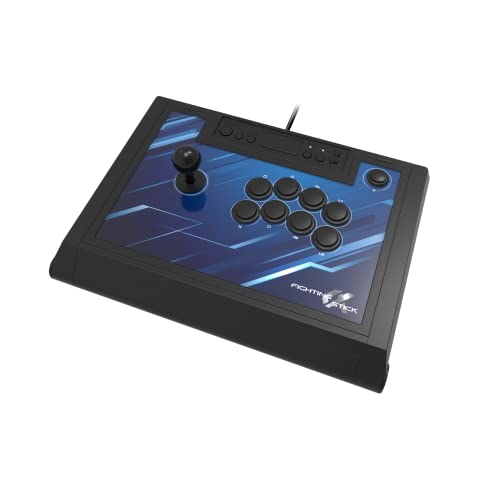
HORI’s Fighting Stick Alpha is built around the clamshell design philosophy—open the top and you have immediate access to every internal component, from the lever to the PCB. This makes it the easiest stick on the market for swapping out parts, whether you want to replace the stock Hayabusa buttons with Sanwas or install a custom joystick. The lightweight plexi body weighs about 3.3 pounds, making it comfortable for long sessions without feeling flimsy.
The stock Hayabusa lever offers a slightly longer throw and looser feel compared to Sanwa sticks, which some players prefer for games like Street Fighter where circular motions feel smoother. The button layout is spacious, and the built-in carrying divots on the sides make it easy to transport. The replaceable top-panel artwork is a great option for personalizing the stick without complex modding.
Changing the artwork requires removing all the buttons, which adds extra steps compared to magnetic faceplates. The cable management hooks inside the housing can also bunch the cord, making it tricky to close the case properly. For players who prioritize native PS5 compatibility and a mod-friendly design, the Fighting Stick Alpha is a solid workhorse.
Why it’s great
- Clamshell design makes internal modding effortless
- Lightweight yet sturdy for table or lap play
- Officially licensed for PS5, PS4, and PC
Good to know
- Artwork replacement requires full button removal
- Hayabusa lever may feel too loose for some players
- Cable management hooks can be frustrating to close
4. Victrix Pro FS ESports Fight Stick
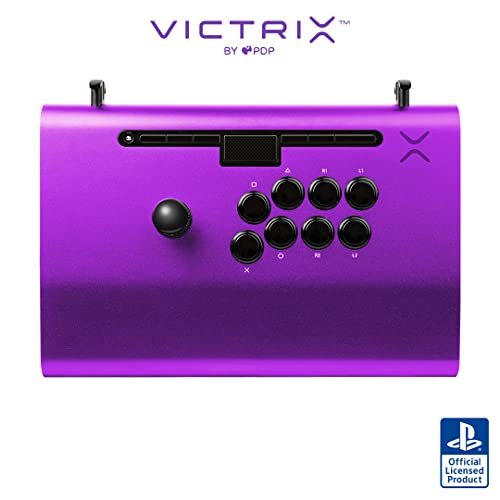
Machined from a single block of aircraft-grade aluminum, the Victrix Pro FS is built to survive the bumps of tournament travel without any flex. It comes equipped with genuine 30mm Sanwa Denshi buttons and a Link 2 detachable joystick on a Sanwa JLF base, so you get the same precision as the Daija but in a more rugged chassis. The integrated 6.28-degree wrist slope and built-in foam lap pad on the back make extended sessions noticeably more comfortable than flat-bottom sticks.
The quick-access back panel opens with an included Allen wrench, revealing a cleanly laid out interior for easy modding. The carrying handles are cut into the aluminum body, and the cable organizers keep your cord tidy. Tournament Mode locks out the control bar buttons, preventing accidental disqualifications. At 7.8 pounds, it has a reassuring weight that stays put on your lap without sliding around.
Some users find the stock Sanwa buttons too loud for quiet environments, though swapping them out is simple. The packaging can be surprisingly sparse, with the stick rattling around in the box during shipping. For competitive players who need a durable, travel-ready stick with comfortable ergonomics, the Victrix Pro FS is a long-term investment.
Why it’s great
- Aircraft-grade aluminum frame is incredibly durable
- Detachable joystick for easy packing
- Ergonomic wrist slope and lap pad for comfort
Good to know
- Stock Sanwa buttons can be loud
- Heavy at 7.8 pounds for some travel bags
- Shipping packaging may lack adequate padding
5. Turtle Beach Victrix Pro KO Leverless Fight Stick
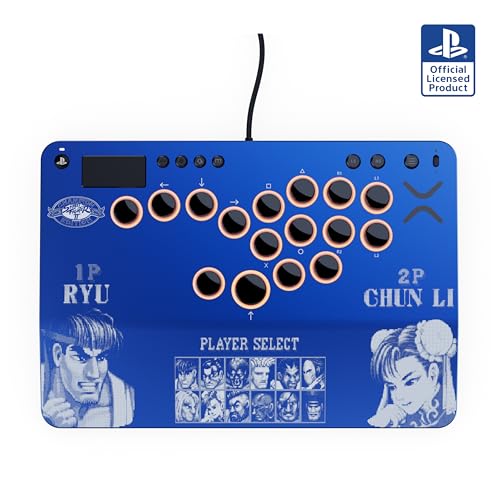
The Turtle Beach Victrix Pro KO combines a leverless layout with hot-swappable Cherry MX Speed Silver RGB switches, giving you the freedom to change button feel without soldering. This Street Fighter II Champion Edition variant features the iconic Player Select design, making it a standout collector’s piece while still delivering competitive performance. The slim 0.8-inch profile and 2.7-pound weight make it easy to slide into a backpack for travel or tournaments.
The ergonomic 6.28-degree wrist slope mirrors the full-sized Victrix Pro FS, providing comfortable support for long sessions. The 16 movable and mappable buttons allow you to reposition them to match your hand span, and the Tournament Lock Switch disables system buttons for competition. RGB light rings around each button are customizable through the Victrix Control Hub app, adding a layer of personalization. The 3-meter braided USB-C cable ensures a stable wired connection with zero latency.
The up directional button is very sensitive, which can lead to accidental jumps until you adjust your hand positioning. The Cherry MX switches are clicky and loud, which may be distracting in quiet environments. For players who want a leverless stick with premium build quality and the ability to fine-tune switch feel, the Victrix Pro KO is a compelling choice.
Why it’s great
- Hot-swappable switches allow custom button feel
- Limited edition Street Fighter II design is visually striking
- 16 movable buttons for personalized layouts
Good to know
- Up button is very sensitive, causing accidental jumps
- Cherry MX switches are loud and clicky
- Premium price point
6. MAYFLASH F300 Elite Arcade Stick
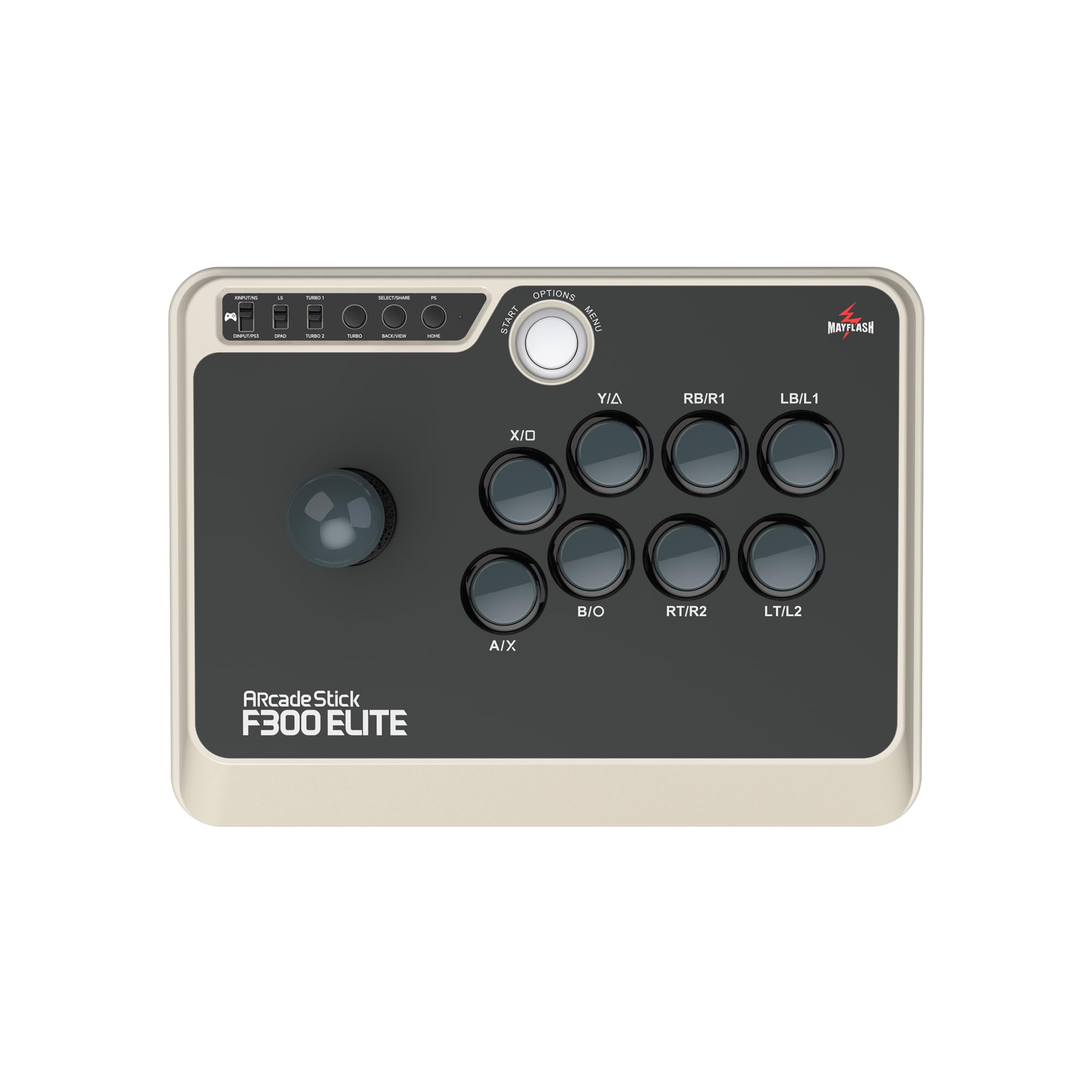
The MAYFLASH F300 Elite offers a rare combination: Sanwa buttons and joystick at an accessible price point. It works with Switch, PS4, PS3, Xbox Series X|S, Xbox One, Xbox 360, PC, macOS, Steam Deck, and Android, making it the most widely compatible stick on this list. The 11.81 x 8.86 x 2.2-inch footprint is compact but still comfortable for adult hands, and the square gate provides a clear diagonal notch for precise inputs.
The Elite version includes Sanwa parts straight from the factory, saving you the cost and hassle of an aftermarket upgrade. The interior is accessible with six screws, and the joystick and buttons can be swapped to match your preferences. The customizable faceplate lets you add your own artwork, and the included Turbo function adds convenience for repetitive games. The 9-button layout covers all standard fighting game inputs without feeling cramped.
Using the F300 Elite on consoles often requires plugging a controller into the stick for authentication, which adds an extra step. The Turbo button may also disqualify the stick in some tournament settings if not disabled. For players who need a single arcade stick that works across multiple platforms and comes with quality parts out of the box, the F300 Elite is a smart buy.
Why it’s great
- Sanwa parts included at a mid-range price
- Works with nearly every console and PC
- Easy to mod with accessible interior
Good to know
- Requires controller plugin for some consoles
- Turbo button may be a tournament restriction
- Slightly smaller footprint than full-size sticks
7. 8Bitdo Retro Arcade Fight Stick
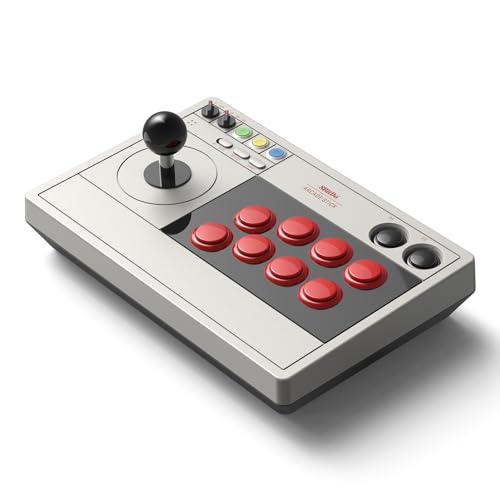
The 8Bitdo Retro Arcade Fight Stick brings wireless freedom to your retro and fighting game sessions with Bluetooth, 2.4G, and wired USB-C connectivity. The 40-hour battery life on 2.4G mode means you can leave the charging cable behind for weeks of casual play. It is compatible with Switch, Switch 2, and PC Windows, making it a flexible option for players who want to move between their Nintendo console and desktop without swapping hardware.
The stick is designed to be moddable, supporting 30mm and 24mm arcade buttons and a universal joystick mounting plate that works with Sanwa JLF levers and many other aftermarket sticks. The 8BitDo Ultimate Software allows custom button mapping, macro creation, and controller profile switching. The dynamic button layout changes its visual display when switching between Switch and X-Input mode, which is a thoughtful touch for clarity.
Some users report that the stock buttons feel cheap and unresponsive compared to Sanwa or Hayabusa alternatives, which is noticeable in competitive play. The build quality is decent but not pro-level, with a lightweight plastic body that may slide around during aggressive inputs. For casual players who prioritize wireless convenience, retro emulation, and modding potential without breaking the bank, the 8Bitdo is a solid entry-level choice.
Why it’s great
- Wireless connectivity with 40-hour battery life
- Moddable with universal joystick mounting plate
- Compatible with Switch and PC
Good to know
- Stock buttons feel cheap and unresponsive
- Lightweight body can slide during play
- Not suitable for high-level competitive play out of the box
FAQ
What is the difference between Sanwa and Hayabusa arcade parts?
Can I use an arcade stick on PS5 without an adapter?
Is a leverless arcade stick better for fighting games?
Final Thoughts: The Verdict
For most users, the arcade stick winner is the NACON Daija because it combines genuine Sanwa parts, a heavy non-slip chassis, and official PS5 licensing in a package that performs right out of the box. If you want a leverless controller for faster inputs and travel-friendly portability, grab the Razer Kitsune. And for multi-platform compatibility without sacrificing quality, nothing beats the MAYFLASH F300 Elite.