
Our readers keep the lights on and the weekend projects moving. As an Amazon Associate, I earn from qualifying purchases.
The first digital drawing is a leap of faith. You move a plastic pen across a smooth slab, and a line appears on a distant screen. That disconnect is the single biggest hurdle for anyone picking up a pen tablet for the first time. The right tablet minimizes this gap with precise tracking, responsive pressure, and a battery-free stylus that feels like an extension of your hand.
I’m Rikta — the co-founder and writer behind FitlyFast. My buying guides are built on hours of cross-referencing spec sheets, pressure curves, driver compatibility reports, and real user feedback to find tablets that actually perform for beginners without requiring a second mortgage on your desk space.
Whether you are sketching anime characters, signing PDFs, teaching math on Zoom, or tracing your first digital portrait, the right art tablet for beginners should challenge your skill, not your patience.
How To Choose The Best Art Tablet For Beginners
Picking your first drawing tablet comes down to four factors that directly affect your learning curve and daily use. Skip the marketing noise and focus on these specs.
Pressure Sensitivity: The Feel of Every Stroke
Pressure sensitivity determines how light or hard you must press to get a thin or thick line. Almost every modern tablet offers 8192 levels, which is more than enough for shading, line weight variation, and natural brush behavior. A few premium options now offer 16384 levels, delivering even finer gradation but requiring a more sensitive hand to fully exploit. For a beginner, 8192 is the sweet spot — it matches what most professional software expects without overcomplicating the learning process.
Active Area: Bigger is Not Always Better
The active area is the surface where your pen strokes register. Small tablets (roughly 6×4 inches) require more wrist movement and work well for tight desk spaces or on-the-go sketching. Medium tablets (around 8×5 inches) let you draw from the elbow and shoulder, producing smoother curves and reducing hand fatigue. Large tablets (10×6 inches) offer a ratio closer to a standard monitor but demand significant desk real estate. Beginners often succeed faster on a medium tablet because it balances natural arm movement with portability.
Battery-Free vs Battery-Powered Stylus
A battery-free stylus draws power from the tablet surface via electromagnetic resonance (EMR). It never needs charging, is lighter, and feels closer to a normal pen. Battery-powered pens add weight and the inconvenience of swapping batteries mid-sketch. Every tablet in this guide uses a battery-free stylus, which is the industry standard for reliability. Avoid any budget tablet that forces you to charge the pen.
Shortcut Keys and Scroll Wheel
Customizable express keys let you map shortcuts like Undo, Zoom, and Brush Size directly to the tablet surface, reducing how often you reach for the keyboard. A scroll wheel or touch ring adds another layer of efficiency for zooming or canvas rotation. For a beginner, four to eight keys are plenty — too many keys become confusing. The scroll wheel is a genuine quality-of-life upgrade worth prioritizing if you plan to use the tablet daily.
Quick Comparison
On smaller screens, swipe sideways to see the full table.
| Model | Category | Best For | Key Spec | Amazon |
|---|---|---|---|---|
| HUION Inspiroy 2 Medium | Mid-Range | Daily sketching with smooth workflow | 8.7×5.4″ area, scroll wheel, PenTech 3.0 | Amazon |
| XPPen Deco 01 V3 | Mid-Range | Precision shading with 16K pressure | 10×6.25″ area, 16384 pressure levels | Amazon |
| HUION Inspiroy 2 Small (Pink) | Mid-Range | Portable tablet with scroll wheel | 6.3×3.9″ area, USB-C, PenTech 3.0 | Amazon |
| GAOMON M10K | Mid-Range | Large canvas with touch ring | 10×6.25″ area, touch ring, 10 hot keys | Amazon |
| Wacom Intuos Small | Budget | Trusted brand reliability | 6×3.7″ area, EMR battery-free pen | Amazon |
| Huion HS64 | Budget | Absolute lowest entry point | 6×4″ area, 8192 pressure, 4 express keys | Amazon |
| ienRon IES1060 | Budget | Value bundle with stand and gloves | 10×6.25″ area, 60° tilt, 12 hot keys | Amazon |
In‑Depth Reviews
1. HUION Inspiroy 2 Medium

The Inspiroy 2 Medium hits the perfect balance for a beginner who expects to grow. Its 8.7 x 5.4-inch active area is large enough to draw from the shoulder without dominating your desk, and PenTech 3.0 delivers smooth, wobble-free lines at all tilt angles. The eight customizable press keys plus a physical scroll wheel let you navigate brush sizes, zoom, and undo without touching the keyboard — a workflow advantage that becomes addictive within hours.
Huion’s PW110 stylus is slimmer than previous generations, with a soft silicone grip that reduces finger fatigue during long sessions. The battery-free design means zero downtime, and the included USB-C cable with OTG adapter supports Android 6.0 tablets and phones, turning your mobile device into a portable canvas. The scroll wheel does require a firm push to register clicks, but the tactile feedback is consistent across units.
Driver setup is straightforward on Windows, Mac, and Linux (Ubuntu), though the Huion app sometimes fails to mirror the 180-degree rotation in its UI — a minor quirk when working left-handed. For a first tablet that will still feel capable two years in, the Inspiroy 2 Medium is the clear starting point.
Why it’s great
- PenTech 3.0 produces no lag or wobble even at high stroke speeds
- Scroll wheel speeds up navigation without clutter
- Includes USB-C OTG adapter for mobile drawing on Android
Good to know
- Huion driver UI lacks 180-degree rotation display for left-handed layout
- Scroll wheel click requires deliberate pressure
2. XPPen Deco 01 V3

The Deco 01 V3 stands alone in this lineup with its 16,384 levels of pressure sensitivity — double the industry standard. In practice, this means featherlight brush strokes register as distinct, barely-there marks, and shading transitions are smoother without visible banding. The 60-degree tilt recognition further refines the experience, letting you angle the pen for natural hatching and calligraphy flourishes that would feel stiff on lower-end tablets.
The 10 x 6.25-inch drawing area is the largest in this guide, forcing you to use full arm motion rather than cramped wrist flicks — a habit that improves line quality immediately. XPPen includes a protective film, artist glove, stylus stand, and ten replacement nibs, making the unboxing feel more premium than the mid-range price suggests. The eight hotkeys are placed on the left edge but work fine for right-handed users out of the box, and OpenTabletDriver on Linux detects the tablet without any proprietary software.
Some users report random disconnection issues after extended use, though this appears to be isolated to a small batch rather than a widespread defect. The included USB-C to USB-C cable plus adapters ensures compatibility with modern laptops and Android devices running version 10.0 or later. If you want the most future-proof pressure resolution available at this level, the Deco 01 V3 delivers.
Why it’s great
- 16,384 pressure levels deliver unmatched shading and fine line control
- Large active area encourages proper drawing posture
- Works out of the box on Linux via OpenTabletDriver
Good to know
- Occasional disconnection issues reported on some units
- 8 hotkeys are left-aligned, not adjustable to right side
3. HUION Inspiroy 2 Small (Pink)

If your workspace is tight — a dorm room desk, a crowded coffee table, or the passenger seat of a car — the Inspiroy 2 Small shrinks everything down without sacrificing the core features that matter. The 6.3 x 3.9-inch active area is roughly the size of a large smartphone, making it genuinely pocketable in a laptop bag. Despite the small footprint, Huion kept the scroll wheel and six programmable press keys, so you do not lose efficiency when zooming or switching brushes.
PenTech 3.0 performs identically to the medium version: no jitter, no detectable lag, and consistent pressure from the first stroke to the hundredth. The PW110 stylus with its silicone grip feels balanced in hand, and the battery-free operation removes any worry about charging. The USB-C cable and included OTG adapter let you connect to Android phones running OS 6.0 or later, turning your mobile screen into a miniature drawing studio on the go.
The rubber stoppers on the underside are smaller than ideal — the tablet can shift slightly if you press hard on the corners. Left-handed users should note that the express keys are fixed on the left side, though the driver allows you to mirror the tablet orientation in software. For the price, this is the most portable full-feature tablet available.
Why it’s great
- Extremely portable without losing the scroll wheel or express keys
- PenTech 3.0 performs identically to the medium version
- USB-C connectivity with Android OTG adapter included
Good to know
- Rubber feet are small and allow some sliding under heavy pressure
- Hotkeys only on left side; mirroring requires software adjustment
4. GAOMON M10K

GAOMON’s M10K offers a 10 x 6.25-inch drawing area at a price point that typically buys a medium tablet. The surface has a papery texture that provides subtle drag, helping your hand feel less like it is skating on glass. The battery-free AP31 stylus delivers 8192 levels of pressure sensitivity with accurate edge-to-edge tracking, and the two side buttons let you toggle between pen and eraser without reaching for the keyboard.
The standout feature here is the touch ring — a capacitive ring on the left side that you can program for canvas zooming, brush adjustment, or page scrolling. It works intuitively once you set your sensitivity in the driver, and it avoids the mechanical click noise of a traditional scroll wheel. The ten physical press keys sit in two rows above the ring, providing enough shortcuts for Photoshop, Krita, and Clip Studio Paint without overwhelming a beginner.
Driver installation requires uninstalling any previous tablet drivers first — a common step for GAOMON products. Some users note that the pen requires a slightly firmer press after one to two hours of continuous use, which may indicate the nib wearing faster than Huion or XPPen alternatives. The included carrying bag and pen sleeve with eight extra nibs help offset this concern. For a large drawing surface with a unique control input, the M10K is a strong contender.
Why it’s great
- Paper-textured surface provides natural pen-on-paper feel
- Touch ring enables smooth zooming and scrolling
- Large 10×6.25-inch area at an accessible price point
Good to know
- Driver must be reinstalled after removing previous tablet drivers
- Pen may require firmer press after extended use
5. Wacom Intuos Small
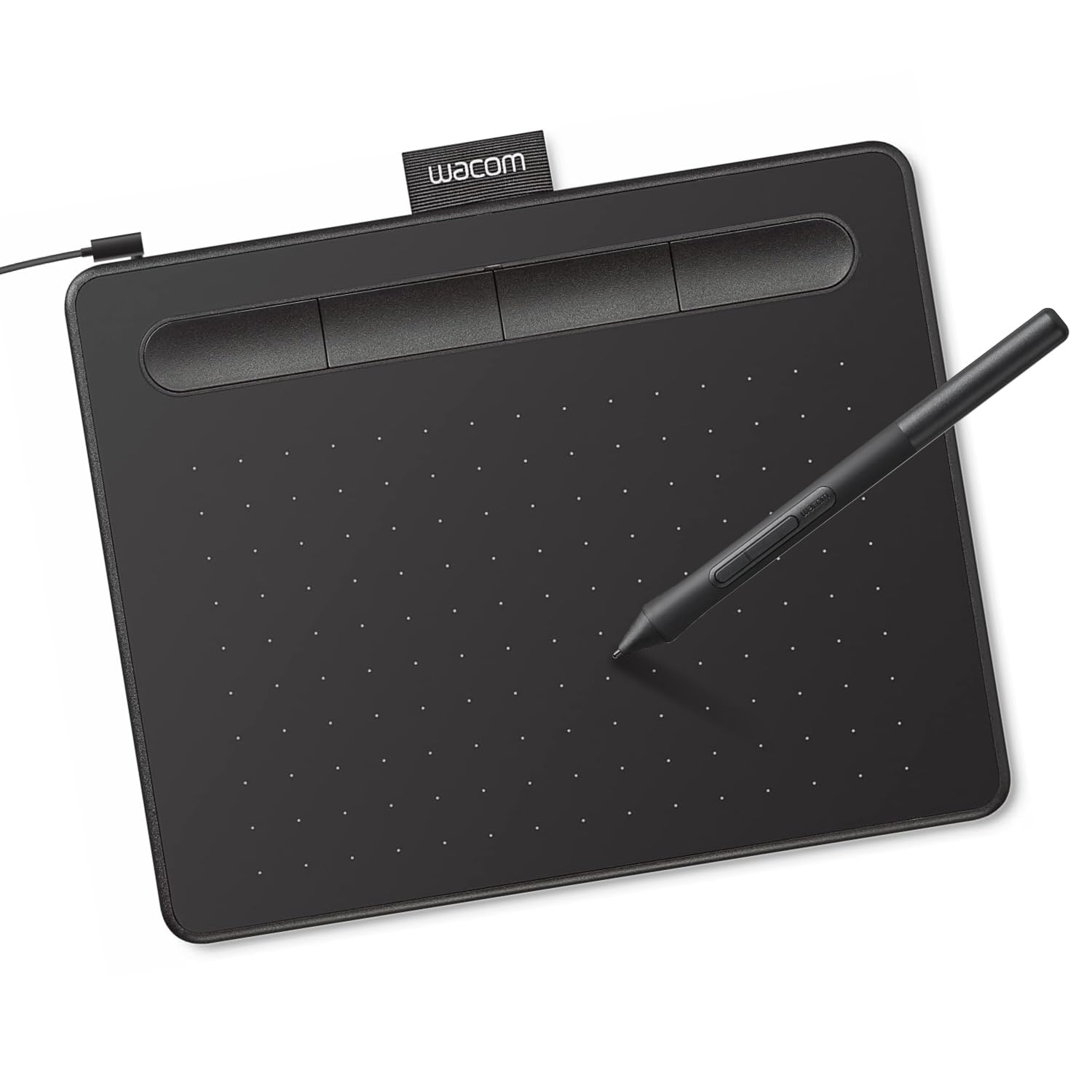
Wacom’s Intuos Small is the tablet that generations of digital artists started on. The 6 x 3.7-inch active area is modest, but the Electro-Magnetic Resonance (EMR) technology delivers the most consistent pressure curve of any budget tablet — Wacom’s 4095 effective pressure levels feel more nuanced than many 8192 implementations from newer brands. The matte surface provides just enough drag to prevent your hand from slipping during detailed work.
Setup is genuinely plug-and-play on Windows and Mac — the tablet works as a mouse replacement immediately, and the full driver unlocks the four ExpressKeys and pen button customization. Wacom’s software bundle includes free trials for Corel Painter Essentials, Clip Studio Paint Pro, and other creative tools, giving a beginner immediate software access without extra cost. The pen is battery-free, slim, and features a rubber grip that the CTH-480 series made famous.
The small size forces wrist-dominant drawing, which can cause fatigue over long periods and does not encourage the shoulder stroke technique that improves line confidence. Nib wear is faster than on Huion or XPPen models — an issue long-time Wacom users accept as normal. The included USB-A cable lacks a USB-C adapter, so Android mobile users will need a separate OTG cable. For pure brand reliability and software support, the Intuos Small remains a safe choice.
Why it’s great
- Industry-leading EMR pen technology with reliable pressure curve
- Includes software bundle with professional creative tool trials
- Plug-and-play setup without driver tweaks for basic use
Good to know
- Small active area encourages wrist-dominant drawing
- No USB-C or OTG adapter for mobile devices
6. Huion HS64

The HS64 is the definition of a no-frills workhorse. At its entry-level price point, it delivers an active area of 6 x 4 inches with 8192 levels of pressure sensitivity via the battery-free PW100 stylus. The 5080 LPI resolution ensures that strokes register accurately even at high speeds, making it functional for both OSU rhythm gaming and casual sketching. The four customizable express keys are minimal but cover the essentials: Undo, Redo, Brush Size, and Eraser.
Huion’s driver support has matured significantly, and the HS64 is compatible with Windows, Mac, Linux (Ubuntu), and Android 6.0 or later via the included OTG adapter. Setup takes under ten minutes — install the driver, plug in the Micro USB cable, and the tablet is recognized immediately. The slim profile (under half an inch thick) and 4.8-ounce weight make it easy to toss into a laptop sleeve for note-taking on the go.
The Micro USB connection feels dated compared to the USB-C connections appearing on newer tablets, and the four keys require reaching toward the top edge rather than sitting naturally under your thumb. Some users report that the surface finish can develop micro-scratches from regular nib contact, though performance is unaffected. For the absolute lowest barrier to entry into digital art, the HS64 is unbeatable.
Why it’s great
- Lowest price point with full 8192 pressure sensitivity and battery-free pen
- Works with Android 6.0+ via included OTG adapter
- Extremely portable and lightweight for travel
Good to know
- Micro USB connection instead of modern USB-C
- Four express keys are placed at the top edge, not ergonomic for quick access
7. ienRon IES1060
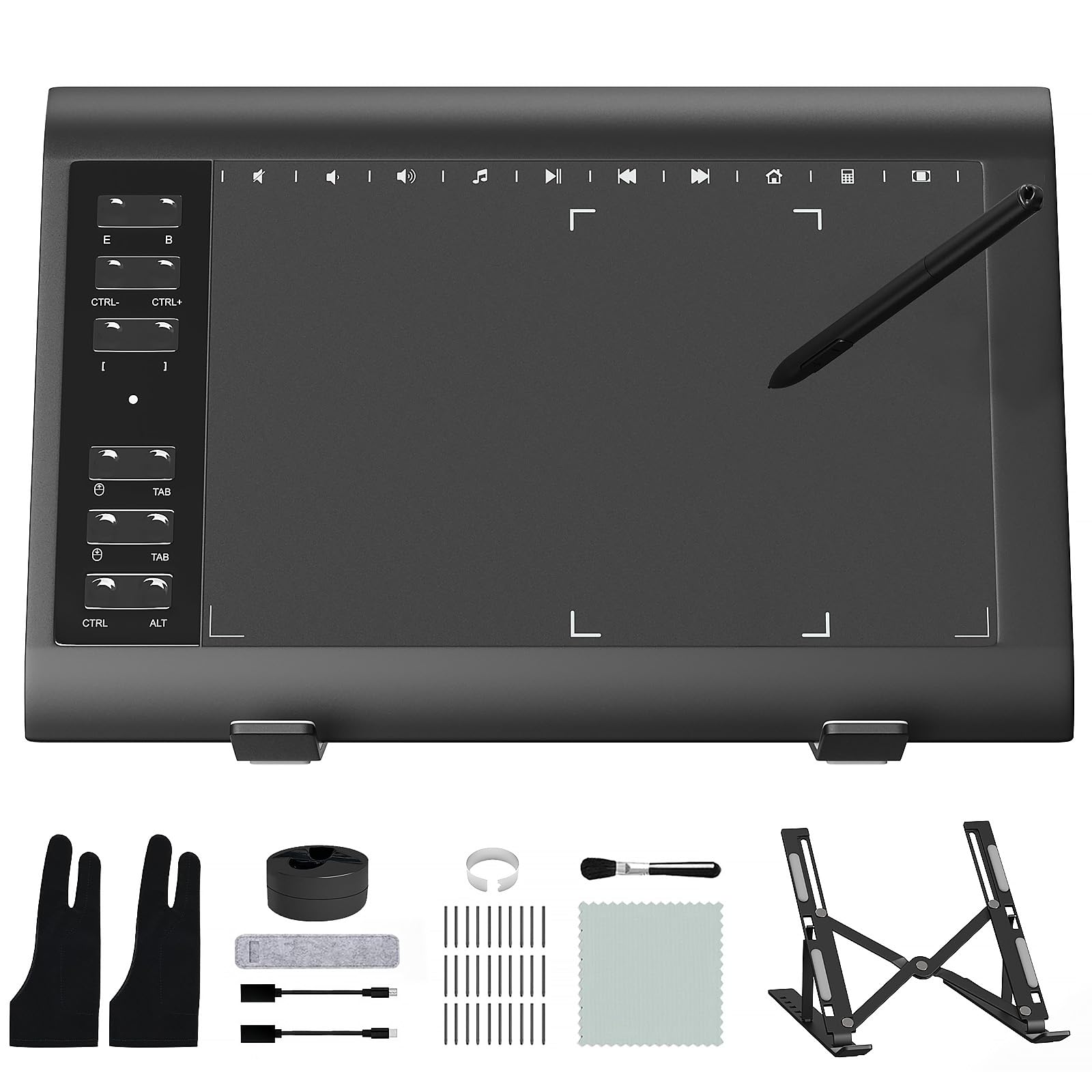
The ienRon IES1060 goes all-in on the value proposition: a 10 x 6.25-inch drawing tablet, an adjustable aluminum alloy stand, an artist glove, a cleaning brush and cloth, thirty replacement nibs, and a battery-free stylus with 8192 pressure sensitivity and 60-degree tilt support — all at a price point that competes with smaller tablets. The 12 customizable hotkeys plus 10 soft multimedia keys provide more shortcut real estate than any other tablet in this guide, appealing to beginners who want immediate access to every tool without memorizing keyboard shortcuts.
The stylus requires no charging and the 60-degree tilt recognition allows for natural shading — a feature usually reserved for mid-range tablets from larger brands. Setup involves downloading the driver from the ienRon website (not included on a CD), which is straightforward on Windows and Mac. The tablet also supports Android 5.0 and later via a standard USB connection, though it is not compatible with iPhones, iPads, or Chromebooks.
The pen buttons can feel slightly loose out of the box, and some users report the undo button malfunctioning after a few months of heavy use. The USB cable protrudes from the left side, which may interfere with left-handed users who prefer a clean right-side cable path. Despite these quirks, the IES1060 offers the most generous accessory bundle and the largest drawing area at its price tier, making it a compelling starter kit for someone unsure about committing to digital art.
Why it’s great
- Includes adjustable stand, glove, brush, cloth, and 30 nibs
- Large 10×6.25-inch active area with 60-degree tilt support
- 22 total shortcut keys provide maximum customization
Good to know
- Pen button quality may degrade after months of regular use
- Not compatible with Chromebook, iPhone, or iPad
FAQ
Do I need a drawing tablet with a screen to learn digital art?
What size drawing tablet is best for a child or young beginner?
Can I use a drawing tablet for things other than art?
How long does a pen tablet nib last before I need to replace it?
Final Thoughts: The Verdict
For most users, the art tablet for beginners winner is the HUION Inspiroy 2 Medium because its 8.7 x 5.4-inch active area, PenTech 3.0 precision, and built-in scroll wheel deliver a professional-feeling workflow without overwhelming a new user. If you want the highest pressure sensitivity available at a competitive price, grab the XPPen Deco 01 V3 with its 16,384 levels for ultra-fine shading control. And for a portable, budget-friendly option that still includes modern features, nothing beats the HUION Inspiroy 2 Small in pink — it packs the same PenTech 3.0 engine into a compact frame that slides into any bag.