
Our readers keep the lights on and the weekend projects moving. As an Amazon Associate, I earn from qualifying purchases.
You snap a dozen images on your phone, but getting them off the screen and into your hands usually means a trip to the pharmacy, a file upload, or settling for muddy office-printer paper. An at-home photo printer changes that by putting a dedicated dye-sublimation or 6-color inkjet engine on your desk, delivering lab-quality 4×6 or 8×10 prints that resist water, fingerprints, and fading for years.
I’m Rikta — the co-founder and writer behind FitlyFast. Over the last decade, I’ve tracked the evolving specs (print resolution, ink economics, paper handling) that separate a toy from a true keeper.
The right machine for your home depends on print volume, paper size, and whether you value portability or archival longevity. This guide cuts through the jargon to help you find the best at home photo printer for your actual shelf space.
How To Choose The Best At Home Photo Printer
Before you buy, lock in the print size you will use most often. A portable 4×6 dye-sublimation unit is great for scrapbook pages and fridge magnets, while a wide-format 11×17 inkjet opens up framed art prints. Your choice also hinges on whether you want a single-function photo machine or a versatile all-in-one that can also copy and scan documents.
Inkjet vs. Dye-Sublimation — The Core Technology
Inkjet printers, especially those with six or more pigment inks (like Epson’s Claria HD), produce a wider color gamut on matte and glossy fine-art papers. Dye-sublimation transfers heat-activated inks into a protective layer, making each print waterproof, smudge-proof, and resistant to fingerprints — ideal for 4×6 snapshots that get passed around. The trade-off: sublimation prints are limited to rigid paper sizes and typically cost a few cents more per sheet than inkjet when you factor in the dedicated ribbon and paper packs.
Resolution, DPI, and Color Depth
Do not get lost in the maximum DPI numbers. A 300 DPI dye-sublimation printer produces smooth continuous-tone images because it blends colors through heat, while a 5760 x 1440 dpi inkjet relies on tiny dots that can show pattern noise on glossy paper. For home viewing, 300 DPI dye-sub prints look cleaner than most inkjets at the same physical size. The real differentiator is color depth — look for 24-bit or 48-bit color processing to avoid banding in skies and skin tones.
Connectivity and App Quality
Wi-Fi Direct eliminates the need for a home router, making it easy to print from your phone at a party or on vacation. Bluetooth is faster to pair but limits range. A dedicated SD card slot (found on the Canon SELPHY) lets you skip the phone altogether — a huge time saver if you shoot with a dedicated camera. Equally important is the companion app: look for one that supports collage creation, border styles, and ID photo templates without forcing you to jump through multiple menus.
Quick Comparison
On smaller screens, swipe sideways to see the full table.
| Model | Category | Best For | Key Spec | Amazon |
|---|---|---|---|---|
| Epson XP-980 | Inkjet All-in-One | 11×17 Archival Prints | 5760 x 1440 dpi & 6-color Claria HD | Amazon |
| Canon SELPHY CP1500 | Dye-Sublimation | Portable & Scrapbooking | 300 x 300 dpi, 3.5″ LCD, SD card slot | Amazon |
| HP Envy Photo 7975 | Inkjet All-in-One | Documents + Borderless Photos | Separate photo tray, auto-duplex, 15 ppm B&W | Amazon |
| Liene Amber M110 | Dye-Sublimation | Dual-Size Printing (4×6 & 3×3) | Dual paper tray, fast Bluetooth pairing | Amazon |
| HP Sprocket Studio Plus | Dye-Sublimation | Smartphone-Only Instant Prints | Wi-Fi, tear/water/smudge-proof 4×6 | Amazon |
| HPRT CP4100 | Dye-Sublimation | Bundled Starter Kit (108 sheets) | 300 DPI, AR video print via Heyphoto app | Amazon |
| Canon PIXMA TS7720 | Inkjet All-in-One | Budget Home Office + Occasional Photos | Auto-duplex, 2.7″ touchscreen | Amazon |
| Fujifilm Instax Mini Link 3 | Instant Film | Party & Sticker-Style Snapshots | Instax Mini film, Click to Collage, USB-C | Amazon |
| Liene Pearl N200 Pro | Dye-Sublimation | AI-Enhanced & Sticker Prints | CCD camera filter, AI portrait, 2×3 adhesive paper | Amazon |
In‑Depth Reviews
1. Epson Expression Photo XP-980

The Epson XP-980 is the most versatile photo printer on this list, thanks to its six individual Claria Photo HD ink cartridges (CMYK plus light cyan and light magenta). That additional light-ink pair eliminates the graininess you often see in sky gradients and skin tones on four-color machines. The 5760 x 1440 dpi resolution and flatbed scanner with 48-bit color input make it a genuine alternative to a dedicated photo lab for 11×17 prints.
Setup is straightforward through the Epson Smart Panel app, and both Wi-Fi Direct and Ethernet are available for router-free or wired networks. The separate photo paper tray holds up to 20 sheets of 4×6 glossy, while the rear specialty feed handles fine-art media up to 1.3mm thick. Real-world 4×6 prints land in about 11 seconds, and early users report excellent color accuracy on third-party papers like Red River Polar Gloss Metallic.
The paper handling for 11×17 requires single-sheet rear loading, which is slower than a dedicated tray. Still, for the home photographer who needs both web-form documents and exhibition-quality wide-format prints, nothing else here matches the XP-980’s capability.
Why it’s great
- 6-color ink system produces smoother tonal transitions than 4-color inkjets
- Borderless prints up to 11×17 for framing without white borders
- 4.3″ color touchscreen and flatbed scanner for copying and scanning
Good to know
- Infrequent use may cause nozzle clogs requiring heavy cleaning cycles
- Photo tray is slightly finicky to load, and 11×17 requires manual rear feed
- Uses Epson 279 cartridges; non-genuine ink voids the limited warranty
2. Canon SELPHY CP1500

The Canon SELPHY CP1500 is the benchmark for portable dye-sublimation photo printing. Its three-pass (yellow, magenta, cyan) plus overcoat process produces continuous-tone 4×6 prints that are waterproof, scratch-resistant, and fingerpint-proof. The integrated SD memory card slot is a standout feature — insert your camera’s card and print directly without touching a phone. The 3.5-inch LCD makes cropping and date-stamping simple.
Wireless printing via the SELPHY Layout app works smoothly on both iOS and Android, and you can choose from four paper sizes including postcard, credit-card, square stickers, and wide. The bundled KP-108IN pack gives you 108 sheets plus the matching ribbon, so you are ready out of the box. Users consistently praise the print yield per consumable set — around 10 cents per image when bought in bulk.
The key trade-off is that the CP1500 is a print-only device (no scanning or copying) and it loses fine detail compared to a high-end inkjet — individual strands of hair or intricate textures can look slightly soft. It is also slower per print than an inkjet, taking roughly 47 seconds for a 4×6. But if portability, predictable running costs, and genuine durability matter, this is the most refined dedicated photo printer available.
Why it’s great
- SD card slot enables camera-direct printing without a phone or computer
- Waterproof, scratch-proof, and smudge-proof laminated prints
- Consistent low per-print cost with high-yield KP-108 packs
Good to know
- Print-only with no scan/copy functionality
- Image detail is slightly softer than a high-resolution inkjet
- Print speed is about 47 seconds per 4×6 sheet
3. HP Envy Photo 7975

The HP Envy Photo 7975 is the best choice if you need a single device that handles homework, bills, and 5×7 borderless prints equally well. Its separate photo tray holds glossy paper while the main cassette feeds plain letterhead, so you never need to swap media. The built-in AI processing cleans up web pages and emails before printing, removing ads and dead space so you get clean layouts without manual reformatting.
Print speeds of 15 ppm B&W and 10 ppm color are respectable for a home inkjet, and the automatic document feeder makes multi-page scanning effortless. Connectivity includes Wi-Fi, USB, and a 2.7-inch color touchscreen. The HP Smart app is mature and stable, letting you print from cloud services like Google Drive and Dropbox. The 3-month Instant Ink trial can lower your consumable costs if you print regularly.
Build quality is where budget occasionally shows: some units have developed paper-feed errors and faint horizontal lines after a few weeks of use, and the “quiet printing” mode cannot be disabled — it makes each job take longer than it should. Photo color accuracy, especially skin tones, leans slightly cool compared to the XP-980 or SELPHY CP1500. For mixed-use homes that prioritize convenience, it remains a strong mid-range contender.
Why it’s great
- Separate photo tray means no media swapping between documents and 5×7 prints
- AI web-page cleaning saves paper and ink by removing clutter before printing
- Auto document feeder simplifies multi-page scanning and copying
Good to know
- Color accuracy for skin tones can run slightly cool
- Some units have reported paper-feed jams and faint line artifacts
- Quiet mode is always on, slowing down print speed
4. Liene Amber M110

The Liene Amber M110 solves a real pain point for home photo printing: handling two paper sizes without swapping cassettes. Its dual tray design holds 4×6 sheets in one slot and 3×3 sticky-backed paper in the other, letting you switch between standard prints and sticker prints with a tap in the app. Bluetooth pairing takes about 13 seconds, and the connection is stable within a 30-foot range.
Image quality from the thermal dye-sublimation engine is vibrant, with natural skin tones and a glossy, laminated finish that resists water and fingerprints. The companion Liene app supports ID photo templates, Polaroid-style borders, and collage layouts. The printer also works with Windows via USB-C (after downloading the driver from Liene’s website), which adds flexibility beyond phone-only printing.
Print detail is slightly softer than a high-resolution inkjet — raindrops and fine texture elements lose some definition. The per-print cost hovers around 40 cents when using bundled paper packs, which is slightly above the SELPHY CP1500’s cost per sheet. The app also has occasional interface quirks (a misspelled frame overlay, for example). Still, for households that regularly want both 4×6 photos and 3×3 sticker prints, the Amber M110’s dual-tray design is unmatched in this price tier.
Why it’s great
- Dual paper tray accommodates 4×6 and 3×3 sticker paper without swapping
- Fast Bluetooth pairing in about 13 seconds
- Glossy, water-resistant, laminated finish resists scratches and fingerprints
Good to know
- Per-print cost is slightly higher than Canon’s SELPHY consumables
- Fine detail (raindrops, fine textures) is softer than inkjet
- App has occasional UI quirks and limited editing features
5. HP Sprocket Studio Plus

The HP Sprocket Studio Plus is built around one job: taking photos from your smartphone and turning them into dry-to-the-touch 4×6 prints in seconds. It uses dye-sublimation technology, so each print comes out already laminated and resistant to tears, water, and smudges. The HP Sprocket app includes photo booth, collage, and ID-print modes that make it a fun choice for parties and family gatherings.
Setup is genuinely effortless — download the app, connect over Wi-Fi, and the printer shows up immediately. The included 10-sheet starter pack gets you going, and replacement cartridges are sold in 108-sheet bundles. Early users found that ink cartridge yield exceeds official estimates: some reported printing over 90 photos before noticing fading, well past the stated yield from a single color cartridge.
Color accuracy is the weak point. Skin tones can lean slightly warm or cool depending on the photo, and prints from high-resolution cameras or DSLRs often show poor shadow detail and visible compression artifacts. The app occasionally loses connection mid-session, which forces you to restart a print batch. For casual snapshots and party favors, the concrete durability is hard to beat, but serious photographers should look at the Epson XP-980 or Canon SELPHY CP1500.
Why it’s great
- Truly waterproof, tear-resistant, and smudge-proof prints out of the box
- Sprocket app includes fun modes like photo booth and collage
- Cartridge yield often exceeds advertised count in real-world use
Good to know
- Color accuracy struggles with skin tones and high-resolution camera files
- Prints can show visible compression artifacts from large originals
- App connection can drop mid-session, requiring a restart
6. HPRT CP4100
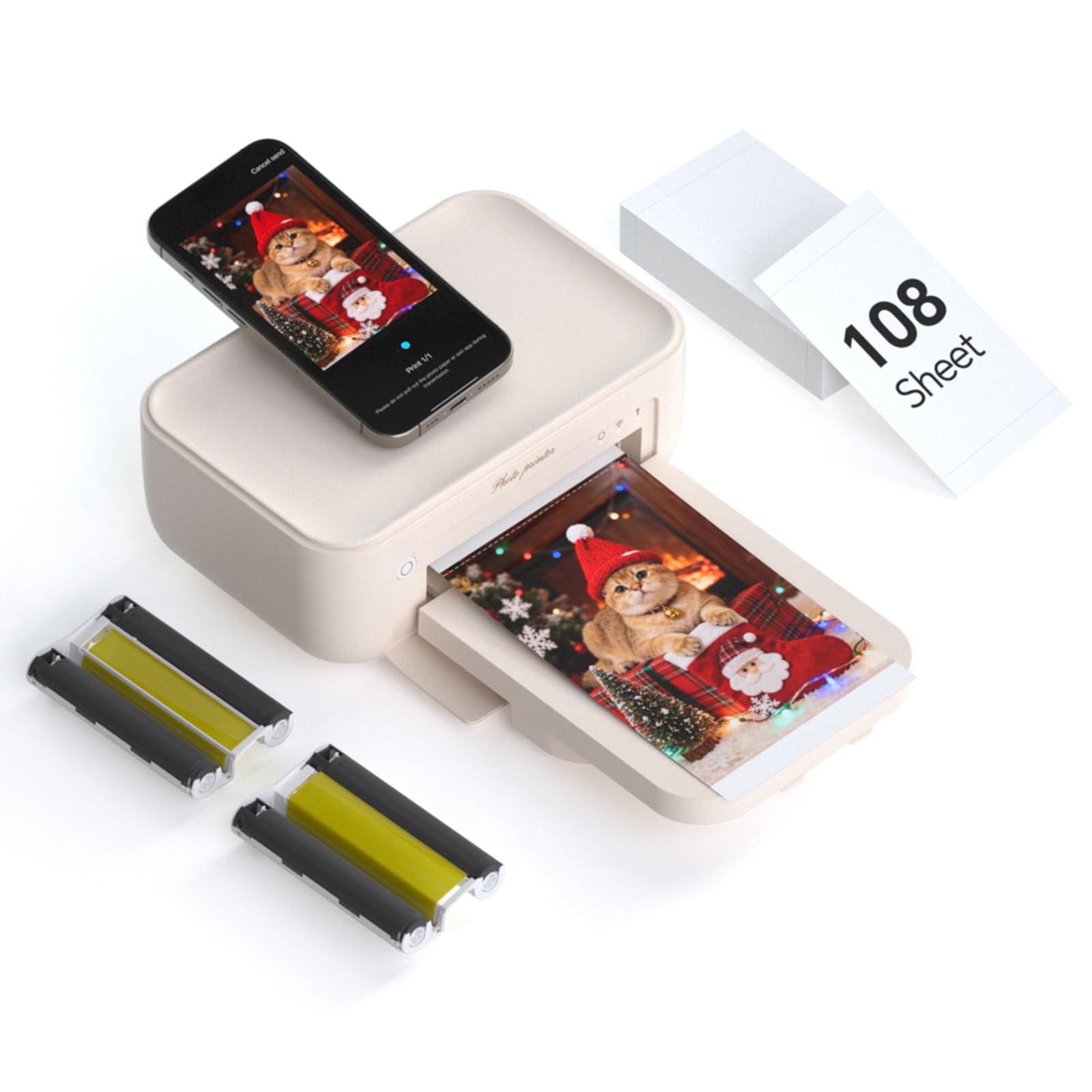
The HPRT CP4100 enters the market with a rare value proposition: the box includes 108 sheets of 4×6 photo paper plus two full ribbon cartridges, enough for 108 prints right out of the box. That eliminates the first round of consumable costs entirely. The thermal dye-sublimation engine delivers a laminated finish at 300 DPI and 256-color gradation per channel, producing prints that are resistant to water, scratching, and fading over time.
The Heyphoto app is one of the more creative in this category — it supports an augmented-reality print mode where you can associate a short video clip with a printed photo. After printing, scanning the photo with the app replays the video, adding an interactive element to scrapbooks or gifts. The app also includes filters, borders, and multi-size printing (6, 5, 3, 2, and 1 inch). Wi-Fi connectivity is straightforward, and the printer can connect directly to your phone or through a shared home network.
Print quality is very good for dye-sublimation, with strong contrast and accurate color reproduction on the included glossy paper. The machine is print-only (no scanner or copier) and its build leans toward the lighter, more plastic-heavy end of the spectrum. The per-print cost after the initial 108 sheets is about average for this category, though bundling a replacement pack at purchase can keep it lower. For a giftable starter kit that includes everything but the phone, this is the top pick.
Why it’s great
- Generous 108-sheet paper and 2-ribbon starter kit for immediate out-of-box use
- AR print mode lets you attach a video to a printed photo for interactive memories
- Good contrast and color accuracy for a dye-sublimation engine
Good to know
- Print-only device; no scanning or copying functions
- Build materials feel light and somewhat plasticky
- Replacement consumable packs add typical ongoing cost
7. Canon PIXMA TS7720

The Canon PIXMA TS7720 is the most affordable all-in-one on this list, combining print, copy, and scan in a compact chassis that requires only two ink cartridges (one PG-285 pigment black, one CL-286 color). That simple cartridge system makes replacement cheaper than printers with five or six individual tanks. The 2.7-inch touchscreen is responsive, and automatic duplex printing saves paper on multi-page documents.
Print speeds of 15 ppm black and 10 ppm color are decent for light home use, and the Canon PRINT app handles wireless setup and cloud printing from Google Drive and Dropbox. The bottom cassette handles plain paper, while a rear tray accepts photo media up to 8.5×11. For occasional 4×6 snapshots and school projects, it gets the job done without a large footprint.
Photo quality, however, is noticeably less vivid than any dye-sublimation unit or the 6-color Epson XP-980. Colors from the trial cartridges look muted and hazy, and some users report the printer defaults to glossy settings that cannot be easily overridden. The auto power-off timer (4 hours of inactivity) can be frustrating, and the printer will not turn on automatically when you send a job. For pure photo printing, it is outclassed by dedicated machines; as a budget home-office printer that can also handle the occasional photo, it remains a functional option.
Why it’s great
- Low-cost two-cartridge ink system keeps replacement costs down
- Auto-duplex printing saves paper on double-sided documents
- Compact footprint with print, copy, and scan all in one device
Good to know
- Photo quality is noticeably less vivid than dye-sublimation or 6-color inkjet printers
- Trial cartridges run out quickly — budget for full-size replacements soon after opening
- Auto power-off after 4 hours must be manually disabled to avoid surprise shutdowns
8. Fujifilm Instax Mini Link 3

The Fujifilm Instax Mini Link 3 takes a different approach: instead of producing conventional 4×6 prints, it uses Instax Mini film to make credit-card-sized prints with the classic white border, soft tones, and instant-camera aesthetic that fans love. It is less about photorealistic accuracy and more about the tactile, retro experience of sharing tangible keepsakes at parties, events, or with kids. The “Click to Collage” feature lets you combine multiple images into one print.
Setup is genuinely simple — charge via USB-C, pair over Bluetooth, and open the Instax Mini app. The printer is slightly larger than a phone, has a sturdy build with a soft-touch finish, and prints in about 15 seconds per shot. The app also lets you adjust brightness, add frames, and create collages before sending to print. It works with both iOS and Android and supports batch printing up to 80 photos from a phone on a tripod.
The downsides are inherent to the Instax format: small print size (roughly 2.4 x 1.8 inches useful image area), a per-print cost that is higher than dye-sublimation 4×6 prints, and the fact that film packs (10 shots each) are a recurring expense. Colors lean toward the warm, slightly muted Instax look rather than true-to-life reproduction. If you want a wallet-sized memento with that unmistakable analog feel, it is wonderful — but for archival-quality home prints, choose a dye-sub or inkjet unit.
Why it’s great
- Classic Instax aesthetic with soft warm tones and iconic white border
- USB-C charging and fast Bluetooth pairing
- Collage and batch-print features are great for events and parties
Good to know
- Small credit-card-sized prints limit visible detail and usable image area
- Per-print cost is significantly higher than dye-sublimation alternatives
- Color reproduction is intentionally muted and warm, not photorealistic
9. Liene Pearl N200 Pro

The Liene Pearl N200 Pro is a portable 2×3 inch sticker printer that focuses heavily on creative app features. Its AI portrait mode lets you upload a selfie and generate stylized versions (artistic backgrounds, costume overlays) without leaving the Liene Photo app. The “InstaPic Print” mode uses a built-in CCD camera filter to shoot and print in one seamless step, making it ideal for parties where speed matters more than editing.
Print quality is a clear step above Zink (zero-ink) pocket printers. The thermal dye-sublimation engine produces vibrant, peelable sticker prints that do not tear when removed — a detail noticed by journalers and scrapbookers. Refill packs cost more than some users expect, but the per-print quality justifies the premium. The app includes extensive framing options, AI background removal, and custom watermark/timestamp overlays.
The app can be finicky: it sometimes fails to detect uploads and requires closing and reopening to refresh. Battery life is adequate for a day of light printing (about 27 prints per charge), but heavy party use may require mid-day charging. There is no desktop software, so this is strictly a phone-based device. For its niche — teens, scrapbookers, and anyone who wants personalized sticker prints with AI flourishes — it is impressively capable.
Why it’s great
- AI portrait mode generates stylized versions of uploaded selfies without leaving the app
- Dye-sublimation engine produces peelable sticker prints that do not tear
- InstaPic mode lets you shoot and print in one step for fast party sharing
Good to know
- App can be glitchy — occasional upload failures require an app restart
- Refill paper/cartridge costs are higher than standard 4×6 dye-sub packs
- No desktop or laptop support; phone-only operation
FAQ
How long do dye-sublimation prints last compared to inkjet prints?
Can I use third-party ink or paper in my Canon SELPHY or HP Sprocket?
What print size should I buy for framing vs. scrapbooking?
Final Thoughts: The Verdict
For most users, the best at home photo printer winner is the Canon SELPHY CP1500 because it delivers consistent, waterproof, smear-proof 4×6 prints with predictable per-print costs and an SD card slot that bypasses phones entirely. If you need wide-format 11×17 framing prints and true 6-color inkjet quality, grab the Epson Expression Photo XP-980. And for a budget-friendly all-in-one that handles documents and occasional photos, nothing beats the utility of the Canon PIXMA TS7720.