
Our readers keep the lights on and the weekend projects moving. As an Amazon Associate, I earn from qualifying purchases.
Struggling with hissing, background noise, or a hollow sound from your PC’s headphone jack? That cheap onboard audio chip is robbing your music, games, and recordings of their full dynamic range. A dedicated audio card bypasses that electrical interference, delivering a clean signal path with enough power to drive high-impedance headphones and studio monitors.
I’m Rikta — the co-founder and writer behind FitlyFast. I’ve spent hundreds of hours dissecting audio card specifications, comparing digital-to-analog converter chips, and mining user feedback to separate marketing claims from measurable performance.
Whether you are a competitive gamer needing precise positional audio, a musician requiring low-latency recording, or an audiophile craving a black-noise floor, this guide breaks down the seven top contenders to help you find the best audio card for your setup.
How To Choose The Best Audio Card
The right audio card hinges on three elements: your primary use case (gaming, recording, or critical listening), the impedance of your headphones, and the physical connection your computer can accept.
Form Factor: Internal vs. External
Internal PCIe cards like the Sound Blaster AE-7 offer the lowest system latency and highest data throughput, which benefits gamers and power users. External USB interfaces are plug-and-play across laptops and desktops, often include microphone preamps with phantom power, and are immune to internal PC electrical noise. Choose internal for raw speed; choose external for portability and recording features.
DAC Quality and Amplifier Power
The digital-to-analog converter (DAC) chip dictates the theoretical noise floor and dynamic range. Look for a minimum of 114 dB dynamic range for transparent playback. For headphones above 150 ohms, the headphone amplifier’s output impedance and voltage swing become critical — a weak amp will leave your headphones sounding quiet and lifeless.
Bit Depth and Sample Rate
24-bit/192 kHz is the modern standard for high-resolution audio. 32-bit converters offer more headroom during recording, allowing you to capture quiet and loud material without clipping. Higher sample rates (384 kHz) are largely future-proofing for niche hi-res formats but do not improve audible quality for most listeners.
Quick Comparison
On smaller screens, swipe sideways to see the full table.
| Model | Category | Best For | Key Spec | Amazon |
|---|---|---|---|---|
| Focusrite Scarlett Solo 3rd Gen | USB Interface | Recording guitar & vocals | 24-bit / 192 kHz, Switchable Air mode | Amazon |
| Creative Sound Blaster AE-7 | Internal PCIe | High-impedance headphone listening | 127 dB DNR, ESS 9018 DAC, 600Ω amp | Amazon |
| Solid State Logic SSL 2 MKII | USB Interface | Professional recording with mic preamps | 32-bit / 192 kHz converters, Legacy 4K | Amazon |
| Universal Audio Volt 2 | USB Interface | Warm analog tone on a budget | 24-bit / 192 kHz, Vintage 610 preamp mode | Amazon |
| Mackie Onyx Producer 2-2 | USB Interface | Durable mobile recording with MIDI | 24-bit / 192 kHz, Onyx preamps, MIDI I/O | Amazon |
| Creative Sound BlasterX G5 | External USB | Console and PC gaming surround | 7.1 virtual surround, 192 kHz, headphone amp | Amazon |
| Behringer U-Phoria UMC204HD | USB Interface | Budget studio recording with MIDAS preamps | 24-bit / 192 kHz, 2 MIDAS preamps, MIDI I/O | Amazon |
In‑Depth Reviews
1. Focusrite Scarlett Solo 3rd Gen

The Scarlett Solo 3rd Gen strikes the ideal balance between recording fidelity and ease of use. Its mic preamp with switchable Air mode adds presence to vocals and acoustic instruments, and the Gain Halo system visually prevents clipping. At 24-bit/192 kHz, recordings retain high-frequency detail without the brittle edge found in lower-end interfaces. The built-in headphone amp delivers clean, low-noise output even with moderately demanding headphones.
Setup is genuinely plug-and-play on macOS, and Windows 10/11 recognizes it without driver hunting. The bundled software suite — Pro Tools Intro, Ableton Live Lite, and the Hitmaker Expansion — provides everything a beginner needs to start recording immediately. The all-metal chassis has survived years of daily use and moves with no degradation in performance, as confirmed by long-term user reports.
One limitation: the single instrument input means you cannot record two stereo sources simultaneously. The USB-C to USB-A cable is short, so placement near your computer is required. For a solo guitarist, vocalist, or podcaster, this remains the most reliable and best-supported entry point into high-quality recording.
Why it’s great
- Pristine preamp clarity with Air mode for added presence
- Robust metal build that survives travel and years of use
- Generous included software for immediate recording projects
Good to know
- Only one instrument input limits simultaneous stereo recording
- Short included USB cable may require a desk rearrangement
2. Creative Sound Blaster AE-7

The AE-7 is the definitive internal sound card for PC users who own high-impedance headphones. Its ESS SABRE-class 9018 DAC delivers a measured 127 dB dynamic range with total harmonic distortion plus noise (THD+N) at just 0.0001%, effectively eliminating the noise floor. The discrete Xamp headphone amplifier drives each earcup independently, providing the voltage swing needed for planar-magnetic headphones up to 600 ohms.
Beyond pure playback, the onboard quad-core processor offloads audio effects and surround virtualization from the CPU, which benefits gaming performance. The included Audio Control Module places a physical volume knob and headphone/mic jacks at your desk, though some units exhibit channel imbalance at very low volume settings. The Sound Blaster Command software offers selectable gain stages and a virtual 7.1 surround mode that is noticeably more precise than software-only solutions.
A key caveat: the line-in is a standard stereo jack, not a proper microphone input with phantom power. This card is tuned for playback and gaming, not for recording with XLR microphones. For desktop users who only need pristine sound output and want to power premium headphones, the AE-7 provides the cleanest signal path of any card on this list.
Why it’s great
- Class-leading 127 dB DNR and 0.0001% THD+N
- Discrete headphone amp drives 600Ω headphones effortlessly
- Quad-core processor offloads audio processing from CPU
Good to know
- Audio Control Module may exhibit channel imbalance at low volume
- Not suitable for studio recording with XLR microphones
3. Solid State Logic SSL 2 MKII

SSL’s reputation for mixing console quality translates directly to the 2 MKII. Its 32-bit AD/DA converters provide immense dynamic headroom during recording, allowing you to capture loud peaks without distortion while preserving whisper-quiet passages. The two XLR mic preamps with the Legacy 4K analog enhancement button add a subtle high-frequency sheen and harmonic saturation that mimics classic SSL console channels.
Build quality is exceptional — the metal chassis and knobs feel identical to the brand’s larger studio hardware. The built-in high-pass filter on each channel cuts rumble and low-end noise before it reaches your recording, a lifesaver for voice-over artists working in untreated rooms. The headphone amplifier is powerful enough to drive 250-ohm headphones with authority, and the stereo loopback feature simplifies streaming and podcast setups.
The bundled SSL Production Pack includes useful plugins and instruments, but the real draw is the preamp sound and the confidence that comes from near-zero latency monitoring. Note that the 32-bit converter is a D/A and A/D system — it is not 32-bit float recording, so proper gain staging is still required.
Why it’s great
- 32-bit converters offer exceptional headroom for clean recording
- Legacy 4K analog enhancer adds professional console character
- High-pass filters eliminate room rumble before the AD conversion
Good to know
- Not true 32-bit float; gain staging is still essential
- Physically larger and heavier than competitive USB interfaces
4. Universal Audio Volt 2

The Volt 2 is the most musician-friendly interface on this list, thanks to its Vintage mode that emulates UA’s classic 610 tube preamp. Engaging that single button adds warmth and saturation to any source — vocals gain a roundness, and DI guitar tracks sound less sterile. The 24-bit/192 kHz converters are clear and open, though the character of the preamp is the main selling point.
Build quality is reassuring: the metal chassis, large monitor volume knob, and sturdy USB-C port feel premium. The device is bus-powered, which makes it genuinely portable for laptop recording, though an iPad or iPhone will require the Apple Lightning to USB Camera Adapter. LUNA DAW is included, along with a selection of UAD plugins that emulate classic compressors and reverbs.
One minor drawback: the software bundle setup is time-consuming, requiring multiple downloads and account registrations. Additionally, the vintage preamp character is subtle — it polishes rather than transforms a signal. For home recordists who prioritize a musical input sound over clinical neutrality, the Volt 2 delivers inspiring results.
Why it’s great
- Vintage 610 preamp mode adds analog warmth and saturation
- Solid metal build with a large, satisfying monitor knob
- Includes LUNA DAW and classic UAD plugin emulations
Good to know
- Software installation is lengthy and requires multiple accounts
- Vintage effect is subtle, not a dramatic tone shift
5. Mackie Onyx Producer 2-2

Mackie’s Onyx Producer 2-2 is built to survive the road. Its metal chassis and recessed connectors feel substantially tougher than comparable plastic-shelled interfaces. The two Onyx mic preamps deliver clean, flat gain with enough dynamic range for spoken word and instrument recording, and the 48V phantom power is stable even when the unit is bus-powered over USB 2.0.
The inclusion of MIDI I/O on 5-pin DIN jacks is a rare and welcome feature at this price point, making it a practical upgrade for users controlling hardware synthesizers or drum machines. The zero-latency direct monitoring switch is clearly labeled and works without fuss. Linux users consistently report perfect plug-and-play recognition, which is a strong indicator of standards compliance.
Maximum sample rate is 96 kHz despite the box advertising 192 kHz — the converters are 24-bit/96 kHz. Also, the interface may lose connection if plugged through a USB hub, requiring a direct motherboard port. For the mobile musician or engineer who needs a durable interface with MIDI that works reliably, this is a smart buy.
Why it’s great
- Industrial-grade build quality that survives regular abuse
- Dedicated 5-pin MIDI I/O for hardware synth integration
- Excellent Linux compatibility with no driver configuration
Good to know
- Actual converters are 24-bit/96 kHz, not 192 kHz
- USB connection may fail through a hub, must be direct
6. Creative Sound BlasterX G5

The Sound BlasterX G5 is a tiny external box designed to upgrade the audio of any device with USB or optical output. Its primary strength is hardware-accelerated 7.1 virtual surround processing, which dramatically improves spatial awareness in games and movies over standard stereo. The built-in headphone amplifier provides more gain and clarity than the headphone jacks on consoles, all-in-one PCs, or laptops.
Connectivity is flexible: USB 2.0/3.0 for PC and Mac, plus mini-TOSLINK optical for PS4 and Xbox One. The 10-band EQ and multiple profile settings are stored on the device itself, meaning your custom sound follows the G5 to any computer without requiring software installation. The bass boost (set to 25 Hz or 100 Hz) adds impactful low-end without distorting the midrange.
On the downside, the device uses a mini-TOSLINK connector rather than a full-size optical cable, requiring an adapter or specific cable for console use. Also, a minority of users report that the G5 fails to reconnect after the host computer wakes from sleep, requiring a manual USB re-plug. For gamers and streamers who want a portable, one-box surround solution, the G5 is still the best in its class.
Why it’s great
- Hardware 7.1 virtual surround improves gaming spatial awareness
- Profiles stored on-device work on any system without software
- Compact form factor works with PC, Mac, PS4, and Xbox One
Good to know
- Uses mini-TOSLINK instead of standard optical connector
- May require manual re-plug after system wake from sleep
7. Behringer U-Phoria UMC204HD
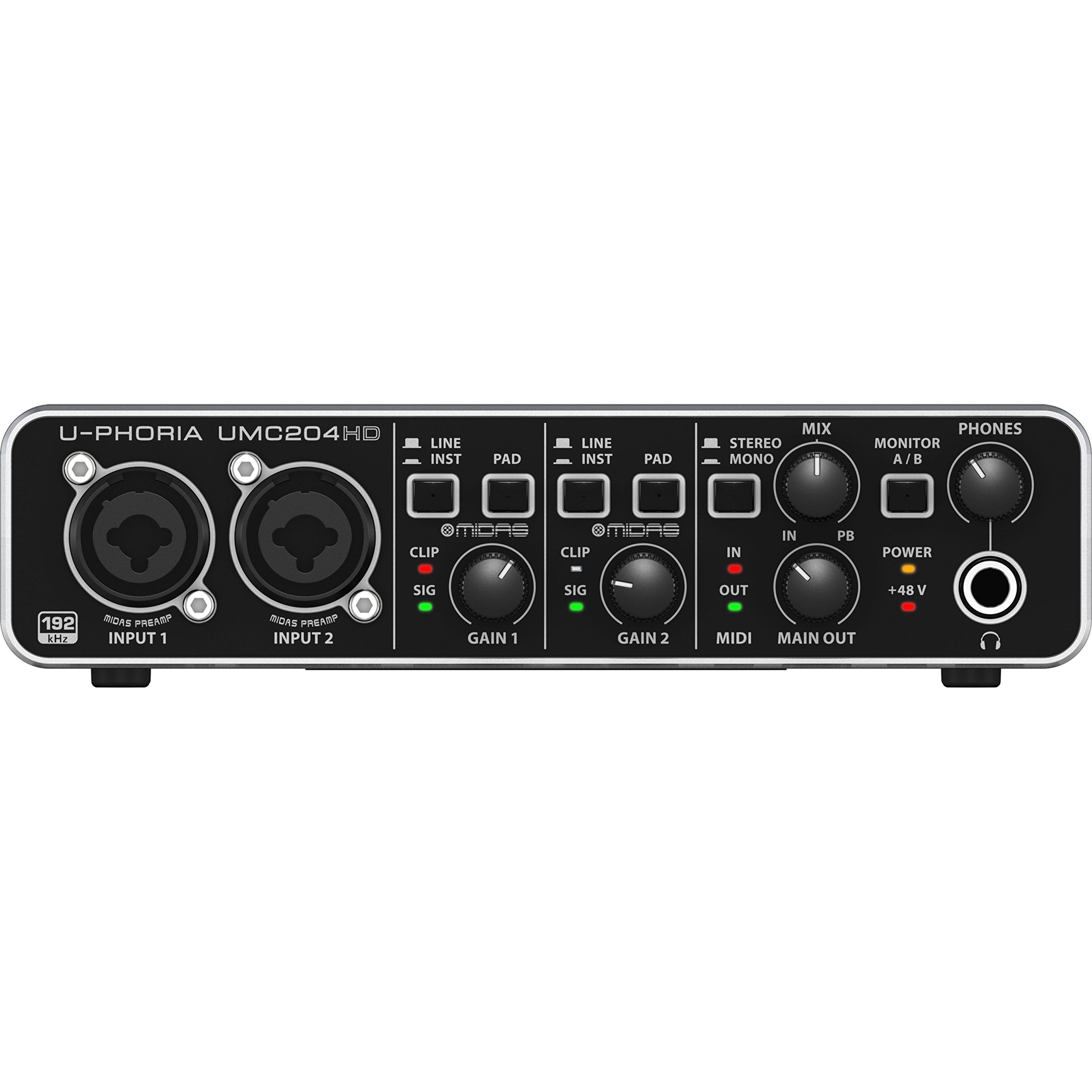
The UMC204HD punches well above its weight by including two MIDAS-designed mic preamps, which offer noticeably lower noise and higher gain than typical budget interfaces. The 24-bit/192 kHz converters resolve detail cleanly, and the 4-output routing (2 main, 2 line) allows for separate monitor mixes and headphone feeds — a feature rarely seen at this price level. MIDI I/O is also included, making it a complete starter studio hub.
Build quality is surprisingly solid: the metal chassis and chunky knobs feel durable, and the switches have a positive click. Linux and macOS users report flawless class-compliant operation, and Windows 10/11 drivers install without issues. The headphone amplifier is strong enough to drive 250-ohm Beyerdynamic DT 990 Pro headphones to satisfying volumes without distortion.
The major downside is the lack of a power switch — sudden USB disconnection during a live monitor session can produce a speaker-damaging pop. Additionally, the input gain headroom is limited, so very hot sources may clip before the preamp reaches noon on the dial. For the price-conscious musician building a first home studio, the UMC204HD offers the best preamp quality and I/O flexibility for the money.
Why it’s great
- MIDAS preamps deliver studio-grade clarity at a budget price
- 4-output routing enables separate monitor and headphone mixes
- Class-compliant on Linux and macOS with no driver needed
Good to know
- No power switch; USB disconnect can cause a loud speaker pop
- Input gain headroom is limited; hot sources clip prematurely
FAQ
Do I need an audio card if my motherboard has built-in 7.1 audio?
What is the difference between an internal sound card and a USB audio interface?
Will an external USB audio interface work with a PS5 or Xbox Series X?
Final Thoughts: The Verdict
For most users, the best audio card winner is the Focusrite Scarlett Solo 3rd Gen because it offers the most versatile package of recording quality, ease of use, and long-term durability at a fair price. If you want an audiophile-grade playback solution that powers demanding headphones, grab the Creative Sound Blaster AE-7. And for professional-grade recording with console-inspired preamp character, nothing beats the Solid State Logic SSL 2 MKII.