
Our readers keep the lights on and the weekend projects moving. As an Amazon Associate, I earn from qualifying purchases.
Stepping into home recording for the first time means facing a wall of specs — sample rates, preamp gain, loopback, direct monitoring — that can stall a creative spark before it lands. The right interface removes that friction so you focus on the performance, not the patch bay. This guide breaks down real-world hardware choices rather than marketing noise.
I’m Rikta — the founder and writer behind FitlyFast. I’ve spent years analyzing market trends and break-down audio hardware specifications to separate genuine beginner-friendly design from feature bloat that only adds confusion.
Whether you are recording vocals, podcasting, or plugging in a guitar for the first time, this guide walks through proven options to help you find the very best audio interface for beginners that matches your specific setup and workflow.
How To Choose The Best Audio Interface For Beginners
Every first interface is a compromise between future-proofing and simplicity. Nail these three factors before looking at any brand badge or bundled software package, and the right unit becomes obvious.
Input Count & Type
A one-input unit (XLR/TRS combo) covers solo podcasting, single-mic vocals, or a guitar. If you plan to record stereo sources like a piano line-output or co-host a show, a two-input model with separate preamps avoids the need to upgrade within months. Check whether the inputs accept Hi-Z instrument signals without a separate DI box — guitarists should confirm this on the spec sheet.
Preamp Quality and Clean Gain
Beginner interfaces often cut corners on preamp noise. Look for at least 56 dB of gain and an EIN (Equivalent Input Noise) figure around -127 dBu or better. Dynamic microphones like the Shure SM58 or SM7B need more gain than condensers, so a unit with a clean, high-gain preamp saves you from buying an inline booster later. Avoid interfaces that produce a noticeable hiss at 75% gain or higher.
Connectivity and Monitoring
USB-C bus power keeps your desk clean and your rig mobile, but some units require more power than a tablet port can deliver — check iOS compatibility carefully. Direct monitoring is non-negotiable for latency-free tracking: you want a hardware switch that blends input and playback without diving into a DAW buffer menu. Loopback is a bonus for streamers who need to feed desktop audio into a call or broadcast along with mic input.
Quick Comparison
On smaller screens, swipe sideways to see the full table.
| Model | Category | Best For | Key Spec | Amazon |
|---|---|---|---|---|
| MOTU M2 | Premium | High-fidelity home recording | ESS Sabre32 DAC, 120 dB DNR | Amazon |
| Focusrite Scarlett Solo 4th Gen | Premium | Vocalists and guitarists | 120 dB dynamic range, Air mode | Amazon |
| Universal Audio Volt 1 | Mid-Range | Vintage-warm vocal takes | 610 tube preamp emulation | Amazon |
| Shure MVX2U Gen 2 | Mid-Range | Mobile XLR-to-USB-C recording | Onboard DSP, Auto Level Mode | Amazon |
| Focusrite Scarlett Solo 3rd Gen | Mid-Range | Proven, reliable starter unit | Air mode, 24-bit/192 kHz | Amazon |
| Arturia MiniFuse 1 | Mid-Range | Software-heavy starter setup | Analog Lab Intro, 5‑year warranty | Amazon |
| Zoom AMS-22 | Mid-Range | iOS and Android recording | 48 kHz, direct monitor switch | Amazon |
| MAONO MaonoCaster AME2 | Budget | All-in-one podcast mixer | 10 channels, 11 sound pads | Amazon |
| FIFINE AmpliGame KS5 | Budget | Gaming/streaming bundle | XLR/USB mic, RGB mixer unit | Amazon |
In‑Depth Reviews
1. MOTU M2 2×2 USB-C Audio Interface

The MOTU M2 packs an ESS Sabre32 Ultra DAC — the same converter technology found in interfaces costing several times more — delivering a measured 120 dB dynamic range on outputs and -129 dBu EIN on the mic preamps. That translates to inaudible noise floors during quiet passages and headroom that keeps digital clipping at bay even when recording dynamic vocals or acoustic guitar with a hot signal. The steel chassis and metal knobs feel reassuringly solid on a crowded desk, and the LCD screen shows real-time level metering for both inputs simultaneously, a rarity at this level.
Two combo XLR/TRS inputs accept mic, line, or Hi-Z instrument sources without a separate DI box, and each preamp provides ample clean gain for dynamic mics without introducing background hiss. The headphone output is driven by the same ESS DAC, meaning you get the same clarity through headphones that the line outputs deliver to studio monitors. Direct monitoring is handled via a simple hardware blend knob, and USB-C bus power keeps the setup mobile for laptop recording.
Users consistently praise the stable ASIO driver performance compared to competitors in the same range. The included software bundle includes Ableton Live Lite and MOTU Performer Lite, giving you two respectable DAWs to start with. Some buyers note that the included USB-C cable should be replaced with a high-quality shielded version to avoid intermittent crackling at higher sample rates, and the unit runs warm during extended sessions — both minor points against otherwise exceptional hardware.
Why it’s great
- Reference-grade ESS Sabre32 DAC for studio-quality monitoring.
- Extremely low noise floor (-129 dBu EIN) suitable for quiet sources.
- Two combo inputs with Hi-Z support, no separate DI box needed.
Good to know
- Runs warm; needs ventilation space.
- Included USB-C cable may cause dropouts at 192 kHz — upgrade recommended.
- No loopback function for streaming without extra routing.
2. Focusrite Scarlett Solo 4th Gen
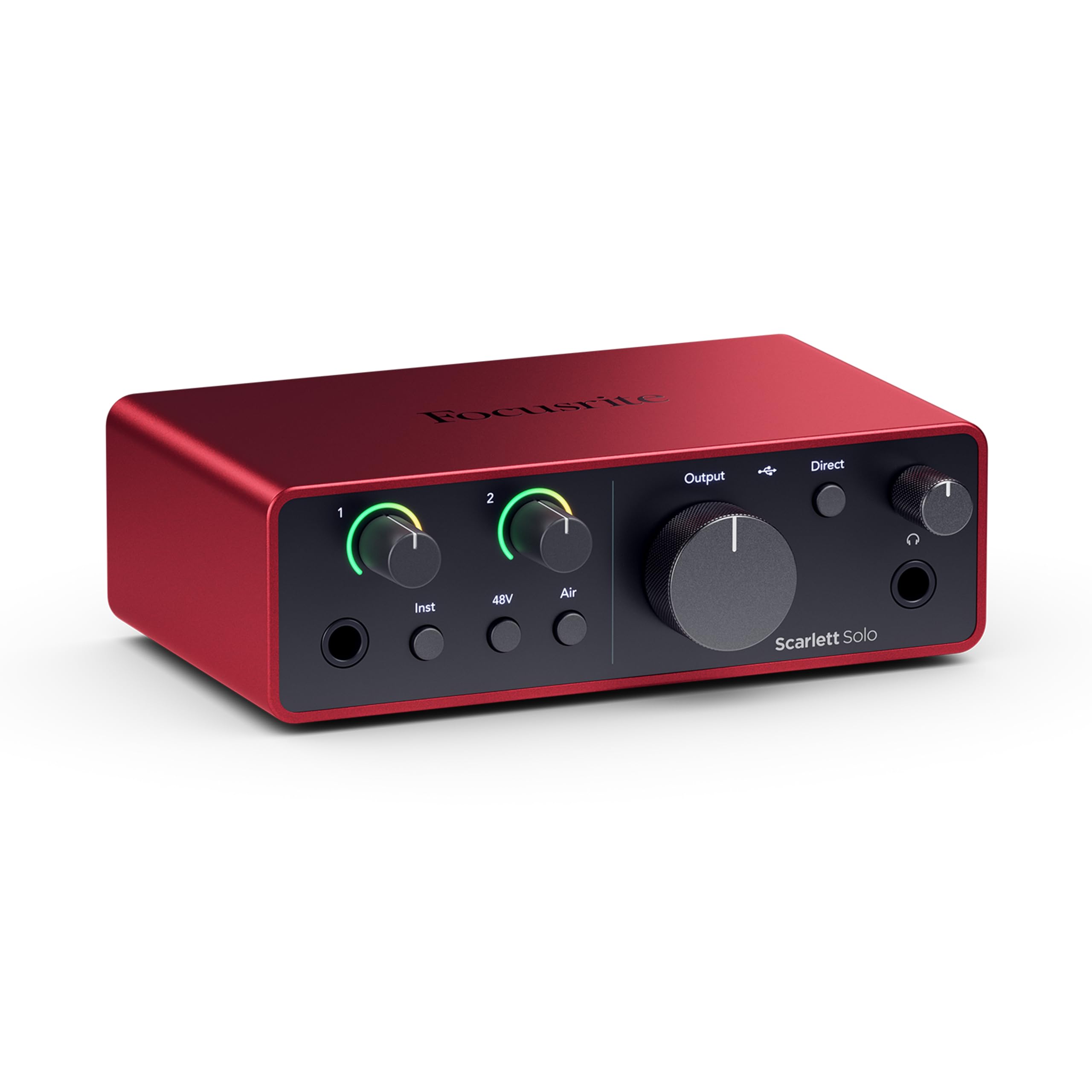
The 4th Gen Scarlett Solo carries the same 120 dB dynamic range found in Focusrite’s top-tier RedNet converters, lifting the entry bar for affordable home recording. The Gain Halo rings around the input knob turn from green to amber to red, giving you a visual cue long before clipping occurs, which is particularly useful when recording a loud source like a snare drum or a belted vocal.
Connectivity is straightforward: one combo XLR/TRS input with 48V phantom power, a Hi-Z instrument input, balanced 1/4″ line outputs, and a dedicated headphone out with independent volume control. The loopback function is baked into the hardware, so you can capture desktop audio alongside your mic signal for streaming or podcast recording without any third-party software. The included Hitmaker Expansion bundle bundles Pro Tools Intro, Ableton Live Lite, Cubase LE, and a suite of effects plugins — everything a beginner needs to start tracking immediately.
Community reports indicate that the unit ships with outdated firmware, requiring a one-time update via the Focusrite Control app — an easy process but one that can catch out first-time users. The USB cable included is USB-A to C, not C to C, which is frustrating for modern laptop owners. Build quality is excellent, with a full metal chassis and satisfyingly tactile knobs that resist accidental bumps during takes.
Why it’s great
- 120 dB dynamic range with flagship-grade converters.
- Improved Air mode with harmonic drive for vocal presence.
- Hardware loopback for easy streaming without extra apps.
Good to know
- Firmware must be updated before first use.
- Included USB-A to C cable; C to C not supplied.
- Gain sweet spot on XLR input is narrow — easy to bump out of range.
3. Universal Audio Volt 1

Universal Audio’s Volt 1 borrows the preamp topology from the iconic UA 610 tube console, and its Vintage switch engages a subtle tube-emulation circuit that adds a smooth, saturated warmth to vocal takes — think rich midrange with a softer top end compared to the more clinical sound of typical solid-state preamps at this level. The 24-bit/192 kHz converters capture detail cleanly, and the crystal-clear playback path makes monitoring accurate during mix decisions. MIDI I/O is an unexpected bonus here, letting you connect a keyboard controller without a separate MIDI interface.
The single combo input handles mic, line, and Hi-Z guitar signals, and the 48V phantom power works reliably with condenser mics. The headphone output drives typical studio headphones to healthy levels, though very low-impedance earbuds may expose a slight noise floor at high volume. Volt 1 ships with LUNA — UA’s free DAW that emulates the analog summing and tape saturation of a real console — plus Ableton Live Lite, Melodyne, and a collection of UAD instruments and effects. That software lineup is arguably the strongest bundle among mid-range interfaces.
Some users note that the Vintage mode is subtle rather than transformative — it won’t rescue a poorly recorded take, but it adds a pleasing character that reduces post-processing work. The unit requires external power via a USB-C PD source when used with iPads and iPhones (not strictly bus-powered for mobile iOS use), so traveling recordists should factor that into their kit. Build quality is a mix of metal chassis and plastic side panels that keep weight low without feeling fragile.
Why it’s great
- Vintage 610 preamp emulation adds analog warmth to recordings.
- Best-in-class software bundle with LUNA DAW and Melodyne.
- MIDI I/O built in — no extra interface needed for keyboards.
Good to know
- Not truly bus-powered for iOS — external USB-C power required.
- Vintage mode is mild; not a dramatic effect.
- Headphone output shows noise floor with very low-impedance earbuds.
4. Shure MVX2U Gen 2

The Shure MVX2U Gen 2 is less a traditional interface and more a smart XLR-to-USB-C adapter with advanced onboard processing. Its Auto Level Mode continuously adjusts gain in real time to prevent clipping while maximizing signal-to-noise ratio — invaluable for solo podcasters who can’t monitor levels during a live recording. The Real-Time Denoiser and Digital Popper Stopper operate with zero latency, so your voice sounds clean and plosive-free without needing a cloud filter or post-processing. Three preset tones (Dark, Natural, Bright) let you tailor the voice character to your room or content type.
The unit provides up to +60 dB of clean gain and 48V phantom power, meaning even low-output dynamics like the Shure SM7B can be driven without an additional booster. The MOTIV companion app (iOS, Android, macOS, Windows) gives granular control over EQ, compression, and limiter settings, and the interface remembers your last configuration when powered off — no drift between sessions. Its compact size is about the same as two stacked credit cards, making it easy to slip into a laptop bag for remote recording or field interviews.
Because this is a single-channel device with no traditional line outputs, it’s designed for direct-to-computer or direct-to-phone recording rather than feeding studio monitors. Headphone monitoring is available via the USB-C device’s headphone jack, but there is no independent headphone volume control on the MVX2U itself — you rely on your device’s volume. A small number of users report unit-to-unit variability, so testing immediately after purchase is wise. For mobile creators who already own a quality XLR mic, however, this is the most portable high-fidelity rig available.
Why it’s great
- Auto Level Mode prevents clipping without manual gain riding.
- Zero-latency denoiser and de-esser built into hardware.
- Ultra-compact form factor for field and mobile recording.
Good to know
- Single-channel only — no line outputs or stereo monitoring.
- Headphone volume controlled by host device, not the interface.
- Occasional unit-to-unit quality variance — test upon arrival.
5. Focusrite Scarlett Solo 3rd Gen

The 3rd Gen Scarlett Solo refined the formula that made Focusrite a household name among home recordists. Its revised preamp stage offers a cleaner noise floor than the 2nd Gen, and the switchable Air mode emulates the impedance curve of the classic Focusrite ISA console, adding a subtle presence boost that helps vocals cut through a dense mix without sounding harsh. The Gain Halo rings provide immediate visual feedback on input level — green for safe, amber for nearing clipping, red for distortion — which is especially helpful when recording a dynamic source like acoustic guitar strumming.
Inputs consist of a single XLR/TRS combo jack with 48V phantom power and a dedicated Hi-Z instrument input, allowing you to keep a mic and guitar connected simultaneously. Outputs include two balanced 1/4″ TRS jacks for studio monitors and a dedicated headphone output with its own volume control. The included Hitmaker Expansion software suite covers recording, production, and mastering: Pro Tools Intro, Ableton Live Lite, Cubase LE, plus effects plugins like Antares Auto-Tune Unlimited and Softube Marshall Amp Room.
Users across multiple review cycles consistently report robust build quality — metal casing survives backpack travel and accidental desk drops. The main criticism remains the lack of MIDI connectivity and the absence of a second input for stereo recording or co-host setups. Some early 4th Gen adopters cite higher driver stability on the 3rd Gen, making this a safer choice if you prefer mature firmware over the latest features. For a no-surprises, start-immediately interface, this is still the benchmark.
Why it’s great
- Industry-standard driver stability across Windows and macOS.
- Air mode adds clarity without harsh EQ boosts.
- Metal body withstands regular travel and handling.
Good to know
- No MIDI I/O for connecting keyboard controllers.
- Single combo input limits stereo recording.
- Gain halo range is narrow — easy to over-ride on dynamic mics.
6. Arturia MiniFuse 1
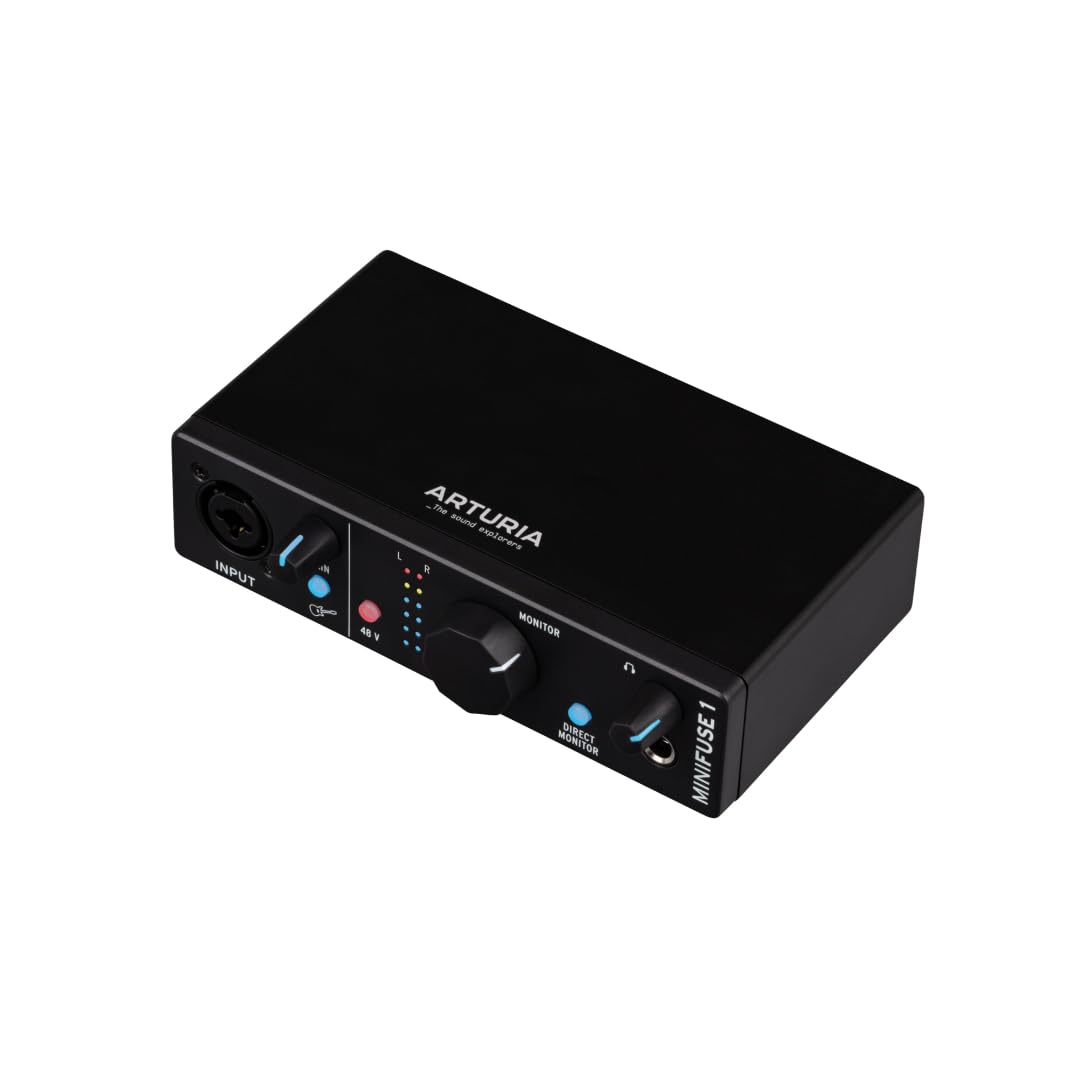
Arturia’s MiniFuse 1 packs a surprising feature set into its compact footprint while backing it with a five-year warranty — the longest standard coverage among budget and mid-range interfaces. The single combo input and headphone output deliver clean 24-bit/192 kHz conversion, and an integrated USB-A hub on the rear panel provides 250 mA of power for connecting a MIDI controller or USB microphone directly through the interface, freeing up a laptop port. The loopback switch and dedicated direct monitoring knob allow latency-free blending of input and playback without touching a DAW.
The bundled software is where MiniFuse 1 punches above its weight: Analog Lab Intro gives you hundreds of pro-grade synth and keyboard presets from Arturia’s V Collection, while NI Guitar Rig 6 LE offers amp sims and effects for direct recording without physical amps. Ableton Live Lite, Arturia FX, and Auto-Tune Unlimited round out a bundle that would cost hundreds if purchased separately. The solid plastic and metal construction feels sturdy without adding unnecessary heft — easy to slip into a laptop bag for mobile sessions.
Some users report that the interface is not immediately recognized by macOS without a reboot after initial driver installation. The headphone amp is adequate for studio headphones but lacks the authority to drive high-impedance models (250Ω+) to satisfying levels. Additionally, the loopback function struggles with native iOS screen recording, which may disappoint iPad producers. For desktop-first beginners who want the deepest software bundle and the peace of mind of a 5-year warranty, this is a compelling choice.
Why it’s great
- Five-year warranty — longest in its class.
- Built-in USB-A hub powers a controller or USB mic.
- Software bundle worth over if purchased separately.
Good to know
- Headphone amp struggles with 250Ω+ headphones.
- Requires reboot after initial driver install on macOS.
- Loopback incompatible with native iOS screen recording.
7. Zoom AMS-22

The Zoom AMS-22 is built for absolute simplicity — one XLR/TRS combo input with a Hi-Z switch, a stereo 3.5 mm auxiliary input, and two 1/4″ line outputs in a body that weighs only 230 grams. The maximum sample rate of 48 kHz may seem dated against the 192 kHz competition, but for spoken-word podcasting, live streaming, and casual instrument recording, 48 kHz is perfectly adequate and reduces file size and CPU load on older computers. The dedicated Music/Stream toggle is a genuinely thoughtful touch: Music mode treats each input channel independently for DAW recording, while Stream mode sums everything into a single stereo signal for software-free livestreaming.
The direct monitor switch lets you hear your input without any software latency, and the loopback function blends computer audio with the input signal for streaming or recording voiceovers over video playback. USB-C bus power means no wall wart, and the compact size clips neatly to a mic stand or fits in a small pocket of your gear bag. The AMS-22 is plug-and-play with Windows, macOS, iOS, and Android — no driver installation required for class-compliant operation.
The 48 kHz cap is a hard ceiling if you plan to record high-resolution audio or do extreme time-stretching, and the lack of balanced monitor outputs on 1/4″ TRS means you rely on the headphone output for monitoring in unbalanced setups. Some users have noted that the gain range is modest compared to premium interfaces; sensitive dynamic mics need the knob turned nearly to maximum. For mobile journalists, church service recorders, and iPad musicians who want a no-fuss, tiny interface, the AMS-22 is a near-perfect tool.
Why it’s great
- Ultra-light 230 g — ideal for mobile and iOS recording.
- Music/Stream toggle simplifies DAW vs. live streaming setup.
- Class-compliant on iOS and Android — no drivers needed.
Good to know
- Maximum sample rate is 48 kHz — no 96 or 192 kHz support.
- Modest preamp gain; sensitive dynamics may need near-max gain.
- Unbalanced 1/4″ outputs — less suitable for long cable runs.
8. MAONO MaonoCaster AME2

The MAONO MaonoCaster AME2 is a 10-channel podcast mixer that wraps an audio interface into a control surface meant for live streaming and spoken-word content. Its built-in preamps deliver up to 60 dB of gain with an ultra-low noise floor, and the 48V phantom power supports condenser microphones without an external supply. The standout features are the 11 customizable sound pads — three record up to 60 seconds each with one-key looping, and eight hold 20-second clips — letting a podcaster trigger intros, sound effects, or listener donations live during a show without touching a mouse. Six reverb modes, 12-step auto-tune, and three-band EQ give voice shaping options that bypass post-processing entirely.
Connectivity is generous: two XLR combo inputs with independent gain controls, a 6.35 mm instrument input for guitar or bass, Bluetooth input for backing tracks from a phone, and multiple output options including USB-C to computer, TRRS to smartphone, and line outputs to studio monitors. The sidechain and loopback switches are directly labeled rather than buried in software, which makes the AME2 extremely intuitive for streamers who need to adjust audio routing mid-broadcast. Compatibility spans Windows, macOS, iOS, and Android, and the unit works with standard dynamics like the Shure SM58 and SM7B.
Long-term reliability is the primary concern: multiple user reports describe USB-C port failure and LED malfunction after roughly 12 months of light use, and the headphone monitor signal does not always match the final live stream output — a known quirk that requires rehearsal. The sheer number of buttons and knobs can overwhelm absolute beginners who just want to record a single microphone. For content creators who want a dedicated podcasting mixer with live production capabilities, however, the AME2 is a versatile and budget-conscious option.
Why it’s great
- 11 assignable sound pads for live podcast production.
- Multiple connectivity paths: XLR, Bluetooth, instrument, USB-C.
- Built-in reverb, auto-tune, and sidechain without external plugins.
Good to know
- Reported USB-C port and LED reliability issues after extended use.
- Headphone monitoring may differ from live stream output.
- Complex layout may overwhelm users wanting simple recording.
9. FIFINE AmpliGame KS5

FIFINE’s AmpliGame KS5 bundle includes a dynamic XLR/USB microphone and a separate gaming mixer, designed as an all-in-one starter pack for gamers and streamers. The microphone supports both USB (for plug-and-play simplicity) and XLR (for lower noise when paired with the included mixer), giving beginners a path to upgrade without buying a second mic. The mixer offers four channels with individual mute buttons, a volume fader for each, headphone monitoring, and selectable RGB lighting effects with five color modes — static, flowing, or reactive — that match popular gaming themes.
The dynamic mic capsule does an effective job rejecting background room noise — keyboard clicks, fan hum, and distant conversations — making it well-suited to untreated home office or dormitory environments. The USB connection route is genuinely zero-setup: plug into a PC or Mac, select the device in your streaming software, and the audio is ready. The XLR connection requires the mixer’s USB power but delivers a cleaner signal path with less processing overhead, and the included XLR cable is a welcome addition for a bundle at this entry-level price point.
Critical functional limitations: all mixer controls (RGB mode, mute, monitoring, volume knobs) work only when the mic is connected via USB, not XLR, which somewhat undermines the purpose of the XLR path. The mixer lacks onboard voice processing, so effects like pitch shifting or compression must be added via software. The plastic build is lightweight but does not feel as durable as metal-chassis alternatives. For younger gamers or budget-streamers who want a coordinated desk aesthetic and a simple route to better-than-USB-mic audio, the KS5 bundle is a functional and affordable gateway.
Why it’s great
- All-in-one mic and mixer bundle — no separate purchases needed.
- XLR/USB dual connectivity offers a natural upgrade path.
- Dynamic mic design rejects ambient room noise effectively.
Good to know
- Mixer controls (mute, RGB, monitoring) work only in USB mode, not XLR.
- No onboard voice effects — processing must be done in software.
- Plastic construction feels less durable than metal alternatives.
FAQ
Do I need phantom power for a dynamic microphone?
What does loopback do and who needs it?
Can I connect a USB microphone to an audio interface?
How many inputs do I need as a beginner?
Why does my interface need a driver download on Windows but not on Mac?
Final Thoughts: The Verdict
For most users, the audio interface for beginners winner is the MOTU M2 because it delivers reference-grade converter performance with ESS Sabre32 DAC technology and a -129 dBu noise floor — specs that prevent buyer’s remorse as your recording skills advance. If you want the broadest software bundle with a five-year warranty, grab the Arturia MiniFuse 1. And for mobile creators using an iPad or smartphone, nothing beats the Zoom AMS-22 for pure plug-and-play portability.