
Our readers keep the lights on and the weekend projects moving. As an Amazon Associate, I earn from qualifying purchases.
Specs are compiled from manufacturer listings and verified buyer reviews and can change over time — please confirm the key details on the product page before buying.
The moment your teammates hear your voice crisp and clear—instead of muffled and distant—is the moment you stop sounding like a casual player. An audio interface takes your gaming headset’s cheap microphone and replaces it with studio-grade XLR clarity, giving your stream or Discord calls that professional polish. This guide breaks down the nine best options for gamers, focusing on the specs that actually matter for gameplay: gain, latency, and connectivity.
I’m Rikta — the founder and writer behind FitlyFast. This guide is built by comparing the manufacturers’ published specifications and the patterns across verified customer reviews, so you get each pick’s real strengths and trade-offs instead of marketing spin.
Your voice is the heart of your stream, so the right audio interface for gaming makes you sound clear and professional without breaking your budget. The key is balancing mic quality, routing flexibility, and console compatibility for your exact setup.
Our Picks at a Glance



How To Choose The Best Audio Interface For Gaming
Most gamers overthink this. You do not need dozens of inputs or a rack of outboard gear—you need a clean preamp that makes your voice loud and clear without hiss, and you need low enough latency that you never hear your own voice delayed. Three decisions matter more than everything else.
Gain and Preamp Quality
Gain is how much your interface amplifies the microphone’s weak signal. Dynamic mics like the Shure SM7B are notoriously quiet and need serious gain—around 60dB or more—to sound full without a separate booster. Interfaces with 56dB to 80dB of gain cover most mics, but the higher the number, the safer you are with power-hungry dynamic mics. The preamp’s noise floor matters just as much: a quiet preamp means your voice stays clean even when you crank the gain.
Latency and Monitoring
Latency is the delay between you speaking and hearing yourself in your headphones. If it is high, you sound like you are on a laggy phone call, which wrecks your timing in tense gaming moments. The fix is direct or zero-latency monitoring—the interface routes your mic straight to your headphones internally, bypassing your computer entirely so there is no processing delay. Every interface on this list offers it, but some do it more transparently than others.
Connectivity and Routing
Think about every device you need your audio to reach: your PC, maybe a second streaming PC, a PlayStation 5, or a capture card. Some interfaces are pure single-connection boxes, while premium gaming mixers route multiple audio sources at once and even let you EQ your game audio separately from your voice. If your setup is simple, a basic USB interface is plenty. If you run a dual-PC stream or play on console while streaming from a PC, routing becomes the feature that saves your sanity.
Quick Comparison
| Model | Best For | Gain | Inputs | Connectivity | Amazon |
|---|---|---|---|---|---|
| Focusrite Scarlett Solo 3rd Gen★ Best Overall | Beginners wanting a proven, budget-friendly entry | 56dB | 1 XLR, 1 Instrument | USB | Amazon |
| Focusrite Vocaster TwoDuo Pick | Podcasters and duo streamers | Over 70dB | 2 XLR | USB, Bluetooth, TRRS | Amazon |
| Shure MVX2U Gen 2Mobile Pro | Mobile creators on iPhone and tablet | 60dB | 1 XLR | USB-C | Amazon |
| Focusrite Scarlett Solo 4th Gen | Vocalists wanting latest converters and Air modes | 69dB (est.) | 1 XLR, 1 Instrument | USB | Amazon |
| Elgato Wave XLR MK.2 | Streamers wanting onboard effects and touch controls | 80dB | 1 XLR | USB-C | Amazon |
| Universal Audio Volt 176 | Musicians wanting classic analog tone | — | 2 XLR/Instrument | USB | Amazon |
| BEACN Studio | Dual-PC streamers needing deep routing | — | 1 XLR | Dual USB-C | Amazon |
| Roland BRIDGE CAST | Console gamers mixing PC and PS5 audio | — | 1 XLR | USB-C | Amazon |
| RØDE RØDECaster Duo | Serious creators wanting an all-in-one studio | 76dB | 2 XLR/Instrument Combo | USB-C | Amazon |
In‑Depth Reviews
1. Focusrite Scarlett Solo 3rd Gen
Our pick — over 4.5★ from 29,000+ verified ratings; the strongest balance of quality and price.
The default pick that proves an interface can be both beginner-friendly and genuinely pro-sounding.
This little box is the benchmark every gaming mic upgrade is measured against, and for good reason: its high-performance mic preamp delivers a 56dB gain range that makes most XLR mics sound full and clear without extra boosters. The switchable Air mode brightens acoustic instruments and vocals with a touch of extra clarity, while the 24-bit/192kHz converters keep your recordings studio-grade. Buyers report the audio quality is “crisp” and that setup takes minutes via the included USB Type-C to A cable.
For gamers, the 2 low-noise balanced outputs feed your speakers or monitors cleanly, and the headphone jack gives you private, high-fidelity monitoring—so you can hear your own voice with zero lag. The crowd favorite here, with sound quality and value being what owners praise most, sits at 4.7 stars across a very large pool of owners. It is simply the safest, most proven entry into XLR audio on this list.
Everything you need to start recording ships in the box: Pro Tools Intro+, Ableton Live Lite, Cubase LE, and the Hitmaker Expansion suite of effects and instruments. The three-year worldwide warranty removes the usual first-interface anxiety. At 12.32 ounces and roughly 1.71″D x 5.65″W x 3.77″H, it is compact enough to tuck beside a keyboard—far smaller than the Vocaster Two’s footprint.
Why It Wins Over Newcomers
- 56dB of gain handles dynamic mics well
- Air mode adds clarity to vocals and instruments
- Zero-lag headphone monitoring for real-time voice check
Know Before You Buy
- Compatibility gets mixed notes from a minority of owners
- A few reliability gripes appear in the review pool—treat the unit gently
- No MIDI ports if you ever want to connect keyboards
Reach for this if: you are switching from a headset mic to XLR and want the lowest-risk, most-documented path with a 3-year warranty.
Think twice if: you run a dual-PC stream or need two microphones—this handles one mic and one guitar/instrument input.
2. Focusrite Vocaster Two
The two-host podcast studio squeezed into a small box that guests can join from Bluetooth or a phone cable.
If you co-stream with a friend or record a two-person show, this is the interface that removes the sharing headache. Vocaster Two gives both presenters their own microphone input and their own headphone output with separate Show Mix controls, so each of you hears exactly what you need. Its over 70dB of gain pulls clean level from quiet dynamic mics with “no booster needed,” and Auto Gain sets your level in seconds—press the button, start talking, and it does the rest.
Enhance is the highlight: four podcaster-approved presets that reveal the true quality of your voice without manual EQ fiddling. There is also a physical mute button that cuts coughs and sneezes instantly, plus Bluetooth phone connectivity so remote guests can join your show, or you can play music from your phone straight onto the stream. Owners running dynamic mics for game chat and Discord report “crisp vocals” and call it great value, with build quality being what wins people over most.
It wants a bit more desk room than the Scarlett Solo—4.45″D x 8.84″W x 1.99″H at 1.8 pounds—and the plastic body can show fingerprints. The camera connectivity is a hidden gem for vloggers: a single TRS cable sends Vocaster’s premium audio straight to your camera, leveling up video audio without post-production. “Works great with my AT2035 Microphone,” as one buyer put it.
Built for Two
- Two mic inputs with separate headphone mixes
- Four Enhance presets for instant voice polish
- Bluetooth and TRRS phone connectivity for remote guests
Watch These
- Plastic shell attracts fingerprints easily
- Front headphone jacks stick out and can snag
- Phone power means portable, but not powerful alone
Best suited for: co-hosts and duo streamers who want plug-and-play two-mic audio with zero gain-matching fuss.
Not the one if: you only ever use one microphone—the Scarlett Solo gives you extra inputs for instruments at a lower footprint.
3. Shure MVX2U Gen 2
A palm-sized XLR-to-USB-C converter that turns your iPhone into a recording studio on the go.
This 100-gram interface is the one to grab when your gaming setup is not a desk—it is a tablet on the couch or a phone beside a laptop. The MVX2U converts any XLR mic to USB-C and works across desktop, tablet, and smartphone with plug-and-play convenience, no drivers needed. Its onboard Shure Digital Audio Processing includes Auto Level Mode, which adjusts gain in real time so your volume stays consistent even when you lean back or get excited mid-game.
You also get a Real-Time Denoiser (a built-in noise filter) and Digital Popper Stopper (a pop filter) right in the hardware, killing background hum and plosive pops before they reach your stream. The interface provides up to +60 dB of clean gain and 48V phantom power (the voltage that powers condenser mics), so it can drive a power-hungry dynamic mic without an external booster—eliminating the need for a separate Cloudlifter. Owners pairing it with iPhones report “crisp sound” and easy connectivity, calling it a reliable high-quality solution for both desktop and mobile.
The free MOTIV apps (MOTIV Mix, MOTIV Audio, and MOTIV Video) let you manage gain, tone, EQ, compression, and limiter from your phone or PC, choosing between Dark, Natural, or Bright tone profiles. Its zero-latency headphone monitoring keeps you in sync during intense matches. The recurring note is that it is heavier than its tiny size suggests, and an occasional unit arrives DOA—but the consensus is that it rivals interfaces many times its size.
The Travel Advantage
- Auto Level Mode keeps mic volume consistent automatically
- Real-Time Denoiser and Digital Popper Stopper on-board
- Zero-latency monitoring for lag-free voice checking
The Trade-Offs
- Single XLR input limits multi-mic setups
- MOTIV software can nag about updates
- Some Android phones may not be recognized
Choose this when: you split gaming time between a desktop and mobile devices and want one interface that follows you everywhere.
Skip it for: a permanent dual-mic desk setup—the Vocaster Two’s two inputs suit that better.
4. Focusrite Scarlett Solo 4th Gen
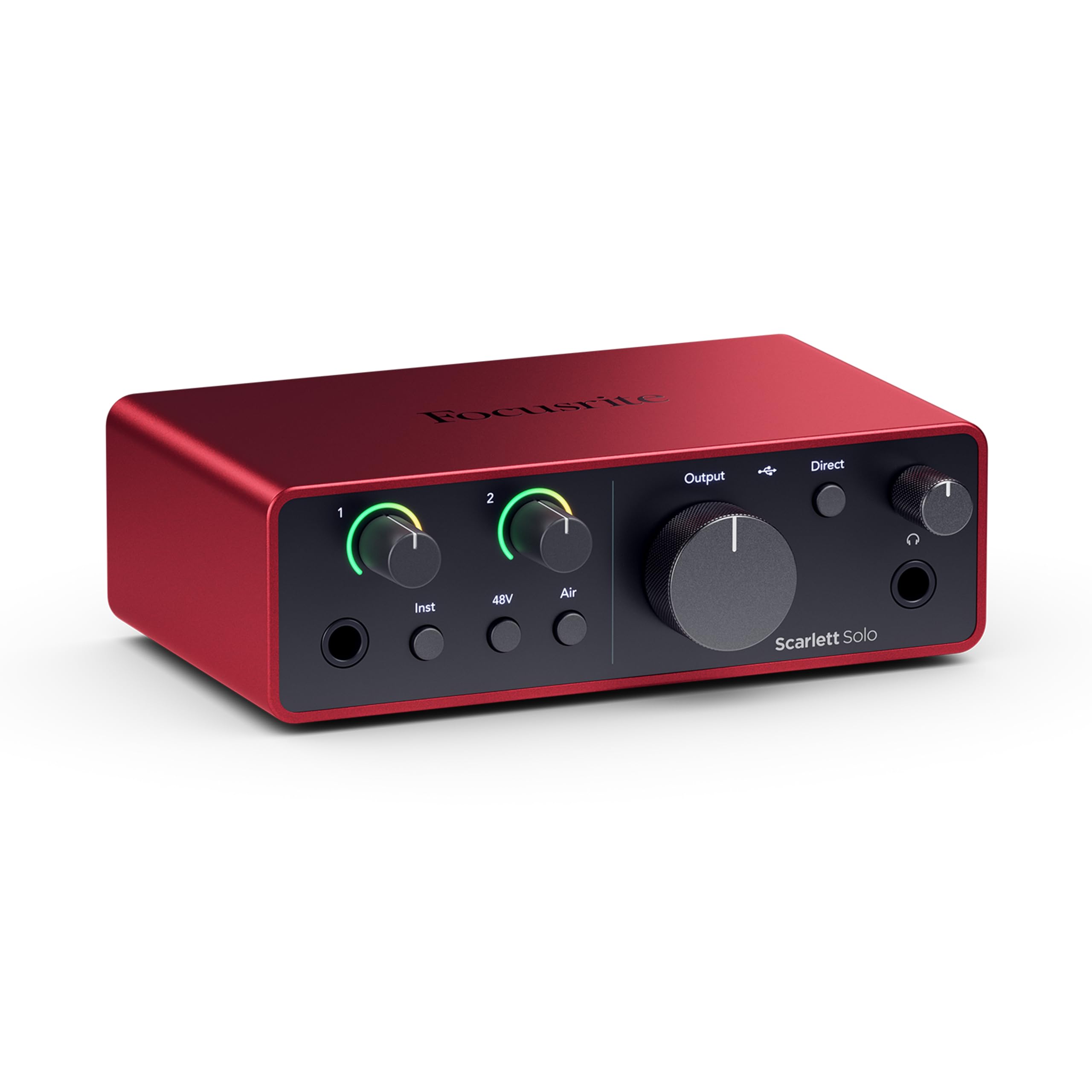
The songwriter’s interface grows up with flagship-grade converters and an Air mode that lifts your voice right out of the mix.
This is the third-gen’s bigger sibling, and the headline number is the jump to a 120dB dynamic range—the same converters found in Focusrite’s flagship interfaces used in world-class studios. For a gamer or streamer, that translates to a cleaner, more open sound with more headroom before distortion. The improved Air mode lifts vocals and guitars to the front of the mix, adding musical presence and rich harmonic drive that makes your voice cut through game audio and music cleanly.
It keeps the same 1 XLR mic preamp and 1 Hi-Z instrument input layout as the 3rd Gen, so you plug in your mic and guitar the same way. Owners describe the sound as “clear, warm, clean” and note the preamps drive RODE dynamic mics excellently, with near-zero latency and a strong headphone amp. The LED gain indicators give you instant visual feedback so you land the right level without guessing. It is heavier than the 3rd Gen at 14.4 ounces, but the build feels more premium.
The honest catch: the XLR gain knob has a small balance around 75%, where too low adds noise and too high clips. Setup is easy on Windows 11, though the included USB-A to C cable (instead of C to C) is a minor gripe for modern laptops. The bundled software—Pro Tools Intro+, Ableton Live Lite, Cubase LE, and Hitmaker Expansion—gives you a full recording suite from the start.
The Upgrade Perks
- 120dB dynamic range matches flagship converters
- Improved Air mode adds presence and harmonic drive
- LED gain indicators prevent clipping mistakes
Watch The Details
- XLR gain knob needs a careful touch around 75%
- USB-A to C cable, not the USB-C to C many laptops prefer
- Firmware update recommended on first plug-in
Grab it if: you are a vocalist or guitarist who wants the latest converter tech and the Air mode’s musical presence without stepping up to a multi-input mixer.
Consider the 3rd Gen if: your budget is tighter—the older model still delivers 56dB of gain and proven reliability for less.
5. Elgato Wave XLR MK.2

The console-style interface that puts a touch-mute button and 80dB of gain right under your streaming thumb.
This is the interface built for streamers first and musicians second, and it shows. The headline is a massive 80dB of gain—the highest on this list—which easily drives even the most power-hungry dynamic mics like the Shure SM7B without any external booster. The onboard Wave FX Processor unifies DSP effects like voice enhancer, compressor, and EQ with VST plugins into one signal chain, so you get broadcast-ready processing without taxing your gaming PC.
Touch control with LED feedback is the star feature: tap the top to mute instantly and glance at the customizable LED lighting to check levels and status at a glance. Ultra-low-latency monitoring at 24-bit, 48kHz resolution means you hear what your audience hears with no distracting delay. The Wave Link software handles precise routing across your game, Discord, and music channels—owners call it smooth and easy, with one noting it replaces Voicemeeter entirely for up to 5 mixes.
The 11.36-ounce unit is a solid, audio-first desktop piece that fits work calls as well as streams, and it integrates natively with the Stream Deck for one-button control. The honest caveats: Wave Link’s current version has occasional crash bugs, and a few owners hit a quirk where half of PC restarts require unplugging and replugging to detect the device. Still, for pure streaming and gaming, the MK.2’s combination of gain, effects, and workflow is tough to top.
Built for Live Streaming
- 80dB gain drives quiet dynamic mics without boosters
- Onboard voice enhancer, compressor, and EQ in one chain
- Touch mute with customizable LED level feedback
Notes From Owners
- Wave Link 3.0.2 can crash without warning
- LED ring color is not adjustable
- Some restarts need a USB re-plug to detect it
Reach for this if: streaming is your main game and you want onboard effects plus Stream Deck integration in a single compact unit.
Look elsewhere if: you need multiple microphone inputs—this is a one-mic interface by design.
6. Universal Audio Volt 176

A compact interface carrying the sound of vintage UA 610 preamps and an 1176-style compressor for instantly polished vocals.
Universal Audio’s Volt 176 brings legendary analog tone to your gaming rig in a way no other interface on this list attempts. Its classic UA 610 preamp with Vintage mode delivers that rich, album-ready sound famously used on countless records, and the built-in analog compressor based on the renowned 1176 adds clarity and punch to vocals—right in the hardware, before anything hits your PC. For streamers, that means your voice arrives already polished and consistent, without needing software plugins.
The compressor is adjustable via a dedicated gain knob, which owners love for its limiter-like ability to catch peaks automatically. You get 2 channels for a mic and instrument, plus the award-winning LUNA Digital Audio Workstation included for recording and mixing with a real analog studio feel. It is portable across MacOS, Windows, iPad, iPhone (iOS 14+) but needs an external Volt power supply and an Apple Lightning to USB Camera Adapter on older iPhones.
Owners doing voiceover work call it “great sounding, low noise, easy to use,” with the built-in compressor being the standout reason to buy. The recurring note is that phantom power resets to off each power cycle, which is actually a safety feature many appreciate. It is not PlayStation 5 compatible, so console-only gamers should look at the Roland BRIDGE CAST instead. At 653 grams, it has a reassuring heft on the desk.
The Sound Advantage
- Vintage 610 preamp mode adds classic analog warmth
- 1176-style compressor smooths vocals in hardware
- LUNA DAW and UAD plugins included
Keep In Mind
- Requires external power supply, not bus-powered
- Volume knob can develop a scratchy feel over years
- No PS5 compatibility
Buy it for: the fastest route to polished, radio-ready vocal tone without learning EQ and compression—the hardware does it for you.
Pass if: you only play on PlayStation 5—this interface will not connect to your console.
7. BEACN Studio

The dual-PC streamer’s dream—one interface that routes 8 channels of clean digital audio between two computers with ease.
If you run a two-computer stream setup, this is the interface engineered specifically for you. BEACN Studio’s proprietary dual USB technology sends up to 8 channels of clean digital audio between computers, consoles, and phones—so your gaming PC and streaming PC share one microphone with zero complicated routing. The BEACN App manages where audio comes from and goes, and BEACN Link provides industry-first remote app assignments, letting you see which programs make sound on your second PC right from your main PC.
The on-board DSP includes EQ, Compression, Expander/Gate, Noise Suppression, and Low Frequency Enhancement, with 32-bit on-board processing delivering zero latency. Owners running a Shure SM7B across two PCs call it a top-notch solution with excellent noise suppression—one even reports it killed the sound of a loud AC unit. The clip guard is described as flawless, and the clean, powerful preamp drives dynamic mics easily. It replaces a multi-interface and DAW setup at a fraction of the cost.
At 6.48 ounces and 8 channels, it is tiny but powerful. The honest trade-offs: the build feels a bit cheap with a hollow button and loose dial, and phantom power resets to ON on reboot, which can be risky for mics that do not need it. There is also no secondary Line Out. But for multi-PC streaming, the routing flexibility is class-leading at this price and the customer service earns praise.
Dual-PC Superpowers
- 8-channel routing between two PCs via dual USB-C
- 32-bit on-board DSP with flawless clip guard
- Excellent noise suppression for noisy rooms
Minor Annoyances
- Plastic build with a cheap-feeling knob
- Phantom power defaults to ON at reboot
- No secondary line out for extra speakers
This is your pick if: you run a two-PC stream and want one box that handles both without a tangled mess of cables and software.
Skip if: you use a single computer—the extra routing power will go unused.
8. Roland BRIDGE CAST
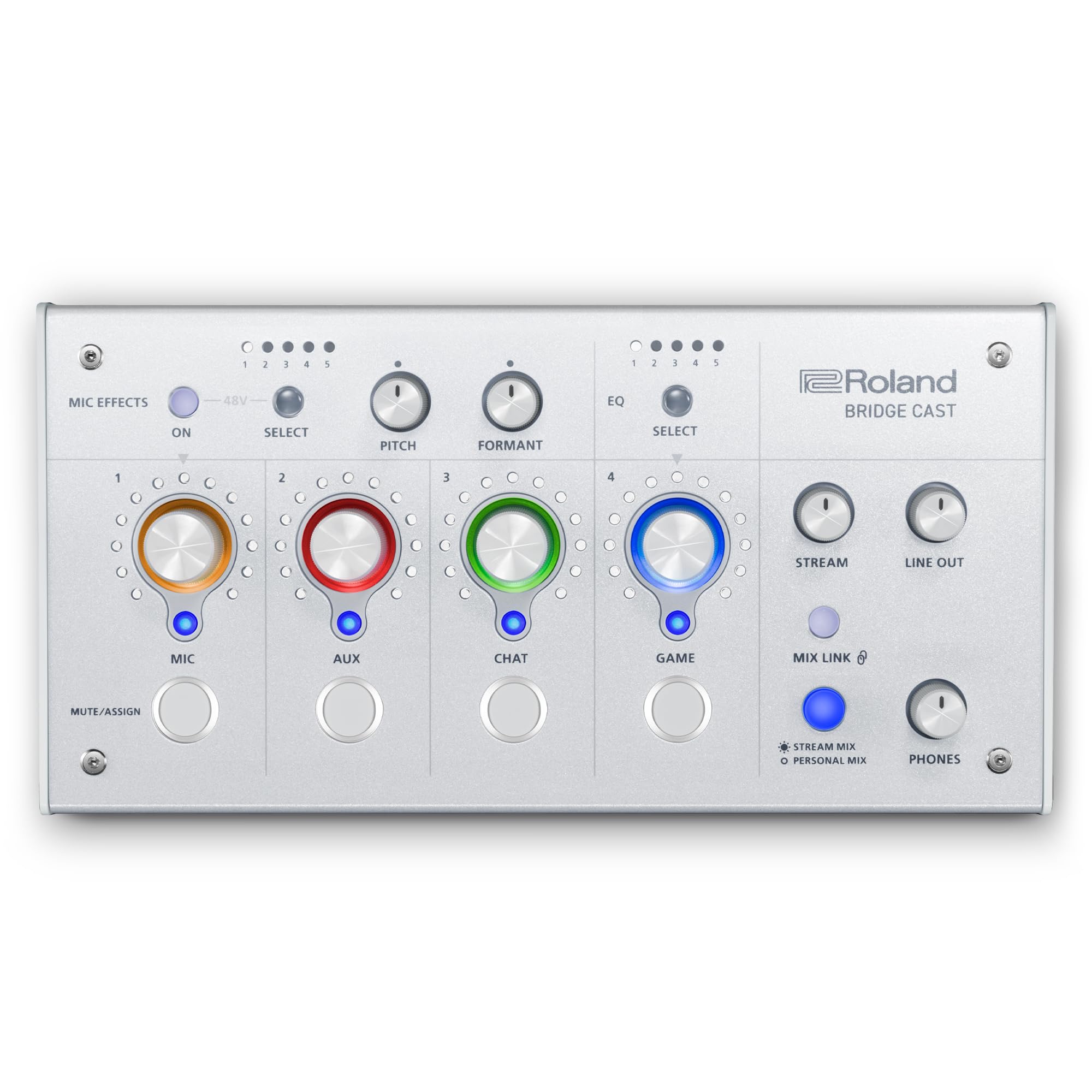
The console gamer’s broadcast hub—a mixer that blends your PC, PlayStation 5, and chat audio with touch control.
This is the only interface on the list that works directly with the Sony PlayStation 5 console, making it the default choice for console-first streamers. BRIDGE CAST is a customizable desktop hub with dual sound mixes, vocal transformer effects, music playback, and sound effects, all designed to take online gaming audio to the next level. Its powerful 32-bit hardware DSP does the heavy processing, so your computer dedicates all its resources to gaming and streaming rather than audio plugins.
You get a high-quality XLR microphone preamp with phantom power for broadcast-grade mics, plus separate personal and audience mixes so you hear one thing while your stream hears another. Owners praise the ability to independently EQ the outputs and route PC, PS5, and Discord audio with on-the-fly adjustment. There are 5 voice pitch/formant presets for fun vocal effects, 5 game EQ presets, and a bleep button for instant censorship. The customizable faceplate and adjustable knob LED colors let you match your setup aesthetic.
Owners switching from the Elgato Wave XLR specifically note the BRIDGE CAST offloads processing from the PC, fixing sluggishness caused by VST plugins. The software gets occasional refinement requests, and the setup is not entirely intuitive the first time—you assign app audio to knobs in the Windows mixer and set the mic to STREAM in OBS. At 16 ounces, it is a solid desk presence, and the RGB knobs and custom faceplates add a gaming-native feel that pure audio interfaces lack.
Console Gaming Ready
- Works directly with PlayStation 5 console
- 32-bit DSP offloads processing from your PC
- Separate personal and audience audio mixes
Setup Notes
- Software needs refinement for some workflows
- Mac audio routing is more limited than Windows
- No click-to-mute dials on the hardware
Reach for it if: you game on PS5 while streaming from a PC and want one hub to mix both worlds cleanly.
Consider the BEACN instead if: you stream from two PCs with no console involved—its 8-channel routing goes deeper.
9. RØDE RØDECaster Duo

The everything box—a two-channel production studio with faders, a touchscreen, SMART pads, and legendary APHEX processing.
This is the flagship of the list, a compact all-in-one production studio that replaces an entire rack of gear. The RØDECaster Duo features two high-quality Neutrik combo jacks for microphones and instruments, powered by ultra-low-noise, high-gain Revolution Preamps with -131.5dBV EIN and 76dB of gain—pristine audio for any mic you throw at it. Four broadcast-quality faders, a high-resolution touchscreen with haptic feedback, and six SMART pads with bank switching put everything at your fingertips.
For creators, the studio-grade effects and powerful APHEX processing include the legendary Aural Exciter and Big Bottom effects—the same processing used in professional broadcast and recording. The 2 kg unit is built for a creator’s desk, with an intuitive layout that owners say streamlines their workflow with no lag and excellent clean audio for vocals and monitoring. It is made for podcasting, streaming, music production, and content creation alike.
This is where the list gets honest about trade-offs. Owners strongly disagree on ease of use: some find it “super easy,” while others describe a steep learning curve, especially when connecting to an iPhone, which may require adapters and setup fiddling. More importantly, reliability is the most-discussed aspect—there are reports of the unit randomly stopping and crashing, sometimes requiring a full 24-hour unplug to reset, with RØDE replacing affected units. It is brilliant when it works, but it is a professional tool that expects patience.
The All-In-One Appeal
- 76dB high-gain Revolution Preamps with -131.5dBV EIN
- Legendary APHEX Aural Exciter and Big Bottom effects
- Touchscreen with haptic feedback and SMART pads
The Honest Catch
- Reliability is a mixed bag—some units crash randomly
- Steep learning curve for beginners, especially on iPhone
- Heavy at 2 kg, designed to stay on your desk
Choose the Duo if: you are a serious creator who wants faders, pads, and studio-grade effects in one elegant package and do not mind a learning curve.
Step down to the Vocaster Two if: you want simpler, dependable two-mic audio without the touchscreen complexity.
Understanding the Specs
Gain (dB)
Gain is how much your interface amplifies the microphone’s weak signal, measured in decibels (dB). Dynamic mics like the Shure SM7B are famously quiet and need a lot of gain—around 60dB or more—to sound full without a separate booster. Interfaces on this list range from 56dB to 80dB. The higher the number, the more headroom you have with power-hungry mics, and the less likely you are to need a Cloudlifter or similar inline preamp.
Phantom Power (48V)
Phantom power is 48 volts sent down the XLR cable to power condenser microphones, which have no internal battery. Interface switches labeled 48V must be turned on for condenser mics to work at all. Dynamic mics do not need it, and some owners note the switch resets differently across models—so know which mic you use and whether your interface remembers the setting after reboot.
Latency and Monitoring
Latency is the delay between speaking and hearing yourself in your headphones. High latency makes you sound like a laggy phone call. Direct or zero-latency monitoring routes your mic straight to your headphones inside the interface, bypassing your computer entirely, so there is no processing delay. Interfaces with on-board DSP—like the BEACN Studio or Roland BRIDGE CAST—also process effects with zero extra latency because the chip handles it locally.
Routing and Mixes
Routing is how an interface sends audio between your mic, PC, console, and stream. Basic interfaces send one signal to your computer. Gaming mixers create separate mixes—one you hear, one your audience hears—so you can adjust game volume, chat volume, and your own voice independently. Dual-PC interfaces like the BEACN Studio route audio between two computers, letting them share one microphone with clean separation.
FAQ
What is the difference between an XLR microphone and a USB microphone for gaming?
How much gain do I need for a dynamic microphone like the Shure SM7B?
Will an audio interface work with my PlayStation 5 or Xbox?
What does phantom power do and do I need to turn it on?
What is zero-latency monitoring?
Can I use a regular gaming headset with an audio interface?
What is the difference between a single-PC and dual-PC streaming setup?
Do I need an audio interface if I only play games and chat on Discord?
What is a DSP and why does it matter for gaming audio?
How does a built-in compressor help my gaming streams?
Final Thoughts: The Verdict
If you want one dependable pick, the audio interface for gaming winner is the Focusrite Scarlett Solo 3rd Gen because it delivers the proven combination of 56dB gain, zero-lag monitoring, and a three-year warranty at an entry-level price. If you co-stream with a partner, grab the Focusrite Vocaster Two for its two-mic inputs and Bluetooth guest connectivity. And for the console-first streamer, the Roland BRIDGE CAST is the one to reach for—its PlayStation 5 support and dual audio mixes simply have no rival on this list.
How We Picked
We do not accept paid placement. Every pick is matched to a real buyer and a real use-case; we do not hands-on test units.
Sources & Methodology
Specifications: manufacturer listings and product documentation. Review insights: verified customer reviews, as of August 2026. Pricing: not shown on this page (it changes often); check the current price via the retailer link.
As an Amazon Associate, FitlyFast earns from qualifying purchases. This does not affect which products we feature.