
Our readers keep the lights on and the weekend projects moving. As an Amazon Associate, I earn from qualifying purchases.
Your stream’s audio chain starts at the interface, and a muddy, noisy signal loses viewers before they ever see your face. The right unit delivers clean preamps, zero-latency monitoring, and the routing flexibility to separate your game audio, mic, and chat into independent channels—all without a background hum.
I’m Rikta — the co-founder and writer behind FitlyFast. I’ve spent countless hours analyzing preamp gain specs, loopback routing tables, converter quality, and real-world driver stability across dozens of models to separate the streaming-ready units from the ones that cause more setup headaches than they solve.
This guide breaks down the critical specs, streaming-specific features, and real performance of the nine most capable units on the market to help you pick the right audio interface for streaming without overspending on unnecessary channels or missing the routing features that matter most.
How To Choose The Best Audio Interface For Streaming
Streaming audio interfaces differ from standard recording interfaces in one key way: they need to handle multiple audio sources (game, chat, mic, music) simultaneously and output them in separate mixes for you and your audience. Look for loopback functionality, sufficient preamp gain for your mic type, a sample rate of at least 48 kHz with 24-bit depth, and enough I/O to connect your microphone and any additional sound sources without external adapters.
Loopback and Submix Routing
Loopback allows the interface to send audio from your computer back into the input stream so your broadcast software can capture it alongside your microphone. Without it, your viewers hear your mic but not your game or desktop audio. Some interfaces handle this entirely in hardware (dedicated mix knobs), while others rely on a companion software mixer—check which approach fits your workflow before buying.
Preamp Gain and Mic Compatibility
Dynamic microphones like the Shure SM7B or Rode PodMic require significantly more clean gain than condenser mics. If your interface delivers less than 60 dB of gain, you will likely need a separate inline preamp (like a CloudLifter or FetHead) to achieve adequate levels without hiss. Interfaces with 70 dB or more eliminate this need entirely.
Latency and Monitoring
Streaming demands real-time performance. A round-trip latency above 10 ms causes a noticeable delay between speaking and hearing yourself in your headphones. Look for interfaces with direct hardware monitoring or sufficiently low ASIO buffer performance (under 6 ms round-trip at 128 samples) so your vocal timing stays natural on camera.
Quick Comparison
On smaller screens, swipe sideways to see the full table.
| Model | Category | Best For | Key Spec | Amazon |
|---|---|---|---|---|
| Focusrite Vocaster Two | Mid-Range | Beginner podcasters and streamers | 70 dB gain, Auto Gain, Enhance | Amazon |
| Shure MVX2U Gen 2 | Mid-Range | Portable XLR-to-USB conversion | 60 dB gain, Real-Time Denoiser | Amazon |
| MAONO AME2C Pro Bundle | Mid-Range | All-in-one podcast bundle with sound pads | 10 channels, 36 sound pads | Amazon |
| Universal Audio Volt 2 | Mid-Range | Vintage preamp sound on a budget | Vintage 610 emulation, 24-bit/192 kHz | Amazon |
| M-AUDIO AIR192x4 VSPro | Mid-Range | Complete starter recording package | 24-bit/192 kHz, 2.59 ms latency | Amazon |
| BEACN Mix Create | Premium | Per-app volume and submix control | 5″ display, unlimited audio sources | Amazon |
| MOTU M4 | Premium | Low-noise home studio with loopback | 4-in/4-out, LCD meters, loopback | Amazon |
| Zoom PodTrak P8 | Premium | Multi-host in-person podcast recording | 6 XLR, 6 headphone outs, 36 pads | Amazon |
| RØDE RØDECaster Duo | Premium | All-in-one production for serious creators | 76 dB gain, APHEX processing | Amazon |
In‑Depth Reviews
1. Focusrite Vocaster Two

The Vocaster Two delivers 70 dB of clean gain through its XLR inputs labeled Host and Guest, which means you can drive a demanding dynamic mic like the PodMic without an external booster—a significant advantage over many interfaces in its tier. The Auto Gain button sets your level in about ten seconds, and the Enhance feature applies one of four voice presets (broadcast, music, production, or vocal) that actually sound musical rather than processed.
The hardware mute button is a streaming lifesaver during coughs or off-mic comments, though the rubberized switch does feel like a potential long-term failure point. Bluetooth phone connectivity lets you bring a caller into the stream without additional cables, and the camera line-out sends your audio directly to a DSLR or mirrorless camera, removing the need to sync audio in post-production—a clean signal chain from mic to stream.
The plastic chassis is more rugged than it looks, but the front-mounted headphone jacks protrude enough to catch on desk clutter. Some users report the included USB-C cable is unreliable; swapping it for a high-quality shielded cable eliminates the issue. For streamers who want broadcast features without learning complex software, this is the most accessible entry point.
Why it’s great
- 70 dB of gain removes the need for an external preamp
- Auto Gain and Enhance presets speed up setup
- Bluetooth and camera output simplify multi-device streaming
Good to know
- Plastic build may not survive frequent travel
- Included USB cable can be faulty
2. Shure MVX2U Gen 2

The MVX2U Gen 2 is an XLR-to-USB-C dongle that transforms any dynamic or condenser XLR mic into a USB plug-and-play device. Its standout feature is onboard Shure Digital Audio Processing—Auto Level Mode continuously adjusts gain in real time, the Real-Time Denoiser suppresses room rumble without artifacts, and the Digital Popper Stopper handles plosives before they reach the recording. You choose a tone (Dark, Natural, or Bright) that persists across restarts.
With 60 dB of clean gain and 48V phantom power, the MVX2U can drive an SM7B to adequate levels without a CloudLifter, though you’ll run the gain near maximum for quiet speakers. The MOTIV app (available on desktop and iOS/Android) gives you manual EQ, compression, and limiter controls, plus the ability to save settings to the device so your configuration stays even when unplugged.
The form factor is the MVX2U’s killer advantage: it weighs about 100 grams and fits in a pocket, making it ideal for streamers who travel or use multiple locations. The main limitation is a single XLR input, so it is strictly a one-mic solution. A small number of units arrive defective, so testing immediately on arrival is wise; Shure’s warranty process is straightforward but requires a ticket.
Why it’s great
- Ultra-portable with onboard DSP that sounds good
- MOTIV app provides full EQ and compression control
- 48V phantom and 60 dB gain eliminate need for extra gear
Good to know
- Single XLR input limits multi-mic setups
- Some units have QC issues—test immediately
3. MAONO AME2C Pro Bundle

The AME2C Pro bundles a 10-channel audio mixer with an XLR dynamic microphone, boom arm, and all necessary cables, creating a turnkey solution for new streamers. The mixer includes 11 customizable sound pads (three of which record up to 60 seconds each with one-key looping, plus eight at 20 seconds), six reverb modes, a 12-step auto-tune, and a three-band EQ per channel. You can also plug in a guitar or bass through the 6.35 mm instrument jack and apply the same processing.
The bundled XLR dynamic mic delivers clean audio with decent noise isolation, though it lacks the detail and headroom of dedicated broadcast mics. The 60 dB of preamp gain is adequate for most dynamic mics, but you may need to run the gain near maximum for quieter voices. The interface connects via USB-C to a computer or tablet, and the two LIVE-OUTPUT jacks let you send audio to a smartphone for simultaneous livestreaming—a dual-platform streaming feature rarely found at this price point.
Long-term reliability is the main concern: some users report sound pad buttons failing after two months, and the pad volume knob has a non-zero minimum level that can’t be turned completely off. The controls feel finicky—you need to run a sound check before every stream because the saved pad levels occasionally reset. For streamers on a strict budget who need an all-in-one kit, the AME2C Pro delivers impressive features per dollar, but it comes with a shorter expected lifespan than premium alternatives.
Why it’s great
- Complete bundle with mic, arm, and cables included
- 36 customizable sound pads and six reverb modes
- Dual-platform live output via USB and 3.5 mm jacks
Good to know
- Sound pads and controls may fail after weeks of use
- Gain at maximum is needed for quieter mics
4. Universal Audio Volt 2

The Volt 2 packs the emulation of UA’s classic 610 tube preamp into a compact desktop interface. Engaging Vintage mode adds a warm, slightly saturated harmonic texture to your voice that mimics the sound of a high-end analog console—a noticeable improvement over sterile modern preamps, especially for vocal-heavy streams. The converters operate at 24-bit/192 kHz, delivering a noise floor and transient response that rival UA’s much pricier Apollo series.
The interface is USB bus-powered and works with Mac, Windows, iPad, and iPhone, though iOS users need an external power supply and an Apple Lightning-to-USB Camera Adapter. The included LUNA DAW integrates tightly with the Volt 2, providing a near-zero-latency monitoring experience that is especially useful for musicians who also stream. Free UAD plugins and instruments come with the unit, giving you access to studio-grade compression, EQ, and reverb.
At this price, the Volt 2 omits loopback routing, which is a significant omission for streamers who need to capture desktop audio alongside their mic. You can work around this with third-party software (like VoiceMeeter or OBS’s internal routing), but it adds complexity. The two inputs handle a microphone and one instrument, so multi-mic podcasts require an external mixer. For solo streamers who prioritize warm vocal tone and don’t mind software routing, the Volt 2 delivers exceptional sound quality.
Why it’s great
- Vintage 610 emulation adds real analog warmth
- Crystal-clear 24-bit/192 kHz converters
- Includes LUNA DAW and UAD plugin suite
Good to know
- No hardware loopback—requires software routing
- Only two inputs limit multi-mic streams
5. M-AUDIO AIR192x4 VSPro

The AIR192x4 VSPro ships as a complete bundle: the AIR 192|4 interface, Nova condenser microphone, shock mount, XLR cable, and HDH40 headphones. The interface itself features transparent Crystal Preamps with a class-leading round-trip latency of just 2.59 ms, making it one of the most responsive USB interfaces for real-time vocal monitoring. The 24-bit/192 kHz converters capture every detail without coloration, though the Nova microphone lacks the body and warmth of dedicated broadcast mics.
The bundle includes a generous software suite: MPC Beats, Ableton Live Lite, Touch Loops, Creative FX Collection, Xpand!2, Mini Grand, and Revalver. For a streamer who also produces music or sound effects, this eliminates the need to buy separate DAW and plugin licenses. The interface provides one XLR+¼” combo input and one dedicated ¼” instrument input, plus stereo ¼” main outputs and a ¼” headphone out with independent level control.
The main trade-off is input quantity: two inputs total (one mic, one instrument) mean you cannot run two microphones for a co-host podcast without buying an additional preamp or mixer. Some users report the USB connection failing after several months, with M-Audio’s RMA process providing a replacement unit. For a solo streamer who wants a turnkey studio-quality package that doubles as a music recording setup, this bundle delivers strong value.
Why it’s great
- 2.59 ms round-trip latency for real-time monitoring
- Complete bundle with mic, headphones, and software
- Crystal Preamps deliver clean, transparent recording
Good to know
- USB connection failures reported after months of use
- Two inputs limit expansion without external gear
6. BEACN Mix Create

The Mix Create is not a traditional audio interface—it is a dedicated USB audio mixer designed specifically for streamers who need per-application volume control and submix routing. Its 5-inch full-color touchscreen displays all your audio sources (games, chat, mic, music, alerts) as individual faders, and the smooth push-button encoders let you adjust any source’s volume or mute it instantly.
The submix functionality is the core differentiator: you can create separate mixes for your headphone output and your stream output, so you hear your game loud while your audience hears it at a different level, or you can silence a game notification that would distract viewers. The advanced routing table lets you send any source to any output—headphones, chat, or streaming software—and mute any route on command. This level of control eliminates the need for complex VoiceMeeter setups.
The Mix Create requires the BEACON software to function, and the software is Windows-only with Mac support still incomplete. It does not natively accept XLR microphones; you still need a separate audio interface or USB microphone for your mic input. The unit has been reported to have occasional issues with non-BEACON USB mics, so pairing it with the BEACON Mic is the recommended path. For streamers who already own a USB mic and want granular control over every audio source, this is the most powerful mixer on the market.
Why it’s great
- Per-app volume control with intuitive touchscreen interface
- Separate headphone and stream submixes
- Advanced routing table eliminates software routing complexity
Good to know
- Requires PC software—no standalone operation
- Does not accept XLR mics directly
7. MOTU M4

The MOTU M4 delivers four inputs and four outputs over USB-C with a noise floor so low that it effectively disappears from recordings. The two mic preamps are clean and transparent, with enough headroom to handle condenser or dynamic mics without coloration. The built-in LCD level meters on each input are a rarity at this price and let you visually confirm your gain staging at a glance—no need to guess or switch to a DAW to check levels.
The hardware direct monitoring mix is the M4’s secret weapon for streamers: a physical knob blends the input signal and computer playback so you hear yourself without any software-induced delay. This is separate from the loopback feature, which the M4 implements at the driver level (dedicated loopback output), making it compatible with OBS and other streaming software without third-party tools. The front-panel 48V phantom power switch for each pair of inputs is convenient for mixing condenser and dynamic mics.
The headphone amp is bus-powered and noticeably weaker than standalone options, so high-impedance headphones (above 150 ohms) may not reach comfortable volume without an external headphone amplifier. Some users report a pitch-shifting quirk on certain Windows systems, which is resolved by disabling Windows Fast Startup. For a serious streamer who also records music and needs low-latency ASIO performance, the M4 offers the best driver stability and cleanest signal path in its class.
Why it’s great
- Extremely low noise floor and clean preamps
- LCD level meters on every input
- Hardware direct monitoring and driver-level loopback
Good to know
- Headphone amp is weak for high-impedance headphones
- Pitch-shifting bug requires Windows Fast Startup to be off
8. Zoom PodTrak P8
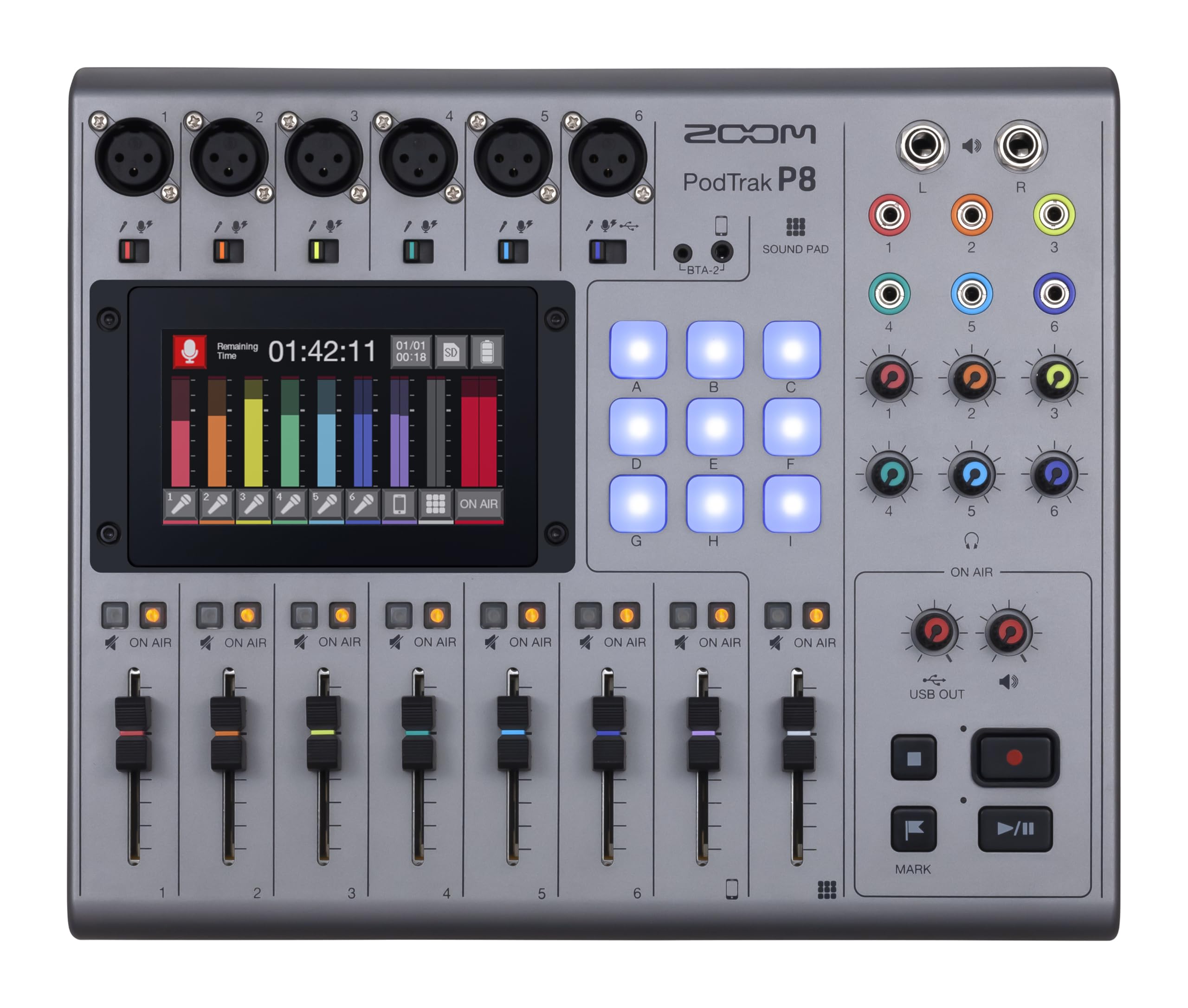
The PodTrak P8 functions as a standalone recorder, USB audio interface, and mixer all in one, supporting up to six XLR microphones with individual headphone outputs for each participant. The 4.3-inch color touchscreen gives you visual access to per-channel EQ, compression, de-essing, noise reduction, and limiters without needing an external computer. The Mix-Minus function automatically cancels echo when you bring a phone caller into the stream—a critical feature for interview-based podcasts.
The 36 sound pads (nine physical pads across four banks) let you trigger jingles, ads, or prerecorded segments at the push of a button, and the unit records everything directly to an SD card at up to 24-bit/48 kHz WAV quality. When used as a USB audio interface, the PodTrak P8 presents 13 inputs and 2 outputs to your streaming software, giving OBS access to all six individual mic channels plus the stereo mix. It runs on four AA batteries for about two hours, allowing completely mobile recording.
The trade-offs are size and complexity: the P8 is the largest unit in this guide at 11.5 x 9.5 x 2 inches, and the touchscreen interface has a learning curve for the on-the-fly adjustments that experienced podcasters use. The preamps are clean but not as transparent as the MOTU or RØDE offerings—they add a subtle mid-forward character. For a streamer or podcaster who regularly hosts multiple in-person guests and wants to record and stream simultaneously without a computer, the PodTrak P8 is the most complete solution.
Why it’s great
- Six XLR inputs with individual headphone outputs
- Standalone recording to SD card—no computer required
- Built-in Mix-Minus for phone interviews
Good to know
- Bulky footprint takes up significant desk space
- Preamps add subtle coloration—not fully transparent
9. RØDE RØDECaster Duo
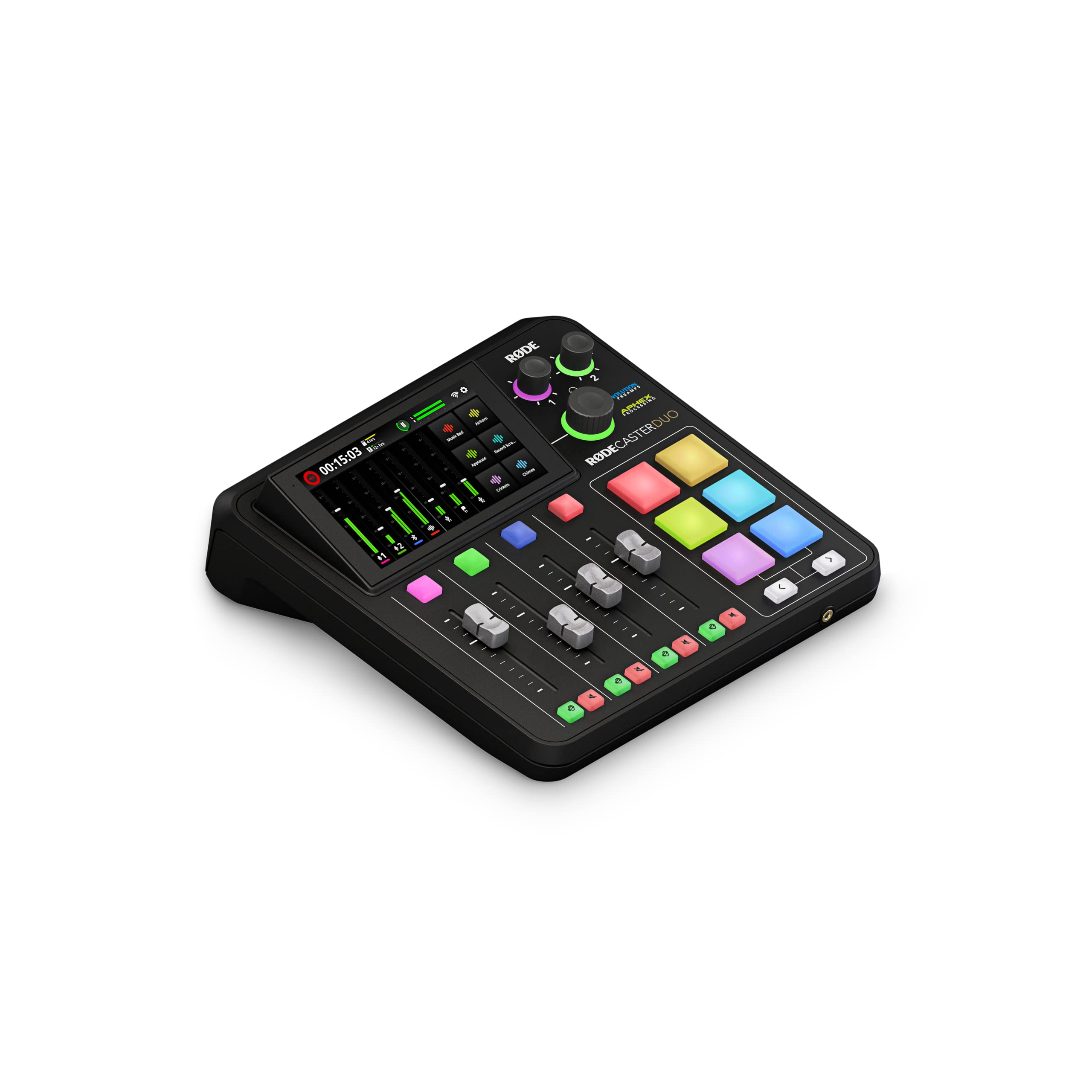
The RØDECaster Duo is a compact all-in-one production studio that integrates four broadcast-quality faders, a high-resolution haptic touchscreen, and two Neutrik combo jacks powered by Revolution Preamps delivering 76 dB of clean gain and an EIN of -131.5 dBV. This means any low-output dynamic mic—SM7B, RE20, PodMic—reaches broadcasting volume without a separate preamp. The APHEX processing suite, including the legendary Aural Exciter and Big Bottom effects, adds professional polish in real time.
The six SMART pads with bank switching support custom sound effects, jingles, and recording triggers, and the unit records directly to an SD card at up to 24-bit/48 kHz. The 3.5 mm TRRS input accepts a headset for monitoring, and the USB-C connection routes 4 channels to your computer, giving streaming software access to your mic, a stereo mix, and the pads simultaneously. The touchscreen interface handles EQ, compression, and noise gate settings with haptic feedback that makes on-the-fly adjustments feel tactile and precise.
The main drawback is the learning curve: the RØDECaster Duo is not plug-and-play for beginners. Routing for iPhone streaming requires extra adapters and specific cables, and the onboard software, while powerful, has a convoluted routing table that confuses first-time users. Some users report buggy virtual fader behavior and issues with the mute function. For serious content creators who are willing to invest setup time, the RØDECaster Duo delivers the most polished and feature-rich all-in-one streaming experience available.
Why it’s great
- 76 dB of gain drives any dynamic mic without an external booster
- APHEX processing adds professional polish to live audio
- Compact footprint with four faders and six SMART pads
Good to know
- Steep learning curve—not beginner friendly
- Software bugs reported with routing and mute features
FAQ
Do I need a separate audio interface if I already have a USB microphone?
What is the minimum sample rate I should use for streaming?
Can I use a recording-focused interface for streaming without loopback?
Final Thoughts: The Verdict
For most users, the audio interface for streaming winner is the Focusrite Vocaster Two because it combines 70 dB of gain, Auto Gain setup, and broadcast presets in a simple USB-C package that needs no external booster for dynamic mics—directly addressing the most common streaming audio pain points. If you want per-application volume control and hardware submixing without complex software, grab the BEACN Mix Create. And for the ultimate all-in-one production studio with professional APHEX processing and 76 dB of gain, nothing beats the RØDE RØDECaster Duo.