
Our readers keep the lights on and the weekend projects moving. As an Amazon Associate, I earn from qualifying purchases.
Specs are compiled from manufacturer listings and verified buyer reviews and can change over time — please confirm the key details on the product page before buying.
A home recording interface should make your mic and guitar sound like the real performance — not thin or noisy. The trouble is, many entry-level units hide their limits in the noise floor and preamp gain, leaving you with recordings you have to fix in the mix. This guide covers seven options, from compact bus-powered units to expandable studio centerpieces, so you know which one fits your setup.
I’m Rikta — the founder and writer behind FitlyFast. This guide is built by comparing the manufacturers’ published specifications and the patterns across verified customer reviews, so you get each pick’s real strengths and trade-offs instead of marketing spin.
Finding the right audio interface under $1000 depends on matching your input needs with the preamp quality and converter specs that actually lift your sound.
Quick Picks
- Focusrite Scarlett 18i20 4th Gen — Best Overall
- PreSonus Quantum HD 2 — Premium Preamp Pick
- Universal Audio Apollo Solo USB Heritage Edition — DSP Studio Pick
- MOTU M4 4×4 USB-C Audio Interface — Best Value Home Studio
- Solid State Logic SSL 2 MKII — Analog Character Pick
- Behringer UMC1820 — Multi-Channel Budget
- Universal Audio Volt 2 — Entry-Level Champion
How To Choose The Best Audio Interface Under $1000
The single most important decision for a home studio is matching your interface’s input and preamp count to your workflow. A solo podcaster needs a clean 2-channel unit, but a band recording drums needs eight preamps minimum, plus ADAT expansion (a digital port that lets you add even more inputs later) to cover every mic.
Inputs, Preamps, and Expandability
Count your physical inputs first. Each mic or instrument you want to record simultaneously needs its own preamp channel. If you think you might grow, look for an interface with ADAT or S/PDIF ports — these let you add extra channels without buying a whole new interface. The Focusrite Scarlett 18i20 and the Behringer UMC1820 both offer ADAT, so you can pair them with an expansion unit down the road and double your inputs without replacing the core device.
Sample Rate and Bit Depth
You will see numbers like 24-bit / 96 kHz or 32-bit / 192 kHz. The bit depth affects the dynamic range — how quiet the quiet parts can be before the noise floor rises. The sample rate determines the highest frequency you can capture accurately. For most music and podcast work, 24-bit / 48 kHz is plenty, but a 192 kHz maximum sample rate gives headroom for sound design or future projects. Units like the PreSonus Quantum HD 2 and the MOTU M4 both hit a maximum sample rate of 192 KHz, versus the Behringer UMC1820 at 96 KHz.
Build, Connectivity, and Power
Bus-powered interfaces (the unit draws power from your computer via USB) are great for mobile rigs but sometimes limit headphone output or phantom power stability. Externally-powered units like the Behringer UMC1820 or the Focusrite Scarlett 18i20 give you consistent voltage across all preamps and a stronger headphone amp. Check the item weight and dimensions too — the Behringer comes in at 3.97 Pounds and measures 7.2″D x 24.35″W x 4″H, versus the compact MOTU M4 at 4.25″D x 8.25″W x 1.75″H, and that weight difference matters if you rack-mount your gear.
Quick Comparison
| Model | Best For | Channels | Max Sample Rate | Weight | Amazon |
|---|---|---|---|---|---|
| Focusrite Scarlett 18i20 4th Gen | Full multitrack studio | 18 | 192 KHz | 8.04 Pounds | Amazon |
| PreSonus Quantum HD 2 | High-end preamp quality | 20 | 192 KHz | 2.9 Pounds | Amazon |
| Universal Audio Apollo Solo USB HE | DSP-powered tracking | 2 | 192 KHz | 16 ounces | Amazon |
| MOTU M4 4×4 | Home studio value | 8 | 192 KHz | 16 ounces | Amazon |
| Solid State Logic SSL 2 MKII | Signature analog color | 2 | 192 KHz | 2.57 pounds | Amazon |
| Behringer UMC1820 | Budget multi-channel rig | 18 | 96 KHz | 3.97 Pounds | Amazon |
| Universal Audio Volt 2 | Entry-level simplicity | 2 | 192 KHz | 650 Grams | Amazon |
In‑Depth Reviews
1. Focusrite Scarlett 18i20 4th Gen
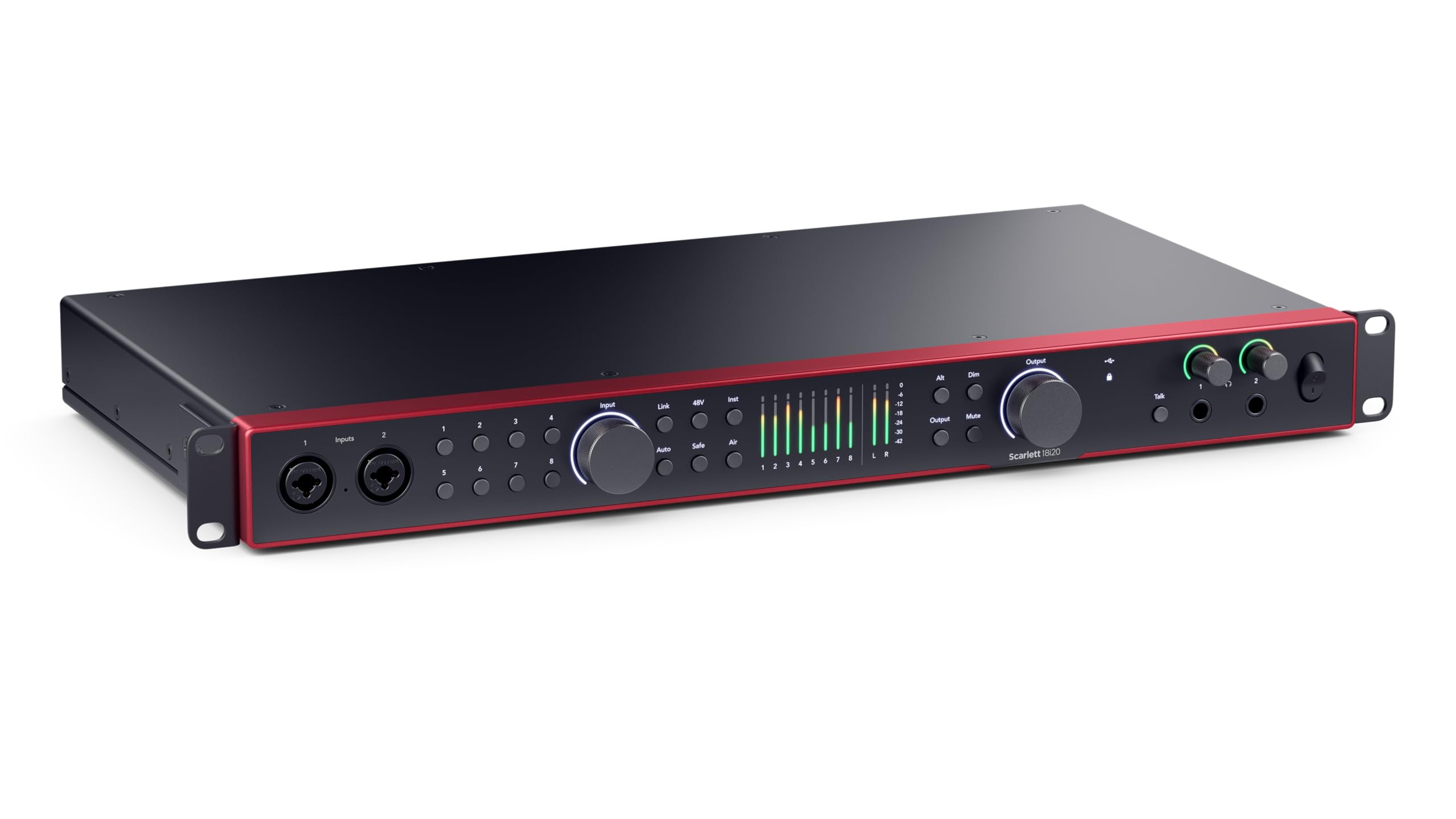
The multitrack powerhouse that grows with your studio.
If you are recording a full band, tracking drums, or running a multi-mic podcast, you want the Focusrite Scarlett 18i20. It delivers 18 inputs and 20 outputs across eight 4th Generation mic preamps, each with 69dB of gain, plus ADAT, S/PDIF, and MIDI I/O, so you can expand further without swapping gear. The converters come from Focusrite’s RedNet range, giving you a 122dB dynamic range — that is studio-grade headroom for keeping quiet takes clean and loud ones undistorted.
The 4th Gen adds practical tools you did not know you needed until you used them. The Auto Gain button sets your recording level instantly, and Clip Safe monitors your input and adjusts gain in real-time to prevent clipping. Buyers report the initial hardware setup was a breeze on Windows 11, and one owner noted the unit feels solid enough to expect at least ten years of use, just like their Scarlett 2i2 first-gen from 2013. The Air modes bring presence and harmonic drive to vocals, mimicking classic studio console character without needing extra outboard gear.
What It Does Best
- Eight mic preamps for serious multitrack recording
- Auto Gain and Clip Safe prevent takes ruined by bad levels
- RedNet-derived converters with 122dB dynamic range
What To Keep In Mind
- At 8.04 Pounds it is a heavy 1U rack unit, not for mobile use
- You need the desktop app to enable all input channels
Best For Serious Studios: If you record multiple sources simultaneously and want a centerpiece interface that expands via ADAT, this is your choice.
Consider Alternatives: For a solo musician who only needs two inputs, a lighter unit like the MOTU M4 saves desk space and money.
2. PreSonus Quantum HD 2
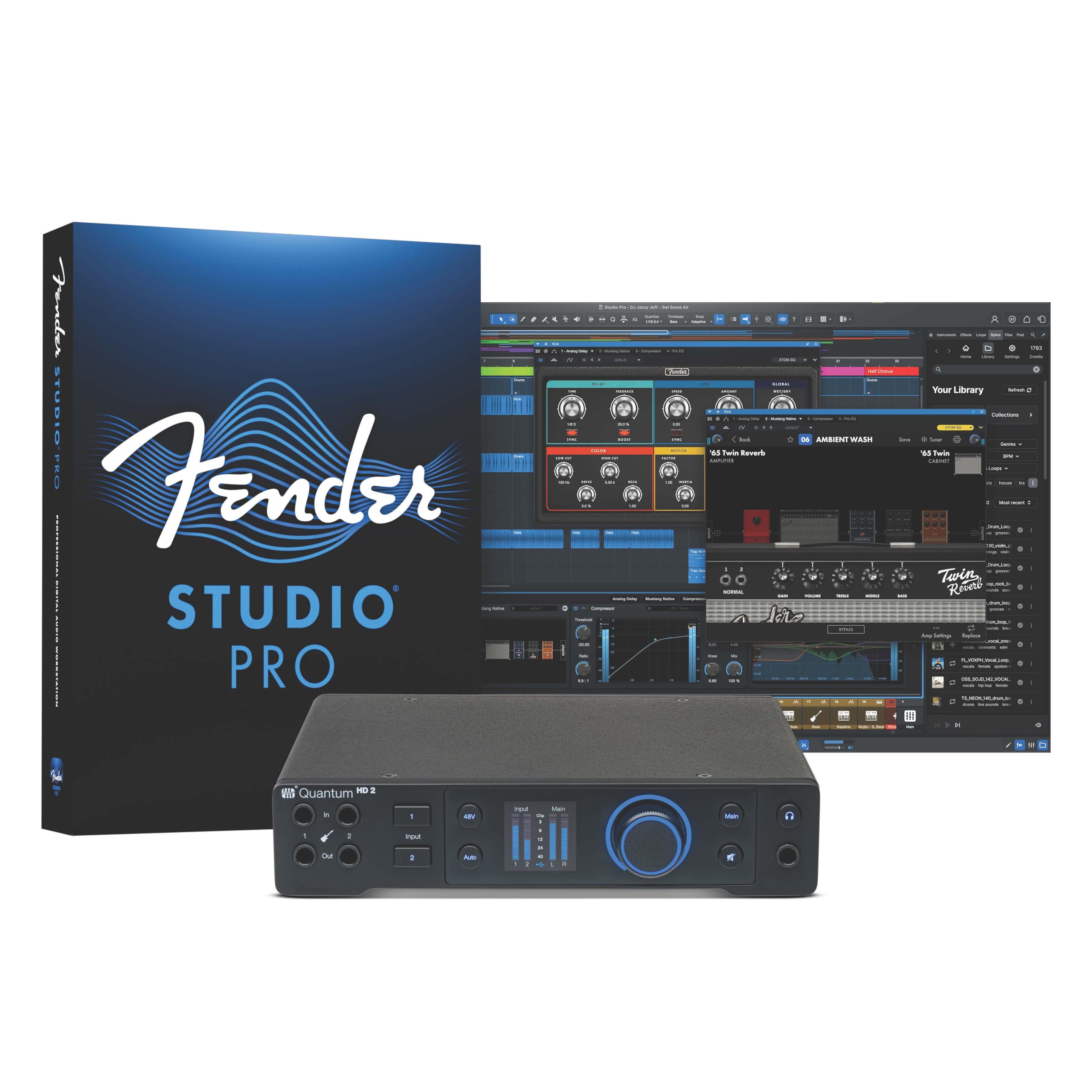
Clean preamps with +75 dB of gain and a custom low-latency driver.
The PreSonus Quantum HD 2 stands out for its two newly designed MAX-HD mic preamps, which offer +75 dB of gain — that is enough to drive even quiet dynamic microphones without needing a separate booster. It has 20 x 24 channels of 32-bit / 192 kHz USB-C audio, and at a maximum sample rate of 192 KHz versus the Behringer UMC1820 at 96 KHz, this interface keeps up for high-sample-rate work in film or sound design without dropping details. The instrument input was co-developed with Fender engineers, which owners mention makes it the only interface where their guitars plug in without impedance issues.
The Auto Gain button sets your levels automatically, though customers note the auto-gain is not perfect, the total gain and audio quality here are superior to most competitors. It ships with a Studio One Pro perpetual license, so you get a full DAW included in the box. The Universal Control App lets you control preamp gain and phantom power from your phone or tablet, which is handy if your interface is in a rack across the room. At 2.9 Pounds and measuring 7.5″D x 8.5″W x 1.9″H, it is compact enough for a desktop setup but feels reassuringly dense.
Where It Excels
- +75 dB preamp gain handles quiet mics easily
- Fender-co-developed instrument input sounds natural for guitar and bass
- Includes full Studio One Pro license with minimal bloatware
Where It Falls Short
- Auto-gain feature is less reliable than manual level setting
- Fewer out-of-the-box effects than some competitors
Reach For This If: You want the highest preamp gain and a flexible control app, plus a full DAW license included.
Look Elsewhere If: You need a larger number of simultaneous analog inputs without using ADAT expansion.
3. Universal Audio Apollo Solo USB Heritage Edition

Near-zero latency tracking through classic vintage emulations.
The Universal Audio Apollo Solo USB Heritage Edition brings UAD SOLO Core processing into your recording chain, letting you track through emulations of vintage compressors, EQs, tape machines, and guitar amps from Neve, API, Avalon, Manley, Marshall, and Fender — all with near-zero latency because the processing happens inside the interface, not on your computer. It is a 2-input, 2-output interface with a maximum sample rate of 192 KHz and a top-tier headphone amplifier that reviewers point out sounds cleaner, fuller, and tighter than any computer DAC they had used before. The Heritage Edition includes five premium plug-in titles from Teletronix, Pultec, and UA, which the maker values at.
The Unison technology sets this apart from other small interfaces: when you plug in a microphone or guitar, the preamp’s impedance and gain stage physically change to match the emulation you have loaded, so a Neve preamp emulation behaves like a real Neve preamp, not just a software filter. Buyers confirm the audio quality is beautiful once everything is connected, but installation on Windows 11 can be extremely frustrating — one owner tried five cables before a Belkin Thunderbolt 4 USB-C cable finally worked. At 16 ounces, it is light and portable, but you need a Thunderbolt 4 cable, which is not included.
Signature Sound
- UAD SOLO Core processing for real-time, near-zero latency effects
- Unison preamps physically mimic classic analog hardware
- Excellent headphone amp for low-noise monitoring
Warning Signs
- Windows installation can be extremely difficult and cable-dependent
- Only 2 inputs, no ADAT expansion for adding channels later
Ideal For: An engineer who wants to track vocals or guitars through vintage emulations without taxing their computer’s CPU.
Not For: Anyone needing more than two simultaneous inputs or a smooth Windows plug-and-play setup.
4. MOTU M4 4×4 USB-C Audio Interface

Four inputs and a built-in loopback at a price that respects your budget.
The MOTU M4 packs 4-in/4-out USB-C connectivity, 2 mic preamps, and a maximum sample rate of 192 KHz into a box that measures 4.25″D x 8.25″W x 1.75″H and weighs 16 ounces, versus the Behringer UMC1820 at 3.97 Pounds if you carry your gear between rooms. It has 8 channels total (4 in, 4 out), which means more simultaneous recording paths than its physical XLR inputs suggest, thanks to the built-in loopback feature — a digital mixer that lets you route computer audio back into your DAW for podcasting or livestream gaming.
Buyers consistently praise the transparent sound, rock-solid Windows drivers, and very low noise and distortion. The LCD screen gives you a clear level readout for each channel, and the front-panel 48V phantom power switch is easy to reach. One reviewer noted a quirk: an occasional pitch-shift bug that they fixed by disabling Windows fast startup. The headphone amp is a bit weak on USB bus power, but if you use an external headphone amp, that shortfall disappears. At 4.25″D x 8.25″W x 1.75″H, it takes up very little desk space, and the physical direct monitoring mix control is rare at this price point.
Strengths
- Built-in loopback for podcasting and streaming without extra cables
- Very low noise floor and clean preamps with 192 KHz maximum sample rate
- Compact and light at 16 ounces for easy portability
Weak Points
- Headphone amp is underpowered when bus-powered
- Volume knobs have an unusual zero point at 25% rotation
Grab It If: You want a core home-studio interface with four inputs, loopback, and professional converters in a small footprint.
Skip It If: You need a powerful headphone output without buying an external amp.
5. Solid State Logic SSL 2 MKII

SSL’s famous console sound in a compact desktop package.
If you want that polished, pro-studio analog feel without the rack size, the Solid State Logic SSL 2 MKII brings 32-bit / 192 kHz AD/DA converters and the brand’s Legacy 4K analog enhancement circuit directly into your recording chain. The Legacy 4K button adds a subtle high-frequency sheen and harmonic saturation that shoppers say makes their voice sound crisper and mouth noises lessened. It is a 2×2 interface with two XLR mic preamps, two 1/4-inch line or Hi-Z inputs, two headphone outputs, and two 1/4-inch line outputs, plus MIDI I/O on 5-pin DIN jacks.
The high-pass filter (HPF) is a standout tool that buyers report eliminated rumble from their recordings, cleaning up low-end noise before it hits the converters. At 2.57 pounds, it is noticeably heavier than the MOTU M4 at 16 ounces, but that weight comes from the stainless steel construction and rubber feet that give it an industrial, rock-solid feel. It is bus-powered and works with Mac and Windows — one reviewer on Windows 11 confirmed no driver issues and an easy firmware update. The headphone amp is powerful and quiet, with one owner calling it excellent for the price point.
What You Get
- Legacy 4K analog enhancement adds studio character
- High-pass filter cleans up rumble and mouth noises
- Stainless steel build feels premium and durable
What You Give Up
- Only 2 inputs with no ADAT expandability
- Not 32-bit float architecture (can clip if input levels are too high)
Perfect For: Solo musicians and podcasters who want SSL’s signature analog color and a high-quality headphone amp in a compact, well-built unit.
Consider Alternatives: If you need more than two inputs or plan to expand your channel count later, the MOTU M4 offers four inputs and a loopback at a similar value.
6. Behringer UMC1820

Eight MIDAS preamps for multi-mic recording on a tight budget.
The Behringer UMC1820 is the entry-level champion for anyone who needs a lot of inputs without spending a lot. It gives you 18 inputs and 20 outputs over USB 2.0, including eight MIDAS-designed mic preamplifiers with +48 V phantom power, and ADAT I/O so you can expand beyond the onboard channels later. The maximum sample rate is 24-bit / 96 kHz, versus the PreSonus Quantum HD 2 at 192 KHz, but most podcast and music production works perfectly at 96 kHz. Owners mention it replaced their Focusrite Pro40 and was easy to set up with stable ASIO drivers and no complex routing.
At 3.97 Pounds and measuring 7.2″D x 24.35″W x 4″H, the Behringer is big compared to the compact MOTU M4 at 4.25″D x 8.25″W x 1.75″H, so make sure your desk or rack has space. The MIDAS preamps are clean and neutral according to reviewers, who say this unit outperforms Focusrite and Presonus interfaces at this price range. It drives 250 OHM headphones well and works as a plug-and-play device on Mac and Logic. The trade-off is that you trade higher sample rates for channel count — at 96 kHz vs 192 kHz, you get less headroom in the ultrasonic range, but for standard recording, the audio quality is 10/10 according to buyers.
Why It Stands Out
- Eight MIDAS preamps at an affordable price point
- ADAT expansion for adding 8 more inputs later
- Reliable drivers with low USB latency and a true 24-bit noise floor
Where It Compromises
- Maximum sample rate of 96 KHz — versus 192 KHz on some rivals
- Very wide at 24.35 inches; needs significant desk or rack space
Choose This If: You need eight simultaneous preamps and the ability to expand later via ADAT, and 96 kHz sample rate is enough for your projects.
Avoid If: You want the highest sample rates (192 kHz) for sound design, or if your desk is too narrow for a 24.35-inch wide unit.
7. Universal Audio Volt 2

UA’s classic preamp sound and a vintage button for that extra polish.
The Universal Audio Volt 2 is the most affordable way to get UA’s preamp technology on your desk. It features Vintage Mode, which emulates the sound of UA’s classic 610 tube preamp, giving your recordings a warm, full-bodied character that buyers describe as “so warm and clear.” It delivers up to 24-bit / 192 kHz quality through its converters, matching the maximum sample rate of the Focusrite Scarlett 18i20 and PreSonus Quantum HD 2. With 2 inputs and 2 outputs, it is designed for solo recording — a single vocalist, a podcaster, or a guitarist who wants a high-quality DI setup.
It comes with the LUNA Digital Audio Workstation and a generous selection of UAD plug-ins and instruments. Customers note it feels super solid and is great for a beginner, though one experienced user mentioned it is a little soft for their higher-end microphones. It works with MacOS, Windows, iPad, and iPhone (iOS 14+), but it requires an external power supply and an Apple Lightning to USB Camera Adapter for iOS devices. Measuring 5.12″D x 6.85″W x 2.09″H and weighing 650 Grams, it is compact enough for a mobile recording bag. The included VSTs are one of the best software bundles at this level.
Why Newcomers Love It
- Vintage Mode adds analog warmth without extra gear
- 192 kHz maximum sample rate for future-proofed recordings
- Includes LUNA DAW and a full suite of UAD plugins
Limitations
- Only 2 channels — no expandability without upgrading the whole unit
- Requires external power supply on iOS devices, not pure bus power
Best For Beginners: If you are just starting your home studio, the Volt 2 gives you a high-quality preamp and a full software bundle at a friendly price.
Not For: Anyone recording more than one microphone at a time or wanting ADAT expansion without replacing the interface.
Understanding the Specs
Preamp Gain and Noise Floor
Gain is measured in decibels (dB) and tells you how much the interface can amplify a weak signal — important for quiet microphones like the Shure SM7B. A higher number, like +75 dB on the PreSonus Quantum HD 2, means you can push a quiet mic to recording level without needing a separate booster. The noise floor is the hiss you hear when nothing is playing; cleaner preamps (like those on the MOTU M4) keep this extremely low so your recordings come out as clean as the room you captured them in.
Sample Rate and Bit Depth
Sample rate (measured in kHz, e.g. 96 kHz or 192 kHz) controls how many snapshots of the sound wave the converter takes per second. A higher sample rate captures more high-frequency detail, which matters for film/sound design but not much for standard music recording. Bit depth (24-bit or 32-bit) affects the dynamic range — the gap between the quietest and loudest signal the interface can capture. A 32-bit converter, like the one inside the SSL 2 MKII, gives you more headroom before clipping occurs than a 24-bit converter would.
FAQ
What does ADAT expansion mean for an audio interface?
Do I need a 192 kHz sample rate for my home studio?
Can I use a bus-powered interface with a laptop for mobile recording?
What is the difference between an instrument input and a line input?
How many preamps do I need for recording drums?
Will a interface sound noticeably worse than a interface?
What is loopback and why would I use it?
Should I choose a rack-mount or desktop interface?
What does the Legacy 4K button on the SSL 2 MKII actually do?
How do I know if I need external phantom power for my microphones?
Final Thoughts: The Verdict
For the majority of shoppers, the audio interface under $1000 winner is the Focusrite Scarlett 18i20 4th Gen because it combines 8 preamps, ADAT expandability, and professional workflow tools (Auto Gain, Clip Safe, Air modes) that genuinely improve your recordings without a steep learning curve. If you want the highest preamp gain and a full Studio One Pro license in a compact package, grab the PreSonus Quantum HD 2. And for a portable, budget-friendly entry point with UA’s signature Vintage Mode, the Universal Audio Volt 2 is the perfect first interface.
How We Picked
We do not accept paid placement. Every pick is matched to a real buyer and a real use-case; we do not hands-on test units.
Sources & Methodology
Specifications: manufacturer listings and product documentation. Review insights: verified customer reviews, as of July 2026. Pricing: not shown on this page (it changes often); check the current price via the retailer link.
As an Amazon Associate, FitlyFast earns from qualifying purchases. This does not affect which products we feature.