
Our readers keep the lights on and the weekend projects moving. As an Amazon Associate, I earn from qualifying purchases.
Whether you are tracking vocals, recording a guitar riff, or launching a podcast, the audio interface is the central nervous system of your home studio. A bad choice introduces noise, latency, and frustrating driver issues; the right one delivers pristine conversion and ultra-clean preamps that let your mic and instrument shine. The market under $200 is crowded with capable options, but parsing the specs — preamp gain range, maximum sample rate, driver stability, and I/O configuration — is the difference between a smart purchase and a regretful one.
I’m Rikta — the co-founder and writer behind FitlyFast. I have spent hundreds of hours dissecting the technical specifications, reading through real user field reports, and comparing the preamp designs, converter chips, and software bundles across the most popular interfaces to identify which models truly deliver professional performance without pushing past the $200 ceiling.
This guide breaks down the critical metrics — from dynamic range to phantom power reliability to zero-latency monitoring — so you can confidently select the best audio interface under $200 that perfectly matches your specific recording workflow.
How To Choose The Best Audio Interface Under $200
Choosing the right interface means matching its core specifications to your actual recording needs. An interface with four mic preamps is wasted on a solo vocalist, while a two-input model will frustrate a band tracking drums. Focus on the specs that directly affect your sound quality and workflow.
Preamp Quality and Gain
The preamp is the first electronic stage your microphone signal hits. Look for models with at least 55 dB of gain for dynamic mics like the Shure SM7B or SM58. Clean gain with low EIN (below -129 dBu) preserves the natural detail of your voice or instrument without introducing hiss. Switchable Air mode or Vintage mode can add presence or warmth, but clean transparent gain is the baseline requirement.
Sample Rate and Bit Depth
Most pro-grade interfaces operate at 24-bit depth. Sample rates of 96 kHz or 192 kHz define the upper frequency limit of your recordings. While 44.1 kHz is standard for CD-quality audio and most streaming platforms, 96 kHz reduces aliasing artifacts during digital processing. A 192 kHz ceiling gives you headroom for future-proofing, but the real-world audible difference between 96 kHz and 192 kHz is negligible for most home studio applications.
Connectivity and I/O
Count your inputs and outputs honestly. A 2-in/2-out interface handles a single mic and one guitar input. If you plan to record stereo sources, add a second microphone, or connect external hardware processors, step up to a 4-in/4-out model. USB-C connectivity is ideal for modern computers and tablets, but USB 2.0 Type-B is still reliable and widely compatible. MIDI I/O is essential if you use keyboard controllers or hardware synthesizers.
Software and Driver Support
A capable interface is worthless without stable drivers. ASIO drivers on Windows and class-compliant operation on macOS ensure low-latency recording. The included software bundle — DAWs like Ableton Live Lite, Studio One Artist, or Pro Tools Intro — can save you hundreds on recording software. Verify that the drivers are actively maintained and compatible with your operating system version before buying.
Quick Comparison
On smaller screens, swipe sideways to see the full table.
| Model | Category | Best For | Key Spec | Amazon |
|---|---|---|---|---|
| Focusrite Scarlett Solo 4th Gen | USB Interface | Vocalists & Guitarists | 120 dB dynamic range | Amazon |
| Universal Audio Volt 176 | USB Interface | Vintage Tone Seekers | Built-in 1176 compressor | Amazon |
| Focusrite Scarlett Solo 4th Gen Bundle | USB Interface | Complete Starter Kits | 120 dB dynamic range | Amazon |
| Behringer U-PHORIA UMC404HD | USB Interface | Multi-Mic Recording | 4 MIDAS preamps | Amazon |
| PreSonus Studio 24c | USB-C Interface | DAW Integration | 192 kHz converters | Amazon |
| Focusrite Scarlett Solo 3rd Gen | USB Interface | Budget Reliability | Air mode preamp | Amazon |
| Shure MVX2U Gen 2 | XLR-to-USB | Portable & Simple Setup | 60 dB clean gain | Amazon |
| M-AUDIO M-Track Duo HD | USB-C Interface | High-Resolution Recording | 192 kHz / 24-bit | Amazon |
| PreSonus AudioBox 96 25th | USB Interface | Absolute Entry-Level | 96 kHz converters | Amazon |
In‑Depth Reviews
1. Focusrite Scarlett Solo 4th Gen
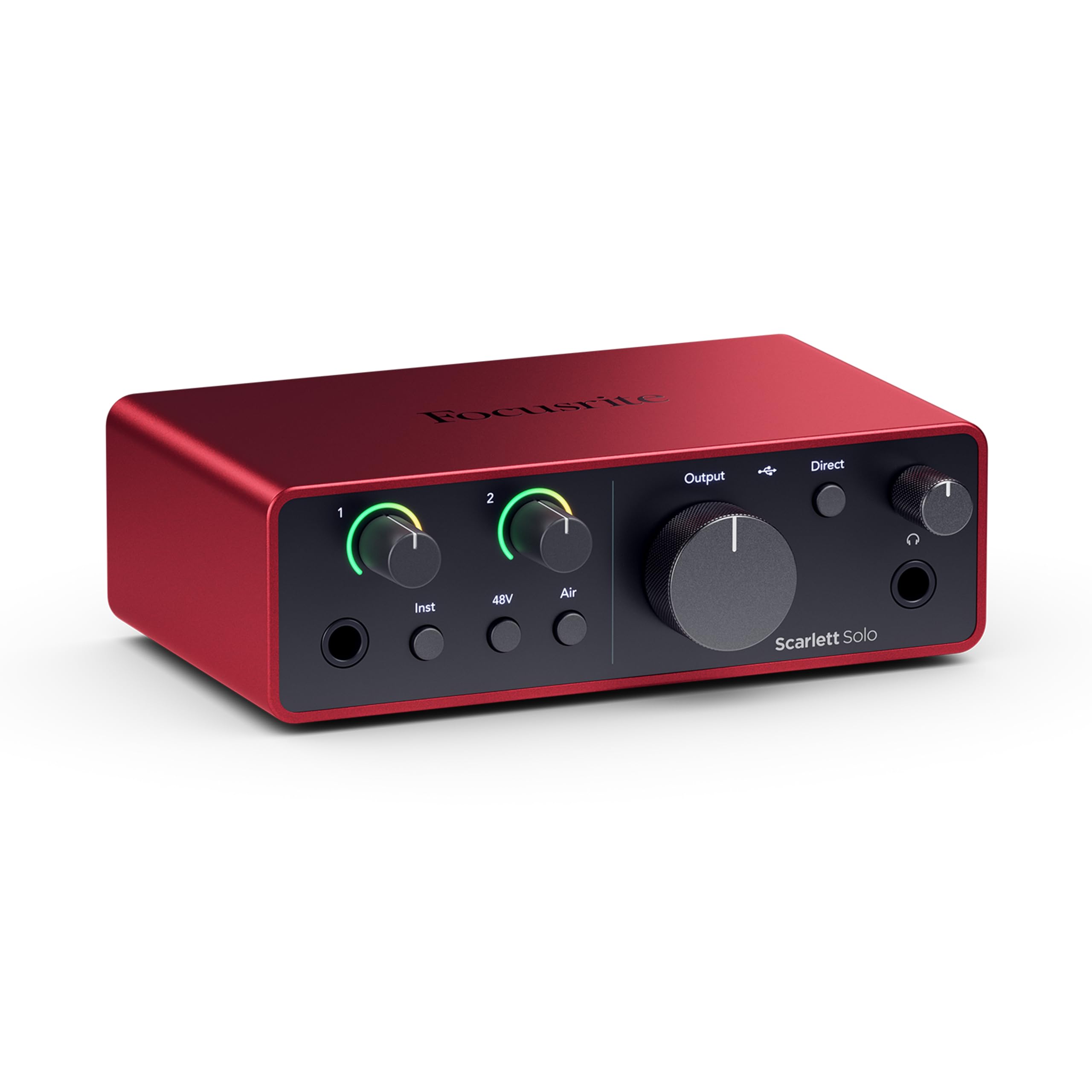
The Focusrite Scarlett Solo 4th Gen sets the new benchmark for entry-level interfaces with a massive 120 dB dynamic range — the same converter technology used in Focusrite’s flagship RedNet and Red series interfaces found in commercial studios. This translates to an exceptionally low noise floor and headroom that handles transient peaks from loud vocals or aggressive guitar strumming without distortion. The redesigned preamp delivers 69 dB of gain, enough to drive a Shure SM7B or Beyerdynamic M 90 Pro X without an external Cloudlifter, a significant upgrade over the 3rd Gen’s 56 dB.
Air mode has been refined in the 4th Gen, shifting from a simple fixed high-frequency shelf to a more musical presence boost combined with rich harmonic drive, making vocals and acoustic guitars sit forward in the mix naturally. The Gain Halos provide intuitive real-time visual feedback — green for optimal signal, amber for nearing clipping, and red for distortion — so you never have to guess at your input levels during a take. The rugged metal chassis and smooth knobs feel premium, and the independent headphone output has enough power to drive 250-ohm headphones to satisfying volumes.
The bundled software package includes Pro Tools Intro+, Ableton Live Lite, Cubase LE, and the Hitmaker Expansion suite — a genuinely useful collection of compressors, reverbs, and instrument plugins that covers most production needs right out of the box. Setup is simple via the Easy Start tool, and Focusrite provides a three-year worldwide warranty, reflecting confidence in the build quality. The only minor issue is the included USB-A to USB-C cable rather than a USB-C to USB-C cable, but that’s a trivial swap.
Why it’s great
- 120 dB dynamic range rivals pro studio gear
- 69 dB of clean preamp gain handles demanding dynamic mics
- Improved Air mode adds musical presence without harshness
- Intuitive Gain Halos simplify level setting
Good to know
- Only one mic preamp input limits stereo recording
- Firmware update required out of the box on some units
- Included USB cable is USB-A to USB-C
2. Universal Audio Volt 176

The Universal Audio Volt 176 stands apart from every other interface in this segment because it packs an actual analog compressor — derived from UA’s legendary 1176 FET compressor — right into the unit’s signal path. This is not a software emulation running in your DAW; it is a hardware circuit that you engage with a single button, applying fast FET-style compression to smooth out vocal peaks or add punch to a bass DI before the signal ever hits your computer. The amount of compression is tied to the gain knob, giving you a simple one-knob control that works like a built-in limiter for dynamic sources.
Beyond the compressor, the Volt 176 features a Vintage preamp mode that emulates the sweet, warm saturation of UA’s classic 610 vacuum tube consoles. Engaging Vintage mode adds a subtle harmonic richness that makes budget microphones sound more expensive and gives digital recordings an analog glue. The preamp itself offers 55 dB of clean gain, which is adequate for most condenser mics but may require the compressor’s gain makeup stage to push quieter dynamic mics to optimal levels.
Connectivity is modern with USB-C, and the unit is class-compliant on macOS and iOS, meaning you can plug it directly into an iPad Pro or iPhone (with a Camera Connection Kit) for mobile recording without drivers. The included software bundle features the award-winning LUNA DAW, which provides a unique analog-style recording workflow with real-time tape saturation and summing. Build quality is solid though lightweight, and the compact form factor fits easily into a laptop bag. Note that the 48V phantom power does not persist through a power cycle, so you must re-engage it each time you power on the unit.
Why it’s great
- Hardware 1176-style compressor is unique at this price point
- Vintage preamp mode adds desirable analog warmth
- Class-compliant on macOS/iOS for mobile recording
Good to know
- Phantom power resets on power loss
- Volume knob may develop static noise over time
- 55 dB gain may be insufficient for low-output dynamic mics without compressor
3. Focusrite Scarlett Solo 4th Gen Bundle

This bundle packages the same exceptional Scarlett Solo 4th Gen interface at the core — with its 120 dB dynamic range, 69 dB preamp gain, and refined Air mode — and adds Polsen HPC-A30 studio monitor headphones, a pop filter, and an XLR-to-XLR cable. For a first-time buyer who owns no gear at all, this bundle removes the friction of sourcing individual accessories. The Polsen headphones offer a closed-back design with 40mm drivers and a frequency response that leans slightly bright, which is fine for monitoring vocal takes but not ideal for critical mixing decisions.
The interface itself is identical to the standalone 4th Gen model reviewed above, meaning you get the same premium converters, Gain Halo level metering, and robust metal construction. The bundled pop filter is a standard clamp-on design, though some users report that the gooseneck arm is short and the clamp angle makes positioning awkward in front of the microphone. The XLR cable is a basic 10-foot balanced cable, perfectly functional for connecting a dynamic or condenser mic to the interface’s combo input.
Setup remains streamlined via the Easy Start tool, which guides you through driver installation, firmware updates, and software registration. The bundle also includes the same software suite (Pro Tools Intro+, Ableton Live Lite, and Hitmaker Expansion) as the standalone unit. For someone who needs everything to start recording immediately, this bundle is a time-saver, but the accessory quality is entry-level — the headphones are utilitarian, and the pop filter is best considered a temporary solution until you upgrade.
Why it’s great
- Same top-tier 4th Gen interface as standalone unit
- Includes headphones, pop filter, and XLR cable
- Easy Start tool simplifies first-time setup
Good to know
- Bundled headphones are entry-level and not for critical mixing
- Pop filter arm is short and awkward to position
- Interface firmware update required on first use
4. Behringer U-PHORIA UMC404HD

The Behringer UMC404HD is the only interface on this list that offers four discrete mic preamps, making it the clear choice for recording drums, podcast roundtables with multiple hosts, or any scenario requiring more than two simultaneous microphone channels. The preamps are designed by MIDAS — a brand synonymous with high-end live sound consoles — and deliver clean, low-noise gain with an EIN of -129 dBu, which is competitive with interfaces costing twice as much. The unit streams 4-in/4-out at up to 24-bit/192 kHz, with separate monitor outputs and a dedicated headphone output.
Build quality is notably robust with an impact-resistant metal chassis that feels substantially heavier than its 2.65-pound weight suggests. The front panel includes individual gain knobs with signal/clip LEDs for each channel, a master volume knob, and a direct monitoring mix control that lets you blend the input signal and playback without latency. The rear panel offers balanced TRS main outputs, MIDI I/O for connecting synthesizers or drum machines, and a USB 2.0 Type-B port. Phantom power is switchable via a single global button, so you cannot toggle it per channel — a limitation when using ribbon mics alongside condenser mics.
Driver installation on Windows requires downloading the dedicated Behringer ASIO driver, but once installed, the unit runs stably with low latency at 44.1 kHz and 48 kHz sample rates. The unit is class-compliant on macOS, meaning no driver is needed for plug-and-play operation. A common user note is that placing a cellphone on top of the unit can inject noise into the audio path, so keep it isolated on your desk. For the price, the UMC404HD delivers an unmatched input count and preamp quality that punches well above its weight class.
Why it’s great
- Four MIDAS preamps at an unbeatable price point
- MIDI I/O for hardware synthesizers
- Rugged metal chassis and easy-to-use controls
Good to know
- Global phantom power only — no per-channel switching
- Cellphone proximity can cause electrical noise
- Limited headroom on input 3/4 line inputs
5. PreSonus Studio 24c

The PreSonus Studio 24c bridges the gap between a pure interface and a computer-based recording system by bundling the full Studio One 6 Artist Edition DAW — a mature, single-window production environment that rivals Logic Pro in workflow efficiency. The hardware itself is a 2-in/2-out USB-C interface with XMAX-L microphone preamps delivering 55 dB of gain, 24-bit/192 kHz converters, and a front-panel mixing knob for zero-latency monitoring. The inclusion of MIDI I/O on the rear panel is a thoughtful addition for users with keyboard controllers or external sequencers, something the Scarlett Solo series omits entirely.
The unit features four ladder-style LED meters (two for input, two for main output), giving you better visual level monitoring than most 2-channel interfaces at this price. The front-panel headphone output is powered by a dedicated amplifier that easily drives headphones up to 300 ohms, which is not always the case with competing units. The build quality is solid, and the unit has been reported to run reliably for years of daily use — one user review notes their unit ran 8–12 hours a day for six years without failure.
Connectivity is forward-looking with USB-C, and PreSonus includes both USB-C to USB-C and USB-C to USB-A cables, ensuring compatibility with both modern and older computers. The included Studio One 6 Artist edition is not a stripped-down “lite” version — it includes unlimited audio and instrument tracks, Melodyne Essential, and the Notation view, making it fully functional for producing complete songs. The main limitation is the single headphone output located on the rear panel, which makes frequent plugging and unplugging slightly inconvenient if your desk layout is tight.
Why it’s great
- Studio One 6 Artist is a full-featured DAW, not a lite version
- MIDI I/O included for keyboard controllers
- Both USB-C to C and USB-C to A cables in the box
Good to know
- Headphone output is on the rear panel
- 55 dB gain is lower than some competitors
- Only two inputs limit multi-mic recording
6. Focusrite Scarlett Solo 3rd Gen

The Scarlett Solo 3rd Gen defined the under- interface segment for years and remains a dependable choice even after the 4th Gen release. It features a single XLR/TRS combo input with the classic Air mode — which applies a fixed high-frequency shelving boost to add clarity to vocals and acoustic instruments — plus a dedicated instrument input on the front panel for connecting a guitar or bass directly. The preamp delivers 56 dB of gain, which is sufficient for most condenser microphones and moderate-output dynamic mics, though low-output dynamics like the SM7B will require cranking the gain near maximum and may introduce self-noise.
The converters operate at up to 24-bit/96 kHz, producing recordings that retain detail and transient accuracy. The direct monitoring switch on the front panel lets you blend the input signal with your DAW playback for zero-latency monitoring during recording, eliminating the disorienting echo that occurs when hearing your own delayed voice through headphones. Users consistently report the unit as “bulletproof” in terms of build quality — the all-metal chassis withstands daily transport in laptop bags and backpacks without damage.
The bundled software includes Pro Tools Intro+, Ableton Live Lite, Cubase LE, and the Hitmaker Expansion effects suite. While the 3rd Gen lacks the 4th Gen’s 120 dB dynamic range and 69 dB gain, its street price is significantly lower, making it an attractive entry point for podcasters or singer-songwriters on a tight budget who primarily use high-output condenser microphones. Connectivity uses the older USB 2.0 Type-B port, which is still widely compatible with virtually every computer manufactured in the last decade.
Why it’s great
- Proven, durable design with thousands of positive reviews
- Air mode adds useful high-frequency clarity
- Lower price makes it a true budget-friendly entry point
Good to know
- 56 dB gain insufficient for low-output dynamic mics
- USB 2.0 Type-B port is older standard
- No MIDI I/O for hardware synthesizers
7. Shure MVX2U Gen 2

The Shure MVX2U Gen 2 is a radically different approach to the audio interface concept — it is a single-channel XLR-to-USB-C adapter that puts Shure’s advanced digital audio processing directly into an inline device smaller than a pack of gum. Unlike traditional box interfaces, the MVX2U is designed for users who want a mobile, dead-simple way to connect a professional XLR microphone to a computer, tablet, or smartphone. The onboard DSP includes Auto Level Mode (which dynamically adjusts gain to maintain consistent output volume), Real-Time Denoiser, and a Digital Popper Stopper that minimizes plosives without a physical pop filter.
The preamp delivers up to 60 dB of clean gain, which is enough to drive a Shure SM58 or Beta 58A to proper recording levels without any external booster. The MOTIV companion app (available for desktop and mobile) lets you choose from three tone presets — Dark, Natural, and Bright — and adjust compression, EQ, and limiter settings. The settings persist even after disconnecting the unit, so once you dial in your preferred profile, it stays active across different devices without needing the app open each time.
Phantom power is provided for condenser microphones, and the unit is bus-powered via USB-C, drawing power directly from the connected device. Build quality is excellent, as expected from Shure, with a compact metal housing that survives being thrown into a camera bag or backpack. The main limitation is the single-channel input — you cannot record two microphones simultaneously, which makes it unsuitable for interview-style podcasts or stereo recording. Additionally, some users report that the unit can be finicky with certain Android devices, so iOS and macOS provide the most reliable experience.
Why it’s great
- Ultra-compact form factor fits in any pocket or bag
- Auto Level Mode simplifies gain staging during live streams
- 60 dB gain handles dynamic mics without external booster
Good to know
- Single-channel input only — no stereo or two-mic recording
- Best performance on iOS and macOS
- No direct monitoring jack for zero-latency headphone listening
8. M-AUDIO M-Track Duo HD
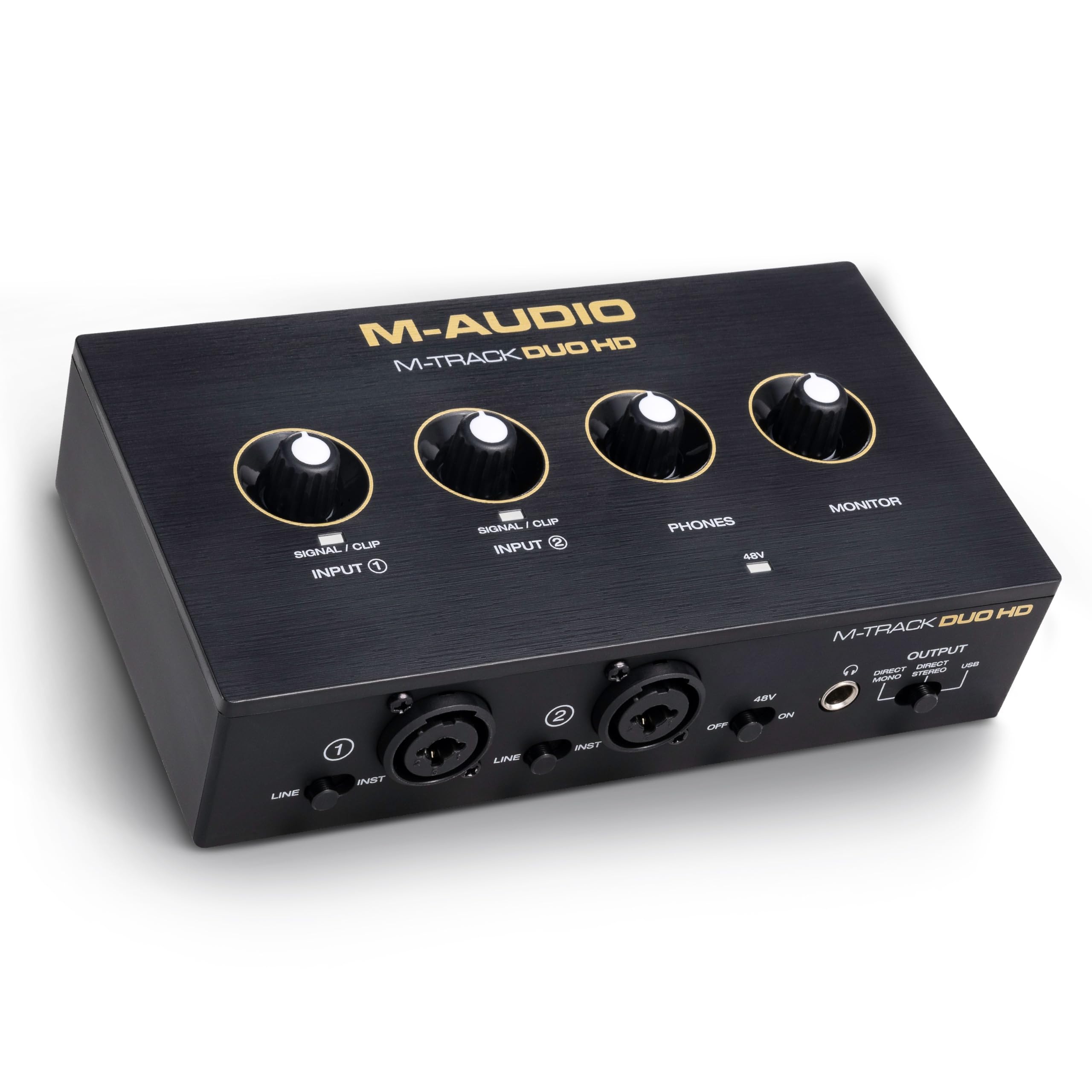
The M-AUDIO M-Track Duo HD enters the budget-to-mid-range space with a focus on high-resolution audio at up to 24-bit/192 kHz — the same ceiling as premium interfaces that cost twice as much. The two combo inputs accept both XLR and 1/4-inch connections, with Crystal preamps that provide 55 dB of gain and switchable +48V phantom power for condenser microphones. The front panel is cleanly laid out with separate gain knobs for each channel, a dedicated headphone volume knob, and a Direct/USB monitor switch that lets you choose between hearing the direct input signal or the playback from your computer.
Build quality is solid for the price, with a lightweight but sturdy enclosure that is designed for both desktop use and transport in a gig bag. The USB-C connection ensures compatibility with modern laptops and tablets, and the unit is class-compliant on macOS and iOS, meaning plug-and-play operation without driver installation. The included software suite provides Ableton Live Lite, Reason+, Akai Professional MPC Beats, and a two-month Splice subscription, offering a versatile starting point for music production in various genres.
User feedback highlights the reliable plug-and-play experience on Windows 11 and macOS, with the unit functioning well for Zoom calls, instrument recording, and livestreaming audio capture. The lightweight body is a double-edged sword: it is easy to move but feels less substantial than the metal-chassis Scarlett or Behringer units. Some users note that the gain knobs are slightly close together, making fine adjustments a bit fiddly when both channels are in use. For a budget-minded buyer who wants 192 kHz resolution and dual inputs, the M-Track Duo HD delivers excellent measured performance.
Why it’s great
- 192 kHz / 24-bit converters at a budget-friendly price
- USB-C connectivity is modern and convenient
- Includes Ableton Live Lite and MPC Beats software
Good to know
- 55 dB gain is on the lower side for dynamic mics
- Lightweight plastic body feels less durable than metal competitors
- Gain knobs are closely spaced for easy adjustment
9. PreSonus AudioBox 96 25th Anniversary

The PreSonus AudioBox 96 25th Anniversary Edition is the distillation of PreSonus’s two decades of interface design into an affordable, no-frills 2-channel unit that prioritizes rock-solid stability and ease of use. It offers two Class-A mic preamps with switchable +48V phantom power, two high-headroom instrument inputs, and MIDI I/O — a rare inclusion at this price point that makes it compatible with keyboard controllers and hardware sequencers. The converters operate at up to 24-bit/96 kHz, which is perfectly adequate for podcasting, voiceovers, and basic music production.
The physical design is a classic “silver brick” with all connections on the top edge, making it ideal for rack-mounting or sliding into a tight desk setup. The unit is USB bus-powered, so no wall wart is needed for power, enhancing its portability. A dedicated Mixer knob on the front panel allows zero-latency direct monitoring by blending the input signal with the playback from your DAW, a crucial feature for recording vocals without latency distractions. The bundled software suite is generous, including Studio One Artist, Ableton Live Lite, and the Studio Magic Plug-In suite worth over in individual plugin value.
User reports over the life of the product line consistently praise the durability of the AudioBox series — the metal chassis survives years of abuse without issue. The drivers are mature and stable on both Windows and macOS, with ASIO support on PC providing reliable low-latency operation. A few users note that the gain knobs are somewhat crowded on the small front panel, and the global phantom power switch means you cannot power a condenser mic on one channel while keeping a ribbon mic safe on the other. Nevertheless, for a first-time buyer who wants a proven, affordable interface with MIDI I/O and a comprehensive software bundle, the AudioBox 96 remains a compelling choice.
Why it’s great
- Class-A mic preamps deliver clean, detailed sound
- MIDI I/O is rare at this price point
- Bus-powered and portable with a rugged metal chassis
Good to know
- Global phantom power switch — no per-channel control
- 96 kHz sample rate ceiling is lower than 192 kHz competitors
- Gain knobs are closely spaced on the front panel
FAQ
Do I need 192 kHz sample rate or is 96 kHz enough?
Can I use a USB-C interface with an older USB-A computer?
What does direct monitoring mean and why does it matter?
Is the included software bundle actually usable or just bloatware?
Final Thoughts: The Verdict
For most users, the best audio interface under $200 winner is the Focusrite Scarlett Solo 4th Gen because it combines a market-leading 120 dB dynamic range with 69 dB of ultra-clean preamp gain, refined Air mode, and a premium converter section that rivals professional-grade units. If you want built-in analog compression and vintage tube-style warmth for instant character, grab the Universal Audio Volt 176. And for multi-mic recording sessions with four simultaneous inputs, nothing beats the Behringer U-PHORIA UMC404HD.