
Our readers keep the lights on and the weekend projects moving. As an Amazon Associate, I earn from qualifying purchases.
Choosing your first audio mixer for a home studio often means navigating a conflict between the number of channels you *think* you need and the preamp quality that actually determines your final recording clarity. Many beginners load up on cheap inputs only to fight noise and brittle EQ later, which is why this guide focuses on the specific balance of preamp quality, digital connectivity, and effects processing that actually matters in a project studio environment.
I’m Rikta — the co-founder and writer behind FitlyFast. My approach to this guide involved cross-referencing published amplifier specifications, signal-to-noise ratio data, and hundreds of real-user stress reports on long-duration recording sessions to identify the mixers that deliver consistent, clean audio in a home studio workflow.
After analyzing seven models built for different studio needs, the most reliable options share a common trait: a clean preamp section and a flexible USB audio interface. This guide breaks down the best choices for every scenario, helping you find the ideal audio mixer for home studio that actually improves your recordings instead of creating extra headaches.
How To Choose The Best Audio Mixer For Home Studio
The right mixer for a home studio is a different animal than one built for a live DJ set or a church sound system. In a studio, you are recording to a DAW, so the quality of the analog-to-digital conversion and the noise floor of your preamps are primary. You don’t need 16 channels for a solo podcast—but you absolutely need a clean, low-noise signal path and flexible routing to your computer.
Prioritize Preamp Quality Over Channel Count
The microphone preamp is the first electronic circuit your vocal or instrument signal touches. A noisy or thin preamp adds a layer of “hiss” or “fuzz” that no amount of post-processing can fully remove. Look for models that specify “low-noise” or “discrete class A” preamps. Yamaha’s D-PRE and Mackie’s Onyx preamps are consistently reliable for clean gain, while cheaper generic preamps often produce noticeable hiss above 3/4 gain.
Confirm Multi-Track USB Audio Interface Capability
A “mixer with USB” is not the same as a “mixer with a multi-track audio interface.” Many budget mixers send only a single stereo mix (the master L/R) to your computer. For recording each microphone or instrument on its own track in software, you need a model that sends multiple discrete channels over USB. The Tascam Model 16 sends 16 individual tracks, while the Mackie ProFX6v3+ sends 2 channels individually plus a stereo mix. Know your recording software limitations before buying.
Evaluate Built-In Effects for Practical Studio Use
Reverb and delay effects can be helpful for monitoring during recording, but they should never be printed to your recorded track. Look for mixers that let you apply effects to the monitor/aux send only, keeping the direct signal clean for your DAW. Yamaha’s SPX effects are studio-grade and subtle, while many budget mixers have only one or two usable sounds among dozens of digital presets.
Quick Comparison
On smaller screens, swipe sideways to see the full table.
| Model | Category | Best For | Key Spec | Amazon |
|---|---|---|---|---|
| Yamaha MG10XU | Studio Workhorse | Clean multi-track recording with effects | D-PRE discrete class A preamps | Amazon |
| Mackie ProFX6v3+ | Compact Streaming | Podcast & streaming with loopback | 24-bit/192 kHz USB-C interface | Amazon |
| Behringer FLOW 8 | Digital Hybrid | Bluetooth app control & auto-gain | 8-ch digital mixer + 10×2 USB | Amazon |
| Mackie Mix12FX | Compact Analog | Portable jam sessions & basic mixing | 12 built-in reverb/delay effects | Amazon |
| Depusheng DT12 | High Channel Count | Multi-device input for live drums | 12 XLR/1/4″ combo inputs | Amazon |
| D Debra SI-6UX | Entry-Level DSP | Karaoke & basic home recording | 99 DSP vocal effects | Amazon |
| Tascam Model 16 | Production Hub | Standalone 16-track recording to SD | 16-in/14-out USB audio interface | Amazon |
In-Depth Reviews
1. Yamaha MG10XU

The Yamaha MG10XU is widely considered the standard for home studio mixers under , and the consistency of user feedback supports that reputation. Its studio-grade discrete Class A D-PRE preamps deliver a clean, low-noise signal with enough headroom to handle dynamic and condenser mics without coloration. The internal SPX digital effects—especially the reverbs—are genuinely musical and not just afterthoughts, which matters when you want a natural room sound during headphone monitoring.
The 10-channel layout includes four mono inputs with individual 3-band EQ and high-pass filters, plus three stereo channels for synths or backing tracks. The one-knob compressor per channel is a practical tool for taming vocal peaks before they hit your interface, and the USB output sends a stereo mix to your DAW at 24-bit resolution. The impact-resistant metal chassis feels solid compared to plastic-bodied alternatives.
The main trade-off is the lack of individual track recording over USB—you only get the stereo master mix. Also, only the mono channels have a 3-band EQ, while the stereo channels are limited to 2-band. For a producer recording multi-mic setups, this means you need an external interface or a digital mixer with more routing flexibility. For a solo musician or podcaster who wants one clean stereo mix, this is the safest choice.
Why it’s great
- Discrete Class A D-PRE preamps deliver very low noise floor for clean recordings
- SPX effects processor includes 24 high-quality reverb/delay presets with dedicated send
- One-knob compressors per channel provide easy vocal peak control
- Rugged powder-coated metal chassis resists wear in frequent-use studios
Good to know
- USB output is stereo mix only—no individual multi-track recording channels
- Stereo channels have only 2-band EQ (no sweepable mid)
- Effects are global per FX bus; cannot apply separate effects per channel
2. Mackie ProFX6v3+
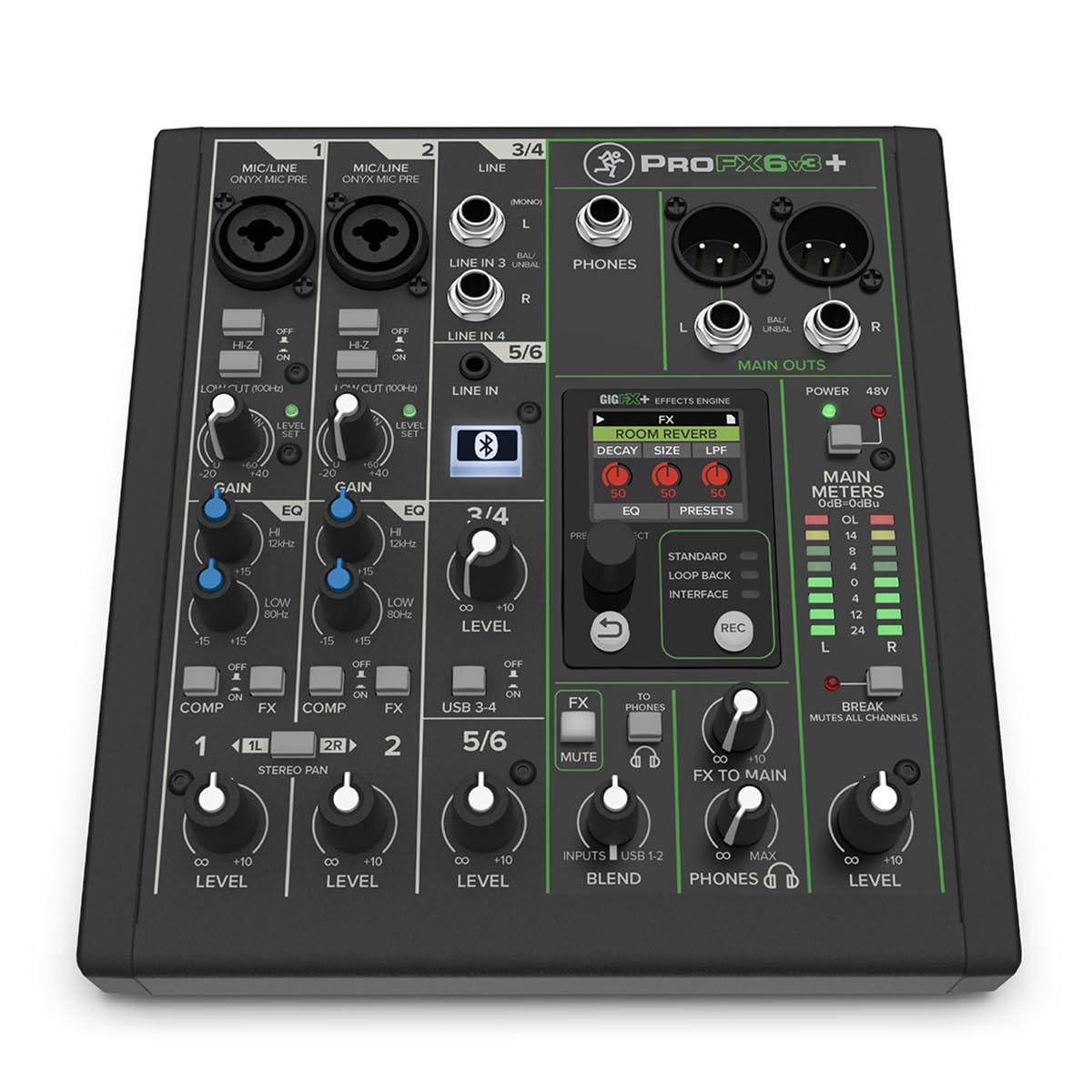
The Mackie ProFX6v3+ is built specifically for the modern streamer and podcaster who needs a simple, high-quality analog workflow with digital connectivity. Its Onyx mic preamps are known for their clarity and 60 dB of gain, which is enough to drive a Shure SM7B or similar dynamic mic without an external booster. The standout feature is the switchable USB-C audio interface with three modes: Standard (stereo mix), Loopback (mix computer audio with your mic for streaming), and Interface mode (record channels 1-2 dry without effects).
The GigFX+ effects engine includes 12 presets (reverbs, delays, choruses) that you can edit and save via the color LCD screen—a rare feature at this price point. Bidirectional Bluetooth lets you stream backing tracks from your phone or take phone calls with Mix Minus to prevent echo. The chassis is extremely compact at under 8 inches deep, making it one of the few mixers that fits on a small desk without dominating the workspace.
The limitation is that it only has 6 channels (2 mic, 2 stereo line), which can feel tight if you add a second mic and a stereo instrument. A few users reported arriving units that appeared opened, indicating potential quality control in packaging. The effects, while editable, are limited compared to Yamaha’s deeper SPX library. For a focused podcast or solo streaming setup, however, its routing flexibility is unmatched.
Why it’s great
- Onyx preamps deliver 60 dB of clean gain for low-output dynamic mics
- Loopback mode enables seamless streaming with computer audio and mic
- USB-C interface records at 24-bit/192 kHz for high-resolution captures
- Bidirectional Bluetooth with Mix Minus prevents caller echo
Good to know
- Only 6 channels (2 mic inputs) limits expansion for multi-mic setups
- GigFX+ effects have 12 presets versus Yamaha’s 24 SPX effects
- No second output bus for separate monitor mix
3. Behringer FLOW 8
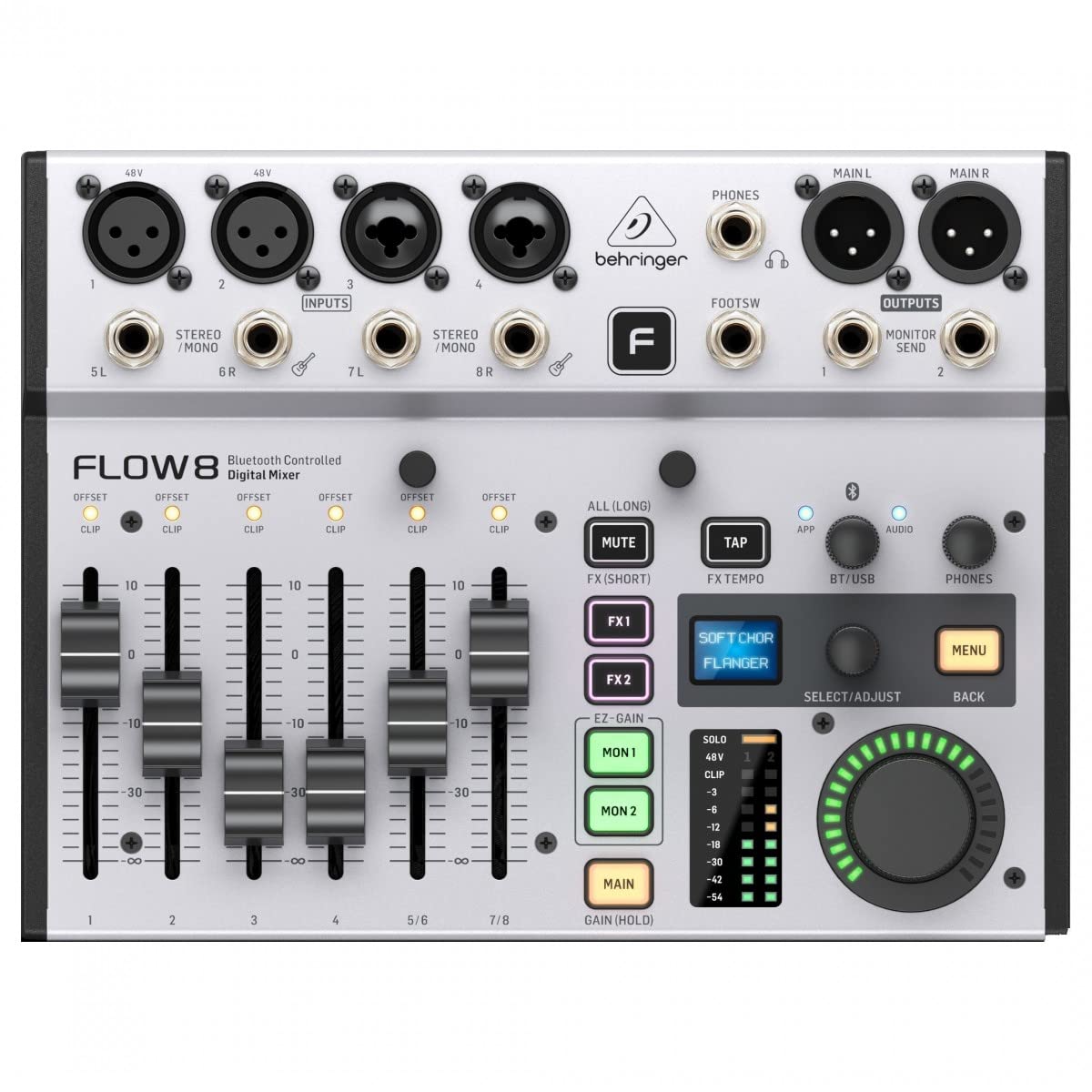
The Behringer FLOW 8 represents a shift toward digital flexibility in a compact analog-style chassis. It functions as an 8-input digital mixer with a 10×2 USB audio interface, meaning it can record up to 10 channels into your DAW while also processing effects and EQ digitally. The remote control app (iOS/Android) allows you to adjust levels, effects, and EQ from your smartphone or tablet during a session—useful for fine-tuning monitor mixes without leaving your listening position.
The built-in auto-gain function is a genuinely useful tool for home studio users who struggle with setting proper input levels. It analyzes the incoming signal and sets the gain automatically, which can save time during quick recording sessions. The onboard effects include reverb and delay on two separate FX buses, and the Bluetooth connectivity is reliable up to 30 feet according to user reports. The physical layout is intuitive, with motorized faders that remember your last position.
The limitations are real for critical studio work. The documentation is sparse, and some users found the setup non-intuitive without watching video tutorials. The effects are global per FX bus, meaning you can’t apply different reverbs to vocal and guitar simultaneously. The input count is 8, but channels 7/8 are stereo line inputs without dedicated EQ. For a mobile podcaster or a small band recording scratch tracks, the FLOW 8 offers a unique blend of analog comfort and digital flexibility.
Why it’s great
- Remote app control for wireless level and EQ adjustment during sessions
- Auto-gain function sets input levels automatically for consistent recordings
- 10×2 USB audio interface enables multi-track tracking into DAW
- Compact footprint at 13.85″ deep fits easily on smaller desks
Good to know
- Documentation is minimal; setup requires online tutorials for best results
- Effects are global per FX bus—no per-channel effect routing
- Channels 7/8 are stereo line inputs only, without dedicated EQ
4. Mackie Mix12FX

The Mackie Mix12FX is a no-frills analog mixer designed for portability and simplicity. At only 11.7 inches wide and 2.1 inches tall, it fits in a laptop bag and can be powered on the go, making it a favorite for mobile recording setups and small live jam sessions. It includes 12 built-in effects (reverbs, choruses, delays) that are adequate for monitoring but not studio-grade—most users stick to one or two favorites. The 4 mic/line inputs with 3-band EQ provide basic but effective tone shaping.
The Mix12FX features dedicated stereo RCA inputs and outputs for connecting a playback device or recording to an external recorder. The low-noise preamps perform well for the price, and the 48V phantom power is reliable for condenser mics. User feedback consistently notes that the pots and faders operate smoothly without crackling, and the build quality—while plastic-based—exceeds expectations for an ultra-budget mixer.
The main disadvantage for home studio use is the lack of a proper USB audio interface—the RCA outputs are analog only, so you need an external audio interface to record to your computer. The effects are preset-based and cannot be adjusted in detail. Additionally, there is no power switch; the mixer is live as soon as you plug it in, which is a minor inconvenience. For someone who needs a simple, durable analog mixer for monitoring or submixing, it’s an excellent value.
Why it’s great
- Ultra-compact size (11.7″ wide) fits into a laptop bag for mobility
- 12 built-in effects provide basic reverb/delay for monitoring
- Dedicated stereo RCA inputs and outputs for external device integration
- Reliable phantom power and smooth fader operation at this price tier
Good to know
- No USB audio interface—requires external interface for computer recording
- Effects are preset-based with limited adjustability
- No power switch; unit is always on when plugged into AC
5. Depusheng DT12

The Depusheng DT12 is a 12-channel mixer that prioritizes input count and Bluetooth convenience over premium preamp quality. Each channel features a combined XLR and 1/4-inch input with a 3-band EQ, and the mixer offers Bluetooth streaming, RCA input/output, and a headphone monitoring jack. The ultra-thin chassis (1.6 inches) is visually modern, and the LED peak meters are clear and responsive. For the price, the channel count is hard to beat.
User feedback reveals a split opinion. Many report that the DT12 is excellent for premixing live drums or expanding an existing PA system on a budget. The Bluetooth function is useful for streaming backing tracks during practice. The built-in effects are described as “terrible” by multiple users—limited to basic, artificial-sounding reverb—so they are best left unused for recording. The preamps are functional but lack the clarity and headroom of name-brand models, exhibiting noticeable hiss at higher gain settings.
The DT12 is not suited for critical studio recording due to its noisy preamps and weak effects. It also lacks a USB audio interface for direct computer recording, so you need an external interface to capture audio. The EQ is a fixed-frequency design (no sweepable mid), limiting precision. For a live setup that needs many inputs on a tight budget, it works; for a home studio aiming for clean tracks, look elsewhere.
Why it’s great
- 12 channel inputs with XLR/1/4″ combo jacks for multiple microphones
- Bluetooth streaming for integrating backing tracks from a smartphone
- Ultra-thin 1.6″ chassis design saves space in cramped racks or desks
- LED peak meters provide clear visual monitoring of channel levels
Good to know
- Preamps introduce noticeable hiss at higher gain settings
- Built-in effects are low-quality with limited usefulness
- No USB audio interface—requires external device for computer recording
- EQ is fixed-frequency (no sweepable mid) for channel 1-12
6. D Debra SI-6UX

The D Debra SI-6UX is an entry-level portable mixer that packs Bluetooth streaming, 99 DSP effects, and a USB audio interface into a compact, lightweight chassis. At only 100 grams, it is exceptionally portable, and the +48V phantom power enables condenser microphone use. The 6-channel design includes 4 XLR/1/4″ combo inputs and stereo RCA outputs. Beginners will appreciate the straightforward layout and the ability to record directly to a computer via the USB soundcard.
Customer reviews highlight two distinct experiences. For karaoke and simple vocal recording, the DSP effects—especially the reverb and echo—are described as “studio-quality” by casual users. However, more experienced users point out that only 1-2 of the 99 effects are genuinely usable, and the volume knobs have a tendency to develop crackling noise over time due to low-grade potentiometers. One alarming report involved a capacitor failure after a few hours of use, and the unit lacks an internal fuse for protection.
The SI-6UX is best viewed as a trial-level tool for someone unsure about committing to a higher investment. The preamp quality is sufficient for basic vocal tracking but lacks headroom for dynamic mics or loud sources. The headphone output is reportedly loud, but the lack of RCA output jacks (only 3.5mm and XLR) is a limitation for connecting to standard home speakers. It is functional for learning, but not reliable for regular studio work.
Why it’s great
- 99 built-in DSP effects provide experimentation for beginners
- Bluetooth wireless streaming works up to 15 feet for backing tracks
- USB soundcard enables direct recording to computer without additional interface
- Extremely lightweight (100 grams) for easy transport and storage
Good to know
- Only 1-2 of the 99 DSP effects are considered usable for typical studio work
- Potentiometers reported to develop crackling noise with extended use
- No internal fuse; one user reported capacitor failure after few hours
- Lacks RCA output jacks, limiting compatibility with home stereo systems
7. Tascam Model 16

The Tascam Model 16 is the most ambitious product in this lineup, functioning as a 16-track analog mixer, a digital multitrack recorder, and a 16-in/14-out USB audio interface. This means you can record each channel to its own track on an SD card (up to 48 kHz/24-bit WAV) without a computer, then transfer the files to your DAW for mixing. The 10 Ultra-HDDA mic preamps deliver clean, transparent gain with plenty of headroom, rivaling standalone audio interfaces in the same price range.
User feedback consistently praises the build quality and reliability. The chassis is large (19″ wide, 8″ deep) but feels robust, and the routing flexibility allows for multiple monitor mixes and aux sends. The onboard digital recorder is straightforward: assign any channel to any track and punch in/out on up to 8 tracks simultaneously. The USB audio interface works seamlessly with major DAWs for hybrid analog/digital workflows. It is an ideal hub for a band recording live demos or a serious home studio that wants to avoid computer-dependent latency.
The biggest note of caution: channels 15/16 are virtual-only, and channels 13/14 are a Bluetooth/1/8-inch stereo input with no EQ or aux sends, limiting the effective physical input count to 12. The unit is also heavy and takes up significant desk space. The effects are functional but not as deep as dedicated processors. For a producer who needs standalone multitrack recording without a laptop, the Model 16 is unmatched in its class.
Why it’s great
- Standalone 16-track recorder to SD card eliminates computer dependency
- Ultra-HDDA preamps provide clean, high-headroom gain for multiple mics
- 16-in/14-out USB interface enables full multi-track recording to DAW
- Punch-in/out on up to 8 tracks simultaneously for easy overdubs
Good to know
- Channels 13-16 are limited—13/14 are stereo Bluetooth/1/8″ only with no EQ
- Large chassis (19″ wide) requires significant desk space
- Onboard effects are functional but not as deep as dedicated processors
FAQ
Can I use a live sound mixer for recording in a home studio?
What does 48V phantom power do and do I need it?
How many channels do I really need for a home studio?
Are built-in mixer effects good enough for final recordings?
Final Thoughts: The Verdict
For most users, the audio mixer for home studio winner is the Yamaha MG10XU because it delivers the cleanest preamps and most reliable performance in the mid-range, with a proven track record for years of consistent use. If you want a dedicated streaming setup with loopback and USB-C connectivity, grab the Mackie ProFX6v3+. And for a full band or serious multi-track recording without a computer, nothing beats the Tascam Model 16.