
Our readers keep the lights on and the weekend projects moving. As an Amazon Associate, I earn from qualifying purchases.
The gap between tinny monitor speakers and a full desktop soundstage is wider than most PC users realize. Whether you’re tracking footsteps in a competitive match, editing audio, or just wanting your music to breathe, the right setup transforms the experience from background noise to an immersive environment.
I’m Rikta — the co-founder and writer behind FitlyFast. I’ve spent countless hours analyzing frequency response curves, driver materials, and power delivery systems across dozens of PC audio configurations to separate genuine performance from marketing hype.
This guide breaks down what actually matters when you’re shopping for an audio system for pc, covering driver topology, amplifier architecture, and real-world connectivity so you can make a choice that matches both your space and your ears.
How To Choose The Best Audio System For PC
Your desktop audio system must balance acoustic performance with physical footprint, power requirements, and connectivity options. The wrong choice means wasted desk space or perpetual compromise on clarity and bass extension.
Driver Size and Material
The satellite driver is the single most important component for midrange and treble reproduction. A 2.5-inch full-range paper cone will sound fundamentally different from a 3-inch carbon-fiber driver paired with a dedicated silk-dome tweeter. Larger drivers generally move more air, but cone material determines breakup behavior at higher frequencies. Carbon fiber and woven composites offer better stiffness-to-mass ratios, reducing distortion at higher output levels. If you prioritize vocal clarity and instrument separation, look for a two-way design with a separate tweeter rather than a single full-range driver.
Subwoofer Configuration and Space Constraints
Not all subwoofers are built to fit under a standard desk. Down-firing ported subs like the one in the Creative Pebble Plus distribute bass more evenly in small rooms but require at least 4 inches of clearance below. Side-firing subs, such as the Klipsch ProMedia 6.5-inch unit, can sit closer to walls but may need careful placement to avoid boominess. The subwoofer’s driver size directly correlates with how low it can play before significant roll-off — a 4-inch driver struggles below 60Hz, while a 6.5-inch unit can hit 35Hz with authority. Measure your desk’s height clearance before committing to any 2.1 system.
Connectivity and Control Flexibility
A modern PC audio system should handle at least three input types: USB for digital-to-analog conversion, 3.5mm AUX for analog passthrough, and Bluetooth for wireless convenience. USB-powered systems like the Creative Pebble Plus simplify cable management by drawing power and signal through a single port, but the total amplifier power is limited by USB’s 5V/2A ceiling. Systems with an external power brick (the Klipsch ProMedia 2.1, Logitech Z623) can deliver substantially more headroom. Physical controls — a dedicated volume knob, subwoofer gain, and a headphone jack on the satellite — beat software-only EQ adjustments every time for quick access.
Quick Comparison
On smaller screens, swipe sideways to see the full table.
| Model | Category | Best For | Key Spec | Amazon |
|---|---|---|---|---|
| Klipsch ProMedia 2.1 | Premium 2.1 | Room-filling THX sound | 6.5″ side-firing subwoofer, 200W peak | Amazon |
| Razer Leviathan V2 | Premium Soundbar | Compact surround with RGB | THX Spatial Audio, 18-zone Chroma RGB | Amazon |
| Logitech Z623 | High-Power 2.1 | 400W peak, large rooms | 200W RMS, 7″ subwoofer driver | Amazon |
| FIFINE KS5 Bundle | Streaming Setup | Streaming & podcast production | XLR/USB dynamic mic + audio mixer | Amazon |
| Edifier G1000 II | Compact Gaming | Small desk, RGB lighting | 2.5″ full-range driver, Bluetooth 5.4 | Amazon |
| OHAYO 60W | Active Bookshelf | Hi-Fi on a budget | 0.75″ silk dome tweeter + 3″ carbon driver | Amazon |
| Creative Pebble Plus | Budget 2.1 | USB-powered simplicity | 4″ down-firing ported subwoofer, 8W RMS | Amazon |
In‑Depth Reviews
1. Klipsch ProMedia 2.1 THX

The Klipsch ProMedia 2.1 remains the benchmark for desktop audio because it pairs a 6.5-inch side-firing ported subwoofer with two-way satellites using Klipsch’s MicroTractrix horn technology. The horn-loaded tweeter controls sound dispersion so precisely that the imaging remains locked even when you move your head off-center — a critical advantage for gaming sessions where positional audio matters. The subwoofer delivers tactile, room-filling bass down to 35Hz, which is rare for a desktop package without requiring a separate amplifier.
Plug-and-play simplicity with a 3.5mm input means no drivers or software to configure, yet the control pod gives you independent volume and subwoofer gain. The satellites’ 8.5-inch height fits under most monitor risers, and the 9.5-foot speaker cables offer generous placement flexibility. At 110dB peak output, this system can easily fill a medium living room, let alone a desktop setup. The dynamic headroom means clean playback even during explosive action sequences in films or games.
The single minor friction point is the absence of a dedicated power switch — the system goes into standby when no signal is detected. Some users report the satellites’ lower-midrange can feel slightly recessed before burn-in, but after 20-30 hours of use, the frequency response evens out noticeably. For anyone wanting a true one-and-done desktop speaker system, this is the reference.
Why it’s great
- THX certification ensures flat, accurate frequency response
- Horn-loaded tweeter delivers unmatched clarity and dispersion
- Subwoofer output is deep, tight, and musical
Good to know
- No Bluetooth or USB digital input (analog only)
- Satellite cones are exposed and somewhat fragile without grilles
2. Razer Leviathan V2

The Razer Leviathan V2 takes a fundamentally different approach by packing dual full-range drivers and a down-firing subwoofer into a single soundbar form factor, supplemented by a separate wireless subwoofer. What makes this setup compelling is the THX Spatial Audio processing — it creates a convincing 7.1 surround sound field from a compact footprint that fits under virtually any monitor. The soundbar’s 10-degree upward tilt and rubber dampening feet minimize desk reflections that plague flat-lying soundbars.
Bluetooth 5.2 with low-latency support lets you switch between up to 8 paired devices, and the Razer Audio App unlocks detailed EQ tuning. The 18-zone Chroma RGB lighting is genuinely useful as visual feedback for EQ mode changes, not just decoration. The subwoofer connects wirelessly, which eliminates a messy cable run across your desk — a rare convenience in this category. Audio clarity is excellent for a soundbar, with the down-firing driver keeping vocals crisp even at moderate volumes.
The trade-off is physical: the subwoofer remains a separate box that requires floor or under-desk space, so you don’t save as much room as a pure soundbar would suggest. The USB-C connection is PC-only — there are no additional output ports. Some users also report that the THX Spatial processing can sound artificial with poorly mixed stereo content. For a clean, RGB-infused desktop with minimal cable clutter, this is a strong premium pick.
Why it’s great
- Wireless subwoofer eliminates a major cable
- THX Spatial Audio creates convincing surround from a compact bar
- Bluetooth 5.2 with fast device switching
Good to know
- Subwoofer is still a bulky separate unit
- No analog inputs beyond USB-C from PC
3. Logitech Z623

The Logitech Z623 delivers 200W RMS (400 watts peak) through a 7-inch subwoofer and 2.5-inch full-range satellite drivers, making it the raw-power king in this lineup. Certified by THX, this system is designed to fill larger spaces than a typical desk area — think dorm rooms, home theaters, or spacious office corners. The subwoofer’s 12-inch enclosure houses a side-firing driver that produces authoritative, room-shaking bass without the boxy resonance you get from cheaper plastic subs.
Connectivity is simple but effective: dual RCA inputs and a 3.5mm jack let you keep a PC, game console, and phone all plugged in simultaneously, with the right satellite acting as the control hub. The volume knob doubles as a power switch, and there’s a dedicated headphone jack on the front. Build quality is substantial — the satellites weigh over 2 pounds each, with thick MDF construction that resists vibration at high SPLs.
The Z623’s out-of-box sound signature is bass-forward, which appeals to gamers who want explosion impact but may overwhelm critical listeners. The mids are slightly recessed, and there’s no treble control — only a bass knob. A parametric EQ calibration can fix the frequency response hole around the crossover point, but that requires software intervention. For raw, unfiltered power on a budget, the Z623 is hard to beat.
Why it’s great
- 200W RMS provides massive headroom for large spaces
- Dual RCA and 3.5mm inputs for multi-device setups
- Heavy MDF construction suppresses resonance
Good to know
- No treble control or adjustable crossover
- Bass can overwhelm mids without EQ tuning
4. FIFINE AmpliGame KS5 Bundle

The FIFINE AmpliGame KS5 is not a traditional speaker system — it’s a complete streaming audio bundle combining a dynamic XLR/USB microphone with a 4-channel audio mixer. For PC users who also need to capture clear voiceovers, podcast audio, or live commentary, this bundle replaces both a standalone mic and a separate audio interface. The XLR connection between mic and mixer provides balanced audio transmission that rejects electrical noise from your PC’s internal components.
The mixer offers individual mute controls, a volume fader per channel, headphone monitoring, and built-in voice changer effects. The RGB lighting across both the mixer and the mic arm creates a cohesive desk aesthetic, and the five lighting modes integrate well with gaming setups. The dynamic microphone capsule does an excellent job rejecting ambient room noise — keyboard clicks and fan hum drop significantly compared to condenser mics at this price point.
The caveat is that the function keys (RGB, mute, monitoring) only work over USB connection, not when using pure XLR mode. The mixer’s plastic build feels robust enough for desktop use but doesn’t match the all-metal chassis of higher-end interfaces. For streamers who want an all-in-one voice and audio control hub without breaking into the pro audio space, this bundle delivers exceptional value.
Why it’s great
- XLR dynamic mic rejects background noise better than USB-only mics
- Integrated mixer with voice changer and headphone monitoring
- RGB lighting syncs well with gaming setups
Good to know
- Mixer functions are USB-only, not available in XLR mode
- Plastic build on the mixer, not as heavy-duty as pro audio gear
5. Edifier G1000 II
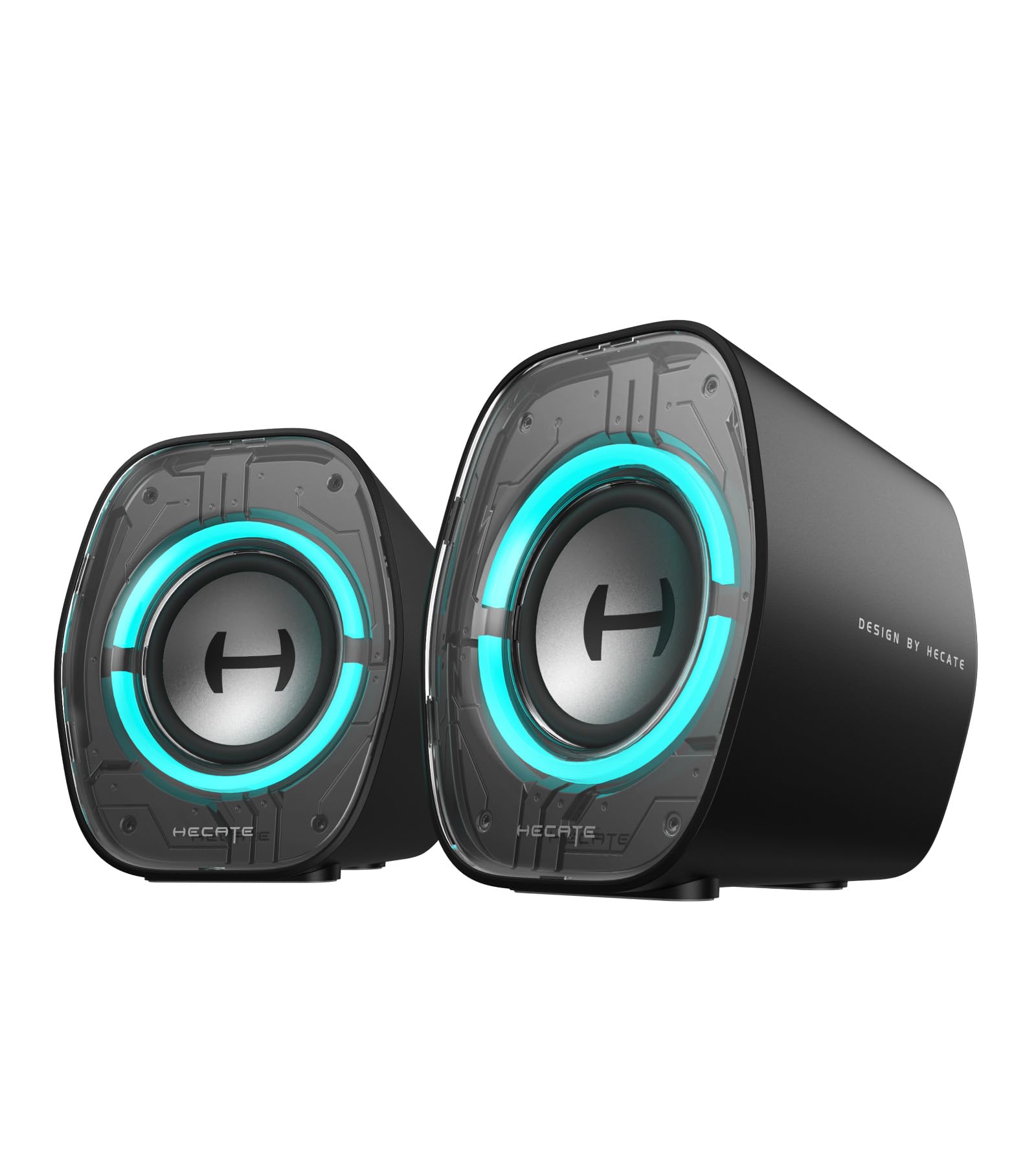
The Edifier G1000 II is an ultra-compact 2.0 system designed for tight desks where a subwoofer simply won’t fit. Despite its small 3.6-inch width, it houses a 2.5-inch full-range driver with a 16-core high-magnetic motor and a racetrack bass reflex port. The 10-degree upward-tilted baffle aims the sound toward your ears rather than your monitor bezel, reducing early reflections. Bluetooth 5.4 with sub-40ms latency pairs with the EDIFIER ConneX App for EQ customization on the fly.
Three preset EQ modes — Music, Gaming, and Movie — are selectable via top-mounted buttons, and the 9 dynamic RGB modes let you match the lighting to your rig’s theme. The USB-C/USB-A input accepts a single cable for both power and audio, making desktop integration genuinely clean. For its size, the G1000 II produces surprising detail in the upper mids and treble, though bass extension naturally stops around 80Hz due to the small driver size and lack of a separate subwoofer.
The plastic enclosure is lightweight and the anti-slip pads keep it planted, but the 2.5-inch driver can’t compete with a proper 2.1 system for low-end authority. The auto EQ feature adjusts based on input type, which is handy but can be disorienting if you switch sources frequently. For minimalists who prioritize desk space and RGB customization over chest-thumping bass, this is a refined choice.
Why it’s great
- Ultra-compact footprint leaves maximum desk space
- Bluetooth 5.4 with low latency and App-based EQ
- 10-degree tilted baffle improves acoustic imaging
Good to know
- Limited bass extension without a subwoofer
- Plastic build, not as acoustically inert as wood enclosures
6. OHAYO 60W

The OHAYO 60W active bookshelf speakers take a hi-fi approach with a 0.75-inch carbon fiber silk dome tweeter paired with a 3-inch carbon fiber full-range driver, housed in a genuine MDF wooden enclosure. The wood cabinet reduces panel resonance dramatically compared to plastic shells, yielding a cleaner midrange and more controlled bass. The rear bass port extends low-end response, and the independent sound card inside the active speaker ensures digital-to-analog conversion doesn’t bottleneck the signal path.
Connectivity is generous: Bluetooth 5.3, RCA, AUX, and USB inputs give you a true multi-source hub. The front-panel knob controls volume, but there are separate treble and bass knobs on the back panel for system-level EQ. The 3-inch carbon fiber drivers produce remarkably clear vocals and instrument separation, with a measured frequency capture from about 45Hz to 22kHz. The soundstage is wide for a compact bookshelf speaker, with good left-right separation even in near-field listening.
The 60W total power (30W per channel) is sufficient for a small to medium room, but the 3-inch driver limits maximum SPL — these won’t fill a large living room without distortion. The balanced TRS inputs are a nice touch for audio interfaces, though they are uncommon at this price tier. For budget-conscious listeners who want studio-quality clarity and genuine wood construction, the OHAYO 60W punches well above its weight.
Why it’s great
- MDF wooden enclosure kills resonance for cleaner sound
- Carbon fiber driver + silk dome tweeter for clarity
- Multiple inputs including balanced TRS
Good to know
- Limited max volume for larger rooms
- Treble and bass knobs located on the back
7. Creative Pebble Plus

The Creative Pebble Plus is a 2.1 system that achieves true plug-and-play simplicity by powering the entire setup — 2-inch satellite drivers and a 4-inch down-firing ported subwoofer — through a single USB connection. The 45-degree elevated satellite drivers angle sound toward your ears naturally, which improves imaging consistency without requiring separate stands or wedges. The down-firing subwoofer design helps spread bass evenly across a desk surface, reducing localized hotspots.
With High Gain Mode activated (requires a 5V 2A USB adapter), the system delivers 8W RMS total power. That’s modest on paper, but the subwoofer adds enough low-end weight to make gaming explosions and movie soundtracks feel substantial. The front-mounted volume controls are easy to reach, and the minimalist bronze-on-black design looks clean on any desk. Setup takes under 60 seconds without any software installation.
The limitations become apparent at higher volumes: the 8W total power means dynamic range compresses when pushed past 75% volume, and the subwoofer lacks the authority to reproduce deep bass notes below 50Hz. The short included cables (less than 4 feet per satellite) can limit placement flexibility. The Pebble Plus excels as a budget-friendly entry point into 2.1 audio — it’s a massive upgrade over monitor speakers or laptop output, but serious listeners will eventually crave more headroom and extension.
Why it’s great
- True single-cable USB power and audio solution
- Down-firing subwoofer improves desk bass distribution
- 45-degree tilted satellites provide natural soundstage
Good to know
- 8W RMS limits dynamic range and max volume
- Short satellite cables restrict placement options
FAQ
Is a 2.1 system always better than a 2.0 setup for PC gaming?
What does the THX certification actually guarantee for a desktop speaker?
Can I use my PC speakers with a TV or game console, or are they locked to a computer?
How much amplification wattage do I actually need for a normal-sized room?
Final Thoughts: The Verdict
For most users, the audio system for pc winner is the Klipsch ProMedia 2.1 THX because it combines horn-loaded clarity, a genuinely potent 6.5-inch subwoofer, and THX certification in a package that simply outclasses everything else at its price tier. If you want a clutter-free, monitor-matching space saver with impressive surround processing, grab the Razer Leviathan V2. And for pure raw power that can shake an entire room without breaking your back financially, nothing beats the Logitech Z623.