
Our readers keep the lights on and the weekend projects moving. As an Amazon Associate, I earn from qualifying purchases.
A dedicated document scanner with an automatic document feeder (ADF) transforms a stack of paper into digital files in minutes, not hours. Unlike a flatbed or multifunction printer, an auto feed scanner pulls pages—both sides at once—through a roller mechanism, handling everything from business cards to multi-page contracts without requiring you to lift a lid or place each sheet manually.
I’m Rikta — the co-founder and writer behind FitlyFast. I’ve spent hundreds of hours analyzing the technical specifications, real-world reliability data, and software ecosystems of the best auto feed document scanners on the market to build this guide.
Whether you are digitizing receipts, archiving client files, or going paperless at home, choosing the right model depends on speed, sheet capacity, and duplex capability. This guide breaks down the top options to help you find the perfect auto feed document scanner for your workflow.
How To Choose The Best Auto Feed Document Scanner
Not all auto feed document scanners are created equal. The key differentiators are scanning speed (measured in pages per minute for duplex operation), the capacity of the automatic document feeder, the supported operating systems and drivers, and the quality of the bundled software for image processing and organization. Below are the critical specs to evaluate before making a purchase.
Duplex Scanning Speed and ADF Capacity
Duplex speed, listed as pages per minute (ppm) for double-sided scanning, is the most important performance metric. A scanner that does 40 ppm duplex will process an 80-page stack (40 sheets, two sides each) in one minute. The ADF capacity tells you how many sheets you can load at once. For home offices, a 20-30 sheet feeder is adequate; for businesses, a 60-100 sheet feeder is far more efficient.
Driver and Software Compatibility
For professional use, especially in medical, legal, or accounting fields, TWAIN driver support is non-negotiable. It allows the scanner to interface directly with specialized document management and electronic medical records (EMR) software. Mac and Windows support is standard, but Linux or Chromebook compatibility is rarer. Bundled software that auto-crops, straightens, removes blank pages, and generates searchable PDFs is a huge time saver.
Connectivity and Workflow Integration
USB connectivity is the most reliable and fastest option. Wi-Fi is convenient for cable-free setups and scanning from mobile devices, but can introduce lag. Some premium models offer Ethernet networking for shared office access. Standalone scanning to a USB drive or directly to cloud services like Dropbox, Google Drive, or a NAS is a powerful feature for computer-free operation.
Quick Comparison
On smaller screens, swipe sideways to see the full table.
| Model | Category | Best For | Key Spec | Amazon |
|---|---|---|---|---|
| ScanSnap iX2400 | Premium | High-Speed Batch Scanning | 45 ppm duplex, 100-sheet ADF | Amazon |
| Epson Workforce ES-580W | Premium | Wireless Touchscreen Workflow | 35 ppm duplex, 100-sheet ADF, 4.3″ touchscreen | Amazon |
| Canon imageFORMULA R50 | Premium | Mixed Media & Touchscreen Control | 40 ppm duplex, 60-sheet ADF, LCD touchscreen | Amazon |
| Epson RapidReceipt RR-620W | Premium | Receipt & Expense Management | 45 ppm duplex, 100-sheet ADF, AI-ready software | Amazon |
| Brother ADS-3100 | Mid-Range | Compact Office Speed | 40 ppm duplex, 60-sheet ADF, USB 3.0 | Amazon |
| ScanSnap iX1300 | Mid-Range | Compact Wireless Versatility | 30 ppm duplex, 20-sheet ADF, Wi-Fi | Amazon |
| Canon imageFORMULA DR-C225 II | Mid-Range | Reliable Durable Workhorse | 25 ppm duplex, 30-sheet ADF, 3-year warranty | Amazon |
| Doxie Pro | Mid-Range | Compact Home & Receipt Use | 25 ppm duplex, 20-sheet ADF, USB-C | Amazon |
| RICOH SP-1130Ne | Budget | Entry-Level TWAIN & Ethernet | 30 ppm duplex, Ethernet, TWAIN driver | Amazon |
In‑Depth Reviews
1. ScanSnap iX2400

The ScanSnap iX2400 is the fastest model in this roundup, capable of 45 pages per minute in duplex mode. Its 100-sheet automatic document feeder is ideal for high-volume batch scanning—processing an entire stack of 80 pages (40 sheets, two-sided) in under a minute. The one-touch button combined with ScanSnap Home software delivers automated image cleanup, blank page removal, and searchable PDF generation without manual driver configuration.
Users report that it handles business cards, receipts, and envelopes without jamming, making it a versatile choice for busy offices. The USB connection is stable and fast, though the lack of Wi-Fi or TWAIN driver support means it is best suited for a solo workstation where driver-level integration is not required.
For speed and reliability in a dedicated desktop scanner, the iX2400 is the current performance benchmark.
Why it’s great
- Blazing 45 ppm duplex speed handles huge stacks fast
- 100-sheet ADF minimizes reloading
- Excellent auto-crop, deskew, and blank page removal
Good to know
- No Wi-Fi or TWAIN driver support
- Software interface can feel clunky with extra steps
2. Epson Workforce ES-580W

The Epson ES-580W combines a large 4.3-inch color touchscreen with wireless connectivity, allowing computer-free scanning directly to email, cloud services, or a USB drive. It delivers 35 ppm duplex scanning with a 100-sheet ADF, making it competitive with higher-speed models while adding the flexibility of standalone operation.
Its CCD sensor technology provides superior depth of field compared to CIS sensors, ensuring crisp scans even for slightly curved or imperfect documents. Users praise its reliability for heavy business use, including notary work and EMR filing, and note that the touchscreen presets make repeated scanning tasks fast and intuitive.
If you need a scanner that works independently of a computer and offers robust wireless integration, this is a top-tier choice.
Why it’s great
- Large 4.3″ touchscreen for standalone scanning
- CCD sensor for crisp images on varied paper
- Wi-Fi and USB connectivity with cloud support
Good to know
- No Ethernet port for wired network sharing
- Slightly slower than the iX2400 at 35 ppm
3. Canon imageFORMULA R50
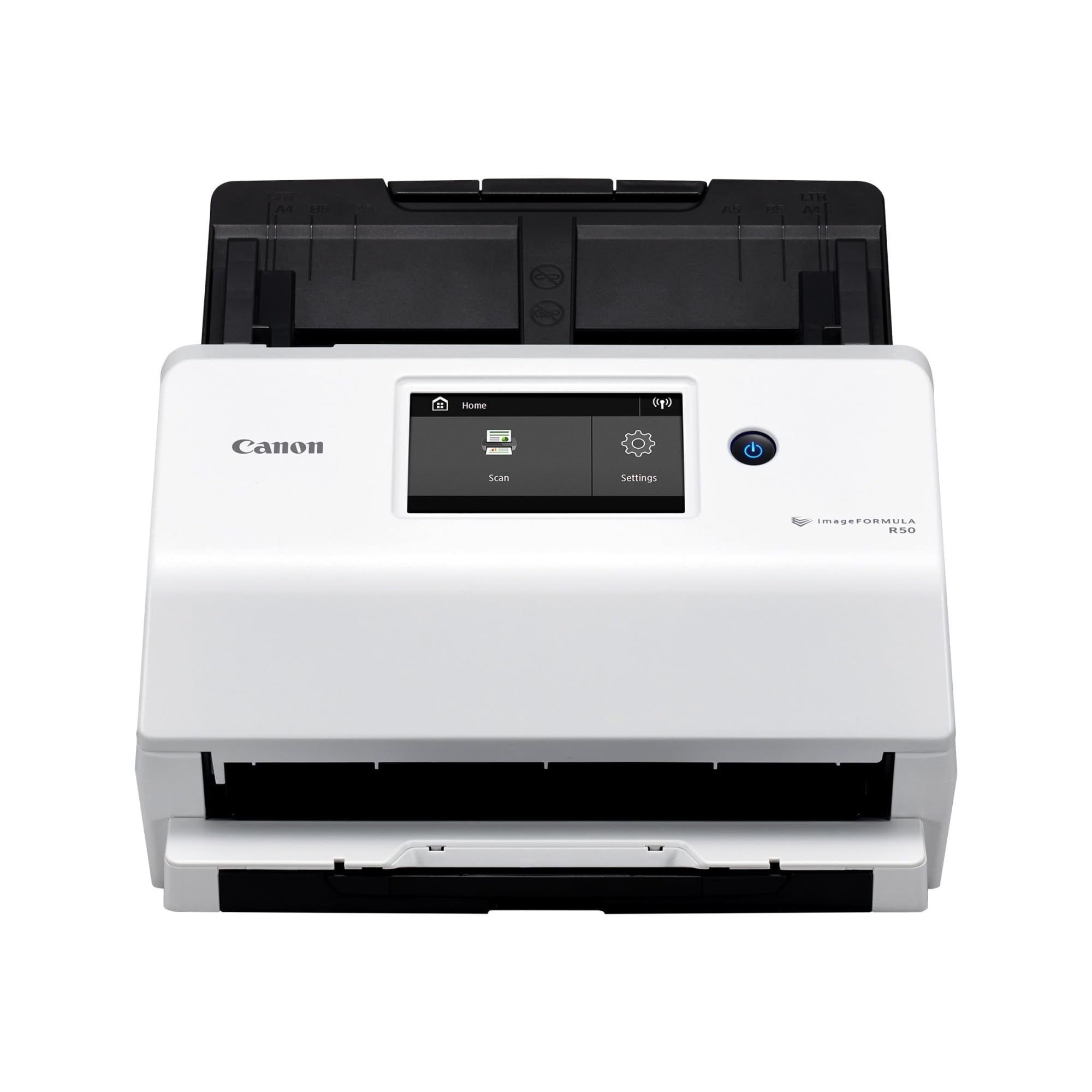
The Canon imageFORMULA R50 offers a large color LCD touchscreen, making it easy to select scan destinations and adjust settings on the fly. It runs at 40 ppm duplex and includes a 60-sheet ADF, a strong mid-range capacity that suits busy home offices or small teams. The adjustable output resolution helps balance image quality and file size for mixed batches.
Users consistently highlight its ability to handle mixed document sizes—cards, pictures, and letter-size pages—simultaneously without issues. The TWAIN driver compatibility ensures it works seamlessly with professional document management software. Setup took roughly 20 minutes, and the included software supports scanning to searchable PDFs and other formats.
For those who want a touchscreen interface and TWAIN support at a competitive speed, the R50 is a compelling option.
Why it’s great
- User-friendly color LCD touchscreen
- 40 ppm duplex with robust TWAIN driver support
- Handles mixed document sizes reliably
Good to know
- Setup instructions lack clarity
- Output tray is somewhat fragile
4. Epson RapidReceipt RR-620W

The Epson RapidReceipt RR-620W is purpose-built for receipt and expense management, offering 45 ppm duplex scanning with a 100-sheet ADF. Its standout feature is the AI-ready ScanSmart PRO technology, which automatically extracts and categorizes data from receipts and invoices, syncing directly with QuickBooks, TurboTax, and Excel.
The large 4.3-inch color touchscreen enables computer-free scanning to email, cloud services, or a USB flash drive. Users report that the wireless scanning to phone and laptop is seamless, and the ADF handles stacks of receipts without jams. It is the clear choice for anyone who needs to digitize and organize receipts systematically.
While the bundled Power PDF software had setup hiccups, the native Epson ScanSmart software works flawlessly and handles all core tasks.
Why it’s great
- AI-driven receipt data extraction and categorization
- Direct sync with QuickBooks, TurboTax, Excel
- Fast 45 ppm duplex with 100-sheet ADF
Good to know
- Bundled Power PDF software had activation issues
- Too fast for delicate photos; use a table scanner
5. Brother ADS-3100

The Brother ADS-3100 packs 40 ppm duplex speed into a compact footprint ideal for small offices and home workstations. Its 60-sheet ADF is generous for its size, and USB 3.0 connectivity ensures fast data transfer. The bundled software suite includes seven applications for workflow optimization, scanning direct to USB, and triple-layer security for safeguarding sensitive documents.
Users report that it handles business cards, ID cards, and various paper types reliably, and that the auto blank-page skip feature is smart and efficient. Some reviewers noted that feeding issues can occur with certain paper types, and that Brother support was not always helpful in resolving them.
For a fast, space-conscious scanner with security features, the ADS-3100 is a strong mid-range contender.
Why it’s great
- Compact design with 40 ppm duplex speed
- 60-sheet ADF and USB 3.0 connectivity
- Bundled with 7 workflow-enhancing applications
Good to know
- Occasional double-feed issues reported
- Driver download instructions could be clearer
6. ScanSnap iX1300

The ScanSnap iX1300 is a space-saving marvel, featuring an innovative design that folds into a compact unit when not in use. It offers 30 ppm duplex scanning with a manual feeder for thick items and a 20-sheet auto document feeder for standard paper. Wi-Fi and USB connectivity allow flexible placement around the office.
Users competing with home clutter love that it fits into a drawer and wakes instantly. The ScanSnap Home software handles auto-de-skew, color optimization, and blank page removal without driver setup. Some reviewers report occasional paper jams if the feeder is not perfectly aligned, but the overall speed and ease of use are widely praised.
For a wireless, ultra-compact scanner that sacrifices a little speed for a tiny footprint, the iX1300 is an excellent fit.
Why it’s great
- Ultra-compact foldable design saves desk space
- Wi-Fi for wireless scanning from any device
- Easy setup and no complicated drivers needed
Good to know
- 20-sheet ADF is smaller than many competitors
- Some reports of paper jams and skew
7. Canon imageFORMULA DR-C225 II

The Canon imageFORMULA DR-C225 II is a proven workhorse with a track record of reliability. It scans at 25 ppm duplex, has a 30-sheet ADF, and supports Windows and Mac. Its upright design with top feed and top eject saves desk space, and the built-in cable management keeps connections tidy.
Users coming from other brands specifically praise its ability to handle documents with Post-It notes or tape attached when the double-feed detection is turned off. The TWAIN driver ensures long-term compatibility with legacy software, and the three-year warranty is the longest in this roundup. Some users have reported double-feed errors if pages are not separated, but overall, its reliability is rated highly.
If you value durability and long-term support over raw speed, the DR-C225 II is a safe investment.
Why it’s great
- Three-year warranty and US-based tech support
- Reliable handling of documents with tapes or sticky notes
- Upright space-saving design with cable organization
Good to know
- Double-feed sensor triggers unless pages are separated
- Slower than newer models at 25 ppm
8. Doxie Pro

The Doxie Pro is a compact scanner designed for home use, particularly receipt and document organization. It offers 25 ppm duplex scanning with a 20-sheet ADF and a collapsible feeder. The direct feed slot handles thick or delicate papers like photographs and folded documents. Its USB-C connectivity and compact footprint make it easy to store.
Users love the simplicity of the software—no complicated drivers, just intuitive scan-to-export to Dropbox, Evernote, and iCloud. The auto-enhancement features, including contrast boost and gamma correction, fix wrinkled or glossy pages effectively. Some users noted that the price can be higher than expected, but when found at a good value, it’s a great entry-level choice.
For home offices and receipt scanning, the Doxie Pro provides a smooth, low-fuss experience.
Why it’s great
- Very compact and folds for storage
- Direct feed slot for thick or delicate items
- Simple software with direct cloud export
Good to know
- 20-sheet ADF is small for batch scanning
- No Chromebook or Linux support
9. RICOH SP-1130Ne

The RICOH SP-1130Ne is a budget-friendly entry-level duplex scanner that includes Ethernet for network connectivity and a TWAIN driver. It scans at 30 ppm with a sheet feeder, making it a practical option for small teams or medical practices that need shared access without Wi-Fi. The PaperStream software is intuitive for one-push scanning to email, folders, or the cloud.
Users appreciate that it offers TWAIN support at a fraction of the cost of Fujitsu Fi series scanners. It handles receipts, business cards, ID cards, and standard letter paper reliably. A minor caveat is that Ethernet networking only allows one user at a time; others must wait until the connection is released. Most users find USB to a single workstation to be the most practical setup.
For those on a tight budget who still need TWAIN and networked scanning, the SP-1130Ne is a smart choice.
Why it’s great
- Budget price with TWAIN driver support
- Ethernet connectivity for network sharing
- Simple one-push scan to email or cloud
Good to know
- Network only allows one user at a time
- Entry-level build; less robust than premium models
FAQ
What is the typical lifespan of a sheetfed document scanner?
Can an auto feed document scanner scan glossy photos without damage?
Do I need a TWAIN driver for my scanner?
Final Thoughts: The Verdict
For most users, the auto feed document scanner winner is the ScanSnap iX2400 because its 45 ppm duplex speed and 100-sheet ADF deliver unmatched batch scanning performance. If you want a wireless touchscreen for standalone scanning, grab the Epson Workforce ES-580W. And for receipt and expense management with AI data extraction, nothing beats the Epson RapidReceipt RR-620W.