
Our readers keep the lights on and the weekend projects moving. As an Amazon Associate, I earn from qualifying purchases.
An automated home system promises convenience, but the reality often lands somewhere between a tangle of unresponsive apps and a collection of hubs that refuse to talk to one another. The smart home market is a battlefield of competing protocols, cloud dependencies, and ecosystems that lock you in before you realize the limitations. The goal is a unified, reliable experience—one where your lights dim on command, your alarm arms itself when you leave, and your energy monitor spots a failing appliance before it becomes an emergency, all without requiring a degree in network engineering to maintain.
I’m Rikta — the co-founder and writer behind FitlyFast. For this guide, I’ve spent dozens of hours parsing the technical specifications, real user reports, and compatibility matrices of the leading smart home hubs and starter kits to separate the rock-solid systems from the ones that create more problems than they solve.
The result is a curated breakdown of the best automated home system options available now, covering everything from lighting and security to energy and water management, so you can build a setup that actually works as one cohesive unit.
How To Choose The Best Automated Home System
The right system starts with a clear understanding of what you want to automate—lighting, security, climate, energy, or water—and whether you want all of those functions under one dashboard. The products below represent the top contenders across these categories, from dedicated lighting hubs to universal automation controllers. Before you buy, consider three critical factors.
Ecosystem Lock-in vs. Open Compatibility
Some hubs speak only to their own brand’s devices. Others, like the Home Assistant Green, are designed to bridge every protocol. If you value the freedom to mix and match, an open platform is essential. If you want a simple, guaranteed-to-work setup, a dedicated ecosystem like Lutron Caséta gives you rock-solid reliability at the cost of brand exclusivity.
Local Control vs. Cloud Dependency
When the internet goes down, does your system still execute automations? The Lutron Caséta hub operates locally without Wi-Fi and remains responsive. The Tapo H500 offers offline mode for recorded footage. Systems that rely solely on the cloud—many lower-end Wi-Fi switches—become useless during an outage. For security and water shutoff, local operation is non-negotiable.
Expandability and Sensor Support
A growing smart home needs room to grow. The Philips Hue Bridge Pro supports over 150 lights and 50 accessories. The Tapo H500 connects up to 16 cameras and 64 sensors. The YoLink water leak kit is built on long-range LoRa, allowing you to place sensors in remote corners of a property. Check the maximum device count and protocol range before committing.
Quick Comparison
On smaller screens, swipe sideways to see the full table.
| Model | Category | Best For | Key Spec | Amazon |
|---|---|---|---|---|
| Home Assistant Green | Universal Hub | Total local automation | 4GB RAM, 32GB storage | Amazon |
| Philips Hue Bridge Pro | Lighting Hub | Large-scale lighting control | 150+ lights, 50 accessories | Amazon |
| Lutron Caséta Original | Lighting Starter | Reliable switch-to-hub lighting | 600W incandescent, 5A LED | Amazon |
| Lutron Diva Smart Dimmer | Lighting Starter | No-neutral dimming | 150W LED, no neutral required | Amazon |
| Tapo H500 CentralHub | Security Hub | Local camera storage & AI | 16 cameras, 64 sensors | Amazon |
| Ring Alarm 8-Piece Kit | Security Starter | DIY home security | 4 contact sensors, 1 motion detector | Amazon |
| Emporia Vue 3 | Energy Monitor | Real-time energy tracking | 16 branch sensors, ±2% accuracy | Amazon |
| YoLink Water Leak Kit | Water Protection | Remote leak detection & shutoff | 1/4 mile range, D2D control | Amazon |
| OSD Nero Max8 | Audio Hub | Whole-home multi-room audio | 8 channels, 4 zones, 80W each | Amazon |
In‑Depth Reviews
1. Home Assistant Green

The Home Assistant Green is the purest expression of the open-source smart home philosophy. It ships with Home Assistant OS pre-installed, a quad-core processor, 4GB of RAM, and 32GB of onboard storage, and consumes only a couple of watts of power. It breaks down the walled gardens of proprietary hubs, allowing you to control Lutron, Philips Hue, Ring, Sonos, and thousands of other devices from a single dashboard—all processed locally with no cloud dependency. For users who value data privacy and absolute control over every automation rule, this is the definitive foundation.
Setup is straightforward: plug in the included power supply and Ethernet cable, and follow the onboarding wizard. The web-based interface gives you granular control over triggers, conditions, and actions, from dimming lights when a movie starts to turning off the HVAC when no one is home. The expandability via USB ports for Z-Wave, Zigbee, and Thread dongles means you can add virtually any wireless protocol later. The learning curve is real—users report spending time with browser-based configuration and AI help for complex automations—but the payoff is a system that answers only to you.
One reviewer noted that it “transformed my local smart home” and praised the speed of local control over cloud-dependent alternatives. Another warned that it’s not fully plug-and-play for total beginners, especially if you have mixed-protocol devices. Once configured, it runs silently and reliably, with scheduled backups protecting your automations. It is, without question, the most capable brain for a serious automated home system.
Why it’s great
- Total local control with no cloud requirement
- Unifies devices from every major brand in one interface
- Silent, fanless, and uses minimal power
Good to know
- Steep learning curve for complex automations
- Requires separate USB dongles for Z-Wave or Zigbee devices
2. Philips Hue Bridge Pro

The Philips Hue Bridge Pro is a meaningful hardware leap over its predecessor. It packs a 1.7 GHz quad-core Cortex-A35 CPU and 4GB of DDR4 SDRAM, which translates to instant response times even in large installations. It supports up to 150 lights and 50 accessories, and its increased memory allows you to store up to 500 personalized scenes. The standout feature is MotionAware, which uses existing Hue devices to trigger lights on movement without requiring separate motion sensors—a clever way to add presence detection without additional hardware costs.
Migration from an older Hue Bridge is automated, though users report losing some scenes in the process. One reviewer who replaced three Bridge v2 units with a single Bridge Pro saw every lag and disconnect issue disappear, with lights responding on the first press and all loads coming on simultaneously. The Ethernet connection ensures stability, and the Zigbee Trust Center upgrade adds robust data protection against unauthorized access. It integrates natively with Apple Home, Alexa, Google, and SmartThings, making it a lighting-first system that plays well with broader automation platforms.
The plastic build is light at 11.3 ounces, and the compact 3.68-inch square footprint tucks neatly into a media cabinet. The price positions it as a mid-range premium choice, but for anyone building a large-scale Hue setup, the performance improvement over the standard Bridge is dramatic. If you prioritize lighting as the backbone of your smart home, this is the hub to anchor it.
Why it’s great
- Instant response even with 100+ lights
- MotionAware enables motion lighting without extra sensors
- 500-scene storage capacity for complex schedules
Good to know
- Migration may lose some saved scenes
- Plastic housing feels lightweight for the price
3. Lutron Caséta Original Smart Light Switch Kit

The Lutron Caséta Original Smart Light Switch Kit is the gold standard for reliability in lighting control. The hub operates on its own RF protocol independent of your Wi-Fi network, meaning it remains fully functional even when the internet goes down—a critical advantage over every cloud-dependent smart switch. This kit includes one smart switch, the Caséta Smart Hub, and a wall plate. The switch controls up to 600W of incandescent or 5A of LED load, making it suitable for most residential lighting circuits.
Installation takes about 15 minutes if you have a neutral wire, which is required. The hub pairs effortlessly, and users consistently report that devices appear immediately without the pairing frustration common to Zigbee or Z-Wave alternatives. The Pico remote (sold separately) adds wireless three-way control anywhere in the home without running new wiring—simply mount it on any wall or keep it on a table. The Lutron app supports scenes, scheduling, geofencing, and smart-away mode, and the system integrates with Alexa, Apple Home, Google Home, Ring, and Sonos.
One reviewer who uses it with Home Assistant noted that it “works flawlessly with HA automations” and looks like a standard white decora switch. Another reported needing to return their first unit due to a defect, but the replacement has performed perfectly since. The system is not expandable beyond lighting and a few shades, but within that scope, it delivers zero-drama operation that outclasses most competitors.
Why it’s great
- Hub works locally without Wi-Fi for rock-solid reliability
- Simple 15-minute installation with clear instructions
- Pico remote adds wireless three-way control anywhere
Good to know
- Neutral wire is required for installation
- Limited to lighting and shade automation only
4. Lutron Diva Smart Dimmer Switch Starter Kit

The Lutron Diva Smart Dimmer Starter Kit solves a major pain point for older homes: it does not require a neutral wire. This makes it one of the few premium smart dimmers that can be installed in switch boxes wired before the 1980s, where neutrals are often absent. The kit includes the Diva smart dimmer switch, a Pico remote, a Pico pedestal, and the Caséta Smart Hub. The dimmer handles up to 150W of LED and 600W of incandescent, providing smooth, flicker-free dimming across a wide range of bulb types.
The classic Lutron Diva paddle design blends seamlessly with existing Decora-style switches, and the hub connects to Alexa, Apple HomeKit, Google Home, Ring, and Sonos. Users report that the system is “rock solid” after months of use, with one reviewer specifically highlighting that it replaced failed Kasa switches and has been flawless for over six months. The Pico remote can be mounted on a wall, placed in a junction box, or simply left on a nightstand, and it communicates directly with the hub without needing to be paired through an app.
The only catch is that the wall plate is sold separately, which is a minor inconvenience for a kit at this price point. The dimming range is limited by the specific LED bulbs you use, but for most modern dimmable LEDs, it performs admirably. This starter kit is the right choice if you need smart dimming in a home without neutral wiring and want the same bulletproof reliability Lutron is known for.
Why it’s great
- No neutral wire required for installation
- Classic paddle design matches standard Decora switches
- Includes hub, dimmer, and Pico remote in one box
Good to know
- Wall plate is not included
- Dimming performance varies with specific LED bulbs
5. Tapo H500 CentralHub

The Tapo H500 CentralHub is designed for users who want a self-contained security ecosystem without recurring subscription fees. It connects up to 16 Tapo cameras and 64 Sub-G sensors, and it ships with 16GB of built-in storage for local recording. You can further expand storage using a 2.5-inch SATA HDD or SSD (sold separately), allowing for weeks or months of footage retention without cloud costs. The hub adds facial recognition to existing Tapo cameras, filtering out familiar faces and alerting you only to unknown individuals—a feature that significantly reduces notification fatigue.
The H500 includes an HDMI port that displays up to four live camera feeds on a monitor or TV, and the built-in 110dB alarm doubles as a chime for connected doorbells. Offline mode ensures that footage is saved directly to the device during network outages, keeping your recordings private and accessible even when the internet is down. Two-way audio allows you to speak to visitors through connected cameras or doorbells, and the WPA3 encryption protects against unauthorized access. The unit connects via Ethernet or Wi-Fi, giving placement flexibility.
Critics note that only four cameras support continuous recording simultaneously, and the lack of ONVIF or RTSP compatibility limits integration with non-Tapo systems. The 2.5-inch drive requirement also blocks many common 3.5-inch desktop hard drives. If you are already invested in the Tapo ecosystem, or simply want a subscription-free local storage hub, the H500 delivers robust performance at a mid-range price.
Why it’s great
- No subscription fees for local recording with expandable storage
- Facial recognition reduces false alerts
- Offline mode ensures security during network outages
Good to know
- Only 4 cameras support continuous recording
- No ONVIF/RTSP support for third-party cameras
6. Ring Alarm 8-Piece Kit
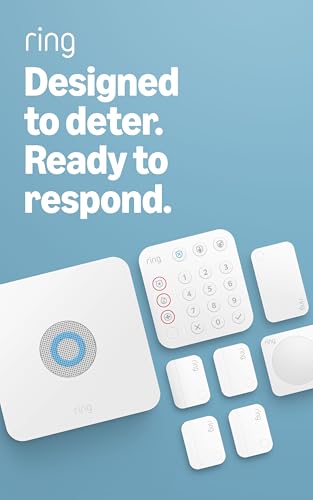
The Ring Alarm 8-Piece Kit is a complete DIY security starter system for 1-2 bedroom homes. It includes a base station, a keypad, four contact sensors for doors and windows, one motion detector, and one range extender. The base station features a backup battery, cellular connectivity via AT&T (check coverage in your area), Ethernet and Wi-Fi options, and thoughtful cable management. Setup is genuinely beginner-friendly—the app walks you through each step, and the contact sensors use common CR2032 batteries, so replacements are easy to find.
One 69-year-old reviewer described the installation as “extremely simple” and praised the system for replacing a local provider that wanted over eight hundred dollars for an upgrade plus monthly monitoring. The Ring Protect Plan (sold separately) adds professional monitoring for police, fire, and medical response, along with cellular backup that keeps the alarm online during Wi-Fi outages. The system integrates with Alexa for voice arming and disarming, and it pairs seamlessly with Ring cameras, doorbells, and Schlage smart deadbolts, allowing you to arm or disarm from the lock itself.
The kit lacks a glass break sensor, though a contact sensor can be placed on the glass pane as a workaround. Some users experienced shipping delays when Amazon sent the 14-piece kit in separate packages over five days. For the price, the Ring Alarm delivers a polished, expandable security foundation with an intuitive app that makes it the easiest path to a monitored alarm system.
Why it’s great
- Super easy DIY installation guided by the app
- Backup battery and optional cellular keep it running during outages
- Integrates with Ring cameras, doorbells, and smart locks
Good to know
- No glass break sensor included
- Professional monitoring requires a subscription
7. Emporia Vue 3 Home Energy Monitor

The Emporia Vue 3 is a UL-listed home energy monitor that installs inside your electrical panel using 16 clamp-on branch sensors. It tracks real-time power consumption with ±2% accuracy across individual circuits, allowing you to see exactly how much energy your air conditioner, water heater, dryer, and other high-draw appliances use. The app provides minute-level data retained for seven days, hour-level data retained indefinitely, and one-second data visible when the app is actively open. It supports solar net metering and integrates with smart plugs, EV chargers, and third-party thermostats for automated energy management.
Users consistently report that the monitor pays for itself within months. One user identified an overactive humidifier and phantom loads, then adjusted their furnace settings to achieve the lowest electric bill in nine months. Another found that the monitor helped justify switching to a heat pump dryer, saving over thirty dollars per month. The 2.4 GHz Wi-Fi connection is generally stable, though the included antenna cable is short—plan to install the monitor near the router or add an extension. The Home Assistant integration via ESPHome custom firmware works well for users who want local control without cloud dependency.
The installation is non-trivial because you must fit 18 CT clamps into a crowded electrical panel, so comfort with basic electrical work is assumed. The app lacks pinch-to-zoom and cannot combine a 240V circuit and its associated 120V loads into a single sensor reading—a feature users have requested for years. Despite these quirks, the Vue 3 provides granular, actionable energy data that few other products match at this price.
Why it’s great
- UL listed for safe installation inside the electrical panel
- 16 branch sensors give per-circuit energy details
- Often pays for itself in energy savings within months
Good to know
- Installation requires comfort with electrical panels
- App lacks pinch-to-zoom and combined sensor views
8. YoLink Water Leak Detection & Shut-Off Starter Kit

The YoLink Water Leak Detection & Shut-Off Starter Kit is a comprehensive protection system that combines three leak sensors, an EVO valve operator, a smart valve controller, and a hub. The defining technology is LoRa—a long-range, low-power wireless protocol that communicates up to a quarter mile between devices, even through concrete walls and metal floors. This means you can place a leak sensor in a remote basement corner, an attic crawl space, or a detached garage and still receive alerts reliably.
The Device-to-Device (D2D) functionality is the safety net: the leak sensors communicate directly with the valve controller without the hub, so even during a power outage or internet disruption, a detected leak triggers an automatic main valve shutoff. The valve operator installs without cutting pipes—it physically turns a quarter-turn lever handle—and the entire system runs on batteries, with the valve controller lasting up to two years on its internal cells. Users report that the setup takes about 20 minutes and that the QR-code-based sensor pairing is glitch-free.
One reviewer noted that their insurance company required a leak detection system, and this kit satisfied the requirement at a fraction of the cost of professional alternatives. Another praised the ability to add multiple sensors (they use 14) for whole-house coverage. The built-in temperature sensor in each leak detector provides added utility for remote freeze monitoring. The kit is pricier than standalone leak sensors, but the integrated automated shutoff and offline reliability make it a cost-effective insurance policy against water damage.
Why it’s great
- LoRa technology reaches up to 1/4 mile through obstacles
- D2D control shuts off water even during power/internet loss
- No plumbing required for valve operator installation
Good to know
- Higher upfront cost than basic leak sensors
- Valve operator works only with quarter-turn lever valves
9. OSD Audio Nero Max8

The OSD Audio Nero Max8 is an 8-channel, 4-zone multi-room amplifier that delivers 80 watts per channel at 4 ohms. It is designed for whole-house distributed audio, allowing four independent stereo zones to play different sources simultaneously or the same source in sync. Inputs include four stereo RCA, two auxiliary, and one optical, giving you flexibility to connect Chromecast Audio units, streaming receivers, or a central media server. The amplifier supports expansion to 12 zones with additional units and includes RS232 control for integration with automation platforms like Control4, Crestron, and Home Assistant.
The OSD Control App manages zone volume, source selection, and grouping, though users report that the app requires a wired Ethernet connection for reliable discovery and that you may need to use an IP scanner to find the unit on your network. Once connected, the sound quality is described as crisp and clear, with enough headroom to drive outdoor speakers or a whole-house ceiling speaker array. The amplifier supports bridging channels for higher power to a single zone, and the audio-sense auto-on feature powers the amp up only when an input signal is detected, saving energy when music is not playing.
One reviewer successfully integrated it with Home Assistant using the Monoprice 6-zone integration via socket commands on port 8080. Another noted that the default volume is set to zero, requiring an initial configuration step that can confuse first-time users. The build quality is solid—rack-mountable at 17 inches wide and 4 inches tall—but the lack of a Wi-Fi antenna means it must be hardwired. This is a specialized component for serious multi-room audio setups, and it earns its place as a premium audio hub in an automated home system.
Why it’s great
- 80W per channel provides clean power for whole-house audio
- RS232 allows deep integration with automation systems
- Expandable to 12 zones for larger installations
Good to know
- Requires Ethernet connection for app control
- Default volume is zero, requiring initial configuration
FAQ
Can I use Lutron Caséta switches without the hub?
Is the YoLink water shutoff system compatible with all main water valves?
Does the Philips Hue Bridge Pro require a subscription for motion sensing?
Can the Emporia Vue 3 monitor solar production?
How difficult is it to set up Home Assistant Green for a non-technical user?
Final Thoughts: The Verdict
For most users, the best automated home system winner is the Home Assistant Green because it provides universal local control, total privacy, and the flexibility to unite every brand of smart device under a single dashboard. If you want a plug-and-play lighting system with legendary reliability, grab the Lutron Caséta Original Smart Light Switch Kit. And for dedicated whole-home water protection that works offline, nothing beats the YoLink Water Leak Detection & Shut-Off Starter Kit.