
Our readers keep the lights on and the weekend projects moving. As an Amazon Associate, I earn from qualifying purchases.
Your laptop freezes mid-edit, your desktop spins its wheels, and that sinking feeling hits—the one where an entire project, photo library, or gaming install could vanish with a single click. A portable mechanical drive is the difference between disaster and a five-minute file transfer. The trick is picking one that balances read speed, physical durability, and raw capacity without spending on a full SSD.
I’m Rikta — the founder and writer behind FitlyFast. I’ve spent weeks cross-referencing transfer benchmarks, enclosure durability tests, and real-world user experiences to match each drive to the right buyer.
Whether you’re a creative hauling footage, a gamer archiving a library, or a student backing up semester projects, finding the right backup external hard drive comes down to matching capacity, portability, and interface speed to your daily workflow.
How To Choose The Best Backup External Hard Drive
Buying a mechanical external drive today means choosing between capacity, speed, and physical toughness. Most buyers get stuck on the price tag without checking the three specs that define day-to-day reliability: the drive’s rotational speed, the interface generation, and the enclosure’s drop rating. Here is exactly what matters.
Capacity and Platter Density
Modern 2.5-inch drives pack up to 5TB into a bus-powered form factor. A 2TB model is adequate for a single laptop backup and a medium-sized photo library. 4TB and 5TB drives cost about the same per gigabyte, so if your dataset exceeds 1.5TB, jumping to the higher tier is smarter than buying a second drive later. Smaller 1TB units remain useful for quick file transfers where weight and pocket size are priorities.
Interface Speed: USB 3.2 Gen 1 vs. USB-C
Every mechanical drive listed caps out at roughly 130-140 MB/s sustained read speed. That means a USB 3.2 Gen 1 (5 Gbps) connection is more than enough—no spinning HDD can saturate that bandwidth. USB-C is a convenience for cable management, not a speed advantage. If your computer has only USB-C ports, check whether the drive includes the proper cable or an adapter in the box.
Physical Durability and Portability
If your drive moves between a backpack, desk, and coffee shop, shock resistance matters more than a few extra MB/s. Look for models with rubber bumpers or a rated drop survival height (2 feet minimum). Drives with plastic enclosures are lighter but less protective; metal-top or rubber-sheathed designs add ounces but survive a tumble off a table. For stationary desktop backup where the drive sits plugged in permanently, enclosure material is nearly irrelevant.
Driver and Format Compatibility
Most drives ship pre-formatted as NTFS for Windows. Mac users must reformat to APFS or exFAT. ExFAT works across both platforms but lacks journaling, making it riskier for primary backups. APFS is optimal for Time Machine but locks the drive to the Apple ecosystem. Windows users enjoy plug-and-play—no reformatting required. Linux users need to account for SMR write behavior on drives like the Seagate Portable, which slows dramatically after the native cache fills.
Quick Comparison
On smaller screens, swipe sideways to see the full table.
| Model | Category | Best For | Key Spec | Amazon |
|---|---|---|---|---|
| Samsung T7 Portable SSD | SSD | Speed for editing | 1,050 MB/s read | Amazon |
| LaCie Rugged Mini 4TB | HDD | Rugged fieldwork | 4-ft drop rating | Amazon |
| WD_BLACK P10 5TB | HDD | Game library storage | 130 MB/s transfer | Amazon |
| Seagate Portable 2TB | HDD | Value with rescue service | 1-Year Rescue Service | Amazon |
| WD Elements 2TB | HDD | Reliable plug-and-play | USB 3.2 Gen 1 | Amazon |
| WD Elements 5TB | HDD | High capacity value | 5TB storage | Amazon |
| Toshiba Canvio Basics 1TB | HDD | Budget portability | 1TB, 2.5-inch | Amazon |
In‑Depth Reviews
1. Samsung T7 Portable SSD

The Samsung T7 uses PCIe NVMe technology to deliver read speeds up to 1,050 MB/s and write speeds up to 1,000 MB/s—roughly ten times faster than any mechanical 2.5-inch drive. That makes it a completely different product category: a portable SSD that doubles as a working drive for 4K video editing, massive Lightroom catalogs, or game installs that need fast random I/O. The aluminum unibody construction dissipates heat effectively even after sustained transfers of 50GB or more, keeping peak temperature around 42°C in real-world use.
Out of the box, the T7 ships in MBR format, which limits partition size on modern systems. Reformatting to GPT is straightforward and removes that ceiling. The included USB-C cable is short at 1.5 feet, so a separate longer Gen 2 cable is a practical addition for desk setups. On Macs, reformatting to APFS is required for Time Machine; on Windows, switching to NTFS/GPT unlocks full performance. The drive also supports 256-bit AES hardware encryption via a companion app.
For creative professionals or power users who move large files between workstations daily, the T7 eliminates the waiting time inherent to mechanical drives. It is silent, pocket-sized at roughly 2.3 inches wide, and weighs only two ounces. The trade-off is a higher per-gigabyte cost, so it is best deployed as an active project drive rather than a deep archival library.
Why it’s great
- 1,050 MB/s read speed dramatically cuts transfer times versus any HDD
- Aluminum unibody stays cool under sustained load
- Hardware encryption via free software
Good to know
- Short USB-C cable included; need a longer one for desktop use
- Must reformat to GPT for full capacity on modern systems
- No water resistance rating unlike some rugged HDDs
2. LaCie Rugged Mini 4TB
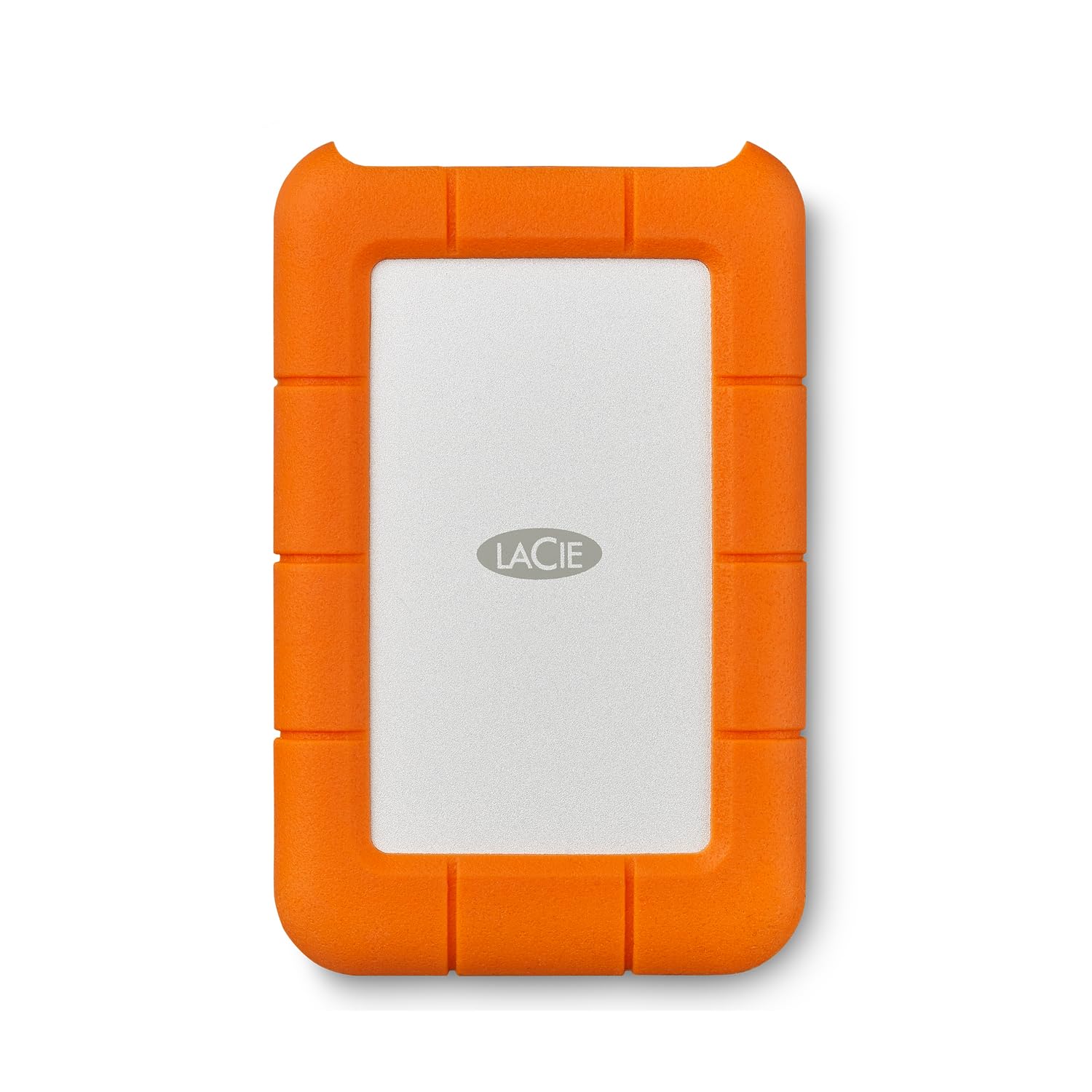
The LaCie Rugged Mini has earned its reputation among field videographers and IT professionals who need a drive that survives drops onto concrete from four feet, splashes from rain, and dust on a work site. The bright orange rubber bumper absorbs impact effectively, and the drive has shipped pre-formatted as exFAT for years, making it cross-platform ready for Mac and Windows out of the box. Sustained read speeds hover around 130 MB/s, which aligns with the USB 3.0 interface.
One persistent drawback is the use of a micro-B USB port instead of USB-C. This means users with modern MacBooks or ultrabooks will need an adapter or a separate cable. The 4TB capacity is practical for backing up a full laptop plus several years of photos and documents. Some Mac users have reported intermittent mounting issues linked to exFAT formatting over extended or frequent write cycles; reformatting to APFS resolves this but sacrifices Windows compatibility without third-party drivers.
The included 1-month Adobe Creative Cloud plan has expired, so treat that as a non-feature. However, the LaCie Rescue Service plan is a legitimate differentiator: if the drive fails physically, LaCie attempts data recovery, which can save thousands in professional recovery fees. For anyone who works in rough conditions or travels constantly, the Rugged Mini is the most physically resilient mechanical drive in this comparison.
Why it’s great
- Rated to survive a 4-foot drop onto concrete
- Dust and water resistant for outdoor use
- Includes data rescue service for peace of mind
Good to know
- Micro-B USB port requires adapter for USB-C devices
- exFAT formatting can cause rare mounting issues on Mac
- Heavier than plastic-enclosure drives of same capacity
3. WD_BLACK P10 5TB

The WD_BLACK P10 is built for gamers who need to store a large game library without clogging internal SSD space. Available in up to 6TB, the 5TB version holds roughly 100-150 titles depending on size. Read speeds of 130 MB/s are standard for a 2.5-inch 4800 RPM drive, which is sufficient for loading Xbox One games and PS4 titles. For high-data-rate open-world games on PS5 or Xbox Series X, the P10 works as cold storage—you archive games to it and move them back to the internal SSD when you want to play.
The enclosure features a brushed metal top plate that adds a touch of rigidity and helps dissipate heat during extended play sessions. The drive stays below 50°C even after hours of transfers, which is cooler than many all-plastic alternatives. It connects via USB Type-A to Micro-B, mirroring the LaCie Rugged Mini in cable interface. The three-year limited warranty is among the longest in the mechanical drive segment.
On the software side, the WD_BLACK Dashboard allows basic performance monitoring and firmware updates. The drive is pre-formatted NTFS for Windows, requiring reformatting for Mac. A minor consideration: the drive performs best when dedicated to game storage; using it for simultaneous backup duty can fragment the drive and slow access times over the long term. For pure game archival, this is the top pick.
Why it’s great
- 5TB holds a large game library without breaking the bank
- Metal top plate improves durability and heat dissipation
- 3-year warranty covers longer ownership cycles
Good to know
- Micro-B USB connection; not USB-C native
- Speeds limited to 130 MB/s like any mechanical drive
- Best used as game storage, not as a primary backup drive
4. Seagate Portable 2TB

The Seagate Portable 2TB packs the extra feature that no other drive in this mid-range bracket includes: one year of Rescue Data Recovery Services. If the drive suffers a mechanical failure or accidental damage, Seagate will attempt to recover the data at no additional cost. The drive uses SMR (shingled magnetic recording) technology, which keeps costs low but causes write speeds to drop to about 25 MB/s after the drive’s conventional cache fills up—typically after 100GB of continuous writing.
Out of the box, the Seagate Portable is NTFS-formatted for Windows. Mac users will need to reformat to APFS or exFAT. The drive is recognized automatically by PC, PlayStation, and Xbox consoles, making it a versatile offload device for cross-platform users. The included 18-inch USB 3.0 cable is short, identical to the WD Elements in length. The enclosure is an all-plastic shell with a matte finish that resists fingerprints but offers zero drop protection.
For the typical user who backs up a laptop every weekend and stores media files, the SMR slowdown will rarely become an issue. The drive is quiet, light enough for a backpack, and the Rescue Service adds genuine value that competitors like Toshiba and WD do not match at this tier. If you regularly write hundreds of gigabytes in a single session, consider a PMR drive instead.
Why it’s great
- One-year Rescue Service provides built-in data recovery protection
- Works with PC, Mac, PlayStation, and Xbox out of the box
- Lightweight and quiet for daily carry
Good to know
- SMR technology causes severe write slowdown after ~100GB
- Plastic enclosure offers no shock protection
- Short cable included; longer cable recommended for desktop
5. WD Elements 2TB

The WD Elements 2TB is the definition of a no-surprises external drive. It uses a conventional PMR mechanism that maintains consistent write performance across the entire capacity, unlike the SMR drives found in Seagate’s portable line. That means you can fill the 2TB in a single session without the speed cliff that plagues competing models. The USB 3.2 Gen 1 interface delivers the standard 5 Gbps connection, which the mechanical internals cannot saturate, ensuring the limiting factor is always the drive’s own read/write head.
The enclosure is a matte-black plastic shell with a slightly textured surface that minimizes scratches during bag travel. At 3.5 inches, this is a 2.5-inch drive in a compact footprint, though the form factor listed officially is 3.5-inch—an artifact from older product packaging. Real-world user reports confirm it fits easily in a laptop sleeve or cable pouch. Plug-and-play on Windows is flawless, with no software installation required. Mac users must reformat for Time Machine use.
One quirk: the drive can cause USB 3.0 signal interference with wireless peripherals like keyboard and mouse receivers if placed directly next to the receiver. Moving the drive a few inches away resolves the issue. For pure reliability and predictable speeds, the WD Elements is the safest value pick in the 2TB category. The trade-off is the lack of bundled extras like Seagate’s Rescue Service or LaCie’s rugged shell.
Why it’s great
- PMR drive maintains consistent write speeds across entire capacity
- Flawless plug-and-play on Windows with no software
- Compact and scratch-resistant enclosure
Good to know
- May cause USB wireless interference if placed too close to receivers
- Plastic enclosure offers no drop protection
- Must reformat for Mac; not pre-configured for Apple devices
6. WD Elements 5TB

The larger sibling of the 2TB WD Elements, this 5TB variant offers the same PMR technology and USB 3.2 Gen 1 interface but triples the capacity in the same portable form factor. The mechanical drive inside uses a higher platter density to achieve 5TB in a 2.5-inch casing, which means slightly higher latency than a lower-capacity drive, but sustained read speeds still hover around 130 MB/s. For archiving years of family photos, video projects, or Steam libraries, the 5TB eliminates the need for a second drive for most single-PC users.
The enclosure is identical to the 2TB version—matte-black plastic with a textured finish—and it weighs only a few grams more despite the higher capacity. Noise levels are low, with a faint hum during active reads and virtually silent idle behavior. The drive draws power exclusively from the USB port, eliminating the need for a wall adapter. Like its smaller counterpart, it works instantly with Windows and requires reformatting for Mac, but the out-of-box experience is as clean as portable storage gets.
The main downside is the same USB wireless interference issue reported on the 2TB model. Placing the drive too close to a wireless mouse or keyboard dongle can cause lag or disconnects. A simple cable extension solves it. For users who want high capacity in a bus-powered portable package without paying the SSD premium, the 5TB Elements is the most cost-effective option in this roundup for bulk storage.
Why it’s great
- 5TB capacity in a bus-powered, portable 2.5-inch enclosure
- PMR drive avoids write slowdown typical of SMR competitors
- True plug-and-play on Windows with no formatting needed
Good to know
- USB wireless interference possible when placed close to receivers
- Plastic shell offers minimal physical protection
- Higher latency than smaller-capacity PMR drives
7. Toshiba Canvio Basics 1TB

The Toshiba Canvio Basics 1TB is the smallest and lightest drive in this lineup, designed for users who need a quick offload solution rather than a deep archive. The matte polycarbonate enclosure resists smudges and weighs almost nothing, making it ideal for slipping into a jacket pocket or camera bag. The USB 3.0 interface delivers standard 5 Gbps connectivity, though the drive’s internal mechanism peaks at around 100-110 MB/s in real-world sequential reads—slightly slower than the WD or Seagate 2TB models but perfectly adequate for document backups and photo transfers.
Setup is genuinely plug-and-play for Windows: the drive is pre-formatted as NTFS and recognized automatically without driver installation. Mac users must reformat, as no exFAT option is provided out of the box. The drive stays cool during operation—users report no overheating after three hours of continuous downloads—and the lack of an external power brick keeps the cable mess to zero. The included USB 3.0 cable is a standard Type-A to Micro-B, similar to the LaCie Rugged Mini.
The 1TB capacity is the limiting factor. Once you exceed 500GB of data, the drive feels cramped, and upgrading to a 2TB unit from another brand becomes more cost-effective per gigabyte. The 1-year warranty is standard but shorter than the 3-year coverage on the WD_BLACK P10. For students transferring semester files or travelers who need a single backup destination for one device, the Canvio Basics is a reliable, compact entry point.
Why it’s great
- Smallest and lightest form factor for easy pocket carry
- Runs cool even during extended read/write sessions
- Smudge-resistant matte finish stays clean over time
Good to know
- 1TB fills up quickly for photo or video libraries
- Read speeds slightly slower than WD/Seagate equivalents
- Mac reformatting required; no exFAT option out of the box
FAQ
Can I use an external HDD for Time Machine on Mac?
Is faster USB (USB 3.2 Gen 2) worth it for a mechanical hard drive?
Why does my external drive slow down after I copy 100GB of files?
Can a portable external hard drive work with a PlayStation 5 or Xbox Series X?
How long does a portable external hard drive typically last?
Final Thoughts: The Verdict
For most users, the backup external hard drive winner is the LaCie Rugged Mini 4TB because it combines true physical durability with data recovery protection and enough capacity to cover a full laptop backup plus years of media. If you need blazing transfer speeds for active project files, grab the Samsung T7. And for gamers looking to expand console storage without breaking the bank, nothing beats the WD_BLACK P10 5TB.