
Our readers keep the lights on and the weekend projects moving. As an Amazon Associate, I earn from qualifying purchases.
The jump from a USB headset or built-in laptop mic to a dedicated audio interface is the single biggest upgrade you can make for your recordings. A beginner interface eliminates the hollow, distant quality that plagues most raw captures, replacing it with clean, full-spectrum sound that doesn’t fight you during editing.
I’m Rikta — the co-founder and writer behind FitlyFast. I’ve spent many hours analyzing converter specs, preamp noise floors, driver stability, and bundle software offerings across this crowded market so you can skip the research phase and land on the interface that truly fits your start.
The trick is matching the right set of inputs, preamp quality, and included software to your specific recording goals, and this breakdown of the absolute best beginner audio interface options will guide you straight to the correct purchase.
How To Choose The Best Beginner Audio Interface
First-time buyers often over-focus on channel count or fancy brand names. For a starter unit, your real priorities are preamp clean gain, low-latency driver stability, and the quality of the included software bundle. A single good preamp with adequate gain for your microphone type beats a noisy two-preamp unit every time.
Preamp Gain and Noise Floor
The preamp is the engine of any interface. You need enough clean gain to drive dynamic mics (like a Shure SM58 or SM7B) without introducing hiss. Look for an EIN (Equivalent Input Noise) rating at or below -127 dBu. Units offering 55-60 dB of gain give you headroom for quiet sources. Interfaces with only 40-45 dB may force you to max the knob and hear the noise floor.
Sample Rate and Bit Depth
Nearly every modern interface offers 24-bit recording, which provides a theoretical dynamic range of 144 dB. While 192 kHz is a common marketing bullet, most beginners will never hear a difference above 48 kHz or 96 kHz. Prioritize converter transparency and low jitter over chasing the highest number. A proven 24-bit/96 kHz converter from a reputable brand often sounds better than a cheap 192 kHz implementation.
Connectivity and Latency
USB-C is the modern standard, offering both bus power and sufficient bandwidth for two-input interfaces. Confirm your computer has the correct port or be ready with an adapter. Zero-latency direct monitoring is a crucial feature — without it, you hear your own voice delayed, which destroys your performance timing. A proper ASIO driver (or Core Audio on macOS) also minimizes round-trip latency.
Quick Comparison
On smaller screens, swipe sideways to see the full table.
| Model | Category | Best For | Key Spec | Amazon |
|---|---|---|---|---|
| Focusrite Scarlett Solo 3rd Gen | USB Interface | Vocalists and guitarists seeking proven reliability | 192 kHz / 24-bit, Air mode preamp | Amazon |
| Universal Audio Volt 2 | USB Interface | Those wanting vintage 610 preamp character | 192 kHz / 24-bit, Vintage mode circuit | Amazon |
| Motu M2 2×2 | USB-C Interface | Users wanting ESS Sabre32 DAC clarity | 120 dB dynamic range, ESS Sabre32 DAC | Amazon |
| Arturia MiniFuse 1 | USB Interface | Travel-friendly recording with MIDI connectivity | 192 kHz / 24-bit, built-in USB hub | Amazon |
| IK Multimedia AXE I/O One | USB Interface | Guitarists who need Z-Tone impedance shaping | 192 kHz / 24-bit, Z-Tone circuit | Amazon |
| Shure MVX2U | XLR-to-USB | Plug-and-play XLR mic upgrade without a box | 48 kHz / 24-bit, 60 dB gain | Amazon |
| Rode AI-1 | USB Interface | Podcasters needing a dead-silent preamp | 96 kHz / 24-bit, ultra-low noise preamp | Amazon |
| M-AUDIO AIR192x4 VSPro | Complete Bundle | Buyers wanting a mic, headphones, and interface in one box | 192 kHz / 24-bit, 2.59 ms round-trip latency | Amazon |
| FIFINE AmpliGame KS5 | Gaming Bundle | Budget-conscious gamers wanting an all-in-one mixer | 16-bit / 48 kHz, 4-channel mixer | Amazon |
In‑Depth Reviews
1. Focusrite Scarlett Solo 3rd Gen

The Scarlett Solo 3rd Gen has become the benchmark entry-level interface for good reason. Its mic preamp features a switchable Air mode that emulates the high-frequency lift of an analog console, adding presence to vocals and acoustic guitar without additional EQ work. The Gain Halo metering rings provide an intuitive visual cue for setting levels without clipping — a huge confidence booster when you are still learning proper gain staging.
The build is a rugged metal chassis that has held up for years in mobile and home studio use. Bus-powered via USB-C, it connects cleanly to Mac and Windows machines. The converter quality at 24-bit/192 kHz captures transients with surprising detail for this price tier. The included software bundle includes Ableton Live Lite, Pro Tools Intro, and the Hitmaker Expansion pack, giving you studio-grade plugins right out of the box.
The solo configuration (one XLR combo input and one instrument input) is perfect for a single vocalist or guitarist tracking one source at a time. Installation takes seconds on macOS, and the Focusrite Control app handles routing and monitoring mix quickly. If you want the most tested, most supported starter interface on the market, this is your pick.
Why it’s great
- Air mode adds clarity without external processing
- Gain Halo makes level-setting foolproof
- Industry-standard driver support across all major DAWs
Good to know
- Single mic input limits simultaneous multi-mic recording
- No MIDI I/O built-in
2. Universal Audio Volt 2

The Volt 2 brings Universal Audio’s legendary preamp heritage to the beginner market. The Vintage mode button engages a circuit modeled after UA’s classic 610 tube preamp, adding a subtle saturation and warmth that smooths out harsh digital transients — particularly flattering on vocals and acoustic guitar. The solid metal chassis feels premium on the desk, and the large monitoring knob includes an integrated LED halo that indicates signal presence.
Recording quality hits 24-bit/192 kHz with converters that sound noticeably open in the high end. The two combo inputs allow simultaneous stereo recording or dual-mic setups. UA bundles the LUNA DAW with the Volt, which integrates seamlessly with UAD plug-ins and provides a tape-style workflow that feels more tactile than traditional linear DAWs. The included UAD Essentials bundle adds reverb, compression, and EQ plug-ins that sound closer to analog hardware than most free offerings.
The Volt 2 also supports iOS devices (iPad and iPhone with USB-C) using external power, making it a capable mobile recording partner. The only catch is that the Vintage mode and UAD plug-ins work best within LUNA or a compatible DAW, so beginners locked into another platform should verify workflow compatibility. For someone who wants their first recordings to have a polished, analog character, the Volt 2 delivers immediately.
Why it’s great
- Vintage mode adds instant analog warmth to any source
- Includes LUNA DAW and UAD Essentials plug-in suite
- Two inputs for flexible recording
Good to know
- Requires external power when used with iOS devices
- UAD plug-in ecosystem works best within LUNA
3. Motu M2 2×2 USB-C Audio Interface

The Motu M2 punches far above its price tier by using the ESS Sabre32 Ultra DAC — the same converter technology found in interfaces costing several times more. Measured dynamic range hits 120 dB on the outputs, translating to an exceptionally black noise floor and transparent playback that reveals detail you would miss on lesser hardware. The mic preamps measure -129 dBu EIN, making them among the quietest in this class.
The front panel includes a full-color LCD screen that displays real-time metering for both inputs and the output bus — a rare luxury at this price. Two combo inputs with independent preamps handle both mic and instrument signals, and the headphone output is powerful enough to drive high-impedance studio headphones like the Beyerdynamic DT 990 Pro (250 ohms) without an external amp. Loopback functionality is built in for easy streaming or podcast capture.
The only notable omission is the lack of MIDI ports, and some users report the need to download the correct ASIO driver for optimal latency on Windows. Despite those minor quirks, the M2’s converter performance and metering make it the best-sounding interface in its segment. For a beginner who plans to grow into better monitoring, the M2 is a future-proof foundation.
Why it’s great
- ESS Sabre32 DAC for reference-grade audio clarity
- Full-color LCD metering for precise level monitoring
- High-current headphone output drives 250-ohm cans
Good to know
- No MIDI input or output ports
- Windows users must install ASIO drivers separately
4. Arturia MiniFuse 1
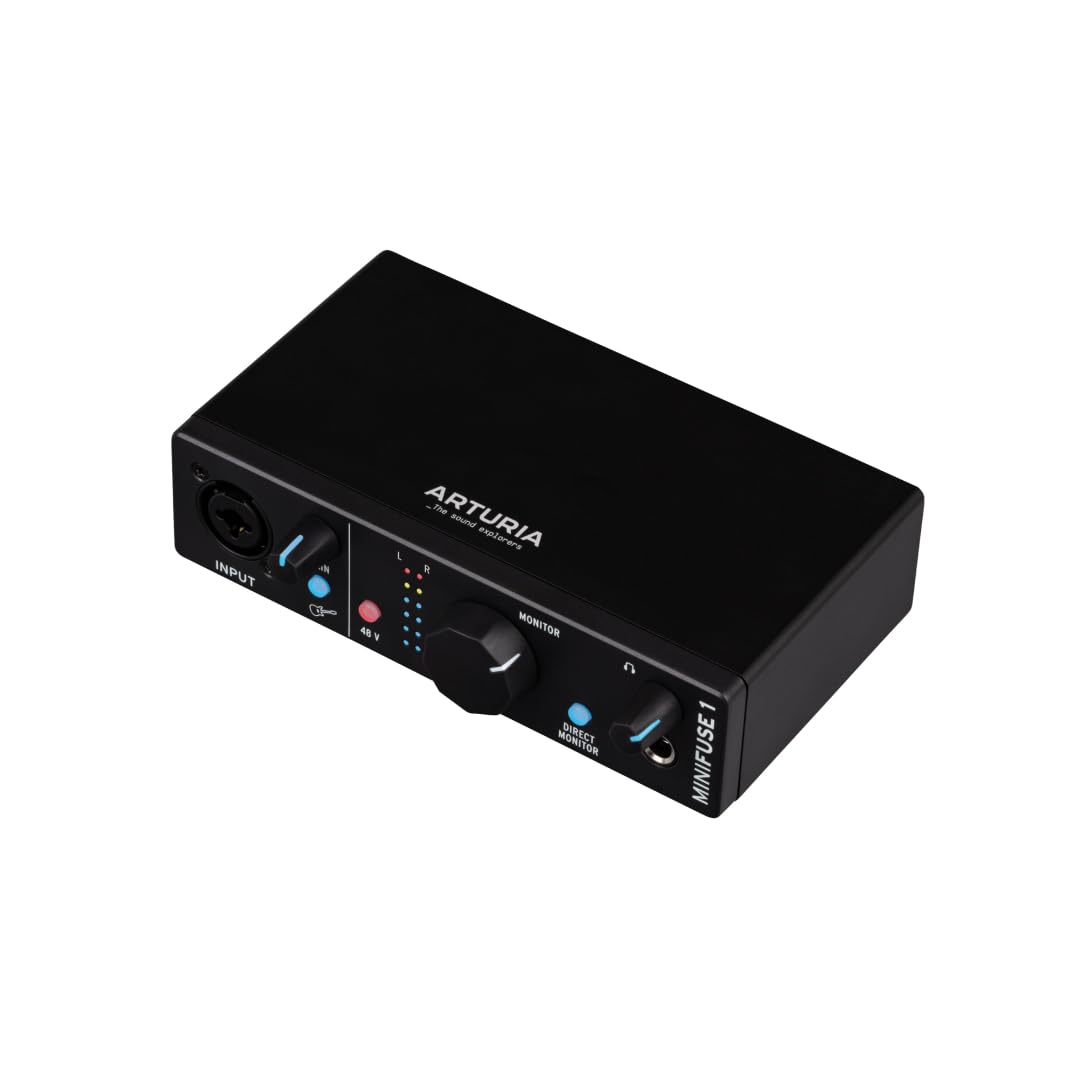
The Arturia MiniFuse 1 is a deceptively capable single-input interface that packs MIDI I/O and a built-in USB hub into its compact frame. The USB-A hub port on the back lets you connect a MIDI controller or dongle without eating another port on your computer — a small detail that makes a big difference in a tight desktop setup. The preamp delivers clean gain up to 56 dB, sufficient for most dynamic mics, and the combo input accepts both XLR and 1/4-inch sources.
Conversion quality hits 24-bit/192 kHz, and the loopback feature lets you capture computer audio alongside your mic for streaming or voiceover work. Arturia backs the MiniFuse 1 with a 5-year warranty and claims over 200 reliability tests per unit, signaling confidence in the build quality. The software bundle is generous: Ableton Live Lite, Analog Lab Intro (hundreds of synth presets), Auto-Tune Unlimited, and Guitar Rig 6 LE give you a professional starting toolkit.
The main limitation is the single input, which restricts you to one source at a time. For a solo podcaster, singer-songwriter, or remote worker needing a high-quality audio upgrade for calls, the MiniFuse 1 is a space-saving gem. The MIDI connectivity also makes it the most attractive option for producers using hardware synths or drum machines.
Why it’s great
- Built-in USB hub saves computer ports
- MIDI I/O included for synth and controller integration
- 5-year warranty provides long-term peace of mind
Good to know
- Only one mic/instrument input
- Headphone output may lack power for very high-impedance headphones
5. IK Multimedia AXE I/O One

The AXE I/O One is the only interface in this roundup engineered specifically for guitarists. Its defining feature is the Z-Tone impedance-adapting circuit, which matches the input impedance to your pickup type — passive or active — preserving the natural resonance and treble response of your guitar. A dedicated Active/Passive switch on the front panel lets you dial in the exact loading your pickups need, eliminating the dulling effect common in standard instrument inputs.
The recording specs are robust at 24-bit/192 kHz, and the XLR mic preamp is clean enough for voiceover work. The built-in onboard mixer lets you blend the direct guitar signal with the return from your DAW for zero-latency monitoring while tracking through amp sims. The software bundle is the real prize: AmpliTube 5 SE and TONEX SE give you over 16,000 amp and cab models, plus the ability to capture your own real amps using TONEX’s advanced modeling technology.
The chassis is plastic rather than metal, but users report that this actually reduces electrical interference — an intelligent engineering trade-off for a guitar-focused device. Setup requires multiple software registrations, and you need to disable exclusive mode in Windows audio settings to prevent audio muting. For a guitarist buying their first interface, the AXE I/O One removes the most common complaint: that standard interfaces make electric guitars sound flat.
Why it’s great
- Z-Tone circuit preserves guitar tone better than standard inputs
- Includes AmpliTube 5 SE and TONEX SE with thousands of sounds
- Zero-latency monitoring for real-time amp sim playing
Good to know
- Plastic housing may feel less premium than metal rivals
- Multiple software registrations required for full bundle access
6. Shure MVX2U XLR-to-USB Interface

The Shure MVX2U redefines simplicity by eliminating the traditional interface box. It is a compact inline adapter that plugs directly into the bottom of any XLR microphone, converting it into a USB device with zero fuss. The integrated preamp delivers a massive 60 dB of clean gain, enough to power even gain-hungry dynamic mics like the SM7B without an additional cloudlifter. Phantom power at 48V is available for condenser mics.
The built-in 3.5mm headphone jack provides zero-latency monitoring, and the companion ShurePlus Desktop app gives you manual control over compression and EQ if you prefer to shape the sound before it hits your computer. Auto Level Mode automatically adjusts gain in real time, making it virtually impossible to clip or record too quietly — a godsend for livestreamers and podcasters who need to focus on content, not levels. The MVX2U also stores your settings when disconnected, so your preferred processing travels with the device.
The trade-off is the lack of expandability. You cannot add a second mic or instrument input, and the maximum sample rate is 48 kHz rather than the 192 kHz found on box interfaces. For most spoken-word and streaming applications, 48 kHz is more than adequate. This device is not for musicians needing multiple tracks, but for anyone who just wants to make their XLR microphone sound professional with zero learning curve, it is the most elegant solution available.
Why it’s great
- 60 dB of gain handles demanding dynamic mics without external boost
- Auto Level Mode prevents clipping during live use
- Tiny footprint attaches directly to the microphone
Good to know
- Limited to a single microphone with no instrument input
- Maximum sample rate is 48 kHz, not suitable for high-resolution recording
7. Rode AI-1

The Rode AI-1 is a no-frills interface built around a single goal: delivering the cleanest, quietest preamp in its class. The EIN is rated exceptionally low, and many users report that the preamp is essentially silent even at high gain settings — a critical spec for spoken-word and podcast recording where silence between words matters. The all-metal chassis has a tank-like build quality that inspires confidence in mobile or home setups.
The front panel keeps things simple with a single combo input, a large gain knob, a 48V phantom power switch, and a direct monitoring button. A dedicated instrument input is located on the side panel. Outputs include balanced TRS jacks for studio monitors and a headphone output with independent level control. The maximum sample rate is 96 kHz / 24-bit, which is entirely sufficient for podcasting, voiceover, and most music recording needs.
Some users have reported driver-related quirks on Windows, including occasional disconnection that requires a power cycle. Rode has released beta firmware updates to address these issues, and many users find the interface stable after applying the patches. For macOS users, plug-and-play is seamless. The AI-1 is best suited for someone who values absolutely clean, noise-free audio above all else and is willing to navigate minor driver setup to get it.
Why it’s great
- Exceptionally low-noise preamp is ideal for spoken word
- Robust all-metal chassis for durability
- Plug-and-play on macOS with Core Audio
Good to know
- Some Windows users experience occasional disconnection issues
- Only 96 kHz maximum sample rate vs competitors at 192 kHz
8. M-AUDIO AIR192x4 VSPro Complete Recording Package

The M-AUDIO AIR192x4 VSPro bundle solves the biggest problem new buyers face: needing three separate purchases (interface, microphone, headphones) to get started. This package includes the AIR 192|4 interface, a NOVA Black condenser microphone with shock mount, an XLR cable, and HDH40 studio headphones — everything you need to record immediately. The interface itself is a 2-in/2-out unit capable of 24-bit/192 kHz resolution with low-latency USB-C connectivity.
The AIR 192|4 features transparent Crystal preamps and a dedicated instrument input that handles guitar and bass without impedance mismatch. The loopback function is built in for streaming and podcast capture. M-AUDIO claims a class-leading round-trip latency of only 2.59 ms, which is competitive with much more expensive units. The included software suite — MPC Beats, Ableton Live Lite, Xpand!2 synth, Mini Grand piano, and Creative FX Collection — covers production, instrument, and processing needs.
The condenser mic included in the bundle is a solid starter, but users seeking a richer vocal tone may want to upgrade to a dedicated dynamic or large-diaphragm condenser later. The headphones are functional for monitoring but lack the detail of separate studio cans. For a budget-conscious beginner who wants to open one box and start recording the same day, this bundle is the most practical entry point. The value of receiving a complete recording setup in a single purchase cannot be overstated.
Why it’s great
- Includes interface, condenser mic, headphones, and cables in one box
- 2.59 ms round-trip latency is excellent for real-time monitoring
- Crystal preamps deliver clear, transparent capture
Good to know
- Bundled microphone and headphones are entry-level quality
- Some users report long-term USB power reliability concerns
9. FIFINE AmpliGame KS5 Gaming Equipment Bundle

The FIFINE AmpliGame KS5 approaches audio interface functionality from a gaming perspective. The bundle pairs a dynamic XLR/USB microphone with a dedicated 4-channel audio mixer that provides individual mute controls, headphone monitoring, and a volume fader for each channel. Voice changer effects with multiple modes add a layer of fun for streamers who want to alter their voice during live gameplay.
The dynamic microphone is weighted and feels substantial on the desk. It connects via XLR to the mixer for the best audio quality, but also works as a standalone USB mic if you prefer simplicity. The mixer includes RGB lighting with five effects modes, adding visual flair that aligns with typical gaming setups. The included cables cover both USB and XLR connections, plus a headphone monitoring cable.
Audio quality is competitive with other budget interfaces, though the maximum bit depth is 16-bit rather than 24-bit — a clear differentiator from the pro-audio-focused interfaces in this list. The mixer’s function keys (mute, monitoring, RGB) work only via USB connection, not through the XLR link. The plastic build is expected at this price point, and a few users have reported mixer rebooting issues. This bundle is a solid choice for gaming streamers who want a complete audio upgrade with mixer control and voice effects without investing in traditional studio gear.
Why it’s great
- All-in-one bundle with mic, mixer, and all cables included
- Voice changer effects add entertainment value for streaming
- RGB lighting matches gaming desktop aesthetics
Good to know
- 16-bit recording limits dynamic range compared to 24-bit interfaces
- Mixer function keys are only active via USB, not XLR
FAQ
Do I need an audio interface if my microphone uses USB?
What is the difference between 44.1 kHz and 192 kHz for a beginner?
Can I use a beginner audio interface with my iPad or iPhone?
Do I need studio monitors or can I use regular speakers?
What does “phantom power” actually do to my microphone?
Final Thoughts: The Verdict
For most users, the beginner audio interface winner is the Focusrite Scarlett Solo 3rd Gen because it offers the perfect balance of proven preamp quality, foolproof gain metering, and the widest software ecosystem for new producers. If you want vintage analog character and premium DAW integration, grab the Universal Audio Volt 2. And for a guitarist who needs their instrument to sound its best from day one, nothing beats the IK Multimedia AXE I/O One with its Z-Tone circuit and AmpliTube bundle.