
A flimsy, unresponsive keybed kills the joy of learning before you ever lay down a single note. The difference between a controller that feels like a toy and one that feels like an instrument comes down to key action, pad sensitivity, and bundled software that actually works. A true beginner MIDI keyboard should reward every finger press with precise velocity response, offer a smart set of controls that don’t overwhelm, and include a DAW and sound library that let you start producing immediately rather than hunting for downloads.
I’m Rikta — the co-founder and writer behind FitlyFast. I’ve spent hundreds of hours cross-comparing keybed quality, pad responsiveness, workflow integration, and software bundle value across every major controller at the entry level.
If you want the short answer, the beginner midi keyboard that best blends playability, creative tools, and lasting build quality is the Akai Professional MPK Mini IV.
How To Choose The Best Beginner MIDI Keyboard
Every beginner controller makes a trade-off between portability, playability, and control depth. Understanding these three dimensions will help you pick a board that grows with you instead of one you outgrow in a month.
Key Count and Key Size
The number of keys determines how much music you can play without reaching for octave buttons. A 25-key controller fits in a backpack and works well for beat-making and bass lines, but a 49-key board with full-size keys allows two-handed piano practice and proper chord voicings. Mini keys on 25-key models save space but feel cramped for players with average-sized hands. If you plan to learn proper piano technique, prioritize full-size keys, even if that means fewer octaves.
Velocity Sensitivity and Key Action
Velocity-sensitive keys register how hard you press, allowing soft versus loud notes — this is the foundation of expressive playing. Synth-action keys are light and springy, ideal for fast synth leads and drum programming. Semi-weighted keys add resistance closer to an acoustic piano, better for practicing finger strength. Beginner boards almost never include fully weighted keys; if you find a controller that claims it at this price tier, it is likely misleading marketing.
Built-in Controls and DAW Integration
Pads, knobs, faders, and pitch/mod wheels let you shape sounds without clicking a mouse. For beginners learning music production, a set of responsive drum pads (MPC-style or FSR) and at least two assignable knobs dramatically speed up the learning curve. Pre-mapped integration with your DAW of choice — especially Ableton Live Lite, which ships with most controllers — eliminates frustrating manual MIDI mapping. A controller that offers chord mode and arpeggiator also helps new producers create fuller arrangements instantly.
Software Bundle Quality
The included DAW and virtual instruments often determine whether a controller is usable out of the box. Ableton Live Lite, Bitwig Studio 8-Track, and Analog Lab Intro are legitimate production tools, not trialware. A bundle with 1000+ pro-grade sounds plus a structured lesson platform like Melodics offers real educational value. Avoid controllers that ship only with demo versions that expire in weeks — the software should be ready to use the moment you plug in the USB cable.
Quick Comparison
On smaller screens, swipe sideways to see the full table.
| Model | Category | Best For | Key Spec | Amazon |
|---|---|---|---|---|
| Akai MPK Mini IV | Premium 25-Key | All-around production and beat-making | 8 MPC pads, arpeggiator, color screen | Amazon |
| Arturia MiniLab 3 | Premium 25-Key | Expressive play and analog-style control | Mini display, 8 pads, 8 knobs, fader | Amazon |
| Novation Launchkey Mini 37 MK4 | Premium 37-Key | Full-featured DAW control and live jamming | 16 FSR pads, chord/scale modes, arp | Amazon |
| Nektar Impact GX49 | Mid-Range 49-Key | Full-size key practice and DAW integration | 49 full-size synth-action keys | Amazon |
| Akai APC Key 25 MK2 | Mid-Range 25-Key | Ableton Live clip launching and performance | 40 RGB pads, 8 knobs, Ableton pre-mapped | Amazon |
| Arturia MicroLab Mk3 | Budget 25-Key | Ultra-portable sketching and travel | 500 presets, slim keybed, touch strips | Amazon |
| Nektar SE25 | Budget 25-Key | Minimalist travel board and basic entry | 25 mini keys, Nektar DAW integration | Amazon |
In‑Depth Reviews
4. Akai Professional MPK Mini IV

The MPK Mini IV is the most complete 25-key production controller at the beginner level. Its eight velocity- and pressure-sensitive MPC pads deliver the same finger-drumming feel as Akai’s standalone MPCs, and the 360-degree knobs with a full-color screen let you tweak synth parameters without diving into software menus. The built-in arpeggiator with Pattern, Freeze, and Mutate functions turns simple chord stabs into evolving sequences, and Chord and Scale modes ensure you never hit a wrong note.
Akai ships this controller with a massive bundle that includes Ableton Live Lite 12, a 1000+ sound suite from AIR, Akai Pro, and Moog, plus a 30-day Melodics trial for keyboard and pad lessons. The USB-C connectivity and full-size MIDI Out jack make it compatible with modern laptops and older hardware synths alike. Users consistently report plug-and-play operation with Logic, FL Studio, and Ableton with zero driver hassles.
The mini keys are unweighted and slightly smaller than full-size, which is the norm for a 25-key board, but the key feel is consistent and responsive. The menu system has a small learning curve for deep editing, but the front-panel encoder and color display make it manageable without a computer. For a beginner who wants to produce, jam, and learn on a single portable device, this is the benchmark.
Why it’s great
- MPC pads with genuine velocity and pressure sensitivity rival dedicated drum controllers
- Color screen and arpeggiator/chord modes unlock creative ideas fast
- USB-C and full MIDI Out for modern and legacy gear
Good to know
- Mini keys may feel cramped for players with larger hands
- Pad sounds inaudible during edit mode until a possible firmware fix
5. Arturia MiniLab 3

The MiniLab 3 is widely praised for having the best-feeling slim keybed in its class — the same upgraded keybed found on Arturia’s MiniLab 3, offering a responsive, springy action that feels closer to a full-size synth key than most mini-key competitors. Its eight multi-color drum pads are solid but slightly stiffer than the MPC-style pads on the MPK Mini, which some users prefer for deliberate pad hits and others find less forgiving for fast rolls.
Arturia bundles Analog Lab Intro with 500 curated presets from its flagship analog synth emulations, plus Ableton Live Lite. The inclusion of a physical fader alongside eight knobs and two touch strips gives hands-on control over mix levels and filter sweeps without menu diving. The build uses over 50% recycled materials without feeling cheap, and the USB-C and 5-pin MIDI out let you connect to both computers and external hardware synths.
The main trade-off is pad sensitivity — drummers coming from MPC-style controllers may find the MiniLab’s pads less responsive for intricate patterns. Also, the knob and fader auto-assignments work seamlessly on desktop DAWs but require manual configuration on iPad versions of Logic and GarageBand. For beginners focused on melody, chord progressions, and analog-style sound design, the MiniLab 3 is a refined, inspiring instrument.
Why it’s great
- Best-in-class slim keybed with genuine expressive feel
- Analog Lab Intro presets are high-quality and immediately usable
- Fader + 8 knobs + touch strips offer deep hands-on control
Good to know
- Drum pads feel stiff and less dynamic than MPC-style pads
- Auto-assign knobs require manual setup on iPad DAWs
6. Novation Launchkey Mini 37 MK4

The Launchkey Mini 37 MK4 offers a rare sweet spot: 37 mini keys that provide two extra octaves over standard 25-key boards while still fitting in a backpack. Its 16 FSR (force-sensitive resistor) pads are the standout feature — they support polyphonic aftertouch and can function as drum pads, clip launchers, step sequencers, and chord triggers simultaneously. This is the only controller at this level that lets you play chords from a single pad or trigger complex arpeggios with one finger.
Novation includes Ableton Live Lite, Cubase LE, Novation Play, and a comprehensive orchestral and synth sound pack from GForce, Klevgrand, and Orchestral Tools. The DAW integration is the deepest of any board in this guide — pre-mapped for Ableton, Logic, Cubase, Reason, Reaper, FL Studio, and Ardour with auto-mapped controls for mix, transport, and device parameters. The chord mode, scale mode, and arpeggiator are powerful enough for live performance and studio composition alike.
The bundled software is generous but comes with a catch: each vendor requires its own account, permissions, and desktop app for installation, which can feel overwhelming for a true beginner. Also, Reason DAW users report that manual mapping for knobs and faders is flaky out of the box. Despite these minor friction points, the Launchkey Mini 37 MK4 delivers the most creative control per square inch of any beginner controller.
Why it’s great
- 37 keys offer more range than 25-key boards without sacrificing portability
- 16 FSR pads with polyphonic aftertouch are incredibly versatile
- Deep DAW integration across seven major platforms
Good to know
- Software bundle requires separate accounts per vendor
- Manual knob mapping inconsistent with Reason DAW
3. Nektar Impact GX49

The Nektar Impact GX49 is the only controller in this guide with 49 full-size synth-action keys, making it the best choice for beginners who want to practice two-handed piano technique without buying a separate digital piano. Its keybed is heavier than most mini-key boards but lighter than a fully weighted hammer action, offering a realistic resistance that builds finger strength over time. The pitch bend and modulation wheels plus a sustain pedal socket add essential expression controls.
Nektar’s DAW integration is excellent — the controller auto-maps transport, mixer, and instrument controls to Reason, Reaper, Studio One, and more. Bitwig Studio 8-Track is included in the box, which is a legitimate production DAW with workflow that rivals Ableton Live. Users report zero latency at a 512-sample buffer and immediate recognition by Studio One and FL Studio without driver installation.
The keys feel slightly spongy when fully depressed according to some users, and the included USB cable is white and flimsy, but those are minor quibbles for a board at this value tier. It is also compact enough to travel despite its full-size keys — a rare combination. For anyone who plans to learn proper piano fingerings and music theory while also producing electronic music, the Impact GX49 is the most practical bridge between those worlds.
Why it’s great
- Full-size 49-key keybed supports real piano practice
- Excellent Nektar DAW integration with auto-mapping
- Zero-latency performance at standard buffer settings
Good to know
- Keys feel slightly spongy at full compression
- Included USB cable is low quality; recommend replacing
1. Akai Professional APC Key 25 MK2
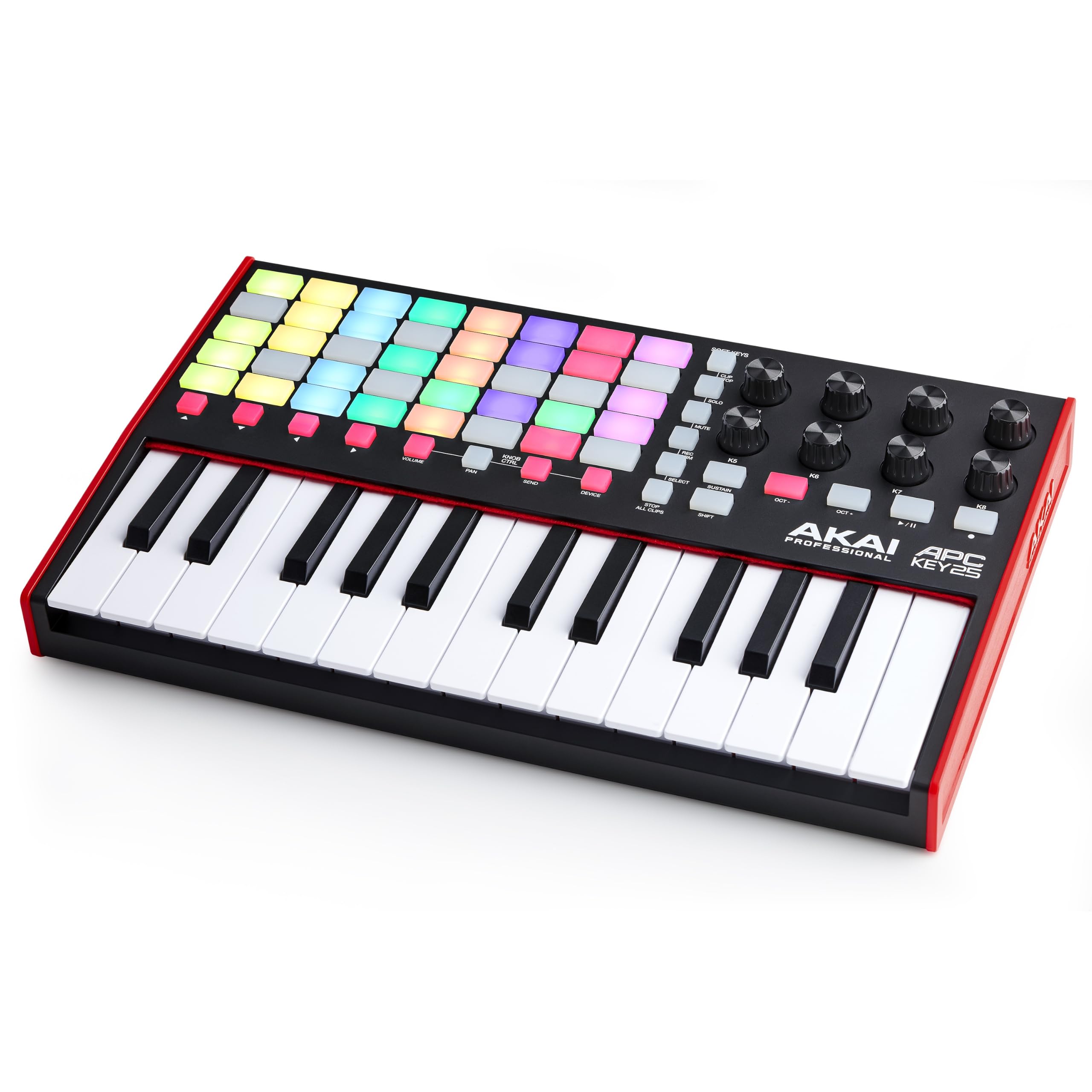
The APC Key 25 MK2 is purpose-built for Ableton Live users, delivering the tightest integration between keyboard and clip launcher at this price point. Its 40 RGB pads in a 5×8 matrix provide color-coded visual feedback for triggering loops, samples, and scenes — making it ideal for electronic music performance and live arrangements. The 25 responsive mini keys are velocity-sensitive and backed by a compact, solid build that survived school musical pit use according to verified users.
Akai includes Ableton Live Lite, plus virtual instruments like Hybrid 3 analog synth, Mini Grand acoustic piano, and Velvet vintage electric piano. The 8 assignable rotary knobs control volume, pan, sends, and device macros directly from the hardware. For Ableton users, the APC Key 25 MK2 is essentially a dedicated control surface with keyboard integration rather than a general-purpose MIDI controller — and it excels at that role.
The biggest caveat is DAW compatibility: the board is pre-mapped for Ableton 11 and later but requires manual mapping for Ableton 10 and other DAWs. A small number of users report a timing glitch where finger glissandos cause delayed note-off events, though this does not affect typical step-by-step playing. For producers who live inside Ableton Live and want immediate hands-on control over clips and effects, this is the most efficient tool available.
Why it’s great
- Deepest Ableton Live integration of any beginner controller
- 40 RGB pads provide instant visual feedback for clip launching
- Includes industry-standard virtual instruments
Good to know
- Requires manual mapping for Ableton 10 and non-Ableton DAWs
- Minor timing glitch with fast glissando technique
2. Arturia MicroLab Mk3

The MicroLab Mk3 is the most portable controller in this lineup — a lightweight, ultra-slim board that fits inside a laptop bag alongside a 13-inch computer. Its upgraded slim keybed (the same as the MiniLab 3) punches well above its size, delivering a responsive feel that reviewers consistently call the best at its price point. Two capacitive touch strips serve as pitch and modulation controls, replacing traditional wheels and saving significant space.
Arturia loads it with 500 curated presets from Analog Lab Intro, covering everything from vintage analog synths to modern digital textures. The bundled Ableton Live Lite provides a full production environment, and USB-C plug-and-play means zero setup — connect to any Mac or PC and it is immediately recognized by FL Studio, Logic Pro, and Ableton. The build is durable despite the recycled materials, and the white finish stands out on a crowded desk.
The key size is the most common complaint — these are slim keys, noticeably narrower than standard, so players with larger hands may find chord stretches uncomfortable. The touch strips lack the tactile feedback of physical wheels, which some users find imprecise for filter sweeps. For travelers, minimalists, and laptop producers who prioritize footprint above all else, the MicroLab Mk3 is a refined, purpose-built solution.
Why it’s great
- Extremely portable — fits in any laptop bag
- Best slim keybed in the budget tier
- 500 usable presets out of the box with Analog Lab Intro
Good to know
- Mini keys are uncomfortable for larger hands
- Touch strips lack the precision of physical wheels
7. Nektar SE25

The Nektar SE25 is the most affordable way to get a playable keyboard with DAW integration. Its 25 mini keys are narrow — about the width of a Korg nanoKEY — but they offer a stable, well-made feel with surprising sensitivity for the price point. The SE25 includes Bitwig Studio 8-Track, a DAW that competes directly with Ableton Live in workflow, plus a full sound content package, so you can start recording immediately without spending extra on software.
Nektar DAW integration provides auto-mapping for transport and basic controls in most popular DAWs, though the SE25 lacks the pads, knobs, and wheels found on pricier boards. Modulation control is all-or-nothing via the default button mapping, which limits expressiveness for synth leads and filter sweeps. Verified users praise it as an excellent travel board for saving song ideas on a laptop or iPad (with a USB adapter).
The key noise is slightly louder than premium boards when played with force, and the lack of pitch/mod wheels forces you to use the included button-based controls or automate in software. The micro-USB port feels dated compared to newer USB-C boards, and the cable is essential since the board does not pass MIDI data through standard micro-USB power cables. For absolute beginners on a strict budget who want a functional keyboard and a real DAW included, the SE25 is a legitimate starting point that leaves room to upgrade.
Why it’s great
- Includes full Bitwig Studio 8-Track DAW license
- Stable, responsive keys for the price tier
- Compact and lightweight for travel sketching
Good to know
- Mini keys are narrow and noisy at full force
- No pitch/mod wheels; button-based modulation is binary
- Requires specific micro-USB data cable, not standard charger cable
FAQ
What is the difference between mini keys and full-size keys on a beginner MIDI keyboard?
Do I need 25 keys or 49 keys as a complete beginner?
Are the drum pads on a MIDI keyboard good enough for finger drumming?
Can I use a beginner MIDI keyboard with an iPad or iPhone?
What software comes with beginner MIDI keyboards and is it any good?
Final Thoughts: The Verdict
For most users, the beginner midi keyboard winner is the Akai Professional MPK Mini IV because it delivers the most complete package — responsive MPC pads, a versatile arpeggiator, a color screen, and a massive software bundle that includes Ableton Live Lite and 1000+ pro sounds. If you want the best-in-class keybed for expressive melodic play, grab the Arturia MiniLab 3. And for practice-oriented beginners who need full-size keys for proper piano technique, nothing beats the Nektar Impact GX49.