
Our readers keep the lights on and the weekend projects moving. As an Amazon Associate, I earn from qualifying purchases.
Audio cuts out mid-sentence, video lags behind your mouth, and you’re wrestling with a webcam that makes you look like a glitchy hologram. Starting out in streaming doesn’t have to feel like a second job in IT support. The right gear eliminates the friction before you hit “Go Live,” letting your personality do the heavy lifting.
I’m Rikta — the co-founder and writer behind FitlyFast. I’ve spent hundreds of hours dissecting audio interfaces, capture card latencies, and condenser microphone frequency responses to find the combinations that actually work for a first-time streamer, not just the ones with the flashiest marketing.
This guide cuts through the jargon and the rabbit holes to deliver a curated snapshot of the best hardware investments for your channel. It is your definitive roadmap to building the ideal beginner streaming setup without wasting a single dollar on gear that collects dust.
How To Choose The Best Beginner Streaming Setup
Your first streaming buy should prioritize the chain from your mouth to the output: microphone, interface, and PC or capture device. A solid audio foundation covers hours of mediocre video, while buzzy, echoey audio kills a stream in seconds.
Audio Interface or All-in-One Bundle
An audio interface with phantom power and a preamp gives you clean XLR audio from a dynamic or condenser mic. Bundles that include a mixer-style control surface let you add sound effects and adjust levels on the fly without fumbling with software sliders.
Capture Cards vs. Plug-and-Play Simplicity
If you stream console gameplay, you need a capture card with low-latency passthrough to keep your game on the big screen while OBS captures on your PC. For desktop-only streaming, a capable prebuilt or mini PC can handle both game encoding and broadcasting if it has a discrete or strong integrated GPU.
Video Switching and Multi-Camera Needs
Once you grow to using a face cam, screen capture, and maybe a second angle, a video switcher with HDMI inputs replaces juggling USB cables. Look for a device that supports chroma key, a picture-in-picture overlay, and live streaming directly to a platform without a PC tether.
Quick Comparison
On smaller screens, swipe sideways to see the full table.
| Model | Category | Best For | Key Spec | Amazon |
|---|---|---|---|---|
| MAONO AME2A Bundle | Audio Interface | All-in-one audio control | 11 sound pads, 3-level mic gain, 48V phantom | Amazon |
| Movo iVlogger-PRO | Mobile Kit | Smartphone vlogging | Shotgun mic, RGB light, full-size tripod | Amazon |
| MAONO PD200W Duo | Wireless Mic | Co-hosted podcasts | Wireless + USB + XLR, 60hr battery | Amazon |
| AVerMedia GC553G2 | Capture Card | Low-latency console capture | 4K144 passthrough, VRR, HDR | Amazon |
| GMKtec G3S Mini PC | Mini Computer | Compact streaming PC | Intel N95, 8GB RAM, dual 4K HDMI | Amazon |
| Osee GoStream Deck | Video Switcher | Multi-camera production | 4 HDMI inputs, NDI, onboard recorder | Amazon |
| PreSonus AudioBox 96 Studio | Studio Bundle | Home recording & streaming | 24-bit/96kHz audio interface, studio monitors | Amazon |
| STGAubron Gaming PC | Prebuilt Desktop | Entry-level gaming & streaming | i5 up to 3.6GHz, RX 550 4G, 16GB RAM | Amazon |
In‑Depth Reviews
1. MAONO AME2A Podcast Equipment Bundle

This bundle mates a condenser mic with a desktop audio interface that offers 11 customizable sound pads, 3-level mic gain, and 60dB of ultra-low noise amplification. The cardioid polar pattern on the included microphone rejects side and rear ambient noise, keeping your vocal track clean even in untreated rooms.
Beyond the mic, the interface gives you six reverb modes, 12-step auto-tune, and dedicated tone knobs for treble, mid, and bass. You can connect Bluetooth from your phone for backing tracks or interview calls, making it a central hub for solo streams or guest segments. The plug-and-play USB-C connection works with PC, Mac, and mobile devices.
The after-sales support is notably responsive, with multiple reviews citing fast replacement of defective units. The small footprint and comprehensive package — mic, stand, cables, shock mount, and pop filter — mean you’re streaming with professional-level audio control from the moment you unbox it.
Why it’s great
- Comprehensive audio control in one box
- Bluetooth input for guests or music
- Excellent signal-to-noise ratio for a budget interface
Good to know
- Only a single XLR mic input
- Compact controls can be fiddly for large hands
2. Movo iVlogger-PRO Vlogging Kit

This kit is built for smartphone-first creators, bundling the VXR10 shotgun mic with a tabletop and full-size tripod, a rotating phone mount, an RGB LED light, and a wireless remote in a travel case. The shotgun mic uses a directional capsule to focus on your voice while reducing room reverb, which is critical for on-the-go vlogging or indoor product demos.
The included RGB light provides constant illumination with adjustable brightness and color temperature, eliminating the unflattering shadows that plague built-in phone lights. The full-size tripod extends to a comfortable eye level, and the tabletop tripod handles low-angle shots. Cables for USB-C, Lightning, and 3.5mm ensure compatibility with recent iPhones and Android devices.
Reviewers consistently highlight the convenience of having everything in a single case, though some note the tripod base is light enough to tip with larger phones like the iPhone Pro Max. The mic noticeably improves audio clarity over internal phone mics, making this ideal for real estate walkthroughs, unboxings, or tutorial recordings.
Why it’s great
- Complete mobile vlogging rig in one case
- Directional shotgun mic cuts background noise well
- Universal cable set for iPhone and Android
Good to know
- Tripod base is unstable with heavy phones
- LED light quality can vary between units
3. MAONO PD200W Hybrid Wireless Podcast Bundle
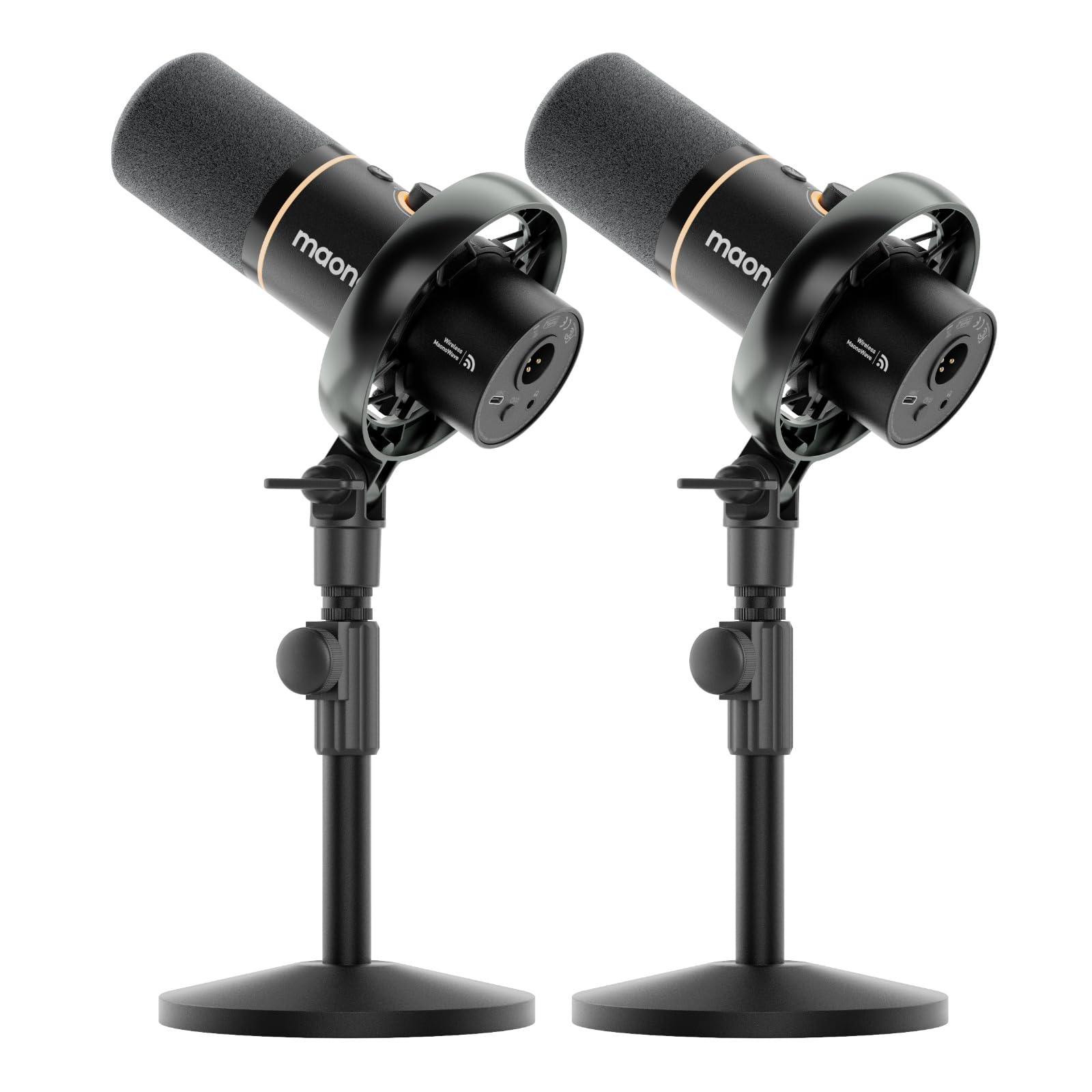
This bundle delivers two dynamic microphones that can operate wirelessly via a single receiver, over USB-C for plug-and-play simplicity, or via XLR for a permanent studio setup. Each mic features a 30mm dynamic capsule with a cardioid pickup pattern and an 82dB signal-to-noise ratio, ensuring spoken word cuts through without background spill.
The MaonoLink app gives you access to four preset EQ modes plus manual control over reverb and compression, adapting the sound profile for interviews, solo narration, or live streaming. Battery life reaches 60 hours with the RGB lighting off, and the wireless range extends to 60 meters, freeing you from desk tethers. The kit includes two desktop stands, cables, and the receiver.
Reviewers praise the flawless wireless connection and the clean sound quality, noting it works out of the box with both iPad and PC. The headphone jack on each mic enables real-time monitoring, and the mute button illuminates red when activated — a small detail that prevents accidental hot-mic moments during a live show.
Why it’s great
- Two-mic wireless system for co-hosts
- Versatile connectivity (wireless, USB, XLR)
- Long 60-hour battery life
Good to know
- Requires a separate USB-C to USB-C cable for some laptops
- Battery needs recharging a couple of times per week with daily use
4. AVerMedia Live Gamer Ultra 2.1 GC553G2

For streamers who play on PlayStation 5, Xbox Series X, or Nintendo Switch, this external capture card offers HDMI 2.1 connectivity with a 4K144 HDR passthrough that preserves your monitor’s high refresh rate and variable refresh rate. The capture resolution tops out at 4K60 in YUY2, ensuring your stream feed is sharp while your gameplay remains buttery smooth on screen.
Low latency is the headline here — the card passes through video with minimal delay, so you don’t feel a disconnect between your controller input and the monitor. It also features a 3.5mm headset jack for live party chat capture, letting you record in-game voice without extra cables. Customizable RGB lighting adds a touch of flair for visible desk setups.
Some users report that 4K144 capture is unstable and that the card requires a USB 3.2 Gen 2 port to function correctly. The included cable set is adequate, though the form factor is compact enough to mount behind a monitor. For a beginner console streamer who wants the highest refresh rate passthrough, this card delivers a clean signal path for a polished broadcast.
Why it’s great
- Low-latency 4K144 passthrough for smooth gameplay
- Captures party chat without extra adapters
- Compact design with customizable RGB
Good to know
- 4K144 capture mode may require a very high-end GPU for encoding
- Some users find the software UI less polished than competitors
5. GMKtec G3S Mini PC N95

If you’re streaming from a home office or bedroom, this mini PC packs a 12th Gen Intel N95 processor with 8GB of DDR4 RAM and a 256GB M.2 SSD into a palm-sized chassis. It supports dual 4K displays via HDMI 2.0, making it a viable encoding machine for OBS while you game or present on a separate monitor.
The N95 offers up to 36% better performance than older N100 and N5100 processors, handling light video rendering, streaming software, and web-based tools without audible fan noise. The VESA mount lets you attach it behind a monitor, keeping your desk surface clear. Connectivity includes WiFi 5, Bluetooth 5.0, and Gigabit Ethernet for a stable network tether.
This is not a gaming PC — its integrated UHD Graphics can display 4K video but won’t run modern games at playable frame rates. It excels as a dedicated streaming brain for a capture card or as a quiet secondary PC for running OBS, chat bots, and overlays. The 1-year warranty provides a safety net for a budget-friendly investment.
Why it’s great
- Ultra-compact footprint with VESA mount
- Supports dual 4K displays for multitasking
- Quiet and cool operation for long streams
Good to know
- Not suitable for gaming or heavy rendering
- Limited to 8GB RAM for multitasking
6. Osee GoStream Deck HDMI Pro

When you need to switch between a face cam, a second camera, screen captures, and a lower-third graphic, this hardware switcher replaces a USB hub and a second PC. It offers four HDMI inputs and two outputs, plus a T-Bar for smooth transitions, downstream and upstream keyers for chroma key and logo overlays, and an onboard H.264 recorder to an SD card or SSD.
The GoStream Deck can stream directly to three platforms simultaneously via its Ethernet port, bypassing the need for a dedicated streaming PC. It supports NDI HX input for wireless camera sources and includes a USB-C webcam output for use with software like Zoom or OBS. The hard control panel with PVW/PGM buses gives you broadcast-level switching without a mouse.
Reviewers note that the build quality feels a bit plasticky and that the unit runs hot under extended use, but its feature set — including PBP, chroma key, and audio mixing — rivals switchers at several times the price. The learning curve is steeper than a simple capture card, but for a growing channel, it unlocks professional production value.
Why it’s great
- Multi-camera switching with hardware T-Bar
- Streams to three platforms simultaneously
- Onboard recording and media player for intros
Good to know
- Only accepts 1080p input — no 4K switching
- Runs hot and has a plastic chassis feel
7. PreSonus AudioBox 96 Studio Bundle

This bundle centers on the AudioBox 96 interface, a 2-in/2-out USB-C device with 24-bit/96kHz conversion and a pair of XMAX-L mic preamps. It includes a boom stand, pop filter, XLR and TRS cables, and — critically — a pair of Mackie CR3-XBT Bluetooth studio monitors for accurate near-field monitoring of your stream audio and music.
The interface supports MIDI I/O for connecting keyboards or drum pads, and its zero-latency monitoring circuit lets you hear yourself without the delay that plagues software monitoring. Studio One Artist DAW and a full plug-in suite ship with the bundle, providing a complete production environment for recording intros, sound effects, or entire podcast episodes.
Reviewers appreciate the straightforward setup on Mac and Windows, and the bundled components offer good value for a starter studio. The CR3-XBT monitors feature Bluetooth input for quick playback from a phone, plus a front-panel headphone jack. Some users find the Studio One software has a learning curve for complete beginners, but the hardware itself is rock-solid for live streaming audio.
Why it’s great
- Professional-grade 24-bit/96kHz audio capture
- Includes studio monitors for accurate sound
- Zero-latency monitoring for natural delivery
Good to know
- Included DAW software has a steep learning curve
- Not compatible with Chromebooks
8. STGAubron Gaming PC Desktop

This prebuilt desktop pairs an Intel Core i5 with 16GB of RAM, a 512GB SSD, and an AMD Radeon RX 550 4GB GPU, making it a functional entry point for streaming and light gaming. It handles games like Fortnite, Valorant, and Minecraft at 60+ FPS, and the 16GB of system memory gives OBS and other streaming software room to run alongside a game without choking.
The system includes Wi-Fi 6, Bluetooth 5.0, and a bundle with RGB keyboard and mouse. The RX 550 supports basic hardware encoding, which reduces the CPU load during a live broadcast. For a beginner who wants a single machine that can game and stream without separate capture hardware, this offers a simple “plug and stream” experience.
Several reviews flag long-term reliability concerns — some units have experienced component failures after a few months, and the internal parts are often generic rather than name-brand. The seller includes a 1-year parts and labor warranty with free lifetime tech support, which mitigated the experience for some users. It’s a budget-tier bet best suited for someone willing to troubleshoot occasional hiccups.
Why it’s great
- 16GB RAM ensures smooth multitasking for streaming
- Handles popular competitive games at 60+ FPS
- Wi-Fi 6 and Bluetooth 5.0 included
Good to know
- RX 550 is a low-end GPU for modern AAA titles
- Reports of component reliability issues over time
FAQ
Do I need an audio interface or a USB microphone for my first stream?
What minimum PC specs do I need to stream at 1080p60?
Should I use a capture card for PC gaming or only consoles?
Final Thoughts: The Verdict
For most users, the beginner streaming setup winner is the MAONO AME2A Bundle because it combines pro-level audio control and plug-and-play simplicity in a single affordable package. If you want to stream console games with minimal latency, grab the AVerMedia GC553G2. And for a co-hosted podcast or interview show, nothing beats the wireless freedom of the MAONO PD200W Duo Bundle.