
Our readers keep the lights on and the weekend projects moving. As an Amazon Associate, I earn from qualifying purchases.
Specs are compiled from manufacturer listings and verified buyer reviews and can change over time — please confirm the key details on the product page before buying.
If your home office or small team runs on black-and-white documents, the real question isn’t whether to get a laser printer — it’s which all-in-one model actually saves you time and frustration every single day. The wrong pick jams on your third batch, forces you through a painful setup, or locks you into expensive toner that eats into your savings.
I’m Rikta — the founder and writer behind FitlyFast. This guide is built by comparing the manufacturers’ published specifications and the patterns across verified customer reviews, so you get each pick’s real strengths and trade-offs instead of marketing spin.
if you need fast multi-page copying, reliable wireless printing, or a compact footprint for a tight desk, the right black and white all-in-one laser printer delivers clean text and low running costs that your old inkjet never could.
Quick Picks
- Brother HL-L2480DW Wireless Compact Monochrome Multi-Function Laser Printer — Best Overall
- HP LaserJet Pro MFP 3101sdw Wireless Black and White All-in-One Laser Printer — Pro Productivity
- Xerox B225DNI All-in-One Printer, Laser, B&W, Wireless, ADF — Best Value
- HP LaserJet MFP M235sdw All-in-One Laser Printer — Compact Pick
- Brother MFC-L2820DW Wireless Compact Monochrome All-in-One Laser Printer — Fax Ready
- Brother MFC-L2900DW XL Wireless Compact Monochrome All-in-One Laser Printer — High Yield
- Canon imageCLASS D1620 Monochrome Duplex Wireless Laser Printer — High Speed
- Brother MFC-L5710DW Business Monochrome Laser All-in-One Printer — Business Grade
How To Choose The Best Black And White All-In-One Laser Printer
Picking the right monochrome laser printer depends on how you really work — not just the sticker price. The three specs that separate a joy from a daily headache are print speed (ppm), the scanner type (flatbed vs. ADF), and the toner yield of the included starter cartridge.
Print Speed and Duplex Printing
Print speed is measured in pages per minute (ppm) — the number of standard sheets the machine can spit out in sixty seconds. For a home office, 28–36 ppm is plenty fast. A busy small business with multi-page reports will appreciate 45–48 ppm. Automatic duplex printing (printing on both sides of the page) is a must-have and can reduce paper use while keeping your desk from turning into a pile of single-sided sheets.
Scanner Type: Flatbed vs. Automatic Document Feeder (ADF)
All all-in-ones include a flatbed scanner — the glass pane you lift the lid to use for a single page or a book. An automatic document feeder (ADF) is a tray on top that pulls in a stack of pages one by one and scans them all without you babysitting it. If you regularly scan or copy multi-page contracts, a 50-sheet ADF is a real time-saver. For occasional single-page scans, a flatbed is all you need.
Toner Yield and Running Costs
The starter cartridge that comes in the box varies wildly: some yield just 1,000–1,200 pages, while others (like the XL packs) give you 4,200 pages or more. A higher-yield toner cartridge costs more upfront but saves you money per page over the life of the machine. Also watch for brand policies that block third-party toner — some HP models will refuse non-HP cartridges after a firmware update, locking you into their own supplies.
Quick Comparison
| Model | Best For | Print Speed | Scanner Type | Starter Toner Yield | Amazon |
|---|---|---|---|---|---|
| Xerox B225DNI | Small team value | 36 ppm | Flatbed + ADF | 1,200 pages | Amazon |
| HP LaserJet MFP M235sdw | Ease of use | 28 ppm | Flatbed | — | Amazon |
| HP LaserJet Pro MFP 3101sdw | Small team productivity | 35 ppm | Flatbed + 50-sheet ADF | ~1,000 pages | Amazon |
| Brother HL-L2480DW | Compact home office | 36 ppm | Flatbed | — | Amazon |
| Brother MFC-L2820DW | Fax + small office | 34 ppm | Flatbed + 50-sheet ADF | — | Amazon |
| Brother MFC-L2900DW XL | High-volume small biz | 36 ppm | Flatbed + 50-sheet ADF (duplex) | 4,200 pages (XL) | Amazon |
| Canon imageCLASS D1620 | High-speed office | 45 ppm | Flatbed + ADF | 5,000 pages | Amazon |
| Brother MFC-L5710DW | Business workgroup | 48 ppm | Flatbed + 50-sheet ADF (duplex) | 3,000 pages | Amazon |
In‑Depth Reviews
1. Brother HL-L2480DW Wireless Compact Monochrome Multi-Function Laser Printer

Small footprint, big speed — the compact office workhorse that beats the HP on initial page time.
You get a 3-in-1 laser printer (print, copy, scan) that fires out black-and-white pages at 36 ppm — that is one page every 1.6 seconds. The first page lands in 8.5 seconds, versus the HP 3101sdw’s 7 seconds, but once it gets going the speed is tough to top for the price. Reviewers report reliable wireless printing with easy Apple setup, and one reviewer noted the machine was “fast, quiet” and that the first cartridge was “near end” after a full year of use — a strong sign of long toner life.
The 2.7″ touchscreen lets you print and scan straight to cloud apps like Google Drive and Dropbox without touching a computer. The 250-sheet paper tray handles your typical weekly volume, and the manual feed slot takes envelopes and specialty paper. Automatic duplex printing saves paper on multi-page documents.
Why it works
- Fast 36 ppm print speed with automatic duplex
- 2.7″ touchscreen for cloud-app navigation
- Compact size fits small desks
- Reliable wireless connectivity over dual-band (2.4GHz/5GHz)
Watch for
- No automatic document feeder (flatbed scan only)
- Starter toner yield not listed on box
Your best match: Ideal for a home office or small team that prints dozens of pages daily and wants a compact, no-fuss machine with a touchscreen interface.
Consider another if: You need to regularly scan or copy stacks of pages — the lack of an ADF means you will lift the lid for every single sheet.
2. HP LaserJet Pro MFP 3101sdw Wireless Black and White All-in-One Laser Printer

First page in 7 seconds — the fastest start in this list for small teams.
That 7-second initial page time is quicker than the Brother HL-L2480DW’s 8.5 seconds. Print speed is rated at 35 ppm, so it keeps pace with the Brother above while adding a 50-sheet auto document feeder for hands-free scanning and copying of multi-page sets. One buyer mentioned after a year that “good after 1 year; prints from USB/phone” and that the auto doc feeder works well if you keep the stack under 25 sheets to avoid jams.
The big watch-out here is HP’s cartridge policy: the printer blocks non-HP cartridges via firmware updates. Buyers report you can decline the updates to keep using cheaper toner, but it is a nuisance you will not hit with Brother models. The 250-sheet input tray and 50-sheet ADF give you solid paper handling for a small team, and the LED display keeps setup simple.
What stands out
- Blazing 7-second first page out
- 50-sheet ADF for multi-page scan/copy
- Auto 2-sided printing (duplex)
Know this
- HP firmware blocks third-party toner cartridges
- Starter toner yields only ~1,000 pages
Best for: Small teams printing many short documents — the fast first-page time keeps you moving.
Not ideal: If you want total freedom on toner brand without firmware workarounds.
3. Xerox B225DNI All-in-One Printer, Laser, B&W, Wireless, ADF

More toner in the box, plus a scanning suite that saves you clicks every day.
At 36 ppm with a 1,200-page starter cartridge, this Xerox includes a higher starter yield than the HP 3101sdw’s 1,000-page cartridge. The built-in Wi-Fi supports Apple AirPrint, Mopria, and Chromebook printing, so any device in your home or small office can connect without a hassle. Buyers rave about the scanning: one wrote “excellent scanning with ‘Build Job’ for 2-sided copies, page reordering, blank deletion, and PDF save” — those software smarts save you from manually reordering pages.
The security features are a plus if you handle sensitive documents: comprehensive protections against cyber threats. The LCD display and Ethernet connection give you wired reliability when Wi-Fi gets finicky. A few buyers hit Wi-Fi connection failures that were solved by switching to USB cable, so keep that cable handy.
Why it earns its spot
- 36 ppm speed with duplex printing
- 1,200-page starter toner in box
- Smart scan features (Build Job, blank deletion)
- AirPrint and Chromebook support
The trade-off
- Some users report unreliable Wi-Fi; USB works reliably
- Starter toner runs out faster than expected for heavy use
Best for: A small team or home office that scans and copies multi-page documents and wants smart software to automate page reordering.
Look elsewhere if: You rely entirely on Wi-Fi and want zero connectivity headaches — keep a USB cable as backup.
4. HP LaserJet MFP M235sdw All-in-One Laser Printer

The simplest wireless setup in the lineup — and it fixes its own Wi-Fi troubles.
Print speed here is 28 ppm, slower than the 36 ppm Xerox or 35 ppm HP above, but the trade-off is a famously easy setup that reviewers consistently call “plug-and-play.” The dual-band Wi-Fi with self-reset means the printer automatically detects and fixes connectivity issues without you digging into settings. One buyer replaced a Brother HL-L5200DW with this and praised the “true, crisp black prints” after the old machine produced grey-ish text. Another noted printing smoothly from Mac, Windows, iPad, and Samsung phones over Wi-Fi.
At 12.13″D x 16.46″W x 11.59″H, it is compact enough for a tight desk. The 24-bit color depth helps scanning capture grayscale detail more accurately than cheaper scanners. Paper jams are reported occasionally — it is not the most jam-proof machine, but owners mention it is fast enough that the occasional jam is tolerable.
What you get
- True plug-and-play wireless setup
- Self-reset dual-band Wi-Fi
- Crisp black print output
What to expect
- 28 ppm is slower than most rivals here
- Occasional paper jams reported
Best for: Anyone who wants the least-fuss wireless setup for printing from multiple devices at home.
skip it if: You need high-speed print for big daily volumes — the 28 ppm ceiling will feel slow.
5. Brother MFC-L2820DW Wireless Compact Monochrome All-in-One Laser Printer

Full fax functionality tucked into a compact machine with a 50-sheet ADF.
This Brother adds fax to the print/copy/scan trifecta, making it the rare compact all-in-one that still supports that old-school office workflow. Print speed is 34 ppm — slightly below the 36 ppm of its HL-L2480DW cousin — but you gain a 50-sheet auto document feeder for multi-page scanning, copying, and faxing. Scan speeds are rated at 23.6/7.9 ipm (black/color), so it moves through stacks faster than entry-level flatbed-only models.
Customers note the machine is “solid” once set up, though the setup instructions were described as “vague” and sparse — several buyers defaulted to manual Wi-Fi configuration. One owner called it “a work horse” that produces “little paper jams.” The 2.7″ touchscreen handles cloud printing and scanning the same way the HL-L2480DW does, so you get a familiar Brother interface.
Why choose this
- Includes fax function for legacy office needs
- 50-sheet ADF for hands-free multi-page jobs
- Fast scan speed (23.6 ipm black)
Heads up
- Vague setup instructions frustrate some buyers
- Firmware updates nag about third-party supplies
Best for: Small offices that still fax documents and need to scan multi-page stacks without supervision.
Consider another if: You prefer a guided, video-based setup and do not want to manually configure Wi-Fi.
6. Brother MFC-L2900DW XL Wireless Compact Monochrome All-in-One Laser Printer
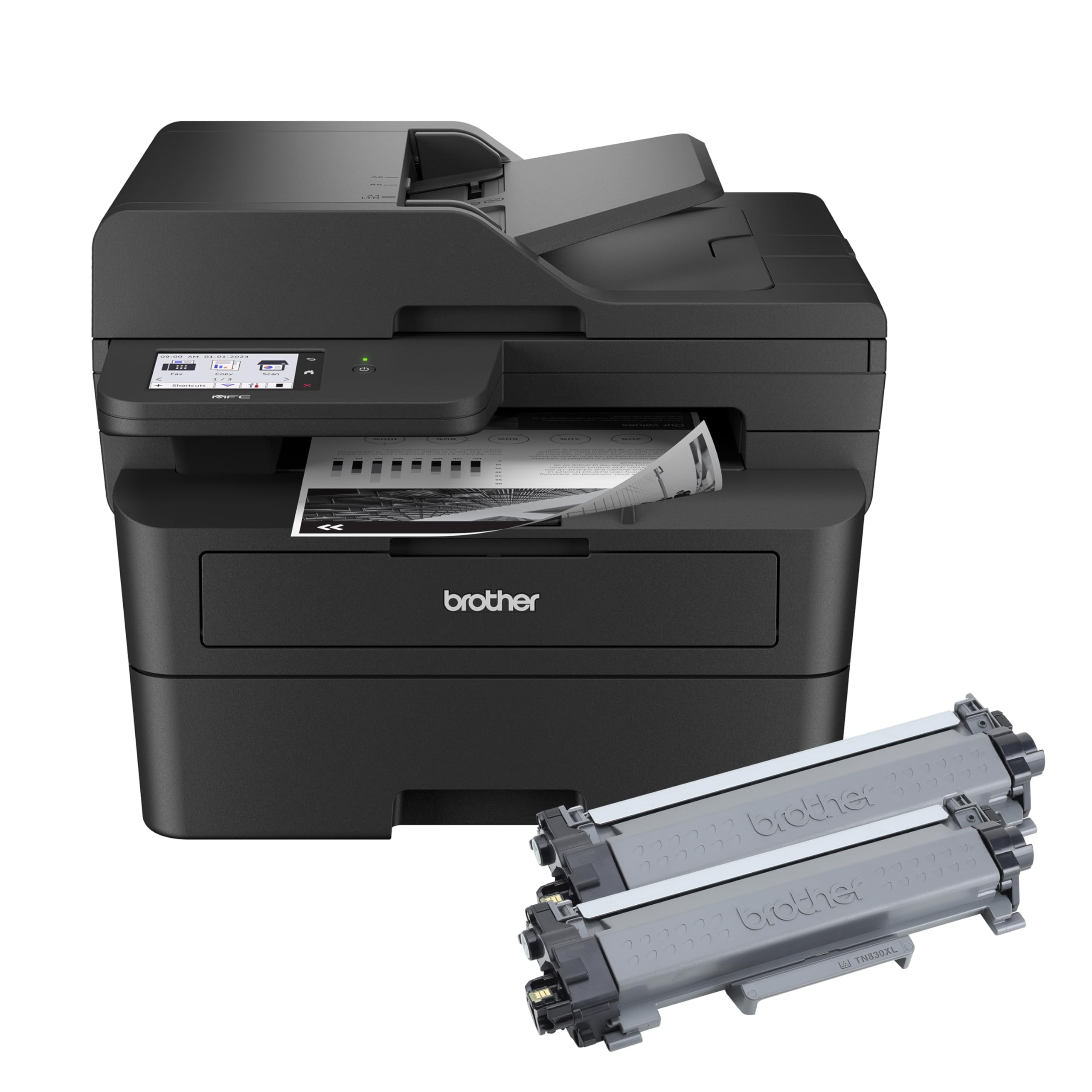
4,200 pages of toner in the box, ready to print the moment you open it.
This is the version of the Brother MFC-L2900DW that ships with an XL toner cartridge yielding up to 4,200 pages. For a small business that churns through a ream of paper each week, that alone can save a trip to the supply store for months. Print speed is 36 ppm, and the 50-page ADF offers duplex scanning, ideal for two-sided contracts.
Reviewers point out easy USB and Wi-Fi setup, with one noting the “fast print speed” and the “great two-sided scan/copy” as standout features. The 3.5″ touchscreen is larger than the 2.7″ screen on the L2820DW and HL-L2480DW, making cloud-app navigation even easier. A few reviewers noted the touchscreen lacks a backlight and can be hard to see in low light.
what separates it
- 4,200-page XL toner in box saves months of replacements
- Single-pass duplex ADF for 2-sided scanning
- 3.5″ touchscreen for cloud app access
Worth noting
- Touchscreen is hard to read without backlight
- Mac scanning software setup can be finicky
Ideal for: A busy small business printing thousands of pages a month that wants to delay the first toner replacement as long as possible.
Not for: Buyers who need a bright, backlit touchscreen for dim offices.
7. Canon imageCLASS D1620 Monochrome Duplex Wireless Laser Printer

45 pages per minute with a 5,000-page starter toner — the throughput champion here.
This Canon outruns most machines on this list on raw speed: 45 ppm versus 36 ppm for the Brother models and 48 ppm for the Brother MFC-L5710DW. The included Canon Genuine Toner 121 yields 5,000 pages, versus the Xerox’s 1,200-page cartridge and the Brother MFC-L5710DW’s 3,000-page cartridge. The maximum paper capacity hits 2,300 sheets if you expand the trays, so high-volume offices can load up and walk away for days.
One buyer has used it since 2019 and reports it is “still great” for homeschooling and constant weekly use. Another auto shop owner printed 100+ sheets daily for two years without issues. The trade-off is a heavier, larger machine — and the scan-to-email feature is notoriously difficult to configure, with “poor documentation” and hidden menus.
Why it dominates
- Fastest print speed in this roundup at 45 ppm
- 5,000-page starter toner — lowest per-page cost initially
- Three-year limited warranty standard
Know before you buy
- Scan-to-email setup is frustrating and poorly documented
- Large footprint; not a compact desk fit
Best for: A busy office that prints hundreds of pages daily and wants the lowest toner-replacement frequency paired with the fastest speed.
pass on it if: You need a compact printer for a small desk or rely heavily on scan-to-email without patience for tech support calls.
8. Brother MFC-L5710DW Business Monochrome Laser All-in-One Printer

48 ppm and an optional 11,000-page toner — the workgroup boss that keeps going.
The fastest printer here at 48 ppm, with a first-page print time of just 6.7 seconds, this Brother is built for a business workgroup that demands volume. The included 3,000-page starter toner is decent, but the real saving comes when you upgrade to the Brother Genuine TN920XXL super high-yield cartridge at 11,000 pages — that is a full year or more of printing for many small offices. The 50-page ADF offers single-pass duplex scanning at up to 60 ipm (images per minute), meaning double-sided stacks scan in one smooth pass.
Buyers praise the fast printing and scanning, with one noting it works well with 8.5×11 and 8.5×14 paper. Another appreciated the expandable cassette setup (up to 3 trays). However, some reported Wi-Fi connectivity issues with Ubiquity networking hardware, and envelope printing came out streaky — a deal breaker if you mail a lot of correspondence.
Why it leads
- 48 ppm top speed and 6.7-second first page
- Up to 11,000-page XXL toner cartridge option
- Single-pass duplex scanning at 60 ipm
Watch out for
- Wi-Fi may struggle with Ubiquity routers
- Envelope printing produces streaks and faint text
For: A growing business printing high volumes of double-sided documents who wants the lowest per-page toner cost over the long run.
Not for: Anyone who frequently prints envelopes or relies on Ubiquity networking gear.
Understanding the Specs
Print Speed (Pages Per Minute)
Print speed tells you how many standard sheets the printer can produce in one minute of continuous output. A 36 ppm rating means roughly one page every 1.6 seconds. For a home office that prints a few dozen pages a day, 28–36 ppm is plenty. A workgroup handling reports and manuals will appreciate 45–48 ppm to keep the queue moving. The first-page-out time (measured in seconds) matters just as much for short jobs — a 7-second start versus 8.5 seconds adds up when you print ten separate documents in a morning.
Toner Yield and Starter Cartridge
Toner yield is the number of pages a single cartridge can print, measured to a standard industry test (usually 5% coverage per page). A starter cartridge that yields 1,000–1,200 pages means you may be shopping for a replacement within weeks of moderate use. XL and XXL cartridges (3,000–11,000 pages) cost more upfront but slash your per-page cost. Always check the yield of the cartridge that actually ships in the box — some brands skimp on the starter to lower the initial price.
FAQ
Can I use third-party toner in an HP laser printer?
What is the difference between a flatbed scanner and an ADF?
Does an all-in-one laser printer need a computer to scan?
How long does a toner cartridge last in a monochrome laser printer?
Can I print from my phone or tablet?
Is automatic duplex printing standard on all these printers?
What paper sizes can a monochrome laser printer handle?
Do I need a subscription to use these printers?
Final Thoughts: The Verdict
If you want one dependable pick, the best black and white all-in-one laser printer is the Brother HL-L2480DW because it combines fast 36 ppm print speed, a 2.7″ touchscreen for cloud apps, and automatic duplex printing in a compact desktop footprint that suits home offices and small teams alike. If you need the highest-efficiency starter toner for heavy volume, grab the Brother MFC-L2900DW XL with its 4,200-page cartridge. And for sheer speed, the Canon imageCLASS D1620 at 45 ppm with a 5,000-page toner yield is the throughput leader for a busy office.
How We Picked
We do not accept paid placement. Every pick is matched to a real buyer and a real use-case; we do not hands-on test units.
Sources & Methodology
Specifications: manufacturer listings and product documentation. Review insights: verified customer reviews, as of July 2026. Pricing: not shown on this page (it changes often); check the current price via the retailer link.
As an Amazon Associate, FitlyFast earns from qualifying purchases. This does not affect which products we feature.