
Our readers keep the lights on and the weekend projects moving. As an Amazon Associate, I earn from qualifying purchases.
If your home office is drowning in a sea of expensive, dried-out inkjet cartridges and slow, streaky document prints, the solution is a single-function machine that does one thing flawlessly: produce crisp, high-speed black-and-white text pages without the hassle. A dedicated monochrome laser printer eliminates the constant cost-per-page anxiety of color inkjets and delivers a reliable, no-fuss printing experience that just works.
I’m Rikta — the co-founder and writer behind FitlyFast. I’ve spent dozens of hours analyzing the hardware specs, real-world print speeds, paper handling systems, and connectivity protocols of the current monochrome laser printer market to separate the workhorses from the paperweights.
Whether you need a compact USB-only unit for a dedicated desk or a wireless duplex powerhouse for a multi-device household, this guide narrows the field to the nine best contenders for your home. The best black and white laser printer for home use depends on your specific balance of speed, connectivity, and budget.
How To Choose The Best Black And White Laser Printer For Home Use
A monochrome laser printer is a long-term investment in friction-free document printing. Before you click buy, focus on the three variables that define your daily experience: print speed and first-page-out time, the connectivity options that match your devices, and the ongoing cost of toner. Speed is measured in pages per minute (ppm) — a 28 ppm printer finishes a 10-page report in about 22 seconds, while a 35 ppm model does it in 17 seconds. First-page-out time (FPOT) matters more if you print in short bursts. For connectivity, ask yourself whether every device in your home will connect via Wi-Fi, or if a wired USB connection at a single desk is simpler and more secure. Finally, toner yield (standard versus high-capacity cartridges) determines your cost per page — a high-yield cartridge that prints 3,000 pages at a lower per-page price usually pays for itself within the first few reorders. If you share the printer across multiple people, automatic duplex printing is non-negotiable for both cost savings and environmental impact.
Print Speed and First-Page-Out Time
Advertised ppm numbers are based on standard test documents, so treat the spec as a ceiling rather than an average. A 30 ppm printer rarely sustains that speed with complex text layouts. The critical spec for home workers printing one-off letters or shipping labels is the first-page-out time, measured in seconds. Models like the Canon LBP172dw boast a fast FPOT, making them feel snappier in real-world home use than their higher-ppm counterparts with sluggish warm-up cycles. Check reviews for real-world FPOT feedback — a cold-start delay of 10 seconds versus 7 seconds is a noticeable difference when you’re in a hurry.
Connectivity and EcoSystem Compatibility
If you use a mix of Windows, macOS, iOS, and Android devices, look for a printer with dual-band Wi-Fi (2.4GHz and 5GHz), Apple AirPrint, Mopria Print Service, and ideally an Ethernet port for a wired network fallback. USB-only models like the HP M209d are wonderfully simple for a single computer but become a hassle if you later need to share the printer with a laptop or smartphone. Beware of printers that lock you into proprietary subscription services — some brands push toner subscription plans that can remotely disable the printer if the trial ends. A standard printer with a manual high-yield toner purchase gives you full control over your costs.
Toner Yield and Long-Term Cost Per Page
Most printers ship with a “starter” toner cartridge that yields roughly half the pages of a standard retail cartridge. Factor the price of a replacement high-yield cartridge (often XL or High-Capacity models) into your total cost of ownership. Brother’s TN830XL, for example, offers approximately 3,000 pages, while Canon’s 072 High Capacity toner delivers around 3,100 pages. The math is simple: divide the cartridge price by the page yield to get your cost per page. A cost below 4 cents per page is excellent for monochrome laser printing. Avoid models with proprietary, low-yield cartridges that force you to buy frequently at a higher per-page price.
Quick Comparison
On smaller screens, swipe sideways to see the full table.
| Model | Category | Best For | Key Spec | Amazon |
|---|---|---|---|---|
| Brother HL-L2460DW | Wireless Duplex | High-speed home office with duplex | 36 ppm, automatic duplex, Wi-Fi + Ethernet | Amazon |
| Xerox B230/DNI | Wireless Print | Reliable wireless printing for Apple users | 36 ppm, automatic duplex, AirPrint | Amazon |
| Canon imageCLASS LBP172dw | Wireless Duplex | Fast printing with high-yield toner option | 35 ppm, automatic duplex, Canon PRINT app | Amazon |
| Canon imageCLASS MF275dw | All-in-One | Versatile home office with scan/copy/fax | 30 ppm, ADF scanner, duplex print | Amazon |
| Brother HL-L2405W | Wireless Print | Compact wireless for small home desks | 30 ppm, manual duplex, Wi-Fi | Amazon |
| HP LaserJet M207dw | Wireless Duplex | Easy wireless printing with self-reset Wi-Fi | 28 ppm, automatic duplex, dual-band Wi-Fi | Amazon |
| Canon imageCLASS MF264dw | All-in-One | Long-lasting multifunction with high-yield toner | 30 ppm, duplex print, wireless scan | Amazon |
| HP LaserJet M209d | Wired Duplex | Simple, fast USB printing for a single desk | 30 ppm, automatic duplex, USB only | Amazon |
| Xerox B315DNI | All-in-One | High-volume home office with scan/copy/fax | 42 ppm, RADF scanner, duplex print | Amazon |
In‑Depth Reviews
1. Brother HL-L2460DW

The Brother HL-L2460DW hits the sweet spot for a home office with its 36 ppm print speed, automatic duplex printing, and dual-band wireless connectivity that includes both 2.4 GHz and 5 GHz bands plus an Ethernet port for a wired fallback. Its compact chassis fits easily on a small desk, yet the 250-sheet paper tray and manual feed slot handle everything from bulk printing to specialty envelopes. The TN830XL high-yield toner delivers up to 3,000 pages per cartridge, keeping your per-page cost well below the threshold for heavy document users.
Real-world reviews consistently praise its fast, reliable wireless setup — most users report sub-5-minute installation via the Brother Mobile Connect app or a simple USB connection. The printer wakes from deep sleep and prints from smartphones and laptops without dropped connections, a common pain point in budget inkjets. The LCD screen is compact but functional, and the control panel is straightforward for navigating basic settings.
The main drawback is the optional Refresh EZ Print subscription, which some users report can cause issues if the trial ends unexpectedly — sticking to standard TN830 cartridges avoids that complication entirely. A few units required a manual USB driver install for older Macs, but the majority of Windows and recent macOS setups were plug-and-play. For a balance of speed, connectivity, and low operating cost, this is the most capable monochrome printer for the average home user.
Why it’s great
- Fast 36 ppm print speed with automatic two-sided printing.
- Dual-band Wi-Fi, Ethernet, and USB for flexible connectivity.
- High-yield TN830XL toner keeps cost per page under 4 cents.
Good to know
- Refresh EZ Print subscription can be problematic; skip it and buy standard toner.
- Some Mac users may need to manually install drivers via USB.
- Compact LCD display with small text, not ideal for extensive menu navigation.
2. Xerox B230/DNI

The Xerox B230/DNI is a wireless monochrome printer built for Apple-centric homes, with seamless AirPrint and Mopria support that lets you print directly from iPhones, iPads, and MacBooks without installing any additional software. Its 36 ppm print speed and automatic duplex printing match the Brother HL-L2460DW in raw throughput, and the compact white-and-blue chassis looks clean on a modern desk. The Ethernet port provides a stable wired option if your Wi-Fi network is unreliable.
User feedback highlights how effortless the setup is for Apple users — many report that the printer was discovered and fully functional within minutes using AirPrint. The B230 prints text with deep, consistent black density on standard copy paper, and the 250-sheet input tray handles a typical home workload without constant refills. The Green World Alliance recycling program is a nice bonus for environmentally conscious buyers who want to keep used toner cartridges out of landfills.
On the downside, the interface for entering Wi-Fi passwords is cumbersome — the tiny LCD screen requires scrolling through the alphabet, which can be frustrating if the connection drops and you need to re-enter credentials. A few users experienced daily disconnections that required re-authentication, though this seems to be an edge case rather than a widespread issue. For a home with mixed Apple and Android devices that prioritizes wireless convenience, the Xerox B230 is a solid contender.
Why it’s great
- Seamless AirPrint and Mopria support for Apple and Android devices.
- Fast 36 ppm speed with automatic duplex as standard.
- Includes Ethernet port for stable wired networking.
Good to know
- Wi-Fi password entry via small LCD screen is slow and tedious.
- Some units may disconnect from Wi-Fi and require re-authentication.
- Setup instructions are minimal; recommend using the Xerox Easy Assist app.
3. Canon imageCLASS LBP172dw

The Canon imageCLASS LBP172dw delivers one of the fastest print speeds in the mid-range segment at 35 ppm, paired with automatic duplex printing and a 250-sheet cassette that keeps paper flow uninterrupted during longer print jobs. It uses the Canon 072 toner platform with a high-capacity cartridge option that yields up to 3,100 pages, driving down the cost per page significantly compared to standard-yield models. The clean white exterior and compact footprint make it a natural fit for a home office or study room.
Users report that the setup process is straightforward on Windows 11 using the Canon Mastersetupv220 tool, though some found the tiny display and navigation buttons cumbersome for initial configuration. Once connected, the printer delivers sharp, smudge-resistant text that holds up well on recycled paper. The Canon PRINT app adds mobile printing capability, and compatibility with Apple AirPrint and Mopria rounds out the connectivity suite.
The biggest complaint is that the bundled Canon App collects data for Canon and Google, and some users opted to uninstall it after setup without affecting printer performance. The small LCD and keyboard make navigating settings like sleep timer adjustments a bit tedious, but once configured, the printer runs reliably. If you want a fast single-function printer with a low long-term toner cost, this Canon model is a strong mid-range pick.
Why it’s great
- Very fast 35 ppm print speed with automatic duplex.
- High-capacity 072 toner yields up to 3,100 pages for low cost per page.
- Supports Canon PRINT, AirPrint, and Mopria for mobile printing.
Good to know
- Small display and keyboard make initial setup fiddly.
- Canon App collects user data; can be uninstalled after setup.
- Some units may become unresponsive if firmware updates are skipped.
4. Canon imageCLASS MF275dw

The Canon imageCLASS MF275dw upgrades the single-function formula by adding a flatbed scanner, automatic document feeder (ADF), copier, and fax into a single black chassis, making it the most versatile all-in-one on this list for home offices that need more than just printing. The 30 ppm print speed is slightly slower than the top-end units, but the 35-sheet ADF and automatic duplex printing make multi-page scanning and copying efficient. The 6-line adjustable touchscreen is a significant improvement over the smaller displays found on competing models, allowing you to navigate settings without squinting.
User reviews are overwhelmingly positive about the print quality — text is crisp and consistent, even at small font sizes. The wireless setup is described as smooth for both Windows and Android users, with AirPrint providing instant printing from iPhones. The 071 toner cartridge platform offers a standard and high-capacity option, and third-party compatible cartridges are widely available, keeping your long-term costs low. The scanner produces excellent color scans with good detail, though black-and-white scan quality is noticeably less sharp.
The primary limitation is the lack of automatic duplex scanning — you can only duplex print, not scan both sides automatically. The ADF is single-sided only, so scanning a double-sided document requires flipping the pages manually. For users who primarily print with occasional scanning needs, this trade-off is acceptable, but heavy-duty scanning workflows should look elsewhere. At its price point, the MF275dw delivers the most complete feature set for a home office that needs print, copy, and scan in one box.
Why it’s great
- All-in-one with flatbed scanner, ADF, copier, and fax in one unit.
- Easy-to-use 6-line adjustable touchscreen interface.
- Low cost per page with compatible 071 high-yield toner options.
Good to know
- No automatic duplex scanning — manual flip required for two-sided documents.
- Black-and-white scan quality is less detailed than color scan output.
- Setup can be finicky for some users; firmware update may be needed.
5. Brother HL-L2405W

The Brother HL-L2405W is a compact, no-frills monochrome laser printer that prioritizes wireless convenience and a small desktop footprint over maximum speed. It prints at 30 ppm with manual duplex (flip the pages yourself) and connects via dual-band Wi-Fi (2.4 GHz and 5 GHz) or USB, making it ideal for a home where multiple family members need to print from different rooms. The 250-sheet paper tray is generous for the size, and the manual feed slot supports envelopes and thick media without jamming.
Reviews highlight how straightforward the setup is — the Brother Mobile Connect app walks you through Wi-Fi configuration, and most users were printing within minutes. Print quality is sharp and consistent, with deep black text that looks professional on standard copy paper. The printer is notably quiet during operation, a welcome feature for an open-concept living space. The TN830 toner platform is well-supported with both standard and high-yield cartridges, and third-party options work reliably.
The lack of automatic duplex printing is the biggest omission for anyone who prints two-sided documents regularly — you’ll need to manually flip each page, which adds time and potential misalignment. Some users report that the printer’s deep sleep mode can cause disconnections on EERO mesh Wi-Fi systems, requiring a restart to re-establish the connection. For a budget-conscious home that values wireless simplicity and small size over speed and duplex convenience, this is a solid choice.
Why it’s great
- Compact, lightweight design fits in tight desk spaces.
- Dual-band Wi-Fi with easy setup via Brother Mobile Connect app.
- Quiet operation and sharp print quality with low-cost TN830 toner.
Good to know
- Manual duplex only — no automatic two-sided printing.
- Deep sleep mode can cause Wi-Fi disconnections on EERO mesh systems.
- Build quality feels slightly less robust than older Brother models.
6. HP LaserJet M207dw

The HP LaserJet M207dw is a wireless monochrome printer that differentiates itself with a self-resetting Wi-Fi feature that automatically detects and resolves wireless connectivity issues — a frequent pain point with less intelligent printers. It prints at 28 ppm with automatic duplex, and the dual-band Wi-Fi, Ethernet, and USB options provide rock-solid connectivity flexibility. HP’s reputation for reliability in home offices extends to this model, with a compact black chassis that blends into any workspace.
Users consistently report that the setup is nearly plug-and-play, with smartphones and laptops discovering the printer instantly. The print quality is crisp and dark, and the fast first-page-out time (approximately 7 seconds) makes it feel responsive for short, frequent print jobs. The input tray holds 150 sheets, which is slightly smaller than the 250-sheet trays on competitors, but sufficient for moderate home printing. The M207dw supports Apple AirPrint, Android, and Chromebook printing without fuss.
The main caveat is that the iPhone version of the printer’s app pushes a paid subscription service that starts at a weekly fee — you can ignore it, but the prompts are persistent. Some users found the single-sheet priority feed slot awkward for envelopes, requiring manual adjustment. The printer also ships with a starter toner cartridge, so factor in the cost of a full-yield replacement sooner than you might expect. For a home that wants a worry-free wireless experience and values HP’s ecosystem, the M207dw is a dependable choice.
Why it’s great
- Self-resetting Wi-Fi automatically fixes connectivity issues.
- Fast first-page-out time of 7 seconds for snappy casual printing.
- Dual-band Wi-Fi, Ethernet, and USB for versatile connectivity.
Good to know
- HP Smart app pushes a weekly subscription for advanced features.
- 150-sheet input tray is smaller than most competitors.
- Envelope feed can be finicky; requires manual adjustment.
7. Canon imageCLASS MF264dw

The Canon imageCLASS MF264dw is a mature, well-documented all-in-one monochrome laser printer that has been in the market long enough to have a proven track record for reliability. It prints at 30 ppm with automatic duplex, and the integrated flatbed scanner and ADF capably handle copying and scanning tasks. The primary differentiator is the 051 toner platform, which offers a standard 1,700-page cartridge and a high-yield option that pushes the drum life to 23,000 pages — meaning the drum unit itself rarely needs replacement.
User reviews spanning multiple years praise the MF264dw’s consistent performance with both Canon genuine and third-party toner cartridges. Print quality remains sharp even after hundreds of pages, and the wireless connectivity is stable once the initial firmware is updated. The scanner works seamlessly with Apple AirPrint, allowing you to scan directly to your iPhone or iPad without a computer. The control panel is intuitive, with a clear LCD display and physical buttons for quick navigation.
The known issues are limited but worth noting: the single-sided ADF means you can only scan one side of a document at a time, requiring manual flipping for double-sided originals. Some users encountered paper jams when using legal-sized paper in the standard tray, especially if the output tray wasn’t properly extended. The starter toner cartridge is standard-yield only (1,700 pages), so upgrading to the high-yield cartridge early is recommended for heavy users. For a proven all-in-one that won’t need a drum replacement for years, the MF264dw is a trustworthy investment.
Why it’s great
- Long-lasting drum unit with up to 23,000-page yield.
- Reliable wireless connectivity with AirPrint for direct scanning.
- Compatible with affordable third-party toner cartridges.
Good to know
- Single-sided ADF only — no automatic duplex scanning.
- Legal paper can jam if output tray is not extended fully.
- Starter toner is standard yield; upgrade to high-yield for best value.
8. HP LaserJet M209d

The HP LaserJet M209d is a focused, wired-only monochrome printer designed for users who want the simplest possible setup and the most secure connection — no Wi-Fi configuration, no network passwords, just a USB cable from your computer to the printer. It prints at a fast 30 ppm with automatic duplex, and the compact white chassis takes up minimal desk real estate. The USB cable is included in the box, so you can be printing within minutes of unboxing.
Reviews consistently state that this printer is exceptionally reliable once set up, with no Wi-Fi dropouts or connectivity headaches to troubleshoot. Print quality is sharp and professional, and the auto-duplex feature works smoothly, cutting paper usage in half without slowing down the overall print speed. The 150-sheet input tray is sufficient for a single-user home office, and the printer wakes from sleep quickly when a print command is sent. Many users who replaced older malfunctioning printers with this model describe it as a hassle-free upgrade.
The obvious trade-off is that the M209d cannot be shared across multiple devices wirelessly — it’s tethered to one computer via USB. This makes it unsuitable for a household where laptops, tablets, and phones need direct printing. Additionally, HP’s firmware blocks non-HP toner cartridges, so you are locked into HP-branded toner at a higher per-page cost unless you use a workaround. For a single-desk setup where security and simplicity are paramount, this printer delivers exactly what it promises.
Why it’s great
- Extremely simple USB-only setup with included cable.
- Fast 30 ppm print speed with automatic duplex.
- Compact footprint; reliable wired connection with zero Wi-Fi issues.
Good to know
- Wired only — no Wi-Fi, Ethernet, or mobile printing support.
- Firmware blocks non-HP toner cartridges.
- Mac compatibility beyond macOS 12.x may require driver workarounds.
9. Xerox B315DNI
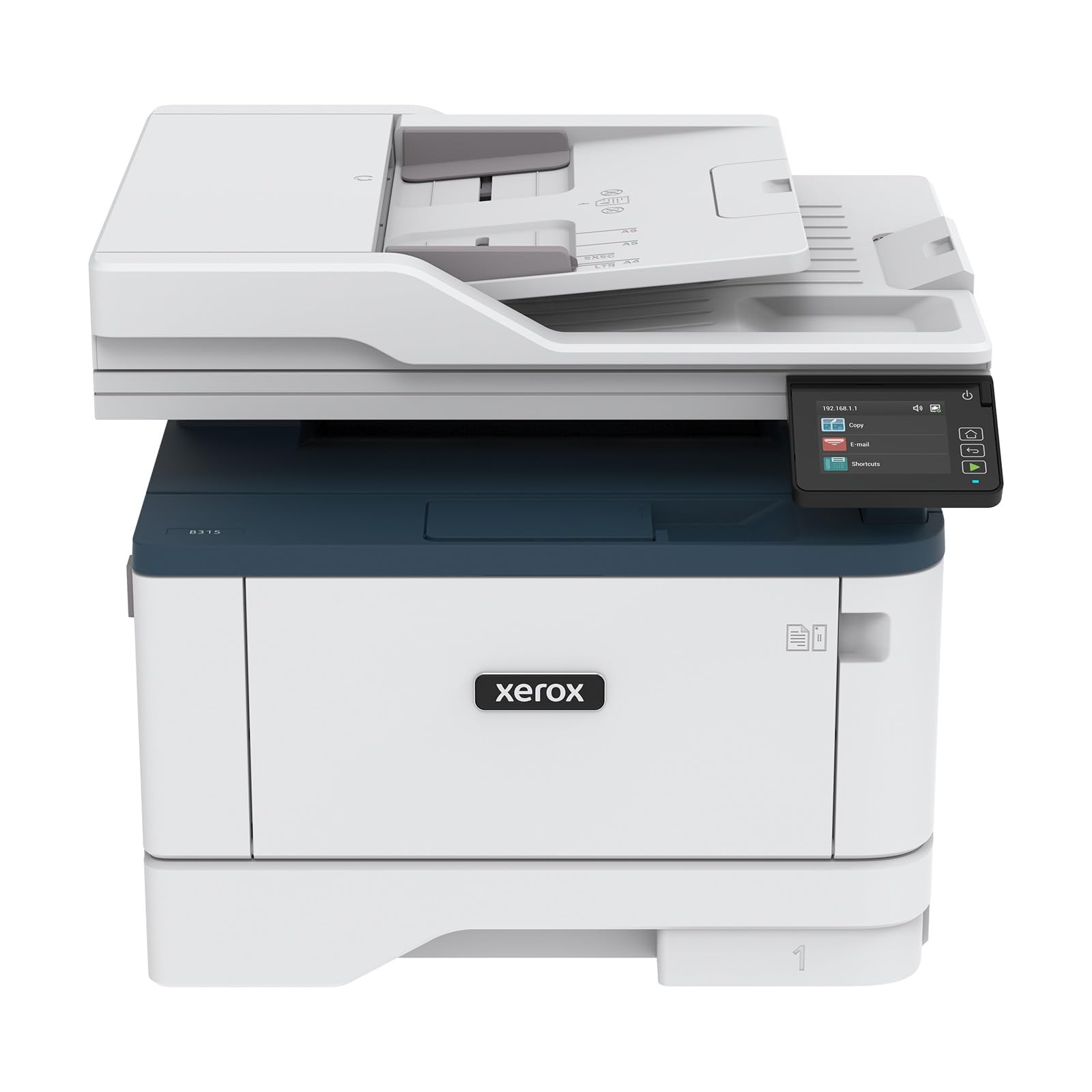
The Xerox B315DNI sits at the top of the performance pyramid with its 42 ppm print speed — the fastest throughput on this list — paired with a reversing automatic document feeder (RADF) that can scan both sides of a document in a single pass. It’s a full all-in-one with print, scan, copy, and fax functions, designed for demanding home offices or small businesses that process high volumes of documents. The 250-sheet paper tray is standard, but the overall build quality feels robust enough for daily heavy use.
User feedback is generally very positive about print quality and speed — text is crisp at high speed, and the duplex printing is fast and reliable. The wireless setup is surprisingly quick for a high-end model, with many users reporting successful connection via QR code scanning rather than manual Wi-Fi entry. The RADF handles double-sided scanning smoothly, a clear advantage over the Canon MF275dw and MF264dw. The intuitive touchscreen interface makes navigating copy and scan settings straightforward.
The biggest complaints center on sporadic network disconnections that require a restart, and the high cost of genuine Xerox toner cartridges — the per-page cost is noticeably higher than Brother or Canon alternatives. Some users found the manual feed slot frustrating for envelopes, as it only processes one page at a time. The initial setup can be tricky for non-technical users, with a few reporting the need for professional IT support. If raw speed and automatic two-sided scanning are your top priorities and budget is less of a concern, the B315DNI is the most powerful option available.
Why it’s great
- Fastest print speed on the list at 42 ppm.
- Reversing ADF for automatic two-sided scanning.
- Robust build quality suitable for high-volume home offices.
Good to know
- Higher cost per page for genuine Xerox toner cartridges.
- Some users experience periodic network disconnections requiring restart.
- Manual feed slot is single-page only, not suitable for envelope batches.
FAQ
Should I buy a monochrome laser printer if I need to print a color document occasionally?
Can I use third-party toner cartridges in these printers?
Is a printer with automatic duplex worth the higher price?
What does “memory” on a laser printer spec sheet mean?
Why does my laser printer take so long to wake up from sleep mode?
Final Thoughts: The Verdict
For most users, the best black and white laser printer for home use winner is the Brother HL-L2460DW because it strikes the ideal balance of fast 36 ppm printing, automatic duplex, flexible dual-band Wi-Fi and Ethernet connectivity, and a low cost per page with high-yield TN830XL toner. If you need an all-in-one with scanning and copying capabilities, grab the Canon imageCLASS MF275dw for its reliable ADF scanner and low-cost toner ecosystem. And for a high-volume home office that processes double-sided scanning and demands the fastest possible print speed, nothing beats the Xerox B315DNI with its 42 ppm output and reversing document feeder.