
Our readers keep the lights on and the weekend projects moving. As an Amazon Associate, I earn from qualifying purchases.
A blue switch keyboard delivers that unmistakable tactile bump and sharp click with every keystroke — a sensory feedback loop that typists and coders find deeply satisfying, yet one that gamers often fear will be too loud or slow. The real challenge isn’t finding a blue switch board; it’s finding one that balances that signature sound with build quality that doesn’t creak or flex under pressure.
I’m Rikta — the co-founder and writer behind FitlyFast. I’ve spent dozens of hours comparing actuation forces, switch housings, and keycap materials to separate the truly well-made blue switch keyboards from the ones that just rattle.
Whether you are a writer who needs crisp tactile confirmation or a gamer who wants that clicky edge, this guide walks through seven different models to help you find the right blue switch keyboard for your desk, your workflow, and your noise tolerance.
How To Choose The Best Blue Switch Keyboard
Blue switches are defined by their audible click and tactile bump. That sound and feel is what you are paying for, but the keyboard frame, keycaps, and connectivity determine whether that experience stays satisfying after months of daily use. Here is what to look for.
Switch Brand and Actuation Feel
Not all blue switches feel identical. Outemu blue switches (found in budget models) have a higher-pitched click and slightly more wobble than Cherry MX Blues. GX Blue switches (Logitech’s proprietary design) deliver a consistent, moderate click with less side-to-side play. Hybrid mechanical switches (SteelSeries) combine a clicky tactile leaf with a membrane base for a softer bottom-out. For the purest blue switch experience, stick with true mechanical switches rated for at least 50 million keystrokes.
Layout Size and Desk Space
Full-size (104-key) boards include a number pad and dedicated media keys, ideal for data entry. Tenkeyless (87-key) drops the numpad to center your hands closer together. Sixty-percent (61-key) layouts remove the function row and navigation cluster for maximum mouse space. For blue switch keyboards, a smaller chassis can amplify the switch noise slightly since there is less dampening material, so consider if you need the quietest footprint or the most compact footprint.
Build Materials and Stability
A metal top plate or aluminum frame reduces flex when you bottom out hard on blue switches. Budget boards use ABS plastic with a thin metal plate; premium boards use aircraft-grade aluminum. Keycaps matter too — double-shot injection molded PBT caps resist shine over time, while ABS keycaps develop a glossy finish after weeks of use. If you plan to mod or swap keycaps, look for a standard bottom row layout with a standard stem.
Quick Comparison
On smaller screens, swipe sideways to see the full table.
| Model | Category | Best For | Key Spec | Amazon |
|---|---|---|---|---|
| Logitech G PRO | Tenkeyless | Competitive gaming & portable setups | GX Blue Click switch, detachable cable | Amazon |
| SteelSeries Apex 5 | Hybrid Full-Size | Typing with wrist support & OLED display | Hybrid Blue switch, aluminum frame | Amazon |
| Redragon K580 VATA | Full-Size Hot-Swap | Macro-heavy workflows & RGB customization | Hot-swappable socket, 5 macro keys | Amazon |
| TECWARE Phantom 87 | Tenkeyless RGB | Budget-conscious typists & gamers | Outemu Blue, fiberglass PCB | Amazon |
| Aula WIN60 HE | 60% Hall Effect | FPS rapid trigger & small desk | Magnetic switches, 8000 Hz polling | Amazon |
| Redragon K630 Dragonborn | 60% Hot-Swap | Minimalist desk & portable gaming | Outemu Blue, hot-swappable | Amazon |
| Redragon K552 | Tenkeyless Entry | First-time mechanical buyers | Outemu Blue, metal frame | Amazon |
In‑Depth Reviews
1. Logitech G PRO Mechanical Gaming Keyboard

The Logitech G PRO delivers competition-grade build quality in a compact tenkeyless form. Its GX Blue Click switches provide a clean, consistent tactile bump with minimal stem wobble — a marked improvement over generic budget blue switches. The detachable Micro USB cable and lightweight chassis make it easy to pack for LAN events or daily commutes.
LIGHTSYNC RGB shines bright with even per-key illumination, and onboard memory stores static lighting patterns so you can use the keyboard on tournament PCs without installing G HUB software. The three-step adjustable feet and rubber base keep the board planted during aggressive gaming sessions.
ABS keycaps develop a shine over time, and the stiff stock cable can be finicky to route. The lack of dedicated media controls and a sold-separately wrist rest are notable omissions at this tier. However, for raw performance and switch consistency in a portable TKL, the G PRO sets the standard for blue switch keyboards.
Why it’s great
- GX Blue switches with stable, crisp actuation
- Onboard memory for tournament-ready RGB profiles
- Ultra-portable TKL design with detachable cable
Good to know
- ABS keycaps shine quickly with heavy use
- Micro USB connection feels dated
- No wrist rest or media controls included
2. SteelSeries Apex 5 Hybrid Mechanical Gaming Keyboard

The Apex 5 uses SteelSeries’ hybrid blue switches — a clicky mechanical feel combined with a membrane base that softens the bottom-out impact. The result is a tactile, clicky sound that is slightly less sharp than traditional blues, making it friendlier for shared spaces. The aircraft-grade aluminum frame provides zero flex even on the widest full-size chassis.
The standout feature is the OLED Smart Display, which shows game stats, Discord messages, or custom GIFs without needing a second monitor. The magnetic wrist rest is plush and stays securely attached, and the volume wheel feels solid under the fingertip. Per-key RGB is vibrant and fully customizable via the SteelSeries Engine software.
Hybrid switches are rated for only 20 million keypresses — less than half the lifespan of standard mechanical blue switches. The membrane layer may degrade sooner if you bottom out hard. Still, for a feature-rich full-size keyboard with a premium wrist rest and a unique display, the Apex 5 is a strong mid-range pick.
Why it’s great
- Aluminum frame with zero deck flex
- OLED display offers useful at-a-glance info
- Magnetic wrist rest is comfortable and stable
Good to know
- Hybrid switches rated for 20 million presses
- Volume wheel can feel rough during rotation
- Occasional 0.5-second lighting blackout reported
3. Redragon K580 VATA RGB Mechanical Gaming Keyboard

The K580 VATA is a full-size keyboard with genuine Outemu blue switches and a hot-swappable socket that accepts nearly any 3- or 5-pin switch. This means you can start with blue switches and later swap to silent reds if the noise becomes too much — no soldering required. The five dedicated macro keys (G1–G5) can be programmed on the fly without software, ideal for productivity or MMO rotations.
RGB backlighting offers 18 onboard modes plus a volume/brightness control wheel on the top right corner. The double-shot injection molded keycaps resist fading and shine longer than standard ABS caps. The aluminum top plate provides structural rigidity, and the overall weight of 1.2 kg keeps the board planted during hard typing.
Some units arrive with slight physical damage due to shipping, and the F1–F12 row sits slightly lower than the main keybank, which can feel awkward during reach. The software translation for custom RGB effects is rough, but onboard controls work well enough for most users. For those wanting a versatile, upgradeable full-size blue switch keyboard, this is a compelling value.
Why it’s great
- Hot-swappable socket works with most switch types
- 5 dedicated macro keys with onboard recording
- Volume/brightness wheel is intuitive and responsive
Good to know
- F1–F12 row is lower than the main key row
- Software for RGB customization is poorly translated
- Shipping damage reported in some units
4. TECWARE Phantom 87 Key RGB Mechanical Gaming Keyboard
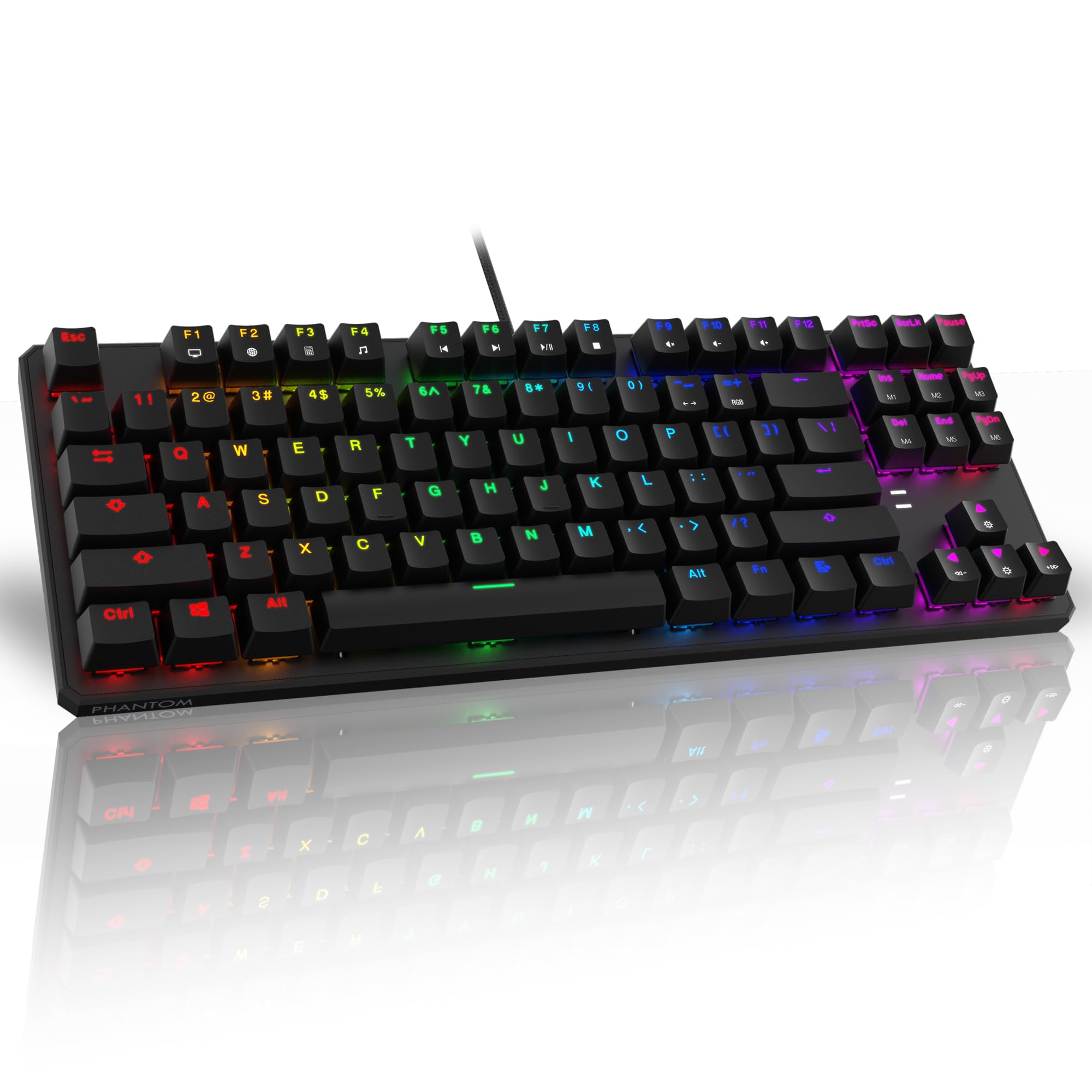
The Phantom 87 delivers a surprising build quality for its price tier. Outemu blue switches provide the classic clicky sound and tactile bump, and the dual-layer fiberglass PCB improves signal stability compared to cheaper single-layer boards. The floating key design and brushed metal top plate give it a clean, modern look that competes visually with keyboards costing double.
Sixteen-point-eight million RGB colors cycle through 18 pre-set effects, and the included software allows full per-key customization and macro assignment. The braided USB cable is a nice touch for durability, and the four extra switches plus switch puller let you swap out a damaged key without buying a new board. N-key rollover and 1000 Hz polling rate keep inputs accurate during fast gameplay.
Minor visible screws under the floating keys detract from the premium aesthetic, and the software interface is functional but not as polished as major brand suites. Some users report the Outemu blues are slightly louder than Cherry MX Blues. For those wanting a sturdy, full-featured tenkeyless blue switch keyboard without spending in the triple digits, the Phantom 87 is a balanced pick.
Why it’s great
- Fiberglass PCB for enhanced signal reliability
- 18 pre-set RGB modes plus software customization
- Includes 4 spare switches, keycap puller, and switch puller
Good to know
- Screws visible under floating keys
- Outemu blues slightly louder than Cherry MX Blues
- Software is functional but somewhat limited
5. Aula WIN60 HE 60% Mechanical Gaming Keyboard

The WIN60 HE is a 60% keyboard featuring hall-effect magnetic switches rather than traditional mechanical leaf contacts. This enables adjustable actuation points and rapid trigger mode with a 0.02 mm RT step distance — meaning the key resets the instant you begin to release it, allowing faster counter-strafes in FPS titles like Valorant and CS2. The 8000 Hz polling rate ensures near-zero input delay.
The Graywood V3 magnetic switches feel light and smooth, and the PBT keycaps have a pleasant texture. The web-based driver lets you remap keys, create macros, and customize RGB without installing bloated software. The compact 60% layout gives your mouse maximum swipe space, and the plastic chassis is surprisingly rigid for its weight.
This is not a traditional blue switch keyboard — there is no tactile click or audible bump, so it won’t satisfy the click-lover seeking that classic sound. The online driver software is still rough around the edges, and the board lacks Bluetooth or wireless connectivity. For players who prioritize absolute input speed over typing feel, the WIN60 HE is a forward-looking alternative to traditional blue switch designs.
Why it’s great
- Hall-effect switches with adjustable actuation and rapid trigger
- 8000 Hz polling rate for minimal latency
- Lightweight 60% layout maximizes desk space
Good to know
- No tactile click — not a traditional blue switch feel
- Web-based software still needs refinement
- No Bluetooth or wireless connectivity
6. Redragon K630 Dragonborn 60% Wired RGB Gaming Keyboard

The K630 Dragonborn crams 61 Outemu blue switches into a 60% chassis, shedding the numpad and function row to leave more room for your mouse. The hot-swappable socket accepts other Redragon switches, so you can experiment with different click or linear options. The metal+ABS frame keeps the board light enough to toss in a bag without sacrificing rigidity.
RGB backlighting offers 11 onboard presets with adjustable brightness and speed — no software needed for basic customization. The compact layout is especially comfortable for gamers who play with their keyboard angled or positioned close to the mouse pad edge. The included keycap puller makes it easy to swap caps for a custom look.
The proprietary software has bricked some devices, with users reporting that the firmware update tool causes the keyboard to stop responding entirely. Sticking to onboard controls is the safer route. The lack of a function row means you’ll need to hold the Fn key for functions like volume and playback, which slows down users who rely on those shortcuts. For a pure, no-frills 60% blue switch board, the K630 delivers the click without extra bulk.
Why it’s great
- Hot-swappable Outemu blues for easy customization
- Ultra-compact 60% layout frees desk space
- Onboard RGB controls work without software
Good to know
- Software can brick the device — avoid if possible
- No dedicated function row or media keys
- Limited to wired connectivity only
7. Redragon K552 Mechanical Gaming Keyboard

The K552 is the budget king of blue switch keyboards. Its 87-key tenkeyless layout saves desk space, and the metal top plate gives it a heft and rigidity that feels far more expensive than its price suggests. Outemu blue switches deliver the familiar clicky sound and tactile bump that typists love, rated for 50 million keystrokes. Rainbow LED backlighting offers six dynamic modes — no software needed.
Full anti-ghosting and N-key rollover ensure every simultaneous key press registers correctly during gaming. The braided USB cable is durable, and the plug-and-play compatibility with Windows, macOS, and Linux means you can use it immediately without driver installation. Some users report that the Outemu switches here are louder than other budget blues, which is either a pro or con depending on your tolerance.
The gamer-styled font and logo may not suit a professional office desk, and there is no detachable cable for easy transport. Quality control is occasionally inconsistent — a few units arrive with a sticky or misfiring key. With basic modding like adding foam inside the case and lubing the switches, the K552 can sound significantly better. For a barebones, reliable entry into the blue switch world, this is the logical starting point.
Why it’s great
- Metal top plate provides solid, stable feel
- Full N-key rollover and anti-ghosting
- Plug-and-play across multiple operating systems
Good to know
- Switches are among the loudest in this category
- Gamer aesthetic may not suit every desk
- No detachable cable or software RGB control
FAQ
Are blue switches good for gaming or only for typing?
Can I replace blue switches with quieter switches later?
Why does my blue switch keyboard sound different from others?
Final Thoughts: The Verdict
For most users, the blue switch keyboard winner is the Logitech G PRO because it delivers consistent GX Blue switches in a portable TKL chassis with tournament-ready RGB profiles. If you want full-size features with a hot-swappable socket and macro keys, grab the Redragon K580 VATA. And for absolute input speed with hall-effect technology instead of a traditional click, nothing beats the Aula WIN60 HE.