
Our readers keep the lights on and the weekend projects moving. As an Amazon Associate, I earn from qualifying purchases.
You finally clear the desk clutter, but your wireless keyboard and mouse still eat batteries every few weeks, the Bluetooth drops just as a deadline hits, and switching between your laptop and tablet requires unplugging and re-pairing. A quality Bluetooth keyboard and mouse combo solves all of that — if you pick the right one.
I’m Rikta — the co-founder and writer behind FitlyFast. I’ve spent hundreds of hours reading through spec sheets, scanning real user feedback, and comparing the connectivity, battery life, and ergonomic designs of dozens of combos to build a guide that actually helps you decide.
This guide walks you through the ergonomic considerations, multi-device switching performance, and build quality that separate a good purchase from a frustrating one, helping you find the best bluetooth keyboard and mouse for your setup.
How To Choose The Best Bluetooth Keyboard And Mouse
The right combo balances typing feel, connectivity stability, and physical durability. Pay attention to the switch type: scissor-switch keys mimic laptop typing with short travel and quiet operation, ideal for shared workspaces or late-night sessions. Membrane keys are softer but often feel mushy over extended use.
Connectivity that actually works
A combo with both Bluetooth and a 2.4GHz USB receiver gives you a fallback when Bluetooth conflicts arise (common in offices with many wireless peripherals). Multi-device models let you toggle between a PC, a MacBook, and a tablet with one key press — but check whether the mouse switches independently or follows the keyboard automatically.
Battery life and charging convenience
Rechargeable combos with USB-C charging are now the standard, but battery capacities vary widely. Look for at least 500mAh in the keyboard and 300mAh in the mouse to get three to four months of real-world use. Auto-sleep timers under 30 minutes for the keyboard and under 10 minutes for the mouse save power without interrupting your flow.
Quick Comparison
On smaller screens, swipe sideways to see the full table.
| Model | Category | Best For | Key Spec | Amazon |
|---|---|---|---|---|
| Logitech MK955 Signature Slim | Premium Combo | Larger hands, quiet office | SilentTouch 90% noise reduction | Amazon |
| Logitech MK850 Performance | Premium Combo | Full-size ergonomic comfort | Cushioned palm rest included | Amazon |
| Macally Premium for Mac | Mac-Focused Combo | Apple ecosystem integration | Aluminum build, 110 keys | Amazon |
| ProtoArc KM60 | Mid-Range Combo | Ergonomic typing with wrist rest | Leather-textured wrist rest | Amazon |
| iClever DK05 | Mid-Range Combo | Compact build with numpad | 99-key layout, 180-day battery | Amazon |
| Samsers Wireless Combo | Mid-Range Combo | Ultra-slim portable setup | 280mAh keyboard / 300mAh mouse | Amazon |
| seenda COE401 | Budget Combo | Entry-level value, dual OS | Full-size metal build | Amazon |
In‑Depth Reviews
1. Logitech MK955 Signature Slim

The MK955 delivers the most refined typing feel in this roundup, pairing a full-size, laptop-style scissor-switch keyboard with a contoured mouse that fits larger hands naturally. The M750 L mouse uses Logitech’s SilentTouch technology, cutting click noise by 90 percent — ideal for open-plan offices or shared home workspaces. The keyboard’s low-profile keys remain quiet yet provide satisfying tactile feedback, and the SmartWheel on the mouse lets you flick through long documents without repeated scrolling.
Multi-device switching works reliably across up to three devices via Bluetooth or the included Logi Bolt USB receiver. The Logi Options+ app unlocks customizable shortcuts and per-application profiles, adding a layer of productivity that cheaper combos lack. The combo is built with recycled plastic (48 percent in the keyboard, 25 percent in the mouse), appealing to environmentally conscious buyers.
Battery life is excellent — the keyboard runs for months on two AAA batteries, and the mouse uses one AA. Setup on Windows, macOS, Chrome OS, and Linux is straightforward, and the Logi Bolt receiver ensures a stable connection even in crowded wireless environments. It is the most expensive option here, but the combination of comfort, silence, and build quality justifies the premium.
Why it’s great
- 90% quieter clicks than standard mice
- Contoured shape fits larger hands without cramping
- Seamless switching across three devices
- Customizable keys via Logi Options+ app
- Sustainable build with recycled materials
Good to know
- Uses disposable batteries, not built-in rechargeable
- No backlight on the keyboard
- Setup instructions for multi-device are sparse in the box
2. Logitech MK850 Performance

The MK850 prioritizes all-day comfort with a full-size keyboard that includes a cushioned palm rest and carefully contoured keys. The membrane-switch keys are quieter than standard mechanical boards but offer a slightly softer landing than scissor-switch alternatives. The right-handed mouse features a hyper-fast scroll wheel that spins freely for rapid navigation through long spreadsheets or web pages, then clicks back into notched mode for precise line-by-line scrolling.
Dual connectivity (Bluetooth and 2.4GHz USB receiver) lets you pair the combo with up to three devices, switching with the touch of a button. The included DuoLink software ties the keyboard and mouse together for custom shortcuts and smarter navigation — a feature that power users will appreciate. Build quality feels solid, with a graphite finish that resists fingerprints and an overall weight that stays planted on the desk.
Battery life is strong, though the MK850 uses AAA batteries rather than a rechargeable pack. Some users report key responsiveness issues after several months, but the majority of reviewers praise the comfort and the mouse’s scroll wheel performance. For anyone who spends eight hours a day at a desk and values ergonomic support over ultra-slim portability, this combo delivers.
Why it’s great
- Cushioned palm rest reduces wrist strain
- Hyper-fast scroll wheel for rapid document navigation
- Multi-device and multi-OS friendly
- DuoLink software enables custom navigation workflows
Good to know
- No backlight on the keyboard
- Some units develop unresponsive keys after six months
- No printed user manual included
3. Macally Premium Bluetooth for Mac

The Macally combo is built specifically for the Apple ecosystem, with an aluminum silver finish that matches the MacBook Pro, MacBook Air, and iMac perfectly. The keyboard features 110 scissor-switch keys, including 20 shortcut keys for macOS functions like Mission Control, volume, and brightness. The mouse includes three adjustable DPI modes and, unusually, allows volume control directly from the mouse body, reducing the need to reach for the keyboard or menu bar.
Multi-device Bluetooth connectivity works with up to three devices, including iOS and Android tablets, making it flexible for mixed-platform users. The built-in rechargeable battery in the keyboard (800mAh) and mouse (300mAh) keeps the combo running for weeks between charges, and the included micro-USB cable supports charging while in use. The keyboard is quieter than Apple’s Magic Keyboard, according to user feedback, and the overall build feels sturdier.
Two caveats: the mouse does not automatically follow the keyboard when switching Bluetooth channels — you must re-pair each device separately if you leave the mouse behind. Also, the keyboard uses micro-USB instead of the more modern USB-C, an odd choice for a Mac-centric product. Still, for users deeply embedded in macOS who want a full-size keyboard with a numpad and a mouse that undercuts Apple’s pricing, the Macally combo is a strong contender.
Why it’s great
- Matches Apple aesthetic with aluminum build
- 20 macOS-specific shortcut keys
- Quieter and sturdier than Apple’s Magic Keyboard
- Mouse volume control and adjustable DPI
Good to know
- Mouse does not follow keyboard’s Bluetooth channel switch
- Uses micro-USB, not USB-C
- Keyboard has a slight lag detectable in fast gaming
4. ProtoArc KM60
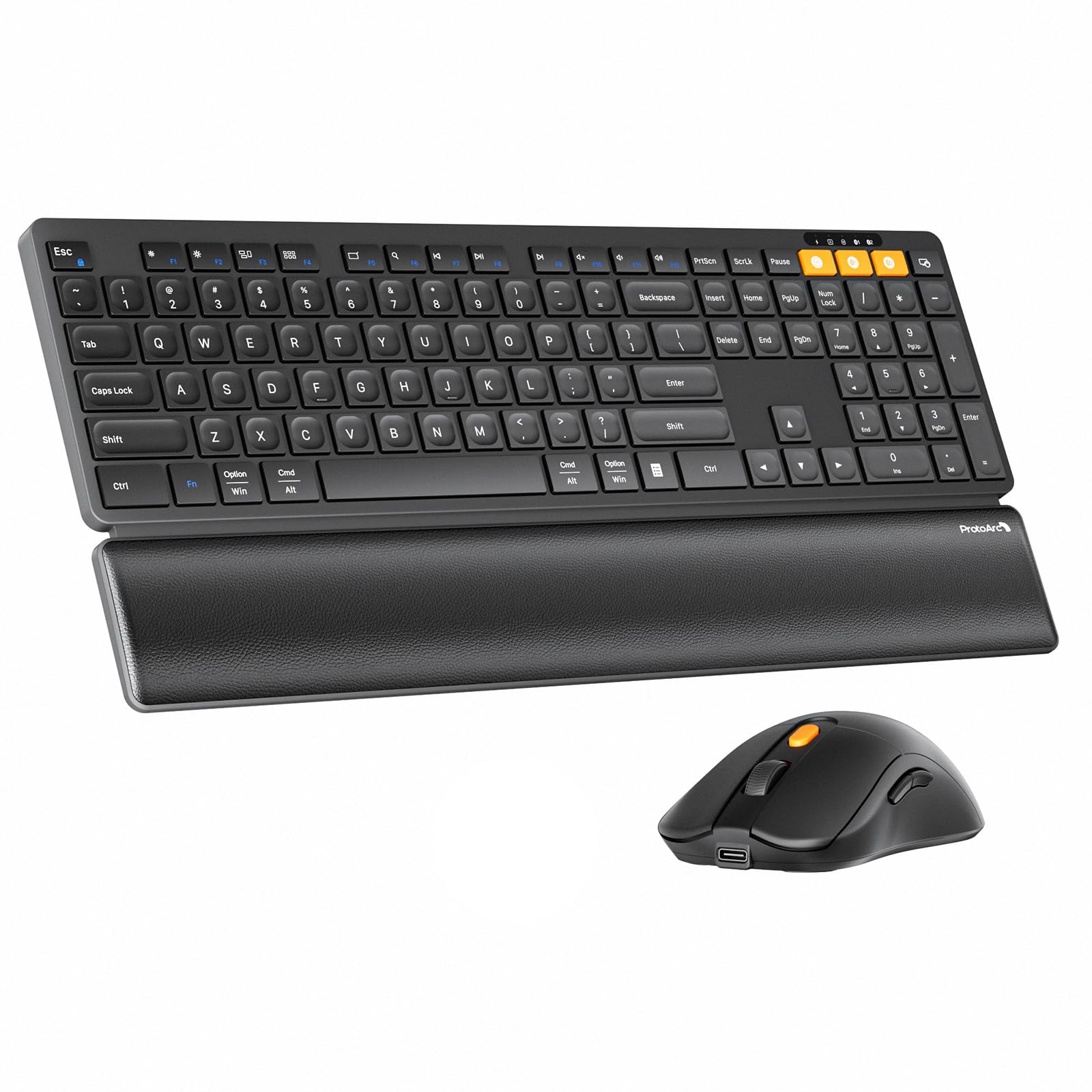
The ProtoArc KM60 punches above its price with a built-in leather-textured wrist rest and adjustable tilt legs — features normally reserved for higher-end ergonomic keyboards. The scissor-switch keys offer quiet, responsive feedback with short travel, and the soft-touch surface gives the keyboard a premium feel. The included mouse weighs only 63 grams, reducing hand fatigue during long sessions, and offers three DPI levels (1000/1600/2400) for customizable sensitivity.
Connectivity covers both Bluetooth and 2.4GHz, with the ability to pair with up to three devices. Switching between a Windows desktop and a MacBook Air is seamless, though users report that the 2.4GHz channel works only with Windows — a limitation to note if you are in a Mac-focused environment. The 500mAh keyboard battery and 300mAh mouse battery recharge via USB-C and deliver an advertised standby of 150 to 200 days.
The lack of backlight is intentional — ProtoArc cites glare reduction and energy efficiency — but it means the combo is best suited for well-lit spaces. Some users have reported the USB connection failing after a few months, though Bluetooth remains reliable. For budget-conscious buyers who refuse to compromise on typing comfort and multi-device flexibility, the KM60 is one of the smartest picks in this category.
Why it’s great
- Integrated leather-textured wrist rest
- Ultra-light 63g mouse reduces fatigue
- USB-C rechargeable with long standby
- Seamless multi-device switching
Good to know
- 2.4GHz mode only supports Windows
- No backlight for low-light environments
- Some units experience USB connection issues over time
5. iClever DK05

The iClever DK05 solves a specific problem: it packs a full numeric keypad into a compact, space-saving 99-key layout. That makes it a strong choice for data entry workers and spreadsheet users who need a numpad but want to reclaim desk real estate. The keyboard is constructed from ABS and metal, giving it a solid feel despite its slim profile, and it includes a silicone cover to protect against spills.
Connectivity options include dual Bluetooth channels and a 2.4GHz receiver that shares a single dongle with the mouse. Switching among three devices works reliably, and the combo is compatible with Windows, Mac, Android, iOS, and Chrome OS. The scissor-switch keys provide a laptop-like typing feel that is quiet enough for shared spaces, and the mouse offers four DPI settings (800-1200-1600-2400).
Battery life is a highlight: a full USB-C charge delivers at least 180 days of use, with the mouse entering sleep mode after 10 minutes and the keyboard after two hours. The compact design does force a slight adjustment period if you are used to a full-size keyboard — the arrow keys are more cramped — but reviewers consistently praise the build quality and connectivity stability. If minimizing desk footprint without losing the numpad is your priority, the DK05 is a near-perfect fit.
Why it’s great
- Compact 99-key layout with full numpad
- Exceptional 180-day battery life
- Sturdy ABS and metal construction
- Includes silicone spill-proof cover
Good to know
- Arrow keys are cramped due to compact layout
- Not compatible with very old desktops using single PS/2 port
- Limited color options
6. Samsers Wireless Combo

It is designed for portability — the included phone stand in the keyboard slot lets you prop up a smartphone for quick glances while typing, though the slot requires removing your phone case. The scissor-switch keys remain quiet and responsive, and the low-profile design makes it easy to slip into a laptop bag.
Dual Bluetooth 5.0 channels plus a 2.4GHz receiver allow switching among three devices, and the connection is instant on Windows, macOS, iOS, and Android. The built-in 280mAh keyboard battery and 300mAh mouse battery recharge via USB-C and deliver up to 190 days of standby for the keyboard and 330 days for the mouse. The mouse has four adjustable DPI levels (800-1200-1600-2400) and is ergonomically shaped, though it is standard size rather than ultra-slim.
Two common complaints: the phone stand does not accommodate phones with cases, and the keyboard has no adjustable legs or backlight. Some users also note that the mouse’s forward/back buttons sit too close to the palm, leading to accidental presses — though this can be fixed with remapping software. For someone who frequently works from a coffee shop, co-working space, or moves between home and office, the Samsers combo offers a compelling balance of slimness and functionality.
Why it’s great
- Ultra-slim, packable design for travel
- Integrated phone stand for dual-screen glances
- Fast USB-C charging with long standby
- Four DPI levels on the mouse
Good to know
- Phone stand does not fit phones with cases
- No adjustable tilt legs or backlight
- Mouse side buttons prone to accidental presses
7. seenda COE401
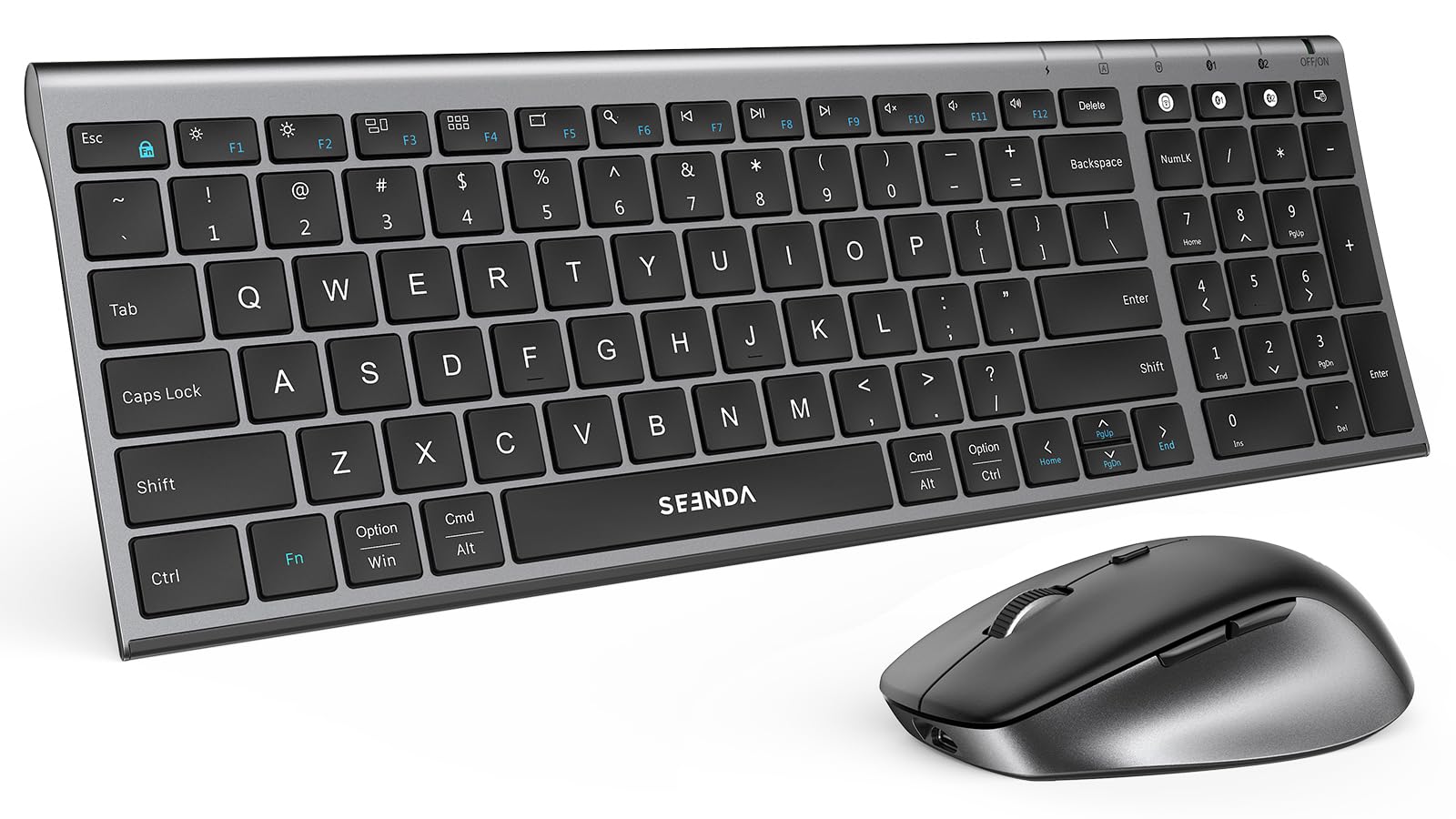
The seenda COE401 is the budget-friendly option that does not feel cheap. The full-size keyboard comes in a slim metal housing with a black-gray finish, and the low-profile scissor-switch keys deliver quiet, laptop-like typing that rivals combos costing twice as much. The mouse includes four adjustable DPI levels (800-1200-1600-2400) for cursor sensitivity that works across different screen sizes and tasks.
Dual Bluetooth and a 2.4GHz receiver allow switching among three devices, though the keyboard and mouse must be switched separately — a minor inconvenience for multi-device users. Compatibility covers Windows 11/10/8/7/XP, macOS 10.12+, iPadOS/iOS 13.0+, and Android 4.3+, making it one of the most platform-agnostic combos here. The USB-C rechargeable battery provides up to 90 days of use, with the mouse entering sleep after 10 minutes and the keyboard after 30 minutes.
The primary downsides are the lack of backlight and the cramped arrow keys due to the compact full-size layout. Some users find the battery life shorter than advertised when using Bluetooth continuously, but for the price, the build quality and feature set are hard to beat. If you need a reliable, no-frills keyboard and mouse for a home office or student dorm, the seenda gets the job done without breaking your budget.
Why it’s great
- Premium metal build at an entry-level price
- Quiet scissor-switch keys for shared spaces
- USB-C rechargeable with 90-day runtime
- Broad OS compatibility including iPadOS and Android
Good to know
- Keyboard and mouse switch devices independently
- No backlight for dim environments
- Arrow keys feel slightly cramped
FAQ
Can I use a Bluetooth keyboard and mouse with a non-Bluetooth computer?
Why does my mouse cursor lag when using Bluetooth?
How long should a rechargeable keyboard and mouse last on one charge?
Final Thoughts: The Verdict
For most users, the bluetooth keyboard and mouse winner is the Logitech MK955 Signature Slim because it combines whisper-quiet operation, a contoured fit for larger hands, and seamless multi-device switching that works out of the box. If you want an integrated wrist rest and lightweight mouse without spending top dollar, grab the ProtoArc KM60. And for the best value compact design with a full numpad, nothing beats the iClever DK05.