
Our readers keep the lights on and the weekend projects moving. As an Amazon Associate, I earn from qualifying purchases.
Every tap, swipe, and drag matters when your desk is a coffee shop table or an airplane tray. A keyboard with a built-in touchpad promises one less device to juggle, but the wrong choice delivers cramped keys, a finicky trackpad, or a short battery that dies mid-flight. The market is packed with folding designs, ultra-slim slabs, and even mechanical options, making it harder than ever to separate the truly portable workstation from the frustrating compromise.
I’m Rikta — the co-founder and writer behind FitlyFast. I’ve spent over 80 hours analyzing Bluetooth keyboard specs, cross-referencing customer builds, and mapping real-world use cases for on-the-go professionals, HTPC builders, and multi-device workers to find the absolute best options in this tightly contested category.
This guide dissects every critical detail — key travel, touchpad responsiveness, build materials, battery endurance, and multi-device switching — to help you pick the ideal bluetooth keyboard with touchpad for your specific workflow.
How To Choose The Best Bluetooth Keyboard With Touchpad
Selecting the right keyboard comes down to balancing portability with actual typing comfort. A foldable model with a 3.4-inch touchpad might be perfect for a business trip, but an ultra-slim slab with a full-size layout could serve a living room HTPC better. Focus on three core areas: the physical typing experience, touchpad quality and gesture support, and the connectivity options that match your device ecosystem.
Key Travel and Switch Type
The most overlooked spec in portable keyboards is key travel — the distance a key moves when pressed. Scissor-switch mechanisms typically offer 1.0mm to 1.5mm of travel, delivering a crisp, laptop-like feel that works well for moderate typing sessions. Premium foldable models now reach 1.5mm, which approaches the comfort of a standard desktop keyboard. Mechanical switches, found in full-size wireless models, provide 2.0mm or more travel and a tactile bump, but add weight and thickness that defeats portability. For daily carrying, scissor-switch with at least 1.2mm travel is the sweet spot.
Touchpad Size and Multi-Touch Support
A touchpad below 3 inches in diagonal can feel cramped for gesture navigation. Look for a pad that supports at least two-finger scroll and tap-to-click. Higher-end models include three- and four-finger gestures for switching apps or desktops on iPadOS and macOS. Palm rejection is a non-negotiable feature — without it, your wrists will trigger accidental cursor jumps during typing. Always verify that the touchpad supports your primary OS, since some models restrict full gesture support to Windows or iPadOS only.
Connectivity and Multi-Device Switching
Bluetooth 5.0 or 5.1 ensures stable connections up to 33 feet with lower power consumption. The ability to pair and switch between three devices — say an iPad, a Windows laptop, and an Android phone — is a major productivity booster. Look for dedicated hotkeys or an FN combination that cycles through saved profiles instantly. Some budget keyboards reconnect automatically to the last device on power-up, while premium models remember all paired devices. If you use non-Bluetooth systems (older Raspberry Pi, Linux servers), a dedicated USB receiver model is still the most reliable choice.
Quick Comparison
On smaller screens, swipe sideways to see the full table.
| Model | Category | Best For | Key Spec | Amazon |
|---|---|---|---|---|
| Nillkin Foldable | Foldable Premium | Traveling professionals | 1.5mm key travel, 50,000 folds | Amazon |
| Logitech K400 | Slim Wireless | HTPC / couch browsing | 3.5-inch touchpad, 33ft range | Amazon |
| AULA F99 Pro | Mechanical | Quiet office / gaming | Gasket structure, 8000mAh battery | Amazon |
| Samsers Foldable | Foldable Value | Multi-device workflow | 70-hour battery, 3 Bluetooth 5.1 | Amazon |
| GEODMAER Foldable | Foldable Budget | Travel with numeric pad | Full-size keys with numpad | Amazon |
| CZUR TouchBoard Pro | Ultra-Slim | Minimalist remote work | 13.2 x 4.3 x 0.3 inches | Amazon |
| Vilros 15 Inch | Wired USB | Raspberry Pi / field use | Wired USB, 78 keys | Amazon |
In‑Depth Reviews
1. Nillkin Foldable Bluetooth Keyboard
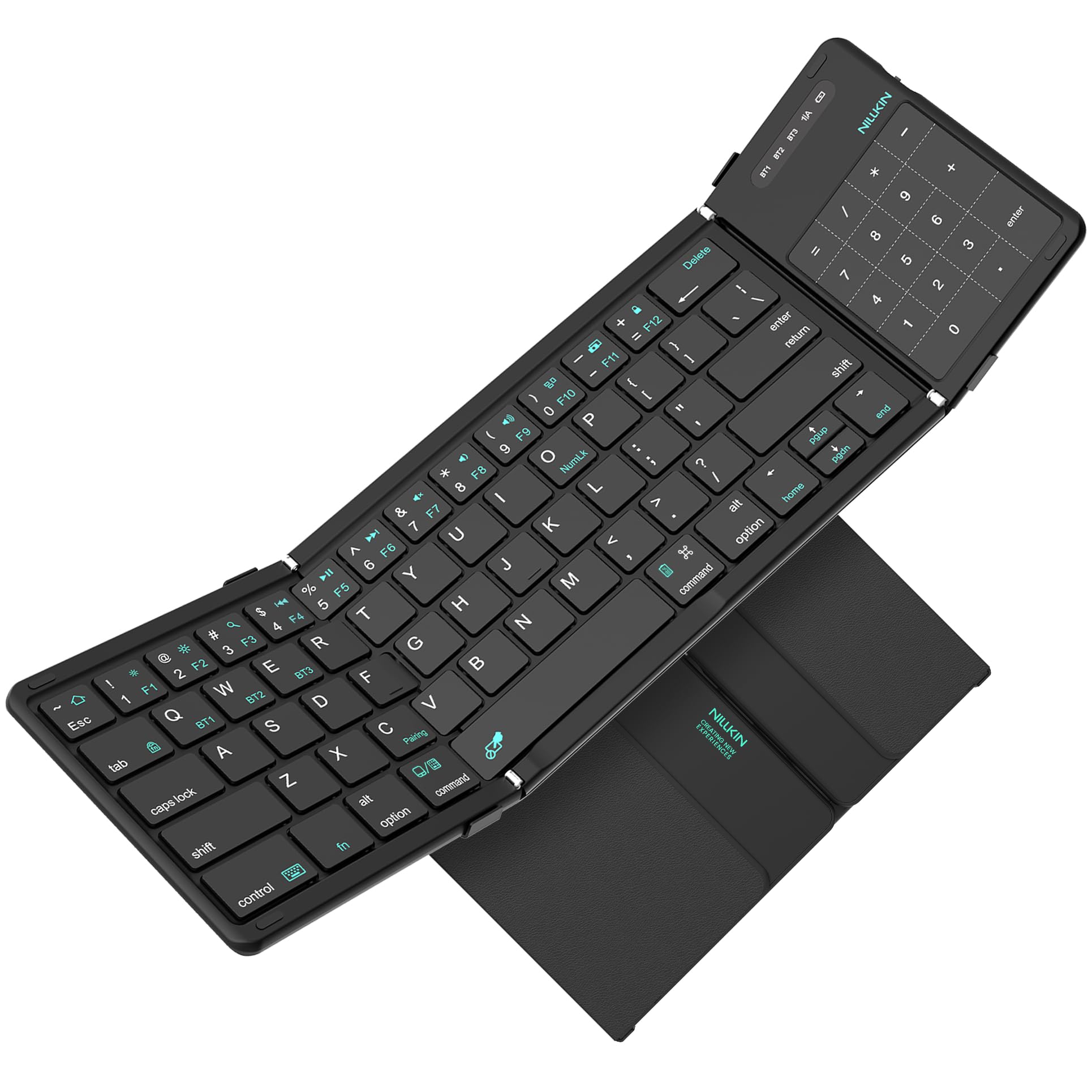
The Nillkin Foldable sets a new high bar for travel keyboards by delivering 1.5mm key travel in a pocketable package that weighs just 0.5 pounds. The 64-key layout keeps letter keys and common punctuation in their standard positions, so touch typists won’t need to relearn muscle memory. The scissor-switch mechanism delivers a crisp, non-mushy feedback that rivals many laptop keyboards.
Its 3.4-inch touchpad doubles as a number pad with a single keystroke — a space-saving innovation that eliminates the usual trade-off between compactness and numeric input. Multi-touch gestures including scroll, zoom, and drag work fully on iPadOS, though iOS users will need AssistiveTouch enabled. The reinforced metal hinges are rated for 50,000 folds, five times the typical lifespan of competing foldable keyboards.
Battery performance impresses with 30 hours of active typing or 140 days of standby on a single charge. The silicone-leather back resists scratches and stains better than standard PU leather. Some users report intermittent key failures after several months of heavy use, but the one-year manufacturer warranty provides a solid safety net. For anyone who needs a near-desktop typing experience on the road, this is the clear first choice.
Why it’s great
- True 1.5mm key travel with scissor-switch mechanism
- 2-in-1 touchpad that converts to a number pad
- 50,000-fold rated hinges for long-term durability
- Long standby battery life
Good to know
- Some gesture support limited on iOS compared to iPadOS
- A few reports of key switch failures after extended use
- Requires flat surface for comfortable typing
2. Logitech Wireless Touch Keyboard K400

The Logitech K400 is the undisputed king of home theater PC setups. Its 3.5-inch multi-touch touchpad is large enough for comfortable couch-based navigation, and the 33-foot wireless range lets you control your TV-connected computer from across the room. The built-in shortcut keys for volume and playback make media control seamless without reaching for a separate remote.
Typing feel is typical Logitech — quiet low-profile keys with a lightweight plastic build. The keyboard is long (13.9 inches) but slim enough to rest on a coffee table or your lap. The Unifying receiver plugs into any USB port and works instantly on Windows without driver installation. Customers consistently report the keyboard can wake a sleeping PC via a simple touchpad movement, a convenience that HTPC users love.
Battery life is excellent thanks to two AA batteries and a physical on/off switch. The key limitation is Windows-only compatibility — this is not the keyboard for iPad or Android workflows. The keys feel slightly wobbly compared to premium scissor-switch models, and the Backspace and Enter keys are smaller than standard. For dedicated living room control, however, it remains the most reliable and best-supported option at this size.
Why it’s great
- Large 3.5-inch multi-touch touchpad
- 33-foot wireless range for couch use
- Instant plug-and-play with Windows
- Built-in media shortcut keys
Good to know
- Windows-only compatibility
- Smaller Backspace and Enter keys
- Key feel less crisp than scissor-switch models
3. AULA F99 Pro Wireless Mechanical Keyboard
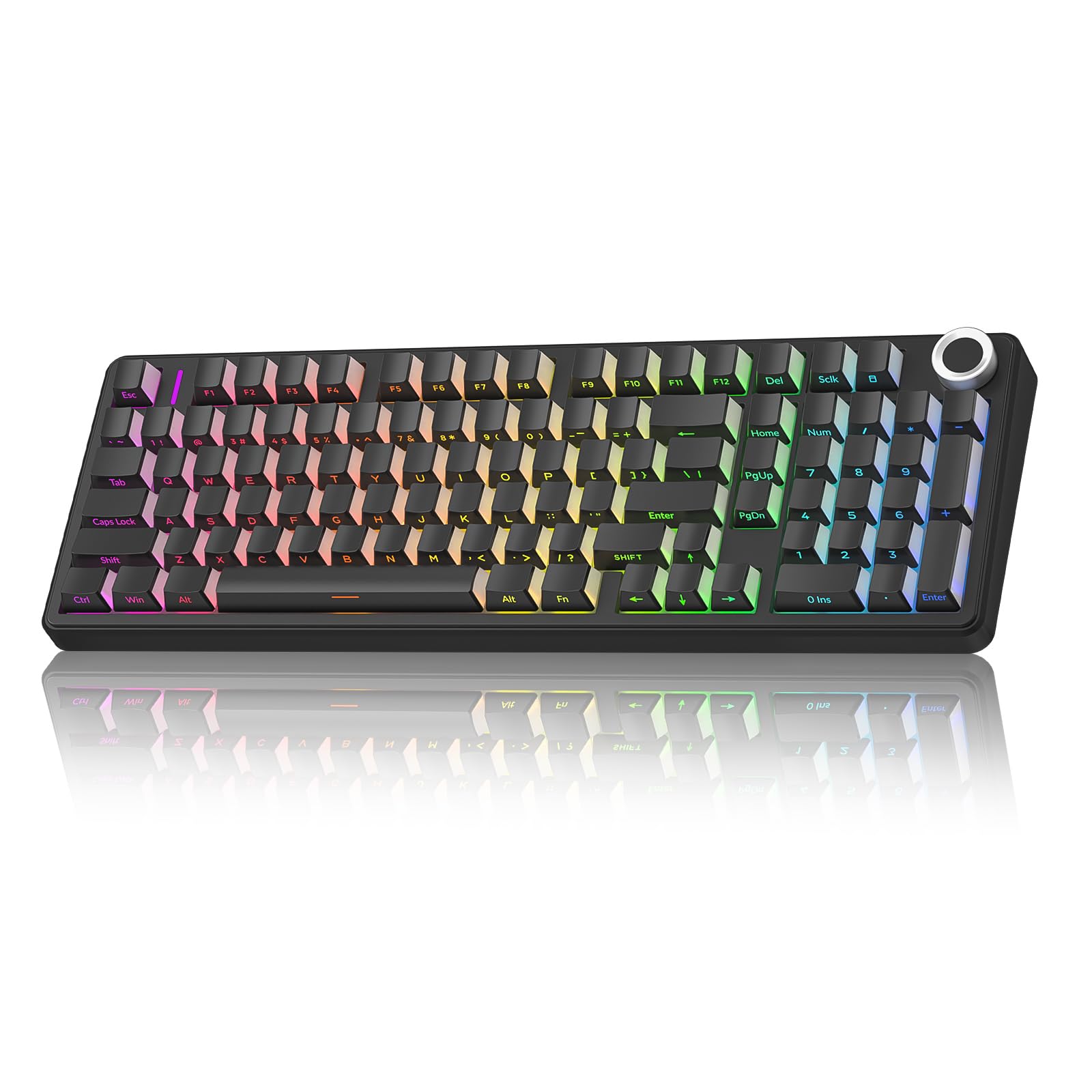
The AULA F99 Pro is a mechanical keyboard that prioritizes silence above all else. Its gasket structure and five layers of silicone filling reduce cavity noise to a muted thock — described by users as “walking on snow.” Pre-lubed linear switches eliminate the clicky racket of traditional mechanical boards, making this an excellent choice for open offices or shared living spaces where every keystroke is audible.
Connectivity is comprehensive: Bluetooth 5.0, 2.4GHz wireless, and USB wired modes let you switch between up to five devices. The 99-key layout keeps the number pad and arrow cluster intact while saving desktop space. A multi-function control knob adjusts RGB backlighting or volume depending on the mode you set. The 8000mAh battery is the largest in this roundup, providing weeks of typical mixed-use without recharging.
The side-printed PBT keycaps resist shine and fading better than standard ABS caps. Hot-swappable switches let you customize the feel without soldering. On the downside, the keyboard is heavy at over two pounds — it is not portable in any practical sense. The lack of a built-in touchpad means you still need a separate mouse unless you pair it with a trackpad accessory. For a quiet desktop workhorse that can also game, it is unmatched.
Why it’s great
- Extremely quiet gasket-mounted mechanical feel
- Tri-mode connectivity (BT / 2.4G / USB-C)
- 8000mAh battery for weeks of use
- Hot-swappable switch support
Good to know
- Heavy — not suitable for travel
- No built-in touchpad
- RGB backlight reduces battery endurance
4. Samsers Foldable Bluetooth Keyboard

The Samsers Foldable strikes an impressive balance between full-size key feel and ultra-portable folding design. At just 9.2 ounces, it unfolds to a standard 13.5-inch layout with 0.63-inch keys that match typical desktop spacing. The scissor-switch keys deliver quiet, tactile feedback suitable for all-day typing. A magnetic closure keeps the keyboard securely folded inside the included velvet storage bag.
Bluetooth 5.1 enables simultaneous pairing with three devices and instant switching via hotkeys — a workflow essential for anyone juggling an iPad, Windows laptop, and Android phone throughout the day. The upgraded touchpad supports basic multi-touch gestures, though some users report it can feel slightly choppy during rapid scrolling. Battery life is excellent at 70 hours of continuous use, with a standby of up to 120 days after a two-hour charge.
The blue PU leather exterior adds a premium visual touch, but the ABS+plastic construction feels less luxurious than the Nillkin’s silicone-leather back. The left space bar can occasionally hit the hinge protrusion, and the trackpad requires some sensitivity tweaks out of the box. For the price, you get a very capable foldable keyboard that handles multi-device productivity without breaking the bank.
Why it’s great
- Full-size key spacing in a foldable form
- 70-hour battery with fast 2-hour recharge
- Bluetooth 5.1 with 3-device switching
- Includes phone stand and storage bag
Good to know
- Trackpad can feel choppy under rapid gestures
- Hinge protrusion may interfere with left space bar
- PU leather less durable than silicone-leather
5. GEODMAER Foldable Bluetooth Keyboard

The GEODMAER Foldable is one of the few Bluetooth keyboards in this category that includes a dedicated numeric keypad in a folding design. For data entry workers, accountants, or anyone who regularly inputs numbers, this eliminates the biggest frustration of compact keyboards. The touchpad is 20% larger than earlier GEODMAER models, and it can be toggled on/off with FN+Space to prevent accidental cursor jumps during typing.
Connectivity covers three Bluetooth channels with instant switching, and the keyboard auto-remembers the last three paired devices. The faux leather exterior provides decent scratch protection while maintaining a professional appearance. Battery life reaches 50 hours of continuous use on a two-hour charge, and the effective range holds steady at 33 feet through standard office walls.
Crucially, the touchpad does not work with systems below iOS 13, so iPhone users with older devices should verify compatibility. The key switches are relatively thin — applying excessive force can cause a keycap stem to jam. Several customers note that the split space bar wastes real estate and the trackpad position below the space bar can cause accidental motions during fast typing. For those who absolutely need a numpad on the go, these trade-offs are manageable.
Why it’s great
- Only foldable model with a full numeric keypad
- Larger touchpad surface than prior generation
- 50-hour battery capacity
- Faux leather exterior for durability
Good to know
- Touchpad incompatible with iOS versions below 13
- Thin key switches prone to jamming under force
- Split space bar and trackpad position cause accidental inputs
6. CZUR TouchBoard Pro Bluetooth Keyboard

The CZUR TouchBoard Pro is the slimmest keyboard in this lineup at just 0.3 inches thick — thin enough to slide into a laptop sleeve alongside your tablet. Despite the wafer-thin profile, it packs a built-in touchpad that supports basic multi-touch gestures. The keys have a springy, responsive feel that surprised reviewers expecting mush from such a slim chassis.
Bluetooth pairing is quick and reliable across Windows, Android, Mac, and iOS. The 33-foot wireless range holds steady with a clear line of sight, though walls can degrade signal quality. The rechargeable battery includes an auto-sleep feature that extends time between charges significantly. The on/off switch adds a layer of power conservation that passive standby alone cannot match.
The keycaps are slightly smaller than a standard desktop keyboard, which may cause errors during fast touch-typing sessions. Light body weight contributes to accidental touchpad clicks when the keyboard shifts on a lap. It lacks backlighting entirely — fine for well-lit spaces but an issue for low-light work. For minimalists who prioritize thinness above all else and primarily type in controlled lighting, it delivers a clean, functional experience.
Why it’s great
- Ultra-slim 0.3-inch profile for easy sleeve storage
- Responsive springy key feel despite thinness
- Stable Bluetooth with quick pairing
- Auto-sleep and on/off switch for battery conservation
Good to know
- Keycaps smaller than standard layout
- Light weight can cause accidental touchpad clicks
- No backlight for low-light environments
7. Vilros 15 Inch USB Keyboard with Touchpad

The Vilros 15 Inch USB Keyboard is a completely different beast — wired, not Bluetooth — but it fills a specific niche that wireless models cannot. Designed primarily for the Raspberry Pi community, it connects via a standard USB-A interface with zero pairing friction. Developers and hobbyists who work with Linux-based single-board computers appreciate that it just works on boot without drivers or Bluetooth configuration.
The 78-key layout is compact enough to pack in a field toolkit yet includes a responsive built-in touchpad that handles basic cursor control. The membrane key switches are quiet and serviceable for command-line work. Build quality is solid with a metal body that gives it a reassuringly heavy feel on a workbench — it will not slide around during operation. The touchpad supports standard mouse functions with two physical buttons.
This keyboard is not designed for typing novels. Key travel is shallow, and the compact layout can lead to typing errors on longer sessions. The FN key is reversed with CTRL, and the touchpad scroll direction defaults opposite to most operating systems (adjustable in Windows 11). There is no numeric keypad and no angle adjustment stand. For its intended use — headless Pi setups, CNC control stations, field diagnostics — it is perfectly adequate and extremely reliable.
Why it’s great
- Zero-configuration wired USB connection
- Solid metal body for workbench durability
- Responsive touchpad with physical buttons
- Works natively with Raspberry Pi and Linux systems
Good to know
- Wired only — no Bluetooth option
- Shallow key travel, not suited for long typing sessions
- No numeric keypad or angle adjustment stand
FAQ
Can I use a Bluetooth keyboard with touchpad on my iPhone?
What is the difference between a scissor-switch and a mechanical keyboard for travel?
How many devices can I pair simultaneously with a multi-device Bluetooth keyboard?
Why does my touchpad cause accidental cursor jumps during typing?
Final Thoughts: The Verdict
For most users, the bluetooth keyboard with touchpad winner is the Nillkin Foldable because it delivers the best combination of full-size key spacing, genuine 1.5mm key travel, and a versatile 2-in-1 touchpad/trackpad in a truly pocketable package. If you need a dedicated couch-control keyboard for your HTPC, grab the Logitech K400 for its unmatched wireless range and large touchpad. And for those who want a silent mechanical powerhouse for desktop use, nothing beats the AULA F99 Pro with its gasket-mounted keys and enormous battery.